R4500 - Radio JBL - Free user manual and instructions
Find the device manual for free R4500 JBL in PDF.


Pick your language and provide your email: we'll send you a specifically translated version.
| Product Type | AM/FM Radio |
| Brand | JBL |
| Model | R4500 |
| Dimensions (W x H x D) | 300 x 150 x 100 mm |
| Weight | 1.5 kg |
| Power Supply | AC 120V/60Hz or 4 x D batteries (not included) |
| Frequency Range AM | 530 – 1600 kHz |
| Frequency Range FM | 88 – 108 MHz |
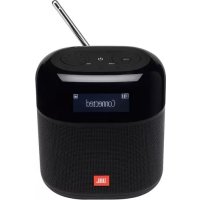
| Antenna Type | Built-in AM ferrite bar and FM telescopic antenna |
| Speaker Size | 4 inches |
| Output Power | 5 W RMS |
| Tuning Type | Analog tuning knob |
| Volume Control | Rotary potentiometer |
| Additional Functions | Headphone jack, external antenna terminal |
| Cabinet Material | Wood veneer with metal front panel |
| Operating Temperature | 0°C to 40°C |
| Cleaning Instructions | Wipe with soft dry cloth; avoid solvents |
| Safety Features | Class II equipment, limited fire enclosure |
| Repairability | Standard screws; spare parts available via service centers |
| Package Contents | Radio, power cord, user manual |
Frequently Asked Questions - R4500 JBL
How do I tune to a specific AM or FM station?
Turn the large tuning knob on the front panel. For AM, rotate slowly to lock onto the station. For FM, extend the telescopic antenna for best reception.
Can I use batteries if there is no power outlet?
Yes, the R4500 can run on 4 D-size batteries (not included). Open the battery compartment on the bottom, insert batteries observing polarity, and slide the power switch to 'Batt'.
How do I connect an external antenna?
On the back panel, you will find an external antenna terminal marked 'ANT'. Connect a longwire antenna to improve AM reception. For FM, the telescopic antenna is sufficient.
What should I do if the radio does not turn on?
Check the power cord connection or battery orientation. Ensure the power switch is set to 'AC' or 'Batt' accordingly. If still no power, replace batteries or inspect the fuse (if accessible).
How do I clean the radio?
Unplug the radio and use a soft, dry cloth to wipe the cabinet and front panel. Do not use water, solvents, or abrasive cleaners. Avoid getting moisture near knobs or openings.
Is there a headphone jack for private listening?
Yes, a headphone jack (3.5mm) is located on the side. Insert headphones and the internal speaker will be muted automatically.
What type of antenna does the R4500 use for FM?
It has a built-in telescopic antenna that can be extended and rotated for optimal FM signal. For best results, fully extend the antenna and adjust orientation.
Can I use rechargeable batteries?
Yes, you can use rechargeable D-cells. Note that the radio does not have a built-in charger, so batteries must be charged externally.
How to improve AM reception?
Rotate the entire radio for best signal as the AM ferrite antenna is internal. Alternatively, connect a longwire to the external antenna terminal. Avoid operating near other electronics.
Where can I get spare parts or repair service?
Contact an authorized JBL service center. You can find local centers on the JBL website. Common spare parts like knobs or antenna may be ordered through support.
User questions about R4500 JBL
0 question about this device. Answer the ones you know or ask your own.
Ask a new question about this device
No questions yet. Be the first to ask one.
Download the instructions for your Radio in PDF format for free! Find your manual R4500 - JBL and take your electronic device back in hand. On this page are published all the documents necessary for the use of your device. R4500 by JBL.
USER MANUAL R4500 JBL

Manual assistant
Powered by Anthropic
Waiting for your message
Product information
Brand : JBL
Model : R4500
Category : Radio