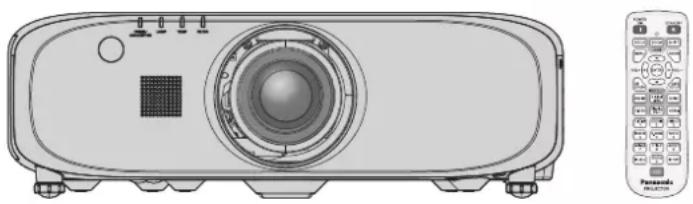
button/▲▼◀▶ button
Used to navigate through the menu screen. (→ page 57)
6 button/ button
Adjusts the volume of the built-in speaker or audio output. (→ page 52)
7 button
Switches on (display)/off (hide) the on-screen display function. (→ page 53)
8 Input selection ( , *1, , , *1, ) buttons
Switches the input signal to project. (→ page 51) (*1 Only for PT-EZ580, PT-EW640 and PT-EX610)
9 Number (<0> - <9>) buttons
Used when the system uses multiple projectors. Used to input ID numbers or passwords.
10 button
Used to simultaneously control all the projectors with a single remote control when using multiple projectors. (→ page 27)
11 button
Displays the setting screen relating to ECO management. (→ pages 55, 87)
12 / button
( button for PT-EZ580, PT-EW640 and PT-EX610; button for PT-EW540 and PT-EX510)
Used when temporarily turning off the image and audio.
(→ page 51)
13 button
Automatically adjusts the image display position while the image is projected.
[PROGRESS] is displayed on the screen while adjusting automatically. (→ page 53)
14 button
Sets the ID number of the remote control to use for a system using multiple projectors. (→ page 27)
15 button
Displays the [KEYSTONE] menu. (→ pages 54, 70)
16 button
Assigns a frequently used operation as a shortcut button.
(→ page 55)
17 button
Used when pausing the image and turning off the audio.
(→ page 52)
18 button
Operates the presentation timer function. (→ page 53)
19 button
Displays the status of the projector. (→ pages 55, 94)
20 button
Resets the content of the sub-menu to the factory default. (→ page 58)
21 button
Displays the [DIGITAL ZOOM] menu. (→ pages 54, 84)
22 button
Used when temporarily turning off the audio. (→ page 52)
23 button
Switches the aspect ratio of the image. (→ page 54)
24
button
Switches the [P IN P] setting. (→ page 55)
25 Remote control signal transmitter
26 Remote control wired terminal
This is the terminal to connect to the projector by a cable when used as a wired remote control. (→ page 28)
Attention
- Do not drop the remote control.
- Avoid contact with liquids or moisture.
- Do not attempt to modify or disassemble the remote control.
- Please observe the following contents that are described on the back of the remote control unit (see the right picture).
- Do not use a new battery together with an old battery.
- Do not use unspecified batteries.
- Make sure the polarities (+ and -) are correct when inserting the batteries.
- In addition, please read the contents that are related to batteries in the "Read this first!".
CAUTION
1. Do not use an old battery with a new one.
2. Do not use batteries other than the specified type.
- Ensure the batteries are inserted correctly.

Note
- When operating the remote control by pointing it directly at the projector's remote control signal receiver, operate it from a distance of approximately 30 m (98'5") or less from the receiver. The remote control can operate at angles up to ±30° vertically and horizontally, but the effective control range may be reduced.
- If there are obstacles between the remote control and the remote control signal receiver, the remote control may not operate properly.
- The signal will reflect off the screen. However, the operating range may be limited due to light reflection loss from the screen material.
- If the remote control signal receiver is exposed to strong light, such as fluorescent light, the remote control may not operate properly. Use it in a location away from the light source.
- The power indicator will flash when the projector receives a remote control signal.
Projector body
Front Side
Rear

: Projection direction


WARNING
Keep your hands and other objects away from the air exhaust port.
- Keep your hands and face away.
- Do not insert your fingers.
- Keep heat-sensitive objects away.
Heated air from the air exhaust port can cause burns, injury, or deformations.
1 Remote control signal receiver (front) 2 Power indicator Displays the status of the power. 3 Lamp indicator You can display the status of the lamp.
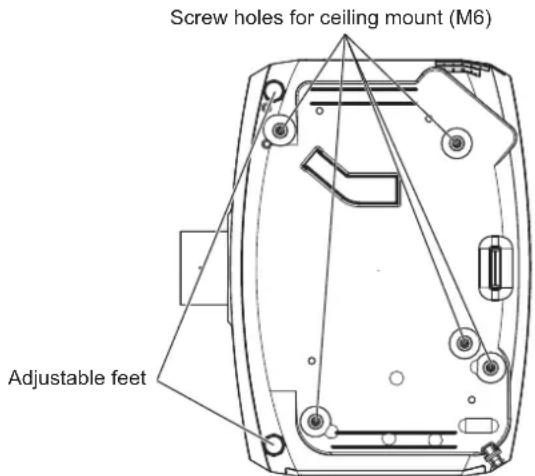
4 Temperature indicator Displays the status of the internal temperature. 5 Filter indicator Displays the status of the air filter unit. 6 Adjustable feet
Adjusts the projection angle. 7 Speaker 8 Projection Lens
(Only models with lens) 9 Air exhaust port 10 Remote control signal receiver (rear) 11 switch
Turns off/on the main power. 12 terminal
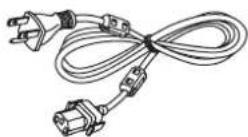
Connect the supplied power cord.
13 Connecting terminals (→ page 26)
14 Security slot
This security slot is compatible with the Kensington security cables.
15 Air intake port
16 Air filter cover
The air filter unit is inside.
17 Control panel (→ page 25)
■ BottomTop

: Projection direction

18 Burglar hook port
Attaches a burglar prevention cable, etc.
19 Luminance sensor (→ page 66)
20 Lens release button (→ page 38)
21 Lamp cover
The lamp unit is inside.
Attention
- Do not block the ventilation ports (intake and exhaust) of the projector.
■Control panel

1 Power standby <@/|> button
Sets the projector to the state where the projector is switched off (standby mode) when the switch on the projector is set to and in the projection mode. Also starts projection when the power is switched off (standby mode).
2
- Since the ID number of the remote control can be set without the projector, do not press the button on the remote control carelessly. If the button is pressed and no number (<0> - <9>) buttons are pressed within five seconds, the ID number returns to its original value before the button was pressed.
- The ID number set on the remote control will be stored unless it is set again. However, it will be erased if the remote control is left with dead batteries. Set the same ID number again when the batteries are replaced.
Note
- Set the ID number of the projector from the [PROJECTOR SETUP] menu → [PROJECTOR ID].
Connecting to the projector with a cable
When controlling the projector by wired remote control, connect the terminal on the projector to the remote control wired terminal on the remote control by a commercial M3 stereo mini plug cable.
The remote control is effective even in places where an obstacle stands in the light path or where devices are susceptible to outside light.

Attention
- Use a cable that is 15 m (49'3") or shorter, with dual core shielded. The remote control may not operate when the length of the cable exceeds 15 m (49'3") or when the shielding of the cable is inadequate.
Chapter 2 Getting Started
This chapter describes things you need to do before using the projector such as the setup and connections.
Setting up
Installation mode
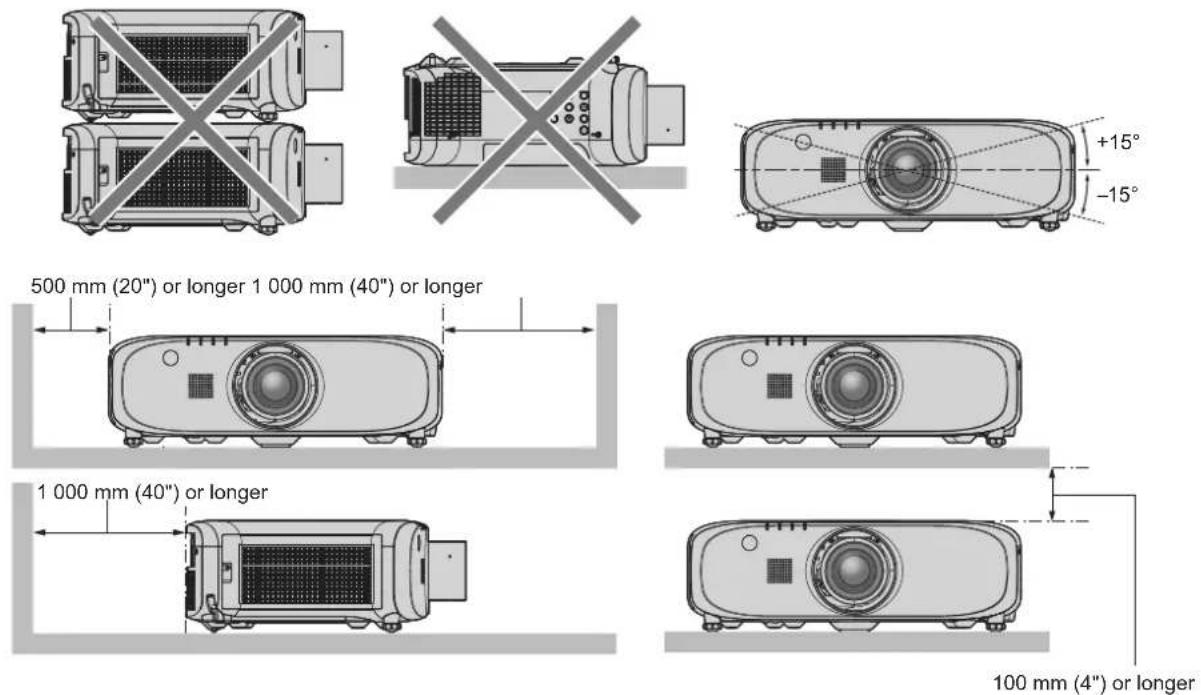
There are four ways to set up the projector. Set the [PROJECTOR SETUP] menu → [PROJECTION METHOD] (→ page 86) depending on the installation method.
Mounting on the ceiling and projecting forward Setting on a desk/floor and projecting from rear
(Using the translucent screen)
[PROJECTION METHOD] [REAR/FLOOR]
Menu item Method Menu item Method [PROJECTION METHOD] [FRONT/CEILING] Mounting on the ceiling and projecting from rear (Using the translucent screen)
Setting on a desk/floor and projecting forward
Menu item Method Menu item Method [PROJECTION METHOD] [REAR/CEILING] [PROJECTION METHOD] [FRONT/FLOOR]
Parts for ceiling mount (optional)
You can install the projector on the ceiling using the optional Ceiling Mount Bracket (Model No.: ET-PKD120H (for High Ceilings), ET-PKD120S (for Low Ceilings), ET-PKE300B (Projector Mount Bracket) or ET-PKE200H (for High Ceilings), ET-PKE200S (for Low Ceilings), ET-PKE200B (Projector Mount Base). 1
- Be sure to use the Ceiling Mount Bracket specified for this projector. • Refer to the Installation Instructions supplied with the Ceiling Mount Bracket when installing the projector with the bracket. *1 Be sure to read "Precautions for Ceiling Mount Bracket" (→ page 153)
Attention
- To ensure projector performance and security, installation of the Ceiling Mount Bracket must be carried out by your dealer or a qualified technician.
Projected image size and throw distance
Refer to the projected image size and projection distance shown below to install the projector. The image size and image position can be adjusted in accordance with the screen size and screen position.

Note
- This illustration is prepared on the assumption that the projected image size and position have been aligned to fit full inside the screen.
(Unit: m)
| L (LW/LT)1 | Projection distance |
| L1 Lens protrusion dimension |
| SH Image height | |
| SW Image width | |
| H Distance from the lens center to the lower edge of the projected image |
| SD Projected image size |
*1 LW: Minimum projection distance when the Zoom Lens is used LT: Maximum projection distance when the Zoom Lens is used
(Unit: m)
| Projection Lens Model No. L1 dimension (approximate value) |
| Standard zoom lens 0.059 | |
| ET-ELW21 0.050 | |
| ET-ELW20 0.080 | |
| ET-ELT20 0.081 | |
| ET-ELT21 0.080 | |
Attention
- Before setting up, read "Precautions for use" (→ page 17).
Projection distance by Projection Lens
A ±5 % error in listed projection distances may occur.
In addition, when [KEYSTONE] is used, distance is corrected to become smaller than the specified screen size.
For PT-EZ580
■When the screen aspect ratio is 16:10
(Unit: m)
| Lens type | Standard zoom lens | Optional lens | Height position (H)*2 |
| Fixed-focus lens | Short focus zoom lens | Long focus zoom lens | Ultra long focus zoom lens |
| Projection Lens Model No. — | | ET-ELW21 | ET-ELW20 ET-ELT20 ET-ELT21 | Standard zoom lens/ET-ELW20/ET-ELT20/ET-ELT21 | ET-ELW21 |
| Throw ratio*1 | 1.7-2.8:1 0.8:1 1.3-1.7:1 2.8-4.6:1 4.6-7 2:1 | |
| Projected image size Projection distance (L) |
| Diagonal (SD) | Height (SH) | Width (SW) | Min. (LW) | Max. (LT) | Fixed | Min. (LW) | Max. (LT) | Min. (LW) | Max. (LT) | Min. (LW) | Max. (LT) |
| 1.02 (40") | 0.538 | 0.862 | 1.36 | 2.35 | 0.63 | 1.02 | 1.41 | 2.29 | 3.81 | 3.72 | 6.03 | -0.05 - 0.59 0.27 |
| 1.27 (50") | 0.673 | 1.077 | 1.71 | 2.95 | 0.80 | 1.29 | 1.77 | 2.89 | 4.79 | 4.70 | 7.59 | -0.07 - 0.74 0.34 |
| 1.52 (60") | 0.808 | 1.292 | 2.06 | 3.55 | 0.97 | 1.55 | 2.14 | 3.49 | 5.77 | 5.68 | 9.15 | -0.08 - 0.89 0.40 |
| 1.78 (70") | 0.942 | 1.506 | 2.42 | 4.15 | 1.14 | 1.82 | 2.50 | 4.09 | 6.75 | 6.66 | 10.71 | -0.09 - 1.04 0.47 |
| 2.03 (80") | 1.077 | 1.723 | 2.77 | 4.76 | 1.32 | 2.09 | 2.87 | 4.69 | 7.73 | 7.64 | 12.27 | -0.11 - 1.18 0.54 |
| 2.29 (90") | 1.212 | 1.939 | 3.12 | 5.36 | 1.49 | 2.36 | 3.23 | 5.30 | 8.71 | 8.63 | 13.83 | -0.12 - 1.33 0.61 |
| 2.54 (100") | 1.346 | 2.154 | 3.48 | 5.96 | 1.66 | 2.63 | 3.60 | 5.90 | 9.69 | 9.61 | 15.39 | -0.13 - 1.48 0.67 |
| 3.05 (120") | 1.615 | 2.585 | 4.18 | 7.16 | 2.00 | 3.16 | 4.32 | 7.10 | 11.65 | 11.57 | 18.51 | -0.16 - 1.78 0.81 |
| 3.81 (150") | 2.019 | 3.231 | 5.24 | 8.96 | 2.52 | 3.96 | 5.42 | 8.90 | 14.59 | 14.52 | 23.19 | -0.20 - 2.22 1.01 |
| 5.08 (200") | 2.692 | 4.308 | 7.01 | 11.96 | 3.38 | 5.31 | 7.25 | 11.91 | 19.49 | 19.43 | 30.99 | -0.27 - 2.96 1.35 |
| 6.35 (250") | 3.365 | 5.385 | 8.77 | 14.96 | 4.24 | 6.65 | 9.07 | 14.91 | 24.39 | 24.34 | 38.79 | -0.34 - 3.70 1.68 |
| 7.62 (300") | 4.039 | 6.462 | 10.54 | 17.97 | 5.10 | 7.99 | 10.9 | 17.92 | 29.29 | 29.25 | 46.59 | -0.40 - 4.44 2.02 |
| 8.89 (350") | 4.712 | 7.539 | 12.30 | 20.97 | 5.95 | 9.33 | 12.73 | 20.92 | 34.19 | 34.16 | 54.39 | -0.47 - 5.18 2.36 |
| 10.16 (400") | 5.385 | 8.616 | 14.07 | 23.97 | 6.81 | 10.67 | 14.55 | 23.93 | 39.09 | 39.07 | 62.19 | -0.54 - 5.92 2.69 |
*1 The throw ratio is based on the value during projection with the projected image size of 2.03 m (80"). *2 When the fixed-focus lens (Model No.: ET-ELW21) is attached, the lens shift is not possible. The height position (H) becomes SH/2.
■When the screen aspect ratio is 16:9
(Unit: m)
| Lens type | Standard zoom lens | Optional lens | Height position (H) -2 |
| Fixed-focus lens | Short focus zoom lens | Long focus zoom lens | Ultra long focus zoom lens |
| Projection Lens Model No. — | | ET-ELW21 | ET-ELW20 ET-ELT20 ET-ELT21 | Standard zoom lens/ET-ELW20/ET-ELT20/ET-ELT21 | ET-ELW21 |
| Throw ratio -1 | 1.7-2.8:1 0.8:1 1.3-1.7:1 2.8-4.6:1 4.6-7 2:1 | |
| Projected image size Projection distance (L) |
| Diagonal (SD) | Height (SH) | Width (SW) | Min. (LW) | Max. (LT) | Fixed | Min. (LW) | Max. (LT) | Min. (LW) | Max. (LT) | Min. (LW) | Max. (LT) |
| 1.02 (40") | 0.498 | 0.886 | 1.40 | 2.42 | 0.65 | 1.05 | 1.45 | 2.36 | 3.92 | 3.83 | 6.20 | -0.05 - 0.55 0.25 |
| 1.27 (50") | 0.623 | 1.107 | 1.76 | 3.04 | 0.83 | 1.32 | 1.82 | 2.97 | 4.92 | 4.83 | 7.81 | -0.06 - 0.68 0.31 |
| 1.52 (60") | 0.747 | 1.328 | 2.12 | 3.65 | 1.00 | 1.60 | 2.20 | 3.59 | 5.93 | 5.84 | 9.41 | -0.07 - 0.82 0.37 |
| 1.78 (70") | 0.872 | 1.550 | 2.49 | 4.27 | 1.18 | 1.87 | 2.57 | 4.21 | 6.94 | 6.85 | 11.01 | -0.09 - 0.96 0.44 |
| 2.03 (80") | 0.996 | 1.771 | 2.85 | 4.89 | 1.35 | 2.15 | 2.95 | 4.83 | 7.95 | 7.86 | 12.62 | -0.10 - 1.10 0.50 |
| 2.29 (90") | 1.121 | 1.992 | 3.21 | 5.51 | 1.53 | 2.43 | 3.32 | 5.45 | 8.95 | 8.87 | 14.22 | -0.11 - 1.23 0.56 |
| 2.54 (100") | 1.245 | 2.214 | 3.57 | 6.12 | 1.71 | 2.70 | 3.70 | 6.06 | 9.96 | 9.88 | 15.82 | -0.12 - 1.37 0.62 |
| 3.05 (120") | 1.494 | 2.657 | 4.30 | 7.36 | 2.06 | 3.25 | 4.45 | 7.30 | 11.97 | 11.90 | 19.03 | -0.15 - 1.64 0.75 |
| 3.81 (150") | 1.868 | 3.321 | 5.39 | 9.21 | 2.59 | 4.08 | 5.58 | 9.15 | 15.00 | 14.93 | 23.84 | -0.19 - 2.05 0.93 |
| 5.08 (200") | 2.491 | 4.428 | 7.20 | 12.29 | 3.47 | 5.46 | 7.45 | 12.24 | 20.03 | 19.98 | 31.86 | -0.25 - 2.74 1.25 |
| 6.35 (250") | 3.113 | 5.535 | 9.02 | 15.38 | 4.36 | 6.83 | 9.33 | 15.33 | 25.07 | 25.02 | 39.87 | -0.31 - 3.42 1.56 |
| 7.62 (300") | 3.736 | 6.641 | 10.83 | 18.47 | 5.24 | 8.21 | 11.20 | 18.42 | 30.10 | 30.07 | 47.89 | -0.37 - 4.11 1.87 |
| 8.89 (350") | 4.358 | 7.748 | 12.65 | 21.55 | 6.12 | 9.59 | 13.08 | 21.51 | 35.14 | 35.12 | 55.91 | -0.44 - 4.79 2.18 |
| 10.16 (400") | 4.981 | 8.855 | 14.46 | 24.64 | 7.00 | 10.97 | 14.96 | 24.60 | 40.18 | 40.17 | 63.92 | -0.50 - 5.48 2.49 |
*1 The throw ratio is based on the value during projection with the projected image size of 2.03 m (80"). *2 When the fixed-focus lens (Model No.: ET-ELW21) is attached, the lens shift is not possible. The height position (H) becomes SH/2.
■When the screen aspect ratio is 4:3
(Unit: m)
| Lens type | Standard zoom lens | Optional lens | Height position (H) -2 |
| Fixed-focus lens | Short focus zoom lens | Long focus zoom lens | Ultra long focus zoom lens |
| Projection Lens Model No. — | | ET-ELW21 | ET-ELW20 ET-ELT20 ET-ELT21 | Standard zoom lens/ET-ELW20/ET-ELT20/ET-ELT21 | ET-ELW21 |
| Throw ratio -1 | 1.9-3.3:1 0.9:1 1.5-2.0:1 3.3-5.4:1 5.4-8:6:1 | |
| Projected image size Projection distance (L) |
| Diagonal (SD) | Height (SH) | Width (SW) | Min. (LW) | Max. (LT) | Fixed | Min. (LW) | Max. (LT) | Min. (LW) | Max. (LT) | Min. (LW) | Max. (LT) |
| 1.02 (40") | 0.610 | 0.813 | 1.54 | 2.67 | 0.72 | 1.16 | 1.60 | 2.61 | 4.33 | 4.24 | 6.85 | -0.06 - 0.67 0.30 | |
| 1.27 (50") | 0.762 | 1.016 | 1.94 | 3.35 | 0.91 | 1.46 | 2.01 | 3.29 | 5.43 | 5.35 | 8.62 | -0.08 - 0.84 0.38 | |
| 1.52 (60") | 0.914 | 1.219 | 2.34 | 4.03 | 1.11 | 1.77 | 2.43 | 3.97 | 6.54 | 6.46 | 10.39 | -0.09 - 1.01 0.46 | |
| 1.78 (70") 1.06 | 7 1.422 | 2.74 4.71 | 1.30 2.07 | 2.84 4.65 | 7.65 7.57 | 12.15 | | | | | | -0.11 - 1.17 0.53 | |
| 2.03 (80") | 1.219 | 1.626 | 3.14 | 5.39 | 1.50 | 2.37 | 3.25 | 5.33 | 8.76 | 8.68 | 13.92 | -0.12 - 1.34 0.61 | |
| 2.29 (90") | 1.372 | 1.829 | 3.54 | 6.07 | 1.69 | 2.68 | 3.67 | 6.01 | 9.87 | 9.79 | 15.68 | -0.14 - 1.51 0.69 | |
| 2.54 (100") | 1.524 | 2.032 | 3.94 | 6.75 | 1.89 | 2.98 | 4.08 | 6.69 | 10.98 | 10.91 | 17.45 | -0.15 - 1.68 0.76 | |
| 3.05 (120") | 1.829 | 2.438 | 4.74 | 8.11 | 2.28 | 3.59 | 4.91 | 8.05 | 13.20 | 13.13 | 20.98 | -0.18 - 2.01 0.91 | |
| 3.81 (150") | 2.286 | 3.048 | 5.94 | 10.15 | 2.86 | 4.50 | 6.15 | 10.09 | 16.53 | 16.47 | 26.28 | -0.23 - 2.51 1.14 | |
| 5.08 (200") | 3.048 | 4.064 | 7.94 | 13.55 | 3.83 | 6.02 | 8.21 | 13.49 | 22.08 | 22.03 | 35.11 | -0.30 - 3.35 1.52 | |
| 6.35 (250") | 3.810 | 5.080 | 9.94 | 16.95 | 4.81 | 7.53 | 10.28 | 16.90 | 27.62 | 27.58 | 43.94 | -0.38 - 4.19 1.91 | |
| 7.62 (300") | 4.572 | 6.096 | 11.94 | 20.34 | 5.78 | 9.05 | 12.35 | 20.30 | 33.17 | 33.14 | 52.77 | -0.46 - 5.03 2.29 | |
| 8.89 (350") | 5.334 | 7.112 | 13.93 | 23.74 | 6.75 | 10.57 | 14.41 | 23.70 | 38.72 | 38.70 | 61.60 | -0.53 - 5.87 2.67 | |
| 10.16 (400") | 6.096 | 8.128 | 15.93 | 27.14 | 7.72 | 12.09 | 16.48 | 27.10 | 44.27 | 44.26 | 70.43 | -0.61 - 6.71 3.05 | |
*1 The throw ratio is based on the value during projection with the projected image size of 2.03 m (80"). *2 When the fixed-focus lens (Model No.: ET-ELW21) is attached, the lens shift is not possible. The height position (H) becomes SH/2.
For PT-EW640 and PT-EW540
■When the screen aspect ratio is 16:10
(Unit: m)
| Lens type | Standard zoom lens | Optional lens | Height position (H) -2 |
| Fixed-focus lens | Short focus zoom lens | Long focus zoom lens | Ultra long focus zoom lens |
| Projection Lens Model No. — | | ET-ELW21 | ET-ELW20 ET-ELT20 ET-ELT21 | Standard zoom lens/ET-ELW20/ET-ELT20/ET-ELT21 | ET-ELW21 |
| Throw ratio -1 | 1.7-2.8:1 0.8:1 1.3-1.7:1 2.8-4.6:1 4.6-7 2:1 | |
| Projected image size Projection distance (L) |
| Diagonal (SD) | Height (SH) | Width (SW) | Min. (LW) | Max. (LT) | Fixed | Min. (LW) | Max. (LT) | Min. (LW) | Max. (LT) | Min. (LW) | Max. (LT) |
| 1.02 (40") | 0.538 | 0.862 | 1.38 | 2.38 | 0.64 | 1.03 | 1.42 | 2.32 | 3.85 | 3.76 | 6.10 | -0.05 - 0.59 0.27 | |
| 1.27 (50") | 0.673 | 1.077 | 1.74 | 2.99 | 0.81 | 1.30 | 1.79 | 2.93 | 4.85 | 4.76 | 7.68 | -0.07 - 0.74 0.34 | |
| 1.52 (60") | 0.808 | 1.292 | 2.09 | 3.60 | 0.99 | 1.57 | 2.16 | 3.54 | 5.84 | 5.75 | 9.26 | -0.08 - 0.89 0.40 | |
| 1.78 (70") | 0.942 | 1.506 | 2.45 | 4.21 | 1.16 | 1.85 | 2.53 | 4.15 | 6.83 | 6.75 | 10.84 | -0.09 - 1.04 0.47 | |
| 2.03 (80") 1.07 | 1.723 | 2.81 4.82 | 1.33 2.1 | 2.90 4.75 7.82 7.74 12.42 | | | | | -0.11 - 1.18 | 0.54 |
| 2.29 (90") | 1.212 | 1.939 | 3.16 | 5.42 | 1.51 | 2.39 | 3.27 | 5.36 | 8.81 | 8.73 | 14.00 | -0.12 - 1.33 0.61 | |
| 2.54 (100") | 1.346 | 2.154 | 3.52 | 6.03 | 1.68 | 2.66 | 3.64 | 5.97 | 9.80 | 9.73 | 15.58 | -0.13 - 1.48 0.67 | |
| 3.05 (120") | 1.615 | 2.585 | 4.24 | 7.25 | 2.03 | 3.21 | 4.38 | 7.19 | 11.79 | 11.72 | 18.73 | -0.16 - 1.78 0.81 | |
| 3.81 (150") | 2.019 | 3.231 | 5.31 | 9.07 | 2.55 | 4.02 | 5.48 | 9.01 | 14.76 | 14.70 | 23.47 | -0.20 - 2.22 1.01 | |
| 5.08 (200") | 2.692 | 4.308 | 7.09 | 12.11 | 3.42 | 5.38 | 7.33 | 12.05 | 19.72 | 19.67 | 31.36 | -0.27 - 2.96 1.35 | |
| 6.35 (250") | 3.365 | 5.385 | 8.88 | 15.16 | 4.29 | 6.74 | 9.17 | 15.10 | 24.68 | 24.64 | 39.26 | -0.34 - 3.70 1.68 | |
| 7.62 (300") | 4.039 | 6.462 | 10.67 | 18.20 | 5.16 | 8.10 | 11.02 | 18.14 | 29.64 | 29.61 | 47.15 | -0.40 - 4.44 2.02 | |
| 8.89 (350") | 4.712 | 7.539 | 12.45 | 21.24 | 6.03 | 9.46 | 12.86 | 21.18 | 34.59 | 34.58 | 55.04 | -0.47 - 5.18 2.36 | |
| 10.16 (400") | 5.385 | 8.616 | 14.24 | 24.28 | 6.89 | 10.82 | 14.71 | 24.22 | 39.55 | 39.55 | 62.94 | -0.54 - 5.92 2.69 | |
*1 The throw ratio is based on the value during projection with the projected image size of 2.03 m (80"). *2 When the fixed-focus lens (Model No.: ET-ELW21) is attached, the lens shift is not possible. The height position (H) becomes SH/2.
■When the screen aspect ratio is 16:9
(Unit: m)
| Lens type | Standard zoom lens | Optional lens | Height position (H) -2 |
| Fixed-focus lens | Short focus zoom lens | Long focus zoom lens | Ultra long focus zoom lens |
| Projection Lens Model No. — | | ET-ELW21 | ET-ELW20 ET-ELT20 ET-ELT21 | Standard zoom lens/ET-ELW20/ET-ELT20/ET-ELT21 | ET-ELW21 |
| Throw ratio -1 | 1.7-2.8:1 0.8:1 1.3-1.7:1 2.8-4.6:1 4.6-7:2:1 | |
| Projected image size Projection distance (L) |
| Diagonal (SD) | Height (SH) | Width (SW) | Min. (LW) | Max. (LT) | Fixed | Min. (LW) | Max. (LT) | Min. (LW) | Max. (LT) | Min. (LW) | Max. (LT) |
| 1.02 (40") | 0.498 | 0.886 | 1.42 | 2.45 | 0.66 | 1.06 | 1.46 | 2.39 | 3.96 | 3.87 | 6.28 | -0.05 - 0.55 0.25 |
| 1.27 (50") | 0.623 | 1.107 | 1.79 | 3.08 | 0.84 | 1.34 | 1.84 | 3.01 | 4.98 | 4.90 | 7.90 | -0.06 - 0.68 0.31 |
| 1.52 (60") | 0.747 | 1.328 | 2.15 | 3.70 | 1.01 | 1.62 | 2.22 | 3.64 | 6.00 | 5.92 | 9.52 | -0.07 - 0.82 0.37 |
| 1.78 (70") | 0.872 | 1.550 | 2.52 | 4.33 | 1.19 | 1.90 | 2.60 | 4.26 | 7.02 | 6.94 | 11.15 | -0.09 - 0.96 0.44 |
| 2.03 (80") | 0.996 | 1.771 | 2.89 | 4.95 | 1.37 | 2.18 | 2.98 | 4.89 | 8.04 | 7.96 | 12.77 | -0.10 - 1.10 0.50 |
| 2.29 (90") | 1.121 | 1.992 | 3.25 | 5.58 | 1.55 | 2.46 | 3.36 | 5.51 | 9.06 | 8.98 | 14.39 | -0.11 - 1.23 0.56 |
| 2.54 (100") | 1.245 | 2.214 | 3.62 | 6.20 | 1.73 | 2.74 | 3.74 | 6.14 | 10.08 | 10.00 | 16.01 | -0.12 - 1.37 0.62 |
| 3.05 (120") | 1.494 | 2.657 | 4.35 | 7.45 | 2.09 | 3.30 | 4.50 | 7.39 | 12.12 | 12.05 | 19.26 | -0.15 - 1.64 0.75 |
| 3.81 (150") | 1.868 | 3.321 | 5.46 | 9.33 | 2.62 | 4.14 | 5.64 | 9.27 | 15.18 | 15.11 | 24.13 | -0.19 - 2.05 0.93 |
| 5.08 (200") | 2.491 | 4.428 | 7.29 | 12.45 | 3.52 | 5.53 | 7.53 | 12.39 | 20.27 | 20.22 | 32.24 | -0.25 - 2.74 1.25 |
| 6.35 (250") | 3.113 | 5.535 | 9.13 | 15.58 | 4.41 | 6.93 | 9.43 | 15.52 | 25.37 | 25.33 | 40.35 | -0.31 - 3.42 1.56 |
| 7.62 (300") | 3.736 | 6.641 | 10.96 | 18.70 | 5.30 | 8.33 | 11.33 | 18.64 | 30.46 | 30.44 | 48.47 | -0.37 - 4.11 1.87 |
| 8.89 (350") | 4.358 | 7.748 | 12.80 | 21.83 | 6.19 | 9.72 | 13.22 | 21.77 | 35.56 | 35.55 | 56.58 | -0.44 - 4.79 2.18 |
| 10.16 (400") | 4.981 | 8.855 | 14.63 | 24.95 | 7.09 | 11.12 | 15.12 | 24.90 | 40.66 | 40.66 | 64.69 | -0.50 - 5.48 2.49 |
*1 The throw ratio is based on the value during projection with the projected image size of 2.03 m (80"). *2 When the fixed-focus lens (Model No.: ET-ELW21) is attached, the lens shift is not possible. The height position (H) becomes SH/2.
■When the screen aspect ratio is 4:3
(Unit: m)
| Lens type | Standard zoom lens | Optional lens | Height position (H)*2 |
| Fixed-focus lens | Short focus zoom lens | Long focus zoom lens | Ultra long focus zoom lens |
| Projection Lens Model No. — | | ET-ELW21 | ET-ELW20 ET-ELT20 ET-ELT21 | Standard zoom lens/ET-ELW20/ET-ELT20/ET-ELT21 | ET-ELW21 |
| Throw ratio*1 | 2.0-3.4:1 0.9:1 1.5-2.0:1 3.3-5.5:1 5.4-8:7:1 | |
| Projected image size Projection distance (L) |
| Diagonal (SD) | Height (SH) | Width (SW) | Min. (LW) | Max. (LT) | Fixed | Min. (LW) | Max. (LT) | Min. (LW) | Max. (LT) | Min. (LW) | Max. (LT) |
| 1.02 (40") | 0.610 | 0.813 | 1.57 | 2.70 | 0.73 | 1.18 | 1.62 | 2.64 | 4.38 | 4.29 | 6.94 | 0.06 - 0.67 | 0.30 |
| 1.27 (50") | 0.762 | 1.016 | 1.97 | 3.39 | 0.93 | 1.48 | 2.04 | 3.33 | 5.50 | 5.41 | 8.73 | 0.08 - 0.84 | 0.38 |
| 1.52 (60") | 0.914 | 1.219 | 2.38 | 4.08 | 1.12 | 1.79 | 2.45 | 4.02 | 6.62 | 6.54 | 10.51 | 0.09 - 1.01 | 0.46 |
| 1.78 (70") | 1.067 | 1.422 | 2.78 | 4.77 | 1.32 | 2.10 | 2.87 | 4.71 | 7.75 | 7.67 | 12.30 | 0.11 - 1.17 | 0.53 |
| 2.03 (80") | 1.219 | 1.626 | 3.18 | 5.46 | 1.52 | 2.41 | 3.29 | 5.40 | 8.87 | 8.79 | 14.09 | 0.12 - 1.34 | 0.61 |
| 2.29 (90") | 1.372 | 1.829 | 3.59 | 6.15 | 1.71 | 2.71 | 3.71 | 6.08 | 9.99 | 9.92 | 15.87 | 0.14 - 1.51 | 0.69 |
| 2.54 (100") | 1.524 | 2.032 | 3.99 | 6.84 | 1.91 | 3.02 | 4.12 | 6.77 | 11.11 | 11.04 | 17.66 | 0.15 - 1.68 | 0.76 |
| 3.05 (120") | 1.829 | 2.438 | 4.80 | 8.21 | 2.30 | 3.64 | 4.96 | 8.15 | 13.36 | 13.29 | 21.24 | 0.18 - 2.01 | 0.91 |
| 3.81 (150") | 2.286 | 3.048 | 6.01 | 10.28 | 2.89 | 4.56 | 6.21 | 10.22 | 16.73 | 16.67 | 26.60 | 0.23 - 2.51 | 1.14 |
| 5.08 (200") | 3.048 | 4.064 | 8.04 | 13.72 | 3.88 | 6.10 | 8.30 | 13.66 | 22.34 | 22.30 | 35.53 | 0.30 - 3.35 | 1.52 |
| 6.35 (250") | 3.810 | 5.080 | 10.06 | 17.16 | 4.86 | 7.64 | 10.39 | 17.10 | 27.95 | 27.92 | 44.47 | 0.38 - 4.19 | 1.91 |
| 7.62 (300") | 4.572 | 6.096 | 12.08 | 20.61 | 5.85 | 9.18 | 12.48 | 20.55 | 33.57 | 33.55 | 53.40 | 0.46 - 5.03 | 2.29 |
| 8.89 (350") | 5.334 | 7.112 | 14.10 | 24.05 | 6.83 | 10.72 | 14.57 | 23.99 | 39.18 | 39.18 | 62.34 | 0.53 - 5.87 | 2.67 |
| 10.16 (400") | 6.096 | 8.128 | 16.12 | 27.49 | 7.81 | 12.25 | 16.66 | 27.43 | 44.79 | 44.80 | 71.28 | 0.61 - 6.71 | 3.05 |
*1 The throw ratio is based on the value during projection with the projected image size of 2.03 m (80"). *2 When the fixed-focus lens (Model No.: ET-ELW21) is attached, the lens shift is not possible. The height position (H) becomes SH/2.
■When the screen aspect ratio is 4:3
(Unit: m)
| Lens type | Standard zoom lens | Optional lens | Height position (H)*2 |
| Fixed-focus lens | Short focus zoom lens | Long focus zoom lens | Ultra long focus zoom lens |
| Projection Lens Model No. — | | ET-ELW21 | ET-ELW20 ET-ELT20 ET-ELT21 | Standard zoom lens/ET-ELW20/ET-ELT20/ET-ELT21 | ET-ELW21 |
| Throw ratio*1 | 1.7-2.8:1 0.8:1 1.3-1.7:1 2.8-4.6:1 4.6-7:2:1 | |
| Projected image size Projection distance (L) |
| Diagonal (SD) | Height (SH) | Width (SW) | Min. (LW) | Max. (LT) | Fixed | Min. (LW) | Max. (LT) | Min. (LW) | Max. (LT) | Min. (LW) | Max. (LT) |
| 1.02 (40") 0.61 | 0 0.813 | 1.30 2.26 | 0.60 0.97 | 1.35 2.19 | 3.65 3.56 | 5.78 | 0.00 - 0 | 61 0.30 | | | | | |
| 1.27 (50") | 0.762 | 1.016 | 1.64 | 2.83 | 0.77 | 1.23 | 1.70 | 2.77 | 4.59 | 4.50 | 7.27 | 0.00 - 0.76 | 0.38 |
| 1.52 (60") | 0.914 | 1.219 | 1.98 | 3.41 | 0.93 | 1.49 | 2.05 | 3.34 | 5.53 | 5.44 | 8.77 | 0.00 - 0.91 | 0.46 |
| 1.78 (70") | 1.067 | 1.422 | 2.32 | 3.98 | 1.10 | 1.74 | 2.40 | 3.92 | 6.47 | 6.38 | 10.27 | 0.00 - 1.07 | 0.53 |
| 2.03 (80") | 1.219 | 1.626 | 2.66 | 4.56 | 1.26 | 2.00 | 2.75 | 4.50 | 7.41 | 7.32 | 11.77 | 0.00 - 1.22 | 0.61 |
| 2.29 (90") | 1.372 | 1.829 | 3.00 | 5.14 | 1.43 | 2.26 | 3.10 | 5.07 | 8.35 | 8.27 | 13.26 | 0.00 - 1.37 | 0.69 |
| 2.54 (100") | 1.524 | 2.032 | 3.33 | 5.71 | 1.59 | 2.51 | 3.45 | 5.65 | 9.29 | 9.21 | 14.76 | 0.00 - 1.52 | 0.76 |
| 3.05 (120") | 1.829 | 2.438 | 4.01 | 6.86 | 1.92 | 3.03 | 4.15 | 6.80 | 11.17 | 11.09 | 17.75 | 0.00 - 1.83 | 0.91 |
| 3.81 (150") | 2.286 | 3.048 | 5.03 | 8.59 | 2.42 | 3.80 | 5.20 | 8.53 | 14.00 | 13.92 | 22.24 | 0.00 - 2.29 | 1.14 |
| 5.08 (200") | 3.048 | 4.064 | 6.72 | 11.47 | 3.24 | 5.08 | 6.95 | 11.41 | 18.70 | 18.63 | 29.73 | 0.00 - 3.05 | 1.52 |
| 6.35 (250") | 3.810 | 5.080 | 8.42 | 14.35 | 4.07 | 6.37 | 8.70 | 14.30 | 23.40 | 23.34 | 37.21 | 0.00 - 3.81 | 1.91 |
| 7.62 (300") | 4.572 | 6.096 | 10.11 | 17.23 | 4.89 | 7.65 | 10.45 | 17.18 | 28.11 | 28.05 | 44.70 | 0.00 - 4.57 | 2.29 |
| 8.89 (350") | 5.334 | 7.112 | 11.81 | 20.11 | 5.72 | 8.94 | 12.20 | 20.06 | 32.81 | 32.76 | 52.18 | 0.00 - 5.33 | 2.67 |
| 10.16 (400") | 6.096 | 8.128 | 13.50 | 22.99 | 6.54 | 10.22 | 13.95 | 22.94 | 37.51 | 37.47 | 59.67 | 0.00 - 6.10 | 3.05 |
*1 The throw ratio is based on the value during projection with the projected image size of 2.03 m (80"). *2 When the fixed-focus lens (Model No.: ET-ELW21) is attached, the lens shift is not possible. The height position (H) becomes SH/2.
■When the screen aspect ratio is 16:9
(Unit: m)
| Lens type | Standard zoom lens | Optional lens | Height position (H) 2 |
| Fixed-focus lens | Short focus zoom lens | Long focus zoom lens | Ultra long focus zoom lens |
| Projection Lens Model No. — | | ET-ELW21 | ET-ELW20 ET-ELT20 ET-ELT21 | Standard zoom lens/ET-ELW20/ET-ELT20/ET-ELT21 | ET-ELW21 |
| Throw ratio 3 | 1.7-2.8:1 0.8:1 1.3-1.7:1 2.8-4.6:1 4.6-7 2:1 | |
| Projected image size Projection distance (L) |
| Diagonal (SD) | Height (SH) | Width (SW) | Min. (LW) | Max. (LT) | Fixed | Min. (LW) | Max. (LT) | Min. (LW) | Max. (LT) | Min. (LW) | Max. (LT) |
| 1.02 (40") | 0.498 | 0.886 | 1.42 | 2.46 | 0.66 | 1.06 | 1.47 | 2.40 | 3.99 | 3.89 | 6.31 | -0.08 - 0.58 | 0.25 |
| 1.27 (50") | 0.623 | 1.107 | 1.79 | 3.09 | 0.84 | 1.40 | 1.85 | 3.03 | 5.01 | 4.92 | 7.94 | -0.10 - 0.73 | 0.31 |
| 1.52 (60") | 0.747 | 1.328 | 2.16 | 3.72 | 1.02 | 1.68 | 2.23 | 3.65 | 6.04 | 5.95 | 9.57 | -0.12 - 0.87 | 0.37 |
| 1.78 (70") | 0.872 | 1.550 | 2.53 | 4.34 | 1.20 | 1.96 | 2.62 | 4.28 | 7.06 | 6.97 | 11.21 | -0.15 - 1.02 | 0.44 |
| 2.03 (80") | 0.996 | 1.771 | 2.90 | 4.97 | 1.38 | 2.24 | 3.00 | 4.91 | 8.09 | 8.00 | 12.84 | -0.17 - 1.16 | 0.50 |
| 2.29 (90") | 1.121 | 1.992 | 3.27 | 5.60 | 1.56 | 2.52 | 3.38 | 5.54 | 9.11 | 9.02 | 14.47 | -0.19 - 1.31 | 0.56 |
| 2.54 (100") | 1.245 | 2.214 | 3.64 | 6.23 | 1.74 | 2.80 | 3.76 | 6.17 | 10.13 | 10.05 | 16.10 | -0.21 - 1.45 | 0.62 |
| 3.05 (120") | 1.494 | 2.657 | 4.38 | 7.48 | 2.10 | 3.36 | 4.52 | 7.42 | 12.18 | 12.1 | 19.36 | -0.25 - 1.74 | 0.75 |
| 3.81 (150") | 1.868 | 3.321 | 5.48 | 9.37 | 2.64 | 4.20 | 5.67 | 9.31 | 15.26 | 15.18 | 24.25 | -0.31 - 2.18 | 0.93 |
| 5.08 (200") | 2.491 | 4.428 | 7.33 | 12.5 | 3.54 | 5.60 | 7.57 | 12.45 | 20.38 | 20.32 | 32.41 | -0.41 - 2.91 | 1.25 |
| 6.35 (250") | 3.113 | 5.535 | 9.18 | 15.64 | 4.44 | 7.00 | 9.48 | 15.59 | 25.51 | 25.45 | 40.56 | -0.52 - 3.63 | 1.56 |
| 7.62 (300") | 3.736 | 6.641 | 11.02 | 18.78 | 5.33 | 8.40 | 11.39 | 18.73 | 30.63 | 30.58 | 48.72 | -0.62 - 4.36 | 1.87 |
| 8.89 (350") | 4.358 | 7.748 | 12.87 | 21.92 | 6.23 | 9.80 | 13.29 | 21.87 | 35.75 | 35.71 | 56.87 | -0.73 - 5.08 | 2.18 |
| 10.16 (400") | 4.981 | 8.855 | 14.72 | 25.05 | 7.13 | 11.20 | 15.20 | 25.01 | 40.88 | 40.84 | 65.03 | -0.83 - 5.81 | 2.49 |
*1 The throw ratio is based on the value during projection with the projected image size of 2.03 m (80"). *2 When the fixed-focus lens (Model No.: ET-ELW21) is attached, the lens shift is not possible. The height position (H) becomes SH/2.
To use a screen size not listed in this manual, check the screen size SD (m) and use the respective formula to calculate projection distance. The unit of all the formulae is m. (Values obtained by the following calculation formulae contain a slight error.)
If you want to calculate the projection distance with projected image size SD (unit: inch) by substituting, please assign 0.0254 times to the SD value.
For PT-EZ580
| Lens type | Projection Lens Model No. | Aspect ratio | Projection distance (L) formula |
| Standard zoom lens — | | 16:10 | Min. (LW) L = 1.3900 x SD | - 0.0549 |
| Max. (LT) L = 2.3640 x SD | - 0.0482 |
| 16:9 | Min. (LW) L = 1.4286 x SD | - 0.0549 |
| Max. (LT) L = 2.4297 x SD | - 0.0482 |
| 4:3 | Min. (LW) L = 1.5736 x SD | - 0.0549 |
| Max. (LT) L = 2.6763 x SD | - 0.0482 |
| Fixed-focus lens ET-ELW21 | | 16:10 — L = 0.6763 x SD | | - 0.0577 |
| 16:9 — L = 0.6951 x SD | | - 0.0577 |
| 4:3 — L = 0.7656 x SD | | - 0.0577 |
| Short focus zoom lens ET-ELW20 | | 16:10 | Min. (LW) L = 1.0557 x SD | - 0.0555 |
| Max. (LT) L = 1.4374 x SD | - 0.0534 |
| 16:9 | Min. (LW) L = 1.0851 x SD | - 0.0555 |
| Max. (LT) L = 1.4774 x SD | - 0.0534 |
| 4:3 | Min. (LW) L = 1.1952 x SD | - 0.0555 |
| Max. (LT) L = 1.6273 x SD | - 0.0534 |
| Long focus zoom lens ET-ELT20 | | 16:10 | Min. (LW) L = 2.3662 x SD | - 0.1140 |
| Max. (LT) L = 3.8583 x SD | - 0.1129 |
| 16:9 | Min. (LW) L = 2.4320 x SD | - 0.1140 |
| Max. (LT) L = 3.9656 x SD | - 0.1129 |
| 4:3 | Min. (LW) L = 2.6788 x SD | - 0.1140 |
| Max. (LT) L = 4.3680 x SD | - 0.1129 |
| Ultra long focus zoom lens ET-ELT21 | | 16:10 | Min. (LW) L = 3.8667 x SD | - 0.2123 |
| Max. (LT) L = 6.1416 x SD | - 0.2108 |
| 16:9 | Min. (LW) L = 3.9742 x SD | - 0.2123 |
| Max. (LT) L = 6.3123 x SD | - 0.2108 |
| 4:3 | Min. (LW) L = 4.3775 x SD | - 0.2123 |
| Max. (LT) L = 6.9529 x SD | - 0.2108 |
For PT-EW640 and PT-EW540
| Lens type | Projection Lens Model No. | Aspect ratio | Projection distance (L) formula |
| Standard zoom lens — | | 16:10 | Min. (LW) L = 1.4062 x SD | -0.0504 |
| Max. (LT) L = 2.3944 x SD | -0.0497 |
| 16:9 | Min. (LW) L = 1.4452 x SD | -0.0504 |
| Max. (LT) L = 2.4609 x SD | -0.0497 |
| 4:3 | Min. (LW) L = 1.5919 x SD | -0.0504 |
| Max. (LT) L = 2.7106 x SD | -0.0497 |
| Fixed-focus lens ET-ELW21 | | 16:10 — L = 0.6842 x SD | | -0.0572 |
| 16:9 — L = 0.7032 x SD | | -0.0572 |
| 4:3 — L = 0.7746 x SD | | -0.0572 |
| Short focus zoom lens ET-ELW20 | | 16:10 | Min. (LW) L = 1.0702 x SD | -0.0554 |
| Max. (LT) L = 1.4530 x SD | -0.0534 |
| 16:9 | Min. (LW) L = 1.1000 x SD | -0.0554 |
| Max. (LT) L = 1.4934 x SD | -0.0534 |
| 4:3 | Min. (LW) L = 1.2116 x SD | -0.0554 |
| Max. (LT) L = 1.6449 x SD | -0.0534 |
Chapter 2 Getting Started — Setting up
| Lens type | Projection Lens Model No. | Aspect ratio | Projection distance (L) formula |
| Long focus zoom lens ET-ELT20 | 16:10 | Min. (LW) L = 2.3952 x SD | -0.1139 | |
| Max. (LT) L = 3.9041 x SD | -0.1128 | |
| 16:9 | Min. (LW) L = 2.4617 x SD | -0.1139 | |
| Max. (LT) L = 4.0126 x SD | -0.1128 | |
| 4:3 | Min. (LW) L = 2.7115 x SD | -0.1139 | |
| Max. (LT) L = 4.4197 x SD | -0.1128 | |
| Ultra long focus zoom lens ET-ELT21 | 16:10 | Min. (LW) L = 3.9138 x SD | -0.2127 | |
| Max. (LT) L = 6.2152 x SD | -0.2107 | |
| 16:9 | Min. (LW) L = 4.0226 x SD | -0.2127 | |
| Max. (LT) L = 6.3880 x SD | -0.2107 | |
| 4:3 | Min. (LW) L = 4.4307 x SD | -0.2127 | |
| Max. (LT) L = 7.0361 x SD | -0.2107 | |
For PT-EX610 and PT-EX510
| Lens type | Projection Lens Model No. | Aspect ratio | Projection distance (L) formula |
| Standard zoom lens — | | 4:3 | Min. (LW) L = 1.3346 x SD | -0.0553 |
| Max. (LT) L = 2.2677 x SD | -0.0480 |
| 16:9 | Min. (LW) L = 1.4541 x SD | -0.0553 |
| Max. (LT) L = 2.4707 x SD | -0.0480 |
| Fixed-focus lens ET-ELW21 | | 4:3 — L = 0.6496 x SD | -0.0585 |
| 16:9 — L = 0.7078 x SD | -0.0585 |
| Short focus zoom lens ET-ELW20 | | 4:3 | Min. (LW) L = 1.0118 x SD | -0.0558 |
| Max. (LT) L = 1.3780 x SD | -0.0540 |
| 16:9 | Min. (LW) L = 1.1024 x SD | -0.0558 |
| Max. (LT) L = 1.5013 x SD | -0.0540 |
| Long focus zoom lens ET-ELT20 | | 4:3 | Min. (LW) L = 2.2693 x SD | -0.1142 |
| Max. (LT) L = 3.7031 x SD | -0.1129 |
| 16:9 | Min. (LW) L = 2.4724 x SD | -0.1142 |
| Max. (LT) L = 4.0346 x SD | -0.1129 |
| Ultra long focus zoom lens ET-ELT21 | | 4:3 | Min. (LW) L = 3.7091 x SD | -0.2132 |
| Max. (LT) L = 5.8937 x SD | -0.2109 |
| 16:9 | Min. (LW) L = 4.0339 x SD | -0.2132 |
| Max. (LT) L = 6.4212 x SD | -0.2109 |
Adjusting adjustable feet
Install the projector on a flat surface so that the front of the projector is parallel to the screen surface and the projected image is rectangular. If the screen is tilted downward, the projected image can be adjusted to be rectangular by adjusting the front adjustable feet. The adjustable feet can also be used to adjust the projector to be level when it is tilted in the horizontal direction.
Extend the adjustable feet by rotating in the direction shown in the figure and retract by rotating in the opposite direction.

Adjustable amount
Front adjustable feet: Approx. 25 mm (31/32")
Attention
- Heated air is expelled from the air exhaust port while the lamp is lit. Do not touch the air exhaust port directly when adjusting the adjustable feet. (→ page 24)
Removing/attaching the Projection Lens
Removing and attaching procedures of the Projection Lens are same for both standard zoom lens and optional lens. Move the lens to the home position before replacing or removing the Projection Lens. (→ page 50)
Attention
- Replace the Projection Lens after turning off the power of the projector.
- Do not touch the electrical contact of the Projection Lens. Dust or dirt may cause defective contact.
- Do not touch the surface of the Projection Lens with your bare hands.
- Before attaching the Projection Lens, remove the lens hole cover (only lens options models) and lens cover attached to the Projection Lens.
Removing the Projection Lens
Remove the Projection Lens with the following procedure.

Projection Lens
1) With the lens release button held down, turn the Projection Lens counterclockwise to the end and remove the Projection Lens.
Attention
- Store the removed Projection Lens where it will be free from vibration and impact.
Attaching the Projection Lens
Attach the Projection Lens using the following procedure.

Fig. 1 Fig. 2
1) Align the red mark on the Projection Lens with the red mark on the projector, and insert the Projection Lens as far as possible. (Fig. 1) 2) Turn clockwise to the end. (Fig. 2)
Attention
- Turn the Projection Lens counterclockwise to confirm that it does not come out.
Connecting
Before connecting
- Before connecting, carefully read the operating instructions for the external device to be connected.
- Turn off the power of all devices before connecting cables.
- Take note of the following points before connecting the cables. Failure to do so may result in malfunctions.
- When connecting a cable to a device connected to the projector or the projector itself, touch any nearby metallic objects to eliminate static electricity from your body before performing work.
- Do not use unnecessarily long cables to connect to a device connected to the projector or to the projector body. The longer the cable, the more it is susceptible to noise. Since using a cable while it is wound makes it act like an antenna, it is more susceptible to noise.
- When connecting cables, connect GND first, then insert the connecting terminal of the connecting device in a straight manner.
- Acquire any connection cable necessary to connect the external device to the system that is neither supplied with the device nor available as an option.
- If video signals from video equipment contain too much jitter, the images on the screen may wobble. In this case, a time base corrector (TBC) must be connected.
- The projector accepts video signals, Y/C signals, Y/B-Y/R-Y or Y/PB/PR signals, analog RGB signals (synchronization signals are TTL level), and digital signals.
- Some computer models or graphics cards are not compatible with the projector.
- Use a cable compensator when you connect devices to the projector using long cables. Otherwise the image may not display properly.
- Refer to "List of compatible signals" (→ page 146) for the types of video signals that can be used with the projector.
Terminal pin assignments and signal names
| Outside view Pin No. Signal name Pin No. Signal name | | |
 | (1) | R/PR | (9) | — |
| (2) | G/Y | (10) | GND |
| (3) | B/PB | (11) | GND |
| (4) | — | (12) | DDC data |
| (5) | GND | (13) | SYNC/HD |
| (6) | GND | (14) | VD |
| (7) | GND | (15) | DDC clock |
| (8) | GND | | |
Terminal pin assignments and signal names
| Outside view Pin No. Signal name Pin No. Signal name | | |
 | (1) | R/PR | (9) | — |
| (2) | G/Y | (10) | GND |
| (3) | B/PB | (11) | GND |
| (4) | — | (12) | — |
| (5) | GND | (13) | SYNC/HD |
| (6) | GND | (14) | VD |
| (7) | GND | (15) | — |
| (8) | GND | | |
Terminal pin assignments and signal names
| Outside view Pin No. Signal name Pin No. Signal name |
Even-numbered pins of (2) to (18) Odd-numbered pins of (1) to (19) Odd-numbered pins of (1) to (19) | (1) | T.M.D.S data 2+ | (11) | T.M.D.S clock shield |
| (2) | T.M.D.S data 2 shield | (12) | T.M.D.S clock- |
| (3) | T.M.D.S data 2- | (13) | CEC |
| (4) | T.M.D.S data 1+ | (14) | — |
| (5) | T.M.D.S data 1 shield | (15) | SCL |
| (6) | T.M.D.S data 1- | (16) | SDA |
| (7) | T.M.D.S data 0+ | (17) | DDC/CECGND |
| (8) | T.M.D.S data 0 shield | (18) | +5 V |
| (9) | T.M.D.S data 0- | (19) | Hot plug detection |
| (10) | T.M.D.S clock+ | | |
Terminal pin assignments and signal names
(Only for PT-EZ580, PT-EW640 and PT-EX610)
| Outside view Pin No. Signal name Pin No. Signal name |
Even-numbered pins of (2) to (20) Odd-numbered pins of (1) to (19) Odd-numbered pins of (1) to (19) | (1) | MainLane-3 | (11) | GND |
| (2) | GND | (12) | MainLane+0 |
| (3) | MainLane+3 | (13) | GND |
| (4) | MainLane-2 | (14) | GND |
| (5) | GND | (15) | Aux+ |
| (6) | MainLane+2 | (16) | GND |
| (7) | MainLane-1 | (17) | Aux- |
| (8) | GND | (18) | Hot plug detection |
| (9) | MainLane+1 | (19) | GND |
| (10) | MainLane-0 | (20) | DP_PWR *1 |
*1 Supplies power of +3.3 V/0.5 A Max. Use at the rated power or less.
Terminal pin assignments and signal names
| Outside view Pin No. Signal name Pin No. Signal name | | |
 | (1) | T.M.D.S data 2- | (13) |
| (2) | T.M.D.S data 2+ | (14) |
| (3) | T.M.D.S data 2/4 shield | (15) |
| (4) | — | (16) |
| (5) | — | (17) |
| (6) | DDC clock | (18) |
| (7) | DDC data | (19) |
| (8) | — | (20) |
| (9) | T.M.D.S data 1- | (21) |
| (10) | T.M.D.S clock1+ | (22) |
| (11) | T.M.D.S data 1/3 shield | (23) |
| (12) | — | (24) |
Connecting example: AV equipment
![graph TD A["BRU-Ray disc player"] --> B["Video/USB"] A --> C["Monitor/OUT"] A --> D["RAM/1/4"] A --> E["VR/DVD/USB"] A --> F["VR/DVD/USB/HDIC"] A --> G["VR/DVD/HDIC/HDIC/HDIC/HDIC/HDIC/HDIC/HDIC/HDIC/HDIC/HDIC/HDIC/HDIC/HDIC/HDIC/HDIC/HDIC/HDIC/HDIC/HDIC/HDIC/HDIC/HDIC/HDIC/HDIC/HDIC/HDIC/HDIC/HDIC/…](/content/2026/06/1378461/images/2326e2a80fcdaccdf48f2f3755564ad2951b6e856b88aac05c16c7e5efe7ffe8.jpg)
Attention
• Always use one of the following when connecting a VCR.
-A VCR with built-in time base corrector (TBC)
-A time base corrector (TBC) between the projector and the VCR
- If nonstandard burst signals are connected, the image may be distorted. In such case, connect the time base corrector (TBC) between the projector and the external devices.
Note
- When entering DVI-D, some external devices to be connected may require switching the setting using the [DISPLAY OPTION] menu → [DVI-D IN] → [EDID].
- The terminal can be connected to HDMI- or DVI-D-compliant devices. However, images may not appear or may not be displayed properly on some devices.
- For an HDMI cable, use an HDMI High Speed cable that conforms to HDMI standards. If a cable that does not conform to HDMI standards is used, images may be interrupted or may not be displayed.
- The terminal of the projector can be connected to an external device with a DVI-D terminal by using an HDMI/DVI conversion cable, but some devices may not project the image properly or function properly. •The projector does not support VIERA Link (HDMI).
Connecting example: Computers
![graph TD A["Control computer"] --> B["Computer"] B --> C["Control computer"] C --> D["Computer"] D --> E["Computer"] subgraph Device1 F["Digital Link LAN"] --> G["HD/MI"] H["Video/IO"] --> I["USB 1 IN"] J["Audio In"] --> K["Microcontroller"] end subgraph Device2 L["Video/G/Y"] --> M["B/P/C"] N["DV/H…](/content/2026/06/1378461/images/24d8bd459dfbf413b4d754b73e1227bf3b6bb8190fca5a3f9a06878fb2bb1177.jpg)
Attention
- When connecting the projector to a computer or an external device, use the power cord supplied with each device and commercially available shielded cables.
Note
- When entering DVI-D, some external devices to be connected may require switching the setting using the [DISPLAY OPTION] menu → [DVI-D IN] → [EDID].
- For an HDMI cable, use an HDMI High Speed cable that conforms to HDMI standards. If a cable that does not conform to HDMI standards is used, images may be interrupted or may not be displayed.
- The terminal of the projector can be connected to an external device with a DVI-D terminal by using an HDMI/DVI conversion cable, but some devices may not project the image properly or function properly.
- The terminal supports single links only.
- For the DisplayPort cable, use a DisplayPort cable that conforms to DisplayPort standards. If a cable that does not conform to DisplayPort standards is used, the image may be interrupted or may not be displayed (Only for PT-EZ580, PT-EW640 and PT-EX610).
- When entering the SYNC ON GREEN signal, do not enter sync signals to the terminal or the terminal.
- If you operate the projector using the computer with the resume feature (last memory), you may have to reset the resume feature to operate the projector.
Connecting example: Twisted-pair-cable transmitter
(Only for PT-EZ580, PT-EW640 and PT-EX610)
Twisted-pair-cable transmitters such as the optional Digital Interface Box (Model No.: ET-YFB100G) use twisted-pair-cables to transmit input images, audio, Ethernet, and serial control signals, and the projector can input those digital signals to the terminal.
![graph TD A["Projector connecting terminals"] --> B["Control computer"] B --> C["Hub"] C --> D["Example of twisted-pair-cable transmitter"] D --> E["Computer"] D --> F["Computer cable (commercially available)"] D --> G["HDMI cable (commercially available)"] D --> H["VCR (with built-in TBC)"] D --> I[…](/content/2026/06/1378461/images/21792f55223a474f66027b4424f88e324446eb45f6cb4b30c84efca378150812.jpg)
Attention
•Always use one of the following when connecting a VCR.
-A VCR with built-in time base corrector (TBC)
-A time base corrector (TBC) between the projector and the VCR
- If nonstandard burst signals are connected, the image may be distorted. In such case, connect the time base corrector (TBC) between the projector and the external devices.
- Ask a qualified technician or your dealer to install the cable wiring for a twisted-pair-cable transmitter and the projector. Image and sound may be disrupted if cable transmission characteristics cannot be obtained due to inadequate installation.
- For the LAN cable between a twisted-pair-cable transmitter and the projector, use a cable that meets the following criteria:
-Compatible with CAT5e or higher
- Shielded type (including connectors) - Straight-through - Single wire
- When laying cables between a twisted-pair-cable transmitter and the projector, check that cable characteristics are compatible with CAT5e or higher using tools such as a cable tester or cable analyzer. When using a relay connector midway, include it in the measurement.
- Do not use a hub between a twisted-pair-cable transmitter and the projector.
- When connecting to the projector using a twisted-pair-cable transmitter (receiver) of another manufacturer, do not place another twisted-pair-cable transmitter between the twisted-pair-cable transmitter of the other manufacturer and the projector. This may cause image and sound to be disrupted.
- Do not pull cables forcefully. Also, do not bend or fold cables unnecessarily.
- To reduce the effects of noise as much as possible, stretch out the cables between the twisted-pair-cable transmitter and the projector without any loops.
- Lay the cables between a twisted-pair-cable transmitter and the projector away from other cables, particularly power cables.
- When installing multiple cables, run them side by side along the shortest distance possible without bundling them together.
- After laying the cables, confirm that the value of [SIGNAL QUALITY] in the [NETWORK] menu → [DIGITAL LINK STATUS] is displayed in green (indicates normal quality). (→ page 108)
Note
- For an HDMI cable, use an HDMI High Speed cable that conforms to HDMI standards. If a cable that does not conform to HDMI standards is used, images may be interrupted or may not be displayed. • The projector does not support VIERA Link (HDMI).
- The maximum transmission distance between the twisted-pair-cable transmitter and the projector is 100 m (328'1"). If this distance is exceeded, image and sound may be disrupted and may cause a malfunction in LAN communication. Please note that we do not support the use of the projector outside the maximum transmission distance.
- For twisted-pair-cable transmitters of other manufacturers whose operation has been verified with the DIGITAL LINK compatible projector, refer to the Panasonic website (http://panasonic.net/avc/projector/). Note that the verification for devices of other manufacturers has been made for the items set by Panasonic Corporation, and not all operations have been verified. For operation or performance problems caused by the devices of other manufacturers, contact the respective manufacturers.
This chapter describes basic operations to start with.
Switching on/off the projector
Connecting the power cord
Make sure that the supplied power cord is securely fixed to the projector body to prevent it from being removed easily.
Confirm that the switch is on the side before connecting the power cord.
For details of power cord handling, refer to "Read this first!" (→ page 2).
Attaching the power cord

1) Check the shapes of the terminal on the rear of the projector body and the power cord connector, and insert the plug completely in the correct direction (until you hear the side tabs click in place).
Removing the power cord

1) Confirm that the switch on the rear of the projector body is on the side, and remove the power plug from the outlet. 2) Remove the power cord connector from the terminal of the projector body while pressing the side tabs.
Power indicator
Displays the status of the power. Check the status of the power indicator before operating the projector.

| Indicator status Projector status | |
| Off The main power is switched off. |
| Red Lit | | The power is switched off (in standby mode).Projection will start when the power on <|> button is pressed.The projector may not operate when the lamp indicatoror temperature indicatoris flashing. (→ page 127) |
| Green Lit Projecting. | | |
| Orange Lit | | The projector is preparing to switch off the projector.The power is switched off after a while. (Changes to the standby mode.) |
Note
- While the power indicator is lit in orange, the fan is running to cool the projector.
- For about 75 seconds after the projector is switched off and the lamp cooling starts, the lamp indicators do not light up even if the power is switched on. After the power indicator lights in red, turn on the power again.
- The projector consumes power even in standby mode (power indicator lit in red). Refer to "Power consumption" (→ page 149) for the power consumption.
- The power indicator will flash if the projector receives a remote control signal.
- The power indicator will flash slowly in green while the shutter is closed or AV mute function is used.
- If the power indicator is flashing in red, consult your dealer.
Switching on the projector
When using the optional Projection Lens, attach the Projection Lens before switching on the projector. Remove the lens cover first.

1) Connect the power cord to the projector body. 2) Connect the power plug to an outlet.
•(AC 100 V - 240 V, 50 Hz/60 Hz)
3) Press the side of the switch to turn on the power.
- After a short while, the power indicator will light in red, and the projector will enter the standby mode.
4) Press the power <∅/|> button on the control panel or the power on <|> button on the remote control.
- The power indicator lights in green and the image is soon projected on the screen.
Note
- If the [PROJECTOR SETUP] menu → [ECO MANAGEMENT] → [STANDBY MODE] is set to [ECO], it may take approx. 10 seconds longer before the projector starts projecting after the power is turned on, compared with when [NORMAL] is set.
- If the switch was set to during projection to end the projection using the direct power off function last time, and the switch is set to with the power plug connected to the outlet, the power indicator will light in green and the image will soon be projected on the screen.
When the initial setting screen is displayed
When the projector is switched on for the first time after purchase as well as when [ALL USER DATA] in the [PROJECTOR SETUP] menu → [INITIALIZE] is executed, the focus adjustment screen is displayed after projection starts, then the initial setting screen is displayed. Set them in accordance with circumstances.
In other occasions, you can change the settings by menu operations.
Focus adjustment
Adjust the focus to display the menu screen clearly.
You may also need to adjust the zoom and shift.
Refer to "Adjusting the focus, zoom, and shift" (→ page 49) for details.
1) Press ▲▼◀▶ to adjust the focus.

2) Press the
- If you press the button while the initial setting screen is displayed, you can go back to the previous screen.
- By default, the time zone of the projector is set to +09:00 (Japan and Korean Standard Time). Change the setting in the [PROJECTOR SETUP] menu → [DATE AND TIME] → [TIME ZONE] to the time zone of the region where you use the projector.
Making adjustments and selections
It is recommended that images be projected continuously for at least 30 minutes before the focus is adjusted.

1) Press the button to roughly adjust the focus of the image. (→ page 49) 2) Change the setting of [PROJECTOR SETUP] menu → [PROJECTION METHOD] depending on the installation mode. (→ page 30) - Refer to "Navigating through the menu" (→ page 57) for the operation of the menu screen. 3) Press the button on the control panel or the input selection ( , *1, , , *1, ) buttons on the remote control to select the input. (*1 Only for PT-EZ580, PT-EW640 and PT-EX610) 4) Adjust the front, back and sideway tilt of the projector with the adjustable feet. (→ page 37) 5) Press the button to adjust the position of the image.
6) If the input signal is an RGB signal, press the button. 7) Press the button to adjust the size of the image to match the screen. 8) Press the button again to adjust the focus. 9) Press the button again to adjust the zoom and the size of the image to match the screen.
Note
- When the projector is switched on for the first time after purchase as well as when [ALL USER DATA] in the [PROJECTOR SETUP] menu → [INITIALIZE] is executed, the focus adjustment screen is displayed after projection starts, then the initial setting screen is displayed. Refer to "When the initial setting screen is displayed" (→ page 45).
Switching off the projector

1) Press the power <∅/|> button on the control panel or the power standby <∅> button on the remote control. - The [POWER OFF(STANDBY)] confirmation screen is displayed. 2) Press ◀▶ to select [OK], and press the button.
(Or press the power <∅/|> button on the control panel or the power standby <∅> button on the remote control again.)
- Projection of the image will stop, and the power indicator on the projector body lights in orange. (The fan keeps running.)
3) Wait for about 100 seconds until the power indicator on the projector body lights in red. 4) Press the side of the switch to turn off the power.
Note
- Do not switch on the projector and project images immediately after switching off the projector. Turning on the power while the lamp is still hot may shorten the lamp life.
- For about 75 seconds after the projector is switched off and the luminous lamp cooling is started, the lamp indicators will not light up even if the power is switched on. Even after 75 seconds, the lamp may not light up if the projector is switched on. In such a case, after the power indicator lights in red, switch on the projector again.
- The projector consumes power even when the power button on the control panel or the power standby button on the remote control is pressed and the projector is switched off if the main power of the projector is on.
When the [PROJECTOR SETUP] menu → [ECO MANAGEMENT] → [STANDBY MODE] is set to [ECO], use of some functions is restricted, but the power consumption during standby can be conserved.
Direct power off function
The projector can be turned off during projection or immediately after the luminous lamp is turned off by setting the switch to . Also, when the projector is mounted on the ceiling or installed in an environment where the switch of the projector cannot be easily turned , the power can be turned off directly using the circuit breaker. It is also safe in case a power outage occurs or the power cord is pulled out immediately after the projector is switched off.
Note
- If the projector was turned off by turning off the circuit breaker directly during projection last time, then the power indicator will light in green a while after the circuit breaker is turned on, and then projection of the image will start.
- If the power was turned off directly by turning the switch to , or the power was turned off by turning off the circuit breaker directly, projection may take a longer time than usual to start when the projector is switched on the next time.
Projecting
Check the attachment of the Projection Lens (→ page 38), external device connection (→ page 39), power cord connection
(→ page 44), and switch on the projector (→ page 45) to start projecting. Select the image for projection, and adjust appearance of the projected image.
Select an input signal.
1) Press the button on the control panel or the input selection ( , *1, , , *1, ) buttons on the remote control.
- The image of the signal being input in the selected terminal is projected.
*1 Only for PT-EZ580, PT-EW640 and PT-EX610
Attention
- Images may not be projected properly depending on the external device, or the Blu-ray disc or DVD disc, to be played back. Set the [PICTURE] menu → [SYSTEM SELECTOR].
- Confirm the aspect ratio of the projection screen and the image, and switch to an optimum aspect ratio from the [POSITION] menu → [ASPECT].
Adjusting the focus, zoom, and shift
If the projected image or the position is not correct when the positioning of the projector and the screen is correctly installed, adjust the focus, zoom, and shift.
Using the control panel
1) Press the button on the control panel.
- Pressing the button changes the adjustment screen in the order of [FOCUS], [ZOOM], and [SHIFT].
2) Select each item and press ▲▼◀▶ to adjust it.
Using the remote control
1) Press the lens ( , , ) buttons on the remote control.
- button: Adjusts focus.
- button: Adjusts zoom.
- button: Adjusts shift.
2) Select each item and press ▲▼◀▶ to adjust it.
Caution
During the lens shift operation, do not insert your hand in any opening around the lens. Your hand may be caught and result in injuries.
Note
- When the fixed-focus lens (Model No.: ET-ELW21) is attached, the zoom adjustment screen will be displayed. However, operation is not possible.
- Use the fixed-focus lens (Model No.: ET-ELW21) with the lens position set to the home position. (→ page 50)
- The adjustment can be performed quickly by pressing and holding ▲▼◀▶ for at least three seconds.
- It is recommended that images be projected continuously for at least 30 minutes before the focus is adjusted.
- Only [FOCUS] is shown in yellow so that the displayed menu item can be recognized by color, even when the projector is not focused and displayed characters are unreadable. (Factory default) The display color of [FOCUS] depends on the setting of the [DISPLAY OPTION] menu → [ON-SCREEN DISPLAY] → [OSD DESIGN].
Moving the lens to the home position
To move the lens to the home position, perform the following procedure.
1) While the [SHIFT] adjustment screen is displayed, press the button on the remote control.
•The [HOME POSITION] screen is displayed.

2) While the [HOME POSITION] screen is displayed (for approximately five seconds), press the button.
- [PROGRESS] is displayed in the [HOME POSITION] screen, and the lens returns to the home position.
Note
- The home position of the lens is the lens position when the lens is being replaced or when the projector is being stored, and it is not the optical center of the screen.
- You can also display the [HOME POSITION] screen by pressing the button on the control panel or the button on the remote control for at least three seconds.
Adjustment range by the lens position shift (optical axis shift)
Perform the lens position shift within the adjustment range.
The focus may change when the lens position is shifted out of the adjustment range. This is because the movement of the lens is restricted to protect the optical parts. Projection position can be adjusted with the optical axis shift based on the standard projection position in the respective range.
| Lens type | Zoom lens |
| Standard zoom lens, ET-ELW20, ET-ELT20, ET-ELT21 |
| PT-EZ580PT-EW640PT-EW540 |  |
| PT-EX610PT-EX510 |  |
Note
- When the optional fixed-focus lens (Model No.: ET-ELW21) is attached, shift adjustment is not available.
Operating with the remote control
For PT-EZ580, PT-EW640 and PT-EX610
For PT-EW540 and PT-EX510


The input for projection can be switched.
INPUT SELECT
RGB 1/2
DIGITAL LINK
DVI-D
VIDEO
Display Port
HDMI
1) Press the input selection ( , , , , , ) buttons.
- This operation can be also performed using the button on the control panel.
| Switches the input to RGB1 or RGB2. Switches to another input when one input has already been chosen. |
| *1 | Switches the input to DIGITAL LINK. |
| Switches the input to DVI-D. |
| Switches the input to VIDEO. |
| *1 | Switches the input to DisplayPort. |
| Switches the input to HDMI. |
*1 Only for PT-EZ580, PT-EW640 and PT-EX610
Note
- When the optional Digital Interface Box (Model No.: ET-YFB100G) is connected to the terminal, the ET-YFB100G input changes with each press of the button. The input can also be changed using the control command of RS-232C. For twisted-pair-cable transmitters of other manufacturers, switch the input on the projector to DIGITAL LINK, and then switch the input on the twisted-pair-cable transmitter.
If the projector is not used for a certain period of time during the meeting intermission, for example, it is possible to turn off the image and audio temporarily.
* button
(Only for PT-EZ580, PT-EW640 and PT-EX610)

1) Press the button.
•The image and audio disappear.
- This operation can be also performed using the button on the control panel.
•The image and audio reappear.
* button
(Only for PT-EW540 and PT-EX510)

•The image and audio disappear. - This operation can be also performed using the button on the control panel.
The image and audio reappear.
Attention
When the [PROJECTOR SETUP] menu → [ECO MANAGEMENT] → [SHUTTER DETECTION] or [AV MUTE DETECTION] is set to [ON], do not switch on/off in a short time.
Note
The power indicator will flash slowly in green while the shutter function or AV mute function is in use.
Using the mute function
Audio can be temporarily turned off.

The audio disappears.
The audio reappears.
Adjusting the volume
The volume of the built-in speaker or audio output can be adjusted.

- This operation can be also performed using the button/ button on the control panel.
| Increases the volume. |
| Decreases the volume. |
Using the freeze function
The projected image can be paused and audio turned off regardless of the playback of the external device.

•The image freezes and audio disappears.
- Freezing of the image is canceled and audio reappears.
Note
•[FREEZE] is displayed on the screen when video is paused.
Using the on-screen display function
Turn off the on-screen display function (no display) when you do not wish the viewers to see the on-screen display, such as the menu or the input terminal name.

1) Press the button.
•The on-screen display disappears.
2) Press the button again.
•The on-screen display appears.
Note
- If you press the
- The presentation timer is ended by holding the button down for at least three seconds.
- For details such as presentation timer function settings, refer to [DISPLAY OPTION] menu → [P-TIMER] (→ page 83).
Using the automatic setup function
The automatic setup function can be used to automatically adjust the resolution, clock phase, and image position when analog RGB signals consisting of bitmap images such as computer signals are being input, or to automatically adjust the image position when DVI-D/HDMI signals are input. Supplying images with bright white borders at the edges and high-contrast black and white characters is recommended when the system is in automatic adjustment mode. Avoid supplying images that include halftones or gradation, such as photographs and computer graphics.

1) Press the button.
- [COMPLETE] is displayed when it has completed without any problem.
Note
- The clock phase may shift even if it has completed without any incident. In such cases, adjust the [POSITION] menu → [CLOCK PHASE] (→ page 70).
- If an image with blurred edges or a dark image is input, [INCOMPLETE] may appear or adjustment may not be performed properly even when [COMPLETE] appears. In this case, adjust the settings in the [ADVANCED MENU] menu → [INPUT RESOLUTION] (→ page 73), [POSITION] → [CLOCK PHASE] (→ page 70), and [SHIFT] (→ page 68).
- Adjust special signals according to the [DISPLAY OPTION] menu → [AUTO SETUP] (→ page 76). • Automatic adjustment may not work depending on the model of the computer. • Automatic adjustment may not work for a synchronization signal of C-SY or SYNC ON GREEN.
- Images may be disrupted for a few seconds during automatic adjustment, but it is not a malfunction.
- Adjustment is required for each input signal.
- Automatic adjustment can be canceled by pressing the button during the automatic adjustment operation.
- If the automatic setup function is used while moving images are being input, the adjustment may not be performed properly even for an RGB signal that can use automatic setup. [INCOMPLETE] may appear, or adjustment may not be finished properly even if [COMPLETE] appears.
Using the keystone distortion correction function
The [KEYSTONE] menu can be displayed.
You can correct the keystone distortion that occurs when the projector is installed tilted or when the screen is tilted.

- The individual adjustment screen of [KEYSTONE] or [CORNER CORRECTION] ([UPPER LEFT]) is displayed.
•The other individual adjustment screen is displayed.
When the [KEYSTONE] individual adjustment screen is displayed in Step 1), the [CORNER CORRECTION] individual adjustment screen ([UPPER LEFT]) is displayed.
Note
- After the individual adjustment screen of [KEYSTONE] or [CORNER CORRECTION] is displayed, press ▲▼◀▶ to adjust the keystone distortion.
- Either setting of [KEYSTONE] or [CORNER CORRECTION] is enabled. If the other item is adjusted after [KEYSTONE] or [CORNER CORRECTION] was adjusted, the previous setting value will be reset.
- If the button is pressed while the [CORNER CORRECTION] individual adjustment screen is displayed, the individual adjustment screen for the next corner is displayed.
- Refer to the [POSITION] menu → [KEYSTONE] (→ page 70) for details.
Using the digital zoom function
The [DIGITAL ZOOM] menu can be displayed.
You can enlarge images.

• The [DIGITAL ZOOM] screen is displayed.
2) Press ◀▶ to adjust the magnification.
4) Press ▲▼◀▶ to move the zoom position.
Note
- Refer to the [DISPLAY OPTION] menu → [DIGITAL ZOOM] (→ page 84) for details.
Switching the aspect ratio of the image
You can switch aspect ratios according to the input signal.

- The setting will change each time you press the button.
Note
- Refer to the [POSITION] menu → [ASPECT] (→ page 68) for details.
Using the P IN P function
Locate a separate, small sub screen in the main screen to project two images simultaneously.

button.
- The setting will change each time you press the button.
Note
- Refer to the [P IN P] menu (→ page 98) for details.
[SUB MEMORY], [SYSTEM SELECTOR], [DAYLIGHT VIEW], or [TEST PATTERN] operations can be assigned to the button on the remote control so that it can be used as an easy shortcut button.

Note
- Assignment of the function is performed from the [PROJECTOR SETUP] menu → [FUNCTION BUTTON] (→ page 92).
Using the status function
You can display the status of the projector.

• The [STATUS] screen is displayed.

Note
- This can be displayed from the [PROJECTOR SETUP] menu → [STATUS] (→ page 94).
Using the ECO management function
You can display the setting screen relating to ECO management.

Note
- Refer to the [PROJECTOR SETUP] menu → [ECO MANAGEMENT] (→ page 87) for details.
Chapter 4 Settings
This chapter describes the settings and adjustments you can make using the on-screen menu.
The on-screen menu (Menu) is used to perform various settings and adjustments of the projector.
Operating procedure
MENU
1) Press the
- Pressing the button while the menu screen is displayed returns to the previous menu.
- Some items may not be adjusted or used for certain signal formats to be input to the projector. The menu items that cannot be adjusted or used are shown in black characters, and they cannot be selected. [DIGITAL CINEMA REALITY] may not be displayed depending on the input signal.
- Some items can be adjusted even if signals are not input.
- Individual adjustment screen is cleared automatically if no operation is performed for approximately five seconds.
- For menu items, refer to "Main menu" (→ page 58) and "Sub-menu" (→ page 59).
- The cursor color depends on the settings of the [DISPLAY OPTION] menu → [ON-SCREEN DISPLAY] → [OSD DESIGN]. The selected item is displayed with the yellow cursor by the factory default.
Resetting adjustment values to the factory defaults
If the button on the remote control is pressed, the values adjusted in the menu items are restored to the factory default settings.


Note
- You cannot reset all the settings to the factory default at a time.
- To reset all the settings adjusted in the sub-menu item to the factory default one at a time, execute [PROJECTOR SETUP] menu → [INITIALIZE] (→ page 96).
- Some items cannot be reset to the factory defaults by pressing the button on the remote control. Adjust each item manually.
- The triangular mark under the bar scale in the individual adjustment screen indicates the factory default setting. The position of the triangular mark varies according to the selected input signals.
Current adjustment value

Factory default setting
Main menu
The following items are in the main menu.
When a main menu item is selected, the screen changes to a sub-menu selection screen.
| Main menu item Page | |
 | [PICTURE] 62 | |
 | [POSITION] 68 | |
 | [ADVANCED MENU] 72 | |
 | [DISPLAY LANGUAGE] 74 | |
 | [DISPLAY OPTION] 75 | |
 | [PROJECTOR SETUP] 86 | |
 | [P IN P] 98 | |
Chapter 4 Settings — Menu navigation
| Main menu item Page | |
|  | [TEST PATTERN] 100 | |
| [SHKG] | [SIGNAL LIST] 101 | |
|  | [SECURITY] 104 | |
|  | [NETWORK] 107 | |
The sub-menu of the selected main menu item is displayed, and you can set and adjust items in the sub-menu.
[PICTURE]
![PANASONIC PT-EW540 - [PICTURE] - 1](/content/2026/06/1378461/images/e47f724bea3184bd0481333cef4236f1127433b4e4b9d73fff6053cba924e928.jpg)
| Sub-menu item Factory default Page | | |
| [PICTURE MODE] [STANDARD] | 1 | 62 |
| [CONTRAST] [0] 62 | | |
| [BRIGHTNESS] [0] 63 | | |
| [COLOR] [0] 63 | | |
| [TINT] [0] 63 | | |
| [COLOR TEMPERATURE] [DEFAULT] 63 | | |
| [GAMMA] | [0] 65 | |
| [SHARPNESS] | [+6]1 | 65 |
| [NOISE REDUCTION] | [OFF] | 65 |
| [IRIS] 2 | [OFF] 1 | 65 |
| [DAYLIGHT VIEW] | [AUTO] | 66 |
| [SYSTEM SELECTOR] | [YPBPR]1 | 66 |
*1 Depends on the signal input. *2 Only for PT-EZ580, PT-EW640 and PT-EX610
Note
- The factory default settings may vary depending on the picture mode.
[POSITION]
![PANASONIC PT-EW540 - [POSITION] - 1](/content/2026/06/1378461/images/332368f61fbb989819421a222cd96a0c7387cca810bdfb11c4d1a21cbc3696c2.jpg)
| Sub-menu item Factory default Page | | |
| [SHIFT] | — | 68 |
| [ASPECT] | [NORMAL]*1 | 68 |
| [ZOOM] | — | 69 |
| [CLOCK PHASE] | [0]*1 | 70 |
| [KEYSTONE] | — | 70 |
*1 Depends on the signal input.
![PANASONIC PT-EW540 - [ADVANCED MENU] - 1](/content/2026/06/1378461/images/a220936693db9a3e47349bdd028b78ae00627975911d4c6b7672823179b9c131.jpg)
| Sub-menu item Factory default Page | | |
| [ DIGITAL CINEMA REALITY] | [AUTO] 1 | 72 |
| [BLANKING] — 72 | | |
| [INPUT RESOLUTION] | — | 73 |
| [CLAMP POSITION] | [24] 1 | 73 |
| [RASTER POSITION] | — | 73 |
*1 Depends on the signal input.
Note
- Sub-menu items and factory default settings vary depending on the selected input terminal.
[DISPLAY LANGUAGE]
Details ( → page 74)
[DISPLAY OPTION]
![PANASONIC PT-EW540 - [DISPLAY OPTION] - 1](/content/2026/06/1378461/images/d9ff239869dd758510a49887ebba7390482ac23ce6cf80aa49aa7e4ebadf4c1e.jpg)
| Sub-menu item Factory default Page | | |
| [COLOR ADJUSTMENT] [OFF] 75 | | |
| [COLOR CORRECTION] [OFF] 75 | | |
| [SCREEN SETTING] — 76 | | |
| [AUTO SIGNAL] [OFF] 76 | | |
| [AUTO SETUP] — 76 | | |
| [RGB IN] — 77 | | |
| [DVI-D IN] — 78 | | |
| [HDMI IN] — 78 | | |
| [DIGITAL LINK IN]1 | — | 79 |
| [DisplayPort IN]1 | — | 79 |
| [ON-SCREEN DISPLAY] — 79 | | |
| [CLOSED CAPTION SETTING] — 81 | | |
| [BACK COLOR] | [BLUE] | 82 |
| [STARTUP LOGO] [DEFAULT LOGO] 82 | | |
| [SHUTTER SETTING]*1 | — 82 | |
| [P-TIMER] | — 83 | |
| [FREEZE] | — 84 | |
| [DIGITAL ZOOM] | [1.5] | 84 |
*1 Only for PT-EZ580, PT-EW640 and PT-EX610
[PROJECTOR SETUP]
![PANASONIC PT-EW540 - [PROJECTOR SETUP] - 1](/content/2026/06/1378461/images/2fa7d690e826ae752715a9b7d50441ccefa3d20796398723a384a973d2cc4cad.jpg)
| Sub-menu item Factory default Page | | |
| [PROJECTOR ID] | [ALL] | 86 |
| [PROJECTION METHOD] | [FRONT/FLOOR] | 86 |
| [ECO MANAGEMENT] | — 87 | |
| [SCHEDULE] | [OFF] 88 | |
| [STARTUP INPUT SELECT] | [LAST USED] | 90 |
| [RS-232C] | — 90 | |
| [REMOTE2 MODE] | [DEFAULT] | 92 |
| [FUNCTION BUTTON] | — 92 | |
| [AUDIO SETTING] | — 92 | |
| [STATUS] | — 94 | |
| [DATE AND TIME] | — 95 | |
| [SAVE ALL USER DATA] | — 96 | |
| [LOAD ALL USER DATA] | — 96 | |
| [INITIALIZE] | — 96 | |
| [SERVICE PASSWORD] | — 97 | |
[P IN P]
Details (→ page 98)
[TEST PATTERN]
Details (→ page 100)
[SIGNAL LIST]
Details (→ page 101)
[SECURITY]
| Sub-menu item Factory default Page | | |
| [SECURITY PASSWORD] [OFF] 104 | | |
| [SECURITY PASSWORD CHANGE] — 104 | | |
| [DISPLAY SETTING] [OFF] 105 | | |
| [TEXT CHANGE] — 105 | | |
| [MENU LOCK] [OFF] 105 | | |
| [MENU LOCK PASSWORD] — 105 | | |
| [CONTROL DEVICE SETUP] — 106 | | |
[NETWORK]
| Sub-menu item Factory default Page | | |
| [DIGITAL LINK MODE]1 | [AUTO] 107 | |
| [DIGITAL LINK SETUP]1 | — 107 | |
| [DIGITAL LINK STATUS]1 | — 108 | |
| [NETWORK SETUP] — 108 | | |
| [NETWORK CONTROL] — 109 | | |
| [NETWORK STATUS] | — 109 | |
| [DIGITAL INTERFACE BOX]1 | — 109 | |
*1 Only for PT-EZ580, PT-EW640 and PT-EX610
Note
- Some items may not be adjusted or used for certain signal formats to be input to the projector. The menu items that cannot be adjusted or used are shown in black characters, and they cannot be selected.
- Sub-menu items and factory default settings vary depending on the selected input terminal.
On the menu screen, select [PICTURE] from the main menu, and select an item from the submenu.
Refer to "Navigating through the menu" (→ page 57) for the operation of the menu screen.
• After selecting the item, press ▲▼◀▶ to adjust.

[PICTURE MODE]
You can switch to the desired picture mode suitable for the image source and the environment in which the projector is used.
1) Press ▲▼ to select [PICTURE MODE]. 2) Press ◀▶ or the button.
- The [PICTURE MODE] individual adjustment screen is displayed.
3) Press ◀▶ to switch the item.
- The items will switch each time you press the button.
| [STANDARD] | The image becomes suitable for moving images in general. |
| [DYNAMIC] | The light output is maximized for use in bright areas. |
| [DICOM SIM.] | The image becomes similar to that of DICOM Part 14 Grayscale Standard. |
| [CINEMA] 1 | The image becomes suitable for movie contents. |
| [NATURAL] 2 | The image is sRGB compliant. |
*1 Only for movie-based input signals *2 Only for still image input signals
Note
- The factory default picture mode is [DYNAMIC] for still image input signals and [STANDARD] for movie-based input signals.
- When [PICTURE MODE] is set to [DICOM SIM.], [LAMP POWER] (→ page 87) is fixed to [NORMAL].
- DICOM is an abbreviation of “Digital Imaging and COmmunication in Medicine” and is a standard for medical imaging devices. Although the DICOM name is used, the projector is not a medical device, and should not be used for purposes such as diagnosis of display images.
[CONTRAST]
You can adjust the contrast of the colors.
1) Press ▲▼ to select [CONTRAST]. 2) Press ◀▶ or the button.
- The [CONTRAST] individual adjustment screen is displayed.
3) Press ◀▶ to adjust the level.
| Operation Adjustment Range of adjustment | |
| Press the ▶ button. | The screen becomes brighter. | -31 - +31 |
| Press the ◀ button. | The screen becomes darker. |
Attention
- Adjust [BRIGHTNESS] first when you need to adjust the black level.
[BRIGHTNESS]
You can adjust the dark (black) part of the projected image.
1) Press ▲▼ to select [BRIGHTNESS]. 2) Press ◀▶ or the button.
- The [BRIGHTNESS] individual adjustment screen is displayed.
3) Press ◀▶ to adjust the level.
| Operation Adjustment Range of adjustment | |
| Press the ▶ button. | Increases the brightness of the dark (black) parts of the screen. | -31 - +31 |
| Press the ◀ button. | Reduces the brightness of the dark (black) parts of the screen. |
[COLOR]
You can adjust the color saturation of the projected image.
1) Press ▲▼ to select [COLOR]. 2) Press ◀▶ or the button.
- The [COLOR] individual adjustment screen is displayed.
3) Press ◀▶ to adjust the level.
| Operation Adjustment Range of adjustment | |
| Press the ▶ button. | Deepens colors. | -31 - +31 |
| Press the ◀ button. | Weakens colors. |
You can adjust the skin tone in the projected image.
1) Press ▲▼ to select [TINT]. 2) Press ◀▶ or the button.
- The [TINT] individual adjustment screen is displayed.
3) Press ◀▶ to adjust the level.
| Operation Adjustment Range of adjustment | |
| Press the ▶ button. | Adjusts skin tone toward greenish color. | -31 - +31 |
| Press the ◀ button. | Adjusts skin tone toward reddish purple. |
[COLOR TEMPERATURE]
You can switch the color temperature if the white areas of the projected image are bluish or reddish.
Adjusting with color temperature
1) Press ▲▼ to select [COLOR TEMPERATURE]. 2) Press ◀▶ or the button.
- The [COLOR TEMPERATURE] individual adjustment screen is displayed.
3) Press ◀▶ to switch the item.
- The items will switch each time you press the button.
| [DEFAULT] | Factory default setting. |
| [USER] | Adjusts white balance as desired. Refer to “Adjusting desired white balance” (→ page 64) for details. |
| [LOW] | Becomes a reddish image. Select this when the white areas of the projected image are bluish. |
| [HIGH] | Becomes a bluish image. Select this when the white areas of the projected image are reddish. |
Note
- When [COLOR ADJUSTMENT] (→ page 75) is set to other than [OFF], [COLOR TEMPERATURE] is fixed to [USER].
Adjusting desired white balance
1) Press ▲▼ to select [COLOR TEMPERATURE]. 2) Press ◀▶ or the button.
- The [COLOR TEMPERATURE] individual adjustment screen is displayed.
3) Press ◀▶ button to select [USER]. 4) Press the button.
- The [COLOR TEMPERATURE] screen is displayed.
5) Press ▲▼ to select [WHITE BALANCE]. 6) Press the button.
• The [WHITE BALANCE] screen is displayed.
7) Press ▲▼ to select [WHITE BALANCE HIGH] or [WHITE BALANCE LOW]. 8) Press the button.
- The [WHITE BALANCE HIGH] screen or the [WHITE BALANCE LOW] screen is displayed.
9) Press ▲▼ to select [RED], [GREEN], or [BLUE]. 10) Press ◀▶ to adjust the level.
| Item Operation Adjustment Range of adjustment | |
| [RED] | Press the ▶ button. | Deepens red. | [WHITE BALANCE HIGH]: 0 - +255 (factory default is +255)[WHITE BALANCE LOW]: -127 - +127 (factory default is 0) |
| Press the ◀ button. | Weakens red. |
| [GREEN] | Press the ▶ button. | Deepens green. |
| Press the ◀ button. | Weakens green. |
| [BLUE] | Press the ▶ button. | Deepens blue. |
| Press the ◀ button. | Weakens blue. |
Note
- Adjust [COLOR TEMPERATURE] correctly. All colors will not be displayed properly unless adequate adjustment is made. If the adjustment does not look suitable, you can press the button on the remote control to return the setting for the selected item only to the factory default setting.
- When [COLOR ADJUSTMENT] (→ page 75) is set to other than [OFF], [WHITE BALANCE HIGH] cannot be adjusted.
Changing the [USER] name
1) Press ▲▼ to select [COLOR TEMPERATURE]. 2) Press ◀▶ or the button.
- The [COLOR TEMPERATURE] individual adjustment screen is displayed.
3) Press ◀▶ to select [USER]. 4) Press the button.
- The [COLOR TEMPERATURE] screen is displayed.
5) Press ▲▼ to select [COLOR TEMPERATURE NAME CHANGE]. 6) Press the button.
- The [COLOR TEMPERATURE NAME CHANGE] screen is displayed.
7) Press ▲▼◀▶ to select the text, and press the button to enter the text. 8) Press ▲▼◀▶ to select [OK], and press the button.
•The name set to color temperature is changed.
Note
- When a name is changed, display of [USER] is also changed.
[GAMMA]
You can adjust contrast balance.
1) Press ▲▼ to select [GAMMA]. 2) Press ◀▶ or the button.
- The [GAMMA] individual adjustment screen is displayed.
3) Press ◀▶ to adjust the level.
| Operation Adjustment Range of adjustment | |
| Press ▶. | The midtones become brighter. | -8 - +7 |
| Press ◀. | The midtones become darker. |
[SHARPNESS]
You can adjust the sharpness of the projected image.
1) Press ▲▼ to select [SHARPNESS]. 2) Press ◀▶ or the button.
- The [SHARPNESS] individual adjustment screen is displayed.
3) Press ◀▶ to adjust the level.
| Operation Adjustment Range of adjustment | |
| Press the ▶ button. | Contours become sharper. | 0 - +15 |
| Press the ◀ button. | Contours become softer. |
Note
- If you press ▶ while the adjustment value is [+15], the value will become [0]. If you press ◀ while the adjustment value is [0], the value will become [+15].
[NOISE REDUCTION]
You can reduce noises when the input image is degraded and noise is occurring in the image signal.
1) Press ▲▼ to select [NOISE REDUCTION]. 2) Press ◀▶ or the button.
- The [NOISE REDUCTION] individual adjustment screen is displayed.
3) Press ◀▶ to switch the item.
- The items will switch each time you press the button.
| [OFF] | No correction. |
| [1] | Slightly corrects the noise. |
| [2] | Moderately corrects the noise. |
| [3] | Strongly corrects the noise. |
Attention
- When this is set for an input signal with less noise, the image may look different from what it originally was. In such a case, set it to [OFF].
[IRIS]
(Only for PT-EZ580, PT-EW640 and PT-EX610)
Aperture correction is performed automatically based on the image to result in an image of optimum contrast.
1) Press ▲▼ to select [IRIS]. 2) Press ◀▶ or the button.
• The [IRIS] individual adjustment screen is displayed.
3) Press ◀▶ to switch the item.
- The items will switch each time you press the button.
| [OFF] | No correction. |
| [ON] | Automatically corrects the aperture. |
[DAYLIGHT VIEW]
You can correct the image to the optimal vividness even if it is projected under a bright light.
1) Press ▲▼ to select [DAYLIGHT VIEW].
- The [DAYLIGHT VIEW] individual adjustment screen is displayed.
3) Press ◀▶ to switch the item.
- The items will switch each time you press the button.
| [AUTO] | The brightness of the room is detected by the luminance sensor, and the vividness of the image is automatically corrected. |
| [OFF] | No correction. |
| [1] | Corrects the image to weaken vividness. |
| [2] | Corrects the image to medium vividness. |
| [3] | Corrects the image to high vividness. |
Note
- When [PROJECTION METHOD] (→ page 86) is set to [REAR/FLOOR] or [REAR/CEILING], [AUTO] cannot be selected.
- When objects, etc. are placed on the top of the projector, the [AUTO] mode may not function properly.
[SYSTEM SELECTOR]
The projector will automatically detect the input signal, but you can set the system method manually when an unstable signal is input. Set the system method matching the input signal.
1) Press ▲▼ to select [SYSTEM SELECTOR].
• Available system formats vary depending on the input signal.
| Terminal System format |
| terminal, | Select [AUTO], [NTSC], [NTSC4.43], [PAL], [PAL-M], [PAL-N], [SECAM], or [PAL60].Set it to [AUTO] normally. (Setting [AUTO] will automatically select [NTSC], [NTSC4.43], [PAL], [PAL-M], [PAL-N], [SECAM], or [PAL60].)Switch the setting to the signal method for the TV used. |
| terminals |
| terminal, | 480i, 576i, or 576p signal Select [RGB] or [YCB CR] . |
| VGA60 or 480p signal Select from [VGA60], [480p YC_B C_R], or [480p RGB]. |
| Other movie-based signals Select [RGB] or [YPB PR] . |
| terminal | 480i, 576i, 480p, or 576p signal Select [RGB] or [YCB CR] . |
| Other movie-based signals Select [RGB] or [YPB PR] . |
| terminal,*1 terminal, | 480i, 576i, 480p, or 576p signal Select [AUTO], [RGB], or [YCB CR] . |
| Other movie-based signals Select [AUTO], [RGB], or [YPB PR] . |
*1 For PT-EZ580, PT-EW640 and PT-EX610; terminal for PT-EW540 and PT-EX510 *2 Only for PT-EZ580, PT-EW640 and PT-EX610
Note
- Refer to "List of compatible signals" (→ page 146) for the types of video signals that can be used with the projector.
- This may not function properly for some connected external devices.
sRGB-compliant video
sRGB is an international standard (IEC61966-2-1) for color reproduction defined by IEC (International Electrotechnical Commission). Set according to the following steps to reproduce more faithful, sRGB compliant colors.
1) Set [COLOR ADJUSTMENT] to [OFF]. - Refer to [COLOR ADJUSTMENT] (→ page 75).
2) Set [COLOR CORRECTION] to [OFF].
• Refer to [COLOR CORRECTION] (→ page 75).
3) Display the [PICTURE] menu.
• Refer to “[PICTURE] menu” (→ page 62).
4) Press ▲▼ to select [PICTURE MODE].
5) Press ◀▶ to set [NATURAL].
6) Press ▲▼ to select [COLOR].
7) Press the button on the remote control to set the factory default setting.
8) Follow Steps 6) - 7) to set [TINT], [COLOR TEMPERATURE], and [GAMMA] to the factory default settings.
9) Display the [PICTURE] menu.
10) Press ▲▼ to select [DAYLIGHT VIEW].
11) Press ◀▶ button to set [OFF].
Note
- sRGB is available for RGB signal input only.
On the menu screen, select [POSITION] from the main menu, and select an item from the submenu.
Refer to "Navigating through the menu" (→ page 57) for the operation of the menu screen.
• After selecting the item, press ▲▼◀▶ to adjust.

[SHIFT]
Move the image position vertically or horizontally if the image position projected on the screen is shifted even when the relative position of the projector and the screen is installed correctly.
1) Press ▲▼ to select [SHIFT]. 2) Press the button.
•The [SHIFT] screen is displayed.
3) Press ▲▼◀▶ to adjust the position.
| Orientation Operation Adjustment | |
| Vertical (up and down) adjustment | Press the ▲ button. | The image position moves up. | ![PANASONIC PT-EW540 - [SHIFT] - 1](/content/2026/06/1378461/images/03fc75664ffa4607df01ea6947d8b9aa276b9eace0050efbc8645cbeb6be6a58.jpg) |
| Press the ▼ button. | The image position moves down. | ![PANASONIC PT-EW540 - [SHIFT] - 2](/content/2026/06/1378461/images/41962f9afb1912278e0a008cd12f238a8a915a7c47a375eef8ccc726bf11716d.jpg) |
| Horizontal (right and left) adjustment | Press the ▶ button. | The image position moves to the right. | ![PANASONIC PT-EW540 - [SHIFT] - 3](/content/2026/06/1378461/images/561552f52d55b1447de20b538321f752bcafc947db5d1aea373fbbb2ae9324b5.jpg) |
| Press the ◀ button. | The image position moves to the left. | ![PANASONIC PT-EW540 - [SHIFT] - 4](/content/2026/06/1378461/images/a8caf93b9ac5e77bf14541e6bcf2f5e6fdeb5039850c8c9d24e4665fb497ad10.jpg) |
[ASPECT]
You can switch the aspect ratio of the image.
The aspect ratio is switched within the screen range selected in [SCREEN SETTING]. Set [SCREEN SETTING] first. (→ page 76)
1) Press ▲▼ to select [ASPECT]. 2) Press ◀▶ or the button.
- The [ASPECT] individual adjustment screen is displayed.
3) Press ◀▶ to switch the item.
- The items will switch each time you press the button.
[NORMAL]
Displays images without changing the aspect ratio of the input signals.
| [VID AUTO]*1 | The projector identifies the video ID (VID) embedded in the video signals and displays the image by automatically switching the screen sizes between 4:3 and 16:9. This function is effective for NTSC signals. |
| [AUTO]*2 | The projector identifies the video ID (VID) embedded in the video signals and displays the image by automatically switching the screen sizes between 4:3 and 16:9. This function is effective for 480i/480p signals. |
| [NATIVE] | Displays images without changing the resolution of the input signals. |
| [WIDE] | Displays images with the aspect ratio converted to 16:9 when standard signals are input*3. Display images without changing the aspect ratio when wide-screen signals are input*4. |
| [4:3] | Displays images without changing the aspect ratio when standard signals are input*3. Displays images without changing the aspect ratio so that the images will fit in the 4:3 screen when wide-screen signals are input*2. |
| [H FIT] | Displays images using the entire width of the screen. When signals have the aspect ratio vertically longer than the aspect ratio of the screen selected in [SCREEN FORMAT], the images are displayed with the top and bottom parts cut off. |
| [V FIT] | Displays images using the entire height of the screen range selected in [SCREEN FORMAT]. When signals have the aspect ratio horizontally longer than the aspect ratio of the screen selected in [SCREEN FORMAT], the images are displayed with the right and left parts cut off. |
| [FULL] | Displays images in the entire screen range selected in [SCREEN FORMAT]. When the aspect ratio of the input signals differs from that of the screen range, the images are displayed with the aspect ratio converted to that of the screen selected in [SCREEN FORMAT]. |
*1 For video signals (NTSC) and Y/C signals (NTSC) only *2 During RGB signal (480i, 480p) input *3 Standard signals are input signals with an aspect ratio of 4:3 or 5:4. *4 Wide-screen signals are input signals with an aspect ratio of 16:10, 16:9, 15:9 or 15:10.
Note
- Some size modes are not available for certain types of input signals. [NORMAL] cannot be selected for video signal (NTSC), Y/C signal (NTSC), and RGB signal (480i, 480p).
- If an aspect ratio which is different from the aspect ratio for the input signals is selected, the images will appear differently from the originals. Be careful of this when selecting the aspect ratio.
- If using the projector in places such as cafes or hotels to display programs for a commercial purpose or for public presentation, note that adjusting the aspect ratio or using the zoom function to change the screen images may be an infringement of the rights of the original copyright owner for that program under copyright protection laws. Take care when using a function of the projector such as the aspect ratio adjustment and zoom function.
- If conventional (normal) 4:3 images which are not wide-screen images are displayed on a wide screen, the edges of the images may not be visible or they may become distorted. Such images should be viewed as with an aspect ratio of 4:3 in the original format intended by the creator of the images.
[ZOOM]
You can adjust the image size.
When [ASPECT] is set to other than [NORMAL] and [NATIVE]
1) Press ▲▼ to select [ZOOM]. 2) Press the button.
•The [ZOOM] screen is displayed.
3) Press ▲▼ to select [INTERLOCKED]. 4) Press ◀▶ to switch the item.
| [OFF] | Sets the [VERTICAL] and [HORIZONTAL] zoom ratio. |
| [ON] | Uses [BOTH] to set zoom ratio. Image can be enlarged or reduced vertically and horizontally at the same magnification. |
5) Press ▲▼ to select [VERTICAL] or [HORIZONTAL].
- If [ON] is selected, select [BOTH].
6) Press ◀▶ to adjust.
Note
- When [ASPECT] is set to [NATIVE], [ZOOM] cannot be adjusted.
When [ASPECT] is set to [NORMAL]
1) Press ▲▼ to select [ZOOM]. 2) Press the button.
•The [ZOOM] screen is displayed.
3) Press ▲▼ to select [MODE]. 4) Press ◀▶ to switch the item.
| [INTERNAL] | Enlarges the size within the aspect range set with [SCREEN FORMAT]. |
| [FULL] | Enlarges or reduces the size using the entire display area set with [SCREEN FORMAT]. |
5) Press ▲▼ to select [INTERLOCKED]. 6) Press ◀▶ to switch the item.
| [OFF] | Sets the [VERTICAL] and [HORIZONTAL] zoom ratio. |
| [ON] | Uses [BOTH] to set zoom ratio. Image can be enlarged or reduced vertically and horizontally at the same magnification. |
7) Press ▲▼ to select [VERTICAL] or [HORIZONTAL].
- If [ON] is selected, select [BOTH].
8) Press ◀▶ to adjust.
Note
- When [ASPECT] is not set to [NORMAL], [MODE] is not displayed.
[CLOCK PHASE]
You can adjust to achieve an optimal image when there is a flickering image or smeared outlines.
1) Press ▲▼ to select [CLOCK PHASE]. 2) Press ◀▶ or the button.
- The [CLOCK PHASE] individual adjustment screen is displayed.
3) Press ◀▶ to adjust. - Adjustment value will change between [0] and [+31]. Adjust so that the amount of interference is at a minimum.
Note
• Certain signals may not be adjustable. - Optimal value may not be achieved if the output from the input computer is unstable. - Optimal value may not be achieved when there is a shift in the total dot numbers. - [CLOCK PHASE] can be adjusted only when a signal is input to the terminal or the terminal. - [CLOCK PHASE] cannot be adjusted when a digital signal is input. - If you press ▶ while the adjustment value is [+31], the value will become [0]. If you press ◀ while the adjustment value is [0], the value will become [+31].
[KEYSTONE]
You can correct the keystone distortion that occurs when the projector is installed tilted or when the screen is tilted.
Setting [KEYSTONE]
1) Press ▲▼ to select [KEYSTONE]. 2) Press the button. 3) Press ▲▼ to select [KEYSTONE]. 4) Press the button. - The [KEYSTONE] individual adjustment screen is displayed. 5) Press ▲▼◀▶ to adjust.
| [KEYSTONE] |
| [VERTICAL] [HORIZONTAL] | | | |
![PANASONIC PT-EW540 - Setting [KEYSTONE] - 1](/content/2026/06/1378461/images/96fe86604a52b4289e7616180d0599c96059dd70b9bed102ef4bef75ef604edc.jpg) | ![PANASONIC PT-EW540 - Setting [KEYSTONE] - 2](/content/2026/06/1378461/images/ea9ae70af4dec0ed3a39cf60e56b335b1d42961979e12cb59a3e00d1c3a2b76f.jpg) | ![PANASONIC PT-EW540 - Setting [KEYSTONE] - 3](/content/2026/06/1378461/images/d28ba684151320081920c7ce10b74068efc29a55abfde930c828f36029c83f23.jpg) | ![PANASONIC PT-EW540 - Setting [KEYSTONE] - 4](/content/2026/06/1378461/images/27f76ab455f432909186d84207ca76bd4bd620a89c7a95172cd2d52cd75f9d47.jpg) |
Setting [CORNER CORRECTION]
1) Press ▲▼ to select [KEYSTONE]. 2) Press the button. 3) Press ▲▼ to select [CORNER CORRECTION]. 4) Press the button.
• The [CORNER CORRECTION] screen is displayed.
5) Press ▲▼ to select the item to adjust, and press the button.
- The [CORNER CORRECTION] individual adjustment screen ([UPPER LEFT], [UPPER RIGHT], [LOWER LEFT] or [LOWER RIGHT]) is displayed.
6) Press ▲▼◀▶ to adjust.
| [CORNER CORRECTION] |
| [UPPER LEFT] [UPPER RIGHT] | [LOWER LEFT] [LOWER RIGHT] | | |
![PANASONIC PT-EW540 - Setting [CORNER CORRECTION] - 1](/content/2026/06/1378461/images/45c7da19845e9704462543145f38ce05ebbb94e91d0d4d4d0ac45ce523784de2.jpg) | ![PANASONIC PT-EW540 - Setting [CORNER CORRECTION] - 2](/content/2026/06/1378461/images/1e002136f4f0484b12e4957afd6e0954e90738d7dcd0bc2f64a71be28261852b.jpg) | ![PANASONIC PT-EW540 - Setting [CORNER CORRECTION] - 3](/content/2026/06/1378461/images/45e41abd8319867f454f54d31e486bffe2029e7cef8cf4531231c4099795a858.jpg) | ![PANASONIC PT-EW540 - Setting [CORNER CORRECTION] - 4](/content/2026/06/1378461/images/5860422d15ce91ddb77b4d9474e01ede440fea1facc8c53a0e11c376912fb722.jpg) |
Note
- Either setting of [KEYSTONE] or [CORNER CORRECTION] is enabled. If the other item is adjusted after [KEYSTONE] or [CORNER CORRECTION] was adjusted, the previous setting value will be reset.
- If the button is pressed on the remote control while the [KEYSTONE] or [CORNER CORRECTION] screen is displayed, the screen will be switched to the other adjustment screen.
- Pressing the button while the [CORNER CORRECTION] individual adjustment screen is displayed will also display the individual adjustment screen for the next corner.
- Correcting up to ± 40° for the tilt in the vertical direction (maximum value when adjusting only [VERTICAL]), and up to ± 30° for the tilt in the horizontal direction (maximum value when adjusting only [HORIZONTAL]) are available for adjustments with [KEYSTONE]. (Maximum correction amount may be reduced depending on the Projection Lens in use or lens position by shift adjustment.) However, the image quality will degrade and it will get harder to focus with more correction. Install the projector so that the correction will be as small as possible.
- Screen size will also change when [KEYSTONE] is used to perform various adjustments.
On the menu screen, select [ADVANCED MENU] from the main menu, and select an item from the sub-menu.
Refer to "Navigating through the menu" ( → page 57) for the operation of the menu screen.
• After selecting the item, press ▲▼◀▶ to adjust.

[DIGITAL CINEMA REALITY]
You can increase the vertical resolution and enhance the image quality by performing cinema processing when the PAL (or SECAM) 576i signal, the NTSC 480i signal, and 1080/50i, 1080/60i are input.
1) Press ▲▼ to select [DIGITAL CINEMA REALITY]. 2) Press ◀▶ to switch the item.
- The items will switch each time you press the button.
| [AUTO] | Performs automatic detection and cinema processing. (Factory default) |
| [OFF] | Does not perform cinema processing. |
| [30p FIXED] | Only during 480i or 1080/60i signal input | Performs forced cinema processing (2:2 pulldown). |
| [25p FIXED] | Only during 576i or 1080/50i signal input |
Note
- In [DIGITAL CINEMA REALITY], the picture quality will degrade when a signal other than the 2:2 pulldown is set as [25p FIXED] or [30p FIXED]. (Vertical resolution will degrade.)
[BLANKING]
You can adjust the blanking width if there are noises at the edge of the screen or the image is slightly running out from the screen while an image from the VCR or other devices is projected.
1) Press ▲▼ to select [BLANKING]. 2) Press the button.
- The [BLANKING] adjustment screen is displayed.
3) Press ▲▼ to select [UPPER], [LOWER], [LEFT], or [RIGHT]. 4) Press ◀▶ to adjust the blanking width.
| Blanking correction Item Operation Adjustment Range of adjustment | |
| Top of the screen [UPPER] | Press the ◀ button. | The blanking zone moves upward. | ![PANASONIC PT-EW540 - [BLANKING] - 1](/content/2026/06/1378461/images/a672290adf8d653cf645d27a4c8ddf29295e62f5988ac3566f073afe0e691b4a.jpg) | PT-EZ580: Top to bottom 0 - 599 PT-EW640 PT-EW540: Top to bottom 0 - 399 PT-EX610 PT-EX510: Top to bottom 0 - 383 |
| Press the ▶ button. | The blanking zone moves downward. |
| Bottom of the screen | [LOWER] | Press the ▶ button. | The blanking zone moves upward. | ![PANASONIC PT-EW540 - [BLANKING] - 2](/content/2026/06/1378461/images/4d03812ba79782c0930b9586abf394501278f93b06d9ef4d34da58280e88b257.jpg) |
| Press the ◀ button. | The blanking zone moves downward. |
72 - ENGLISH
| Blanking correction Item Operation Adjustment Range of adjustment | |
| Left side of the screen | [LEFT] | Press the ▶ button. | The blanking zone moves to the right. |  | PT-EZ580: Left to right 0 - 959 PT-EW640 PT-EW540: Left to right 0 - 639 PT-EX610 PT-EX510: Left to right 0 - 511 |
| Press the ◀ button. | The blanking zone moves to the left. |
| Right side of the screen | [RIGHT] | Press the ◀ button. | The blanking zone moves to the right. |  |
| Press the ▶ button. | The blanking zone moves to the left. |
You can adjust to achieve an optimal image when there is a flickering image or smeared outlines.
1) Press ▲▼ to select [INPUT RESOLUTION]. 2) Press the button.
- The [INPUT RESOLUTION] screen is displayed.
3) Press ▲▼ to select [TOTAL DOTS], [DISPLAY DOTS], [TOTAL LINES], or [DISPLAY LINES], and press ◀▶ to adjust each item. - Values corresponding to the signal being input are displayed automatically for each item. Increase or decrease the displayed values and adjust to the optimal point viewing the screen when there are vertical stripes or sections are missing from the screen.
Note
- Previously mentioned vertical banding will not occur with all white signal input.
- [INPUT RESOLUTION] can be adjusted only when an RGB signal is input to the terminal or the terminal.
•Certain signals may not be adjustable.
[CLAMP POSITION]
You can adjust the optimal point when the black part of the image is blunt or it has turned green.
1) Press ▲▼ to select [CLAMP POSITION]. 2) Press ◀▶ to adjust.
| Status Rough guide for optimal value Range of adjustment | |
| The black part is blunt. | The point where bluntness of the black part improves the most is the optimal value. | 1 - 255 |
| The black part is green. | The point where the green part becomes black, and the bluntness has improved is the optimal value. |
Note
- [CLAMP POSITION] can be adjusted only when a signal is input to the terminal or the terminal. •Certain signals may not be adjustable.
[RASTER POSITION]
This will allow the position of the image to move within the display area arbitrarily when the input image is not using the whole display area.
1) Press ▲▼ to select [RASTER POSITION]. 2) Press the button.
•The [RASTER POSITION] screen is displayed.
3) Press ▲▼◀▶ to adjust the position.
On the menu screen, select [DISPLAY LANGUAGE] from the main menu, and display the submenu.
Refer to "Navigating through the menu" (→ page 57) for the operation of the menu screen.
- Press ▲▼ to select a language, and press the button to set.
![PANASONIC PT-EW540 - [DISPLAY LANGUAGE] menu - 1](/content/2026/06/1378461/images/aa1f05f06e118c2b0d1becce356c6dfb67905b07b1854b8596f2c3a5c6b7e791.jpg)
Changing the display language
You can select the language of the on-screen display.

- Various menus, settings, adjustment screens, control button names, etc., are displayed in the selected language. • The language can be changed to English, German, French, Spanish, Italian, Portuguese, Japanese, Chinese, Russian, or Korean.
Note
- The on-screen display language of the projector is set to English by default and when [ALL USER DATA] (→ page 96) in [INITIALIZE] is executed.
On the menu screen, select [DISPLAY OPTION] from the main menu, and select an item from the sub-menu.
Refer to "Navigating through the menu" (→ page 57) for the operation of the menu screen.
• After selecting the item, press ▲▼◀▶ to set.

[COLOR ADJUSTMENT]
Correct the color difference between projectors when using multiple projectors simultaneously.
1) Press ▲▼ to select [COLOR ADJUSTMENT].
2) Press ◀▶ to switch the item.
- The items will switch each time you press the button.
| [OFF] | Color adjustment is not carried out. |
| [3COLORS] | Adjusts the three colors [RED], [GREEN], or [BLUE]. |
| [7COLORS] | Adjusts the seven colors [RED], [GREEN], [BLUE], [CYAN], [MAGENTA], [YELLOW], or [WHITE]. |
3) Select [3COLORS] or [7COLORS], and press the button.
- The [3COLORS] or [7COLORS] screen is displayed.
4) Press ▲▼ to select [RED], [GREEN], or [BLUE] ([RED], [GREEN], [BLUE], [CYAN], [MAGENTA], [YELLOW], or [WHITE] for [7COLORS]).
5) Press the button.
- The [3COLORS:RED], [3COLORS:GREEN], or [3COLORS:BLUE] screen is displayed. For [7COLORS], the [7COLORS:RED], [7COLORS:GREEN], [7COLORS:BLUE], [7COLORS:CYAN], [7COLORS:MAGENTA], [7COLORS:YELLOW], or [7COLORS:WHITE] screen is displayed.
- Set [AUTO TESTPATTERN] to [ON] to display a test pattern of selected colors.
6) Press ▲▼ to select [RED], [GREEN], or [BLUE].
7) Press ◀▶ to adjust.
•The adjustment value changes between 0 and 2,048.
*1 The lower limit varies depending on the adjusting color.
Note
•Operation when correcting the adjustment color
When the correction color same as the adjustment color is changed: The luminance of the adjustment color changes.
When correction color red is changed: Red is added to or subtracted from the adjustment color.
When correction color green is changed: Green is added to or subtracted from the adjustment color.
When correction color blue is changed: Blue is added to or subtracted from the adjustment color.
- This adjustment should be carried out by a person who is familiar with the projector or by a service person because a high level of skill is required to make a successful adjustment.
- Set [AUTO TESTPATTERN] to [ON] to automatically display a test pattern for use in adjusting the selected adjustment colors.
- Pressing the button on the remote control will restore the factory default settings for all items.
- If [COLOR ADJUSTMENT] is set to other than [OFF], [COLOR CORRECTION] is fixed to [OFF], and [COLOR TEMPERATURE] is fixed to [USER]. (However, [WHITE BALANCE HIGH] cannot be adjusted.)
[COLOR CORRECTION]
Colors can be adjusted and registered for each input signal format.
1) Press ▲▼ to select [COLOR CORRECTION]. 2) Press ◀▶ to switch the item.
•The items will switch each time you press the button.
| [OFF] | Standard setting |
| [USER] | For each of the following four signal formats: VIDEO, Y/C, RGB, and YPBPR/YCBCR , six colors of red, green, blue, cyan, magenta, and yellow can be adjusted and registered. Press thebutton to set the details. Adjustment is possible within the range of -31 - +31. |
[SCREEN SETTING]
Set the screen size.
Correct to the optimum image position for the set screen when changing the aspect ratio of a projected image. Set as necessary for the screen in use.
1) Press ▲▼ to select [SCREEN SETTING].
2) Press the button.
•The [SCREEN SETTING] screen is displayed.
3) Press ◀▶ to switch the [SCREEN FORMAT] item.
- The items will switch each time you press the button.
| Model No. [SCREEN | FORMAT] Range when [SCREEN POSITION] is selected |
| PT-EZ580 | [16:10] | Cannot be adjusted. |
| [4:3] | Adjusts the horizontal position between -160 and 160. |
| [16:9] | Adjusts the vertical position between -60 and 60. |
| PT-EW640, PT-EW540 | [16:10] | Cannot be adjusted. |
| [16:9] | Adjusts the vertical position between -40 and 40. |
| PT-EX610, PT-EX510 | [4:3] | Cannot be adjusted. |
| [16:9] | Adjusts the vertical position between -96 and 96. |
4) Press ▲▼ to select [SCREEN POSITION].
- If [SCREEN FORMAT] is set to [16:10] on PT-EZ580, PT-EW640, PT-EW540, or [SCREEN FORMAT] is set to [4:3] on PT-EX610, PT-EX510, then selection and adjustment of [SCREEN POSITION] are not available.
5) Press ◀▶ to adjust [SCREEN POSITION].
[AUTO SIGNAL]
Set whether to execute automatic setup of signals automatically.
The screen display position or signal level can be adjusted automatically without pressing the button on the remote control on each occasion if you input unregistered signals frequently at meetings, etc.
1) Press ▲▼ to select [AUTO SIGNAL].
2) Press ◀▶ to switch the item.
- The items will switch each time you press the button.
| [OFF] | Sets the auto signal function to off. |
| [ON] | Executes automatic setup automatically when images are changed to unregistered signals during projection. |
[AUTO SETUP]
Set this when adjusting a special signal or horizontally long (such as 16:9) signal.
Setting with [MODE]
1) Press ▲▼ to select [AUTO SETUP].
2) Press the button.
•The [AUTO SETUP] screen is displayed.
3) Press ▲▼ to select [MODE].
4) Press ◀▶ to switch the item.
- The items will switch each time you press the button.
[DEFAULT]
Standard setting.
76 - ENGLISH
| [WIDE] | Select when an image aspect ratio is a wide-screen signal, which does not meet the [DEFAULT] settings. |
| [USER] | Select when receiving a signal with a special horizontal resolution (number of display dots). |
- When [DEFAULT] or [WIDE] is selected, proceed to Step 7).
- When [USER] is selected, proceed to Step 5).
5) Press ▲▼ to select [DISPLAY DOTS], and press ◀▶ to adjust [DISPLAY DOTS] to the horizontal resolution of the signal source.
6) Press ▲▼ to select [MODE]. 7) Press the button.
- Automatic adjustment is executed. [PROGRESS] is displayed while automatically adjusting. When complete, the system returns to the [AUTO SETUP] screen.
Adjusting position automatically
1) Press ▲▼ to select [AUTO SETUP]. 2) Press the button.
•The [AUTO SETUP] screen is displayed.
3) Press ▲▼ to select [POSITION ADJUST]. 4) Press ◀▶ to switch the item.
| [ON] | Adjust the screen position and size when automatic setup is executed. |
| [OFF] | Does not perform automatic adjustment. |
Adjusting signal level automatically
1) Press ▲▼ to select [AUTO SETUP]. 2) Press the button.
•The [AUTO SETUP] screen is displayed.
3) Press ▲▼ to select [SIGNAL LEVEL ADJUST]. 4) Press ◀▶ to switch the item.
| [OFF] | Does not perform automatic adjustment. |
| [ON] | Adjusts black level (on-screen menu [BRIGHTNESS]) and white level (on-screen menu [CONTRAST]) when automatic setup is executed. |
Note
- [SIGNAL LEVEL ADJUST] may not function properly unless a still image containing clear blacks and whites is input.
[RGB IN]
Set to match the signal to input to the terminal and terminal.
1) Press ▲▼ to select [RGB IN]. 2) Press the button.
•The [RGB IN] screen is displayed.
3) Press ▲▼ to select [RGB1 SYNC SLICE LEVEL] or [RGB2 SYNC SLICE LEVEL]. 4) Press ◀▶ to switch the item.
| [LOW] | Sets the slice level to [LOW]. |
| [HIGH] | Sets the slice level to [HIGH]. |
1) Press ▲▼ to select [RGB IN]. 2) Press the button.
•The [RGB IN] screen is displayed.
3) Press ▲▼ to select [RGB2 INPUT SETTING]. 4) Press ◀▶ to switch the item.
- The items will switch each time you press the button.
| [RGB/YPBPR] | Select when inputting RGB signals or YCBR/YPBRsignals to theterminal. |
| [Y/C] | Select when inputting luminance signals and color signals to theterminal. |
| [VIDEO] | Select when inputting video signals to theterminal. |
[DVI-D IN]
Switch the setting when the external device is connected to the terminal of the projector and the image is not projected correctly.
1) Press ▲▼ to select [DVI-D IN]. 2) Press the button.
•The [DVI-D IN] screen is displayed.
3) Press ▲▼ to select [EDID]. 4) Press ◀▶ to switch the item.
- The items will switch each time you press the button.
| [EDID3] | Recognizes movie-based video signals and still image signals automatically. |
| [EDID1] | Select mainly when an external device that outputs movie-based video signals (such as a Blu-ray disc player) is connected to theterminal. |
| [EDID2:PC] | Select mainly when an external device that outputs still image video signals (such as a computer) is connected to theterminal. |
5) Press ▲▼ to select [SIGNAL LEVEL]. 6) Press ◀▶ to switch the item.
- The items will switch each time you press the button.
| [AUTO] | Automatically sets the signal level. |
| [0-255:PC] | Select when the DVI-D terminal output of an external device (such as a computer) is connected to theterminal. |
| [16-235] | Select when the HDMI terminal output of an external device (such as a Blu-ray disc player) is connected to theterminal via a conversion cable or similar cable. |
Note
- The optimal setting varies depending on the output setting of the connected external device. Refer to the operating instructions of the external device regarding the output of the external device.
- The data for Plug and play will change when the setting is changed. Refer to “List of compatible signals” (→ page 146) for a resolution that supports plug and play.
[HDMI IN]
Set the signal level when HDMI input is selected.
1) Press ▲▼ to select [HDMI IN]. 2) Press the button.
• The [HDMI IN] screen is displayed.
3) Press ◀▶ to switch the [SIGNAL LEVEL] item.
- The items will switch each time you press the button.
| [AUTO] | Automatically sets the signal level. |
78 - ENGLISH
| [64-940] | Select when the HDMI terminal output of an external device (such as a Blu-ray disc player) is connected to theterminal. |
| [0-1023] | Select when the DVI-D terminal output of an external device (such as a computer) is connected to theterminal via a conversion cable or similar cable.Select also when the HDMI terminal output of a computer or other device is connected to theterminal. |
Note
- The optimal setting varies depending on the output setting of the connected external device. Refer to the operating instructions of the external device regarding the output of the external device.
- The displayed signal level is assumed when the input is 30 bits.
[DIGITAL LINK IN]
(Only for PT-EZ580, PT-EW640 and PT-EX610)
Set the signal level when DIGITAL LINK input is selected.
1) Press ▲▼ to select [DIGITAL LINK IN].
2) Press the button.
• The [DIGITAL LINK IN] screen is displayed.
3) Press ◀▶ to switch [SIGNAL LEVEL].
- The items will switch each time you press the button.
| [AUTO] | Automatically sets the signal level. |
| [64-940] | Select when the HDMI terminal output of an external device (such as a Blu-ray disc player) is connected to theterminal via a twisted-pair-cable transmitter. |
| [0-1023] | Select when the DVI-D terminal output or HDMI terminal output of an external device (such as a computer) is connected to theterminal via a twisted-pair-cable transmitter. |
Note
- The optimal setting varies depending on the output setting of the connected external device. Refer to the operating instructions of the external device regarding the output of the external device.
- The displayed signal level is assumed when the input is 30 bits.
[DisplayPort IN]
(Only for PT-EZ580, PT-EW640 and PT-EX610)
Set the signal level when DisplayPort input is selected.
1) Press ▲▼ to select [DisplayPort IN].
2) Press the button.
•The [DisplayPort IN] screen is displayed.
3) Press ◀▶ to switch [SIGNAL LEVEL].
- The items will switch each time you press the button.
| [AUTO] | Automatically sets the signal level. |
| [64-940] | Select when the dark parts of the screen rise up as black. |
| [0-1023] | Select when bright parts of the screen are dropped out white and dark parts are filled in as solid black. |
Note
- The optimal setting varies depending on the output setting of the connected external device. Refer to the operating instructions of the external device regarding the output of the external device.
- The displayed signal level is assumed when the input is 30 bits.
[ON-SCREEN DISPLAY]
Set the on-screen display.
Setting [OSD POSITION]
Set the position of the menu screen (OSD).
1) Press ▲▼ to select [ON-SCREEN DISPLAY].
- The [ON-SCREEN DISPLAY] screen is displayed.
3) Press ▲▼ to select [OSD POSITION].
4) Press ◀▶ to switch the item.
- The items will switch each time you press the button.
| [2] | Sets to the center left of the screen. |
| [3] | Sets to the bottom left of the screen. |
| [4] | Sets to the top center of the screen. |
| [5] | Sets to the center of the screen. |
| [6] | Sets to the bottom center of the screen. |
| [7] | Sets to the upper right of the screen. |
| [8] | Sets to the center right of the screen. |
| [9] | Sets to the bottom right of the screen. |
| [1] | Sets to the upper left of the screen. |
Setting [OSD DESIGN]
Set the color of the menu screen (OSD).
1) Press ▲▼ to select [ON-SCREEN DISPLAY]. 2) Press the button.
- The [ON-SCREEN DISPLAY] screen is displayed.
3) Press ▲▼ to select [OSD DESIGN]. 4) Press ◀▶ to switch the item.
- The items will switch each time you press the button.
| [1] | Sets to yellow. |
| [2] | Sets to blue. |
| [3] | Sets to white. |
| [4] | Sets to green. |
| [5] | Sets to peach. |
| [6] | Sets to brown. |
Setting [OSD MEMORY]
Set hold for the position of the menu screen (OSD) cursor.
1) Press ▲▼ to select [ON-SCREEN DISPLAY]. 2) Press the button.
- The [ON-SCREEN DISPLAY] screen is displayed.
3) Press ▲▼ to select [OSD MEMORY]. 4) Press ◀▶ to switch the item.
- The items will switch each time you press the button.
| [ON] | Holds the cursor position. |
| [OFF] | Does not hold the cursor position. |
Note
- Even if [OSD MEMORY] is set to [ON], the cursor position will not be held when the switch of the projector body is turned .
Set whether to display the input guide (input terminal name, signal name, and memory number currently selected) in the position set in the [OSD POSITION].
1) Press ▲▼ to select [ON-SCREEN DISPLAY].
- The [ON-SCREEN DISPLAY] screen is displayed.
4) Press ◀▶ to switch the item.
- The items will switch each time you press the button.
| [ON] | Displays the input guide. |
| [OFF] | Hides the input guide. |
Setting [WARNING MESSAGE]
Set the display/hide of the warning message.
1) Press ▲▼ to select [ON-SCREEN DISPLAY].
- The [ON-SCREEN DISPLAY] screen is displayed.
3) Press ▲▼ to select [WARNING MESSAGE].
4) Press ◀▶ to switch the item.
- The items will switch each time you press the button.
| [ON] | Displays the warning message. |
| [OFF] | Hides the warning message. |
Set closed captions.
Selecting the closed caption display
1) Press ▲▼ to select [CLOSED CAPTION SETTING].
- The [CLOSED CAPTION SETTING] screen is displayed.
3) Press ▲▼ to select [CLOSED CAPTION].
4) Press ◀▶ to switch the item.
- The items will switch each time you press the button.
| [OFF] | Hides closed captions. |
| [ON] | Displays closed captions. |
- When [ON] is selected, proceed to Step 5).
Setting the closed caption display
1) Press ▲▼ to select [CLOSED CAPTION SETTING].
- The [CLOSED CAPTION SETTING] screen is displayed.
3) Press ▲▼ to select [MODE].
4) Press ◀▶ to switch the item.
- The items will switch each time you press the button.
| [CC1] | Displays CC1 data. |
| [CC2] | Displays CC2 data. |
| [CC3] | Displays CC3 data. |
| [CC4] | Displays CC4 data. |
Note
- Closed caption is a function that displays text information of video signals mainly used in North America. Captions may not be displayed depending on the connected devices or contents being played back. •[CLOSED CAPTION SETTING] can be selected only if NTSC or 480i YCbCr signal is input.
- If [CLOSED CAPTION] is set to [ON], brightness of images may change depending on the external devices compatible with closed caption function to be connected or contents to be used.
- If a closed caption signal of the selected mode is input, the security message set in the [SECURITY] menu → [DISPLAY SETTING] (→ page 105) is not displayed.
- Closed captions are not displayed when the menu screen is displayed.
[BACK COLOR]
Set the display of the projected screen when there is no signal input.
1) Press ▲▼ to select [BACK COLOR].
2) Press ◀▶ to switch the item.
- The items will switch each time you press the button.
| [BLUE] | Displays the entire projection area in blue. |
| [BLACK] | Displays the entire projection area in black. |
| [DEFAULT LOGO] | Displays the Panasonic logo. |
| [USER LOGO] | Displays the image registered by the user. |
Note
- To create/register the [USER LOGO] image, use "Logo Transfer Software" included in the supplied CD-ROM.
[STARTUP LOGO]
Set the logo display when the power is turned on.
1) Press ▲▼ to select [STARTUP LOGO].
2) Press ◀▶ to switch the item.
- The items will switch each time you press the button.
| [DEFAULT LOGO] | Displays the Panasonic logo. |
| [USER LOGO] | Displays the image registered by the user. |
| [NONE] | Disables the startup logo display. |
Note
- The startup logo will disappear in approximately 15 seconds.
- To create/register the [USER LOGO] image, use "Logo Transfer Software" included in the supplied CD-ROM.
[SHUTTER SETTING]
(Only for PT-EZ580, PT-EW640 and PT-EX610)
Set automatic opening and closing of the shutter when the power is turned off/on.
Setting [STARTUP]
1) Press ▲▼ to select [SHUTTER SETTING]. 2) Press the button.
•The [SHUTTER SETTING] screen is displayed.
3) Press ▲▼ to select [STARTUP]. 4) Press ◀▶ to switch the item.
| [OPEN] | Projection begins with the shutter open when the power is turned on. |
| [CLOSE] | Projection begins with the shutter close when the power is turned on. |
Setting [SHUT-OFF]
1) Press ▲▼ to select [SHUTTER SETTING].
2) Press the button. •The [SHUTTER SETTING] screen is displayed. 3) Press ▲▼ to select [SHUT-OFF]. 4) Press ◀▶ to switch the item.
| [KEEP CURRENT STATE] | When the projector is switched off, the projector turns into standby with the shutter status as is. |
| [OPEN] | When the projector is switched off, the projector turns into standby with the shutter left opened. |
| [CLOSE] | When the projector is switched off, the projector turns into standby with the shutter left closed. |
[P-TIMER]
Set and operate the presentation timer function.
Setting the mode
1) Press ▲▼ to select [P-TIMER]. 2) Press the button.
•The [P-TIMER] screen is displayed.
3) Press ▲▼ to select [MODE]. 4) Press ◀▶ to switch the item.
| [COUNT UP] | Displays the elapsed time since the count was started. |
| [COUNT DOWN] | Displays the remaining time of the time set by [TIMER]. |
Setting the timer
1) Press ▲▼ to select [P-TIMER]. 2) Press the button.
•The [P-TIMER] screen is displayed.
3) Press ▲▼ to select [TIMER]. 4) Press ◀▶ to set the time.
- The time can be set in 1-minute increments from 1 to 180 minutes. •The factory default value is 10 minutes.
Note
- [TIMER] is enabled when [MODE] is set to [COUNT DOWN].
Using the presentation timer
1) Press ▲▼ to select [P-TIMER]. 2) Press the button.
•The [P-TIMER] screen is displayed.
3) Press ▲▼ to select the item, and press the button.
| [START] | The count is started. |
| [STOP] | The count is stopped. |
| [RESTART] | The count is resumed. |
| [RESET] | The count is reset. |
- When [START] or [RESTART] is selected, the elapsed time or the remaining time is displayed at the bottom right of the projected image.
- When [STOP] is selected, the elapsed time or the remaining time when the count was stopped is displayed at the bottom right of the projected image.
- When [RESET] is selected, proceed to Step 4).
- The start time is displayed at the bottom right of the projected image.
Note
- Presentation timer operations are also possible by the button on the remote control. (→ page 53)
- The security message set in the [SECURITY] menu → [DISPLAY SETTING] (→ page 105) is not displayed when the elapsed time or remaining time is displayed.
- The elapsed time or remaining time are not displayed when the menu screen is displayed.
- The start time becomes "000:00" when [MODE] is set to [COUNT UP].
- When [MODE] is set to [COUNT DOWN], the start time becomes the value set at [TIMER].
- The time gauge turns clockwise when [COUNT UP] is set, and turns counterclockwise when [COUNT DOWN] is set.
Ending the presentation timer
1) Press ▲▼ to select [P-TIMER]. 2) Press the button. •The [P-TIMER] screen is displayed. 3) Press ▲▼ to select [EXIT]. 4) Press the button.
[FREEZE]
The projected image is paused and audio turned off regardless of the playback of the external device.
1) Press ▲▼ to select [FREEZE].
2) Press the button.
- Press the
- The magnification can be adjusted in increments of 0.1 between 1.0x and 2.0x. For some computer signals, the magnification can be adjusted up to 3.0x.
- The digital zoom function is canceled if the button is pressed during a digital zoom.
- The digital zoom function is canceled if the input signal changes during a digital zoom.
- During a digital zoom, the freeze function is disabled.
On the menu screen, select [PROJECTOR SETUP] from the main menu, and select an item from the sub-menu.
Refer to "Navigating through the menu" (page 57) for the operation of the menu screen.
• After selecting the item, press ▲▼◀▶ to set.
![PANASONIC PT-EW540 - [PROJECTOR SETUP] menu - 1](/content/2026/06/1378461/images/482b0ec8e2d6506a1277719f1758a76c5f9d3b3c2ed1905e5126db37bc170c50.jpg)

[PROJECTOR ID]
The projector has an ID number setting function that can be used when multiple projectors are used side by side to enable simultaneous control or individual control via a single remote control.
1) Press ▲▼ to select [PROJECTOR ID]. 2) Press ◀▶ to switch the item.
- The items will switch each time you press the button.
| [ALL] | Select when controlling projectors without specifying an ID number. |
| [1] - [64] | Select when specifying an ID number to control individual projector. |
Note
- To specify an ID number for individual control, the ID number of a remote control must match the ID number of the projector.
- When the ID number is set to [ALL], the projector will operate regardless of the ID number specified during remote control or computer control. If multiple projectors are set up side by side with IDs set to [ALL], they cannot be controlled separately from the projectors with other ID numbers.
- Refer to "Setting the ID number of the remote control" (→ page 27) for how to set the ID number on the remote control.
[PROJECTION METHOD]
Set the projection method in accordance with the installation status of the projector.
Change the projection method if the screen display is upside down or inverted.
1) Press ▲▼ to select [PROJECTION METHOD]. 2) Press the button.
- The [PROJECTION METHOD] screen is displayed.
3) Press ▲▼ to select the projection method.
| [FRONT/FLOOR] | When installing the projector on the desk, etc., in front of the screen |
| [FRONT/CEILING] | When installing the projector in front of the screen using the Ceiling Mount Bracket (optional) |
| [REAR/FLOOR] | When installing the projector on the desk, etc., behind the screen (with a translucent screen) |
| [REAR/CEILING] | When installing the projector behind the screen (with a translucent screen) using the Ceiling Mount Bracket (optional) |
4) Press the button.
Note
- When [FRONT/CEILING] or [REAR/CEILING] is set, the operation direction using ▲▼ on the control panel is reversed.
[ECO MANAGEMENT]
This function optimizes lamp power according to the operating status to reduce power consumption.
Setting [LAMP POWER]
Switch the brightness of the lamp according to the operating environment of the projector or the purpose.
1) Press ▲▼ to select [ECO MANAGEMENT]. 2) Press the button.
•The [ECO MANAGEMENT] screen is displayed.
3) Press ▲▼ to select [LAMP POWER]. 4) Press ◀▶ to switch the item.
| [AUTO] | Power is automatically adjusted so that optimum luminance is obtained according to the brightness of input signals. |
| [NORMAL] | Select when high luminance is required. |
| [ECO] Power is lowered by about 15 % on average. |
Note
- When [ECO] is set, you can reduce power consumption and operation noise, and extend the life of the lamp.
- When [LAMP POWER] is set to [ECO], [AMBIENT LIGHT DETECTION] cannot be set.
- When [PICTURE MODE] (→ page 62) is set to [DICOM SIM.], [LAMP POWER] cannot be set. [LAMP POWER] is fixed to [NORMAL].
Setting [AUTO POWER SAVE]
Set whether or not to enable the three functions, [AMBIENT LIGHT DETECTION], [SIGNAL DETECTION] and [SHUTTER DETECTION] 1 , [AV MUTE DETECTION] 2 .
1) Press ▲▼ to select [ECO MANAGEMENT]. 2) Press the button.
•The [ECO MANAGEMENT] screen is displayed.
3) Press ▲▼ to select [AUTO POWER SAVE]. 4) Press ◀▶ to switch the item.
- The items will switch each time you press the button.
| [ON] | Enables the energy conservation setting. |
| [OFF] | Disables the energy conservation setting. |
5) Press ▲▼ to select [AMBIENT LIGHT DETECTION], [SIGNAL DETECTION], [SHUTTER DETECTION] 1, [AV MUTE DETECTION] 2.
| [AMBIENT LIGHT DETECTION] | Adjusts the power of the lamp according to the brightness of the installation location. |
| [SIGNAL DETECTION] | Lowers the power of the lamp when there is no signal. |
| [SHUTTER DETECTION]*1 | Lowers the power of the lamp when the shutter is closed. |
| [AV MUTE DETECTION]*2 | Lowers the power of the lamp when the AV mute function is activated. |
*1 For PT-EZ580, PT-EW640 and PT-EX610 *2 For PT-EW540 and PT-EX510
6) Press ◀▶ to switch the item.
- The items will switch each time you press the button.
| [ON] | Enables the setting. |
| [OFF] | Disables the setting. |
Note
- When [AUTO POWER SAVE] is set to [OFF], settings of [AMBIENT LIGHT DETECTION], [SIGNAL DETECTION], [SHUTTER DETECTION] 1 are unavailable.
- When objects, etc. are placed around the luminance sensor on the top of the projector, [AMBIENT LIGHT DETECTION] may not function properly.
Setting [NO SIGNAL SHUT-OFF]
A function that automatically switches the power of the projector to standby if there is no input signal for a certain period of time. The time before switching to standby can be set.
1) Press ▲▼ to select [ECO MANAGEMENT]. 2) Press the button.
•The [ECO MANAGEMENT] screen is displayed.
3) Press ▲▼ to select [NO SIGNAL SHUT-OFF]. 4) Press ◀▶ to switch the item.
•The items will switch each time you press the button.
| [DISABLE] | Disables the No signal shut-off function. |
| [10MIN.] - [90MIN.] | Allows you to set in ten minutes intervals. |
Setting [STANDBY MODE]
Set the power consumption during the standby.
1) Press ▲▼ to select [ECO MANAGEMENT]. 2) Press the button.
•The [ECO MANAGEMENT] screen is displayed.
3) Press ▲▼ to select [STANDBY MODE]. 4) Press ◀▶ to switch the item.
•The items will switch each time you press the button.
| [ECO] | Use this setting to reduce power consumption during standby. |
| [NORMAL] | Use this setting to use the network function during standby. |
Note
- When [ECO] is set, the network function and some RS-232C commands become inoperable during standby. When [NORMAL] is set, the network function becomes operable during standby.
- When set to [ECO], it may take approx. 10 seconds longer before the projector starts projecting after the power is turned on, compared with when [NORMAL] is set.
- The [STANDBY MODE] settings are not reset to their factory defaults when [ALL USER DATA] in [PROJECTOR SETUP] menu → [INITIALIZE] (→ page 96) is executed.
[SCHEDULE]
Set the command execution schedule for each day of the week.
Enabling/disabling the schedule function
1) Press ▲▼ to select [SCHEDULE]. 2) Press ◀▶ to switch the item.
- The items will switch each time you press the button.
| [OFF] | Disables the schedule function. |
| [ON] | Enables the schedule function. Refer to “How to assign a program” (→ page 88) or “How to set a program” (→ page 89) for how to set the schedule. |
Note
- When [SCHEDULE] is set to [ON], the [STANDBY MODE] setting is forcibly switched to [NORMAL], and the setting cannot be changed. Even if [SCHEDULE] is then set to [OFF] when in this state, the setting of [STANDBY MODE] remains at [NORMAL].
How to assign a program
1) Press ▲▼ to select [SCHEDULE].
2) Press ◀▶ to select [ON], and press the button.
•The [SCHEDULE] screen is displayed.
3) Select and assign program to each day of week.
- Press ▲▼ to select the day of week, and press ◀▶ to select a program number.
- You can set the program from No.1 to No.7. “--” indicates that the program number has not been set.
How to set a program
Set up to 16 commands to each program.
1) Press ▲▼ to select [SCHEDULE]. 2) Press ◀▶ to select [ON], and press the button.
•The [SCHEDULE] screen is displayed.
3) Press ▲▼ to select [PROGRAM EDIT]. 4) Press ◀▶ to select a program number, and press the button. 5) Press ▲▼ to select a command number, and press the button.
- You can change the page using ◀▶.
6) Press ▲▼◀▶ to select [TIME], and press the button. 7) Press ◀▶ to select "hour" or "minute", and press ▲▼ or the number (<0> - <9>) buttons to set a time, and then press the button. 8) Press ▲▼◀▶ to select [COMMAND]. 9) Press the button.
- The [COMMAND] detailed screen is displayed.
10) Press ▲▼ to select a [COMMAND].
- For [COMMAND] which requires detailed settings, the items of the detailed settings will switch each time you press ◀.
- When [INPUT] is selected, press the button, and then press ▲▼◀▶ to select the input to set.
| [COMMAND] | Detailed settings of [COMMAND] | Description |
| [POWER ON] | — Switches on the projector. |
| [STANDBY] | — Enters standby. |
| [SHUTTER] *1 | [OPEN] | Opens the shutter. |
| [CLOSE] | Closes the shutter. |
| [INPUT] | [VIDEO] | Switches the input to VIDEO. |
| [RGB1] | Switches the input to RGB1. |
| [RGB2] | Switches the input to RGB2. |
| [DVI-D] | Switches the input to DVI-D. |
| [HDMI] | Switches the input to HDMI. |
| [DIGITAL LINK] *2 | Switches the input to DIGITAL LINK. |
| [DisplayPort] *2 | Switches the input to DisplayPort. |
| [INPUT1] - [INPUT10] *2*3 | Switches the input to DIGITAL LINK, and switch the input of the Panasonic twisted-pair-cable transmitter to the specified input. |
| [LAMP POWER] | [AUTO] | Sets [LAMP POWER] to [AUTO]. |
| [NORMAL] | Sets [LAMP POWER] to [NORMAL]. |
| [ECO] Sets [LAMP POWER] to [ECO]. |
| [P IN P] | [OFF] | P IN P function is not used. |
| [USER1] | Lays out the sub-screen with the settings of [USER1]. |
| [USER2] | Lays out the sub-screen with the settings of [USER2]. |
| [USER3] | Lays out the sub-screen with the settings of [USER3]. |
| [IN STANDBY MODE(AUDIO)] | [OFF] | Audio output is stopped during standby. |
| [ON] | Audio is output during standby. |
| [VOLUME] [0] - [63] | | Sets the volume. |
*1 For PT-EZ580, PT-EW640 and PT-EX610 [AV MUTE] for PT-EW540 and PT-EX510 *2 Only for PT-EZ580, PT-EW640 and PT-EX610
*3 When the Panasonic twisted-pair-cable transmitter (such as the optional Digital Interface Box (Model No.: ET-YFB100G)) is connected to the projector, its input name is reflected from [INPUT1] to [INPUT10] automatically. If an item where the input name is not reflected is selected, it is disabled.
- The command is fixed and is displayed at the left of the selected command.
- After the command is fixed, press the button to close the detailed setting screen.
Note
- If you attempt to register the setting that would make the lamp turn on for a short time during the same day, an error message will be displayed on the screen. Set the time and command again. If you set a schedule that would make the lamp turn on for a short time across two or more days, an error message will not be displayed. When executing a command for turning the projector on, provide an interval of at least four minutes between the [STANDBY] and the [POWER ON] command. When executing a command for setting the projector to standby, provide an interval of at least 31 minutes between the [POWER ON] command and the [STANDBY] command.
- To delete a command already set, press the button on the remote control at the screen in Step 5), or select [DELETE] at the screen in Step 6) and press the button.
- If multiple commands have been set for the same time, they are executed in chronological order starting from the smallest command number.
- The operating time will be the local time. (→ page 95)
- If an operation is executed with the remote control or control panel of the projector or with a control command before the command set in [SCHEDULE] is executed, the command set with this function may not be executed.
Set the input when the projector is switched on to start projection.
- The [STARTUP INPUT SELECT] screen is displayed.
• The items will switch each time you press the button.
| [LAST USED] | Keeps the input selected last. |
| [VIDEO] | Sets the input to VIDEO. |
| [RGB1] | Sets the input to RGB1. |
| [RGB2] | Sets the input to RGB2. |
| [DVI-D] | Sets the input to DVI-D. |
| [HDMI] | Sets the input to HDMI. |
| [DIGITAL LINK]*1 | Sets the input to DIGITAL LINK. |
| [DisplayPort]*1 | Sets the input to DisplayPort. |
| [INPUT1] - [INPUT10]^1*2 | Sets the input to DIGITAL LINK, and switch the input of Panasonic twisted-pair-cable transmitter to the specified input. |
*1 Only for PT-EZ580, PT-EW640 and PT-EX610. *2 When the Panasonic twisted-pair-cable transmitter (such as the optional Digital Interface Box (Model No.: ET-YFB100G)) is connected to the projector, its input name is reflected from [INPUT1] to [INPUT10] automatically. If an item where the input name is not reflected is selected, it is disabled.
[RS-232C]
Set the communication conditions of the terminal.
Setting the communication condition of the terminal
1) Press ▲▼ to select [RS-232C]. 2) Press the button.
• The [RS-232C] screen is displayed.
3) Press ▲▼ to select [INPUT SELECT].
- Only for PT-EZ580, PT-EW640 and PT-EX610. PT-EW540 and PT-EX510 are from step 5).
4) Press ◀▶ to switch the item.
Chapter 4 Settings — [PROJECTOR SETUP] menu
| [PROJECTOR] | Use theterminal of the projector to execute RS-232C communication. |
| [DIGITAL INTERFACE BOX] | Executes RS-232C communication via the optional Digital Interface Box (Model No.: ET-YFB100G) and theterminal. |
5) Press ▲▼ to select [BAUDRATE]. 6) Press ◀▶ to switch the item.
- The items will switch each time you press the button.
| [9600] | Select the proper speed. |
| [19200] |
| [38400] |
7) Press ▲▼ to select [PARITY]. 8) Press ◀▶ to switch the item.
- The items will switch each time you press the button.
| [NONE] | Select the parity condition. |
| [EVEN] |
| [ODD] |
Setting the control commands of an existing projector
When controlling the projector on a computer, set use of control commands on a previously purchased Panasonic projector. This allows the control software for an existing Panasonic projector to be inherited and used.
1) Press ▲▼ to select [RS-232C]. 2) Press the button.
•The [RS-232C] screen is displayed.
3) Press ▲▼ to select [EMULATE]. 4) Press the button. 5) Press ▲▼ to select an item.
| [DEFAULT] | EZ580 series, EW640 series, EX610 series, EW540 series, EX510 series, VW345N series, VX415N series, VW340Z, VX410Z, VX42Z, VX406EA, VX46EA, EZ770 series, EW730 series, EX800 series, RZ475 series, RZ470 series, RW430 series, RZ370 series, RW330 series |
| [D3500] | D3500 series |
| [D4000] | D4000 series |
| [D/W5k SERIES] | D5700 series, DW5100 series, D5600 series, DW5000 series, D5500 series |
| [D/W/Z6k SERIES] | DZ770 series, DW740 series, DX810 series, DZ680 series, DW640 series, DX610 series, DW730 series, DX800 series, DZ6710 series, DZ6700 series, DW6300 series, D6000 series, D5000 series, DZ570 series, DW530 series, DX500 series |
| [L730 SERIES] | L730 series, L720 series, L520 series |
| [L780 SERIES] | L780 series, L750 series |
| [L735 SERIES] | L735 series |
| [L785 SERIES] | L785 series |
| [F/W SERIES] | FW430 series, FX400 series, FW300 series, F300 series, F200 series, FW100 series, F100 series |
| [LZ370] | LZ370 series |
| [LB/W SERIES] | LB3 series, LB2 series, LB1 series, ST10 series, LB90 series, LW80NT series, LB80 series, LB78 series, LB75 series |
| [VX500 SERIES] | VW435N series, VW440 series, VW430 series, VX505N series, VX510 series, VX501U, VX405KEA, VX45KEA, VX500 series, VW330 series, VX400NT series, VX400 series, VX41 series |
| [EZ570 SERIES] | EZ570 series, EW630 series, EW530 series, EX600 series, EX500 series |
| [VW431D] | VW431D series |
6) Press the button. 7) When the confirmation screen is displayed, press ◀▶ to select [OK], and press the button.
Note
(Only for PT-EZ580, PT-EW640 and PT-EX610)
- When [INPUT SELECT] is set to [DIGITAL INTERFACE BOX], communication using that serial terminal is available only when the corresponding device (such as the optional Digital Interface Box (Model No.: ET-YFB100G)) is connected to the terminal.
- When transferring logos via the optional Digital Interface Box (Model No.: ET-YFB100G), "NO SIGNAL SLEEP" of ET-YFB100G must be set to "OFF" to avoid cutting off communication.
- When [INPUT SELECT] is set to [DIGITAL INTERFACE BOX], communication speed is fixed to 9,600 bps.
[REMOTE2 MODE]
Set the terminal.
1) Press ▲▼ to select [REMOTE2 MODE].
2) Press ◀▶ to switch the item.
- The items will switch each time you press the button.
| [DEFAULT] | The pin assignment of theterminal is used by the factory default setting of the projector. |
| [USER] | Used to change the setting of theterminal. |
| [F/W SERIES] | The setting of theterminal is used for the F/W series compatibility. |
- When [USER] is selected, proceed to Step 3).
3) Press the button. 4) Press ▲▼ to select one from [PIN2] to [PIN8], and press ◀▶ to switch the setting.
Set the functions of the button on the remote control.
1) Press ▲▼ to select [FUNCTION BUTTON]. 2) Press the button.
• The [FUNCTION BUTTON] screen is displayed.
3) Press ▲▼ to select a function.
| [DISABLE] | Disables thebutton. |
| [SUB MEMORY] | Displays the sub memory list. (→ page 103) |
| [SYSTEM SELECTOR] | Switches the [SYSTEM SELECTOR] setting. (→ page 66) |
| [DAYLIGHT VIEW] | Switches the [DAYLIGHT VIEW] setting. (→ page 66) |
| [TEST PATTERN] | Displays the test pattern built-in to the projector. (→ page 100) |
4) Press the button.
[AUDIO SETTING]
Set audio functions in detail.
Adjusting the volume
1) Press ▲▼ to select [AUDIO SETTING]. 2) Press the button.
•The [AUDIO SETTING] screen is displayed.
3) Press ▲▼ to select [VOLUME]. 4) Press ◀▶ to adjust the level.
| Operation Adjustment Range of adjustment | |
| Press ▶. | Increases the volume. | 0 - 63 |
| Press ◀. | Decreases the volume. |
Adjusting the left to right audio balance
1) Press ▲▼ to select [AUDIO SETTING]. 2) Press the button.
•The [AUDIO SETTING] screen is displayed.
3) Press ▲▼ to select [BALANCE]. 4) Press ◀▶ to adjust the level.
| Operation Adjustment Range of adjustment | |
| Press ▶. | Increases the volume on the right. | L16 - R16 |
| Press ◀. | Increases the volume on the left. |
Setting audio output of the built-in speaker
1) Press ▲▼ to select [AUDIO SETTING]. 2) Press the button.
•The [AUDIO SETTING] screen is displayed.
3) Press ▲▼ to select [BUILT-IN SP]. 4) Press ◀▶ to switch the item.
- The items will switch each time you press the button.
| [ON] | Audio is output from the built-in speaker. |
| [OFF] | Audio is not output from the built-in speaker. |
Note
- Audio is output from the built-in speaker even if the cable is connected to the terminal. To output audio from external audio devices connected to the terminal and not from the built-in speaker, set [BUILT-IN SP] to [OFF].
Setting audio output in the standby mode
1) Press ▲▼ to select [AUDIO SETTING]. 2) Press the button.
•The [AUDIO SETTING] screen is displayed.
3) Press ▲▼ to select [IN STANDBY MODE]. 4) Press ◀▶ to switch the item.
- The items will switch each time you press the button.
| [OFF] | Audio is not output during standby. |
| [ON] | Audio is output during standby. |
Note
- When [STANDBY MODE] (→ page 88) in [PROJECTOR SETUP] menu → [ECO MANAGEMENT] is set to [ECO], audio cannot be output during standby.
Setting to mute mode
1) Press ▲▼ to select [AUDIO SETTING]. 2) Press the button.
•The [AUDIO SETTING] screen is displayed.
3) Press ▲▼ to select [MUTE]. 4) Press ◀▶ to switch the item.
•The items will switch each time you press the button.
| [OFF] | Audio is not output. |
| [ON] | Audio is output. |
1) Press ▲▼ to select [AUDIO SETTING]. 2) Press the button.
• The [AUDIO SETTING] screen is displayed.
3) Press ▲▼ to select the audio input. 4) Press ◀▶ to switch the item.
- The items will switch each time you press the button.
| [AUDIO IN 1] | Audio connected to theterminal is output at projection of images from a preset input terminal. |
| [AUDIO IN 2] | Audio connected to theterminal is output at projection of images from a preset input terminal. |
| [AUDIO IN 3] | Audio connected to theterminal is output at projection of images from a preset input terminal. |
| [HDMI AUDIO IN]*1 | HDMI audio is output. |
| [DIGITAL LINK AUDIO IN]*2 | DIGITAL LINK audio is output. |
| [DisplayPort AUDIO IN]*3 | DisplayPort audio is output. |
*1 Only when the input is HDMI *2 Only for PT-EZ580, PT-EW640 and PT-EX610
Only when the input is DIGITAL LINK *3 Only for PT-EZ580, PT-EW640 and PT-EX610
Only when the input is DisplayPort
[STATUS]
Display the status of the projector.
1) Press ▲▼ to select [STATUS]. 2) Press the button.
• The [STATUS] screen is displayed.
3) Press ◀▶ to switch the pages.
- The page will change each time you press the button.
| [INPUT] | Displays the input terminal currently selected. |
| [SIGNAL NAME] | Displays the input signal name. |
| [SIGNAL FREQUENCY] | Displays the frequency of the input signal. |
| [PROJECTOR RUNTIME] | Displays the operation times of the projector. |
| [LAMP : ECO] Displays | the lamp runtime when [LAMP POWER] is set to [ECO] by actual time. |
| [LAMP : NORMAL] | Displays the lamp runtime when [LAMP POWER] is set to [AUTO] and [NORMAL] by actual time. |
| [LAMP : TOTAL] *1 | Converts the cumulative lamp runtime into the runtime when set to [NORMAL], and displays the converted runtime. |
| [INTAKE AIR TEMP.] | Displays the status of the air intake temperature of the projector. |
| [AROUND LAMP TEMP.] | Displays the status of the temperature around the lamp of the projector. |
| [PROJECTOR TYPE] | Displays the type of the projector. |
| [SERIAL NUMBER] | Displays the serial number of the projector. |
| [LAMP UNIT MODEL NO.] | Displays the model no. of the lamp unit. |
| [LAMP SERIAL NUMBER] | Displays the serial number of the lamp. |
| [MAIN VERSION] | Displays the main version of the firmware of the projector. |
| [SUB VERSION] | Displays the sub version of the firmware of the projector. |
| [NETWORK VERSION] | Displays the network version of the projector. |
| [EMULATE] | Displays the [EMULATE] settings. |
| [ON COUNT] | [POWER ON TIMES] | Displays the number of times the power is turned on. |
| [LAMP ON] | Displays the number of times the lamp is turned on. |
| [SHUTTER] *2 | Displays the number of times the shutter is closed. |
| [NUMBER OF REGISTERED SIGNAL] | Displays the number of registered signals. |
| [REMOTE2 STATUS] | Displays the control status of the REMOTE2. |
| [SIGNAL INFORMATION] | [MEMORY NO.] | Displays the memory number of the input signal. |
| [INPUT] | Displays the input terminal currently selected. |
| [SIGNAL NAME] | Displays the input signal name. |
| [SIGNAL FREQUENCY] | Displays the frequency of the input signal. |
| [SYNC.STATE] | Displays the synch polarity of the input signal. |
| [V.SYNC WIDTH] | Displays the vertical sync signal pulse width of the input signal. |
| [SCAN TYPE] | Displays the scan type of the input signal. |
| [TOTAL DOTS] | Displays the total dot count of the input signal. |
| [DISPLAY DOTS] | Displays the number of input signal display dots. |
| [TOTAL LINES] | Displays the total line count of the input signal. |
| [DISPLAY LINES] | Displays the number of input signal display lines. |
| [SAMPLING] | Displays the sampling information of the input signal. |
| [SIGNAL LEVEL] | Displays the signal level of the input signal. |
*1 The lamp runtime displayed is calculated internally by the following conversions.
| Formula for lamp replacement time (rough estimate) |
| Lamp runtime displayed in[LAMP : TOTAL] | (A × 9 + B × 8) ÷ 9 A: Runtime when [LAMP POWER] is set to [AUTO] and [NORMAL] B: Runtime when [LAMP POWER] is set to [ECO] |
*2 Only for PT-EZ580, PT-EW640 and PT-EX610
Note
- The content of status can be sent via E-mail by pressing the button while displaying the [STATUS] screen.
- Some items in [SIGNAL INFORMATION] may be displayed and others not displayed, depending on the signal being input.
[DATE AND TIME]
Set the time zone, date, and time of the built-in clock of the projector.
Setting the time zone
1) Press ▲▼ to select [DATE AND TIME]. 2) Press the button. • The [DATE AND TIME] screen is displayed. 3) Press ▲▼ to select [TIME ZONE]. 4) Press ◀▶ to switch [TIME ZONE].
Setting the date and time manually
1) Press ▲▼ to select [DATE AND TIME]. 2) Press the button. - The [DATE AND TIME] screen is displayed.
3) Press ▲▼ to select [ADJUST CLOCK].
4) Press the button.
•The [ADJUST CLOCK] screen is displayed.
5) Press ▲▼ to select an item, and press ◀▶ to set the local date and time.
6) Press ▲▼ to select [APPLY], and press the button.
- The setting of the date and time will be completed.
Setting the date and time automatically
1) Press ▲▼ to select [DATE AND TIME].
2) Press the button.
- The [DATE AND TIME] screen is displayed.
3) Press ▲▼ to select [ADJUST CLOCK].
4) Press the button.
• The [ADJUST CLOCK] screen is displayed.
5) Press ▲▼ to select [NTP SYNCHRONIZATION], and press ◀▶ to change the setting to [ON].
6) Press ▲▼ to select [APPLY], and press the button.
• The setting of the date and time will be completed.
Note
- To set the date and time automatically, the projector must be connected to the network.
- If synchronization with the NTP server fails just after [NTP SYNCHRONIZATION] is turned [ON], or if [NTP SYNCHRONIZATION] is turned [ON] while the NTP server is not set, [NTP SYNCHRONIZATION] will return to [OFF].
- Access the projector via a web browser to set the NTP server. Refer to “[Adjust clock] page” (→ page 117) for details.
[SAVE ALL USER DATA]
Save the various setting values as a backup in the built-in memory of the projector.
1) Press ▲▼ to select [SAVE ALL USER DATA]. 2) Press the button.
- The [SECURITY PASSWORD] screen is displayed.
3) Enter a security password and press the button. 4) When the confirmation screen is displayed, press ◀▶ to select [OK], and press the button.
•[PROGRESS] is displayed while saving data.
Note
- Data set from the computer application is not included in [ALL USER DATA].
[LOAD ALL USER DATA]
Load the various setting values saved as a backup in the built-in memory of the projector.
1) Press ▲▼ to select [LOAD ALL USER DATA]. 2) Press the button.
- The [SECURITY PASSWORD] screen is displayed.
3) Enter a security password and press the button. 4) When the confirmation screen is displayed, press ◀▶ to select [OK], and press the button.
Note
- The projector will go into the standby mode to reflect the setting values when [LOAD ALL USER DATA] is executed.
- Data registered from a computer is not included in [ALL USER DATA].
[INITIALIZE]
Return various setting values to their factory default settings.
1) Press ▲▼ to select [INITIALIZE]. 2) Press the button.
- The [SECURITY PASSWORD] screen is displayed.
3) Enter a security password and press the button.
• The [INITIALIZE] screen is displayed.
4) Press ▲▼ to select an item to initialize.
| [ALL USER DATA] | Returns all setting items including [REGISTERED SIGNAL], [NETWORK SETUP], [E-mail set up], and [USER LOGO] to the factory default settings.The projector will go into the standby status to reflect the setting values. |
Chapter 4 Settings — [PROJECTOR SETUP] menu
| [REGISTERED SIGNAL] | Deletes all the setting values saved for each input signal.To delete only a part of a registered signal, perform the procedure described in “Deleting the registered signal” (→ page 102). |
| [NETWORK/E-MAIL] | Returns [NETWORK SETUP] and [E-mail set up] to factory default settings. |
| [LOGO IMAGE] | Deletes the image registered in [USER LOGO]. |
5) Press the button. 6) When the confirmation screen is displayed, press ◀▶ to select [OK], and press the button.
[SERVICE PASSWORD]
This function is used by a service person.
On the menu screen, select [P IN P] from the main menu, and select an item from the submenu.
Refer to "Navigating through the menu" (→ page 57) for the operation of the menu screen.
• After selecting the item, press ▲▼◀▶ to set.
![PANASONIC PT-EW540 - [P IN P] menu - 1](/content/2026/06/1378461/images/2aac92906cbee2eecaf94f807aa1d7dbcd3a8b5075a72b6f2b4a482c9ba82c71.jpg)
Using P IN P function
Locate a separate, small sub screen in the main screen to project two images simultaneously.
1) Press ▲▼ to select [P IN P MODE]. 2) Press the button.
- The [P IN P MODE] screen is displayed.
3) Press ▲▼ to select a function.
| [OFF] | P IN P function is not used. |
| [USER1] | The items set in “Setting P IN P function” (→ page 98) are used in P IN P function. |
| [USER2] |
| [USER3] |
4) Press the button.
Setting P IN P function
P IN P function settings can be saved to [USER1], [USER2], and [USER3].
1) Press ▲▼ to select [P IN P MODE]. 2) Press the button.
- The [P IN P MODE] screen is displayed.
3) Press ▲▼ to select the desired mode from [USER1], [USER2], and [USER3], and press the button. 4) Press the button. 5) Press ▲▼ to select [MAIN WINDOW] or [SUB WINDOW], and press the button. 6) Press ▲▼ to select the input terminal to be displayed in the window, and press the button. 7) Press the button. 8) Press ▲▼ to select an item.
| [SIZE] | Set the window display size between 10 % and 100 %. |
| [POSITION] | Set the display position of the window within the screen. |
| [CLOCK PHASE] | When the sub window is input from theterminal or theterminal and a flickering image or smeared outline appears, set between 0 and +31. |
9) If [SIZE] is selected in Step 8), press the button.
• The sub-menu is displayed.
10) Press ▲▼ to select an item. 11) Press ◀▶ to make adjustment, and press the