
VT Deluxe - Camera CANON - Free user manual and instructions
Find the device manual for free VT Deluxe CANON in PDF.


| Product Type | VHS-C Camcorder |
| Brand | Canon |
| Model | VT Deluxe |
| Dimensions (approx.) | 120 x 80 x 180 mm |
| Weight (approx.) | 0.8 kg (without battery) |
| Power Supply | 7.2V rechargeable battery or AC adapter |
| Recording Medium | VHS-C cassette |
| Lens | 8x optical zoom, f/1.4 |
| Viewfinder | 0.5-inch black and white CRT |
| Main Functions | Record, Playback, Pause, Stop, Rewind, Fast Forward, Zoom In/Out, Focus, Date/Time Stamp |
| Focus System | Auto/Manual focus |
| White Balance | Auto, Indoor, Outdoor |
| Battery Life (approx.) | 60 minutes (continuous recording) |
| Charging Time | 120 minutes |
| Input/Output Ports | DC input, AV output, MIC input |
| Maintenance | Clean lens with soft cloth, avoid dust and moisture, use only recommended cleaning cassette for video heads |
| Safety | Do not expose to extreme temperatures, avoid dropping, use only original accessories |
| Spare Parts | Battery, AC adapter, AV cable, shoulder strap, lens cap (available from Canon service centers) |
| Repairability | Repairs should be performed by qualified technicians; some components are user-replaceable (battery, cassette) |
| General Information | Released in the early 1990s, supports PAL/NTSC, built-in microphone, optional wireless remote control |
Frequently Asked Questions - VT Deluxe CANON
User questions about VT Deluxe CANON
0 question about this device. Answer the ones you know or ask your own.
Ask a new question about this device
Download the instructions for your Camera in PDF format for free! Find your manual VT Deluxe - CANON and take your electronic device back in hand. On this page are published all the documents necessary for the use of your device. VT Deluxe by CANON.
USER MANUAL VT Deluxe CANON
Canon
Model VT de Luxe

Canon VT de Luxe
① Film Winding Knob ② Shutter Release Button ③ Film Rewind Ring ④ Range-finder Window ⑤ Flash Unit Connector Socket ⑥ Range-viewfinder Window ⑦ Eyelets for Neck Strap ⑧ Lock for Hinged Back
⑨ Tripod Socket ⑩ Lens ⑪ Lens Focusing Lever ⑫ Rapid Wind Trigger (Retractable) ⑬ Built-in Self Timer ⑭ Slow Speed Shutter Dial ⑯ Film Frame Counting Dial Setting Wheel
(Continued on the last page)
CONTENTS

CANON CAMERA CO., INC.
FILM LOADING 7
FILM AND FRAME DIAL... 8
FILM TYPE INDICATOR... 8
SETTING SHUTTER SPEED 9
SETTING LENS APERTURE....10
FOCUSING AND COMPOSING ....11
DEPTH OF FIELD .....12
VIEWFINDER SELECTOR 13
INFRARED PHOTOGRAPHY .....14
EXPOSING 15
FILM WINDING .....16
DOUBLE EXPOSURES .....18
UNLOADING....19
FLASH PHOTOGRAPHY ...20
SELF TIMER 22
CHANGING LENSES .....23
DEPTH OF FIELD TABLES 24
CAMERA CARE 26
312, Shimo-maruko-cho, Ohta-ku, Tokyo, Japan U.S. Factory Branch • 550 Fifth Avenue • New York 36, N.Y.
Any standard 35mm film cartridge will fit the Canon VT de luxe. To open the camera, pull down the Lock for Hinged Back (8) and the camera will swing open.


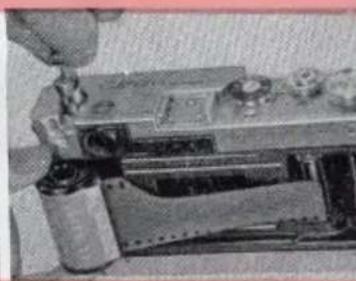
Rotate the Take-up Spool (22) until the groove on the spool permits you to slide the end of the film leader into the groove. Then, engage the second perforated hole of the leader with the small hook inside the groove. Adjust the film so that the perforations fit the teeth of the Film Roller (23).
Lift up the Film Rewind Crank (32) fully.
Pull the film cartridge to the recess directly beneath it. Depress the Film Rewind Crank again to lock the film cartridge in place. Be sure the dull (emulsion) side of the film faces the lens.

With your thumb on the knurled lower end of the Take-Up Spool (22), turn the spool clockwise half a turn until the film is taut. (Be sure the index line of the Film Rewind Ring (3) points to the "A" position.)
The camera back will lock shut automatically when you close it. Next, wind the film one turn* and press the Shutter Release Button (2). Be sure to use the Winding Knob for the first two frames, not the Rapid Wind. Repeat these actions once more. By doing this you will have cleared the two frames already exposed to light while you were loading. After this, you may use the Rapid Wind Trigger (12).
The red dot on the Film Transport Indicator (18) will make one complete turn each time you advance the film one frame. You will know you have loaded correctly if the Rewind Crank turns in a counter-clockwise direction each time you cock the shutter mechanism.
The Film Frame Counting Dial (20) on the Canon V T de luxe shows you the number of frames you have not yet exposed. It should be set at the number corresponding to the number of exposures possible on the film you have just loaded (normally 20 or 36). To do this rotate the Film Frame Counting Dial Setting Wheel (15) until the correct number appears on the dial. Note that only even numbers are engraved. Intermediate dots represent the odd numbers.
Thereafter, the Dial will operate automatically. When the last picture has been exposed, the Dial will register "0".

Film Type Indicator
As a reminder, set the Film Type Indicator (19) to the ASA speed of the film you are using, and to show whether you are using black-and-white or color. (Blue dot indicates daylight, red indicates tungsten.)
This indicator is adjusted by twisting the top of the Film Winding Knob (1) with your finger.
Setting Shutter Speed
This may be done before or after cocking shutter. There are two speed dials on the Canon VT de luxe. The High Speed Shutter Dial (25) is for shutter speeds of 1/30, 1/60, 1/125, 1/250, 1/500 and 1/1000 of a second. Also "B" (Bulb) and "X" (electronic flash contact). The Slow Speed Shutter Dial (14) is for shutter speeds of 1/30, 1/15, 1/8, 1/4, 1/2, 1 second, plus "T" (Time Exposure).
High Speed Dial
Raise the dial with your thumb and index finger and rotate it until the required speed is opposite the center index line; release the dial which will drop into the correct setting. (Note that in the case of 1/1000 sec. the dial drops only half way back). Be sure that the Slow Shutter Speed Dial is set at 1/30 sec. when using the high speeds.


Slow Speed Dial
Set the High Speed Shutter Dial to 1/30 sec. Rotate the Slow Speed Shutter Dial until the speed you want is on top, opposite the indicator line.
To take a picture at 1/30 sec., both Speed Dials should be set at 1/30 sec.
Exposures Longer Than 1 Second
Set the High Speed Shutter Dial to "B" and Slow Speed Shutter Dial to 1/30. The shutter will remain open from the time you press the Shutter Release Button (2) until you release it again.
For "Time," set the High Speed Shutter Dial at 1/30 sec. and the Slow Speed Shutter Dial to "T". The shutter will open when you press the Shutter Release Button. You do not have to maintain pressure on the Shutter Release Button. To close the shutter, turn the Slow Speed Shutter Dial to 1 sec.

Position of Center Index Line
when Shutter when Shutter
is Cocked is Not Cocked
SETTING LENS APERTURE (F: STOP)
Set the Lens Aperture Scale (35) by turning the milled ring at the top of your lens until the required f:stop is opposite the index dot.
For correct aperture opening, consult an exposure data card or use a reliable exposure meter.

The following table shows the relation between aperture value and exposure time.
| Lens aperture | 1.2 | 1.5 | 1.8 | 2.0 | 2.8 | (3.5) | 4.0 | 5.6 | 8.0 | 11 | 16 |
| Relative exposure time | .36 | .56 | .8 | 1 | 2 | (3) | 4 | 8 | 16 | 32 | 64 |

On the Canon VT de luxe, focusing and composing can be done at the same time. When you look through the Range-Viewfinder Eyepiece (30), you will see two images. By releasing the Lens Focusing Lever (11) and rotating the lens barrel, the two images of the object you are focusing upon will coincide. At this point of coincidence your camera is in focus for the object you are about to photograph.
All Canon Lenses are coupled with the Canon Range-Viewfinder mechanism.

FOCUSING & COMPOSING
The Depth-of-Field Scale (33) shows you the range of objects which will also be in focus on the film. This range will vary with the f:stop you have chosen. The larger the lens aperture, the smaller will be your depth of field. For example: with an f:stop of f:4 and with the object you have focused on at 25 ft. (*) your camera will give you a sharp focus picture from approximately 18 feet away from the camera to 40 feet. At f:11 you will get a sharp picture from 12 feet to infinity (∞).
* (Illustration shows 25 ft. on Lens Distance Scale (34) opposite Distance Indicator Mark.)


| For 50mm | For 35mm | 85mm or more |
Adjustment of the Viewfinder Dial (31) is made by turning the Viewfinder Selector (29).
Position "35" shows you the view which any Canon 35mm lens will record.
Position "50" gives you what any Canon 50mm lens will record.
You can focus the Rangefinder at any of the three positions.
VIEWFINDER DIAL & SELECTOR
For long focal length lenses (i.e. greater than 50mm) or when a larger image is desired for focusing, set the selector at "RF". For lenses other than 35mm and 50mm an accessory Viewfinder is necessary to give you correct composition. Alternatively, a Canon Zoomfinder, Special Viewfinder V or Lumi-field Finder V may be used. In all cases, the Automatic Parallax Adjustment Pin (26) built into the Accessory Clip (27) will elevate or depress the viewer to correspond to the focus of your lens from 3.5 feet to infinity.

On the Depth-of-Field Scale (33) of some Canon Lenses is the letter "R". This is for infrared film. When using this type of film, focus in the normal way. Read off the distance of the object you are photographing as shown opposite the Distance Indicator Mark on the Lens Distance Scale (34). Turn the lens barrel until the distance read off is opposite the "R" mark. Your lens is now focused for infrared photography.
Film Plane Mark (28)
This line gives you the exact position of the film plane in your camera. This information is needed for very accurate close-distance photography where a film to subject measurement must be taken.
INFRARED PHOTOGRAPHY
You have now completed the following steps:
- Wound your shutter, ready for your first exposure
- Set both speed dials
- Adjusted the Lens Aperture Scale
- Focused your lens
- Composed your picture through the correct Viewfinder setting
You are now ready to expose your picture. Hold the camera in a vertical or horizontal position, firmly but gently. The camera should be cradled in both palms and the index finger of your right hand should rest over the Shutter Release Button. Check your breath and press the Shutter Release Button in a smooth steady action. Do not jerk the camera.
For exposures longer than 1/15 sec. you should use a tripod and cable release to eliminate movement.
EXPOSING

The Canon VT de luxe features the fastest built-in Rapid Wind mechanism which winds the film to the next exposure and which also recocks the shutter. At the same time it advances the Film Frame Counting Dial to the next number.
Pull out the Rapid Wind Trigger (12) from its bed in the camera base plate and extend it to a vertical position. Pull the trigger the full length of its run. The trigger will automatically return to its original vertical position when released.
For the last three frames on your film, pull the rapid wind very gently or you may tear the film.
A Canon Rapid Wind Pistol Grip (with wrist strap) is available as an accessory.


For copying stand work, or when a tripod is used, the Manual Film Winding Knob (1) is used instead of the Rapid Wind mechanism.
Align any two of the engraved black dots on the top of the Manual Film Winding Knob and raise this Knob into its action position.
Turn the knob clockwise until it locks into position. Your film has then been advanced one frame, the shutter has been rewound and the Film Frame Counting Dial set to the next number. Keep the Rapid Wind Trigger in its bed.
Before using the Rapid Wind Mechanism again, be sure to return the Manual Film Winding Knob back into its lowered position, by depressing the Manual Film Winding Knob Release Button (21).

DOUBLE EXPOSURE PROCEDURE
An accidental Double Exposure is prevented on the Canon VT de luxe. For deliberate Double Exposures the following procedure should be adopted:
- Turn the Film Rewind Ring (3) from its normal "A" position to the Film Rewind Mark (▲).
- Rotate High Speed Shutter Dial counter-clockwise, without lifting dial until you hear a click and the Dial will turn no further.
- Hold the dial in that position with your left hand. Then, turn the Film Rewind Ring (3) back to the "A" position with your right hand.
- You may now reset either Speed Dial to any required speed.
UNLOADING
- Turn the Film Rewind Ring (3) from "A" to the Film Rewind Mark (▲).
- Raise the Rewind Crank (32) into operating position as illustrated below. Turn it in a clockwise direction until all the film
has been wound back into its original cartridge. Tension on the Film Rewind Crank will cease as soon as this has been done and the Film Transport Indicator (18) will also stop rotating. As long as Film Transport Indicator rotates clockwise, film is being rewound in the camera. One complete turn indicates one frame rewound.
- Open the camera back.
- Lift up the Rewind Crank (32) and take out the film cartridge.


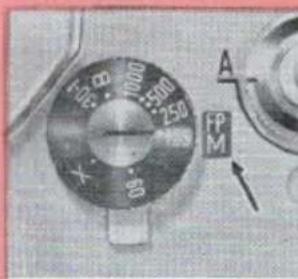
Set the Flash Synchronization Lever to show M for:
FP (Focal Plane) Bulbs for all speeds from 1/1000—1 sec.
M Bulbs for speeds from 1/125—1 sec.
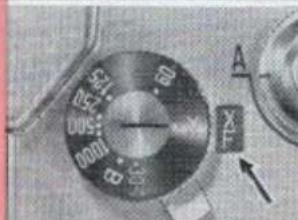
Set the Flash Synchronization Lever to show for:
F or M-2 Bulbs for speeds from 1/30—1 sec.
Electronic Flash (shutter speed 1/50 sec.)
NOTE:
- For Electronic Flash, turn High Speed Shutter Dial, as shown, to "X". Slow Speed Shutter Dial should be set at 1/30 sec.
- When using "F" type bulbs, be sure high speed shutter is at 1/30 sec.

CANON SPEEDLIGHT UNIT

Electrical contact is perfectly made for flash when the Canon Flash Unit Model V or Canon Speedlight Unit Model V is attached to the Flash Unit Connector Socket (5). No external wiring is necessary and all synchronization is done automatically in the camera itself.
To extend the Flash Unit away from the Camera or to connect a Speedlight Unit of non-Canon make, use a Canon Extension Cord Va (15 ft) or Vb 3 ft).
A built-in Self Timer (13) is incorporated in the Canon VT de luxe. When you are ready to take a picture, turn the Self Timer Lever counter-clockwise until it turns no further. This can be done before or after cocking the shutter. The timing device will begin working as soon as you depress the Shutter Release Button. (2) (You will hear a buzz.) The shutter will be actuated approximately 10 seconds later.
Note: Once you have cocked the Self Timer it cannot be released until the shutter has moved.
When taking Self Timer pictures, it is highly recommended that you use a Canon Cable Release and Camera Holder with a sturdy tripod.

All Canon Cameras and Lenses feature standard flanges and threads. The screw-in lens mount has been proven the most accurate and durable, with the greatest area of lens-to-camera contact of any type of camera connection.
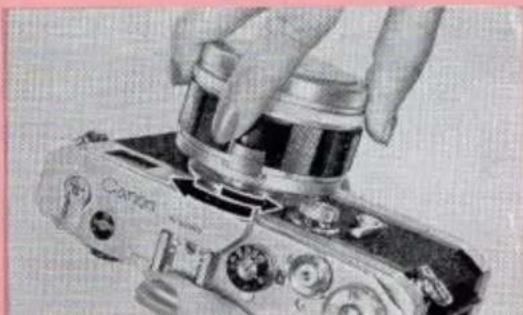
To change your lens, place the Lens Cap over the top of the lens. Grip the lens barrel at its base and apply gentle pressure until the lens is loose. Continue turning until the lens is completely unscrewed: Be sure that the camera (when loaded with film) is in shade and be sure to cover the lens base with a Dust Cap as soon as possible. Any Canon Lens will couple with the Canon VT de luxe.
To replace lens, keep Lens Cap on the lens but remove Base Cap. Turn the lens first in a counter-clockwise direction for half a turn. This makes sure that the lens threads and the camera mount flange do not cross. Next, turn it in a clockwise direction until the lens is securely in place. Do not force the lens any further.
Always tighten a lens by its base, not by the top. If the lens has a Lens Focusing Lever (11) be sure this is in the locked ( ∞ ) position.
Note: When mounting or dismounting any lens of 85mm or greater focal length, be certain you have lens set at nearest footage setting to protect camera, rangefinder and its actuating mechanism.
CHANGING LENSES
Depth of Field Table
for Canon 35mm f:1.8, f:2.8
In Feet
Minimum Circle of Confusion: 0.035 mm
| Distance focused on (ft) | Depth of Field Table. | |||||||||||||||||
| f:1.8 | f:2 | f:2.8 | f:4 | f:5.6 | f:8 | f:11 | f:16 | f:22 | ||||||||||
| ft-in | ft-in | ft-in | ft-in | ft-in | ft-in | ft-in | ft-in | ft-in | ft-in | ft-in | ft-in | ft-in | ft-in | ft-in | ft-in | ft-in | ft-in | |
| ∞ | 65-101/4 | ∞ | 59-31/2 | ∞ | 43- | ∞ | 29-9 | ∞ | 21-33/4 | ∞ | 15- | ∞ | 10-111/2 | ∞ | 7-71/4 | ∞ | 5-71/8 | ∞ |
| 50 | 28-53/4 | ∞ | 27-21/8 | ∞ | 23- | ∞ | 18-81/4 | ∞ | 14-111/4 | ∞ | 11-61/4 | ∞ | 8-111/2 | ∞ | 6-63/8 | ∞ | 4-115/8 | ∞ |
| 25 | 18-21/8 | 40-15/8 | 17-73/4 | 42-117/8 | 15-91/2 | 60- | 13-73/4 | 155- | 10-41/2 | ∞ | 9-47/8 | ∞ | 7-75/8 | ∞ | 5-97/8 | ∞ | 4-61/2 | ∞ |
| 15 | 12-31/8 | 19-4 | 11-117/8 | 19-115/8 | 11-2 | 23-1/4 | 10-3/8 | 29-11 | 8-103/8 | 49-10 | 7-65/8 | ∞ | 6-45/8 | ∞ | 5-7/8 | ∞ | 4-1 | ∞ |
| 10 | 8-85/8 | 12-37/8 | 8-71/8 | 11-114/8 | 8-15/8 | 12-113/4 | 7-61/2 | 14-105/8 | 6-101/2 | 18-63/8 | 6-3/4 | 29-4 | 5-31/2 | 110- | 4-41/2 | ∞ | 3-71/2 | ∞ |
| 8 | 7-2 | 9-3/4 | 7-1 | 9-23/8 | 6-91/4 | 9-93/8 | 6-41/4 | 10-93/4 | 5-101/2 | 12-71/8 | 5-33/8 | 16-91/4 | 4-81/4 | 28-71/2 | 3-111/2 | ∞ | 3-4 | ∞ |
| 6 | 5-61/4 | 6-67/8 | 5-56/8 | 6-75/8 | 5-31/2 | 6-111/8 | 5-1/2 | 7-51/4 | 4-87/8 | 8-25/8 | 4-41/8 | 9-91/4 | 3-113/8 | 12-10 | 3-5 | 27-1/2 | 2-111/2 | ∞ |
| 5 | 4-8 | 5-45/8 | 4-75/8 | 5-51/8 | 4-61/8 | 5-71/2 | 4-37/8 | 5-111/4 | 4-11/4 | 6-51/8 | 3-93/4 | 7-4 | 3-6 | 8-103/4 | 3-1 | 13-103/4 | 2-81/2 | 43-9 |
| 4 | 3-91/2 | 4-27/8 | 3-91/4 | 4-51/4 | 3-81/8 | 4-45/8 | 3-63/4 | 4-63/4 | 3-5 | 4-101/8 | 3-17/8 | 5-37/8 | 2-117/8 | 6-11/8 | 2-81/4 | 8-1/3 | 2-41/2 | 13-15/8 |
| 3.5 | 3-41/8 | 3-81/8 | 3-37/8 | 3-83/8 | 3-31/8 | 3-93/8 | 3-2 | 3-11 | 3-5/8 | 4-11/2 | 2-103/8 | 4-51/2 | 2-81/2 | 4-111/4 | 2-51/2 | 6-21/8 | 2-23/4 | 8-9 |
Depth of Field Table
for Canon 50mm f:1.2, f:1.5, f:1.8, f:2.8
In Feet
Minimum Circle of Confusion: 0.035 mm
| Distance focused on (ft) | Depth of Field Table. | |||||||||||||||||||||||
| f : 1.2' | f : 1.4 | f : 1.5 | f : 1.8 | f : 2' | f : 2.3' | f : 4' | f : 5.6' | f : 8' | f : 11' | f : 16' | f : 22' | |||||||||||||
| ft-in | ft-in | ft-in | ft-in | ft-in | ft-in | ft-in | ft-in | ft-in | ft-in | ft-in | ft-in | ft-in | ft-in | ft-in | ft-in | ft-in | ft-in | ft-in | ft-in | ft-in | ft-in | ft-in | ft-in | |
| ∞ | 209- | ∞ | 179- | ∞ | 167- | ∞ | 139- | ∞ | 125 | ∞ | 89- | ∞ | 63- | ∞ | 44-9 | ∞ | 31-4 | ∞ | 22-11 | ∞ | 15-9 | ∞ | 11-4 | ∞ |
| 50 | 40-4 | 65-9 | 39-1 | 69-3 | 38-7 | 71- | 26-10 | 78 | 35-10 | 82- | 32-2 | 112 | 27-11 | 245- | 23-9 | ∞ | 19-3 | ∞ | 15-9 | ∞ | 12-1 | ∞ | 9-3 | ∞ |
| 25 | 22-4 | 28-5 | 23-11 | 29-1 | 21-10 | 29-4 | 21-3 | 30-4 | 20-11 | 31-1 | 19-7 | 34-6 | 11- | 41-3 | 16-2 | 56- | 14- | 319- | 12-1 | ∞ | 9-9 | ∞ | 7-10 | ∞ |
| 15 | 14-0 | 16-2 | 12-10 | 16-4 | 13-10 | 16-5 | 13-7 | 16-7 | 13-5 | 16-11 | 12-11 | 17-11 | 12-2 | 19-7 | 11-4 | 22-3 | 10-3 | 28-2 | 9-2 | 42-1 | 7-9 | 247- | 6-6 | ∞ |
| 10 | 9-6 | 10-6 | 9-5 | 10-7 | 9-5 | 10-7 | 9-4 | 10-9 | 9-3 | 10-10 | 9-1/2 | 11-2 | 8-8 | 11-10 | 8-3 | 12-10 | 7-8 | 14-5 | 7-1 | 17-4 | 6-3 | 26- | 5-4 | 74-11 |
| 8 | 7-8 | 8-3 | 7-8 | 8-4 | 7-7 | 8-1 | 7-7 | 8-5 | 7-6 | 8-6 | 7-4 | 8-8 | 7-11 | 9-1 | 6-10 | 9-7 | 6-5 | 10-7 | 6-1 | 12- | 5-5 | 15-7 | 4-8 | 25-9 |
| 6 | 5-10 | 6-2 | 5-9 | 6-2 | 5-9 | 6-2 | 5-9 | 6-3 | 5-9 | 6-3 | 5-7 | 6-4 | 5-6 | 6-7 | 5-4 | 6-10 | 5-11 | 7-3 | 4-10 | 7-11 | 4-5 | 9-4 | 3-11 | 12-4 |
| 5 | 4-10 | 5-11 | 4-10 | 5-15 | 4-10 | 5-15 | 4-10 | 5-2 | 4-9 | 5-2 | 4-9 | 5-3 | 4-8 | 5-4 | 4-6 | 5-6 | 4-4 | 5-10 | 4-2 | 6-3 | 3-10 | 7-7 | 3-6 | 8-8 |
| 4 | 3-11 | 4-1 | 3-11 | 4-1 | 3-11 | 4-1 | 3-10 | 4-11 | 3-10 | 4-11 | 3-10 | 4-2 | 3-9 | 4-9 | 3-8 | 4-4 | 3-7 | 4-6 | 3-5 | 4-8 | 5-3 | 5-2 | 3-17 | 6-10 |
| 3.5 | 3-5 | 3-6 | 3-5 | 3-6 | 3-6 | 3-6 | 3-5 | 3-6 | 3-6 | 3-7 | 3-4 | 3-7 | 3-4 | 3-8 | 3-3 | 3-9 | 3-2 | 3-10 | 3-11 | 4-4 | 2-11 | 4-4 | 2-8 | 4-11 |
CARE OF YOUR
DO read this instruction book carefully.
DO consult your dealer if you have any problem about using your Camera or Lenses.
DO
DO keep the Lens Cap on at all times except when you are actually going to take a picture. Your Canon Lens is the fastest lens available. If exposed to direct sun light it may burn a hole in your shutter curtain in a second.
Canon V T
DON'T keep your camera in the glove compartment of your car where it will be subject to shaking, vibration, heat, dust, etc.
DON'T keep your camera in a damp room or where corrosive fumes exist.
Do not clean your Canon lens with anything but special lens tissue, with possibly a little pure alcohol or ether, if available. Wrap the tissue around a wooden matchstick and wipe in a circular motion, lightly and systematically.
ACCESSORIES

GRIP
Screws into the baseplate of the Canon Model VT de luxe for easier operation of the rapid action trigger.
LUMI-FIELD VIEWFINDERS
Gives a clear, sharp field-of-view by a brilliant white-line frame, while at the same time permitting observation of an outer margin which will not appear in the photograph. Couples to the built-in rangefinder mechanism of the Canon Camera VT de luxe for automatic parallax compensation. Separate viewfinders are available for 50mm, 85mm, 100mm, and 135mm lenses.

UNIVERSAL ZOOMFINDER "S" and "L"
Shows the exact field-of-view recorded by the lens itself. Parallax is compensated automatically as you focus your lens on Canon VT de luxe. The eye-piece is adjustable to compensate for individual differences in eye-sight.
Two types are available, "S" and "L". The first (model S) is for wide-angle lenses with focal length between 35mm and 50mm. For any of the ultra wide-angle lenses such as 21mm, 25mm, or 28mm lens the Front Attachment Lens is adapted. The second (model L) is for long lenses with focal length between 85mm and 135mm.

FLASH UNIT MODEL V
Pocket size flash gun; fits directly on Canon's bayonet-type outlet, without the use of any external cables. 5 inch folding reflector, sturdy plastic housing, B.C. circuit, built-in test lamp.

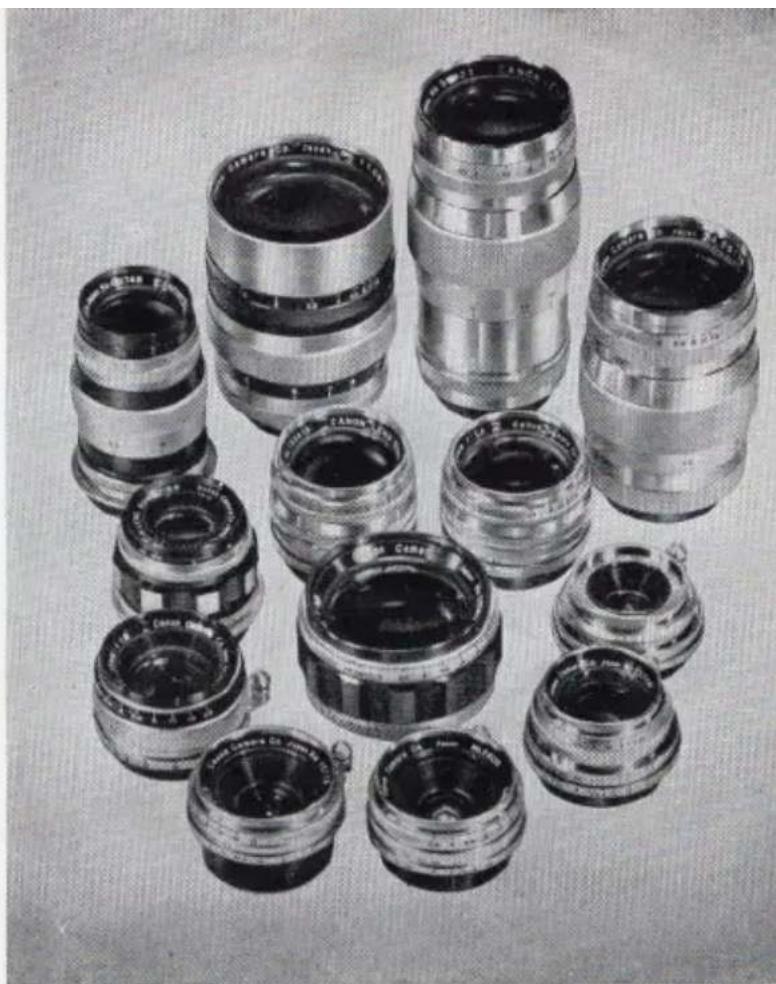
INTERCHANGEABLE CANON LENSES
Your Canon VT de luxe is one of the most versatile cameras ever devised, allowing you to take every kind of pictures, from portrait, landscape to close-up and copywork. In addition, Canon offers a variety of interchangeable lenses that will further increase Canon Camera's versatility and enable you to enjoy every pleasure of 35 mm photography.
The Canon lenses are widely used by professional cameramen the world over because of their high resolving power and color fidelity, which is a result of Canon's constant research in the fields of glass development, lens design and lens coating compounds.
| 25mm f : 3.5 | 50mm f : 1.2 | 85mm f : 1.9 |
| 28mm f : 2.8 | 50mm f : 1.5 | 100mm f : 3.5 |
| 28mm f : 3.5(II) | 50mm f : 1.8(II) | 135mm f : 3.5 |
| 35mm f : 1.8 | 50mm f : 2.8 | 400mm f : 4.5 |
| 35mm f : 2.8(II) | 85mm f : 1.5 | 800mm f : 8 |
Canon Vt de luxe
16 Flash Synchronization Dial 17 Cable Release Socket 18 Film Transport Indicator 19 Film Type Indicator 20 Film Frame Counting Dial 21 Release Button for Film Winding Knob 22 Built-in Take-up Spool 23 Film Roller 24 Flash Synchronization Selector 25 High Speed Shutter Dial
26 Automatic Parallax Adjustment Pin 27 Accessory Clip 28 Film Plane Mark 29 Viewfinder Selector 30 Range-Viewfinder Eyepiece 31 Viewfinder Dial 32 Film Rewind Crank 33 Lens Depth-of-Field Scale 34 Lens Distance Scale 35 Lens Aperture Scale

CANON CAMERA CO., INC.
No. 355 91-3-57 Printed in Japan by Daito

- CANON
- MODEL VT DE LUXE
- CANON VT DE LUXE
- CONTENTS
- FILM TYPE INDICATOR
- SETTING SHUTTER SPEED
- HIGH SPEED DIAL
- SLOW SPEED DIAL
- EXPOSURES LONGER THAN 1 SECOND
- SETTING LENS APERTURE (F: STOP)
- FOCUSING & COMPOSING
- VIEWFINDER DIAL & SELECTOR
- FILM PLANE MARK (28)
- INFRARED PHOTOGRAPHY
- EXPOSING
- DOUBLE EXPOSURE PROCEDURE
- UNLOADING
- NOTE
- CHANGING LENSES
- DEPTH OF FIELD TABLE
- FOR CANON 35MM F:1.8, F
- IN FEET
- CARE OF YOUR
- DO
- CANON V T
- ACCESSORIES
- GRIP
- LUMI-FIELD VIEWFINDERS
- UNIVERSAL ZOOMFINDER "S" AND "L
- FLASH UNIT MODEL V
- INTERCHANGEABLE CANON LENSES
Brand : CANON
Model : VT Deluxe
Category : Camera