
Connect M5 - Router ACER - Free user manual and instructions
Find the device manual for free Connect M5 ACER in PDF.


| Product Type | Wi-Fi Router |
| Brand | Acer |
| Model | Connect M5 |
| Dimensions (W x D x H) | 200 x 150 x 35 mm |
| Weight | 400 g |
| Power Supply | 12V DC, 1.5A |
| Wireless Standard | IEEE 802.11ac Wave 2 |
| Frequency Bands | 2.4 GHz & 5 GHz |
| Maximum Data Rate | 1200 Mbps (300 Mbps on 2.4 GHz + 867 Mbps on 5 GHz) |
| Antenna | 4 external antennas, dual-band |
| Ports | 1x WAN Gigabit, 4x LAN Gigabit, 1x USB 2.0 |
| Security | WPA/WPA2, WPA-PSK, WPA2-PSK, WPS, SPI firewall |
| Management | Web-based interface, mobile app |
| VPN Support | PPTP, L2TP, IPSec pass-through |
| Quality of Service (QoS) | Yes, based on application and device |
| Guest Network | Yes, separate SSID for 2.4 GHz and 5 GHz |
| Maintenance | Clean with dry cloth; avoid liquids |
| Spare Parts & Repairability | Contact Acer support; limited user-serviceable parts |
| General Information | Designed for home and small office use; supports up to 50 devices |
Frequently Asked Questions - Connect M5 ACER
User questions about Connect M5 ACER
0 question about this device. Answer the ones you know or ask your own.
Ask a new question about this device
Download the instructions for your Router in PDF format for free! Find your manual Connect M5 - ACER and take your electronic device back in hand. On this page are published all the documents necessary for the use of your device. Connect M5 by ACER.
USER MANUAL Connect M5 ACER
Acer Connect M5
USER GUIDE
Version: 1.0
© 2021. All Rights Reserved. This revision: December 2020
Important: This manual contains proprietary information that is protected by copyright laws. The information contained in this manual is subject to change without notice. Some features described in this manual may not be supported depending on the Operating System version. Images provided herein are for reference only and may contain information or features that do not apply to your device. Acer Group shall not be liable for technical or editorial errors or omissions contained in this manual.
Table of Contents
Contents
- Overview.... 3
1.1. Package Contents .... 3 1.2 System Requirements 4 1.3 Device description....4 1.4 Environmental....7 1.5 Power Management 7
- Installation 8
2.1 First-time setup....8 2.2 Getting online 9
- Web UI Home Page 9
3.1 Web User Interface (UI)....9
- Status 12
4.1 Status - Internet / LAN/ WiFi.... 13
- Network Settings .... 17
5.1 Network Settings - Quick setup 17 5.2 Network Settings - Setup 19 5.3 Network Settings - WiFi .... 22 5.4 Network Settings - Advanced settings 24
- SIM card .... 30
- Settings 34
7.1 Settings - Device information 34 7.2 Settings - Device management .... 35 7.3 Settings – Firmware Update .... 39 7.4 Settings - System Log 40 7.5 Settings – Mobile App 40
- Regulatory Information 41
8.1 Important Safety Precaution .... 41 8.2 Condition of Use .... 41 8.3 Cleaning and Maintenance 42
8.4 Disposal Instructions .... 42 8.5 Battery Safety .... 42 8.6 Ethernet Cable Line Safety 42 8.7 Medical Devices .... 42 8.8 Vehicles 43 8.9 Warning 43 8.10 Explosive Device Proximity Warning 43 8.11 Wireless adapter regulatory information .... 44 8.12 EU Regulatory Conformance .... 45 8.13 Duty Cycle Attestation 45 8.14 Restrictions 45 8.15 EU Regulatory Compliance -- Radio 45
- Limited Warranty 46
1. Overview
Featuring 5G and Wi-Fi 6 technology, Acer Connect M5 mobile router delivers gigabit transfer speed along with an instant and responsive user experience. With an all-day battery, Acer Connect M5 can be used to provide internet access on-the-go, as well as at home. Paired with Web UI, Acer Connect M5 provides a simple and secure user experience for personal device management.
1.1. Package Contents
The box should include the following items:
Acer Connect M5
USB Type A-C Cable
Quick Start Guide
Warranty Card
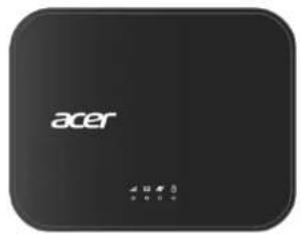



1.2 System Requirements
This Acer Connect M5 is compatible with WiFi devices which support 2.4GHz (802.11 b/g/n/ax) or 5GHz (802.11 a/n/ac/ax) and have a web browser.
1.3 Device description
1.3.1 Top View (LED Indicators)

| LED Type | Status | Description |
| Network type | Red | No coverage or no SIMCheck your SIM card is inserted in the SIM slot with gold contacts facing upwards. If the indicator remains red, there is still no signal coverage. |
| Green | 4G signalYour Acer Connect M5 is connected to the 4G network. | |
| Blue | 5G signalYour Acer Connect M5 is connected to the 5G network. | |
| Flashing Green | Starting upYour Acer Connect M5 is starting up. | |
| SMS | No light | No unread messagesAll SMS messages have been read. |
| Green | Unread messagesA new SMS message has been received. Check your SMS inbox in the Web UI. | |
| Flashing Green | Inbox is fullYou can delete messages via the SMS inbox in the Web UI. | |
| Internet | No light | Internet data disconnectionThe internet is disconnected. |
| Green | Internet data connectionThe internet is connected. | |
| Battery level | No light | The power is offThe Acer Connect M5 power is off. A green light will appear once you press the power button on. |
| Green | Your Acer Connect M5 is powered onThe green light shows the power is on, and the battery level is between 21% to 100%. | |
| Flashing Green | Your Acer Connect M5 needs to be chargedThe green flashing light shows the battery level is between 0% to 20%. It needs to be charged before it completely runs out of battery. If the power supply is connected, then the battery is charging. |
1.3.2 Rear View

1 SIM slot 2 USB-C power port 3 Ethernet port 4 Power button
1.3.3 Bottom View

1
Reset button
2
Device label
1.4 Environmental
Operating temperature: 0 °C to 35 °C (0 °F to 95 °F)
Storage temperature: 0 °C to 45 °C (0 °F to 113 °F)
1.5 Power Management
Your device can be powered by battery, or when connected to the power adapter or a powered USB port via provided USB Type A-C cable.
- Battery — Charge the battery by plugging in the power adapter or powered USB port. While the battery is charging, the battery LED indicator will flash green. When the battery is fully charged, the battery LED indicator will remain solid green.
- USB Cable — You can use the device when the power adapter is connected via the USB Cable. The Acer Connect M5 battery will charge while connected.
Note: To ensure your Acer Connect M5 works as intended, it is recommended you only use the accessories provided with your device.
2. Installation
2.1 First-time setup
2.1.1 Insert the SIM Card
- Lift the SIM door.

- Insert the SIM card into the slot with the gold contacts facing upwards.

- Fully insert the SIM card until it clicks into place.
Note: Push the SIM into the slot smoothly with your nail. Do not use any tool, as it may damage the SIM.
2.1.2 Charge the Battery
- To power your device, connect it to your power adapter connected via the USB Cable to charge it.
- Connect the power supply to the plug socket.

2.1.3 Power on the Acer Connect M5.
- Power on: Press the power button for a few seconds. The signal LED will flash green and the battery LED will be solid green at the same time.
- Switch off: Press the power button for a few seconds, the LED's will power off.

2.2 Getting online
Ensure your Acer Connect M5 is switched on and connected to the network. The Internet LED should be green.
To connect your personal device to the internet
A. Connect your laptop or device to MiFi via WiFi: First, search for the Acer Connect M5 wireless network name (SSID) on your device. The 2.4GHz wireless network name is: AcerConnect-M5-XXXX-2.4GHz. The 5GHz wireless network name is: AcerConnect-M5-XXXX-5GHz. Then, connect to it. Finally, enter your WiFi password. Note: You can find your default WiFi password on the label located on the underside of the Acer Connect M5. B. Connect your laptop to MiFi via USB cable: You will see a virtual LAN port connection on your laptop. C. Connect your laptop to MiFi via Ethernet cable: You will see a LAN port connection on your laptop.
3. Web UI Home Page
3.1 Web User Interface (UI)
The Web User Interface is compatible with the following browsers:
- Google Chrome
- Mozilla Firefox
- Internet Explorer
• Safari - Microsoft Edge
3.1.1 How to log in to the Web UI
- Open your web browser.
- Type http://connect.acer or http://192.168.1.1 into the address bar and press enter. The Home page will then load, as shown in the screenshot below.

On the Home page, enter the password as found on device label on the bottom of the Acer Connect M5 and click Login.
Note: You will need to change your password at first time you login.
3.1.2 Status page/ Home page Icons
| Description | Icon displayed | ||||
| Signal indicator |  From no signal to excellent From no signal to excellent | ||||
| Connection status |  | Disconnected |  | Connected | |
| LAN status |  | LAN is disconnected |  | LAN is connected | |
| USB status |  | USB is disconnected |  | USB is connected | |
| WiFi status |  | WiFi is disabled |  | WiFi is enabled | |
| SMS |  | New message / Unread message(s) in inbox | |||
 | SMS inbox is full | ||||
| Battery |  |  |  |  |  |
 |  |  |  |  | |
| Charging | |||||
| Connected devices |  | Connected devices | |||
| Data usage |  | Data usage | |||
4. Status
You can click on Status to view basic information about your device.

You can spread out each item to see more detail information.
4.1 Status - Internet / LAN/ WiFi
On the Internet page you will find information related to the 5G or 4G connection including network name, network type, signal strength, band, LTE cell identifier and IP addresses.
Internet
LAN
If you connect your laptop to the Acer Connect M5 via Ethernet cable, you will see connection status, IP address, etc. information.

WiFi 2.4GHz
You can see all WiFi related information in the session.

WiFi 5GHz
4.2 Status - Connected devices
All connected and blocked devices are also displayed here; you can block devices from accessing the network here.

4.3 Status - Data usage
Device will count data usage per month. You can setup start date of each month.
Note: this statistical data is calculated by device local system and is not equivalent to the data statistics of actual network provider.

5. Network Settings
5.1 Network Settings - Quick setup
You can make changes to basic connection settings here and enable/disable data roaming.

On the next page, you can change the 2.4 and 5GHz Wireless network name (SSID), SSID broadcast function or disable the WiFi.
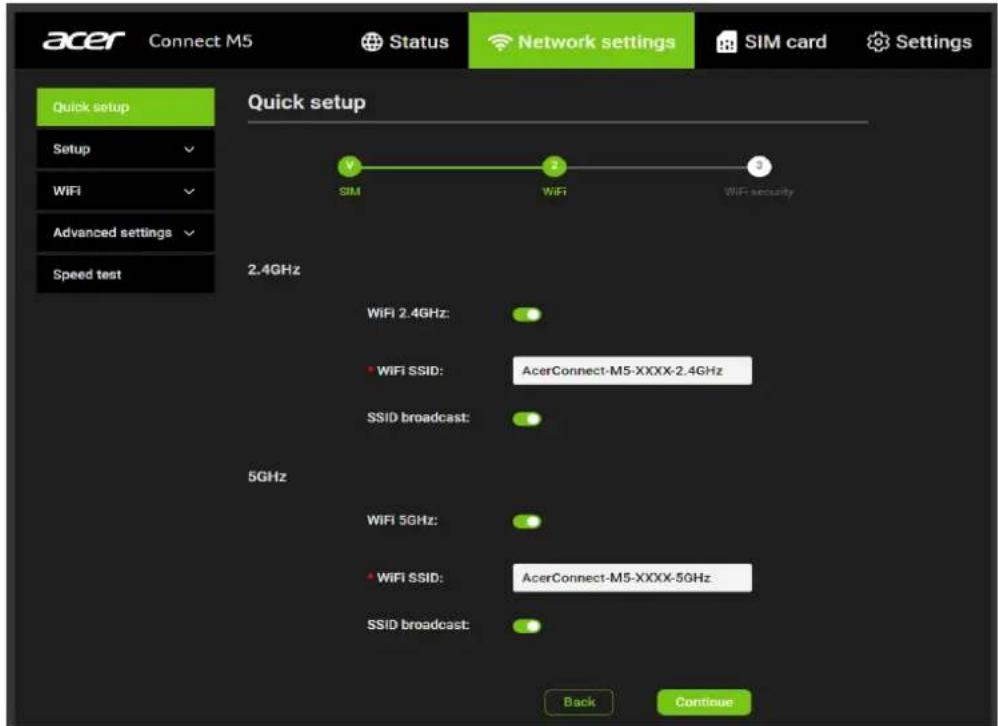
On the final page, you can set up your WiFi security settings and change the WiFi password.

5.2 Network Settings - Setup
Network Connection
Network connection lets you configure connection mode and data roaming.
Selecting connection mode Auto will establish an internet connection automatically.
Selecting connection mode Manual will establish an internet connection manually. You will need to click the connect button on the Internet status page to establish a data call.

Profile Management
Profile management allows you to set up a new APN profile or edit/delete existing profiles that have been created.
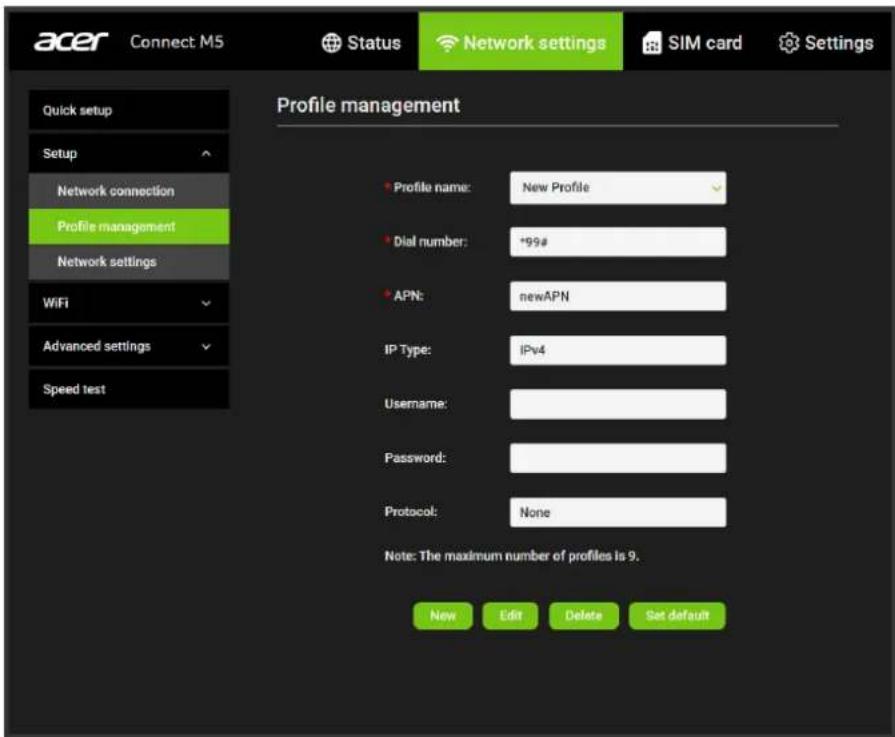
• How to add a new profile
- Click New.
- Input the connection settings for your network provider. A Profile name, Dial number, and APN are mandatory.
- Click Save.

• How to delete a profile:
- Select the profile from the Profile name list.
- Click Delete.
Note: The default profile cannot be deleted.

- Setting as default:
- Select the profile from the Profile name list.
- Click Set default.
Note: Once the new profile has been set as default, (Default) will be added next to the profile name.

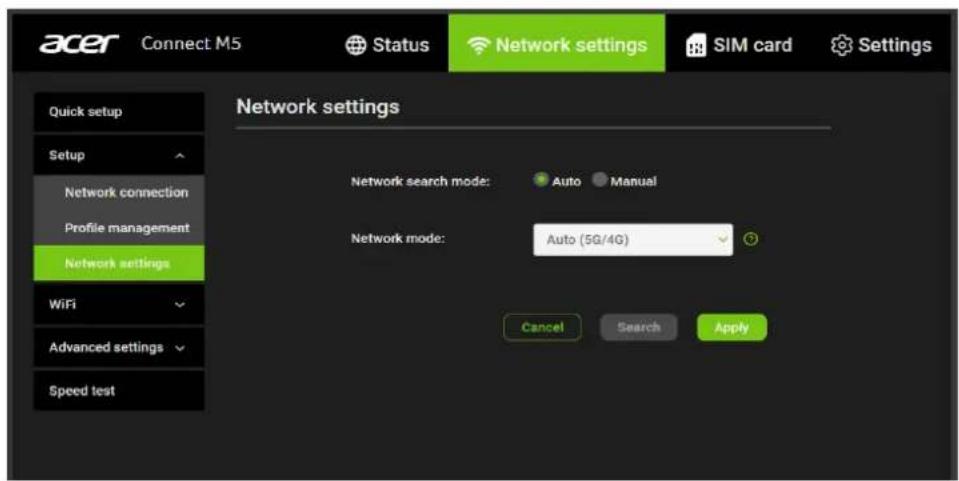
Network settings
You can set the Network search mode to either Auto or Manual and change the network mode to either Auto (5G/4G) or 4G only.
Ensure that you click Apply after making any changes.
If the Network search mode is set to Manual, you can click Search to scan for networks and Register to connect to the network.
Note: It is recommended that you keep the Network search mode set to Auto.
5.3 Network Settings - WiFi
Basic
- WiFi 2.4GHz / 5GHz: You can enable or disable the 2.4GHz or 5GHz wireless networks.
- Wireless network name (SSID): This is the name of the WiFi network and is used to identify your WiFi network. The SSID can be between 1 and 32 characters long.
- SSID Broadcast: This is enabled by default.
Note: If you do choose to disable this, the SSID will no longer be displayed and you will need to set up a connection to the SSID manually on your device.
- Security: You can choose the security mode. Available options are Disabled, WPA2, WPA/WPA2, WPA3 or WPA2/WPA3.
- Encryption: This is set to AES by default. Available options are TKIP, AES, or Auto.

Advanced
- Channel: Select Auto and the Acer Connect M5 will select the best channel for you to use automatically, or select a WiFi channel manually.
- 802.11 Mode: You can select from the available options via the drop-down menu. For 2.4GHz and 5GHz, this is set to 802.11ax by default.
- AP isolation: You can enable or disable this function.
- Bandwidth: You can select from the available options via the drop-down menu. For 2.4GHz, this is set to 20MHz by default. For 5GHz, this is set to 80MHz by default.

WPS
- WPS: Enable WPS and click Start WPS to start connecting a WPS compatible device to the Acer Connect M5.
Note: Connect a wireless device to the Acer Connect M5 Wireless network name (SSID) via WPS within 2 minutes of clicking Start WPS.

5.4 Network Settings - Advanced settings
Please be aware that changing advanced settings could affect your internet connection.
LAN
Local area network (LAN) settings are displayed here. The default Gateway address is 192.168.1.1.
The default Subnet mask is 255.255.255.0.
The DHCP server is enabled by default and will automatically assign IP addresses to devices in the network.

WAN ping
To improve security, this option is disabled and the Acer Connect M5 will not respond to ping from the Internet.

MAC filter
By default, any device is allowed to connect to your Acer Connect M5. You can use the MAC filter to block specific devices from accessing your Acer Connect M5 by MAC address.
Click + to add a device MAC address to the MAC filter table, if a device is added to the table, it will be blocked from accessing the network.

DMZ
When an IP address is set to be a DMZ (Demilitarized Zone) host on the local network, it is exposed to the internet. External users will then have access to all services.

UPnP
With UPnP enabled, the applications or host devices on the local network and the internet can freely communicate with each other and establish functional network services for data sharing, communications, and entertainment.

Port forwarding
Port forwarding allows external users to connect to services inside the local network (LAN).
Click + to create a new Port forwarding rule, and specify the LAN IP address, LAN ports, WAN ports and Protocol types for traffic to be forwarded.

Parental control
Parental Control is an advanced feature that helps parents protect their children while they use the Internet. When you turn on Parental control, you can restrict the websites that can be accessed by URL or URL keyword.
You can add a Parental control rule by clicking +, and entering the rule information, including time and days when the rule is enforced for a device.
Please note that Parental control rules may only block websites and associated mobile applications may not be restricted.

VPN
OpenVPN Client
Acer Connect M5 provides OpenVPN client function to establish a secure connection with an OpenVPN service. It is the easiest and most effective way for users to protect internet traffic and keep identities private online.
Before enabling VPN connection, you need to configure VPN settings.
Press "Config VPN" to enter the settings page.
Username: Enter your username for the VPN service; this may be optional.
Password: Enter the password for the VPN service; this may be optional.
Config file: Press "Browse" to upload the .opvn file you downloaded from your VPN service provider. Then click "Save config".

Turn on the VPN switch in the picture below to enable the function.

5.5 Network Settings – Speed test
Speed test
You can use this tool to test your network speed.

6. SIM card
6.1 SIM card - SIM PIN management
• How to enable a PIN:
- When a PIN is disabled, click Enable. The PIN input page is displayed.
- Enter the PIN you want to set. Your PIN must be between 4-8 digits.
- Click Apply.
- Tick Remember SIM PIN to remember the PIN code.
• How to disable a PIN:
- When a PIN is enabled, click Disable. The PIN input page is displayed.
- Enter the correct PIN.
- Click Apply.


• How to Change the PIN:
- When a PIN is enabled, click Change PIN. The PIN input page is displayed.
- Enter the Old PIN/New PIN/Confirm PIN.
- Click Apply (Note: when a PIN code is entered incorrectly 3 times a PUK code is needed. You can obtain this from the Network Operator.)

• How to verify PUK:
- Enter correct PUK code, then enter the new PIN.
- Click Apply to confirm the new PIN code.
Note: when a PUK code is entered incorrectly 10 times, SIM will be locked permanently.

6.2 SIM card – SMS Inbox
How to read an SMS: Left-click the content of the message you wish to read.
How to delete an SMS:
- Find the message you wish to delete in the Inbox.
- Tick the box in the far-right column for the message(s) that you wish to delete.
- Click Delete.
How to delete all SMS:
- Left-click at the top of the column to select all.
- Click Delete.

How to reply to an SMS:
- Left-click the content of the message you wish to read.
- Write the reply message in the reply text box.
3. Click Send.

6.3 SIM card - SMS forwarding
SMS forwarding allows you to forward SMS messages sent to your Acer Connect M5 to another mobile phone.
- Enable SMS forwarding to mobile phone.
- Enter the phone number you wish to have messages forwarded to.
- Click Apply.
- After clicking Apply, all incoming SMS will be forwarded to that mobile phone number automatically.

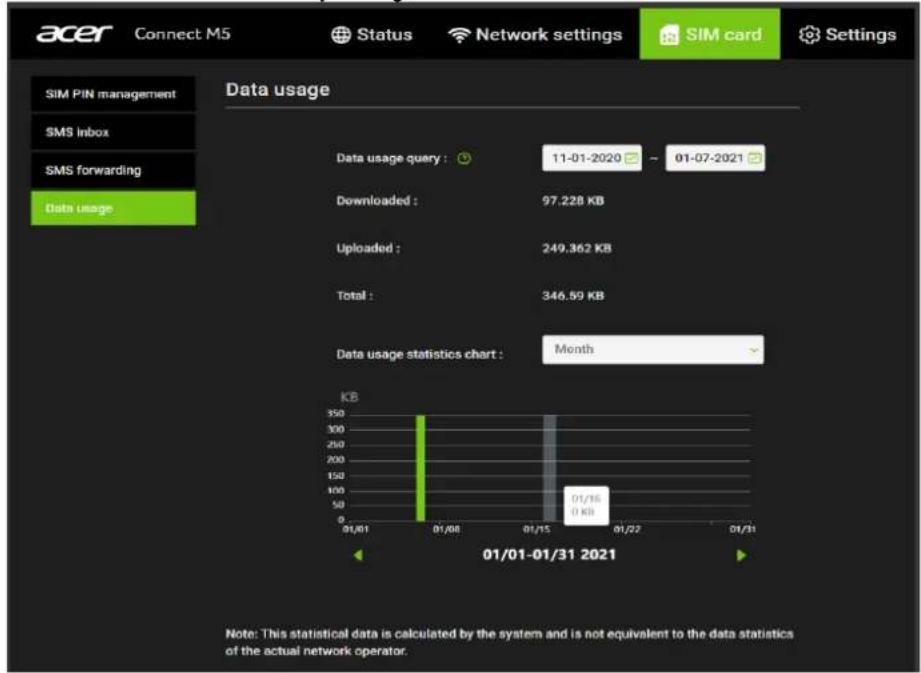
6.4 SIM card – Data Usage
You can query data usage by setting a period. And you can select monthly or daily view to see the statistic chart.
Note: device will keep only 3 month data.
7. Settings
7.1 Settings - Device information
You can view information about your Acer Connect M5 device here such as the IMEI, your mobile phone number, serial number, software version and MAC address.

7.2 Settings - Device management
Log in Password
Enter your current password and confirm a new password. Your chosen password must be between 8-64 characters long.
Note: For security it is recommended your password should contain a mixture of upper-case letters, lower-case letters and numbers. The password should not be easily guessed, or a word from the dictionary.

System time
- Enable daylight saving time
Daylight saving time will be set automatically but can be overridden by changing this setting.
- Time zone
You can change the local time zone here.
- Current date and time
This will show your current local time according to the time zone selected.
Click Apply to confirm your preferences.

Backup & Restore
• How to backup and save device configurations:
- Click Backup to backup current device configurations.
- On both Windows and Mac OS, the default path is to save configurations to your Downloads folder and the file name will be configure.bin.
- How to restore the backup configurations:
- Click Browse to select a backup configuration file.
- Click Restore.

Restart & Reset
- Restart: Click Restart to reboot the Acer Connect M5.
- Reset: Click Reset to reset all settings back to factory default settings. Note that any custom settings will be lost, so Backup a device configuration file as instructed above if you want to restore settings later.

How to factory reset using the button on the device
Use a paperclip or blunt pin to gently press and hold the reset button on the bottom of the device for 10 seconds. The Signal LED will flash blue, and then green while the device is restarted. Note that any custom settings will be reset back to factory defaults.


Reset button

Device information sticker
Languages
You can change system language here.

7.3 Settings – Firmware Update
Firmware update
Click Check for updates. Your Acer Connect M5 device will check if there is an update available. If new firmware is found, you may click Download to begin the update. The firmware update will take approximately 4 minutes to complete.

Note: To do Firmware update, the Acer Connect M5 device must have more than 30% battery.
Please do not power off your Acer Connect M5 device during the update process as this may damage it.
7.4 Settings - System Log
You can see system logs here.

7.5 Settings – Mobile App
APP
You can download the mobile APP by scanning this QR code.
Depending on your mobile system, you will be redirected to the Apple App Store or Google Play.

8. Regulatory Information
8.1 Important Safety Precautions
Your Acer Connect M5 5G MiFi device is manufactured to comply with European safety standards. This section outlines the safety precautions associated with using the device. Please read the safety and operation instructions before using your device and other accessories. Keep these instructions safe for future reference.
8.2 Conditions of Use
- The device is not water-resistant. Protect the device from water or moisture and do not touch it with wet hands. Otherwise, short-circuit, malfunction, or electric shock may occur.
- Keep the device and accessories in a cool, well-ventilated area away from direct sunlight. Do not place the device in a container with poor heat dissipation. Do not enclose or cover the device with clothes, towels, or other objects.
- Keep the device out of the reach of children. Do not allow children to use the wireless device without adult supervision.
- Do not use the device in medical treatment areas (such as operating rooms, intensive care units, or coronary care units) where wireless device use is prohibited. To reduce the risk of accidents, do not use the device while driving.
- RF signals may affect the electronic systems of motor vehicles. For more information, consult the vehicle manufacturer.
- Acer recommends using the charger supplied with your device. Use of another type of charger may result in malfunction and/or danger.
8.3 Cleaning and Maintenance
- Do not attempt to dry the device with an external heat source, such as a microwave oven or hair dryer. Use a clean, soft, dry cloth to clean the device and accessories.
8.4 Disposal Instructions
Do not throw this electronic device into the trash when discarding. To minimize pollution and ensure utmost protection of the global environment, please recycle. For more information on the Waste from Electrical and Electronics Equipment (WEEE) regulations, visit www.acer-
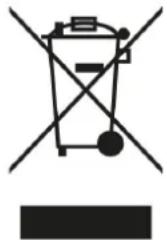
group.com/public/Sustainability
8.5 Battery Safety
- This unit contains a non-replaceable internal lithium-ion battery.
- The battery must be recycled or disposed of properly.
- Contact helpdesk if battery replacement is needed.
8.6 Ethernet Cable Line Safety
- Disconnect all Ethernet cable lines from the equipment when not in use and/or before servicing.
- To avoid the remote risk of electric shock from lightning, do not connect the Ethernet cable line to this equipment during lightning or thunderstorms.
8.7 Medical Devices
Operation of any radio transmitting equipment, including wireless phones, may interfere with the functionality of inadequately protected medical devices. Consult a physician or the manufacturer of the medical device to determine if they are adequately shielded from external RF energy or if you have any questions. Switch off your device in health care facilities when any regulations posted in these areas instruct you to do so. Hospitals or health care facilities may be using equipment that could be sensitive to external RF transmissions.
Pacemakers. Pacemaker manufacturers recommend that a minimum separation of 15.3 centimeters (6 inches) be maintained between wireless devices and a pacemaker to avoid potential interference with the pacemaker. These recommendations are consistent with the independent research by and recommendations of Wireless Technology Research. Persons with pacemakers should do the following:
• Always keep the device more than 15.3 centimeters (6 inches) from the pacemaker - Not carry the device near you pacemaker when the device is switched on. If you suspect interference, switch off your device, and move it.
Hearing aids. Some digital wireless devices may interfere with some hearing aids. If interference occurs, consult your service provider.
8.8 Vehicles
RF signals may affect improperly installed or inadequately shielded electronic systems in motor vehicles such as electronic fuel injection systems, electronic antiskid (anti-lock) braking systems, electronic speed control systems, and air bag systems. For more information, check with the manufacturer, or its representative, of your vehicle or any equipment that has been added. Only qualified personnel should service the device, or install the device in a vehicle. Faulty installation or service may be dangerous and may invalidate any warranty that may apply to the device. Check regularly that all wireless equipment in your vehicle is mounted and operating properly. Do not store or carry flammable liquids, gases, or explosive materials in the same compartment as the device, its parts, or enhancements. For vehicles equipped with an air bag, remember that air bags inflate with great force. Do not place objects, including installed or portable wireless equipment in the area over the air bag or in the air bag deployment area. If in-vehicle wireless equipment is improperly installed, and the air bag inflates, serious injury could result. Using your device while flying in aircraft is prohibited. Switch off your device before boarding an aircraft. The use of wireless devices in an aircraft may be dangerous to the operation of the aircraft, disrupt the wireless telephone network, and may be illegal.
8.9 Warning
- Do not attempt to open the device by yourself. Disassembling may result in damage to the device. Small parts may also present a choking hazard.
- When this device is switched on, it should be kept at least 15 cm from any medical device such as a pacemaker, a hearing aid or insulin pump, etc.
- Switch this device off when you are near gas or flammable liquids. Strictly obey all signs and instructions posted in any potentially explosive atmosphere.
8.10 Explosive Device Proximity Warning
Switch off your device when in any area with a potentially explosive atmosphere and obey all signs and instructions. Potentially explosive atmospheres include areas where you would normally be advised to turn off your vehicle engine. Sparks in such areas could cause an explosion or fire resulting in bodily injury or even death. Switch off the device at refueling points such as near gas pumps at service stations. Observe restrictions on the use of radio equipment in fuel depots, storage, and distribution areas; chemical plants; or where blasting operations are in progress. Areas with a potentially explosive atmosphere are often, but not always, clearly marked. They include below deck on boats, chemical transfer or storage facilities, vehicles using liquefied petroleum gas (such as propane or butane), and areas where the air contains chemicals or particles such as grain, dust or metal powders. Do not switch the notebook on when wireless phone use is prohibited or when it may cause interference or danger.
- Warning: Do not operate a portable transmitter (including this wireless adapter device) near unshielded blasting caps or in an explosive environment unless the transmitter has been modified to be qualified for such use.
- Warning: The wireless adapter is not designed for use with high-gain directional antennas.
8.11 Wireless adapter regulatory information
- Warning: For safety reasons, turn off all wireless or radio transmitting devices when using your device under the following conditions.
Remember to follow any special regulations in force in any area, and always switch off your device when its use is prohibited or when it may cause interference or danger. Use the device only in its normal operating positions. This device meets RF exposure guidelines when used normally. To successfully transmit data files or messages, this device requires a good quality connection to the network. In some cases, transmission of data files or messages may be delayed until such a connection is available. Parts of the device are magnetic. Metallic materials may be attracted to the device, and persons with hearing aids should not hold the device to the ear with the hearing aid. Do not place credit cards or other magnetic storage media near the device, because information stored on them may be erased.
Aircraft
Warning: FCC and FAA regulations may prohibit airborne operation of radio-frequency wireless devices (wireless adapters) because their signals could interfere with critical aircraft instruments. Ask the airport staff and cabin crew before turning on your device's wireless adapter whilst on board.
The wireless adapter and your health
The wireless adapter, like other radio devices, emits radio frequency electromagnetic energy. The level of energy emitted by the wireless adapter, however, is less than the electromagnetic energy emitted by other wireless devices such as mobile phones. The wireless adapter operates within the guidelines found in radio frequency safety standards and recommendations. These standards and recommendations reflect the consensus of the scientific community and result from deliberations of panels and committees of scientists who continually review and interpret the extensive research literature. In some situations or environments, the use of the wireless adapter may be restricted by the proprietor of the building or responsible representatives of the applicable organization. Examples of such situations may include:
- Using the wireless adapter on board airplanes, or
- Using the wireless adapter in any other environment where the risk of interference with other devices or services is perceived or identified as being harmful.
If you are uncertain of the policy that applies to the use of wireless adapters in a specific organization or environment (an airport, for example), you are encouraged to ask for authorization to use the adapter before you turn it on.
8.12 EU Regulatory Conformance
List of applicable countries
This product must be used in strict accordance with the regulations and constraints in the country of use. For further information, contact the local office in the country of use. Please see https://europa.eu/european-union/about-eu/countries_en for the latest country list.
Specific absorption rate information
This device meets the EU requirements on the limitation of exposure of the general public to electromagnetic fields by way of health protection. The limits are part of extensive recommendations for the protection of the general public. These recommendations have been developed and checked by independent scientific organizations through regular and thorough evaluations of scientific studies. The unit of measurement for the European Council's recommended limit for mobile devices is the "Specific Absorption Rate" (SAR), and the SAR limit is 2.0 W/kg averaged over 10 grams of body tissue. It meets the requirements of the International Commission on Non-Ionizing Radiation Protection (ICNIRP). For body worn operation, this device has been tested and meets the ICNIRP exposure guidelines and the European Standard, for use with dedicated accessories. Use of other accessories which contain metals may not ensure compliance with ICNIRP exposure guidelines.
Hereby, Acer Inc. declares that the radio equipment type QTAD52E is in compliance with Directive 2014/53/EU. The full text of the EU declaration of conformity is available: Please search for Acer Connect M5 at www.acer.com
8.13 Duty Cycle Attestation
5G MiFi UE (User Equipment) will operate on its 5G network with a configuration of 1:1 DL:UL ratio, i.e. The highest uplink duty cycle is 50% for NR n78 band for the lifetime of this device.
8.14 Restrictions
Operations in the 5.15–5.35GHz band are restricted to indoor usage only.
| AT | BE | BG | CH | CY | CZ | DE |
| DK | EE | EL | ES | FI | FR | HR |
| HU | IE | IS | IT | LI | LT | LU |
| LV | MT | NL | PL | PT | RO | SE |
| SI | SK | TR |
8.15 EU Regulatory Compliance -- Radio
| Frequency range (MHz) | Max power in the range (dBm) |
| B20 (832 – 862) | 24 |
| B38 (2570 – 2620) | 24 |
| n1 (1920 – 1980) | 24 |
| n3 (1710 – 1785) | 24 |
| n7 (2500 – 2570) | 24 |
| n28 (703 – 748) | 24 |
| n78 (3300 – 3800) | 24 |
| WIFI 2.4G | 17 |
| WIFI 5G | 17.5 |
9. Limited Warranty
The product is covered by a limited warranty. Please check the warranty booklet inside the product package for details.
- ACER CONNECT M
- USER GUIDE
- TABLE OF CONTENTS
- CONTENTS
- OVERVIEW
- PACKAGE CONTENTS
- SYSTEM REQUIREMENTS
- DEVICE DESCRIPTION
- TOP VIEW (LED INDICATORS)
- REAR VIEW
- BOTTOM VIEW
- ENVIRONMENTAL
- POWER MANAGEMENT
- INSTALLATION
- FIRST-TIME SETUP
- INSERT THE SIM CARD
- CHARGE THE BATTERY
- POWER ON THE ACER CONNECT M
- GETTING ONLINE
- WEB UI HOME PAGE
- WEB USER INTERFACE (UI)
- HOW TO LOG IN TO THE WEB UI
- STATUS PAGE/ HOME PAGE ICONS
- STATUS
- STATUS - INTERNET / LAN/ WIFI
- LAN
- WIFI 2.4GHZ
- STATUS - CONNECTED DEVICES
- STATUS - DATA USAGE
- NETWORK SETTINGS
- NETWORK SETTINGS - QUICK SETUP
- NETWORK SETTINGS - SETUP
- NETWORK CONNECTION
- PROFILE MANAGEMENT
- HOW TO ADD A NEW PROFILE
- HOW TO DELETE A PROFILE
- SETTING AS DEFAULT
- NETWORK SETTINGS - WIFI
- BASIC
- ADVANCED
- WPS
- NETWORK SETTINGS - ADVANCED SETTINGS
- WAN PING
- MAC FILTER
- DMZ
- UPNP
- PORT FORWARDING
- PARENTAL CONTROL
- VPN
- OPENVPN CLIENT
- NETWORK SETTINGS – SPEED TEST
- SIM CARD
- SIM CARD - SIM PIN MANAGEMENT
- HOW TO ENABLE A PIN
- HOW TO DISABLE A PIN
- HOW TO CHANGE THE PIN
- HOW TO VERIFY PUK
- SIM CARD – SMS INBOX
- HOW TO DELETE AN SMS
- HOW TO DELETE ALL SMS
- HOW TO REPLY TO AN SMS
- CLICK SEND
- SIM CARD - SMS FORWARDING
- SIM CARD – DATA USAGE
- SETTINGS
- SETTINGS - DEVICE INFORMATION
- SETTINGS - DEVICE MANAGEMENT
- LOG IN PASSWORD
- SYSTEM TIME
- BACKUP & RESTORE
- RESTART & RESET
- HOW TO FACTORY RESET USING THE BUTTON ON THE DEVICE
- LANGUAGES
- SETTINGS – FIRMWARE UPDATE
- FIRMWARE UPDATE
- SETTINGS - SYSTEM LOG
- SETTINGS – MOBILE APP
- APP
- REGULATORY INFORMATION
- IMPORTANT SAFETY PRECAUTIONS
- CONDITIONS OF USE
- CLEANING AND MAINTENANCE
- DISPOSAL INSTRUCTIONS
- GROUP.COM/PUBLIC/SUSTAINABILITY
- BATTERY SAFETY
- ETHERNET CABLE LINE SAFETY
- MEDICAL DEVICES
- VEHICLES
- WARNING
- EXPLOSIVE DEVICE PROXIMITY WARNING
- WIRELESS ADAPTER REGULATORY INFORMATION
- AIRCRAFT
- THE WIRELESS ADAPTER AND YOUR HEALTH
- EU REGULATORY CONFORMANCE
- LIST OF APPLICABLE COUNTRIES
- SPECIFIC ABSORPTION RATE INFORMATION
- DUTY CYCLE ATTESTATION
- RESTRICTIONS
- EU REGULATORY COMPLIANCE -- RADIO
- LIMITED WARRANTY
Brand : ACER
Model : Connect M5
Category : Router