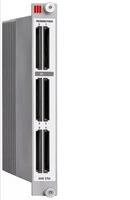
UFZ 896 - Electronic module KATHREIN - Free user manual and instructions
Find the device manual for free UFZ 896 KATHREIN in PDF.


| Product Type | Satellite Receiver |
| Brand | Kathrein |
| Model | UFZ 896 |
| Dimensions (W x H x D) | 280 x 45 x 180 mm |
| Weight | 1.2 kg |
| Power Supply | 12 V DC, 1 A |
| Input Frequency Range | 950 – 2150 MHz |
| Demodulation | DVB-S2 |
| Video Resolution | 1080p Full HD |
| Audio Output | Digital Optical (S/PDIF) |
| USB Port | 1 x USB 2.0 for recording and media playback |
| Remote Control | Infrared remote included |
| Channel Memory | Up to 4000 channels |
| DiSEqC Support | DiSEqC 1.0/1.2 |
| Maintenance | Clean with dry soft cloth; avoid liquids |
| Safety | Operate in dry environment, keep ventilation slots free |
| Spare Parts | Remote control and power adapter available from Kathrein |
| Repairability | Refer to qualified service technician; no user-serviceable parts inside |
Frequently Asked Questions - UFZ 896 KATHREIN
User questions about UFZ 896 KATHREIN
0 question about this device. Answer the ones you know or ask your own.
Ask a new question about this device
Download the instructions for your Electronic module in PDF format for free! Find your manual UFZ 896 - KATHREIN and take your electronic device back in hand. On this page are published all the documents necessary for the use of your device. UFZ 896 by KATHREIN.
USER MANUAL UFZ 896 KATHREIN
natural_image
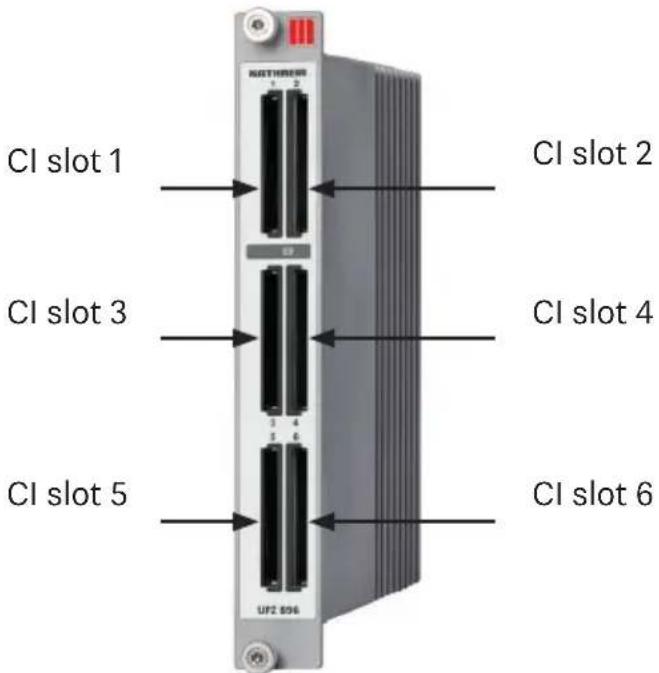
Symbol of a trash bin with crossed lines indicating no waste or restriction, and a solid black rectangle below (no text or labels)■ Six CI slots, each ready for insertion of one CAM
■ Flexible base band data exchange with adjacent modules, e.g. UFO 878
■ Flexible serial connection of up to three CAMs and assignment of incoming transport streams to increase the decoding capacity
■ Flexible parallel operation of up to three CAMs with automatic switch-over in case of fault occurrence to increase decryption reliability (redundancy)
■ Decryption status monitoring and automatic reconfiguration in case of fault occurrence
■ Each cam can be fitted individually reset and reboot (power on reset) or permanently enabled/disabled
Functional blocks

flowchart
graph TD
    subgraph Base Band
        A1["CAM Software Info"] --> B1["6 x CI"]
        B1 --> C1["CAM Info"]
        C1 --> D1["Default Service Configuration"]
        D1 --> E1["TS Routing"]
        A2["Flexible Decryption"] --> B2["Advanced CAM"]
        B2 --> C2["CAM TS Analysis"]
        C2 --> D2["CAM Software Update"]
        D2 --> E2["CAM Multitype"]
    end

    subgraph Special Features
        F1["Hot-Pluggable"] --> G1["Thermal Switch-Off"]
        G1 --> H1["Energy-Efficient"]
    end
Technical data
| Type UFZ 896 Remarks | |||
| User interfaces | |||
| 6 CAM insert positions | PCMCIA interface (As per | EN 50221) | |
| Supported CAM types 5 | V CAM (3.3 V CAMs are not supported) | ||
| System interfaces | |||
| Data interface Mbit/s 80 | 0 (net) To adjacent modules | ||
| Control interface Mbit/s | 12 To control module (UFX 800) | ||
| TS routing to back-plane | Max. 2 x 16 transport streams(right and left) | In conjunction with UFOcompact plus® modules, e.g. UFO 878, and confi guration over USW 800 | |
| Function and option | |||
| MPEG-TS routing | Free allocation of up to 6 CAMs | In conjunction with the operation modes, can be operated in series or parallel | |
| Up to 3 CAMs can be connected in series | For one MPEG TS to increase decoding capacity | ||
| Parallel operation of up to 3 CAMs | Automatic switch-over in case of error in a CAM, redundancy | ||
| Decryption functions | Specific decryption confi guration | Decryption/no decryption for each service or each PID | |
| Default confi guration | Decoding/no decoding for all unconfi gured services | ||
| Decryption monitoring | Resending of CA PMTs or CAM reset if decoding fails | ||
| SI data processing | ES status monitoring and SI data analysis in front of and behind each CAM | Automatic reconfi guration in case of error | |
| Advanced confi guration functions | PMT List Mode, Update Mode, CA-PMT optimisation | ||
| Extraction of information about services and elementary streams from SI tables | For display in USW 800 | ||
| SI data processing | Removal of decryption information (tables, descriptors, etc.) | After decryption has been performed | |
| CAM options and information | Supports decryption, encryption and processing CAMs | ||
| Displays status and names For each CAM inserted | |||
| Memo function | Can be edited individually for each CAM | ||
| Power On/Off | Each inserted CAM can be individually activated/deactivated | ||
| Mode for CAM software update | |||
| CAM status detection | Slot empty, CAM inserted, CAM ready | ||
| CAM name | |||
| System data | |||
| Power consumption W | < 2.5 Without CAM | ||
| Power consumption W | Typ. < 10 With 6 CAMs, each 1.25 W | ||
| Current drain per CAM | A Max. 0.5 | ||
| EMC dBpW Max. 20 EN | 50083-2, A1 | ||
| Temperature range °C | -20 ... +50 | ||
| Safety cut-off | °C | >70 | In case of excess temperature |
| Dimensions (H x W x D) | mm | 265 x 36 x 220 | |
| Weight | kg | 1.1 | Without CAMs |
Included in the delivery
- UFZ 896
■ Application Note UFZ 896
- Note: The up to date version of the application note is available on Kathrein Homepage: "www.kathrein-ds.com" under UFZ 896
Installation
Slide the UFZ 896 in the slot on the left or right of the UFOcompact plus® module (eg UFO 878), whose programs are to be decrypted or encrypted.
Make sure that the UFZ 896 fully inserted and that the contact is made to the backplane (the front plate of the UFZ 896 is located on the front of the base unit).
Fix the two thumbscrews up and down (Torx screws). The UFZ 896 is automatically recognised by the UFX 800. When the UFZ 896 reaches the proper operating condition, the green LED lights up. Hold for encryption, decryption, the corresponding CA modules and smart cards.
Inserting the CA module

When inserting the CA module into the UFZ 896 the top of the CA module must always be uppermost in the UFZ 896 (see example image right)!
If a CA module is inserted incorrectly, damage inside the UFZ 896 can occur! Please also refer to the CA module enclosed instructions.

Operation
The operation of the UFZ 896 via the graphical user interface of the control software USW 800; online help describes the configuration of all modules, including the UFOcompact plus® UFZ 896. All other setting instructions, refer to the manual/online help of the USW 800.
Note: The up to date version of the USW 800 and its instructions are available free to download on the Kathrein website "www.kathrein-ds.com"
Waste/Recycling note

natural_image
Symbol of a trash bin with crossed lines indicating no waste or restriction, and a solid black rectangle below (no text or labels)Electronic equipment is not domestic waste - it must be disposed of properly in accordance with directive 2002/96/EC OF THE EUROPEAN PARLIAMENT AND THE COUNCIL dated 27th January 2003 concerning used electrical and electronic appliances. At the end of its service life, take this device for disposal at a designated public collection point.
Brand : KATHREIN
Model : UFZ 896
Category : Electronic module