
MS28F303TFW - Microwave SAMSUNG - Free user manual and instructions
Find the device manual for free MS28F303TFW SAMSUNG in PDF.


| Product Type | Solo Microwave Oven |
| Brand | Samsung |
| Model | MS28F303TFW |
| Capacity | 28 liters |
| Microwave Power | 900 W |
| Power Consumption | 1400 W |
| Voltage | 230 V / 50 Hz |
| Dimensions (W x D x H) | 517 x 475 x 310 mm |
| Weight | 14 kg |
| Control Type | Digital with LED display |
| Power Levels | 10 levels |
| Defrost Function | Auto defrost by weight or time |
| Auto Cook Programs | 20 preset menus |
| Eco Mode | Yes, reduces standby power |
| Child Lock | Yes |
| Interior Light | Yes |
| Turntable Diameter | 288 mm |
| Interior Material | Ceramic enamel |
| Cleaning | Easy clean interior with wipeable coating |
| Safety Features | Child lock, auto shut-off, door interlock |
| Spare Parts Availability | Available via Samsung service centers |
| Repairability | Modular design; service manual available |
| Manual Included | Yes, user manual and quick guide |
Frequently Asked Questions - MS28F303TFW SAMSUNG
User questions about MS28F303TFW SAMSUNG
0 question about this device. Answer the ones you know or ask your own.
Ask a new question about this device
Download the instructions for your Microwave in PDF format for free! Find your manual MS28F303TFW - SAMSUNG and take your electronic device back in hand. On this page are published all the documents necessary for the use of your device. MS28F303TFW by SAMSUNG.
USER MANUAL MS28F303TFW SAMSUNG
Remove all packaging material from inside the microwave oven. Install the rotating ring and the turntable. Check that the turntable rotates freely.

Maintenance
Cleaning
QUESTIONS AND COMMENTS
| MAA SOITA TAI KAY OSOITTEESSA | ||
| AUSTRIA 0800 72 67 864 (0800 SAMSUNG) www.samsung.com/at/support | ||
| BELGIUM 02-201-24-18 | www.samsung.com/be/support (Dutch)www.samsung.com/be_fr/support (French) | |
| DENMARK 707 019 70 www.samsung.com/dk/support | ||
| FINLAND 030-6227 515 www.samsung.com/fi/support | ||
| FRANCE 01 48 63 00 00 www.samsung.com/fr/support | ||
| GERMANY 06196 77 555 77 www.samsung.com/de/support | ||
| ITALIA 800-SAMSUNG (800.7267864) www.samsung.com/it/support | ||
| CYPRUS | 8009 4000 only from landline, toll free | www.samsung.com/gr/support |
| GREECE | 80111-SAMSUNG (80111 726 7864) only from land line(+30) 210 6897691 from mobile and land line | www.samsung.com/gr/support |
| LUXEMBURG | 261 03 710 | www.samsung.com/be_fr/support |
| NETHERLANDS | 088 90 90 100 | www.samsung.com/nl/support |
| NORWAY | 21629099 | www.samsung.com/no/support |
| PORTUGAL | 808 207 267 | www.samsung.com/pt/support |
| SPAIN | 91 175 00 15 | www.samsung.com/es/support |
| SWEDEN | 0771 726 786 | www.samsung.com/se/support |
| SWITZERLAND | 0800 726 786 | www.samsung.com/ch/support (German)www.samsung.com/ch_fr/support (French) |
| UK 0333 000 0333 | www.samsung.com/uk/support | |
| IRELAND (EIRE) | 0818 717100 | www.samsung.com/i/c/support |
Microwave Oven
User Manual
MS28F303T** / MS28F304T**


Contents
Remove all packaging from inside the microwave oven. Install the rotating ring and the turntable. Check that the turntable rotates freely.

Maintenance
Cleaning
Safety instructions 3
Important safety instructions 3
Correct Disposal of This Product
(Waste Electrical & Electronic Equipment) 7
Installation 8
Accessories 8
Installation site 8
Turntable 8
Maintenance 9
Cleaning 9
Replacement (repair) 9
Care against an extended period of disuse 9
Oven features 10
Oven 10
Control panel 10
Oven use 11
How a microwave oven works 11
Checking that your oven is operating correctly 11
Cooking/Reheating 12
Setting the time 12
Power levels and time variations 13
Adjusting the cooking time 13
Stopping the cooking 14
Setting the energy save mode 14
Using the Healthy Cooking features 14
Using the My Plate features 16
Using the Power Defrost features 17
Using the Soften/Melt features 18
Power steam cooking guide
(only MS28F303TF*, MS28F304TF* models) 19
Using the Deodorisation features 21
Using the Child Lock features 21
Using the Turntable On/Off features 22
Switching the beeper off 22
Cookware guide 23
Troubleshooting and information code 24
Troubleshooting 24
Information code 26
Technical specifications 27
2 English
Safety instructions
IMPORTANT SAFETY INSTRUCTIONS
READ CAREFULLY AND KEEP FOR FUTURE REFERENCE.
WARNING: If the door or door seals are damaged, the oven must not be operated until it has been repaired by a competent person.
WARNING: It is hazardous for anyone other than a competent person to carry out any service or repair operation that involves the removal of a cover which gives protection against exposure to microwave energy.
WARNING: Liquids and other foods must not be heated in sealed containers since they are liable to explode.
WARNING: Only allow children to use the oven without supervision when adequate instructions have been given so that the child is able to use the oven in a safe way and understands the hazards of improper use.
This appliance is intended to be used in household only and it is not intended to be used such as:
- staff kitchen areas in shops, offices and other working environments;
- farm houses;
- by clients in hotels, motels and other residential environments;
- bed and breakfast type environments.
Only use utensils that are suitable for use in microwave ovens. When heating food in plastic or paper containers, keep an eye on the oven due to the possibility of ignition.
The microwave oven is intended for heating food and beverages. Drying of food or clothing and heating of warming pads, slippers, sponges, damp cloth and similar may lead to risk of injury, ignition or fire.
If smoke is observed (emitted), switch off or unplug the appliance and keep the door closed in order to stifle any flames.
Microwave heating of beverages can result in delayed eruptive boiling, therefore care must be taken when handling the container.
The contents of feeding bottles and baby food jars shall be stirred or shaken and the temperature checked before consumption, in order to avoid burns.
Eggs in their shell and whole hard-boiled eggs should not be heated in microwave ovens since they may explode, even after microwave heating has ended.
The oven should be cleaned regularly and any food deposits removed.
Failure to maintain the oven in a clean condition could lead to deterioration of the surface that could adversely affect the life of the appliance and possibly result in a hazardous situation.
The microwave oven is intended to be used on the counter top (freestanding) use only, the microwave oven shall not be placed in a cabinet.
Metallic containers for food and beverages are not allowed during microwave cooking.
The care should be taken not to displace the turntable when removing containers from the appliance.
The appliance shall not be cleaned with a steam cleaner.
The appliance should not be cleaned with a water jet.
The appliance is not intended for installing in road vehicles, caravans and similar vehicles etc.
This appliance is not intended for use by persons (including children) with reduced physical, sensory or mental capabilities, or lack of experience and knowledge, unless they have been given supervision or instruction concerning use of the appliance by a person responsible for their safety.
Children should be supervised to ensure that they do not play with the appliance.
This appliance can be used by children aged from 8 years and above and persons with reduced physical, sensory or mental capabilities or lack of experience and knowledge if they have been given supervision or instruction concerning use of the appliance in a safe way and understand the hazards involved.
Children shall not play with the appliance. Cleaning and user maintenance shall not be made by children without supervision.
If the supply cord is damaged, it must be replaced by the manufacturer, its service agent or similarly qualified persons in order to avoid a hazard.
This oven should be positioned proper direction and height permitting easy access to cavity and control area.
Before using the your oven first time, oven should be operated with the water during 10 minute and then used.
If the oven generates a strange noise, a burning smell, or smoke is emitted, unplug the power plug immediately and contact your nearest service center.
The microwave oven has to be positioned so that plug is accessible.
General safety
Any modifications or repairs must be performed by qualified personnel only. Do not heat food or liquids sealed in containers for the microwave function. Do not use benzene, thinner, alcohol, or steam or high-pressure cleaners to clean the oven. Do not install the oven: near a heater or flammable material; locations that are humid, oily, dusty or exposed to direct sunlight or water; or where gas may leak; or an uneven surface. This oven must be properly grounded in accordance with local and national codes. Regularly use a dry cloth to remove foreign substances from the power plug terminals and contacts. Do not pull, excessively bend, or place heavy objects on the power cord. If there is a gas leak (propane, LP, etc) ventilate immediately. Do not touch the power cord. Do not touch the power cord with wet hands. While the oven is operating, do not turn it off by unplugging the power cord. Do not insert fingers or foreign substances. If foreign substances enter the oven, unplug the power cord and contact a local Samsung service centre. Do not apply excessive pressure or impact to the oven. Do not place the oven over fragile objects. Ensure the power voltage, frequency, and current matches the product specifications. Firmly plug the power plug into the wall socket. Do not use multiple plug adapters, extension cords, or electric transformers. Do not hook the power cord on metal objects. Make sure the cord is between objects or behind the oven. Do not use a damaged power plug, power cord, or loose wall socket. For damaged power plugs or cords, contact a local Samsung service centre. Do not pour or directly spray water onto the oven. Do not place objects on the oven, inside, or on the oven door. Do not spray volatile materials such as insecticide on the oven.
Do not store flammable materials in the oven. Because alcohol vapours can contact hot parts of the oven, use caution when heating food or drinks containing alcohol. Children may bump themselves or catch their fingers on the door. When opening/closing the door, keep children away.
Microwave warning
Microwave heating of beverages may result in delayed eruptive boiling; always use caution when handling the container. Always allow beverages to stand at least 20 seconds before handling. If necessary, stir during heating. Always stir after heating.
In the event of scalding, follow these First Aid instructions:
- Immerse the scalded area in cold water for at least 10 minutes.
- Cover with a clean, dry dressing.
- Do not apply any creams, oils, or lotions.
To avoid damaging the tray or rack, do not put the tray or rack in water shortly after cooking.
Do not use the oven for deep fat frying because the oil temperature cannot be controlled. This could result in a sudden boil over of hot oils.
Safety instructions
Microwave oven precautions
Only use microwave-safe utensils. Do not use metallic containers, gold or silver trimmed dinnerware, skewers, etc.
Remove wire twist ties. Electric arcing may occur.
Do not use the oven to dry papers or clothes.
Use shorter times for small amounts of food to prevent overheating or burning. Keep the power cord and power plug away from water and heat sources.
To avoid the risk of explosion, do not heat eggs with shells or hard-boiled eggs. Do not heat airtight or vacuum-sealed containers, nuts, tomatoes, etc.
Do not cover the ventilation slots with cloth or paper. This is a fire hazard. The oven may overheat and turn off automatically and will remain off until it cools sufficiently.
Always use oven mitts when removing a dish.
Stir liquids halfway during heating or after heating ends and allow the liquid stand at least 20 seconds after heating to prevent eruptive boiling.
Stand at arms length from the oven when opening the door to avoid getting scalded by escaping hot air or steam.
Do not operate the oven when it is empty. The oven will automatically shut down for 30 minutes for safety purposes. We recommend placing a glass of water inside the oven at all times to absorb microwave energy in case the oven is started accidentally.
Install the oven in compliance with the clearances in this manual. (See Installing your microwave oven.)
Use caution when connecting other electrical appliances to sockets near the oven.
Microwave operation precautions
Failure to observe the following safety precautions may result in harmful exposure to microwave energy.
- Do not operate the oven with the door open. Do not tamper with the safety interlocks (door latches). Do not insert anything into the safety interlock holes.
- Do not place any object between the oven door and front face or allow food or cleaner residue to accumulate on sealing surfaces. Keep the door and door sealing surfaces clean by wiping with a damp cloth and then with a soft, dry cloth after each use.
- Do not operate the oven if it is damaged. Only operate after it has been repaired by a qualified technician.
Important: the oven door must close properly. The door must not be bent; the door hinges must not be broken or loose; the door seals and sealing surfaces must not be damaged.
- All adjustments or repairs must be done by a qualified technician
Limited warranty
Samsung will charge a repair fee for replacing an accessory or repairing a cosmetic defect if the damage to the unit or accessory was caused by the customer. Items this stipulation covers include:
- Door, handles, out-panel, or control panel that are dented, scratched, or broken.
- A broken or missing tray, guide roller, coupler, or wire rack. Use this oven only for its intended purpose as described in this instruction manual. Warnings and Important Safety Instructions in this manual do not cover all possible conditions and situations that may occur. It is your responsibility to use common sense, caution, and care when installing, maintaining, and operating your oven.
Because these following operating instructions cover various models, the characteristics of your microwave oven may differ slightly from those described in this manual and not all warning signs may be applicable. If you have any questions or concerns, contact a local Samsung service centre or find help and information online at www.samsung.com.
Use this oven for heating food only. It is intended for domestic use only. Do not heat any type of textiles or cushions filled with grains. The manufacturer cannot be held liable for damage caused by improper or incorrect use of the oven. To avoid deterioration of the oven surface and hazardous situations, always keep the oven clean and well maintained.
Product group definition
This product is a Group 2 Class B ISM equipment. The definition of group 2 which contains all ISM equipment in which radio-frequency energy is intentionally generated and/or used in the form of electromagnetic radiation for the treatment of material, and EDM and arc welding equipment.
For Class B equipment is equipment suitable for use in domestic establishments and in establishments directly connected to a low voltage power supply network which supplies buildings used for domestic purposes.
Correct Disposal of This Product (Waste Electrical & Electronic Equipment)

(Applicable in countries with separate collection systems)
This marking on the product, accessories or literature indicates that the product and its electronic accessories (e.g. charger, headset, USB cable) should not be disposed of with other household waste at the end of their working life. To prevent possible harm to the environment or human health from uncontrolled waste disposal, please separate these items from other types of waste and recycle them responsibly to promote the sustainable reuse of material resources. Household users should contact either the retailer where they purchased this product, or their local government office, for details of where and how they can take these items for environmentally safe recycling. Business users should contact their supplier and check the terms and conditions of the purchase contract. This product and its electronic accessories should not be mixed with other commercial wastes for disposal.
For information on Samsung's environmental commitments and product-specific regulatory obligations, e.g. REACH, WEEE, Batteries: visit : samsung.com/uk/aboutsamsung/samsungelectronics/corporatecitizenship/data-corner.html
Installation
Accessories
Depending on the model that you have purchased, you are supplied with several accessories that can be used in a variety of ways.

01 Roller ring, to be placed in the centre of the oven The roller ring supports the turntable.

02 Turntable, to be placed on the roller ring with the centre fitting to the coupler. The turntable serves as the main cooking surface; it can be easily removed for cleaning.

03 Steam cooker, see pages 19 to 21. (Only MS28F303TF*, MS28F304TF* models) The plastic steam cooker when using power steam function.
CAUTION
DO NOT operate the microwave oven without the roller ring and turntable.
Installation site

A. 20 cm above B. 10 cm behind C. 10 cm on the side D. 85 cm of the floor
- Select a flat, level surface approximately 85 cm above the floor. The surface must support the weight of the oven.
- Ensure adequate space for ventilation: at least 10 cm from the rear wall and both sides, and 20 cm from above.
- Do not install the oven in hot or damp surroundings, such as next to other microwave ovens or radiators.
- Comply with the power supply specifications of this oven. Use only approved extension cables if needed.
- Wipe the interior and the door seal with a damp cloth before using your oven for the first time.
Turntable

Remove all packing materials inside the oven. Install the roller ring and turntable. Check that the turntable rotates freely.

Maintenance
Cleaning
Clean the oven regularly to prevent impurities from building up on or inside the oven. Also pay special attention to the door, door sealing, and turntable and roller ring (applicable models only).
If the door won't open or close smoothly, first check if the door seals have built up impurities. Use a soft cloth in soapy water to clean both the inner and outer sides of the oven. Rinse and dry well.
To remove stubborn impurities with bad smells from inside the oven
- With an empty oven, put a cup of diluted lemon juice on the centre of the turntable
- Heat the oven for 10 minutes at max power.
- When the cycle is complete, wait until the oven cools down. Then, open the door and clean the cooking chamber.

CAUTION
- Keep the door and door sealing clean and ensure the door opens and closes smoothly. Otherwise, the oven's lifecycle may be shortened. Take caution not to spill water into the oven vents.
- Do not use any abrasive or chemical substances for cleaning. After each use of the oven, use a mild detergent to clean the cooking chamber after waiting for the oven to cool down.
Replacement (repair)

WARNING
This oven has no user-removable parts inside. Do not try to replace or repair the oven yourself.
If you encounter a problem with hinges, sealing, and/or the door, contact a qualified technician or a local Samsung service centre for technical assistance.
- If you want to replace the light bulb, contact a local Samsung service centre. Do not replace it yourself.
- If you encounter a problem with the outer housing of the oven, first unplug the power cord from the power source, and then contact a local Samsung service centre.
Care against an extended period of disuse
If you don't use the oven for an extended period of time, unplug the power cord and move the oven to a dry, dust-free location. Dust and moisture that builds up inside the oven may affect the performance of the oven.
Oven features
Oven
01 Door handle
02 Door
03 Ventilation holes
04 Light
05 Door latches
06 Turntable
07 Coupler
08 Roller ring
09 Safety interlock holes
10 Control panel
Control panel
01 Healthy Cooking (Vegetable, Grain) 02 Healthy Cooking (Poultry, Fish) 03 Power Defrost 04 My Plate 05 Microwave 06 Soften/Melt 07 Deodorisation 08 Child Lock 09 Turntable On/Off 10 Dial Knob (Weight/Serving/Time) 11 Clock 12 STOP/ECO 13 START/+30s
Oven use
How a microwave oven works
Microwaves are high-frequency electromagnetic waves; the energy released enables food to be cooked or reheated without changing either the form or the colour.
You can use your microwave oven to:
• Defrost - Reheat • Cook Cooking principle.

- The microwaves generated by the magnetron are reflected in the cavity and distributed uniformly as the food rotates on the turntable. The food is thus cooked evenly.
- The microwaves are absorbed by the food up to a depth of about 1 inch (2.5 cm). Cooking then continues as the heat is dissipated within the food.
- Cooking times vary according to the container used and the properties of the food:
• Quantity and density - Water content - Initial temperature (refrigerated or not)

CAUTION
As the centre of the food is cooked by heat dissipation, cooking continues even when you have taken the food out of the oven. Standing times specified in recipes and in this booklet must therefore be respected to ensure:
• Even cooking of the food right to the centre. • The same temperature throughout the food.
Checking that your oven is operating correctly
The following simple procedure enables you to check that your oven is working correctly at all times. If you are in doubt, refer to the section entitled "Troubleshooting" on pages 24 to 26.

NOTE
The oven must be plugged into an appropriate wall socket. The turntable must be in position in the oven. If a power level other than the maximum (100% - 1000 W) is used, the water takes longer to boil.
Open the oven door by pulling the handle on the right side of the door. Place a glass of water on the turntable. Close the door.

Press the START/+30s button and set the time to 4 or 5 minutes, bypassing the START/+30s button the appropriate number of times. The oven heats the water for 4 or 5 minutes. The water should then be boiling.
Oven use
Cooking/Reheating
The following procedure explains how to cook or reheat food.
CAUTION
ALWAYS check your cooking settings before leaving the oven unattended.
Open the door. Place the food in the centre of the turntable. Close the door. Never switch the microwave oven on when it is empty.

- Press the Microwave button.
- Select the appropriate power level by pressing the Microwave button again until the corresponding wattage is displayed. Refer to the power level table.
- Set the cooking time by turning the Dial Knob.
The cooking time is displayed.
- Press the START/+30s button. The oven light comes on and the turntable starts rotating. Cooking starts and when it has finished.
- The oven beep and flash End 4 times. The oven will then beep one time per minute.
Setting the time
When power is supplied, 88:88 and then 12:00 is automatically displayed on the display.
Please set the current time. The time can be displayed in either the 24-hour or 12-hour notation. You must set the clock:
- When you first install your microwave oven
• After a power failure
NOTE
Do not forget to reset the clock when you switch to and from summer and winter time.

- To display the time in the...
24-hour notation
12-hour notation
Press the Clock button once or twice.
- Turn the Dial Knob to set the hour.
- Press the Clock button.
- Turn the Dial Knob to set the minute.
- When the right time is displayed, press the Clock button to start the clock. The time is displayed whenever you are not using the microwave oven.
Power levels and time variations
The power level function enables you to adapt the amount of energy dissipated and thus the time required to cook or reheat your food, according to its type and quantity. You can choose between seven power levels.
| Power level Percentage Output | ||
| FULL 100 % 1000 W | ||
| HIGH 85 % 850 W | ||
| MEDIUM HIGH 60 % 600 W | ||
| MEDIUM 45 % 450 W | ||
| MEDIUM LOW 30 % 300 W | ||
| DEFROST 18 % 180 W | ||
| LOW/KEEP WARM 10 % 100 W | ||
The cooking times given in recipes and in this booklet correspond to the specific power level indicated.
| If you select a... Then the cooking time must be... | |
| Higher power level | Decreased |
| Lower power level | Increased |
Adjusting the cooking time
You can increase the cooking time by pressing the START/+30s button once for each 30 seconds to be added. - Check how cooking is progressing at any time simply by opening the door - Increase the remaining cooking time
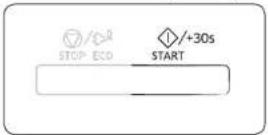
To increase the cooking time of your food during cooking, press the START/+30s button once for each 30 seconds that you wish to add.
• Example: To add three minutes, press the START/+30s button six times.
![graph TD A["Outer Circle"] -->|+| B["Inner Circle"] B -->|-| A](/content/2026/06/1371217/images/99a5c205e50574bccd8876fb784192a7c0a4da7dda076bb1bec20cd1835bb287.jpg)
Just turn the Dial Knob to adjust cooking time. • To increase cooking time, turn to the right; to decrease cooking time, turn to the left.
Oven use
Stopping the cooking
You can stop cooking at any time so that you can:
- Check the food • Turn the food over or stir it
- Leave it to stand.
| To stop the cooking... Then... | |
| Temporarily | Open the door or press the STOP/ECO button once.Cooking stops.To resume cooking, close the door again and press the START/+30s button. |
| Completely | Press the STOP/ECO button once.Cooking stops.Ifyouwishtocancelthecookingsettings.presstheSTOP/ECO button again. |
Setting the energy save mode
The oven has an energy save mode.

- Press the STOP/ECO button. The display turns off.
- To exit energy save mode, open the door or press the STOP/ECO button. The display then shows the current time. The oven is ready for use.

NOTE
Auto energy saving function
If you do not select any function when the appliance is in the middle of setting or operating with a temporary stop condition, the function is canceled and the clock will be displayed after 25 minutes.
The oven lamp will be turned off after 5 minutes with the door open.
Using the Healthy Cooking features
The Healthy Cooking features have 16 pre-programmed cooking times. You do not need to set either the cooking times or the power level. You can adjust the serving size by turning the dial knob.

CAUTION
Use only containers that are microwave-safe.
Open the door. Place the food in the center of the turntable. Close the door.

- Select the type of food you are cooking by pressing the Healthy Cooking button once or more times.

Vegetable & Grain Poultry & Fish
- Select the size of the serving by turning the Dial Knob. (Refer to the table on the side.)
- Press the START/+30s button. The food is cooked according to the pre-programmed setting selected.
- When cooking has finished, the oven will beep and flash End 4 times. The oven will then beep one time per minute.
The following table presents quantities and appropriate instructions about 16 pre-programmed cooking options. This is composed of Vegetable & Grain and Poultry & Fish.
CAUTION
Use oven gloves when taking out food.
- Vegetable & Grain
| Code/Food Serving Size Instructions | ||
| 1Broccoli Florets | 250 g500 g | Rinse and clean fresh broccoli and prepare florets. Put them evenly into a glass bowl with lid. Add 30 ml (2 tbsp.) water when cooking for 250 g, and add 60-75 ml (4-5 tbsp.) for 500 g. Put bowl in the centre of turntable. Cook covered. Stir after cooking. Stand for 1-2 minutes. |
| 2Carrots | 250 g Rinse and clean carrots and prepare even slices. Put them evenly into a glass bowl with lid. Add 30 ml (2 tbsp.) water when cooking for 250 g. Put bowl in the centre of turntable. Cook covered. Stir after cooking. Stand for 1-2 minutes. | |
| 3Green Beans | 250 g Rinse and clean green beans. Put them evenly into a glass bowl with lid.Add 30 ml (1 tbsp.) water when cooking 250 g. Put bowl in the centre of turntable. Cook covered. Stir after cooking. Stand for 1-2 minutes. | |
| 4Spinach | 150 g Rinse and clean spinach. Put into a glass bowl with lid. Do not add water. Put bowl in the centre of turntable. Cook covered. Stir after cooking. Stand for 1-2 minutes. | |
| Code/Food Serving Size Instructions | |
| 5Corn on the Cob | 200 g Rinse and clean corn on the cobs and put into an oval glass dish. Cover with microwave cling film and pierce film. Stand for 1-2 minutes. |
| 6Peeled Potatoes | 250 g500 gWash and peel the potatoes and cut into a similar size. Put them into a glass bowl with lid. Add 45-60 ml (3-4 tbsp.) water. Put bowl in the centre of turntable. Cook covered. Stand for 2-3 minutes. |
| 7Brown Rice (Parboiled) | 250 g Usea large glass ovenware dish with lid.Add double quantity of cold water (500 ml).Cook covered. Stir before standing time and add salt and herbs. Stand for 5-10 minutes. |
| 8Wholemeal Macaroni | 250 g Usea large glass ovenware dish with lid.Add 1 l hot boiling water, a pinch of salt and stir well. Cook uncovered.Cook covered. Stir before standing time and drain thoroughly afterwards. Stand for 1 minutes. |
| 9Quinoa | 250 g Usea large glass ovenware dish with lid.Add double quantity of cold water (500 ml).Cook covered. Stir before standing time and add salt and herbs. Stand for 1 3 minutes. |
| 10Bulgur | 250 g Usea large glass ovenware dish with lid.Add double quantity of cold water (500 ml).Cook covered. Stir before standing time and add salt and herbs. Stand for 2-5 minutes. |
English 15
Oven use
- Poultry & Fish
| Code/Food Serving Size Instructions | ||
| 1Chicken Breasts | 300 g(2 pcs.) | Rinse pieces and put on a ceramic plate. Cover with microwave cling film. Pierce film. Put dish on turntable. Stand for 2 minutes. |
| 2Turkey Breasts | 300 g(2 pcs.) | Rinse pieces and put on a ceramic plate. Cover with microwave cling film. Pierce film. Put dish on turntable. Stand for 2 minutes. |
| 3Fresh Fish Fillets | 300 g(2 pcs.) | Rinse fish and put on a ceramic plate, add 1 tbsp. lemon juice. Cover with microwave cling film. Pierce film. Put dish on turntable. Stand for 1-2 minutes. |
| 4Fresh Salmon Fillets | 300 g(2 pcs.) | Rinse fish and put on a ceramic plate, add 1 tbsp. lemon juice. Cover with microwave cling film. Pierce film. Put dish on turntable. Stand for 1-2 minutes. |
| 5Fresh Prawns | 250 g Rinse prawns on a ceramic plate, add 1 tbsp. lemon juice. Cover with microwave cling film. Pierce film. Put dish on turntable. Stand for 1-2 minutes. | |
| 6Fresh Trout | 400 g(1-2 fish) | Put 1-2 fresh whole fish into an ovenproof dish. Add a pinch salt, 1 tbsp. lemon juice and herbs. Cover with microwave cling film. Pierce film. Put dish on turntable. Stand for 2 minutes. |
Using the My Plate features
The My Plate features has 2 pre-programmed cooking times. You do not need to set either the cooking times or the power level. You can adjust the number of servings by turning the Dial Knob.
First, place the food in the centre of the turntable and close the door.

- Select the type of food that you are cooking by pressing the My Plate button once or more times.
- Select the size of the serving by turning the Dial Knob. (Refer to the table on the side.)
- Press the START/+30s button. The food is cooked according to the preprogrammed setting selected.
- When cooking has finished, the oven will beep and flash End 4 times. The oven will then beep one time per minute.

Use only recipients that are microwave-safe.

The following table presents the My Plate auto reheat programmes, quantities and appropriate instructions. Those programmes are running with microwave energy only.
| Code/Food Serving Size Instructions | ||
| 1 Chilled Ready Meal | 300-350 g400-450 g | Put meal on a ceramic plate and cover with microwave cling film. This programme is suitable for meals consisting of 3 components (e.g. meal with sauce, vegetables and a side dish like potatoes, rice or pasta). Stand for 2-3 minutes. |
| 2 Chilled Vegetarian Meal | 300-350 g400-450 g | Put meal on a ceramic plate and cover with microwave cling film. This programme is suitable for meals consisting of 2 components (e.g. spaghetti with sauce or rice with vegetables). Stand for 2-3 minutes. |
Using the Power Defrost features
The Power Defrost features enable you to defrost meat, poultry, fish, bread and cake. The defrost time and power level are set automatically. You simply select the programme and the weight.
NOTE
Use only containers that are microwave-safe.
Open the door. Place the frozen food on a ceramic in the centre of the turntable. Close the door.
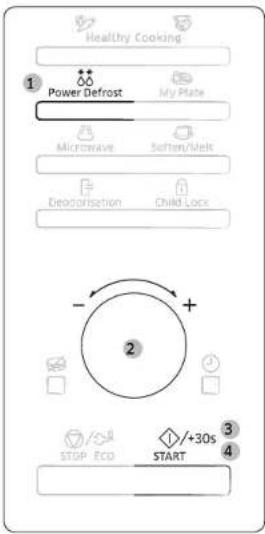
- Select the type of food that you are cooking by pressing the Power Defrost button once or more times.
- Select the size of the serving by turning the Dial Knob. (Refer to the table on the side.)
- Press the START/+30s button. • Defrosting begins. • The oven beeps through defrosting to remind you to turn the food over.
- Press the START/+30s button again to finish defrosting. When cooking has finished, the oven will beep and flash End 4 times. The oven will then beep one time per minute.
Oven use
The following table presents the various Power Defrost programmes, quantities and appropriate instructions. Remove all kind of package material before defrosting. Place meat, poultry, fish and bread/cake on a flat glass dish or ceramic plate.
Code/Food Serving Size Instructions
| 1Meat | 200-1500 g Shield the edges with aluminium foil. Turn the meat over, when the oven beeps. This programme is suitable for beef, lamb, pork,steaks, chops, minced meat. Stand for 20-60 minutes. |
| 2Poultry | 200-1500 g Shield the leg and wing tips with aluminium foil. Turn the poultry over, when the ovenbeeps. This programme is suitable for whole chicken as well as for chicken portions. Stand for 20-60 minutes. |
| 3Fish | 200-1500 g Shield the tail of a whole fish with aluminium foil. Turn the fish over, when the oven beeps.This programme is suitable for whole fishes as well as for fish fillets. Stand for 20-50 minutes. |
| 4Bread/Cake | 125-1000 g Put bread on a piece of kitchen paper and turn over, as soon as the oven beeps. Place cake on a ceramic plate and if possible, turn over, as soon as the oven beeps. (Oven keeps operating and is stopped, when you open the door.) This programme is suitable for all kinds of bread,sliced or whole, as well as for bread rolls and baguettes. Arrange bread rolls in a circle. This programme is suitable for all kinds of yeast cake, biscuit, cheese cake and puff pastry. It is not suitable for short/crust pastry, fruit and cream cakes as well as for cake with chocolate topping. Stand for 5-20 minutes. |
Using the Soften/Melt features
The Soften/Melt features has 4 pre-programmed cooking times. You do not need to set either the cooking times or the power level. You can adjust the number of servings by turning the Dial Knob.
First, place the food in the centre of the turntable and close the door.
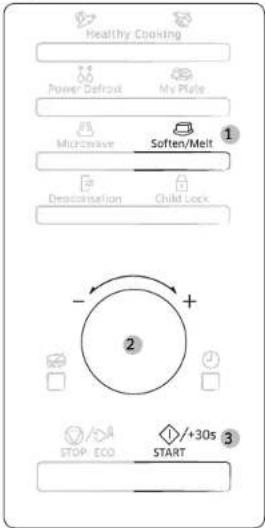
- Select the type of food that you are cooking by pressing the Soften/Melt button once or more times.
- Select the size of the serving by turning the Dial Knob. (Refer to the table on the side.)
- Press the START/+30s button. The food is cooked according to the preprogrammed setting selected.
- When cooking has finished, the oven will beep and flash End 4 times. The oven will then beep one time per minute.

Use only recipients that are microwave-safe.
18 English

The following table presents the Soften/Melt programmes, quantities and appropriate instructions. Those programmes are running with microwave energy only.
| Code/Food Serving Size Instructions | ||
| 1Melt Butter | 50 g100 g | Cut butter into 3 or 4 pieces and Put them on small glass bowl. Melt uncovered. Stir after cooking. Stand for 1-2 minutes. |
| 2Melt Dark Chocolate | 50 g100 g | Grate dark chocolate and put in small glass bowl. Melt uncovered. Stir after melting. Stand for 1-2 minutes. |
| 3Melt Sugar | 25 g50 g | Put sugar on small glass bowl. Add 10 ml water for 25 g and add 20 ml water for 50 g.Melt uncovered. Take out carefully, use oven gloves! Use spoon or fork and pour caramel decorations on baking paper. Let stand for 10 minutes until dry and remove from paper. |
| 4Soften Butter | 50 g100 g | Cut butter into 3 or 4 pieces and Put them in small glass bowl. Soften uncovered. Stand for 1-2 minutes. |
Power steam cooking guide (only MS28F303TF*, MS28F304TF* models)
The Power Steamer is based on the principle of steam cooking, and is designed for fast, healthy cooking in your Samsung Microwave oven.
This accessory is ideal for cooking rice, pasta, vegetables, etc. in record time, while preserving their nutritional values.
The Microwave Power steamer set is made up of 3 items:


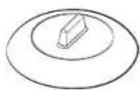
Bowl Insert tray Lid
All parts withstand temperatures from -20 °C to 140 °C.
Suitable for freezer storage. Can also be used separately or together.
Conditions of use:
Do not use:
• to cook foods with a high sugar or fat content,
• with the grill or rotating heat function or on a hob.
Wash all parts well in soapy water before first use.
To find out cooking times, please refer to the instructions in the table on next page.
Maintenance:
Your steamer can be washed in a dishwasher.
When washing by hand, use hot water and washing-up liquid. Do not use abrasive pads.
Some foods (such as tomato) may discolour the plastic. This is normal and not a manufacturing fault.

Oven use
Defrosting:
Place the frozen food in the steam bowl without the lid. The liquid will remain in the bottom of the pot and will not harm the food.
Cooking:
| Food Serving Size | Power levels | Cooking time (min.) | Handling | |
| Artichokes 300 g | (1-2 pcs.) | 850 W 5 | 6 | Bowl with insert tray+ Lid |
| InstructionsRinse and clean artichokes. Put insert tray into bowl. Set artichokes on tray. Add 1 tbsp, lemon juice. Cover with lid. Stand for 1-2 minutes. | ||||
| Fresh Vegetables | 300 g 850 W 4-5 Bowl with insert tray | + Lid | ||
| InstructionsWeigh the vegetables (e.g. broccoli, cauliflower, carrots, pepper) after washing, cleaning and cutting into similar size. Put tray into bowl. Distribute vegetables on insert tray. Add 2 tbsp, water. Cover with lid. Stand for 1-2 minutes. | ||||
| Frozen Vegetables | 300 g 600 W 8-9 Bowl with insert tray+ Lid | |||
| InstructionsPut the frozen vegetables into the steam bowl. Put insert tray into bowl. Add 1 tbsp, water. Cover with lid. Stir well after cooking and standing. Stand for 2-3 minutes. | ||||
| Rice | 250 g | 850 W | 15-18 | Bowl + Lid |
| InstructionsPut rice into the steam bowl. Add 500 ml cold water. Cover with lid. After cooking let stand white rice 5 minutes, brown rice 10 minutes. Stand for 5-10 minutes. | ||||
| Food Serving Size | Power levels | Cooking time (min.) | Handling | |
| Jacket Potatoes 500 g 850 W 7-8 Bowl + Lid | ||||
| Stew (Chilled) 400 g 600 W 51⁄2 61⁄2 Bowl + Lid | ||||
| Soup (Chilled) 400 g 850 W 3-4 Bowl + Lid | ||||
| Frozen Soup 400 g 850 W 8-10 Bowl + Lid | ||||
| Frozen Yeast Dumpling with Jam Filling | 150 g 600 W 11⁄2-21⁄2 Bowl + Lid | |||
| Instructions Moist the top of filled dumplings with cold water. Put 1-2 frozen dumplings side by side into the steam bowl. Cover with lid. Stand for 2-3 minutes. | ||||
| Fruit Compote 250 g 850 W 3 4 Bowl + Lid | ||||
Handling of power steam cooker
PRECAUTIONS:
Take special care when opening the lid of your steamer, because the steam escaping may be very hot. Use oven gloves when handling after cooking.
Using the Deodorisation features
Use this features after cooking odorous food or when there is a lot of smoke in the oven interior.
First clean the oven interior.

Press the Deodorisation button after you have finished cleaning. As soon as you press the Deodorisation button, the operation will start automatically. When it has finished, the oven beeps four times.

- The deodorisation time has been specified as 5 minutes. It increases by 30 seconds whenever the START/+30s button is pressed. The maximum deodorisation time is 15 minutes.
Using the Child Lock features
Your microwave oven is fitted with a special child lock programme, which enables the oven to be locked so that children or anyone unfamiliar with it cannot operate it accidentally.

- Press the Child Lock button.
- The oven is locked (no functions can be selected). The display shows L.


- To unlock the oven, press the Child Lock button. The oven can be used normally.
Oven use
Using the Turntable On/Off features
The Turntable On/Off button enables you to use large dishes which fill the whole oven by stopping the turntable from rotating (only manual cooking mode).

The results will be less satisfactory in this case as the cooking is less even. We recommend that you turn the dish by hand halfway through the cooking process.

Never operate the turntable without food in the oven. This may cause fire or damage to the unit.
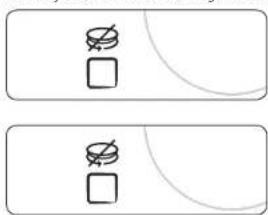
- Press the Turntable On/Off button. The turntable will not rotate.
- To switch the turntable rotating back on, press the Turntable On/Off button again. • The turntable will rotate.
Switching the beeper off
You can switch the beeper off whenever you want.

- Press the START/+30s and STOP/ECO button at the same time. • The oven does not beep to indicate the end of a function.

- To switch the beeper back on, press the START/+30s and STOP/ECO button again at the same time. • The oven operates normally.
Cookware guide
To cook food in the microwave oven, the microwaves must be able to penetrate the food, without being reflected or absorbed by the dish used.
Care must therefore be taken when choosing the cookware. If the cookware is marked microwave safe, you do not need to worry.
The following table lists various types of cookware and indicates whether and how they should be used in a microwave oven.
| Cookware | Microwave-safe | Comments |
| Aluminum foil | √X | Can be used in small quantities to protect areas against overcooking. Arcing can occur if the foil is too close to the oven wall or if too much foil is used. |
| Crust plate | √ | Do not preheat for more than 8 minutes. |
| China and earthenware | √ | Porcelain, pottery, glazed earthenware and bone china are usually suitable, unless decorated with a metal trim. |
| Disposable polyester cardboard dishes | √ | Some frozen foods are packaged in these dishes. |
| Fast food packaging• Polystyrene cups containers• Paper bags or newspaper• Recycled paper or metal trims | √X✗ | Can be used to warm food. Overheating may cause the polystyrene to melt.May catch fire.May cause arcing. |
| Glassware• Oven-to-tableware• Fine glassware | √√ | Can be used, unless decorated with a metal trim.Can be used to warm foods or liquids. Delicate glass may break or crack if heated suddenly. |
| Cookware | Microwave-safe | Comments |
| Class jars | √ | Must remove the lid. Suitable for warming only. |
| MetalDishesFreezer bag twist ties | ✗✗ | May cause arcing or fire. |
| PaperPlates, cups, napkins and kitchen paperRecycled paper | √✗ | For short cooking times and warming. Also to absorb excess moisture.May cause arcing. |
| PlasticContainersCling filmFreezer bags | √√√✗ | Particularly if heat-resistant thermoplastic. Some other plastics may warp or discolour at high temperatures. Do not use Melamine plastic.Can be used to retain moisture. Should not touch the food. Take care when removing the film as hot steam will escape.Only if boilable or oven-proof. Should not be airtight. Prick with a fork, if necessary. |
| Wax or grease-proof paper | √ | Can be used to retain moisture and prevent spattering. |
√ : Recommended
√x : Use caution
x : Unsafe
Troubleshooting and information code
Troubleshooting If you have any of the problems listed below try the solutions given.
| Problem Cause | Action | |
| General | ||
| The buttons cannot be pressed properly. | Foreign matter may be caught between the buttons. | Remove the foreign matter and try again. |
| For touch models: Moisture is on the exterior. | Wipe the moisture from the exterior. | |
| Child lock is activated. Deactivate Child lock. | ||
| The time is not displayed. | The Eco (power-saving) function is set. | Turn off the Eco function. |
| The oven does not work. | Power is not supplied. Make sure power is supplied. | |
| The door is open. Close the door and try again. | ||
| The door open safety mechanisms are covered in foreign matter. | Remove the foreign matter and try again. | |
| The oven stops while in operation. | The user has opened the door to turn food over. | After turning over the food, press the START/+30s button again to start operation. |
| Problem Cause | Action | |
| The power turns off during operation. | The oven has been cooking for an extended period of time. | After cooking for an extended period of time, let the oven cool. |
| The cooling fan is not working. | Listen for the sound of the cooling fan. | |
| Trying to operate the oven without food inside. | Put food in the oven. | |
| There is not sufficient ventilation space for the oven. | There are intake/exhaust outlets on the front and rear of the oven for ventilation.Keep the gaps specified in the product installation guide. | |
| Several power plugs are being used in the same socket. | Designate only one socket to be used for the oven. | |
| There is a popping sound during operation, and the oven doesn't work. | Cooking sealed food or using a container with a lid may causes popping sounds. | Do not use sealed containers as they may burst during cooking due to expansion of the contents. |
| The oven exterior is too hot during operation. | There is not sufficient ventilation space for the oven. | There are intake/exhaust outlets on the front and rear of the oven for ventilation.Keep the gaps specified in the product installation guide. |
| Objects are on top of the oven. | Remove all objects on the top of the oven. | |
| The door cannot be opened properly. | Food residue is stuck between the door and oven interior. | Clean the oven and then open the door. |
| Heating including the Warm function does not work properly. | The oven may not work, too much food is being cooked, or improper cookware is being used. | Put one cup of water in a microwave-safe container and run the microwave for 1-2 minutes to check whether the water is heated. Reduce the amount of food and start the function again. Use a cooking container with a flat bottom. |
| The thaw function does not work. | Too much food is being cooked. | Reduce the amount of food and start the function again. |
| The interior light is dim or does not turn on. | The door has been left open for a long time. | The interior light may automatically turn off when the Eco function operates. Close and reopen the door or press the STOP/ECO button. |
| The interior light is covered by foreign matter. | Clean the inside of the oven and check again. | |
| A beeping sound occurs during cooking. | If the Auto Cook function is being used, this beeping sound means it's time to turn over the food during thawing. | After turning over the food, press the START/+30s button again to restart operation. |
| The oven is not level. | The oven is installed on an uneven surface. | Make sure the oven is installed on flat, stable surface. |
| There are sparks during cooking. | Metal containers are used during the oven/thawing functions. | Do not use metal containers. |
| Problem Cause | Action | |
| When power is connected, the oven immediately starts to work. | The door is not properly closed. | Close the door and check again. |
| There is electricity coming from the oven. | The power or power socket is not properly grounded. | Make sure the power and power socket are properly grounded. |
| 1. Water drips.2. Steam emits through a door crack.3. Water remains in the oven. | There may be water or steam in some cases depending on the food. This is not an oven malfunction. | Let the oven cool and then wipe with a dry dish towel. |
| The brightness inside the oven varies. | Brightness changes depending on power output changes according to function. | Power output changes during cooking are not malfunctions. This is not an oven malfunction. |
| Cooking is finished, but the cooling fan is still running. | To ventilate the oven, the cooling fan continues to run for about 3 minutes after cooking is complete. | This is not an oven malfunction. |
Troubleshooting and information code
| Problem Cause | Action | |
| Turntable | ||
| While turning, the turntable comes out of place or stops turning. | There is no roller ring, or the roller ring is not properly in place. | Install the roller ring and then try again. |
| The turn table drags while turning. | The roller ring is not properly in place, there is too much food, or the container is too large and touches the inside of the microwave. | Adjust the amount of food and do not use containers that are too large. |
| The turn table rattles while turning and is noisy. | Food residue is stuck to the bottom of the oven. | Remove any food residue stuck to the bottom of the oven. |
Information code
| Information code | CAUSE Action | |
| SE | Control buttons are pressed over 10 seconds. | Clean the keys and check if there is water on the surface around key. If it occurs again, turn off the microwave oven over 30 seconds and try setting again. If it appears again, call your local SAMSUNG Customer Care Centre. |
NOTE
If the suggested solution does not solve the problem, contact your local SAMSUNG Customer Care Centre.
Technical specifications
SAMSUNG strives to improve its products at all times. Both the design specifications and these user instructions are thus subject to change without notice.
| Model MS28F303T** / MS28F304T** | |
| Power source 230 V | ~50 Hz AC |
| Power consumption Microwave 1500 W | |
| Output power 100 W / 1000 W - 7 levels (IEC-705) | |
| Operating frequency 2450 MHz | |
| Dimensions (W x H x D) Outside (Include Handle) Oven cavity | 517 x 297 x 428 mm 357 x 255 x 357 mm |
| Volume 28 liter | |
| Weight Net 15.0 kg approx. | |
Memo
SAMSUNG
Please be advised that the Samsung warranty does NOT cover service calls to explain product operation, correct improper installation, or perform normal cleaning or maintenance.
QUESTIONS OR COMMENTS?
| COUNTRY CALL OR VISIT US ONLINE AT | ||
| AUSTRIA 0800 72 67 864 (0800 SAMSUNG) www.samsung.com/at/support | ||
| BELGIUM 02-201-24-18 | www.samsung.com/be/support (Dutch)www.samsung.com/be_fr/support (French) | |
| DENMARK 707 019 70 www.samsung.com/dk/support | ||
| FINLAND 030-6227 515 www.samsung.com/fi/support | ||
| FRANCE 01 48 63 00 00 www.samsung.com/fr/support | ||
| GERMANY 06196 77 555 77 www.samsung.com/de/support | ||
| ITALIA 800-SAMSUNG (800.7267864) www.samsung.com/it/support | ||
| CYPRUS | 8009 4000 only from landline, toll free | www.samsung.com/gr/support |
| GREECE | 80111-SAMSUNG (80111 726 7864) only from land line(+30) 210 6897691 from mobile and land line | www.samsung.com/gr/support |
| LUXEMBURG | 261 03 710 | www.samsung.com/be_fr/support |
| NETHERLANDS | 088 90 90 100 | www.samsung.com/nl/support |
| NORWAY | 21629099 | www.samsung.com/no/support |
| PORTUGAL | 808 207 267 | www.samsung.com/pt/support |
| SPAIN | 91 175 00 15 | www.samsung.com/es/support |
| SWEDEN | 0771 726 786 | www.samsung.com/se/support |
| SWITZERLAND | 0800 726 786 | www.samsung.com/ch/support (German)www.samsung.com/ch_fr/support (French) |
| UK | 0333 000 0333 | www.samsung.com/uk/support |
| IRELAND (EIRE) | 0818 717100 | www.samsung.com/ic/support |
DE68 04599J 00
- MAINTENANCE
- CLEANING
- MICROWAVE OVEN
- CONTENTS
- SAFETY INSTRUCTIONS
- INSTALLATION
- OVEN FEATURES
- OVEN USE
- COOKWARE GUIDE
- TROUBLESHOOTING AND INFORMATION CODE
- TECHNICAL SPECIFICATIONS
- ENGLISH
- IMPORTANT SAFETY INSTRUCTIONS
- GENERAL SAFETY
- MICROWAVE WARNING
- MICROWAVE OVEN PRECAUTIONS
- MICROWAVE OPERATION PRECAUTIONS
- LIMITED WARRANTY
- PRODUCT GROUP DEFINITION
- CORRECT DISPOSAL OF THIS PRODUCT (WASTE ELECTRICAL & ELECTRONIC EQUIPMENT)
- ACCESSORIES
- CAUTION
- INSTALLATION SITE
- TURNTABLE
- TO REMOVE STUBBORN IMPURITIES WITH BAD SMELLS FROM INSIDE THE OVEN
- REPLACEMENT (REPAIR)
- WARNING
- CARE AGAINST AN EXTENDED PERIOD OF DISUSE
- HOW A MICROWAVE OVEN WORKS
- CHECKING THAT YOUR OVEN IS OPERATING CORRECTLY
- NOTE
- COOKING/REHEATING
- SETTING THE TIME
- POWER LEVELS AND TIME VARIATIONS
- ADJUSTING THE COOKING TIME
- STOPPING THE COOKING
- SETTING THE ENERGY SAVE MODE
- USING THE HEALTHY COOKING FEATURES
- USING THE MY PLATE FEATURES
- USING THE POWER DEFROST FEATURES
- USING THE SOFTEN/MELT FEATURES
- POWER STEAM COOKING GUIDE (ONLY MS28F303TF*, MS28F304TF* MODELS)
- CONDITIONS OF USE
- DEFROSTING
- PRECAUTIONS
- USING THE DEODORISATION FEATURES
- USING THE CHILD LOCK FEATURES
- USING THE TURNTABLE ON/OFF FEATURES
- SWITCHING THE BEEPER OFF
- MEMO
- SAMSUNG
Brand : SAMSUNG
Model : MS28F303TFW
Category : Microwave