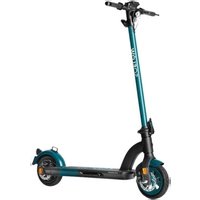
SO4 2nd Gen - Electric scooter SoFlow - Free user manual and instructions
Find the device manual for free SO4 2nd Gen SoFlow in PDF.


| Product Type | Electric Scooter |
| Brand | SoFlow |
| Model | SO4 2nd Gen |
| Unfolded dimensions (L x W x H) | 1100 x 500 x 1200 mm |
| Folded dimensions (L x W x H) | 1100 x 500 x 500 mm |
| Weight | 15 kg |
| Maximum load | 120 kg |
| Power supply | Lithium-ion battery 36V 7.5Ah |
| Motor | 350 W brushless |
| Maximum speed | 25 km/h |
| Range | Up to 25 km |
| Charging time | 4 to 5 hours |
| Tires | 10 inches, pneumatic |
| Brakes | Rear disc brake and front drum brake |
| Lighting | Front LED headlight, rear light and turn signals |
| Suspension | Front and rear suspension |
| Folding | Quick folding system |
| Main features | Three speed modes, cruise control, mobile app |
| Maintenance and cleaning | Clean with a damp cloth; check tire pressure; grease bearings |
| Safety | Helmet recommended; do not ride in rain; check brakes before each use |
| Spare parts and repairability | Tires, batteries, brakes, cables available on SoFlow website; repair possible at authorized workshop |
| General information | Compliant with French regulations; recommended for urban use |
Frequently Asked Questions - SO4 2nd Gen SoFlow
User questions about SO4 2nd Gen SoFlow
0 question about this device. Answer the ones you know or ask your own.
Ask a new question about this device
Download the instructions for your Electric scooter in PDF format for free! Find your manual SO4 2nd Gen - SoFlow and take your electronic device back in hand. On this page are published all the documents necessary for the use of your device. SO4 2nd Gen by SoFlow.
USER MANUAL SO4 2nd Gen SoFlow
SoFlow SO4 2nd Gen / SO4 PRO / SO4 PRO 2nd Gen
Genuine operating instruction / Originalbetriebsanleitung / Mode d'emploi original / Traduzione delle istruzioni per l'uso originali / Original brugsanvisning / Originalbruksanvisning / Original bruksanvisning / Alkuperäisen käyttöohjeen käännös

Instruction for models / Anleitung für Modelle / Instructions pour le modèle / Istruzioni per il modello / Original brugsanvisning / Bruksanvisning för modell / Bruksanvisning for modell / Käyttöohje mallille
SO4 2nd Gen / SO4 PRO / SO4 PRO 2nd Gen
Version 1.1.3, 11.08.2021
SOFLOW
SO FAR + SO FREE
Info@soflow.com
www.soflow.com
EN: User Manual ....3
EN: Detailed warranty conditions....138
1.1 Intended use 4
1.2 Scope of supply 4
1.3 Declaration of conformity 4
- Safety 5
2.1 Warning 5
2.2 Risk of Injury 6
2.3 Attention! 6
2.4 DO NOT! 8
- Getting started 10
3.1 Diagram SO4 2ND GEN / SO4 PRO / SO4 PRO 2ND GEN .... 10
3.2 Montage 11
3.3 Mobile phone holder 12
3.4 Battery and charger 12
3.5 SO4 PRO 2nd Gen - Changeable battery....13
3.6 Maintenance 15
3.7 IPX6 15
- Driving instructions .... 16
4.1 Operation 16
4.2 Display....17
4.3 Turn signal operation 17
4.4 Errors....17
4.5 App instructions 18
- Maintenance, repairs and warranty....19
5.1 Storage 19
5.2 Cleaning....19
5.3 Repairs....19
5.4 Warranty information ....19
5.5 Disposal 20
5.6 Technical data 20
1. Introduction
1.1 Intended use
Congratulations on your purchase of the new e-scooter SO4 2ND GEN / SO4 PRO / SO4 PRO 2ND GEN. Invented to transcend transportation and focus on practical movement, this stylish and compact transporter celebrates personal and intuitive mobility. The SO4 2ND GEN / SO4 PRO / SO4 PRO 2ND GEN is fun to use and easy to drive. It is both, portable and stylish. Experience cutting edge technology as you glide effortlessly along on your way to your destination.
This manual will help you set up and use the SO4 2ND GEN / SO4 PRO / SO4 PRO 2ND GEN. It is important that you adhere to all safety warnings and cautions that appear throughout this manual and that you use good judgment when driving.
1.2 Scope of supply
The Package Contains:
• 1 new SO4 2nd Gen / SO4 PRO / SO4 PRO 2nd Gen
• 4 screws
- 1 charger
• 1 instruction manual
- 1 x 3 mm Allen wrench
• Mobile phone holder
• Data confirmation for the German road approval
If one of these things should be missing, contact your official dealer immediately.
1.3 Declaration of conformity
For the SO4 2ND GEN / SO4 PRO / SO4 PRO 2ND GEN, the following standards and guidelines apply within the EU:
It is explicitly explained, that the product complies with all of the following EU guidelines:
| 2006/42/EGMD | DIRECTIVE 2006/42/EC OF THE EUROPEAN PARLIAMENT AND OF THE COUNCIL of 17 May 2006 on machinery, and amending Directive 95/16/EC (recast).Norm EN 14619. |
Under consideration of the following accompanying guidelines:
| 2011/65/EUROHS | DIRECTIVE 2011/65/EU OF THE EUROPEAN PARLIAMENT AND OF THE COUNCIL of 8 June 2011 on the restriction of the use of certain hazardous substances in electrical and electronic equipment (recast). IEC 62321-3-1:2013. |
| 2014/53/EURED | DIRECTIVE 2014/53/EU OF THE EUROPEAN PARLIAMENT AND OF THE COUNCIL of 16 April 2014 on the harmonisation of the laws of the Member States relating to the making available on the market of radio equipment and repealing Directive 1999/5/EC |
| 2014/30/EUEMC | DIRECTIVE 2014/30/EU OF THE EUROPEAN PARLIAMENT AND OF THE COUNCIL of 26 February 2014 on the harmonisation of the laws of the Member States relating to electromagnetic compatibility (recast). Regulation No 10 of the Economic Commission for Europe of the United Nations (UN/ECE) — Uniform provisions concerning the approval of vehicles with regard to electromagnetic Compatibility. ECE R10, Rev. 5. |
2014/35/EU
LVD
DIRECTIVE 2014/35/EU OF THE EUROPEAN PARLIAMENT AND OF THE COUNCIL of 26 February 2014 on the harmonisation of the laws of the Member
States relating to the making available on the market of electrical equipment designed for use within certain voltage limits (recast). EN 60335-1.
The following harmonized standards according to article 7 (2) were applied:
EN ISO 12100:2010
Safety of machinery - General principles for design - Risk assessment and risk reduction (ISO 12100:2010)
On the product, you will find the following label:

SOFLOW SO4
0.4KW 16.5KG 2020
SoFlow AG
Degersheimerstrasse 40
CH-9230 Flawil
info@so-flow.com
www.so-flow.com
- Safety

DANGER!
2.1 Warning
Whenever you drive the SO4 2ND GEN / SO4 PRO / SO4 PRO 2ND GEN you risk serious injury or death from collisions, falls or loss of control. To drive safely, YOU MUST READ AND FOLLOW ALL INSTRUCTIONS AND WARNINGS IN THIS MANUAL.
This manual includes basic operational instructions for the SO4 2ND GEN / SO4 PRO / SO4 PRO 2ND GEN. It cannot cover all situations where injury or death may occur.
The seller or the company SoFlow do not hold any accountability for damages, loss of belongings, injuries and legal disputes, which occurred due to disregard of any of the information in this manual or due to disregard of any traffic laws by the user.
OPERATORS MUST USE GOOD JUDGMENT AND COMMON SENSE TO DETECT AND AVOID HAZARDS AND DANGERS that they may encounter when driving the SO4 2ND GEN / SO4 PRO / SO4 PRO 2ND GEN. The SO4 2ND GEN / SO4 PRO / SO4 PRO 2ND GEN operator must use the vehicle according to the local traffic law and is not allowed to drive under the influence of alcohol, drugs or medication treatment.
By using the SO4 2ND GEN / SO4 PRO / SO4 PRO 2ND GEN, you accept the inherent risks of operating this product.
Please do not charge the battery when unattended and disconnect the battery from the power source when it is fully charged.

CAUTION!
2.2 Risk of Injury
Whenever you drive the SO4 2ND GEN / SO4 PRO / SO4 PRO 2ND GEN, you risk injury from loss of control, collisions and falls. It is your responsibility to learn how to safely drive the SO4 2ND GEN / SO4 PRO / SO4 PRO 2ND GEN in order to reduce the risks of driving.
This manual is designed to help you learn safe driving techniques.
The SO4 2ND GEN / SO4 PRO / SO4 PRO 2ND GEN must not be used unless the operator has read through and understood the entire manual.
We recommend that you keep this manual in a safe place and read it carefully again after a long period of non-use to ensure the safest possible handling of the SO4 2ND GEN / SO4 PRO / SO4 PRO 2ND GEN.

WARNING!
2.3 Attention!
There are risks to driving every vehicle. This one is no exception.
Start in a safe location without traffic and have somebody helping you with your first steps and start slowly. If you carefully follow all the instructions and warnings in this manual, you should be able to teach yourself to drive. Avoid using the SO4 2ND GEN / SO4 PRO / SO4 PRO 2ND GEN if you are feeling tired, sleepy or you have a medical condition that reduces your ability to drive.
Please ensure this manual is read and understood beforehand, and do pay extra attention when driving.
- All users of the SO4 2ND GEN / SO4 PRO / SO4 PRO 2ND GEN must follow all traffic laws and regulations. Check whether you can use the SO4 2ND GEN / SO4 PRO / SO4 PRO 2ND GEN on public property before you drive it there. Especially keep track of pedestrians, children, animals and other road users when you drive this device. Point out your presence when approaching a pedestrian or cyclist if you are not seen or heard. Cross protected crossings on foot.
- Both tires must be in contact with the ground at all times. Avoid obstacles and slippery surfaces (such as snow, ice, oil, sand etc.), which could result in a loss of balance or traction and cause a fall. The SO4 2ND GEN / SO4 PRO / SO4 PRO 2ND GEN is intended for indoors or use on smooth, flat surfaces. To prevent loss of traction, you must always be careful when driving and you must identify and avoid slippery and wet surfaces, loose materials, slopes, tram tracks, potholes and other obstacles (especially higher than 1 cm). The wheels must be able to grip the ground for you to stay upright.
- Abrupt maneuvers and driving over slippery surfaces, bumps, and loose objects and materials, as well as performing jumps and stunts and risky behavior in general, may cause it to lose traction and pose a risk to the operator and the device and must be avoided therefore. The driving speed must always be adjusted to given conditions (e.g. light, weather, other traffic participants, etc.).
-
Make sure to wear flat shoes (no high heels) when using the SO4 2ND GEN / SO4 PRO / SO4 PRO 2ND GEN. Ask a person to help you if you are not an experienced user.
-
The SO4 2ND GEN / SO4 PRO / SO4 PRO 2ND GEN should not be used by small children. It is at the discretion of the parent to determine whether your child has the necessary motor skills or strength and judgment to use the SO4 2ND GEN / SO4 PRO / SO4 PRO 2ND GEN. In accordance with legal regulations, SO4 2ND GEN / SO4 PRO / SO4 PRO 2ND GEN may not be used by children under 14 years of age. These legal requirements are in accordance with German law. Check the relevant local and national laws of your country and observe the minimum age for riding an electric scooter, which is regulated by law in each country.
- You should not exceed the maximum weight according to the technical specifications including items you carry with you (e.g. backpack) for the use of SO4 2ND GEN / SO4 PRO / SO4 PRO 2ND GEN. A higher load could damage the SO4 2ND GEN / SO4 PRO / SO4 PRO 2ND GEN.
- Never turn off the SO4 2ND GEN / SO4 PRO / SO4 PRO 2ND GEN while you are riding.
- Do not modify the SO4 2ND GEN / SO4 PRO / SO4 PRO 2ND GEN. Modifications could interfere with operating and could result in serious injury and/or damage. Modifications will void the warranty.
- The SO4 2ND GEN / SO4 PRO / SO4 PRO 2ND GEN is designed for the use of one person only at a time. It must never be used by more than one person at a time. Do not carry heavy or spacious objects with you when driving.
- You must wear a complete protection equipment (helmet, kneepads, back protector, etc.) when driving the SO4 2ND GEN / SO4 PRO / SO4 PRO 2ND GEN.
- Hold the handle-bar tightly with both hands at any time when driving.
- Always keep both your feet on the SO4 2ND GEN / SO4 PRO / SO4 PRO 2ND GEN while riding, unless you're accelerating. Wait until you have come to a complete standstill before you get off the SO4 2ND GEN / SO4 PRO / SO4 PRO 2ND GEN.
- Check before every ride that the handlebars are correctly engaged and that the brake function is working. Never ride if the brakes do not work correctly, but contact your SO4 2ND GEN / SO4 PRO / SO4 PRO 2ND GEN dealer. You can operate the front disc brake by using the brake lever on the right side of the handlebars. By pulling the left brake lever you operate the rear disc brake (see also 4.1). Caution, the brake can become hot when used. Please do not touch it.
- Do not use the SO4 2ND GEN / SO4 PRO / SO4 PRO 2ND GEN in temperatures below -5°C. This can have a negative effect on the battery and the engine. There is also an increased risk of slipping at these temperatures due to ice formation.
- Driving in rainy and snowy weather is not recommended. You should also avoid driving through puddles of water because the water could damage the engine or the electricity. Note the extended braking distance on wet surfaces.
- Always keep the device away from humidity, during usage as well as storage (see section 5 "Maintenance, repairs and warranty").
- Check the battery level of the device before each journey. Never use the SO4 2ND GEN / SO4 PRO / SO4 PRO 2ND GEN when the battery level is low. If you need to turn off the SO4 2ND GEN / SO4 PRO / SO4 PRO 2ND GEN due to low battery power, do not use it for long periods of time like a conventional scooter as this may damage the engine in the long run.
- Never operate any SO4 2ND GEN / SO4 PRO / SO4 PRO 2ND GEN while under the influence of drugs, alcohol, strong medication or other substances that can influence your level of attention.
-
The folding mechanism has various holes through which you can pull an appropriate lock to lock your SO4 2ND GEN / SO4 PRO / SO4 PRO 2ND GEN.
-
Remove all sharp edges resulting from use.
-
Plastic packaging should be kept away from children to prevent suffocation by external airway closure.
2.4 DO NOT!
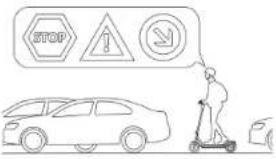 | Always obey all traffic rules! |
| Never drive faster than 20 km/h, also when driving downhill! |  |
 | Avoid puddles on the road! |
Jumping or descending from higher levels are strictly prohibited! |  Never ride into obstacles. Never ride into obstacles. |
| Never charge the scooter unattended! |  |
3. Getting started
3.1 Diagram SO4 2ND GEN / SO4 PRO / SO4 PRO 2ND GEN
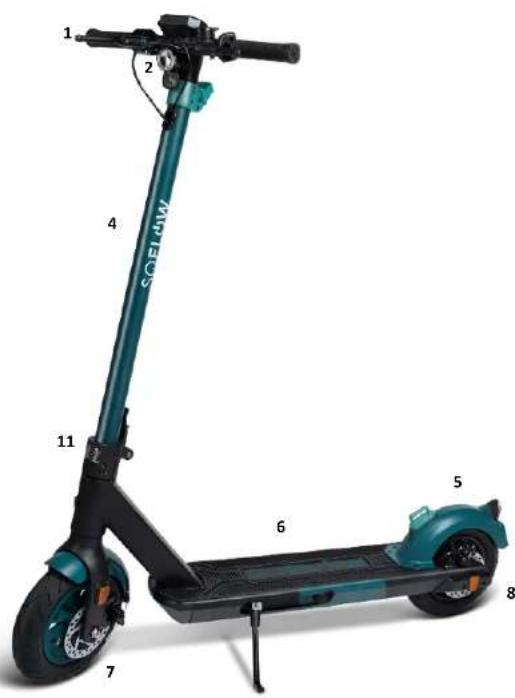
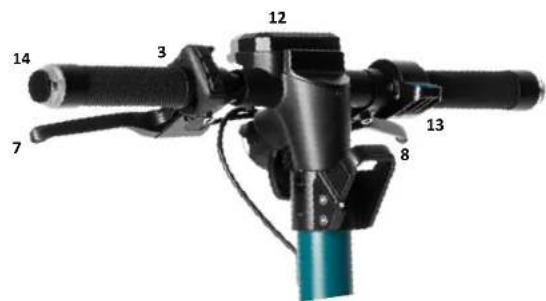
- Handle bar
- Front lamp
- Bell
- Front bar
- Engine
- Footboard
- Front disc brake (right brake lever)
- Rear disc brake (left brake lever)
- Rear lamp
- License plate holder
- Folding mechanism
- Display
- Throttle lever
- Blinker
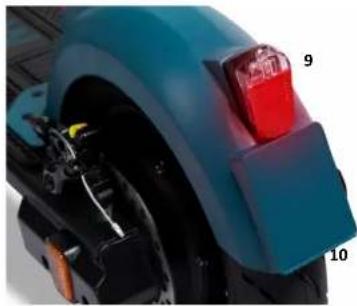
copyright by www.soflow.com 10
3.2 Montage
Assemble your SO4 2ND GEN / SO4 PRO / SO4 PRO 2ND GEN

- straighten the front bar as shown in the figure. Push the folding lever firmly as shown in the illustration to lock the front bar. Please check the tyre pressure. The tyre pressure should be 2.5bar.

- Insert the exposed cable into the front bar. Then insert the handle bar into the front bar as well. Use the tool and screws to bolt the handlebar to the front bar.

- After assembly, test whether the SO4 2ND GEN / SO4 PRO / SO4 PRO 2ND
Folding / Storage of the SO4 2ND GEN / SO4 PRO / SO4 PRO 2ND GEN
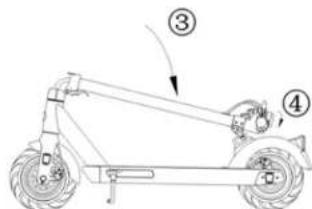
Before folding the SO4 2ND GEN / SO4 PRO / SO4 PRO 2ND GEN, make sure that the scooter is switched off. Press the buckle as shown in the illustration and pull the lever down. Fold the front bar down to the rear mudguard and lock the hook on the buckle on the mudguard.
copyright by www.soflow.com 11

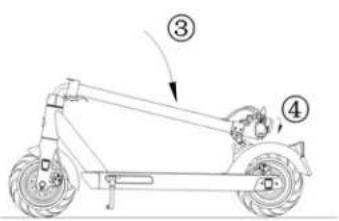
Instructions on adjusting the dics brake
If the brakes are too tight, use a 5mm Allen wrench to loosen the screw of the pressure plate by turning anticlockwise. Shorten the length of the brake wire to loosen the brakes, then tighten the screw again. If the brakes are too loose, loosen the screw and pull the brake wire to extend the wire, then tighten the screw again.
Inflating the tyres
In case that the tyres start lose pressure, you should inflate them to the recommended pressure.
3.3 Mobile phone holder
Your SO4 2ND GEN / SO4 PRO / SO4 PRO 2ND GEN comes with a mobile phone holder which can be easily attached or detached. Simply wrap the strap around the handlebar, pull it through the buckle and make sure it is firmly secured. You can pull around the mount to check if your mobile phone is firmly held in place. The stretchable silicon bands can hold all smartphones with a screen size from 4 to 6.2 inches.

WARNING!
3.4 Battery and charger
The range of the battery may differ from the specifications depending on the temperature, the condition of the track, the incline and the weight of the driver.
Charging the battery
Make sure that the charging connector and the charger are dry and that the SO4 2ND GEN / SO4 PRO / SO4 PRO 2ND GEN is switched off. Connect the charger cable to the scooter's charging connector and plug it into an electrical outlet. The charging light on the charger should glow red. When the charging light changes from red to green, the battery is fully charged. Disconnect the charger from the power source and the scooter.
The e-scooter should only be charged with the original charger. Ensure that the voltage supply is correct. Do not use the charger if the charger or power cable are damaged. Please contact the service department. For optimum battery life, charge and store the e-scooter in a dry and clean environment, preferably room temperature. The charging time of the scooter is approximately 4 – 5 hours. There will be negative effects on the battery life if the charger remains permanently connected to the scooter and the power source.
Battery handling
Do not cover the scooter or the charger during charging. Lithium batteries have different freezing points depending on their charge level. If a battery cell freezes, it is irreparably destroyed and the entire battery must be replaced. As with conventional batteries, a lithium battery loses up to 40% of its capacity starting from approximately 0° C.
Correct handling of the battery
Never remove the battery from the scooter. Charge the battery for at least 1 hour every month (even when not in use). Never heat the battery or expose it to open fire. Never dispose of the battery cells together with general waste. Never bring battery contacts into contact with moisture. The ideal operating temperature of the battery is between 10°C and 30°C . Above as well as below this temperature, the power output deteriorates, resulting in a reduced range and power output.
The life and performance of a battery depends on its age, care and how often it has been used. Compared to other battery models, lithium ion batteries have very low self-discharge and a very low memory effect, but they need to be charged periodically. Even if you do not use your scooter, the battery must be charged for at least 1 hour every month, otherwise it will lose capacity. Regular charging will prevent the battery from total discharge. Please note that an excessively discharged battery is irreparably damaged and must be replaced for a fee, hence the battery should never be completely discharged during operation.
3.5 SO4 PRO 2nd Gen - Changeable battery
Connect the e-scooter to the corresponding app and press "UNLOCK". The cover of the battery compartment will then pop open slightly. Lift the cover upwards by more than 90 degrees with your hand.

Once the battery compartment is open, pull the battery upwards by the tab (1) and then pull the battery towards the rear wheel.

Pull the battery upwards and release it from the case.

When you want to close the battery compartment, fold the cover back in. The closing mechanism will automatically engage.

WARNUNG!
Do not close the compartment if there is no battery in it. Otherwise, the compartment cannot be opened again.
If this still happens, you must lift the cover pad at the marked location so that you can loosen the two screws located underneath.

Loosen the two marked screws to be able to open the cover again.

3.6 Maintenance
Do not try to charge the SO4 2ND GEN / SO4 PRO / SO4 PRO 2ND GEN when the battery is already full. This could diminish the battery's capacity in the long run.
Before every ride, check all screws of the device, especially those of the handle and frontbar, the mudguard and the front and rear wheel. Tighten all screws firmly to ensure safety when using your SO4 2ND GEN / SO4 PRO / SO4 PRO 2ND GEN.
Before each journey, check that the wheels are undamaged.
Check regularly that the brakes are correctly adjusted. You can adjust the braking force by adjusting the brake cable. If in doubt, contact your dealer.
Thoroughly clean the SO4 2ND GEN / SO4 PRO / SO4 PRO 2ND GEN with a dry cloth after usage. The front and rear ball bearings must be lubricated from time to time. Ordinary bicycle oil can be used. Oil the area where the axle runs into the wheel to ensure better durability.
3.7 IPX6
The SO4 2ND GEN / SO4 PRO / SO4 PRO 2ND GEN is splash-proof according to IPX6 but not waterproof. You may therefore use the SO4 2ND GEN / SO4 PRO / SO4 PRO 2ND GEN in light rain and drive through puddles on the ground. You must not immerse the SO4 2ND GEN / SO4 PRO / SO4 PRO 2ND GEN in water or expose it to heavy rain, otherwise the electronics may be damaged. Further information about the scope of protection according to IPX6 can be found on the Internet.
copyright by www.soflow.com 15
Definition IPX6
| IP | First digit for protection against solid particles | IP | Digit 2 for protection against liquids |
| X | Not specified | 6 | Protection against strong water jets |
4. Driving instructions
4.1 Operation
First, switch on your SO4 2ND GEN / SO4 PRO / SO4 PRO 2ND GEN by pressing and holding the start button for a few seconds. You can switch off your SO4 2ND GEN / SO4 PRO / SO4 PRO 2ND GEN by pressing and holding the same button for a few seconds. If you only press the light button for a few seconds, you will switch off the light that is on by default. By pressing it again, you switch the light back on
Before starting your journey, make sure that the handlebars click into place.
You start with the SO4 2ND GEN / SO4 PRO / SO4 PRO 2ND GEN by using one leg to accelerate yourself and the device by pushing your foot off the ground (like a conventional scooter). Now you can accelerate by pushing down the throttle lever on the right side of the handlebar.
You can operate the front disc brake by using the brake lever on the right side of the handlebars. By pulling the left brake lever you operate the rear disc brake. Shift your body weight slightly to the rear to compensate for the braking effect of the brake. This allows safe and controlled braking. Always be careful when using the brake. Pull both brake levers to perform a full stop of the SO4 2ND GEN / SO4 PRO / SO4 PRO 2ND GEN.
4.2 Display
You will find the following information on the display on the handlebar:
• Light status
- Battery status
• real Time speed
- Distance
- Error codes
- Bluetooth status

4.3 Turn signal operation
The control for the turn signals is located on the left side of the handlebar above the switch-on button. The turn signals are located at the end of the handlebars. They are intended to serve as an additional indication for changing direction and are particularly visible from the onset of dusk. Please always drive with foresight and in accordance with the applicable road traffic regulations. Bear in mind that these turn signals are a new product feature which is still unknown on the market. The indicator should be operated in good time before changing direction. To operate the left indicator, briefly press the button with the arrow to the left once or this to the right for right. To end the function, briefly press the respective button again. Please keep both hands on the handlebars at all times and lean slightly in the opposite direction so that the indicator can be seen better by vehicles behind you. The scooter does not have a hazard warning light function.
4.4 Errors
The control electronics of your SO4 2ND GEN / SO4 PRO / SO4 PRO 2ND GEN continuously checks the correct function of all important components. If your SO4 2ND GEN / SO4 PRO / SO4 PRO 2ND GEN detects a malfunction, this will be indicated accordingly on the display. You can display the error code by briefly pressing the start button and the minus button simultaneously:
Error message
• E1: Communication failure
• E2: Error with the brake
• E3: Error with the throttle
• E4: Error with the hall sensor
• E5: Error with the controller
Stop using SO4/SO4 Pro immediately if the display shows one of these error messages. Switch the unit off and on again. Check the plug connection between the handlebars and the front bar that no dirt will affect the contacts of the plugs. Make sure that the battery is fully charged. If the error message still persists, contact the SoFlow service at info@soflow.com.
4.5 App instructions
Make the best of your SoFlow scooter with the SoFlow app.
Features:
- Lock and unlock your personal scooter electronically. Safe is safe.
• Monitor the status of your scooter on the dashboard - all important information at a glance. - Track your ride - record your routes and collect FlowMiles according to the distance ridden.
• Change the riding mode according to your preference - ECO, STANDARD, or SPORT - Change your In FlowMiles in the shop for rewards
• Weekly competitions
• Work your way up a leaderboard with riders from around the world
• Tutorials, videos and important documents about your scooter
• Register today - Flowmiles cannot be credited retrospectively.
Important for using the SoFlow APP
For safety, remove the "App Verification Code" barcode sticker shown (below the footboard) and keep it in a safe place (but make sure you have set up the APP first before removing the sticker).
Scan your QR code and start using the APP. Have fun!


Note: When you lock the scooter, it remains in standby mode and continues to use power. You can switch off the scooter to reduce power consumption. In this case, the motor will no longer be blocked until the scooter is switched on again. When you turn the power back on, the block will remain in effect until you deactivate it.
copyright by www.soflow.com 18
5. Maintenance, repairs and warranty
5.1 Storage
Please store the SO4 2ND GEN / SO4 PRO / SO4 PRO 2ND GEN in a dry place. If left unused, recharge the battery every month to maintain longevity of the battery and to avoid damage. Never store the device under direct sunlight (e.g. not in the trunk of a car). The temperature of the SO4 2ND GEN / SO4 PRO / SO4 PRO 2ND GEN and its battery could rise above 50°C which could lead to irreparable damage. The storage volume of the battery decreases with cold temperatures, thus the range decreases as well. The battery also takes damage when cooler than -20°C.
5.2 Cleaning
In order to avoid rust on the device, you should clean and dry the SO4 2ND GEN / SO4 PRO / SO4 PRO 2ND GEN after every use. Use a slightly moist sponge for the cleaning and dry the device afterwards with a towel. Do not use much water, since the electricity of the device can take damage through water. Also never use corrosive cleaning substances, such as alcohol or petroleum for cleaning. Never use a pressure cleaner for the SO4 2ND GEN / SO4 PRO / SO4 PRO 2ND GEN.
5.3 Repairs
The SO4 2ND GEN / SO4 PRO / SO4 PRO 2ND GEN must only be repaired with original spare parts from a licensed supplier or shop and by a licensed mechanic. The opening, disassembly or modification of the SO4 2ND GEN / SO4 PRO / SO4 PRO 2ND GEN with non-licensed or non-original parts or by a non-licensed person will lead to the warranty becoming invalid.
5.4 Warranty information
Please keep the proof of purchase (i.e., receipt) to claim your right to limited warranty.
Limited Warranty:
• 2 years warranty on the device without battery, motor (1 year) or other consumables.
- 6 months for battery.
The warranty will be invalid under the following conditions:
- Opening-up or modification of the device by an unlicensed person
• Receipt is not in accordance with the device
• Inappropriate handling/use/maintenance/storage of the vehicle
• Non-compliance with one or several points from this manual
The following damage will be not covered by the warranty:
• Damage on device due to inappropriate handling or use
• Damage on device due to modification or unauthorized repair
• Damage on device due to inappropriate storage
• Damage on device caused by accident
• Surface damages on device
• Damage or malfunction caused by water/snow
copyright by www.soflow.com 19
Please note the detailed overview of all warranty conditions in the chapter "detailed warranty conditions" at the end of this instruction manual.
5.5 Disposal
You already make an important contribution to protecting the environment by using the environment-friendly SO4 2ND GEN / SO4 PRO / SO4 PRO 2ND GEN. Therefore, please ensure to avoid unnecessary pollution when disposing your product. Dispose the electrical components (i.e. battery, battery charger) not in domestic waste, but return it to electronic waste. Also make sure, you sort all parts cleanly after their material and then dispose them according to your local disposal guidelines.
5.6 Technical data
| Model name | SO4 | SO4 PRO |
| Dimensions (folded) | 114.5 cm x 109.1 cm x 46.6 cm | 113 cm x 122.8 cm x 47 cm |
| Dimensions (unfolded) | 114.5 cm x 48 cm x 46.6 cm | 113 cm x 50 cm x 47 cm |
| Box size | 109 cm x 50 cm x 18.5 cm | 114 cm x 52.5 cm x 18.5 cm |
| Weight | 16.5 kg | 16.8 kg |
| Maximum load | 150 kg | 150 kg |
| Technically permissible maximum mass in kg | 166.5 kg | 166.8 kg |
| Frame material | Aluminium alloy | Aluminium alloy |
| Wheel diameter | 8.5 Zoll (20.32 cm) | 10 Zoll (25.4 cm) |
| Max. range | 5.2 = Up to 20 km* / 7.8 = Up to 25 km* / 10.4 = Up to 30 km* | 7.8 = Up to 30 km* / 10.5 = Up to 40 km* |
| Inclination | ≤ 10 % | ≤ 15 - 18 % |
| Drive | Electrisch | Electrisch |
| Turning signal | Yes, at the ends of the handlebar | Yes, at the ends of the handlebar |
| Top speed | ≤ 20 km/h | ≤ 20 km/h |
| Brakes | Disc brake (front and rear wheel) | Disc brake (front and rear wheel) |
| Battery | Lithium ion battery | Lithium ion battery |
| Voltage | 36 V | 48 V |
| Capacity | 5.2 Ah, 187.2 WH / 7.8 Ah, 280.8 WH / 10.4 Ah, 374.4 WH | 7.8 Ah, 374.4 WH / 10.5 Ah, 504 WH |
| Max. engine power | 380 W | 500 W |
| Charging time | 5.2 Ah = ca. 2.5h / 7.8 Ah = ca. 3h / 10.4 Ah = ca. 5-6 h | 7.8 Ah = ca. 3.5 h / 10.5 Ah = ca. 5 h |
| Charge cycles | Ca. 500 | Ca. 500 |
* depending on the rider's load, ground, inclination, temp. etc.
copyright by www.soflow.com 22
copyright by www.soflow.com 23
3.1 Diagramm SO4 2nd Gen / SO4 PRO / SO4 PRO 2nd Gen


3.2 Aufbau

copyright by www.soflow.com 30
3.6 Instandhaltung
copyright by www.soflow.com 34
copyright by www.soflow.com 36
copyright by www.soflow.com 38
copyright by www.soflow.com 39
copyright by www.soflow.com 43
copyright by www.soflow.com 44
3.2 Construction
Construisez votre SO4 2ND GEN / SO4 PRO / SO4 PRO 2ND GEN.


copyright by www.soflow.com 49

3.6 Maintenance
copyright by www.soflow.com 56
copyright by www.soflow.com 64
3.2 Montaggio
copyright by www.soflow.com 67
copyright by www.soflow.com 68
3.6 Manutenzione
copyright by www.soflow.com 71
3.2 Samling
copyright by www.soflow.com 85

copyright by www.soflow.com 89
copyright by www.soflow.com 94
3.2 Montering
copyright by www.soflow.com 100
copyright by www.soflow.com 104
copyright by www.soflow.com 109

FORSIKTIG!
2.2 Fare for personskader
copyright by www.soflow.com 115
3.2 Montering
Montere SO4 2ND GEN / SO4 PRO / SO4 PRO 2ND GEN

- Etter montering må du teste om SO4 2ND GEN / SO4 PRO / SO4 PRO 2ND GEN
copyright by www.soflow.com 116

copyright by www.soflow.com 120
copyright by www.soflow.com 121
5.5 Avhending
copyright by www.soflow.com 125

HUOMIO!
3.2 Asennus
Kokoa SO4 2ND GEN / SO4 PRO / SO4 PRO 2ND GEN

copyright by www.soflow.com 131

copyright by www.soflow.com 132
3.5 Huolto
copyright by www.soflow.com 135
EN: Detailed warranty conditions
Generally we grant a warranty of 24 months upon first sale on all products on the basis of the EU common warranty (except battery, motor and wear parts).
Please keep the proof of purchase (original receipt or invoice) in a safe place. These documents are considered necessary proof of purchase for your product. If this proof of purchase cannot be provided, SOFLOW AG reserves the right to refuse a repair under warranty.
In case of a warranty claim, SoFlow has the option to repair or replace the defective parts at its own discretion. If a component of the same type, size or colour is no longer available, SoFlow can provide a successor component to settle the warranty claims.
The warranty is limited to the repair or replacement of defective parts. No further claims can be made beyond this. This shall also not lead to an extension of the device warranty.
Note: A detailed error description enables targeted troubleshooting, which in turn facilitates and accelerates the case-handling process.
Should it be necessary to return the product to us during the warranty period despite telephone or e-mail support, then please do so via our service partner. In case of a return, please choose an appropriate and secure packaging, such as by using the original packaging (please note the packaging instructions for returns).
Damage incurred during transport due to improper packaging is not covered by the warranty. In such a case you will receive a cost estimate. SOFLOW AG does not accept any liability for additional materials sent in which are not included in the original scope of delivery of the product (such as attachments or labels).
Report any damage or defects that may have existed at the time of purchase to your authorized dealer immediately after unpacking. Repairs after the warranty period are subject to a charge.
Scope of warranty and exclusions
Our products are produced according to strictly defined quality guidelines and are thoroughly tested before delivery. The warranty applies to material and manufacturing defects of any kind that may occur during normal and proper use of the product. The determining factors for the proper and intended use of the product are the instructions listed in the user manual which are to be strictly adhered to. Applications and actions which are not recommended or which are indicated as potential hazards in the user manual must be avoided at all costs (please observe the information sheet: Do not – prevention).
Product parts that are subject to normal wear and tear and are therefore to be regarded as wear parts are subject to separate warranty periods. This applies in particular to batteries, motors and accessories subject to mechanical wear such as wheels and tyres. Warranty services are also excluded for normal wear and tear of wear parts, such as: tyres, brakes/brake pads, bottom bracket, saddle, suspension fork, Bowden cables, handlebar grips, tubes/covers, bell, reflectors, front/rear light, kickstand etc. This also includes flat tyres, if these were caused by the rider himself (for instance when driving over sharp objects). Furthermore excluded from warranty services are types of maintenance work or other work that are caused by wear and tear, accidents or operating conditions as well as driving in disregard of the manufacturer's instructions and all incidents such as noise generation, vibrations, wear and tear etc. that do not significantly impair the vehicle and drivability that, for example, are attributable to:
• leaving the device in unsuitable surroundings
• the installation of non-original components or
• the user or third parties not authorized by SoFlow trying to repair the damage themselves
• previous falls or accidents
• etc.
A warranty claim will also become void in the following cases:
• In case of unintentional damage, use of force, improper and/or unintended use and treatment (e.g. use of liquids and/or chemicals of any kind).
- If modifications made to the product, such as conversions and extensions, use of foreign components, use of accessories not approved for your product, neglect (e.g. deep discharge or exposure to extreme temperatures, wetness or humidity), either independently or by third parties not authorized by SoFlow, have caused the damage.
• If the battery has been charged with chargers that are not approved by SOFLOW AG for the respective vehicle.
• If damage to the battery has been caused by overcharging or undercharging, or if the instructions in the user manual for handling batteries have not been followed.
• Software manipulation by the user or third parties.
ATTENTION
If the device has been modified by third parties or by the installation of foreign components, or if defects that have occurred are originally related to such modifications, the warranty claim and, if applicable, the operating permit shall become void. Furthermore, the warranty becomes void if the instructions on the intended operation of the device are not followed.
If the defect is covered by our warranty, either the repaired or an exchanged device will be returned to you. The exchanged device can either be as good as new (for example and overhauled device) or a new device. The old device becomes property of SOFLOW AG.
If during the repair it is found that the defect is not covered by the warranty, SOFLOW AG reserves the right to charge a flat rate of € 39 for inspection. The customer has to pay this flat rate if he does not wish to have a chargeable repair. In case the chargeable repair is approved and ordered by the customer after a cost estimate has been prepared, the inspection fee is no longer applicable.
Attention! A cost estimate is drawn up after an initial inspection of the device and on the basis of the information provided by you and can therefore only serve as a guideline. The actual repair costs can exceed or be lower than the estimated costs.

- SOFLOW SO4 2ND GEN / SO4 PRO / SO4 PRO 2ND GEN
- SOFLOW
- INTRODUCTION
- 1.1 INTENDED USE
- 1.2 SCOPE OF SUPPLY
- 1.3 DECLARATION OF CONFORMITY
- CAUTION
- 2.2 RISK OF INJURY
- WARNING
- 2.3 ATTENTION
- GETTING STARTED
- 3.2 MONTAGE
- INSTRUCTIONS ON ADJUSTING THE DICS BRAKE
- INFLATING THE TYRES
- 3.3 MOBILE PHONE HOLDER
- 3.4 BATTERY AND CHARGER
- CHARGING THE BATTERY
- BATTERY HANDLING
- CORRECT HANDLING OF THE BATTERY
- 3.5 SO4 PRO 2ND GEN - CHANGEABLE BATTERY
- WARNUNG
- 3.6 MAINTENANCE
- 3.7 IPX6
- DRIVING INSTRUCTIONS
- 4.1 OPERATION
- 4.2 DISPLAY
- 4.3 TURN SIGNAL OPERATION
- 4.4 ERRORS
- ERROR MESSAGE
- 4.5 APP INSTRUCTIONS
- FEATURES
- IMPORTANT FOR USING THE SOFLOW APP
- MAINTENANCE, REPAIRS AND WARRANTY
- 5.1 STORAGE
- 5.2 CLEANING
- 5.3 REPAIRS
- 5.4 WARRANTY INFORMATION
- 5.5 DISPOSAL
- 3.2 AUFBAU
- 3.6 INSTANDHALTUNG
- 3.2 CONSTRUCTION
- 3.2 MONTAGGIO
- 3.6 MANUTENZIONE
- 3.2 SAMLING
- 3.2 MONTERING
- FORSIKTIG
- 2.2 FARE FOR PERSONSKADER
- 5.5 AVHENDING
- 3.2 ASENNUS
- 3.5 HUOLTO
- EN: DETAILED WARRANTY CONDITIONS
- SCOPE OF WARRANTY AND EXCLUSIONS
- ATTENTION
Brand : SoFlow
Model : SO4 2nd Gen
Category : Electric scooter