
M471A5244CB0-CWE - Flash Memory SAMSUNG - Free user manual and instructions
Find the device manual for free M471A5244CB0-CWE SAMSUNG in PDF.


| Product Type | DDR4 SO-DIMM Memory Module |
| Model | M471A5244CB0-CWE |
| Capacity | 4 GB |
| Speed | 2400 MHz (PC4-19200) |
| Form Factor | SO-DIMM (Small Outline Dual Inline Memory Module) |
| Memory Type | DDR4 |
| Voltage | 1.2 V |
| CAS Latency | CL17 |
| Dimensions | Approx. 30 mm x 17.5 mm |
| Weight | Approx. 10 g |
| Power Consumption | Typical 1.5 W |
| Main Functions | Random Access Memory for laptop/notebook systems |
| Maintenance & Cleaning | Do not clean; avoid dust by keeping in anti-static bag when not in use |
| Safety Precautions | Handle with ESD protection; avoid bending contacts; ensure system is powered off during installation |
| Spare Parts & Repairability | Non-repairable; replace entire module if defective |
| General Information | Samsung brand; high-quality DDR4 memory for modern laptops |
Frequently Asked Questions - M471A5244CB0-CWE SAMSUNG
User questions about M471A5244CB0-CWE SAMSUNG
0 question about this device. Answer the ones you know or ask your own.
Ask a new question about this device
Download the instructions for your Flash Memory in PDF format for free! Find your manual M471A5244CB0-CWE - SAMSUNG and take your electronic device back in hand. On this page are published all the documents necessary for the use of your device. M471A5244CB0-CWE by SAMSUNG.
USER MANUAL M471A5244CB0-CWE SAMSUNG
Module Handling Guide
How to handle the module
Recently, module failures related to Active/Passive/Component cracks have increased.
The main root causes are wrong handling methods and mechanical damage.
Current products have more capacitors and resistors, and the sizes of those passives are reduced, with most of them located around the edge area.
These characteristics require a more cautious module handling method.
This guide book attempts to identify the tendency and range of module crack patterns based on experiments from several aspects. The main purpose is to reinforce Samsung's process control and help customers effectively control the module handling process.
Test methods include PCB Bow, Twist, Drop Test, and UTM (Universal Testing Machine) Test for DRAM, Resistor, and Capacitor. We observed crack phenomena and tendencies through the data and pictures. Tested products are limited to Registered DIMM [RDIMM], Unbuffered DIMM [UDIMM], and BOC PKG based modules; therefore, test results might differ when applied to other products.
Memory Module Introduction

Unbuffered DIMM

Load Reduced DIMM

Registered DIMM

SODIMM


- Anti-ESD * straps should be used. • The strap should be linked to your body.
*ESD : Electro Static Discharge
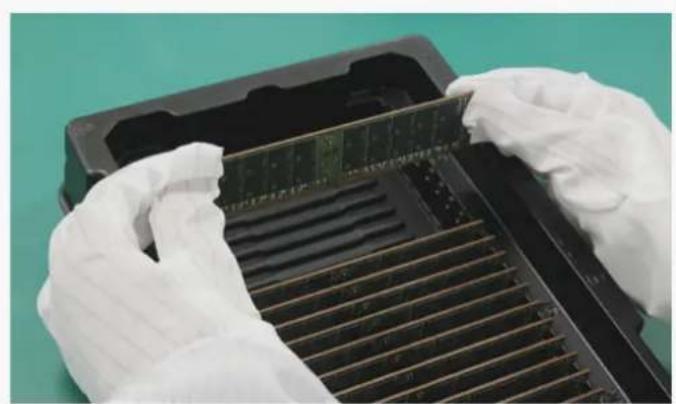
- Modules should be picked up from packing trays only one-by-one. • Product should be handled at the conductive mat.
- Do not grab packages. Hold only the edge of the PCB with both hands.
- Wear gloves when handling.
- Tray must be covered when handling module tray.


- Do not twist or bow a module.
- Do not drop modules on the floor.
- Do not grip several modules using one hand.
- Do not touch module without gloves. It can cause tab contamination.


- Do not detach H/S * or clip. (FDHS product) *H/S : Heat Spreader
- Handling modules near tools is prohibited because hard metal objects can damage Module.
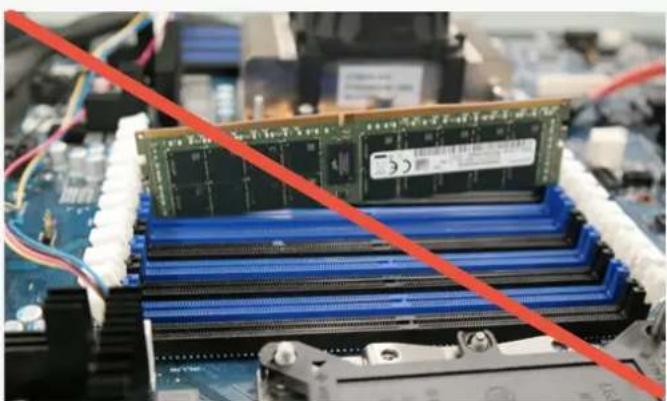
- Do not insert the module by seating one end first then seating the other. (This is called zippering or rock)
- Do not insert module upper side.


- Do not insert module between sockets.
- Do not insert key notch reverse.
- Do not insert several modules at the same time.
- Do not use metal tools when socketing.



- Socketing must be conducted before turn-on.
- Ensure that both latch ejectors of connector are fully opened.
- Grip the module edge side with both hands. (avoid touching component area)
- Align module to socket notch & side guide.
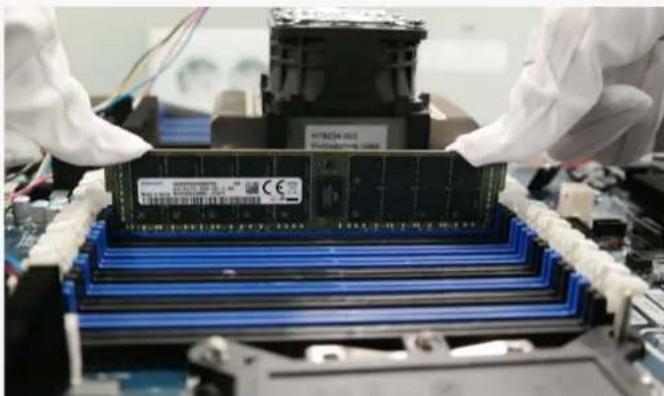
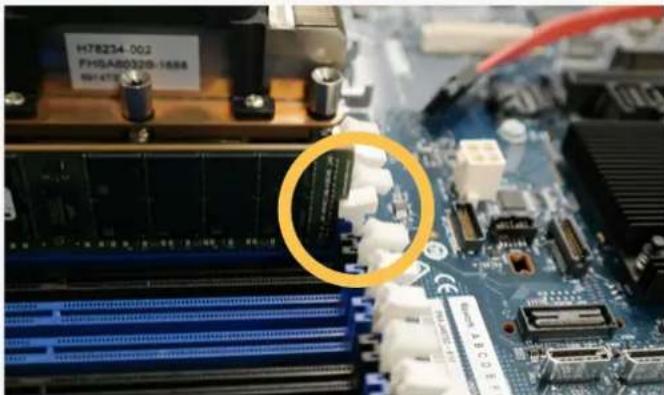
- Press down both edge side of module at the same time.
- Confirm latch ejectors closed properly.
We validated the possibility of cracking tendencies through various tests. Various products, environments, and characteristics of tools can cause errors and affect test results.
However, the most important conclusion that can be deduced from the tests is that special caution against mechanical damage and handling errors should be taken from the point of unpacking modules to inserting them into the sockets on system boards.
Recent memory module products are structurally weak to external damage due to the increasing numbers of ICs and passive components and the unit's diminishing size.
It's difficult to predict and find out clear root causes of failures related with BOC PKG passive components due to many variances and circumstances. However, the above guidelines for memory module handling based on test results should help with crack-related problems and make more effective process control possible.
About Samsung Electronics Co., Ltd.
Samsung inspires the world and shapes the future with transformative ideas and technologies. The company is redefining the worlds of TVs, smartphones, wearable devices, tablets, digital appliances, network systems, and memory, system LSI and LED solutions. For the latest news, please visit the Samsung Newsroom at news.samsung.com.
Copyright © 2018 Samsung Electronics Co., Ltd. All rights reserved. Samsung is a registered trademark of Samsung Electronics Co., Ltd. Specifications and designs are subject to change without notice. Nonmetric weights and measurements are approximate. All data were deemed correct at time of creation. Samsung is not liable for errors or omissions. All brand, product, service names and logos are trademarks and/or registered trademarks of their respective owners and are hereby recognized and acknowledged.
Fio is a registered trademark of Fio Corporation. Intel is a trademark of Intel Corporation in the U.S. and/or other countries. Linux is a registered trademark of Linus Torvalds. PCI Express and PCIe are registered trademarks of PCI-SIG. Toggle is a registered trademark of Toggle, Inc.

Brand : SAMSUNG
Model : M471A5244CB0-CWE
Category : Flash Memory