Antmix 12FX - Mixer ANT - Free user manual and instructions
Find the device manual for free Antmix 12FX ANT in PDF.


Pick your language and provide your email: we'll send you a specifically translated version.
| Product Type | Analog Mixing Console |
| Brand | ANT |
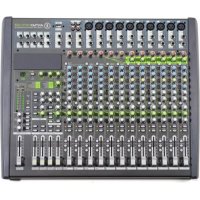
| Model | Antmix 12FX |
| Number of Channels | 12 (8 mono + 2 stereo) |
| Input Connectors | XLR, 1/4" TRS, RCA |
| Output Connectors | XLR Main, TRS Monitor, 1/4" Headphone |
| Built-in Effects | 16 digital FX presets (reverb, delay, chorus) |
| EQ per Channel | 3-band (High, Mid, Low) |
| Phantom Power | +48V switchable |
| Dimensions (W x D x H) | 400 mm x 300 mm x 100 mm |
| Weight | 4.2 kg |
| Power Supply | External AC adapter (12V DC, 1A) |
| Frequency Response | 20 Hz - 20 kHz |
| Total Harmonic Distortion | <0.01% |
| Signal-to-Noise Ratio | >90 dB |
| Headphone Output | 1/4" stereo jack, 32 ohms |
| Main Output Level | +4 dBu balanced |
| USB Interface | No |
| Material | Metal chassis, plastic knobs |
| Included Accessories | Power adapter, user manual |
| Cleaning Instructions | Wipe with dry cloth; avoid liquids |
| Safety Precautions | Do not expose to rain or moisture; disconnect power when not in use |
| Spare Parts Availability | Contact ANT support or authorized dealers |
Frequently Asked Questions - Antmix 12FX ANT
How do I connect the mixer to my speakers?
Connect the main outputs (XLR or 1/4" TRS) to your powered speakers or amplifier. Ensure both devices are powered off before connecting.
How can I use the built-in effects?
Press the FX button to cycle through 16 presets. Adjust the FX send level using the AUX knobs on each channel. The FX return controls the overall effect mix.
What is phantom power and when do I use it?
Phantom power (+48V) supplies voltage to condenser microphones. Activate it via the global switch. Dynamic microphones do not require it.
How do I reduce feedback?
Lower the gain and EQ of the offending microphone, move the microphone away from speakers, or adjust the monitor placement. Use the 3-band EQ to cut problematic frequencies.
Can I record audio from the mixer?
Yes, use the main outputs or AUX sends to connect to an audio interface or recorder. The mixer does not have a built-in USB interface.
What is the correct power supply?
Use the included 12V DC 1A adapter with a center-positive polarity. Using an incorrect supply may damage the mixer.
How do I clean the mixer?
Unplug the mixer and wipe the surface with a soft, dry cloth. Do not use solvents or water. Keep faders and knobs free of dust.
Why is there no sound from my microphone?
Check that the channel is unmuted, gain is turned up, and the fader is raised. Verify the microphone cable works and phantom power is on if using a condenser mic.
How do I connect headphones?
Plug headphones into the 1/4" headphone jack on the front panel. Adjust the headphone volume using the dedicated knob. The output is stereo.
Where can I find the user manual?
Download the PDF manual from notice-facile.com or the ANT website. It includes detailed specifications and connection diagrams.
User questions about Antmix 12FX ANT
0 question about this device. Answer the ones you know or ask your own.
Ask a new question about this device
No questions yet. Be the first to ask one.
Download the instructions for your Mixer in PDF format for free! Find your manual Antmix 12FX - ANT and take your electronic device back in hand. On this page are published all the documents necessary for the use of your device. Antmix 12FX by ANT.
USER MANUAL Antmix 12FX ANT
Manual assistant
Powered by Anthropic
Waiting for your message
Product information
Brand : ANT
Model : Antmix 12FX
Category : Mixer