
DETF115 - Fan DELONGHI - Free user manual and instructions
Find the device manual for free DETF115 DELONGHI in PDF.


| Brand | DeLonghi |
| Model | DETF115 |
| Product Type | Fan |
| Dimensions (W x D x H) | 33 x 33 x 45 cm |
| Weight | 3.5 kg |
| Power Supply | 220-240 V, 50 Hz |
| Power Consumption | 45 W |
| Speed Settings | 3 speeds (low, medium, high) |
| Oscillation | Yes, 90° oscillation |
| Tilt Adjustment | Manual tilt up/down |
| Grille Material | Plastic |
| Blade Diameter | 30 cm |
| Control Type | Rotary knob on base |
| Remote Control | No |
| Safety Features | Overheat protection, tip-over switch |
| Cleaning | Wipe with damp cloth; grille removable for cleaning |
| Spare Parts Availability | Genuine parts available from DeLonghi service centers |
| Warranty | 2 years |
| Noise Level | Approximately 50 dB on highest setting |
Frequently Asked Questions - DETF115 DELONGHI
User questions about DETF115 DELONGHI
0 question about this device. Answer the ones you know or ask your own.
Ask a new question about this device
Download the instructions for your Fan in PDF format for free! Find your manual DETF115 - DELONGHI and take your electronic device back in hand. On this page are published all the documents necessary for the use of your device. DETF115 by DELONGHI.
USER MANUAL DETF115 DELONGHI
Distributed by De'Longhi Australia Pty Ltd.
ABN 49 104 012 857
P.O. Box 4540 Casula Mall, NSW 2170
Distributed by De'Longhi New Zealand Ltd.
P.O. Box 58-056 Botany, MANUKAU 2163

is a registered Trademark
of De'Longhi Australia Pty Ltd.
ABN 49 104 012 857.
© 2014 De'Longhi Australia Pty Ltd.
Model
DETF115

USER GUIDE
Please read this user guide carefully and retain for future reference
Contents Notes
Parts and Features 03
De'Longhi Safety Precautions 04
Tower Fan Safety Precautions 05
Using your Tower Fan 09
- Assembly
- Operation
- Controls
- Control Panel
- Remote Controller
- Replacing the Remote Controller Battery
Care and Cleaning....11
Help us Help You. 12
Warranty Information 13
Notes
Parts and Features

De'Longhi's Safety Precautions
Warranty Information
De'Longhi takes pride in their innovative range of high-quality consumer products.
De'Longhi ensures that all of its products are 100% safe through quality design and manufacture. All products meet or exceed stringent laboratory-tested safety requirements.
It is necessary for anyone using an electrical appliance to be safety conscious. The following precautions are essential for the safe use of an electrical appliance. Carefully read all of the instructions provided with your appliance:
- Always turn the power off at the power outlet before you insert or remove a plug. Remove by grasping the plug, do not pull on the cord.
- Do not use your appliance with an extension cord unless this cord has been checked and tested by a qualified technician or service person. The extension cord must be a VDE-Listed, 3-wire grounding extension cord that has a grounding plug and outlet and that the electrical rating of the cord is 220-240 volts and at least 10 amperes.
• Always use your appliance from a power outlet of the voltage (A.C. only) marked on the appliance.
- Do not use an appliance for any purpose other than its intended use.
- Do not attempt to repair an electrical appliance. Return a damaged or malfunctioning appliance to a qualified service centre for adjustment or repair if required. All servicing should be referred to a qualified technician.
- The appliance must be positioned so the AC plug is accessible.
The De'Longhi Tower Fans are warranted against faults resulting from manufacturing or material defects. The warranty period for normal domestic installation and use is two years from the date of purchase. In non-domestic use, De'Longhi limits the voluntary warranty to 6 months.
De'Longhi undertakes to repair or replace the Tower Fan at our discretion if the product is found to be defective due to a manufacturing fault during the warranty period.
This warranty excludes any damage caused by misuse, neglect, shipping accident, or incorrect installation. Normal wear and tear is also expressly excluded. The warranty claim is void if no fault is found with the product or if work is carried out by anyone other than an authorised De'Longhi Service Agent.
In Australia, this warranty is additional to the conditions and guarantees which are mandatory as implied under the Trade Practices Act 1974 and State and Territory legislation.
How to contact us about a warranty claim
Talk to a De'Longhi representative for further warranty or product information. Please call the number in your country:
Australia
www.delonghi.com.au
Phone: 1800 126 659
New Zealand
www.delonghi.co.nz Phone: 0508 200 300
NOTE: Warranty is determined by unit serial number and date of purchase.
Help us Help you
Tower Fan Safety Precautions
Read this guide carefully. It is intended to help you operate and maintain your new Tower Fan properly.
Keep it handy to answer your questions. If you don't understand something or you need more assistance, please call the De'Longhi Helpline.
To help us provide prompt answers to your queries, please record your Tower Fan model and serial numbers. You'll find them on the rear of the Tower Fan.
Tower Fan details
Date of Purchase
Model Number
Serial Number
Consumer Help
If you have any concerns or questions regarding the performance or use of your appliance, please visit:
www.delonghi.com.au www.delonghi.co.nz
Australia
Phone: 1800 126 659 Fax: 1800 007 289
New Zealand
Phone: 0508 200 300 Fax: 0508 200 301
STAPLE OR AFFIX PURCHASE RECEIPT HERE
IMPORTANT SAFETY INSTRUCTIONS - READ ALL INSTRUCTIONS BEFORE USING, AND SAVE FOR FUTURE REFERENCE.
IMPORTANT SAFETY INSTRUCTIONS - READ ALL INSTRUCTIONS BEFORE USING, AND SAVE FOR FUTURE REFERENCE.
Your safety and the safety of others is very important. Safety messages are displayed in this manual and on your appliance.
Read and obey these safety messages as they will alert you to potential hazards and tell you how to reduce the chance of injury.

This symbol alerts you to potential hazards.
This symbol alerts you to potential hazards.
DANGER
WARNING
Danger
Danger indicates a high level of risk to yourself and others. Ensure that care is taken to avoid severe injury or even death.
Warning
Warning indicates a moderate level of risk to yourself, others and the product. Ensure that care is taken to avoid extensive product damage or serious injury.
CAUTION
Caution
Caution indicates a level of risk to yourself, others and the product. Ensure care is taken to avoid moderate product damage or injuries.
Tower Fan Safety Precautions
Care and Cleaning

Before the appliance is used, it must be properly positioned and installed as described in this manual, so read the
manual carefully. To reduce the risk of fire, electrical shock or injury when using the appliance, follow basic precaution, including the following:

Caution: risk of fire
DANGER
- Plug into a grounded 3-prong outlet, do not remove grounding prong, do not use an adapter, and do not use an extension cord.
- It is recommended that a separate circuit, serving only your appliance be provided. Use receptacles that cannot be turned off by a switch or pull chain.
- Never clean appliance parts with flammable fluids. These fumes can create a fire hazard or explosion. And do not store or use gasoline or other flammable vapours and liquids in the vicinity of this or any other appliance. The fumes can create a fire hazard or explosion.
- Do not connect or disconnect the electric plug when your hands are wet. There is a potential hazard of electric shock.
- Turn off and unplug the appliance before cleaning or servicing. Failure to do so can result in electrical shock or death.
- DO NOT insert any objects such as wooden sticks or metal sticks into the appliance. It may lead to leakage, short circuit, or product damage.
- If something is wrong with the product, please send it to an authorised service centre or call a De'Longhi representative. Do not attempt to repair or replace any part of your appliance unless it is specifically recommended in this material. All other servicing should be referred to a qualified technician.
- Unauthorised disassembly will affect the safety of the product.
- DO NOT spray pesticide or any other flammable sprays near the product.
- When cleaning the appliance, please turn it off and unplug the power cord. Do not proceed until it has completely stopped functioning.
- If you notice an abnormal smell or sound during use, please turn off the appliance immediately and unplug the power.
- DO NOT shower the appliance in water, it may lead to electrical shock, leakage, short circuit or product damage.
WARNING
- To ensure proper ventilation for your appliance, the front of the unit must be completely unobstructed. This unit must be installed in an area protected from the elements, such as wind, rain, water spray, or drips.
- Do not locate the appliance next to open flames, ovens, grills, or other sources of high heat.
Cleaning the Appliance
- First unplug the appliance to avoid electric hazard.
- The surface of the appliance should be cleaned with a damp cloth moistened with mild soap and dried with another clean cloth. Never use an abrasive scourer directly on the outside surface as it might scratch.
- Never use strong or volatile chemicals to clean the fan as it will damage the plastic parts.
- Pouring water on the unit is strictly forbidden.
- Do not immerse in water for cleaning.
- To clean between the grilles, we recommend using a pipe cleaner, flexible dustwand, vacuum cleaner, or compressed air to gently remove the dust.
- For storage, you may leave the fan assembled and covered to protect it from dust. Store the fan in a cool, dry place.
Disposal
- To prevent possible harm to the environment or human health from uncontrolled waste disposal, please recycle this appliance responsibly to promote the sustainable reuse of material resources. Take the appliance to a recycling station in your area for safe disposal.
- Do not dispose of electrical appliances as unsorted municipal waste; use separate collection facilities.
- Contact your local council for information regarding the collection systems available.
- If electrical appliances are disposed of in landfills or dumps, hazardous substances can leak into the groundwater and get into the food chain, damaging your health and well-being.
Using Your Tower Fan
Tower Fan Safety Precautions
Control Panel
POWER BUTTON: Press it once to turn the fan to Medium Fan Speed and Normal Wind Mode. Press it again to select Standby Mode.
NAT BUTTON: Press it once to select Natural Mode and press it again to select Normal Mode.
Normal: Unit operates in selected fan speed, High, Medium or Low.
Natural: Unit operates according to computerised intervals of changing speeds.
OSC BUTTON: To activate Oscillation feature, press the OSC button once. Press the OSC button again to turn the Oscillation feature off.
TIMER BUTTON: When the fan is in use, you can set the time to turn off the appliance. The default time is 0.0 hours. You can press the timer buttons continually to set the timer off function between 1 and 7 hours in 1 hour increments.
SPEED BUTTON: To adjust the fan speed, press once for medium speed, and twice for high speed. Press the third time to return to low fan speed.
Remote Controller
ON/OFF BUTTON: Same as POWER button on control panel.
STYLE BUTTON: Same as NAT MODE button on control panel.
The other buttons are same as control panel.
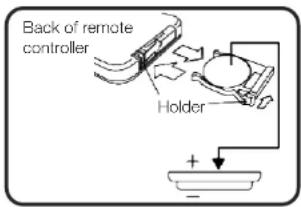
Replacing the Remote Controller Battery
Type: CR 2032, 3V Lithium Battery
WARNING
- Keep batteries out of reach of small children. Should a child swallow a battery, consult physician immediately.
- Do not charge or dispose of in fire.
- Keep in a dry and cool place.
- Insert battery in right direction.
Battery Disposal - Please dispose of the used battery per local laws and regulations.
- Do not plug into the power socket if assembly is incomplete. Use only with the rated voltage.
- Never insert fingers, pencil, or any object through the guard when fan is running.
- Appliance not to be used by young children. Keep children away from the fan.
- Power plug must be removed from power socket before cleaning, servicing, maintenance and move from one location to another.
- Be sure the fan is placed on a stable surface when operating to avoid overturning.
- The fan should not be placed in a damp place or where humidity is high (such as in a bathroom).
- Electrical connections shall be in accordance with National or Local Codes.
- Do not hinder fan oscillation.
- The appliance is not intended for use by persons (including children) with reduced physical, sensory or mental capabilities, or lack of experience and knowledge, unless they have been given supervision or instruction concerning use of the appliance by a person responsible for their safety.
- Children should be supervised to ensure that they do not play with the appliance.
- For indoor use only.
- This appliance is designed exclusively for household use. All other uses are strictly forbidden.
- Do not operate the fan in the presence of explosive and/or flammable fumes.
- The appliance must be used with a standard electrical supply (240V AC only, 50 Hz), properly grounded in accordance with the local codes and regulations.
- The fuse (or circuit breaker) size should be 10 amperes.
- Operate the appliance on a dry level surface.
- To protect against electric shock do not place the fan on a window sill.
- Keep ventilation openings clear of obstruction.
- This appliance is intended to be used in household and similar applications eg: - staff kitchen areas in shops, offices and other working environments;
- farm houses and by clients in hotels, motels and other residential type environments;
- bed and breakfast type environments; - Catering and similar non-retail applications.
- Avoid contact with moving fan parts.
- Do not use attachments not recommended by the manufacturer, as they may be hazardous.
- Do not hang or mount the fan on a wall or ceiling.
- Do not operate the fan if the housing is damaged.
Tower Fan Safety Precautions Using Your Tower Fan
Electrical Connection
- This appliance should be properly grounded for your safety. The power cord of this appliance is equipped with a three-prong plug which mates with standard three-prong wall outlets to minimize the possibility of electrical shock.
- Do not under any circumstances cut or remove the third ground prong from the power cord supplied. For personal safety, this appliance must be properly grounded.
- This appliance requires a standard 240 Volt AC ~/50Hz electrical ground outlet with three-prong. Have the wall outlet and circuit checked by a qualified electrician to make sure the outlet is properly grounded. When a standard 2-prong wall outlet is encountered, it is your responsibility and obligation to have it replaced with a properly grounded 3-prong wall outlet.
- The cord should be secured behind the appliance and not left exposed or dangling to prevent accidental injury.
- The appliance should always be plugged into its own individual electrical outlet which has a voltage rating that matches the rating label on the appliance. This provides the best performance and also prevents overloading house wiring circuits that could cause a fire hazard from overheating.
- Never unplug the appliance by pulling the power cord. Always grip the plug firmly and pull straight out from the receptacle.
- Repair or replace immediately all power cords that have become frayed or otherwise damaged. Do not use a cord that shows cracks or abrasion damage along its length or at either end.
- When moving the appliance, be careful not to damage the power cord.
- If the supply cord is damaged, it must be replaced by the manufacturer, its service agent, or a similarly qualified person in order to avoid a hazard.
- Make sure that the plug is fully inserted into the wall socket before use.
- DO NOT fold or put kinks in the supply cable or place heavy objects on it. It could lead to cable damage.
Extension Cord
- Because of potential safety hazards under certain conditions, it is strongly recommended that you do not use an extension cord with this appliance. However, if you must use an extension cord, it must be checked and tested by a qualified technician or service person.
- The extension cord must be a VDE-Listed, 3-wire grounding extension cord that has a grounding plug and outlet, and the electrical rating of the cord must be 220-240 Volts and at least 10 amperes.
Assembly
WARNING: Do not use the fan before assembly is completed. Ensure all packing material is removed.
Connect the two base pieces together. Insert the fan body into the base and turn the butterfly nuts clockwise to secure the fan body to the base.


Operation
Plug into any 220-240V AC, 50Hz source. Ensure that the plug is fully engaged into the wall socket.
You can operate the appliance by the control panel or remote controller.
Controls
Control Panel
Remote Controller

- CONTENTS NOTES
- DE'LONGHI'S SAFETY PRECAUTIONS
- WARRANTY INFORMATION
- HOW TO CONTACT US ABOUT A WARRANTY CLAIM
- AUSTRALIA
- NEW ZEALAND
- HELP US HELP YOU
- TOWER FAN SAFETY PRECAUTIONS
- TOWER FAN DETAILS
- CONSUMER HELP
- IMPORTANT SAFETY INSTRUCTIONS - READ ALL INSTRUCTIONS BEFORE USING, AND SAVE FOR FUTURE REFERENCE
- THIS SYMBOL ALERTS YOU TO POTENTIAL HAZARDS
- DANGER
- WARNING
- CAUTION
- CARE AND CLEANING
- CLEANING THE APPLIANCE
- DISPOSAL
- USING YOUR TOWER FAN
- CONTROL PANEL
- REMOTE CONTROLLER
- REPLACING THE REMOTE CONTROLLER BATTERY
- TOWER FAN SAFETY PRECAUTIONS USING YOUR TOWER FAN
- ELECTRICAL CONNECTION
- EXTENSION CORD
- ASSEMBLY
- OPERATION
Brand : DELONGHI
Model : DETF115
Category : Fan