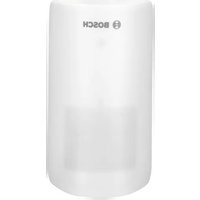
Smart Home Motion Detector - Motion detector BOSCH - Free user manual and instructions
Find the device manual for free Smart Home Motion Detector BOSCH in PDF.


| Product Type | Motion Detector for Smart Home Systems |
| Brand | Bosch |
| Model | Smart Home Motion Detector |
| Dimensions (approx.) | 50 x 50 x 50 mm |
| Weight (approx.) | 30 g |
| Power Supply | 2 x CR123A batteries (included) |
| Battery Life | Up to 2 years with typical use |
| Detection Technology | Passive infrared (PIR) sensor |
| Detection Angle | 120° horizontal, 90° vertical |
| Detection Range | Up to 12 meters |
| Communication Protocol | Bosch Smart Home (proprietary) or Zigbee |
| Smart Home Integration | Compatible with Bosch Smart Home Controller, Amazon Alexa, Google Assistant |
| Functions | Motion detection, push notifications, scene automation, alarm triggering |
| Mounting | Wall or ceiling mounting (bracket included) |
| Operating Temperature | -10°C to 45°C |
| Protection Rating | IP20 (indoor use only) |
| Maintenance & Cleaning | Wipe with a soft, dry cloth. Do not use liquids or cleaners. |
| Safety | Low voltage device; safe for home use. No sharp edges. |
| Spare Parts & Repairability | Batteries are user-replaceable. No other spare parts available. Contact Bosch service for repairs. |
| General Information | Color: White. Ideal for home security and automation. |
Frequently Asked Questions - Smart Home Motion Detector BOSCH
User questions about Smart Home Motion Detector BOSCH
0 question about this device. Answer the ones you know or ask your own.
Ask a new question about this device
Download the instructions for your Motion detector in PDF format for free! Find your manual Smart Home Motion Detector - BOSCH and take your electronic device back in hand. On this page are published all the documents necessary for the use of your device. Smart Home Motion Detector by BOSCH.
USER MANUAL Smart Home Motion Detector BOSCH
natural_image
White cylindrical device with Bosch logo on top, set against blue background (no text or symbols beyond brand name)Bosch Smart Home
Motion Detector Instruction Manual

BOSCH
Start making your home smart! Set up your product in just three steps
Please be sure to install the Bosch Smart Home Controller first.


Ensure that you have a Bosch Smart Home Controller and the Bosch Smart Home App, and that you have set both of them up successfully.

You can also use the explanatory video on our website to help you install your Bosch Smart Home Motion Detector more easily: www.bosch-smarthome.com/installation

Separating the housing and mounting bracket

▶ Start the Bosch Smart Home App and select "Add device"
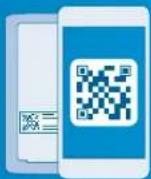
▶ Scan the QR code and follow the instructions

natural_image
Family of four enjoying a moment with soap bubbles, no visible text or symbolsDear customer,
Congratulations on purchasing your Bosch Smart Home Motion Detector. It will help you to make your home even safer and smarter. It reliably detects movement using passive infrared technology, an additional temperature sensor and an intelligent algorithm. Thanks to the integrated pet immunity function, false alarms triggered by pets weighing up to 25 kg can easily be avoided. The Bosch Smart Home App immediately warns you in the event of unauthorized entry into your home or if the Motion Detector is tampered with. The Motion Detector is quickly integrated into your system via the Bosch Smart Home Controller.
We hope you enjoy your new product, The Bosch Smart Home Team
TABLE OF CONTENTS
1.0 Product description....08
1.1 Intendeduse 09
2.0 In the box 10
3.0 Warning notices....12
3.1 Explanation of symbols ..... 12
3.2 Safety instructions .... 13
4.0 The motion detector....14
4.1 Product overview.... 14
5.0 Installationandsetup .....18
5.1 Separating the housing and fixing bracket 19
5.2 Starting the app and
scanning the QR code 20
5.3 Inserting the battery compartment 21
5.4 Configuring the device.....22
6.0 Fixing 23
6.1 Fixing instructions....23
6.2 Choosing the type of fixing ..... 28
6.3 Corner fixing with screws ..... 30
6.4 Corner fixing with adhesive tape 32
6.5 Wall fixing with screws.... 34
6.6 Wall fixing with adhesive tape.....36
6.7 Selecting pet immunity or sneak-by guard 38
6.8 Inserting the Motion Detector into the mounting bracket..... 41
7.0 Functional test 42
8.0 Product details 43
8.1 Technical data 43
8.2 Declaration of conformity......45
8.3 Faults in radio operation....46
8.4 Environmental protection and disposal 47
9.0 Further information....48
1.0 PRODUCT DESCRIPTION 1.1 Intended use
The network-enabled Motion Detector with passive infrared technology (PIR) is equipped with the following components:
The device reliably warns you in the event of unauthorized entry into your house or your apartment. The app provides information on the room and the time of the alarm.
▶ Lens with 7 x 11 segments
▶ 90° and 12 m detection range
▶ Sneak-by guard or pet immunity
▶ Theft protection
▶ One long-life, replaceable battery
The product must only be used together with original Bosch Smart Home components, and is for indoor use only.
▶ Follow the safety instructions and the directions in this manual and the Bosch Smart Home App to ensure that the product is set up correctly
▶ Please note the details in the Technical Data section (see p. 43)
- Avoid installing in areas prone to high amounts of dust, direct sunshine or heat

Do not modify the product in any way. Any other use is considered unintended use. We will not assume liability for any resulting damage.
2.0 IN THE BOX
Motion
Detector
1011

Battery compartment with 1 battery
4 adhesive tapes 4 screws
4 plugs

The scope of delivery includes a battery (123A) with a typical service life of around five years. For a longer service life, you can also insert a second battery into the battery compartment.

To operate the Motion Detector you will require the app, a Controller and an internet connection.
3.0 WARNING NOTICES
3.1 Explanation of symbols

Warning.
This alerts you to danger.

Info.
Indicates important information.
3.2 Safety instructions

Proper handling of batteries
▶ Take the batteries out of the device if it is not used for
a prolonged period of time
▶ The enclosed batteries are not suitable for charging
4.0 THE MOTION DETECTOR
4.1 Product overview
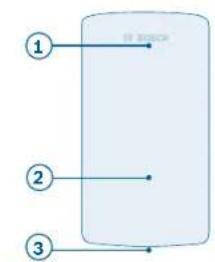
flowchart
graph TD
    A["①"] --> B["中央矩形框"]
    C["②"] --> B
    D["③"] --> B
1415
| Item | Part Explanation |
| 1 | LED indicator Status/fault |
| Red Fault, functional test | |
| Orange Configuration process, update | |
| Green Configuration successful | |
| 2 | Sensor area With lens |
| 3 | Speak-by guard Increased security |
Motion Detector - front side of housing. Motion Detector - rear side of housing
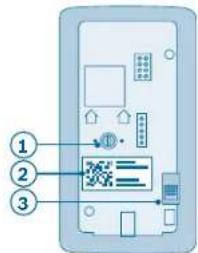
| Item | Part Explanation | |
| 1 | Green rotary switch | For setting pet immunity/sneak by guard |
| 2 | QR code | Scan for device identification |
| 3 | Contact switch | For device resetting and theft protection |

| Item | Part Explanation | |
| 1 | Pre-punched holes For wall mounting | |
| 2 | Pre-punched holes For corner mounting | |
| 3 | Bubble level Aid for alignment | |
| 4 | Theft protection | Remains on wall in case of theft and sends signal |
| 5 | Turn lock | For separating the housing and mounting bracket |
Motion Detector - front side of mounting bracket
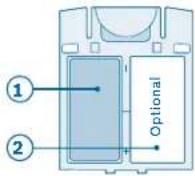
| Item Part Explanation | ||
| 1 Battery | One inserted 123A battery | |
| 2 | Battery compartment with placeholder | Option for another battery |
Motion Detector - battery compartment
5.0 INSTALLATION AND SETUP

Before you start
Ensure that you have a Bosch Smart Home Controller and the Bosch Smart Home App, and that you have set both of them up successfully.

You can also use the explanatory video on our website to help you install your Bosch Smart Home Motion Detector more easily: www.bosch-smarthome.com/installation
5.1 Separating the housing and fixing bracket
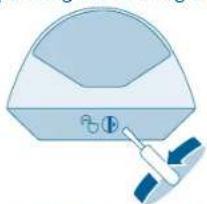
natural_image
Illustration of a stylized helmet with a small gear icon and a tool, no text or symbols present.
Separate the Motion Detector's housing from the mounting bracket. To do so, use a screwdriver to twist the turn lock on the underside of the
Motion Detector counterclockwise by 180°, and simultaneously pull away the housing from the mounting bracket.
5.2 Starting the app and scanning the QR code 5.3 Inserting the battery compartment
Now start the Bosch Smart Home App and select "Add device".

From this point, the app guides you through the installation process. You will find a detailed description in this instruction manual.
2021

The app will prompt you to scan the QR code on the product. You will find the QR code on the back of the housing (see p.15).
Insert the battery compartment from above into the Motion Detector's housing. The LED will start to flash orange.

A battery is included in the scope of delivery. In order to double the service life, you can also insert a second battery into the battery compartment. To do so, remove the placeholder from the battery compartment.

natural_image
Simple line drawing of a cylindrical container with a downward arrow indicating compression or dislocation (no text or symbols)5.4 Configuring the device
As soon as the battery is inserted, the Motion Detector connects to the Controller. The Motion Detector's LED indicates the status of the configuration attempt using the following flash codes:
The app informs you if the configuration was successful.
| LED state Explanation | |
| Flashes green once Successful configuration attempt | |
| Flashes red Unsuccessful configuration attempt |
6.0 FIXING
6.1 Fixing instructions

Prevailing regulations must be observed when installing the product. Failure to comply with the regulations can lead to material damage and/or physical injury.
▶ Check that the scope of delivery is intact. Only install parts that are in immaculate condition
▶ Observe the instructions regarding the installation location
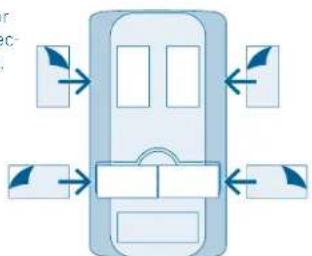
▶ Pay attention to the direction of movement when installing (lateral motion detection)
▶ You can find more information in the online FAQs at:
www.bosch-smarthome.com/faq
Observe the following mounting instructions:
▶ Mount the Motion Detector at a height of minimum 2.20 m to maximum 2.70 m, as desired
The product has a detection range of 90° and 12 m
▶ In addition the sneak by guard can be activated
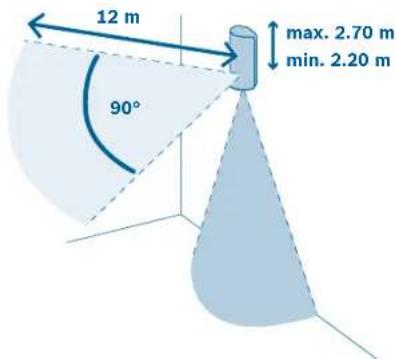

▶ There must not be any windows in the detection area of the Motion Detector
▶ Avoid direct or indirect sunlight in the detection area of the Motion Detector
▶ Do not block the detection area with objects
▶ Do not install the Motion Detector near rotating objects (e.g. fans) or independently moving objects
▶ Do not install the near sources of heat or cold

▶ Do not place any objects on which pets can climb in the detection area

▶ Place the Motion Detector in the part of the room which is most frequently walked through (e.g. near the door)
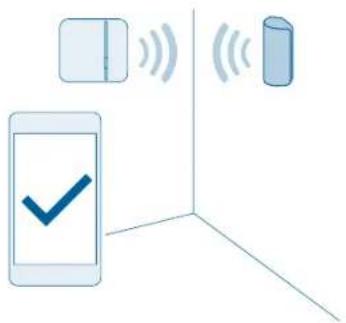
Take the Motion Detector to your chosen mounting location. Before mounting, use the app to perform a communication test in order to check the signal strength.
The connection with the Bosch Smart Home Controller needs to be sufficiently strong (you can perform a communication test using the app)
6.2 Choosing the type of fixing

natural_image
Simple diagram showing a screw and a document with paper, enclosed in a rectangular frame (no text or symbols)The Motion Detector can be mounted in a corner or on a straight wall. In both 28 29

natural_image
Simple line drawing of a room corner with a wall-mounted screw and a blue panel (no text or symbols)cases, you can either mount the device with screws or with adhesive tape.

The device's theft protection function can only be guaranteed if the Motion Detector is installed with screws.


If the Motion Detector is forcibly removed, the theft protection remains on the wall and emits a signal.
6.3 Corner fixing with screws

Punch through the four pre-punched screw holes in the Motion Detector's mounting bracket.
30 31

Hold the mounting bracket against the desired position on the wall and mark the drill holes.

When choosing a fixing location and when drilling, pay attention to potential electrical lines and/or supply lines that could be behind the wall.
Mount the Motion Detector with screws and plugs.

6.4 Corner fixing with adhesive tape

When fixing the Motion Detector with adhesive strips, the theft protection function cannot be guaranteed.
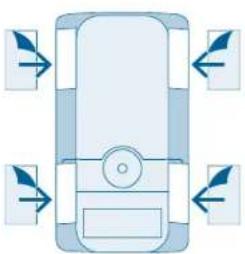
Attach the adhesive tapes to the beveled surfaces of the Motion Detector's mounting bracket and peel off the second protective film.
natural_image
Top-down diagram of a vehicle with directional arrows indicating movement or force (no text or symbols)
Place the Motion Detector in the desired position and press it down firmly.



6.5 Wall fixing with screws

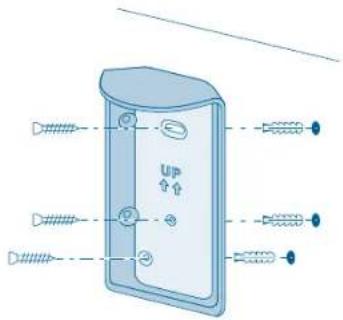
Punch through the three pre-punched screw holes in the Motion Detector's mounting bracket.

Hold the mounting bracket against the desired position on the wall and mark the drill holes.

When choosing a fixing location and when drilling, pay attention to potential electrical lines and/or supply lines that could be behind the wall.
Fix the Motion Detector using screws and plugs.
6.6 Wall fixing with adhesive tape

When attaching the Motion Detector with adhesive strips, the theft protection function cannot be guaranteed.
Attach the adhesive tapes to the back of the Motion Detector's mounting bracket and peel off the second protective film.
flowchart
graph TD
    A["Device"] --> B["Component 1"]
    A --> C["Component 2"]
    A --> D["Component 3"]
    A --> E["Component 4"]

Place the Motion Detector in the desired position and press it down firmly.

natural_image
Illustration of a door with up/down arrows and dashed-line outlines (no text or symbols)6.7 Selecting pet immunity or sneak-by guard
Set the desired sensitivity level on the Motion Detector. When doing so, you can choose between the pet immunity and sneak-by guard functions. Upon delivery, the product is set to pet immunity with the rotary switch on the rear side of the housing turned to the left. For the sneak-by guard, turn the rotary switch to the right.

If pet immunity is activated, small animals (< 25 kg) ignored by the Motion Detector's front sensor. The sensor directed downwards is then switched off. When pet immunity is activated, the sneak-by guard is deactivated.

natural_image
Diagram illustrating a 3D projection setup with a cat, a mirror, and a magnified circular interface showing a device (no text or symbols)When pet immunity is switched off, the sneak-by guard is activated, making it also possible to detect people who are beneath the Motion Detector. As a result, there is a possible risk of false alarms if you have pets.
40 41

natural_image
Diagram showing a camera setup with an eye icon and a magnified view of a device with control buttons (no text or symbols)6.8 Inserting the Motion Detector into the mounting bracket
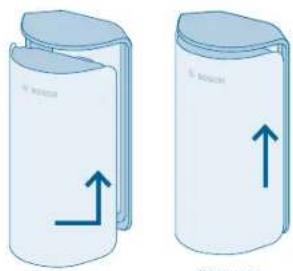
Insert the Motion Detector into the mounting bracket from the bottom up until you hear it click into place.
natural_image
Two cylindrical containers with upward arrows indicating movement or force, no text or symbols present"Click"
7.0 FUNCTIONAL TEST
Once installed, the product's functionality needs to be checked. Start the functional test via the app. Cross the room in order to test the detection range. The Motion Detector will flash red every time it detects movement.

When crossing the room, pay attention to the route that a trespasser would be most likely to take.

natural_image
Illustration of a person walking with directional arrows indicating movement, next to a wall-mounted device (no text or symbols)8.0 PRODUCT DETAILS
8.1 Technical data
| Model Motion Detector | |
| Batteries 123A | |
| Battery life Up to 5 years | ^11 |
| Radio frequency 2.4 GHz | |
| Max. transmission power 10 dBm | |
| Protocol | Based on ZigBee HA1.1 with extended encryption technology |
^11 5 years, based on typical storage temperature (-10 to 55°C), ambient temperature, 160 motion detection/day and 2 software renewals of the device/year. High temperatures over 50 °C shorten the lifetime.
| Radio range in free-field conditions >50 m | |
| Protection class IP20 | |
| Ambient temperature 0 °C to +50 °C | |
| Humidity (non-condensing) 0% to 93% | |
| Housing dimensions (W × H × D) 60 mm × | 108 mm × 42 mm |
| Weight (including battery compartment) 1 | 14 g |
| Detection range 90° and 12 m | |
| Lense 7 × 11 | |
| Mounting height 2.20 m × 2.70 m | |
8.2 Declaration of conformity
Robert Bosch Smart Home GmbH hereby declares that the Bosch Smart Home Motion Detector radio communication unit complies with Directive 1999/5/EC and is designed for use in all countries of the European Union.
The declaration of conformity and declaration of performance can be downloaded from www.bosch-smarthome.com.


8.3 Faults in radio operation
Faults in radio operation (e.g. due to electric motors or defective electrical devices) cannot be ruled out. The radio range inside buildings may differ greatly from the radio range in free-field conditions. Apart from the
transmission power and the receiver characteristics, environmental influences such as humidity and structural characteristics may also influence radio operation.
8.4 Environmental protection and disposal
Electrical and electronic equipment that is no longer usable and defective or used batteries must be separated from other waste and recycled in an environmentally friendly manner (European Directive on waste electrical and electronic equipment).
To dispose of electrical and electronic equipment or batteries, use your country-specific return and collection systems.

9.0 FURTHER INFORMATION
You can find more detailed information on operating and maintaining the Motion Detector in the online FAQs at www.bosch-smarthome.com/faq
You will also find all contact details on the rear side of this document.

Sale and transfer
Before you transfer or sell your device, delete your personal information. To do this, reset the device to its factory settings (see online FAQs).
BeSmarter
INTERCONNECTED SMART HOME PRODUCTS
Save on heating costs, protect your valuables, create mood lighting and much more; Bosch Smart Home offers a complete, intelligent system to make your life more comfortable, safer and more sustainable.
More at www.bosch-smarthome.com


Door/Window Contact Smoke Detector Plug

natural_image
Two people relaxing on a gray sofa in a cozy living room, one using a smartphone (no visible text or symbols)
EN Important information for your Bosch Smart Home!
Robert Bosch Smart Home GmbH declares that this Bosch Smart Home wireless radio equipment is in compliance with the Directive 1999/5/EC (until 12th of June 2017) and Directive 2014/53/EU (from 13th of June 2017). The full text of the EU declaration of conformity is available at the following internet address: www.bosch-smarthome.com/uk/en/EU-declarations-of-conformity
70565 Stuttgart, Germany

00800 8437 6278 (toll-free AT, DE, FR, UK)

service@bosch-smarthome.com
www.bosch-smarthome.com

BOSCH

- Motion Detector Instruction Manual
- Start making your home smart! Set up your product in just three steps
- Dear customer,
- TABLE OF CONTENTS
- PRODUCT DESCRIPTION 1.1 Intended use
- IN THE BOX
- WARNING NOTICES
- Explanation of symbols
- Warning.
- Info.
- Safety instructions
- Proper handling of batteries
- THE MOTION DETECTOR
- Product overview
- INSTALLATION AND SETUP
- Before you start
- Separating the housing and fixing bracket
- Starting the app and scanning the QR code 5.3 Inserting the battery compartment
- Configuring the device
- FIXING
- Fixing instructions
- Corner fixing with screws
- Corner fixing with adhesive tape
- Wall fixing with screws
- Wall fixing with adhesive tape
- Selecting pet immunity or sneak-by guard
- FUNCTIONAL TEST
- PRODUCT DETAILS
- Technical data
- Declaration of conformity
- Faults in radio operation
- Environmental protection and disposal
- FURTHER INFORMATION
- Sale and transfer
- BeSmarter
- INTERCONNECTED SMART HOME PRODUCTS
- EN Important information for your Bosch Smart Home!
Brand : BOSCH
Model : Smart Home Motion Detector
Category : Motion detector