
M2PC - Lighting console MARTIN - Free user manual and instructions
Find the device manual for free M2PC MARTIN in PDF.


| Product Type | Portable Speaker |
| Dimensions (W x H x D) | 10 cm x 15 cm x 10 cm |
| Weight | 0.5 kg |
| Power Source | Built-in rechargeable battery (3.7V, 1200mAh) |
| Battery Life | Up to 6 hours at moderate volume |
| Charging Time | Approximately 2 hours |
| Connectivity | Bluetooth 5.0, AUX input (3.5mm) |
| Bluetooth Range | Up to 10 meters |
| Speaker Driver | 40mm full-range, 5W output |
| Frequency Response | 100 Hz - 20 kHz |
| Controls | Power, Volume +/-, Play/Pause, Bluetooth pairing button |
| Microphone | Built-in for hands-free calls |
| Water Resistance | IPX5 (splash-proof) |
| Operating Temperature | 0°C to 45°C |
| Included Accessories | USB charging cable, AUX cable, user manual |
| Material | ABS plastic with rubber coating |
| Color Options | Black, Blue, Red |
| Maintenance | Clean with a soft, dry cloth. Avoid moisture. |
| Safety | Do not expose to extreme temperatures. Keep away from children. |
| Spare Parts Availability | Contact Martin support for replacement battery and charger. |
Frequently Asked Questions - M2PC MARTIN
User questions about M2PC MARTIN
0 question about this device. Answer the ones you know or ask your own.
Ask a new question about this device
Download the instructions for your Lighting console in PDF format for free! Find your manual M2PC - MARTIN and take your electronic device back in hand. On this page are published all the documents necessary for the use of your device. M2PC by MARTIN.
USER MANUAL M2PC MARTIN
Martin M2GO Martin M2PC
Safety and Installation Guide

natural_image
Two electronic audio workstation consoles with monitor and keyboard interface (no visible text or symbols)Martin
Table of Contents
Dimensions 1
Introduction 3
Technical Support 4
Safety Information 5
Included Items 6
Software 7
Recommended Touch Screen for M2GO....8
Recommended PC system for M2PC 8
Setup and Assembly 9
Unpacking....9
Placement 9
Power Connections.... 10
Connections 11
Right Side panel 11
Back panel 12
Service 13
Specifications 14
M2GO 15
M2PC....16
©2012 Martin Professional A/S. Information subject to change without notice. Martin Professional A/S and all affiliated companies disclaim liability for any injury, damage, direct or indirect loss, consequential or economic loss or any other loss occasioned by the use of, inability to use or reliance on the information contained in this manual. The Martin logo, the Martin name and all other trademarks in this document pertaining to services or products by Martin Professional A/S or its affiliates and subsidiaries are trademarks owned or licensed by Martin Professional A/S or its affiliates or subsidiaries.
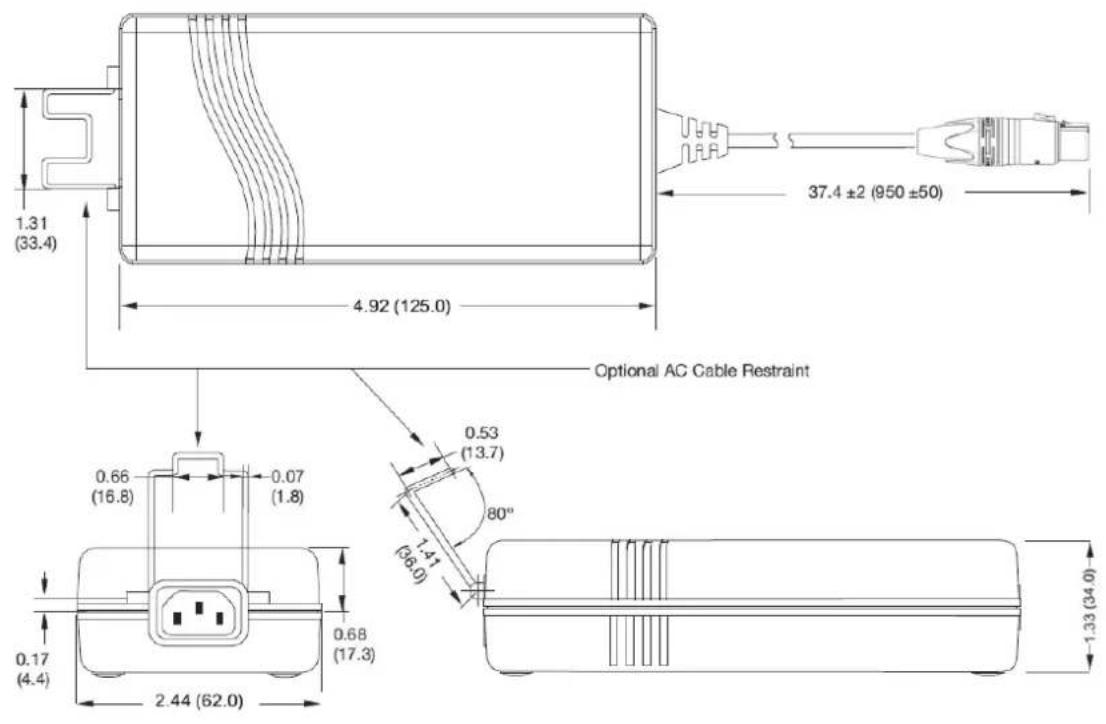
Dimensions
All dimensions are in millimeters


Introduction
Thank you for purchasing the Martin M2GO - M2PC Lighting Control System.
The system offers a powerful lighting controller with all the features of the M-Series of Martin controller in a small and compact housing.
The M2GO is a complete lighting desk with an integrated processor, while the M2PC is a USB control surface that requires an external PC system. Both consoles are identical with the exception of the processor and the associated connections on the back of the M2GO.
Please read this Safety and Installation Guide carefully. Visit the Martin website www.martin.com for further documentation including the user manual for the software and access to our user forums.
Technical Support
For a complete list of Technical Support phone numbers, see the Martin website at www.martin.com/service/hotline.asp
Most information regarding the controller systems of Martin Professional can be found at www.martin.com/controllersupport
Fixture Profiles
The software offers a fixture profile editor to create custom profiles. It is also possible to have Martin Professional add a new profile to the standard library.
Profile requests can be made on our website http://www.martin.com/controllersupport/fixture_libraries.html
Please check whether the profile is already available before filling out a request.
Support Email
For specific questions please contact us directly at controllersupport@martin.dk
Training Videos
A large number of training videos showing the operation of the software can be found on our youtube channel.
http://www.youtube.com/martincontroller
Safety Information
This product is for professional use only. It is not for household use. It presents risks of lethal or severe injury due to electric shock. Read this user manual before powering or installing the console, follow the safety precautions listed below and observe all warnings in this manual and printed on the product.
If you have questions about how to operate the product safely, please contact your Martin supplier or call the Martin 24-hour service hotline on +45 8740 0000, or in the USA on 1888-TECH-180.
This product is for indoor use ONLY.
- Ensure that the power supply is electrically grounded (earthed). Do not use ground lift adapters.
In Finland: "Laite on liitettava suojamaadoituskoskettimilla varustettuun pistorasiaan" In Norway: "Apparatet ma tilkoples jordet stikkontakt" In Sweden: "Apparaten skall anslutas till jordat uttag" - Use only a source of AC power that complies with local building and electrical codes and has both overload and ground-fault protection.
- Use only the provided AC power supply and power cords and use the correct connector for the country of operation. Use of the factory provided power cable is mandatory for operation in the US and Canada.
- Disconnect the product from power immediately if the power supply or cable or any cover or component is wet or not in perfect condition. Do not reconnect to power until the damaged item has been repaired or replaced.
- Do not expose the product to rain or moisture.
- Allow free unobstructed airflow to the bottom and back of the product. Do not block the ventilation slots.
- Operate the console only on a stable and solid surface.
- Do not use the product if the ambient temperature exceeds 40^ (104°F)
- Refer any service operation not described in this manual to a qualified technician.
- Do not modify the product or install other than genuine Martin parts.
- Transport the product only in suitable packaging or a custom fitted road case. Transportation damage is not covered under warranty.
- Protect the internal touch screen from sharp objects and operate the screen using a finger only.
- Caution: Risk of fire and electrical Shock. Use only in dry locations.
- Caution: Risk of explosion if CMOS battery is replaced by an incorrect type. Dispose of used batteries according to local environmental regulations
- Caution: Do not expose CMOS battery to excessive heat such as sunshine or fire.
Included Items
Each package contains the following items:
• M2GO or M2PC Controller
- Protective cover
• External power supply unit with locking 4pin XLR connector
- LED desklamp
• 1.5 m (4.9 ft.) power cable, 3-pin IEC P/N 11501012 (for use outside the USA and Canada)
- 1.5 m (4.9 ft.) power cable, 3-pin IEC P/N 11501502 (with NEMA 15-5P plug for use within the USA and Canada)
- USB cable
• Safety and Installation Manual
Software
The software for the M2GO and M2PC is available from the support website www.martin.com/ controllersupport
Please check periodically for new releases that may add new functionality or resolve a bug.
It is recommended to update to the latest release software before using the controller for the first time.
Recommended Touch Screen for M2GO
The M2GO is designed to be operated with an external touchscreen with a minimum screen resolution of 800x600 pixels.
We strongly recommend that you do not use the M2GO without a touchscreen because the controller software is designed around a touch interface.
Without the touchscreen the system will provide a poor user experience and is difficult to use.
The M2GO can be operated with the following touchscreen types:
- Generic Windows 7 Touch compatible screens that do not require custom drivers
- ELO Touch Systems iTouch, Accutouch and IntelliTouch compatible screens.
• VGA, HDMI or DVI - USB 1.1 or 2.0
Martin recommends a 16:9 ELO touchscreen with iTouch technology.
A recommended screen is the ELO 2201L (part number E382790) which is available worldwide through ELO retail partners.
http://www.elotouch.com/Products/LCDs/2201L/
Other screens may be verified, please check www.martin.com for further recommendations.
Recommended PC system for M2PC
The M2PC is designed to be operated with an external PC system that utilizes a touch screen.
We strongly recommend that you do not use the M2GO without a touchscreen because the controller software is designed around a touch interface.
Without the touchscreen the system will provide a poor user experience and is difficult to use.
The PC should meet these minimum recommendations:
• Windows 7 Operating System
• Intel Core i5 processor
- USB 2.0 connection
- 4GB RAM
• 1280x800 resolution touchscreen
Martin recommends a 16:9 ELO touchscreen with iTouch technology.
A recommended screen is the ELO 2201L (part number E382790) which is available worldwide through ELO retail partners.
http://www.elotouch.com/Products/LCDs/2201L/
Other screens may be verified, please check www.martin.com for further recommendations.
Setup and Assembly
Unpacking
Open the shipping box carefully and keep all included pieces and protective covers for re-use.
Do not transport the M2GO / M2PC in any other container than the factory-provided cardboard box with the original protective packaging inserts or a professionally designed protective case.
The console is provided with a protective clip-on cover. Remove the cover carefully before powering up the system.
The cover can be conveniently placed underneath the console during operation.

natural_image
Simple line drawing of a rectangular tray with an internal triangle (no text or symbols)Placement
The controller requires a stable mounting position that provides support for all 4 rubber feet on the bottom.
Never place the controller onto a blanket or other soft surface as this would block the ventilation openings and cause overheating that will shut down the internal processor and possibly damage the controller.
Power Connections

Martin M2GO - M2PC accepts AC mains power at 100-240V 50/60Hz. Do not connect it to outside this range. Damage resulting from incorrect connection is not covered under warranty.
North America: A cable with a NEMA 15-5P plug is provided for use with the M2GO - M2PC in the USA and Canada. This approved cable must be used in North America.
Rest of the world: The provided IEC cable is not fitted with a country-specific plug.
Install only a plug that meets local and national electrical codes and is suitable for the country's specific power outlet types. Refer to a certified electrician for any questions regarding a country's specific requirements.
A 3-prong grounding-type (earthed type) plug must be installed following the plug manufacturer's instructions. The table below shows some possible pin identification schemes; if the pins are not clearly identified, or if you have any doubts about proper installation, consult a qualified electrician.
| Wire color (standard EU code) | Pin | Symbol |
| brown | live | L |
| blue | neutral | N |
| yellow/green | ground |  |
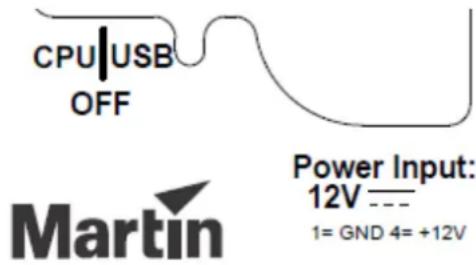
- Check the power switch and ensure that it is set to the center OFF position.
-
Insert the XLR 4-pin connector from the power supply unit into the power input on the back of the desk
-
Insert the provided power cable into the IEC connector of the power supply unit and connect the cable to a properly protected and grounded power outlet.
-
M2GO: Connect an external touch-enabled monitor, e.g. ELO 2201L with both the video and USB connections.
M2PC: Connect the USB cable to the PC system
- Turn on the desk by toggling the power switch to the CPU position (M2GO) or USB position (M2PC)
Connections
Right Side panel
natural_image
Line drawing of a portable electronic device front panel with multiple ports and buttons (no text or symbols)USB
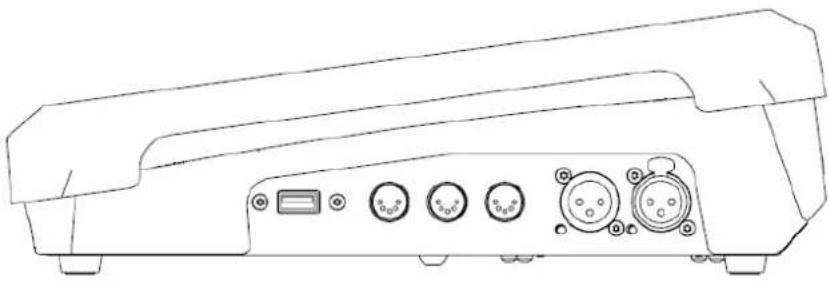
The right side panel offers a USB device socket. This connector is ideally suited for USB flash drives or a keyboard.
This connection is not suitable for boot operations (e.g. installation of an operating system). Use the USB connectors on the back of the console for this purpose instead.
Do not exceed a current of 500ma on any USB device port.
MIDI
An optional MIDI card can be installed inside the controller.
The MIDI card provides MIDI In, Out and Thru 5-pin DIN connectors. The software supports incoming MIDI Notes, MIDI Show Control and MIDI Timecode signals.
SMPTE
An optional SMPTE card can be installed inside the controller.
The SMPTE device offers 3-pin XLR connectors for SMPTE In and Out signals.
Back panel
M2GO

natural_image
Line drawing of a rear panel with multiple electronic components and connectors (no text or symbols)| DC Power IN | XLR 4-pin male |
| Desklight | XLR 3-pin female, 12V, 500ma for Littlite type gooseneck desklights |
| DMX 1-4 | XLR 5-pin female DMX Outputs, RDM compatible, bidirectional for DMX Input |
| USB | 4 x USB-A device connections (max. 500ma.) |
| 1 x USB-B input connection | |
| Network | RJ45 Gigabit Remote network connection |
| EtherDMX | RJ45 Gigabit DMX Ethernet connection |
| VGA | 15-pin monitor connection |
| HDMI | HDMI digital monitor connection |
| Line Out | Green 3.5mm stereo jack |
| Line In | Blue 3.5mm stereo jack |
| Mic In | Pink 3.5mm mono jack |
M2PC

natural_image
Line drawing of a rear panel with multiple connectors and buttons (no text or symbols)| DC Power IN | XLR 4-pin male |
| Desklight | XLR 3-pin female, 12V, 500ma for Littlite type gooseneck desklights |
| DMX 1-2(3+4 optional) | XLR 5-pin female DMX Outputs, RDM compatible, bidirectional for DMX Input |
| USB | 1 x USB-B input connection |
Service
The Martin M2GO - M2PC is designed as a rugged, roadworthy device. Occasional cleaning is the only service required of the user. For any other service-related concerns, please contact your Martin dealer or visit www.martin.com.
Any service not described in this document must be carried out by a qualified Martin technician.
The M2GO - M2PC requires periodic cleaning, as does any computer. The schedule depends heavily on the operating environment; please consult a Martin service technician for recommendations if needed.
As with any computer, never spray the cleaner directly onto the desk, always spray onto a lint-free cloth and wipe clean. Cleaning products designed for cellphone and tablet devices tend to work very well for cleaning of a lighting console.

Important! Excessive dust, dirt smoke fluid build-up etc. can degrade performance and cause overheating and damage to the controller that is not covered by the warranty.
Specifications
Software
Industrial Windows 7 embedded OS
OS installation by USB storage device
Show backup on SSD disk or USB storage device (not included)
Supports ELO iTOUCH, IntellitTouch and AccuTouch USB, generic Windows 7 touch devices
Control and Programming
Protocol: DMX512A (RDM), Artnet2
4 DMX universes, expandable to 8
2048 channels, expandable to 4096
No limit to number of DMX channels per fixture
Extensive fixture library for all known manufacturers
65000 presets for each group of functions (P/T, color, gobo, etc.)
Effect generator for automated programming of complex effects
Customizable highlight and lowlight function to identify individual fixtures
Relative or absolute programming
Fan function for all channels (including timing parameters)
On-the-fly global timing changes
Virtual cuelists
Macros
Wait, follow and link cues
HTP, LTP, chase, timecode, submaster and group master playback functionality
Individual parameter timings
Intuitive patch feature
Fixture type cloning
All channels with 16-bit resolution
Control/User Interface
Main playback interface: Ten 60 mm (2.4 in.) playback faders, each with four function-assignable buttons
Eight customizable multi-function keys
Playback Select button
Master Go section with Go, Pause, Snap and Release
Four digital rotary encoders with push function and status LED for fixture parameter control
3.5" touch screen for parameter groups, effect parameters, fanning and global timings
Grand master rotary fader and button
Blind/preview button
Customizable highlight/lowlight function
Customizable parameter defaults
Next/last fixtures/groups
Large command keys
Playback
Assign a cue, cuelist or effect to any playback fader
100 playback banks, each containing 10 playbacks
100 pages of 100 playbacks activated by touch screen button
No limit to cues per cuelist
Full 16-bit fading for high-resolution fixtures
Individual fade in/fade out times for all playbacks
Manual override available at all times
Live 0-1000% override of global cue timings
Live programmer timing ("Sneak")
Cuelists can be executed in tracking or non-tracking mode
M2GO
Physical
Length: 300 mm (11.8in.)
Width: 540 mm (21.3 in.)
Height with dust cover installed 99 mm (3.9 in.)
Weight: 5.2 kg (11.5 lbs)
Operating Temperature: 0° - 40° C (32° - 104° F)
IP Rating: IP20
Connections
4 x DMX universe outputs: 5-pin locking XLR
External monitor screen: VGA and HDMI
Artnet for up to 8 DMX universes in total: Gigabit RJ-45
MaxNet controller link: Gigabit RJ-45
5 x storage media/hardware peripherals: USB 2.0
Ready to receive internal MIDI module and SMPTE Timecode module
Internal MIDI in/out/thru (MIDI Show Control, MIDI Notes, MIDI Timecode): Optional
Internal SMPTE Timecode In/Out: 3-pin XLR (optional)
12 VDC power supply input: 4-pin XLR
Desk lamp (dimmable): XLR
Electrical:
AC mains power to 12 VDC external PSU (included): 100-240 V nominal, 50/60 Hz
Maximum current: 1.5 A
12 VDC output: 5 A, 60 W max.
Hardware
Industrial 3.5" RGB touchscreen
Internal 32 GB SSD storage drive
Industrial motherboard with dual-core processor
4 GB RAM
Integrated graphics processor
Included Items
1.5 m (4.9 ft.) power cable, EU (Schuko), 3-pin IEC
1.5 m (4.9 ft.) power cable, US, 3-pin IEC
12 VDC 5 A external PSU
LED desk lamp w/angular plug
Protective Cover
Martin Show Designer 5 MC Edition 45-day trial 3D Visualizer
User documentation CD
Ordering Information
M2GO™ Console P/N 90737000
Two DMX Universes Expansion License P/N 39808031
Optional Midi PCB P/N 91613038
Optional SMPTE Timecode PCB P/N 90703040
M2PC
Physical
Length: 300 mm (11.8in.)
Width: 540 mm (21.3 in.)
Height with dust cover installed: 99 mm (3.9 in.)
Weight: 4.6 kg (10.2 lbs)
Operating Temperature: 0° - 40° C (32° - 104° F)
IP Rating: IP20
Connections
2 x DMX universe outputs: 5-pin locking XLR
1 x storage media/hardware peripherals: USB 2.0
Ready to receive internal MIDI module and SMPTE Timecode module
Internal MIDI in/out/thru (MIDI Show Control, MIDI Notes, MIDI Timecode): Optional
Internal SMPTE Timecode In/Out: 3-pin XLR (optional)
12 VDC power supply input: 4-pin XLR
Desk lamp (dimmable): XLR
Electrical:
AC mains power to 12 VDC external PSU (included): 100-240 V nominal, 50/60 Hz
Maximum current: 1.5 A
12 VDC output: 5 A, 60 W max.
Hardware
Industrial 3.5" RGB touchscreen
Included Items
1.5 m (4.9 ft.) power cable, EU (Schuko), 3-pin IEC
1.5 m (4.9 ft.) power cable, US, 3-pin IEC
12 VDC 5 A external PSU
LED desk lamp w/angular plug
Protective Cover
Martin Show Designer 5 MC Edition 45-day trial 3D Visualizer
User documentation CD
Ordering Information
M2PC™ Console P/N 90737010
Two DMX Universes Expansion License P/N 39808031
Optional Two DMX Ports PCB P/N 90703030
Optional Midi PCB P/N 91613038
Optional SMPTE Timecode PCB P/N 90703040
- Martin M2GO Martin M2PC
- Table of Contents
- Dimensions 1
- Introduction 3
- Setup and Assembly 9
- Connections 11
- Service 13
- Specifications 14
- Dimensions
- Introduction
- Technical Support
- Fixture Profiles
- Support Email
- Training Videos
- Safety Information
- This product is for indoor use ONLY.
- Included Items
- Software
- Recommended Touch Screen for M2GO
- Recommended PC system for M2PC
- Setup and Assembly
- Unpacking
- Placement
- Power Connections
- Connections
- Right Side panel
- USB
- MIDI
- SMPTE
- Back panel
- M2GO
- M2PC
- Service
- Specifications
- Control and Programming
- Control/User Interface
- Playback
- Physical
- Electrical:
- Hardware
- Ordering Information
Brand : MARTIN
Model : M2PC
Category : Lighting console