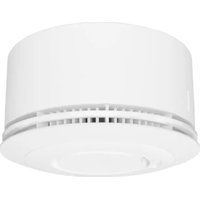
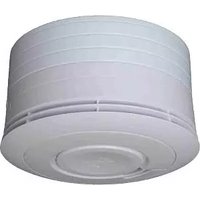
CM4400 - Smoke detector Mobeye - Free user manual and instructions
Find the device manual for free CM4400 Mobeye in PDF.


| Product Type | Smoke Detector |
| Model | CM4400 |
| Brand | Mobeye |
| Detection Principle | Photoelectric (optical) |
| Power Source | 9V alkaline battery (included) |
| Battery Life | Approximately 1 year |
| Standards Compliance | EN 14604:2005 / AS 3786:2014 |
| Test Button | Yes, for functional test and alarm silence |
| Alarm Volume | 85 dB at 3 meters |
| Low Battery Indication | Short beep every 30-40 seconds |
| Operating Temperature | 0°C to 40°C (32°F to 104°F) |
| Humidity Range | Up to 95% RH non-condensing |
| Dimensions | 100 mm diameter x 38 mm height |
| Weight | 150 g (including battery) |
| Mounting | Ceiling mount with screws and anchors supplied |
| LED Indicator | Green blinks every 40 seconds (normal), red blinks on alarm |
| Hush Feature | Silences nuisance alarms for 10 minutes |
| Interconnect | Not interconnectable |
| Warranty | 3 years from date of purchase |
| Maintenance | Vacuum clean every 6 months; test weekly |
| Replace by Date | 10 years after installation date |
| Included in Box | Detector, mounting bracket, screws, anchors, battery, manual |
Frequently Asked Questions - CM4400 Mobeye
User questions about CM4400 Mobeye
0 question about this device. Answer the ones you know or ask your own.
Ask a new question about this device
Download the instructions for your Smoke detector in PDF format for free! Find your manual CM4400 - Mobeye and take your electronic device back in hand. On this page are published all the documents necessary for the use of your device. CM4400 by Mobeye.
USER MANUAL CM4400 Mobeye
Mobeye® CM4410 fire alarm communicator
Accessory for Ei Electronics fire detectors
SW version 1.n Incl. CM4400
CONTENTS
- General description 2
- Standard behaviour 3
2.1 Mobeye CM4410 with Mobeye SIM and Internet Portal 3
2.2 Mobeye CM4410 with own SIM card 4
- Getting started 5
3.1 Insert the SIM card and the batteries 5
3.2 Network connection and program mode 6
- Programming when using the Mobeye SIM and portal 7
4.1 Sign up in the Mobeye Internet Portal 7
4.2 Register the Mobeye SIM card 7
4.3 Configuration and synchronisation 8
4.4 Basics of the Mobeye Internet Portal 8
- Possible settings 10
5.1 Alarm phone numbers 10
5.2 Test message 10
5.3 Call and/or SMS (own SIM cards) 11
- Mount the CM4410 and perform a test 12
6.1 Mount the CM4410 housing to the ceiling 12
6.2 Connect the EI detector and close the cover 12
6.3 Perform a test 13
- Programming when using own SIM card 14
7.1 Program mode 14
7.2 Programming the settings by SMS 14
7.3 Program at least one telephone number 15
7.4 List of SMS commands 16
7.5 SMS reports when using your own SIM card 17
7.6 Technical messages 18
- Combination with other Ei detectors and a wireless network 19
8.1 Combinations of Ei Electronics detectors 19
8.2 Several detectors in a wireless network 19
- System reset and system feedback 20
9.1 System reset 20
9.2 Status feedback 21
Attention!
This user manual contains important guidelines for the installation and usage of the Mobeye ® device as described in this manual. Please read these thoroughly before you start using the Mobeye ® device.
In the case of damage caused by disregarding the guidelines and the instructions for use, no liability is accepted and the warranty becomes void. The user must regularly check the proper functioning of the Mobeye® device. The manufacturer cannot be held liable for (direct and indirect) damage as a result of incorrect operation or incorrect functioning of the device, software, internet or telecom connection. The manufacturer is in no way liable for the loss of personal passwords or codes.
Safety guidelines
- The permitted ambient temperature during operation may not be exceeded (not lower than 0 °C and not higher than 40 °C).
- The device is intended for use in dry and clean places with a residential function.
- Protect the device from moisture, heat and water splashing.
- The guidelines for the battery usage must be regarded.
- Do not expose the device to strong vibrations.
- Do not let it fall from height.
- Do not use in an environment where any inflammable gases, vapors or dust are present or could be present.
- Repair of the device may only be carried out by people, trained for Mobeye® repair.
- If the device must be repaired, only original replacement components may be used.
Use in accordance with the regulations
The purpose of this device in accordance with the regulations is sending messages and making telephone calls after an alarm situation. Other uses are not permitted and may invalidate the warranty.
Battery recycling
This product contains recyclable components. When disposing of this product, please take it to a waste collection point for disposal or to your sales point. Bring empty batteries to a recycling centre or collection point.
1. GENERAL DESCRIPTION
The Mobeye GSM fire alarm communicator CM4410 is a battery operated monitoring device with integrated communication module used to send alarm notifications after the input is triggered by a Ei Electronics smoke or heat detector. The Mobeye 4G Smoke Detector CM4400 is a combination of the Ei605TYC (by Ei Electronics) and the Mobeye CM4410. For other combinations see section 8.1.
In order to activate the device, a few steps are to be followed.
First of all, you need to insert a SIM card. With the Mobeye SIM card, the CM-Guard uses the 4G LTE-M network. This network has a strong network coverage, deep penetrability in buildings and also works in remote areas. The Mobeye SIM card is a 'multi-provider' and can be used internationally; it may choose from several providers per country. In case of a network problem it will switch to another provider or fall back to 2G. In addition, the Mobeye SIM card offers access to the Mobeye Internet Portal. This management environment gives the device essential functions such as online programming, display of status and history, extensive possibilities for reporting messages and will also monitor test messages (keep alive).
Optionally, alarm messages are sent as a push message via an app. The relevant contact person will receive instructions and an installation link on their phone.
It is also possible to place your own (2G) SIM card. The most important alarm functions such as calling and/or texting after an alarm also work. The communication goes entirely through the 2G network. The Mobeye Internet portal features will not work.
Where the installation steps differ for both modes of use, this is indicated. The use of the Mobeye Internet Portal with Mobeye SIM card is also referred to as Mobeye SIM/Portal.
2. STANDARD BEHAVIOUR
2.1 MOBEYE CM4410 WITH MOBEYE SIM AND INTERNET PORTAL
The Mobeye fire alarm communicator CM4410, with Mobeye SIM card and registered on the Mobeye Internet Portal, has the following behaviour as factory settings:
- In case the Ei Electronics fire detector activates the input of the Mobeye CM4410, sends an alarm message to the Mobeye Internet Portal. The Portal forwards the alarm as push notification, call (spoken message), text message and/or e-mail to the 'alarm contacts'.
- When the batteries need to be replaced, the Mobeye GSM communicator (CM4410) sends a 'low battery' message to the Mobeye Internet Portal. The portal forwards this to the 'service' contacts.
- The unit will send test messages to the portal as communication check (default: every 7 days). If these are not received in time, the portal sends an exception message to the 'service' contacts.
Chapter 5 describes how to influence the standard behaviour.
Communication between the Mobeye CM4410 and the Mobeye Internet Portal takes place via data (and SMS as fallback). Messages can be sent to an app (via the portal) as a push message. If the notification is confirmed in the app, it will not be forwarded to subsequent contacts (alternatively a group message is possible). If the message is not confirmed (or the app is not used), it can still be sent by call (with spoken text), SMS or email. A credit system applies to calling and SMS texting, the other methods are unlimited. At initialisation and contract renewal, a starting credit is loaded, which is sufficient for most users. In the event of a low balance, the account holder will receive an email with the advice to top up online. The credit balance has an unlimited validity period and applies to all devices under one account.
2.2 MOBEYE CM4410 WITH OWN SIM CARD
The Mobeye fire alarm communicator CM4410, equipped with your own SIM card, has the following standard behavior as a factory setting:
- In case the Ei Electronics fire detector activates the input of the Mobeye communicator (CM4410), the alarm module sends an alarm SMS text message and calls the phone numbers as programmed in by the user.
- When the batteries need to be replaced, the Mobeye GSM communicator sends a 'battery low' SMS text message to the first telephone number.
Chapter 5 describes how to influence the standard behaviour.
3. GETTING STARTED
To get started with the Mobeye GSM fire alarm communicator CM4410, at least the following steps need to be taken in the following order:
- Insert the SIM card and the batteries
- Programming when using the Mobeye SIM/Portal
a. Sign up in the Mobeye Internet Portal
b. Activate the SIM card and the device
c. Enter the program mode
d. Program the options and synchronise
e. User of the portal and the app
- Programming when using your own SIM card
a. Enter the program mode
b. Program the settings
-
Mount the Mobeye CM4410 to the ceiling
-
Connect the Ei Electronics detector and close the cover
- Perform a test
Step 3 is described in chapter 7.
3.1 INSERT THE SIM CARD AND THE BATTERIES
Follow the steps in the picture to insert the SIM card into the module.
![graph LR A["Lock"] --> B["Printer"] B --> C["MICRO SIM"] C --> D["File Lock"]](/content/2026/06/1356725/images/febcf70b2f50cba054679c480175168e175f6c8063a7a21f600182f0548ce6d5.jpg)
When using the Mobeye SIM card:
The supplied SIM card has a PIN code protection, which means that it can only be used in the Mobeye device. Note: do not place it in another device.
When using your own SIM card:
An own SIM card has a "micro" format, is suitable for the 2G network and can make calls and send text messages. The PIN code is "0000", or the SIM is PIN code free. (A PIN code can be changed or removed by putting the SIM card in to any mobile phone and entering the 'security' menu.)
NB: The settings are saved in the device memory.
Insert the batteries
Insert the two batteries (CR123) in the module. Use the +/- indication for the correct placement.
3.2 NETWORK CONNECTION AND PROGRAM MODE
After placing the batteries the Mobeye CM4410 will search for the network. The LED flashes green and red. This process normally takes 10-30 seconds, in a new device this can take some minutes. When the network has been established the LED will first blink green rapidly and next stay green (or flashes 1 sec. on/1 sec. off in case the unit has not been configured yet).
After 3 minutes a time-out occurs, after which the communication module switches off in order to save the batteries. In this low power mode the LED flashes once per 3 seconds. It will search for network connection once it needs to send notifications. It can be forced to establish a network connection by re-inserting the batteries.
4. PROGRAMMING WHEN USING THE MOBEYE SIM AND PORTAL
The method of programming when using your own SIM card is described in chapter 7.
4.1 SIGN UP IN THE MOBEYE INTERNET PORTAL
Go to www.mymobeye.com and sign up for a new account. Follow the instructions on the screen.

You will receive an e-mail to confirm the new account. After confirmation login on the portal.
If you do not receive this e-mail, please check your spam box or ask Mobeye (info@mobeye.com).
4.2 REGISTER THE MOBEYE SIM CARD
To activate the Mobeye SIM card in the Mobeye Internet Portal, choose 'activate SIM card' on the 'Add Device' screen.
Add Device
Fill in the SIM card number. This is the number written on the plastic SIM card below the barcode. You can take the entire number or only the last 8 digits.
Activate SIM card
If the SIM card and batteries are already installed, a pop-up will appear, where you assign a name and location to the device. You can change these later. (If you have not installed the SIM card and batteries before, you will first be asked to select the device type, in your case it will be "CM4410".)
At the moment you accept the price and terms, you confirm the subscription. You will be taken to the payment screen. You will receive an invoice for the mentioned amount. Your new device is now visible on the dashboard.
Before the device is ready for use, first prepare the settings and alarm forwarding. See next paragraphs to learn how to do this.
4.3 CONFIGURATION AND SYNCHRONISATION
The device settings can be programmed in the Mobeye Internet Portal. In this way you prepare the settings, to be picked up by the device. Since the Mobeye device is leading in the communication between the portal and the device, the data synchronisation is done after:
1) any message to the portal (e.g. the regular test message, alarm, low batteries).
2) reinserting batteries.
4.4 BASICS OF THE MOBEYE INTERNET PORTAL
Dashboard
With multiple devices, the dashboard shows all devices, with the (alarm) messages in the last 24 hours, (missed) test messages and low battery status. Select a device to go to the details of a specific device.
Status & History
The status block shows values that provide information about the unit.
If the "Synchronized" status is set to "No", there are new settings or alarm numbers that still need to be transferred to the device.
The network strength value at the last communication session is shown. If the value is lower than -95dB, consider another location for the device.
Click on the position icon to see the geographical location during the last report.
Note: this is an indication based on "cell-id".
The history displays all historical events. Click on "all events" to see the overview.
Device Settings
The device settings can be changed via the Mobeye Internet Portal. To do this, click on the "edit" icon and type in the security code (factory setting is "1111"). See chapter 5 for the description per setting.
After saving the new settings, they must be retrieved by the device (synchronized).
The device data contain the name and location of the device and can be changed here. These texts are mentioned in every text message and e-mail message to indicate the device. A free text is available as an internal comment field. This is not included in reports.
Alarm dispatch
In the block "Contacts for messages" you link the contact persons who receive alarm and service messages via push notification, call, text message and/or e-mail.
Service messages can be warnings about missed test messages and low battery voltage.
To add a contact person, first create it as a contact. This can be done via the + or in the main menu under the blue Contacts tab.

Tips:
- The alarm messages (including the voice call) consist of a combination of the name, location and message text.
- Always insert a contact to receive service messages by e-mail.
- Assign calls and text messages only after the test phase in order to save credits.
Message texts
The message texts contain the texts that, in addition to the name and location, are included in the messages. These texts can be adapted to your own text.
5. POSSIBLE SETTINGS
The Mobeye fire alarm communicator CM4410 has setting options that influence the behaviour of the module. If connected on the Mobeye Internet Portal, the settings are prepared in the portal (see chapter 4). If your own SIM card is used, programming is done via SMS commands (see chapter 3).
5.1 ALARM PHONE NUMBERS
When using Mobeye Internet Portal: an unlimited number of contacts can receive the alarm messages. These are set in the portal.
When using your own SIM card: the Mobeye CM-Guard can inform 5 telephone numbers in the event of an alarm. It is mandatory to set at least one number (TEL1). The numbers set are used for the telephone calls and/or SMS messages from the unit.
5.2 TEST MESSAGE
When using the Mobeye Internet Portal: The Mobeye GSM fire alarm communicator CM4410 can send regular test messages (keep alive) to the Mobeye Internet Portal, to ensure the proper functioning of the unit. The test message will also be sent if the unit is disarmed. The Mobeye Internet Portal expects the test message and checks the timely receipt. The monitoring of the test messages follows the 'management by exception' rule: only if the message was not received, the 'service' contacts will receive a notification.
The timing of the test message can be programmed. Since new settings (options) will be synchronised after the test message, setting a specific time of the test message can help the process of remote programming. Example: if you force a daily test message at 17.30 hrs, you can prepare new settings and be sure they are loaded into the device before the evening.
The interval between the test messages can be set between 0 days (no test message) and 30 days. The default test interval is set to "7" (weekly test message).
When using your own SIM card: The Mobeye fire alarm communicator CM4410 can send regular test SMS messages (keep alive) to the first phone number (TEL1), to ensure the proper functioning of the unit. The test message function is only active if the unit is armed. The timing of the test message is determined by the time of programming. The test time can also be programmed. The interval between the test messages can be set between 0 days (no test message) and 30 days. The default test interval is set to "0" (no test message).
5.3 CALL AND/OR SMS (OWN SIM CARDS)
When using your own SIM card, by default the CM4410 will call and send SMS text messages. It is possible to suppress one of these. By turning off the CALL, the unit will only send SMS text messages. By turning off the SMS, it will only call. The default both values are set to "ON".
6. MOUNT THE CM4410 AND PERFORM A TEST
6.1 MOUNT THE CM4410 HOUSING TO THE CEILING
Mount the housing in which the module is fixed to the desired place to the ceiling, using the plugs and screws which can be found inside the Ei Electronics box. Please refer to the Ei Electronics manual for the ideal location and installation method.

6.2 CONNECT THE EI DETECTOR AND CLOSE THE COVER
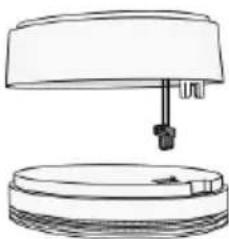
Remove the back cover from the Ei Electronics detector. The CM4410 will be used as back cover.
Press the green cabled connector to the pins of the Ei Electronics detector. Next to the pins the text 1 2 is written. Be sure that the (in most situations) grey connector in the Ei Electronics detector was removed.
Hold the El detector to prevent tension on the wires!
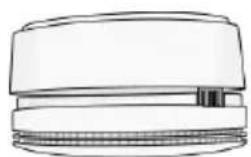
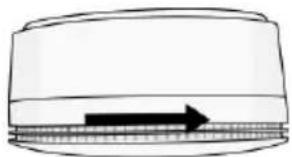
Bring the Ei Electronics detector and the back cover with GSM module to each other at the correct position and turn the detector gently clockwise until it is closed and locked. In the EI detector a red light will flash regularly.
6.3 PERFORM A TEST
After the previous steps, the fire detector is operational.
In order to execute a test, press the TEST & HUSH (or TEST & STUMM) button of the Ei detector during a few seconds (this can take up to 5 seconds). Hold it for another two seconds after the siren starts sounding. Now the communicator will establish network connection to send the notification to the contact persons.
Note: make sure the cover is closed, so that the fire detector and the CM4410 are locked.
7. PROGRAMMING WHEN USING OWN SIM CARD
If your own SIM card is used, programming proceeds via SMS commands. For this purpose the communication module requires network connection. After programming the units needs to be mounted and tested as described in chapter 6.
7.1 PROGRAM MODE
The Mobeye fire alarm communicator CM4410 switches to the program mode after placing the batteries. First the communication module establishes network connection. During this time the LED flashes green and red. Next it will shortly flash very fast. Within 10-30 seconds the connection is established and the status LED starts flashing 1 sec. on/1 sec. off (or stays on continuously in case the first telephone number has been configured).
During the first 3 minutes, the communication module remains active, ready to receive SMS commands. After 3 minutes a time-out occurs and the communication module switches off in order to save the batteries.
7.2 PROGRAMMING THE SETTINGS BY SMS
When using your own SIM card, all settings are programmed in by SMS text messages:
- Make sure the CM4410 is in program mode (please refer to 7.1).
- Send an SMS text message with the (security) code and the command.
- The green LED blinks 3 times to indicate the successful configuration. In case of an incorrect command, the red LED flashes 5 times.
SMS messages have the following content: CODE COMMAND:OPTION Example: 1111 TEL1:+44772345678
- CODE stands for the security code, factory setting is 1111.
-
Do not forget the space character between (security) code and command.
-
The commands are case insensitive.
- Several commands may be combined in one SMS message (with a maximum of 160 characters) by placing a # between the commands.
CODE COMMAND:OPTION#COMMAND:OPTION#COMMAND:OPTION
- All settings are saved and remain saved, even when the unit has no power or the batteries are removed.
In chapter 5 the options are explained.
In chapter 7.3 all possible SMS commands are listed.
7.3 PROGRAM AT LEAST ONE TELEPHONE NUMBER
The Mobeye CM4410 is able to send messages up to 5 telephone numbers. The first telephone number (TEL1) is mandatory. This number will receive, next to alarm message, also system messages such as battery low and keep-alive message. The telephone number TEL1 is programmed via an SMS command. This can be done from any telephone, making it possible to program someone else's number. The TEL1 telephone will receive a confirmation text message with the security code.
SMS command 1st telephone number: CODE TEL1:
example: 1111 TEL1:07212345678
.... similar for TEL2 ... TEL5
To program international numbers, start with 00 followed by the country code (for example 0044123456789).
example: 1111 TEL1:0044612345678
7.4 LIST OF SMS COMMANDS
When using your own SIM card, the settings are programmed via SMS commands. See chapter 7 for the programming method and chapter 5 for an explanation per setting. The commands are case insensitive.
| Setting | SMS Command | Options | Default value |
| Change security code | INSTCODE: | 0000...9999 | 1111 |
| Set telephone number for alarm messages | TEL1:TEL5: | Empty | |
| Delete telephone number | DEL1DEL5 | ||
| Identification text | NAME: | 20 characters | Mobeye |
| Interval 'test SMS' | TEST: | 0...30 (days) | 0 |
| Time test message | TESTTIME: | hhmm | |
| Call on/off | CALL: | ON, OFF | ON |
| SMS on/off | SMS: | ON, OFF | ON |
| Alarm text input 1 | TEXT1: | 20 characters | Fire alarm! |
| Actual time | TIME: | hhmm | Empty |
| Actual date | DATE: | yyyymmdd | Empty |
Examples:
Set phone number 1: 1111 TEL1:0712345678
Delete phone number 1: 1111 del1
Be aware of the space between "1111" and the command.
7.5 SMS REPORTS WHEN USING YOUR OWN SIM CARD
Several lists and status reports can be retrieved by sending an SMS text message to the Mobeye CM4410, from any telephone number. Before sending the request, make sure the unit is in the program mode (please refer to 7.1). Upon sending the command, the Mobeye CM4410 returns an SMS text message to the originator of the request. The commands are case insensitive.
STATUS REQUEST
The status can be requested by sending following SMS text message. The status includes the status of the input, power and batteries.
SMS command status request: STATUS? example: 1111 STATUS?
LIST OF SETTINGS
The settings can be requested by sending following SMS text message:
SMS command list basic settings: SET? example: 1111 SET?
LIST OF PHONE NUMBERS
The list of phone numbers can be requested by following SMS text message:
SMS command list of phone numbers: CALL? example: 1111 CALL?
GSM SIGNAL STRENGTH
The signal strength of the used mobile network can be requested. If the network is weak, it is advised to use a SIM card of another network provider or an external antenna (a Mobeye accessory). The signal strength can be requested by sending following SMS text message:
SMS command request signal: NETWORK?
example: 1111 NETWORK?
7.6 TECHNICAL MESSAGES
In the event of technical issues the administrator receives an SMS message.
Possible technical messages are:
| Message | Reason |
| Low batteries, external power supply OK | Power is available, batteries need to be replaced. |
| No external power supply, batteries OK | No external power supply, batteries are able to take over operation in low power mode. |
| Low batteries, no external power supply | No external power supply, batteries need to be replaced. |
| External power supply OK, batteries OK | The external power is restored (or the adapter is plugged in a socket), batteries do not need to be replaced. |
| (delayed message) | If (delayed message) is added to the SMS text messages, the message couldn't be sent earlier, due to a SIM card failure or GSM network failure. |
| Batteries too low. Module shutting down. | The module has shut down due to low voltage. Replace the batteries or connect the power supply to restart the unit. |
| Module restarted. Power supply [status]. Batteries [status]. | The module has been able to restart after a shutdown. |
When receiving one of the above mentioned technical messages, please take appropriate action as soon as possible. During the battery replacement, the SIM card does not have to be removed.
8. COMBINATION WITH OTHER EI DETECTORS AND A WIRELESS NETWORK
8.1 COMBINATIONS OF EI ELECTRONICS DETECTORS
The CM4410 can be applied in various combinations:
- The CM4410 can be combined with the Ei605C and Ei605TYC smoke detectors, Ei603C and Ei603TYC heat detectors.
- Setting up a network: the detectors mentioned above can be connected wired or wirelessly, whereby only one detector needs to be equipped with the CM4410 communication module. The other detectors in the network can be all connectable detectors from the 600 and 650 series.
- If the CM4410 is used stand-alone, without linking to other fire detectors, this is also possible with the Ei650C and Ei650iC
8.2 SEVERAL DETECTORS IN A WIRELESS NETWORK
Although the Mobeye CM4410 can function as a stand-alone detector, it is possible to create a wireless network with multiple Ei detectors. For this, all Ei Electronics detectors must be equipped with an RF module. This RF module can be integrated in the Ei605(TY)C and Ei603(TY)C. Before the detectors are operational, the detectors need to be enrolled, in order to know each other.
Please refer to the Ei Electronics manuals for the steps to follow.
9. SYSTEM RESET AND SYSTEM FEEDBACK
9.1 SYSTEM RESET
To reset a Mobeye CM4410 two steps are necessary, in following sequence:
- Delete the Mobeye CM4410 from the Mobeye Internet Portal (if relevant)
- Reset the Mobeye GSM fire alarm communicator CM4410
1. To delete the Mobeye CM4410 from the Mobeye Internet Portal
If connected to the Mobeye Internet Portal, first delete the device from the Portal.
The SIM card could be then reused for another Mobeye device, or the same device can be connected again.
In the device list, click the name of the device to go to the details screen. Next choose 'Device'. Click 'delete' to delete the device and confirm the option.
The SIM card will be disconnected from the device and visible on the first screen.
2. To reset the Mobeye CM4410
To reset the Mobeye CM4410 to its factory settings:
- Be sure the GSM module is in program mode.
- Send following SMS text message to the telephone number in the unit (without CODE)
SMS command Reset: RESET
- The green LED blinks 3x to indicate a successful command. In case of an incorrect command the LED flashes 5x green.
After a successful reset, the LED will blink green to indicate that the module is not configured. The security code is back to factory settings as well.
9.2 STATUS FEEDBACK
| LED pattern | Status | Required action |
| Blinking green, 1 second on / 1 second off | Module not configured | Configure at least one telephone number. |
| 1 green flash every 3 seconds | Module is switched on, powered by batteries | No action required. |
| Green LED stays on continuously | Module is switched on, powered by an external source | No action required. |
| Flashing red/ green every second | Module establishes network connection | Wait until the network connection is established. |
| 2 flashes red, every 3 seconds | No GSM connection | Try the SIM card in any mobile telephone; replace SIM card using other telecom provider; try the module at another location. |
| 3 flashes red, every 3 seconds | No valid SIM card or wrong PIN | Try the SIM card in any mobile telephone; remove PIN code; check credit; replace SIM card. |
| Blinking 3 times green | Successful programming action | No action required. |
| Blinking 5 times red | Faulty programming action | Check SMS command. |
| 4 red flashes every 3 seconds | Low batteries | Replace both batteries. |
| Quickly flashing green | Module exchanges data with portal | No action required |
Technical specifications
GSM : 4G LTE-M, Fallback 2G 900/1800 MHz
Batteries : 2* CR123 (lithium)
recommended: Varta, Panasonic and Energizer
(please no Duracell or Philips)
Battery life in normal mode : > 1 year (battery operated)
Power consumption low power : ca. 50 μA stand-by / max. ca. 500 mA
Ambient temperature : 0 °C until +40 °C
This manual is published by Mobeye ® .
All rights, the translation included are reserved. Any reproduction, either photocopy, microfilm or saved in an automated data dictionary, only after written approval of the Publisher. Reprinting, even in summary, is prohibited.
This user manual meets the technical requirements at the moment of printing.
Changes in technology and equipment are reserved.
© Copyright 2021 by Mobeye, version CM4410-EN210601
CE
Declaration of Conformity
Herewith we, Mobeye, declare that the
Mobeye CM41 telemetry module
And the derived products
CM4000, CM4100, CM4200, CM4300, CM4300-FS, CM4410, CM4500, CM4600, CM4610,
CML4015, CML4055, CML4255, CML4275, CML4285, CMVXI-R, iCM41
are in compliance with the essential requirements of the following European standards / EU
Directives:
Directive 214/35/EU (low voltage directive)
Directive 2014/30/EU (electromagnetic compatibility)
Directive 2014/53/EU (RED)
The conformity with the essential requirements set out in Art.3 of the 2014/53/EU has been demonstrated against the following harmonized standards:
EN 60950-1: 2006 + A11: 2009 + A1: 2010 + A12: 2011 + A2: 2013
EN 62311:2008
EN 301 489-1 V2.1.1, Draft EN 301 489-52 V1.1.0
EN 301 511 V12.5.1
Mobeye B.V.
Poeldonkweg 5
5216 JX 's-Hertogenbosch
The Netherlands
Date:
14 april 2021
Name:
security, anywhere, anytime.
- MOBEYE® CM4410 FIRE ALARM COMMUNICATOR
- CONTENTS
- ATTENTION
- SAFETY GUIDELINES
- USE IN ACCORDANCE WITH THE REGULATIONS
- BATTERY RECYCLING
- GENERAL DESCRIPTION
- STANDARD BEHAVIOUR
- 2.1 MOBEYE CM4410 WITH MOBEYE SIM AND INTERNET PORTAL
- 2.2 MOBEYE CM4410 WITH OWN SIM CARD
- GETTING STARTED
- 3.1 INSERT THE SIM CARD AND THE BATTERIES
- WHEN USING THE MOBEYE SIM CARD
- WHEN USING YOUR OWN SIM CARD
- INSERT THE BATTERIES
- 3.2 NETWORK CONNECTION AND PROGRAM MODE
- PROGRAMMING WHEN USING THE MOBEYE SIM AND PORTAL
- 4.1 SIGN UP IN THE MOBEYE INTERNET PORTAL
- 4.2 REGISTER THE MOBEYE SIM CARD
- 4.3 CONFIGURATION AND SYNCHRONISATION
- 4.4 BASICS OF THE MOBEYE INTERNET PORTAL
- DASHBOARD
- STATUS & HISTORY
- DEVICE SETTINGS
- ALARM DISPATCH
- TIPS
- MESSAGE TEXTS
- POSSIBLE SETTINGS
- 5.1 ALARM PHONE NUMBERS
- 5.2 TEST MESSAGE
- 5.3 CALL AND/OR SMS (OWN SIM CARDS)
- MOUNT THE CM4410 AND PERFORM A TEST
- 6.1 MOUNT THE CM4410 HOUSING TO THE CEILING
- 6.2 CONNECT THE EI DETECTOR AND CLOSE THE COVER
- HOLD THE EL DETECTOR TO PREVENT TENSION ON THE WIRES
- 6.3 PERFORM A TEST
- PROGRAMMING WHEN USING OWN SIM CARD
- 7.1 PROGRAM MODE
- 7.2 PROGRAMMING THE SETTINGS BY SMS
- CODE COMMAND:OPTION#COMMAND:OPTION#COMMAND:OPTION
- 7.3 PROGRAM AT LEAST ONE TELEPHONE NUMBER
- 7.4 LIST OF SMS COMMANDS
- EXAMPLES
- 7.5 SMS REPORTS WHEN USING YOUR OWN SIM CARD
- STATUS REQUEST
- LIST OF SETTINGS
- LIST OF PHONE NUMBERS
- GSM SIGNAL STRENGTH
- 7.6 TECHNICAL MESSAGES
- COMBINATION WITH OTHER EI DETECTORS AND A WIRELESS NETWORK
- 8.1 COMBINATIONS OF EI ELECTRONICS DETECTORS
- 8.2 SEVERAL DETECTORS IN A WIRELESS NETWORK
- SYSTEM RESET AND SYSTEM FEEDBACK
- 9.1 SYSTEM RESET
- TO DELETE THE MOBEYE CM4410 FROM THE MOBEYE INTERNET PORTAL
- TO RESET THE MOBEYE CM4410
- 9.2 STATUS FEEDBACK
- TECHNICAL SPECIFICATIONS
- CE
- DECLARATION OF CONFORMITY
Brand : Mobeye
Model : CM4400
Category : Smoke detector