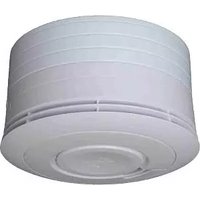
CM2400 - Smoke detector Mobeye - Free user manual and instructions
Find the device manual for free CM2400 Mobeye in PDF.


| Product Type | Smoke Detector |
| Brand | Mobeye |
| Model | CM2400 |
| Dimensions | 120 mm (diameter) x 40 mm (height) |
| Weight | 150 g |
| Power Source | 9V DC battery (included) |
| Sensor Type | Photoelectric |
| Alarm Volume | ≥ 85 dB at 3 meters |
| Test Button | Yes, for functional test |
| Low Battery Warning | Chirping sound (every 30-40 seconds) |
| Installation | Ceiling or wall mounting (screws and anchors included) |
| Operating Temperature | 0°C to 40°C |
| Humidity Range | 10% to 90% relative humidity (non-condensing) |
| Certifications | CE, EN 14604 |
| Mounting Plate | Yes, twist-lock design |
| Included Accessories | Mounting hardware, 9V battery, user manual |
| Battery Life | Approximately 1 year under normal use |
| Maintenance | Vacuum clean every 6 months; test monthly |
| Safety Features | Hush/silence button, tamper-proof lock |
| Warranty | 2 years (limited) |
Frequently Asked Questions - CM2400 Mobeye
User questions about CM2400 Mobeye
0 question about this device. Answer the ones you know or ask your own.
Ask a new question about this device
Download the instructions for your Smoke detector in PDF format for free! Find your manual CM2400 - Mobeye and take your electronic device back in hand. On this page are published all the documents necessary for the use of your device. CM2400 by Mobeye.
USER MANUAL CM2400 Mobeye
Mobeye® Smoke Detector CM2400
Mobeye® Heat Detector CM2400H
SW version 3.n
CONTENT
- General description 1
- Getting started 2
2.1 Insert a SIM card 2 2.2 Insert the batteries 2 2.3 Enter the program mode 2 2.4 Program at least one telephone number 2 2.5 Mount the GSM module housing to the ceiling 3 2.6 Fix the cover to the GSM module housing 3 2.7 Connect the EI detector and close the cover 3 2.8 Perform a test 3
- Several detectors in a wireless network 4
- Use of external power supply 5
- Configuration 6
5.1 Program mode 6 5.2 The (security) code 6 5.3 Programming the settings by SMS 6 5.4 List of SMS commands for configuration 7
- Possible settings 8
6.1 Phone numbers 8 6.2 Identification text 8 6.3 Alarm texts 8 6.4 SMS on/off 8 6.5 Call on/off 8 6.6 Test message 9 6.7 System reset 9
- Request list of the settings and status 10
1. GENERAL DESCRIPTION
This manual is applicable for the Mobeye CM2400 and the Mobeye CM2400H. The CM2400 is a battery operated GSM module used to send out an alarm after the input is triggered by the EI Electronics smoke detector EI605TYC.
The CM2400H is a battery operated GSM module used to send out an alarm after the input is triggered by the EI Electronics heat detector EI603TYC.
In this manual the products are referred to as CM2400(H).
The Mobeye CM2400(H) has following behaviour.
- In case the input of the alarm module is activated by the EI Electronics detector, the Mobeye CM2400(H) sends an alarm SMS text message and calls to the phone numbers as programmed by the user.
- In case the batteries need to be replaced, the Mobeye CM2400(H) sends a 'battery low' SMS text message to the administrator.
Please refer to the manual of the EI Electronics detector for the description of the behaviour of the smoke or heat detector.
2. GETTING STARTED
To get started with the Mobeye CM2400(H) at least the following steps need to be taken in following order:
- Place a SIM card (with PIN code 0000 or without PIN code)
- Place the batteries
- Enter the program mode
- Program at least one telephone number (administrators' number)
- Mount the GSM module housing to the ceiling
- Fix the cover to the GSM module housing
- Connect the EI Electronics detector and close the cover
- Perform a test
These steps are further explained in this chapter. After these steps the module will be operational.
NB: in case several EI detectors form a network communicating by RF, at first the TF modules need to be placed and the detectors need to be enrolled. Please refer to chapter 3.
2.1 INSERT A SIM CARD
Insert a SIM card into the module. Push the black cover outward slightly to open the holder. Before installing the SIM card should have PIN code "0000", or PIN code removed.
(A PIN code can be changed or removed by putting the SIM card in to any mobile phone and entering the 'security' menu)
NB: Make sure the SIM card is inserted before the batteries are inserted. In case of a SIM card change, please first remove the batteries (and remove any other external power supply).

2.2 INSERT THE BATTERIES
Insert the two batteries (CR123) in the module. Use the +/- indication for the correct placement. The green LED will flash to indicate that the module is not configured (at least one telephone number should be programmed).
2.3 ENTER THE PROGRAM MODE
Directly after inserting the batteries, the Mobeye CM2400(H) switches to the program mode. First the GSM module establishes network connection. During this time the LED flashes 2 sec. on/1 sec. off. Within 10-30 seconds the connection is established and the status LED starts flashing 1 sec. on/1 sec. off (or stays on continuously in case the first telephone number has been configured).
The Mobeye CM2400(H) returns to the program mode by pressing the red button for 5 seconds, until the LED starts flashing (or stays on continuously).
As long as the unit is in the program mode, the status green LED is on (or flashing 1 sec. on/1 sec. off if the module has no configuration). During the first 3 minutes, the GSM module remains active, ready to receive SMS commands. After 3 minutes a time-out occurs and the GSM module switches off in order to save the batteries. The unit returns to the low power operational mode.
2.4 PROGRAM AT LEAST ONE TELEPHONE NUMBER
The Mobeye CM2400(H) is able to send messages up to 5 telephone numbers. The first telephone number belongs to the administrator. Technical messages (like battery low) are sent to the administrator only. Without the administrators' phone number, the Mobeye CM2400(H) cannot function.
When the CM2400(H) is in initial (factory) status and the batteries are inserted (so the LED is flashing), the administrators' number is programmed by calling the telephone number of the Mobeye CM2400(H) using the administrators' phone. The unit will recognize this number and store it as administrator (telephone number 1). The administrator will receive a confirmation SMS text message including the security code. This code is needed to program the other settings in the unit.
NB: For this way of programming the number recognition in the administrator's phone must be 'on'. To program or change the administrators' number by SMS command, please refer to 5.2.
2.5 MOUNT THE GSM MODULE HOUSING TO THE CEILING
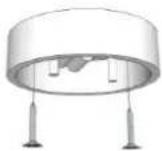
Mount the housing in which the module is fixed to the desired place to the ceiling, using the plugs and screws. Please refer to the manual of the EI Electronics detector for the ideal location.
2.6 FIX THE COVER TO THE GSM MODULE HOUSING
Take the back cover of the EI Electronics detector. Screw this part to the housing of the GSM module. A small opening shows the exact place. Lead the green connector through the hole in the back cover. Take care the cables are not jammed.

2.7 CONNECT THE EI DETECTOR AND CLOSE THE COVER
Press the cabled connector to the pins of the EI Electronics detector. Next to these pins the text 1 2 is written. Hold the EI detector to prevent tension on the wires!
Close the EI detector by bringing it close to the back cover at the correct position and turn it gently until it is closed. In the EI detector a red light will flash regularly.

2.8 PERFORM A TEST
After the previous steps, the Mobeye CM2400(H) is in use.
It is armed (switched on) automatically. The green LED on the GSM module blinks once every 3 seconds, which can only be seen when opening the back cover of the EI detector.
To perform a test:
- Press the TEST & HUSH button on the EI detector for a few seconds. The siren will sound, and the GSM module will establish a network connection to send SMS messages and call the contact persons.
3. SEVERAL DETECTORS IN A WIRELESS NETWORK
Although the Mobeye CM2400(H) can operate as a stand-alone unit, it is also possible to form a wireless network with several EI detectors. For this purpose, each EI Electronics detector needs to be equipped with an RF module. This module can be integrated into the EI Electronics detector. Before the detectors are operational, they need to be enrolled so that they can recognize each other.
The placement of the RF modules in the EI Electronics detectors and the enrollment must be done before all other steps in chapter 1. Please refer to the EI Electronics manuals for the steps to follow.
4. USE OF EXTERNAL POWER SUPPLY
Although the Mobeye CM2400(H) is designed to run on batteries, it is possible to use an external power supply. In this mode, the module is always connected to the GSM network and therefore always in program mode. In case of power failure, the batteries take over the functioning, and the administrator is informed via an SMS text message. The module continues operating, albeit in low power mode. This means the GSM module switches off and only establishes a network connection when it needs to send out an alarm, test message, or low battery alert.
Connect the external power adapter (or any other regulated 12VDC power supply) to the power input of the connector (press on the green pins to connect the wires):
- V+ (black lead with white stripe) to "+"
- Ground (black lead) to "-"

5. CONFIGURATION
To program the Mobeye CM2400(H), the GSM module must have network connection. If only batteries are used, first switch the unit to program mode. Then send SMS commands for configuration.
All settings are stored and will be kept in the unit, even if the power supplies are removed.
5.1 PROGRAM MODE
Directly after inserting the batteries, the Mobeye CM2400(H) switches to the program mode. First the GSM module establishes network connection. During this time the LED flashes 2 sec. on/1 sec. off. Normally this takes 10-30 seconds. Once the connection is established the status LED starts flashing 1 sec. on/1 sec. off (or stays on continuously in case the first telephone number has been configured).
In program mode, the device is ready to receive SMS commands. If no correct command is received for 3 minutes, the GSM module switches off in order to save the batteries. The unit returns to the low power operational mode. The Mobeye CM2400(H) returns to the program mode by pressing the red button for 5 seconds, until the LED starts flashing (or stays on continuously).
If the unit is connected to an external power supply, the CM2400(H) has network connection all the time and the unit is in program mode all the time.
5.2 The (security) code
For configuration activities the (security) code of the Mobeye CM2400(H) must be used. The initial (security) code is '1111'. You can change the (security) code to your own code. See section 4.4.
5.3 PROGRAMMING THE SETTINGS BY SMS
To program the settings by SMS text message:
- Be sure the CM2400(H) is in program mode (please refer to 5.1).
- Send an SMS message with the (security) code and the command
- The green LED blinks 3 times to indicate the successful configuration. In case of an incorrect command, the red LED flashes 5 times.
SMS messages should have the following content: CODE COMMAND:OPTION
- Do not forget the space character between (security) code and command.
- The commands are case sensitive. Use capitals for the commands.
- Several commands may be combined in one SMS message (with a maximum of 160 characters) by placing a # between the commands.
CODE COMMAND:OPTION#COMMAND:OPTION#COMMAND:OPTION
See section 5.4 for a full list of SMS commands.
5.4 LIST OF SMS COMMANDS FOR CONFIGURATION
The setting options for the CM2400(H).
| Setting | SMS Command | Options | Default value |
| Change security code | INSTCODE: | 0000..9999 | 1111 |
| Set telephone number for alarm messages | TEL1:....TEL5: | Empty | |
| Delete telephone number | DEL1....DEL5 | ||
| Identification text | NAME: | 20 characters | Mobeye |
| Call on/off | CALL: | ON, OFF | ON |
| SMS on/off | SMS: | ON, OFF | ON |
| Alarm text input 1 | TEXT1: | 20 characters | Fire alarm! |
| Interval ‘test SMS’ | TEST: | 0..30 (days) | 0 |
Examples:
Set phone number 1 : 1111 TEL1:0712345678
Delete phone number 1: 1111 DEL1
Be aware of the space between "1111" and the command
6. POSSIBLE SETTINGS
6.1 PHONE NUMBERS
The Mobeye CM2400(H) is able to send alarm messages to up to 5 phone numbers. The first telephone number (TEL1) belongs to the administrator. Only this number receives all system messages. The other phone numbers (including the administrator) only get the alarm messages.
To set or change telephone numbers:
SMS command 1st telephone number: TEL1:
example: 1111 TEL1:07123456789
..... similar for TEL2:, TEL3:, TEL4 and TEL5:
For foreign number, start with + followed by the country code (and depending on the country leave out the zero for the local area code).
example: 1111 TEL1:+447123456789
To delete telephone numbers:
SMS command delete 1st telephone number: DEL1
example: 1111 DEL1
.... similar for DEL2, DEL3, DEL4 and DEL5
6.2 IDENTIFICATION TEXT
It is possible to add a standard identification text (NAME) to all messages sent out by the Mobeye CM2400(H). The alarm messages are a combination of the name and the alarm text. A user defined identification has a length of maximum 20 characters. The default identification text is 'Mobeye'.
SMS command identification text: NAME:
example: 1111 NAME:Upstairs
6.3 ALARM TEXTS
A unique alarm text can be programmed into the Mobeye CM2400(H). The user defined text has a maximum length of 20 characters.
Following default text is programmed:
Text 1 (input 1): Fire alarm!
SMS command text:
example:
TEXT1:
1111 TEXT2: Fire alarm, get help
6.4 SMS ON/OFF
By default, the Mobeye CM2400(H) sends alarm notifications via text message and calls (you will hear a beep signal) to the preset contact persons. By turning off the SMS, the unit will only call after a triggered input.
SMS command enable / disable SMS:
example:
SMS:ON or SMS:OFF
1111 SMS:OFF
6.5 CALL ON/OFF
By default, the Mobeye CM2400(H) sends alarm notifications via text message and calls to the preset contact persons. By turning off the CALL, the unit will only send an SMS text message as alarm notification. It is not possible to switch off both the SMS and the call.
SMS command enable / disable call:
example:
1111 CALL:ON
CALL:ON or CALL:OFF
6.6 TEST MESSAGE
The Mobeye CM2400(H) can send regular test SMS messages (keep alive) to the administrator (first phone number), to ensure the proper functioning of the unit. The test message function is only active if the unit is armed.
The interval between the test messages can be set between 0 days (no test message) and 30 days. The default test interval is set to 0 (no test message).
SMS command interval test message: TEST:
example: 1111 TEST:21
6.7 SYSTEM RESET
To reset the Mobeye CM2400(H) to its factory settings:
- Open the back cover of the GSM module, using the reverse order as explained in chapter 2
- Remove the batteries
- Press the red button while reinserting the batteries. Keep it pressed for (about) another 5 seconds
- Release the button immediately after the LED starts to flash
After a successful reset, the status LED on the keypad will blink green to indicate that the module is not configured. The security code is back to factory settings as well.
7. REQUEST LIST OF THE SETTINGS AND STATUS
The programmed settings and status of the GSM detector can be retrieved by SMS message. Before sending the request, make sure the unit is in the program mode (please refer to 5.1).
STATUS REQUEST
The status of the Mobeye CM2400(H) can be requested by sending an SMS with the content:
SMS command status request: STATUS?
example: 1111 STATUS?
Upon sending this request, the Mobeye CM2400(H) returns the status to the originator of the request. The status message includes the ARMED / NOT CONFIGURED status of the Mobeye CM2400(H), the status of the inputs, power and batteries.
LIST OF GENERAL SETTINGS
The general settings of the Mobeye CM2400(H) can be requested by sending an SMS with the content:
SMS command list general settings: SET?
example: 1111 SET?
LIST OF PHONE NUMBERS
The list of telephone numbers can be requested by sending an SMS message with the content:
SMS command list of phone numbers: CALL?
example: 1111 CALL?
8. TECHNICAL MESSAGES AND STATUS FEEDBACK
Technical messages
In the event of technical issues the administrator receives an SMS message. Possible technical messages are:
| Message | Reason |
| Low batteries, external power supply OK | Power is available, batteries need to be replaced |
| No external power supply, batteries OK | No external power supply, batteries are able to take over operation in low power mode |
| Low batteries, no external power supply | No external power supply, batteries need to be replaced |
| External power supply OK, batteries OK | The external power is restored (or the adapter is plugged in a socket), batteries do not need to be replaced |
| (delayed massage) | If (delayed message) is added to the SMS text messages, the message couldn't be sent earlier, due to a SIM card failure or GSM network failure. |
When receiving one of the above mentioned technical messages, please take appropriate action as soon as possible. During the battery replacement, the SIM card does not have to be removed.
Status feedback
| LED pattern | Status | Required action |
| Blinking green, 1 second on / 1 second off | Module not configured | Configure at least one telephone number |
| 1 green flash every 3 seconds | Module is switched on, powered by batteries | No action required |
| Green LED stays on continuously | Module is switched on, powered by an external source | No action required |
| Blinking green, 2 seconds on, 1 second off | Module establishes network connection to send an alarm message | Wait until the network connection is established and the message is sent |
| Blinking green, 3 seconds on, 1 second off | Module establishes network connection to get to program mode | Wait until the network connection is established before programming |
| 2 flashes red, every 3 seconds | No GSM connection | Try the SIM card in any mobile telephone; replace SIM card using other telecom provider; try the module at another location |
| 3 flashes red, every 3 seconds | No valid SIM card or wrong PIN | Try the SIM card in any mobile telephone; remove PIN code; check credit; replace SIM card |
| Blinking 3 times green | Successful programming action | No action required |
| Blinking 5 times red | Faulty programming action | Check SMS command |
| 4 red flashes every 3 seconds | Low batteries | Replace both batteries |
Technical specifications
GSM: Quad band EGSM,
850/900/1800/1900 MHz
Batteries: 2* CR123 (lithium)
Battery life in normal mode: >1 year
Ext. power connection: 12 VDC (+/- 2 VDC) / min. 500 mA.
(optional)
Power consumption low power: ca 50 μA. stand-by / max. ca. 500 mA
Power consumption 12V: ca 50 mA. stand-by / max. ca. 500 mA
Dimensions: 80 x 60 x 40 mm
Ambient temperature: -10 °C until +50 °C
This manual is published by Mobeye®.
All rights, including translation, are reserved. Any reproduction, either photocopy, microfilm, or saved in an automated data dictionary, only after written approval of the Publisher. Reprinting, even in summary, is prohibited.
This user manual meets the technical requirements at the moment of printing. Changes in technology and equipment are reserved.
© Copyright 2014 by Mobeye, version CM2400EN140701

Declaration of Conformity
Herewith we, Mobeye, declare that the product
Mobeye CM21 telemetry module
And the derived products
CM2000, CM2100, CM2200, CM2300, CM2300FS, CM2400, CM2500, CM2600
are in compliance with the essential requirements of the following European standards / EU Directives:
Directive 73/23/EEC (low voltage directive)
Directive IEC/EN 50130 Electromagnetic compatibility
Directive 1995/5/EC R&TTE (Radio & Telecommunications Terminal Equipment)
The conformity with the essential requirements of 1995/5/EC has been verified against:
ETSI EN 301 489-1 V1.5.1
ETSI EN 301 489-7 V1.2.1
ETSI EN 301 511 V9.0.2
CENELEC EN 60950:2001
Mobeye B.V., Poeldonkweg 5, 5216 JX 's-Hertogenbosch, The Netherlands
Position: General Manager
Date: 31 March 2013
- CONTENT
- GENERAL DESCRIPTION
- GETTING STARTED
- 2.1 INSERT A SIM CARD
- 2.2 INSERT THE BATTERIES
- 2.3 ENTER THE PROGRAM MODE
- 2.4 PROGRAM AT LEAST ONE TELEPHONE NUMBER
- 2.5 MOUNT THE GSM MODULE HOUSING TO THE CEILING
- 2.6 FIX THE COVER TO THE GSM MODULE HOUSING
- 2.7 CONNECT THE EI DETECTOR AND CLOSE THE COVER
- 2.8 PERFORM A TEST
- SEVERAL DETECTORS IN A WIRELESS NETWORK
- USE OF EXTERNAL POWER SUPPLY
- CONFIGURATION
- 5.1 PROGRAM MODE
- 5.2 THE (SECURITY) CODE
- 5.3 PROGRAMMING THE SETTINGS BY SMS
- 5.4 LIST OF SMS COMMANDS FOR CONFIGURATION
- EXAMPLES
- POSSIBLE SETTINGS
- 6.1 PHONE NUMBERS
- TO SET OR CHANGE TELEPHONE NUMBERS
- TO DELETE TELEPHONE NUMBERS
- 6.2 IDENTIFICATION TEXT
- 6.3 ALARM TEXTS
- 6.4 SMS ON/OFF
- 6.5 CALL ON/OFF
- 6.6 TEST MESSAGE
- 6.7 SYSTEM RESET
- REQUEST LIST OF THE SETTINGS AND STATUS
- STATUS REQUEST
- LIST OF GENERAL SETTINGS
- LIST OF PHONE NUMBERS
- TECHNICAL MESSAGES AND STATUS FEEDBACK
- TECHNICAL MESSAGES
- TECHNICAL SPECIFICATIONS
- DECLARATION OF CONFORMITY
- MOBEYE CM21 TELEMETRY MODULE
Brand : Mobeye
Model : CM2400
Category : Smoke detector