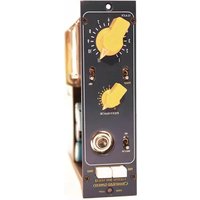
Germ 500 MKII - Receiver Chandler - Free user manual and instructions
Find the device manual for free Germ 500 MKII Chandler in PDF.


| Product Type | Stereo Receiver |
| Brand | Chandler |
| Model | Germ 500 MKII |
| Power Output | 50 W per channel (8 ohms, 20 Hz - 20 kHz, 0.05% THD) |
| Frequency Response | 20 Hz - 20 kHz ±0.5 dB |
| Total Harmonic Distortion | < 0.05% |
| Signal-to-Noise Ratio | 90 dB (Phono: 75 dB) |
| Inputs | 4x Line (RCA), 1x Phono (MM), 1x Optical, 1x Coaxial |
| Outputs | Speaker A/B (binding posts), Pre-out (RCA), Headphone (6.3 mm) |
| Tuner | FM/AM with 30 presets (FM: 87.5-108 MHz, AM: 530-1710 kHz) |
| Dimensions (W x H x D) | 17.3 x 5.5 x 14.2 inches (440 x 140 x 360 mm) |
| Weight | 24.7 lbs (11.2 kg) |
| Power Consumption | 350 W max, 0.5 W standby |
| Remote Control | Yes (included CR2025 battery) |
| Bluetooth | No |
| Built-in DAC | 24-bit/192 kHz |
| Tone Controls | Bass ±10 dB at 100 Hz, Treble ±10 dB at 10 kHz, Balance |
| Loudness | Yes (selectable) |
| Speaker Impedance | 4 - 16 ohms |
| Color | Black |
Frequently Asked Questions - Germ 500 MKII Chandler
User questions about Germ 500 MKII Chandler
0 question about this device. Answer the ones you know or ask your own.
Ask a new question about this device
Download the instructions for your Receiver in PDF format for free! Find your manual Germ 500 MKII - Chandler and take your electronic device back in hand. On this page are published all the documents necessary for the use of your device. Germ 500 MKII by Chandler.
USER MANUAL Germ 500 MKII Chandler
Thank you for purchasing the Chandler Limited Germ 500 MKII. The Germ 500 is an updated version of our original Germ 500. This unit has an improved faceplate layout and nicer look. It uses classic germanium transistors in all class A, transformer balanced circuits. The Germ 500 MKII is our well-known Germanium Preamp adapted for 500 series racks. We use the same transformers and amp blocks to assure the sound is consistent with our rack version. We have updated the power on the MKII so there are no power-up issues with current lunchboxes and rack systems.
Please feel free to call our shop anytime for help or with questions.
Phone: 1-319-885-4200
Email: support@chandlerlimited.com
Send repairs to: Chandler Limited
222 S. Cherry Street
Shell Rock, IA 50670
COMPATIBILITY-
The Germ 500 MKII is tested and proven to have no start up or power errors in these racks:
API 500v 10-slot with L200 PSU
API 500-6B Lunchbox
API 500-6B HC "new version" Lunchbox
BAE 11-slot with power one supply
BAE 6-slot portable with power one supply
BAE 6-slot with Avedis designed supply
Emperical Labs 2-slot (awesome rack and worth the money!)
A-Designs 2-slot
Purple Sweet 10
As of the release of this product we have not yet tested with the Radial Workhorse.
POWER SUPPLY RECOMMENDATIONS-
With ANY 500 modules (not just the Devils) we recommend using a rack with external supply. We feel a power supply in such close proximity to the right hand slots of the rack can cause hum and noise floor issues with many modules by many manufacturers. For this reason we mainly recommend the API 500v rack with external L200 supply and the BAE 11-slot with external supply.
NOTES on BAE racks:
We recommend adding a wire from Earth to power supply common on all BAE racks. In many cases hum can be avoided and Earth to common is standard procedure on most electronic equipment.
CHANDLER LIMITED®
Controls and Features
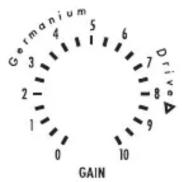
GAIN/GERMANIUM DRIVE - A gain switch in 3dB, is the standard input level type control. The Gain interacts with the feedback control to offer a variety of tones. Driving this control tends to accent low frequency and gives a thicker tone.
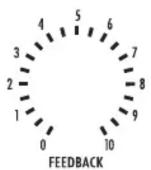
FEEDBACK - The Feedback control is essential to the sound and function of this pre amp. It is the sound and function of the amplifier in many ways. THD, frequency response, and gain change considerably with varying feedback. Using the Feedback in combination with the Gain control creates a wide range of tones - thick, bright, lots of color - choose your tone!
DI/UNBALANCED IN - This is an unbalanced input for guitar, bass, samples, etc. Simply throw the toggle switch and you're off. Jack directly into the Class A circuit to provide a tone different than a standard direct box.

PAD - Use Pad to run Gain and Feedback controls near full or increased low end and harmonic distortion.
THICK - The thick adds a gentle (well maybe not so gentle!) low frequency rise for warmth and roundness. The effect varies slightly with the load on the pre amp and has a bit of life of its own!
48 VOLT SWITCHING - 48 volt switches phantom power.
PHASE - Reverses the polarity of the pre amp's output.
CHANDLER LIMITED®
CE Certification
Chandler Limited declares under its sole responsibility that all products manufactured by them are in compliance with EC directives 2004/108/EC Electromagnetic Compatibility; 2004/108/EG Electromagnetic Compatibility; 2006/95/EC Low Voltage Equipment Safety.

Brand : Chandler
Model : Germ 500 MKII
Category : Receiver