
One+ R18IW - Screwdriver RYOBI - Free user manual and instructions
Find the device manual for free One+ R18IW RYOBI in PDF.


| Product Type | Cordless Screwdriver |
| Model | One+ R18IW |
| Brand | RYOBI |
| Voltage | 18 V |
| Battery Platform | RYOBI ONE+ System |
| Chuck Type | 1/4" Hex Quick-Release |
| No-Load Speed | 0-600 RPM (Variable) |
| Max Torque | 30 Nm |
| Number of Clutch Settings | 21 + Drill Mode |
| LED Work Light | Yes, with delay |
| Belt Clip | Yes |
| Weight (without battery) | 1.05 kg |
| Dimensions (L x H) | 202 x 200 mm |
| Power Source | Ryobi ONE+ 18V Li-ion battery (sold separately) |
| Charger | Not included |
| Maintenance | Keep ventilation slots clean; wipe with dry cloth |
| Safety Features | Lock-off switch, over-mold grip |
| Spare Parts | Chuck, switch, brushes available via authorized service |
| Reparability | Repairable: replaceable brushes, chuck, and motor |
| Warranty | 3 years (limited) |
Frequently Asked Questions - One+ R18IW RYOBI
User questions about One+ R18IW RYOBI
0 question about this device. Answer the ones you know or ask your own.
Ask a new question about this device
Download the instructions for your Screwdriver in PDF format for free! Find your manual One+ R18IW - RYOBI and take your electronic device back in hand. On this page are published all the documents necessary for the use of your device. One+ R18IW by RYOBI.
USER MANUAL One+ R18IW RYOBI
natural_image
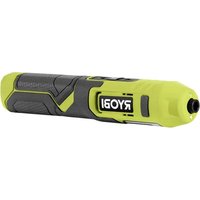
Ryobil 350 speed electric shaver with visible branding and base plate (no text or symbols on the device itself)Important!
It is essential that you read the instructions in this manual before assembling, operating and maintaining the product.
Subject to technical modifications.
Safety, performance, and dependability have been given top priority in the design of your impact wrench.
INTENDED USE
The product is intended for fastening and removing screws, bolts, and nuts using an impact socket
Do not use the product in any way other than those stated for intended use.
GENERAL POWER TOOL SAFETY WARNINGS
WARNING
Read all safety warnings and all instructions. Failure to follow the warnings and instructions may result in electric shock, fire and/or serious injury.
Save all warnings and instructions for future reference.
The term "power tool" in the warnings refers to your mains-operated (corded) power tool or battery-operated (cordless) power tool.
1) WORK AREA SAFETY
- Keep work area clean and well lit. Cluttered or dark areas invite accidents.
■ Do not operate power tools in explosive atmospheres, such as in the presence of flammable liquids, gases or dust. Power tools create sparks which may ignite the dust or fumes. - Keep children and bystanders away while operating a power tool. Distractions can cause you to lose control.
2) ELECTRICAL SAFETY
■ Power tool plugs must match the outlet. Never modify the plug in any way. Do not use any adapter plugs with earthed (grounded) power tools. Unmodified plugs and matching outlets will reduce risk of electric shock.
■ Avoid body contact with earthed or grounded surfaces, such as pipes, radiators, ranges and refrigerators. There is an increased risk of electric shock if your body is earthed or grounded.
■ Do not expose power tools to rain or wet conditions. Water entering a power tool will increase the risk of electric shock.
- Do not abuse the cord. Never use the cord for carrying, pulling or unplugging the power tool. Keep cord away from heat, oil, sharp edges or moving parts. Damaged or entangled cords increase the risk of electric shock.
- When operating a power tool outdoors, use an extension cord suitable for outdoor use. Use of a cord suitable for outdoor use reduces the risk of electric shock.
If operating a power tool in a damp location is unavoidable, use a residual current device (RCD) protected supply. Use of an RCD reduces the risk of electric shock.
3) PERSONAL SAFETY
■ Stay alert, watch what you are doing and use common sense when operating a power tool. Do not use a power tool while you are tired or under the influence of drugs, alcohol or medication. A moment of inattention while operating power tools may result in serious personal injury.
■ Use personal protective equipment. Always wear eye protection. Protective equipment such as dust mask, non-skid safety shoes, hard hat or hearing protection used for appropriate conditions will reduce personal injuries.
■ Prevent unintentional starting. Ensure the switch is in the off-position before connecting to power source and/or battery pack, picking up or carrying the tool. Carrying power tools with your finger on the switch or energising power tools that have the switch on invites accidents.
■ Remove any adjusting key or wrench before turning the power tool on. A wrench or a key left attached to a rotating part of the power tool may result in personal injury.
■ Do not overreach. Keep proper footing and balance at all times. This enables better control of the power tool in unexpected situations.
■ Dress properly. Do not wear loose clothing or jewellery. Keep your hair, clothing and gloves away from moving parts. Loose clothes, jewellery or long hair can be caught in moving parts.
If devices are provided for the connection of dust extraction and collection facilities, ensure these are connected and properly used. Use of dust collection can reduce dust-related hazards.
4) POWER TOOL USE AND CARE
- Do not force the power tool. Use the correct power tool for your application. The correct power tool will do the job better and safer at the rate for which it was designed.
- Do not use the power tool if the switch does not turn it on and off. Any power tool that cannot be controlled with the switch is dangerous and must be repaired.
■ Disconnect the plug from the power source and/or the battery pack from the power tool before making any adjustments, changing accessories or storing power tools. Such preventive safety measures reduce the risk of starting the power tool accidentally.
■ Store idle power tools out of the reach of children and do not allow persons unfamiliar with the power tool or these instructions to operate the power tool. Power tools are dangerous in the hands of untrained users.
- Maintain power tools. Check for misalignment or binding of moving parts, breakage of parts and any other condition that may affect the power tool's operation. If damaged, have the power tool repaired before use. Many accidents are caused by poorly maintained power tools.
- Keep cutting tools sharp and clean. Properly maintained cutting tools with sharp cutting edges are less likely to bind and are easier to control.
■ Use the power tool, accessories and tool bits etc, in accordance with these instructions, taking into account the working conditions and the work to be performed. Use of the power tool for operations different from those intended could result in a hazardous situation.
5) BATTERY TOOL USE AND CARE
■ Recharge only with the charger specified by the manufacturer. A charger that is suitable for one type of battery pack may create a risk of fire when used with another battery pack.
■ Use power tools only with specifically designated battery packs. Use of any other battery packs may create a risk of injury and fire.
- When battery pack is not in use, keep it away from other metal objects, like paper clips, coins, keys, nails, screws or other small metal objects that can make a connection from one terminal to another. Shorting the battery terminals together may cause burns or a fire.
■ Under abusive conditions, liquid may be ejected from the battery; avoid contact. If contact accidentally occurs, flush with water. If liquid contacts eyes, additionally seek medical help. Liquid ejected from the battery may cause irritation or burns.
6) SERVICE
■ Have your power tool serviced by a qualified repair person using only identical replacement parts. This will ensure that the safety of the power
tool is maintained.
IMPACT WRENCH SAFETY WARNINGS
WARNING
The product is not intended for use by persons (including children) with reduced physical, sensory or mental capabilities, or lack of experience and knowledge, unless they have been given supervision or instruction concerning use of the product by a person responsible for their safety.
Children should be supervised to ensure that they do not play with the product.
- Hold power tool by insulated gripping surfaces, when performing an operation where the fastener may contact hidden wiring. Fastener contacting a "live" wire may make exposed metal parts of the power tool "live" and could give the operator an electric shock.
TRANSPORTING LITHIUM BATTERIES
Transport the battery in accordance with local and national provisions and regulations.
Follow all special requirements on packaging and labelling when transporting batteries by a third party. Ensure that no batteries can come in contact with other batteries or conductive materials while in transport by protecting exposed connectors with insulating, non-conductive caps or tape. Do not transport batteries that are cracked or leaking. Check with the forwarding company for further advice.
RESIDUAL RISKS
Even when the product is used as prescribed, it is still impossible to completely eliminate certain residual risk factors. The operator should pay particular and additional attention to these points in order to reduce the risk of serious personal injury.
- Injury to hearing – Wear suitable ear protection and limit exposure.
- Injury to sight – Wear protective eye shields or goggles when using the product.
- Injury caused by vibration – Limit exposure and follow the instructions on risk reduction in this manual.
Electric shock after contact with hidden wires – Hold the product only by insulated surfaces.
■ Respiratory injury – Dust created by operating the product, wear suitable protection dependent on type of dust.
RISK REDUCTION
It has been reported that vibrations from hand-held tools may contribute to a condition called Raynaud's Syndrome in certain individuals. Symptoms may include tingling, numbness and blanching of the fingers, usually apparent upon exposure to cold. Hereditary factors, exposure to cold and dampness, diet, smoking and work practices are all thought to contribute to the development of these symptoms. There are measures that can be taken by the operator to possibly reduce the effects of vibration:
- Keep your body warm in cold weather. When operating the unit wear gloves to keep the hands and wrists warm. It is reported that cold weather is a major factor contributing to Raynaud's Syndrome.
■ After each period of operation, exercise to increase blood circulation.
■ Take frequent work breaks. Limit the amount of exposure per day.
If you experience any of the symptoms of this condition, immediately discontinue use and see your doctor about these symptoms.
WARNING
Injuries may be caused, or aggravated, by prolonged use of a tool. When using any tool for prolonged periods, ensure you take regular breaks.
MAINTENANCE
WARNING
The product should never be connected to a power supply when you are assembling parts, making adjustments, cleaning, performing maintenance, or when the product is not in use. Disconnecting the product will prevent accidental starting that could cause serious injury.
WARNING
When servicing use only original manufacturer's replacement parts. Use of any other parts may create a hazard or cause product damage.
■ Avoid using solvents when cleaning plastic parts. Most plastics are susceptible to various types of commercial solvents and may be damaged by their use. Use clean cloths to remove dirt, carbon dust, etc.
- Do not use compressed air to blow dust / dirt from any power tool. Serious eye injury could result. Use a cloth, brush or vacuum to remove dust and dirt.
WARNING
Do not at any time let brake fluids, gasoline, petroleum-based products, penetrating oils, etc., come in contact with plastic parts. They contain chemicals that can damage, weaken or destroy plastic.
Electric tools used on fiberglass material, wallboard, spackling compounds, or plaster are subject to accelerated wear and possible premature failure because the fiberglass chips and grindings are highly abrasive to bearings, brushes, commutators, etc. Consequently, we do not recommend using this tool for extended work on these types of materials.
WARNING
Always wear safety goggles or safety glasses with side shields during power tool operation or when blowing dust. If operation is dusty, also wear a dust mask.
■ For greater safety and reliability, all repairs should be performed by an authorised Ryobi service centre.
LUBRICATION
All of the bearings in the product are lubricated with a sufficient amount of high grade lubricant for the life span of the product under normal operating conditions. Therefore, no further lubrication is required.
ENVIRONMENTAL PROTECTION
Recycle raw materials instead of disposing of as waste. The machine, accessories and packaging should be sorted for environmental-friendly recycling.
SYMBOLS

Safety alert

No-load speed

Regulatory Compliance Mark (RCM). Product meets applicable regulatory requirements.

Please read the instructions carefully before starting the machine.
Safety

Hot surface
Waste electrical products should not be disposed of with household waste. Please recycle where facilities exist. Check with your local authority or retailer for recycling advice.
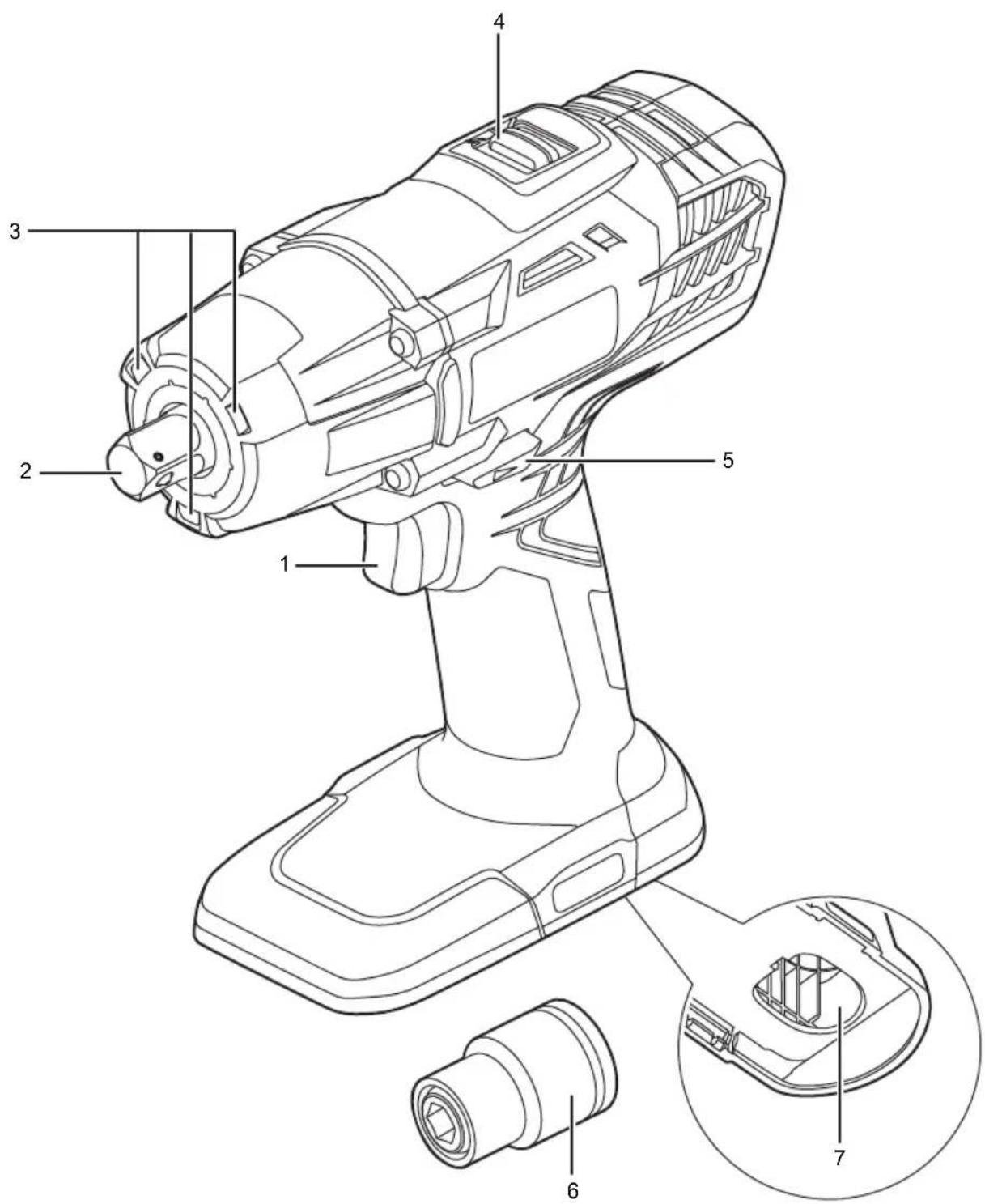
- Switch trigger
- Anvil
- LED worklight
-
Speed selector
-
Rotation selector (Forward / Reverse / Center lock)
- Impact socket
- Battery port
1
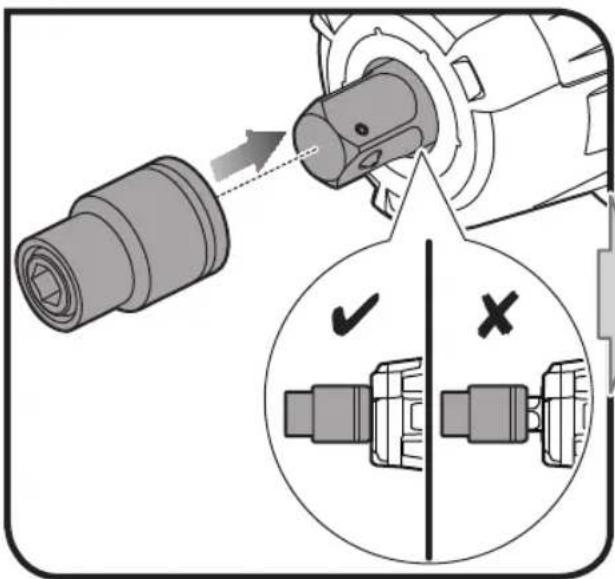
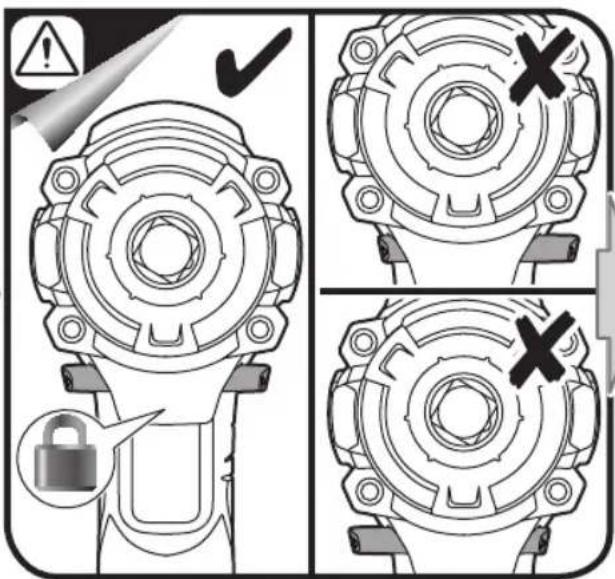
4
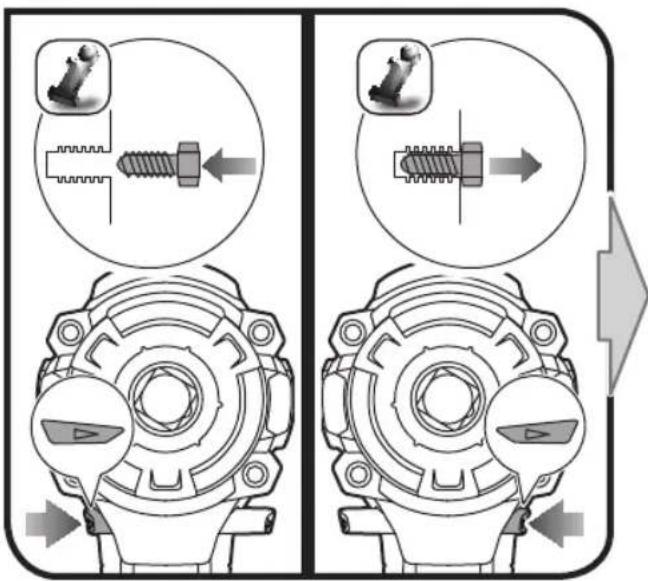
5
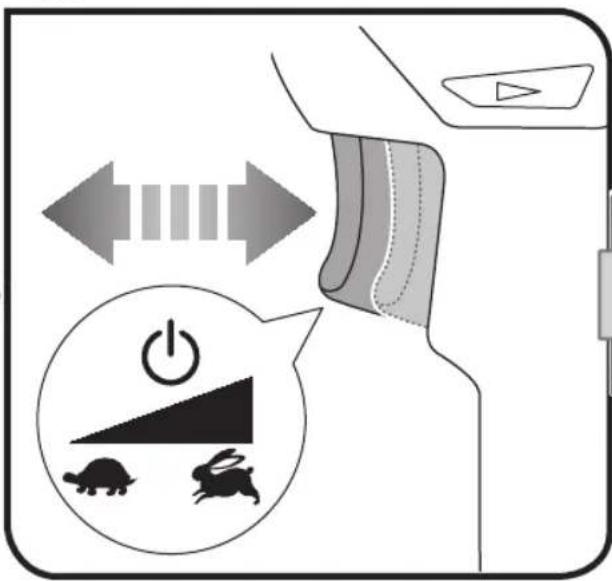
2
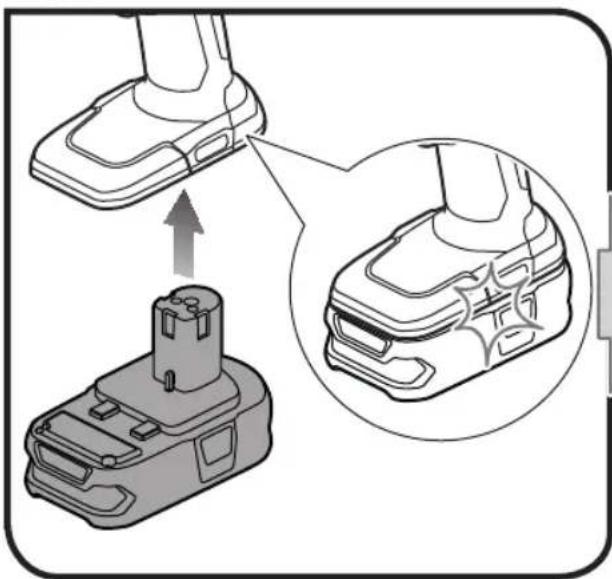
natural_image
Diagram showing a battery pack and its internal components, with an arrow indicating upward movement (no text or symbols present)3
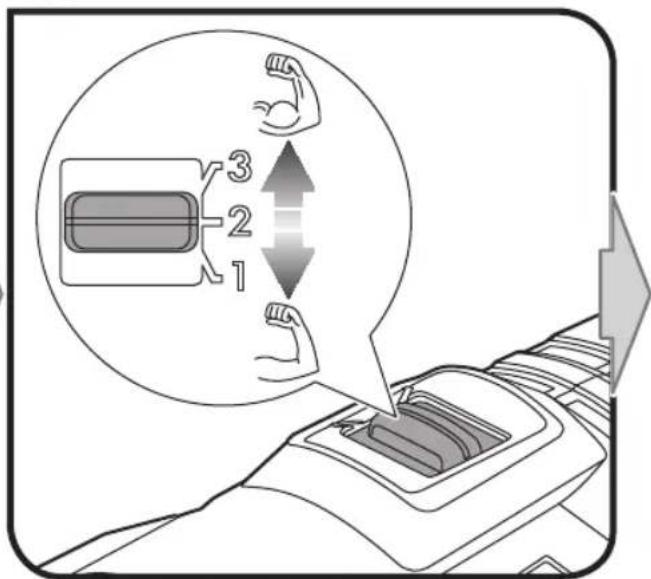
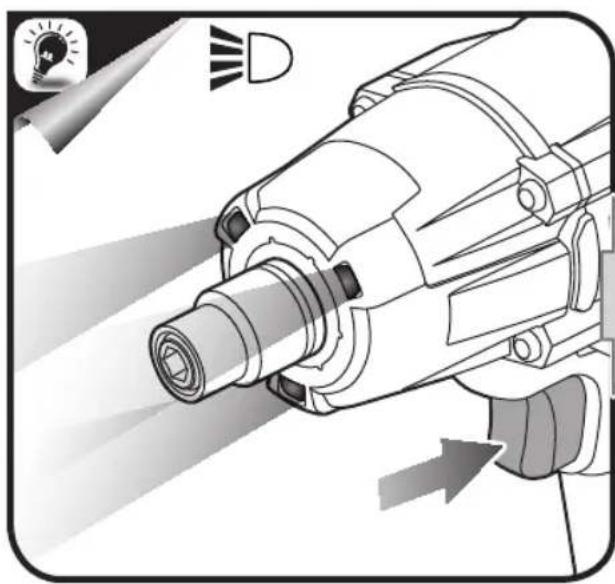
natural_image
Technical illustration of a mechanical device with light rays and a lightbulb icon (no text or symbols)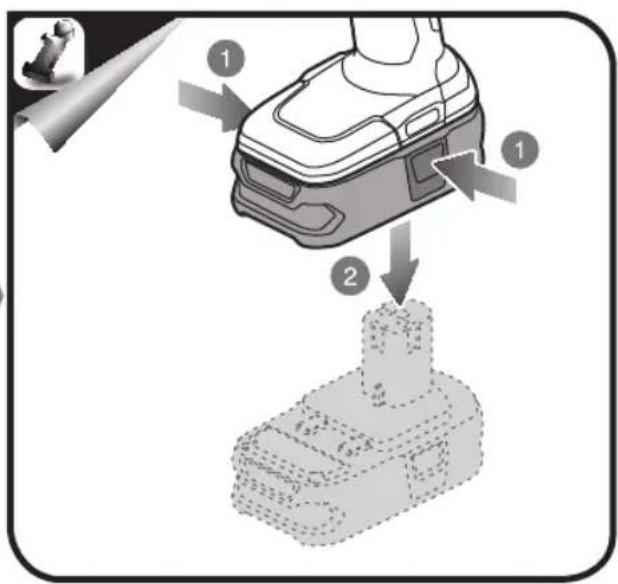
PRODUCT SPECIFICATIONS
| 18V Impact wrench | |
| Voltage 18 V | --- |
| Coupler 12.7 mm (1/2") | |
| Switch Variable speed | |
| No load speed* | |
| Speed 1 | 0 - 2100 min ^-1 |
| Speed 2 | 0 - 2500 min ^-1 |
| Speed 3 | 0 - 2900 min ^-1 |
| Max. torque* | |
| Speed 1 | 186 Nm |
| Speed 2 | 245 Nm |
| Speed 3 | 360 Nm |
| Blows per minute | 0 - 3200 BPM |
* Tested with RB18L50 battery pack
BATTERY AND CHARGER
| Model Compatible batterypack (not included) | Compatible charger(not included) | |
| Lithium-Ion | RB18L13 | |
| RB18L15 | BCS618G | |
| RB18L25 | BCL14181H | |
| RB18L26 | BCL14183H | |
| RB18L40 | BCL1418IV* | |
| RB18L50 | ||
* for vehicles with 12V DC outlets


RYOBI®
Techtronic Industries (Australia) Pty. Ltd.
31 Gilby Road,
Mount Waverley VIC 3149,
Australia
Techtronic Industries New Zealand Ltd.
18-26 Amelia Earhart Avenue
Mangere, Auckland 2022, New Zealand




- Important!
- INTENDED USE
- GENERAL POWER TOOL SAFETY WARNINGS
- WARNING
- 1) WORK AREA SAFETY
- 2) ELECTRICAL SAFETY
- 3) PERSONAL SAFETY
- 4) POWER TOOL USE AND CARE
- 5) BATTERY TOOL USE AND CARE
- 6) SERVICE
- IMPACT WRENCH SAFETY WARNINGS
- TRANSPORTING LITHIUM BATTERIES
- RESIDUAL RISKS
- RISK REDUCTION
- MAINTENANCE
- LUBRICATION
- ENVIRONMENTAL PROTECTION
- SYMBOLS
- Safety
Brand : RYOBI
Model : One+ R18IW
Category : Screwdriver