
WMN5870XT - TV Stand SAMSUNG - Free user manual and instructions
Find the device manual for free WMN5870XT SAMSUNG in PDF.


| Product Type | TV Stand |
| Brand | Samsung |
| Model | WMN5870XT |
| Color | Black |
| Material | Metal frame, tempered glass shelves |
| Dimensions (W x H x D) | 47.2 in x 18.5 in x 15.0 in (1200 mm x 470 mm x 380 mm) |
| Weight | 44.1 lb (20 kg) |
| Max TV Screen Size | Up to 65 inches |
| Max TV Weight Capacity | 55 lb (25 kg) |
| VESA Compatibility | 200x200, 300x300, 400x400 mm |
| Shelves | 2 tempered glass shelves |
| Max Shelf Load | 10 lb (4.5 kg) each |
| Cable Management | Yes, with rear cable covers |
| Assembly Required | Yes, instructions included |
| Power Supply | Not applicable (passive stand) |
| Features | Swivel, tilt, and leveling feet |
| Safety | Anti-tip bracket included |
| Cleaning | Wipe with a soft, dry cloth |
| Spare Parts | Screws and brackets available from Samsung service |
| Repairability | Components replaceable; contact Samsung support |
| Warranty | 1 year limited |
Frequently Asked Questions - WMN5870XT SAMSUNG
User questions about WMN5870XT SAMSUNG
0 question about this device. Answer the ones you know or ask your own.
Ask a new question about this device
Download the instructions for your TV Stand in PDF format for free! Find your manual WMN5870XT - SAMSUNG and take your electronic device back in hand. On this page are published all the documents necessary for the use of your device. WMN5870XT by SAMSUNG.
USER MANUAL WMN5870XT SAMSUNG
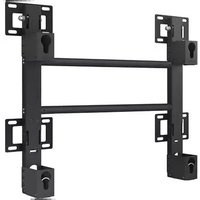
Angle Adjustment and Rotation Type Wall-Mount Bracket Installation Guide WMN5870XT

Product Image


Components
Use only the supplied components for bracket installation.
Angle Adjustment Bracket
× 1
Brackets
Left x 1
Right x 1
Accessories
Plastic hangers x 4
| Screws © x 4 | Washers | ||
| M8 x L35 | M8 x L40 | M8 x L49 | 1T:4 |
| M8 x L55 | M8 x L65 | M8 x L71 | 3T:4 |


Anchor x 12
Screws a x 12 Screws b x 8
Wire Fixing Tool x 1

Safety Instructions
We strongly recommend that you employ a qualified installer to install this wall bracket.
Contact a qualified technician at your dealer to move or replace the wall bracket after installation.

Do not hang on or give sudden impacts to the product.

- Keep children away from the wall mount bracket. Children can be seriously injured if they hit their heads on an edge of the bracket.
- Be careful when you adjust the angle or rotate the bracket. You can damage the bracket or the TV if the bracket or TV strikes the wall. (Attach sponges to 4 corners of the bracket to prevent damage to the bracket or the wall.)
- Do not install the bracket in a location with high temperature and high humidity. Do not install the bracket on a wall that cannot bear the weight of the bracket and TV.
- Since there is a danger of electric shock, do not insert your fingers into the TV stand installation hole while installing the wall bracket.
- Make sure to cover the TV stand installation hole with the hole cover supplied with the TV before completing the wall installation.

Wall Bracket Assembly
1. Install the angle adjustment bracket on the wall as shown in the figure. Make sure the word "Top" on the pull out section of the angle adjustment bracket is facing up. Use a carpenter's level to make sure the bracket is level.

Tighten the angle adjustment bracket by using anchors and screws ①. Insert and tighten the screws in order from ① to ⑨.
If the wall in your initial installation location is not solid enough to install the bracket, install it in a nearby location where the wall is strong enough.
How to Install the Supplied Anchors and Tighten the Supplied Screws.
Concrete wall

Use the angle adjustment bracket as a template to mark the screw hole locations. Make a hole in the wall with a 9 mm x 70 mm (11/32 inch x 2.5 inch) drill bit at one of the marked locations.

Clean out the hole.

Insert the supplied anchor into the hole.

Match the holes on the angle adjustment bracket to the holes on the wall. Insert and then tighten the screws.
Use a drill bit of the required size. Be sure to follow the installation instructions to avoid safety problems.
⚠️ Check the solidity of the wall before installation. Strengthen the wall if necessary. Do not install the bracket on a wall that is not strong enough. The supplied screws and anchors are for installing on concrete walls. ⚠ For plaster, marble, or steel walls, use the appropriate screws and anchors.
2 Securely fix the angle adjustment bracket to the wall. Then, pull the angle adjustment bracket forward and unfold it. Insert the left bracket onto the angle adjustment bracket as shown in the diagram below, and then tighten with the supplied screws (b).
Repeat the same process with the right bracket.

3 Remove the screws from the main body of the TV, assemble the 4 enclosed plastic hangers and screws Ⓞ as shown in the figure, and then fasten them to the back of the main body of the TV.
[Normal TV, Q900R]

[78HU8500~9800, 78JS9000~9500, S9500~9900]
![graph LR A["M8 x L49"] --> B["Component"] B --> C["Speaker"] C --> D["Output"]](/content/2026/06/1355303/images/d1b1e01a768e8da4c5ac622312b6104fd3ff60a71a41fba9cf6746a2d352deee.jpg)
[KU6500~7570, KS7500~8800, MU6500~7600, NU8000~8100, Q6FN]
![graph LR A["M8 x L71"] --> B["Component"] B --> C["Component"] C --> D["Component"]](/content/2026/06/1355303/images/5c284c0ab2390ec6bea20db4dad113eef6b4e25ba0f75411b481e24611378fc4.jpg)

When you mount the TV on the wall bracket, be sure to check the left and right side to ensure it is properly attached to the brackets. ⚠️ Be careful when installing the TV or adjusting the angle as fingers can be caught in the holes. ⚠️ Be sure the wall bracket is securely fixed to the wall. If the TV falls, it can cause physical damage or injury.
4 Pull out the wall-mount bracket assembly to the front as shown. With two people holding the TV, one on either side, lift up the TV and hang it on the bracket assembly.
Do not touch or push the LCD screen. Hold the TV by its frame. Do not push at the corners of the TV.


After you have installed the TV on the wall bracket, rotate the safety pins on the upper part of each bracket to fix the TV to the wall mount.
5 To manage the power cord and other cables from peripheral equipment, bundle the wires using the supplied wire fixing tool. Ensure the wires are not unbundled or do not come off when you rotate or operate the TV.
Insert the cables, then pull the angle adjustment bracket forward.
Arrange the wires in the hole formed by the wire fixing tool so they won't interfere with the TV when you rotate it. Check the operation 2 to 3 times to ensure it works properly.


Wall Bracket Angle Adjustment
The smooth moving mechanism built into the wall bracket lets you adjust the angle of your TV smoothly and easily.

- Do not use excessive force to adjust the angle of the TV. It should move easily.
- Do not angle the TV so that its edges are close to the wall. You can damage the bracket or the TV if the bracket or TV strikes the wall.
- Hold the left and right side of the TV when you want to adjust the left and right angle. Avoid touching the screen.
- Hold the top center to adjust the down angle. You can adjust the angle of the TV up, down, left, and right between -20 degrees and 20 degrees.
The adjustable angle range may vary depending on the model.


Product Standards
| Width (mm / inch) | 664.0 / 26.14 |
| Height (mm / inch) | 460.0 / 18.11 |
| Depth (mm / inch) | 50.0 / 1.97 |
| Weight (kg / lb) | 10.7 / 23.6 |
| Bracket VESA Standard | 600 x 400 |


Information in this document is subject to change without notice.
| Q900RQ95TQ90T | M8 x L40 | → | [IMAGE] | UpDown |  | |
| M8 x L40 | → | [IMAGE] | ||||
| Q90R | M8 x L49 | → | [IMAGE] | UpDown |  | |
| M8 x L49 | → | [IMAGE] | ||||
| Q70R~Q85R | M8 x L64 | → | 1T Washers | UpDown |  | |
| M8 x L64 | → | 1T Washers | ||||
| Q60R~Q65RRU7000~8500Q70T 85 inch | M8 x L71 | → | 1T Washers | UpDown |  | |
| M8 x L71 | → | 1T Washers | ||||
| Q950TS | M8 x L35 | → | 3T Washers | UpDown |  | |
| M8 x L35 | → | 3T Washers | ||||
| Q900TSQ800T~Q850T | M8 x L40 | → | 1T Washers | UpDown |  | |
| M8 x L40 | → | 1T Washers | ||||
| Q80T | M8 x L55 | → | 3T Washers | UpDown |  | |
| M8 x L55 | → | 3T Washers | ||||
| Q70T 82 inch | M8 x L71 | → | 3T Washers | UpDown |  | |
| M8 x L71 | → | 3T Washers | ||||
| TU8000, TU7000 | M8 x L49 | [IMAGE] | UpDown |  | ||
| M8 x L49 | [IMAGE] |
This SAMSUNG brand product, as supplied and distributed by SAMSUNG and delivered new, in the original carton to the original consumer purchaser, is warranted by SAMSUNG against manufacturing defects in materials and workmanship for a limited warranty period of 1 year. (90 Days Parts and Labor for Commercial Use) This limited warranty begins on the original date of purchase. To receive warranty service, the purchaser must contact SAMSUNG for problem determination and service procedures. Warranty service can only be performed by a SAMSUNG authorized service center. The original dated bill of sale must be presented upon request as proof of purchase to SAMSUNG or SAMSUNG's authorized service center.
Korean
Warranty: 1 year
Contact SAMSUNG WORLDWIDE If you have any questions or comments relating to Samsung products, please contact the SAMSUNG customer care center.
| Region | Contact Center a | Web Site | |
| North America | CANADA | 1-800-SAMSUNG (726-7864) | www.samsung.com/ca/support (English)www.samsung.com/ca_fr/support (French) |
| MEXICO | 01-800-SAMSUNG (726-7864) | www.samsung.com/mx/support | |
| Dirección: General Marzano Escobedo 476 Piso 8 Col.Anzures Delegación Miguel Hidalgo, Distrito Federal CP 11590 | |||
| U.S.A | 1-800-SAMSUNG (726-7864) | www.samsung.com/us/support | |
| Latin America | ARGENTINE | 0800 333 3733 | www.samsung.com/ar/support |
| BRAZIL | 0800-124-421 (Demas cidades e regiões)4004-0000 (Capitais e grandes centros) | www.samsung.com/br/support | |
| CHILE | 800-SAMSUNG(726-7864)[HHP] 02-24828200 | www.samsung.com/ci/support | |
| COLOMBIA | Bogotá 600 12 72Gratis desde cualquier parte del país 01 8000 112 112 ó desde su celular #SAM(726) | www.samsung.com/co/support | |
| COSTA RICA | 0-800-507-726700-800-1-SAMSUNG (726-7864) | www.samsung.com/latin/support (Spanish)www.samsung.com/latin_en/support (English) | |
| DOMINICA | 1-800-751-2676 | ||
| EQUADOR | 1-800-10-726701-800-SAMSUNG (72-6786) | ||
| EL. SALVADOR | 800-6225 | ||
| GUATEMALA | 1-800-299-00131-800-299-0033 | ||
| HONDURAS | 800-27919267800-2791-9111 | ||
| JAMAICA | 1-800-234-72671-800-SAMSUNG (726-7864) | www.samsung.com/latin/support | |
| NICARAGUA | 001-800-5077267 | www.samsung.com/latin/support (Spanish)www.samsung.com/latin_en/support (English) | |
| PERU | 0-800-777-08Desde celulares por favor lamar si número 336 8686 | www.samsung.com/pa/support | |
| PUERTO RICO | 1-800-682-3180 | www.samsung.com/latin/support (Spanish)www.samsung.com/latin_en/support (English) | |
| TRINIDAD & TOBAGO | 1-800-SAMSUNG(726-7864) | ||
| VENEZUELA | 0-800-SAMSUNG (726-7864) | www.samsung.com/ve/support | |
| CIS | RUSSIA | 8-800-555-55-55 | www.samsung.com/ru/support |
| GEORGIA | 8-800-555-555 | www.samsung.com/support | |
| ARMENIA | 0-800-05-555 | ||
| AZERBAIJAN | 088-55-55-555 | ||
| KAZAKHSTAN | 8-10-800-500-55-500(GSM: 7799, VIP care 7700) | ||
| UZBEKISTAN | 8-10-800-500-55-500 | ||
| KYRGYZSTAN | 8-10-800-500-55-500 | www.samsung.com/kz_rul/support | |
| TADUKISTAN | 8-10-800-500-55-500 | www.samsung.com/support | |
| MONGOLIA | 7-800-555-55-55 | www.samsung.com/support | |
| UKRAINE | 0-800-502-000 | www.samsung.com/ua/support (Ukrainian)www.samsung.com/ua_ru/support (Russian) | |
| BELARUS | 810-800-500-55-500 | www.samsung.com/support | |
| MOLDOVA | 0-800-614-40 | www.samsung.com/support | |
| Asia Pacific | AUSTRALIA | 1300 362 603 | www.samsung.com/au/support |
| NEW ZEALAND | 0800 SAMSUNG (0800 726 786) | www.samsung.com/hk/support (Chinese)www.samsung.com/hk_en/support (English) | |
| HONG KONG | (852) 3698 4698 | ||
| INDIA | 1800 3000 8282 - Toll Free1800 266 8282 - Toll Free30308282 - Non Toll Free | www.samsung.com/in/support | |
| INDONESIA | 0800112888021-56997777 | www.samsung.com/id/support | |
| JAPAN | 0120-327-527 | www.samsung.com/jp/support | |
| MALAYSIA | 1800-88-9999 | www.samsung.com/my/support | |
| PHILIPPINES | 1-800-10-7267864 [PLDT]1-800-8-7267864 [Globe landline and Mobile]02-4222111 [Other landline] | www.samsung.com/ph/support | |
| SINGAPORE | 1800-SAMSUNG(726-7864) | www.samsung.com/sg/support | |
| THAILAND | 0-2689-3232,1800-29-3232 | www.samsung.com/tr/support | |
| TAIWAN | 0800-32-9999 | www.samsung.com/tw/support | |
| VIETNAM | 1 600 588 889 | www.samsung.com/vn/support | |
| Middle East | U.A.E | 800-SAMSUNG (726-7864) | www.samsung.com/ae/support (English)www.samsung.com/ae_ar/support (Arabic) |
| OMAN | 800-SAMSUNG (726-7864) | ||
| KUWAT | 183-2255 (183-CALL) | ||
| BAHRAIN | 8000-4726 | ||
| EGYPT | 08000-72678616580 | www.samsung.com/eg/support | |
| JORDAN | 0800-2227306 5777444 | www.samsung.com/Levant/support (English) | |
| IRAN | 021-8255 | www.samsung.com/iran/support | |
| MOROCCO | 060 100 2255 | www.samsung.com/n_africa/support | |
| SALUDI ARABIA | 920021230 | www.samsung.com/sa/supportwww.samsung.com/sa_en/support (English) | |
| Africa | NIGERIA | 0800-726-7864 | www.samsung.com/afrika_en/support |
| GHANA | 0800-100770302-200077 | ||
| COTE D'IVOIRE | 8000 0077 | www.samsung.com/afrika_fr/support | |
| SENEGAL | 800-00-0077 | ||
| CAMEROON | 7095- 0077 | ||
| KENYA | 0800 545 545 | www.samsung.com/support | |
| UGANDA | 0800 300 300 | ||
| TANZANIA | 0685 88 99 00 | ||
| SOUTH AFRICA | 0860-SAMSUNG (726-7864) | ||
Brand : SAMSUNG
Model : WMN5870XT
Category : TV Stand