
RRCD 3700 MP3 - Mp3 player GRUNDIG - Free user manual and instructions
Find the device manual for free RRCD 3700 MP3 GRUNDIG in PDF.


| Product type | MP3 player with radio, CD and cassette player |
| Brand | GRUNDIG |
| Model | RRCD 3700 MP3 |
| Category | MP3 player |
| Power supply | Mains adapter 230 V / 50 Hz and 6 LR14 (C) batteries |
| Power consumption | 15 W (estimated) |
| Radio - Frequency ranges | FM 87.5 – 108 MHz, AM 522 – 1620 kHz |
| Radio - Antenna | Telescopic antenna for FM, ferrite bar for AM |
| CD player - Supported formats | Audio CD, CD-R, CD-RW, MP3 |
| Cassette player - Functions | Playback and recording of audio cassettes |
| MP3 function | Playback of MP3 files on CD-R/RW |
| Display | LCD screen with backlight |
| Speakers | 2 × 3 W, stereo |
| Headphone jack | 3.5 mm stereo jack |
| Dimensions (W × H × D) | 350 × 250 × 150 mm (estimated) |
| Weight | 2.5 kg (estimated) |
| Safety | Safety instructions included in the manual: do not expose to moisture, do not open the device |
| Maintenance and cleaning | Clean with a soft, dry cloth. Use a CD lens cleaner if necessary. |
| Spare parts and repairability | Spare parts not specified - contact Grundig customer service or an authorized repairer |
| General information | Manual available in several languages. Keep this manual for future reference. |
Frequently Asked Questions - RRCD 3700 MP3 GRUNDIG
User questions about RRCD 3700 MP3 GRUNDIG
0 question about this device. Answer the ones you know or ask your own.
Ask a new question about this device
Download the instructions for your Mp3 player in PDF format for free! Find your manual RRCD 3700 MP3 - GRUNDIG and take your electronic device back in hand. On this page are published all the documents necessary for the use of your device. RRCD 3700 MP3 by GRUNDIG.
USER MANUAL RRCD 3700 MP3 GRUNDIG
To ensure that this device provides you with long-term satisfaction and enjoyment, please observe the following instructions.
This device is designed for the playback of audio signals. Any other use is expressly prohibited.
Protect the device and the CDs from rain, moisture (dripping or splashing water), sand and heat. Do not leave it next to heaters or inside parked cars in the sun.
Make sure there is adequate ventilation when positioning the device. There must be a free space of at least 10 cm behind the device. Do not place objects on the ventilation slots. Do not cover the device with newspapers, table cloths, curtains, etc.
Only use the device in a moderate climate.
Do not place any vessels containing liquids (for example, vases) on the device. Do not place any naked flames such as candles on the device. Do not insert objects other than CDs into the CD compartment of the device.
Bringing the device in from the cold can cause condensation on the CD lens, which prevents it from playing. Give the device time to warm up.
The CD part contains self-lubricating bearings, which must not be oiled or greased.
Never open the device casing under any circumstances. No warranty claims are accepted for damage caused by incorrect handling.
Thunderstorms are a danger to all electrical devices. Even if the device is switched off, it can be damaged by a lightning strike to the mains. Always remove the power plug during a thunder storm.
Do not use any cleaning agents as they may damage the housing. Clean the device with a clean, dry cloth.
When deciding where to put the device, remember that furniture is often coated with various types of varnish and plastic. Many of these contain chemicals which can corrode the feet of the device, leaving marks on the surface of the furniture which can be difficult or impossible to remove.
Make sure the power plug is freely accessible.
Note:
If malfunctions occur due to static electricity charges or fast transient (burst), reset the device. To do this, pull out the power plug and connect it again after a few seconds.
General information on laser devices
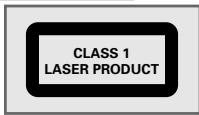
You will find a symbol similar to the one shown here on the bottom of the device.
CLASS 1 LASER PRODUCT means that the laser is designed in such a way as to ensure that the maximum permissible emission value cannot be exceeded under any circumstances.
If operating devices or methods other than those specified here are employed, it may lead to dangerous exposure to emissions.
Invisible laser radiation is emitted if the CD compartment is opened and the safety locking mechanism is shorted. Do not expose yourself to this radiation.
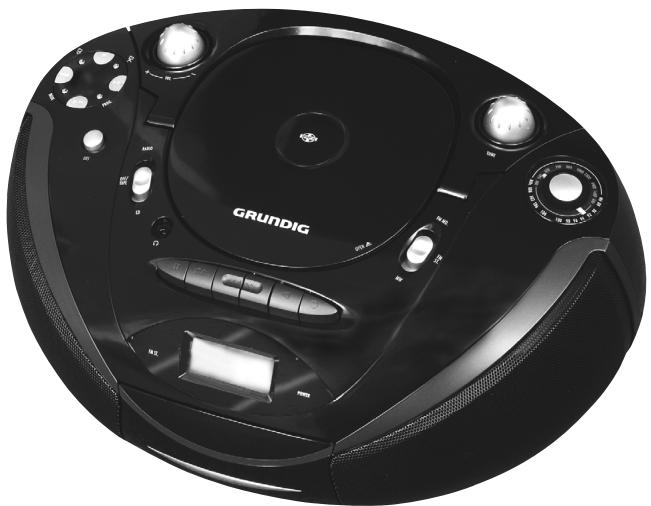
Controls
RRCD 2700
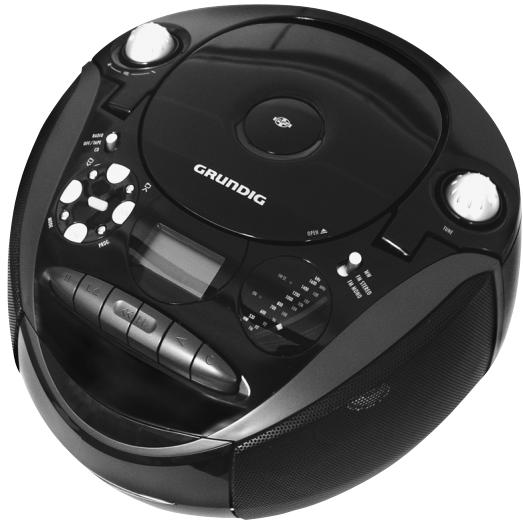
natural_image
Top-down view of a black Grundig portable radio with control knobs and a display (no visible text or symbols on the device body)General information
RADIO OFF/TAPE Switches between the CD, TAPE and RADIO input sources. CD Switches off the device.
POWER (ON) • Mode indicator. Lights up red during operation.
+ VOL. - Adjusts the volume.
UBS Switches the Ultra Bass System on and off.

Headphone jack for connecting a headphone set with a jack plug ( 3.5 mm) on the left side of the device for RRCD 2700 MP3). This automatically switches off the loudspeakers.
AC\~ Socket for connecting the power cord on the back of the device.
Radio unit
Antenne Telescopic antenna for FM (VHF) reception
FM MONO FM STEREO Switches between MW (medium wave), FM stereo and FM mono reception (VHF).
MW
FM ST. • LED indicator. Glows green for FM stereo reception.
RRCD 3700
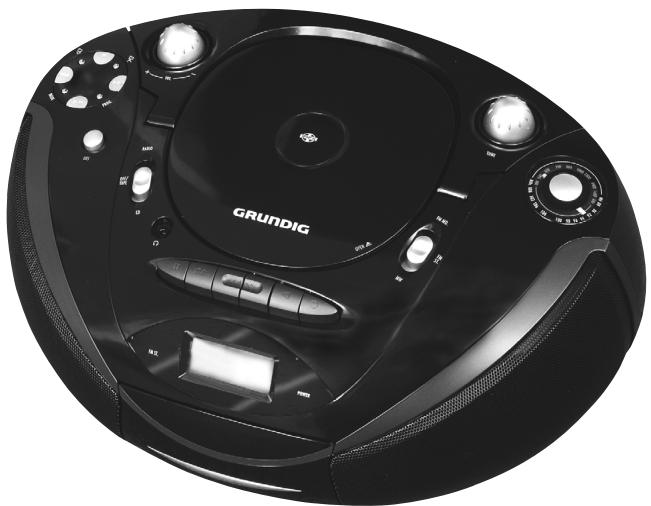
natural_image
Close-up of a black Grundig CD or DVD with control knobs and dials (no visible text or symbols on the device body)TUNE Sets radio stations.
MW Wavelength and frequency display.
530 ... 1600 kHz
FM
88 ... 108 MHz
CD unit
OPEN ▲ Opens and closes the CD compartment.
Starts and pauses playback.
Press briefly to select the next or previous track.
Press and hold down to start a forward or reverse search.
Ends playback and deletes a track memory.
PROG. Saves CD tracks for creating a playlist.
RRCD 2700
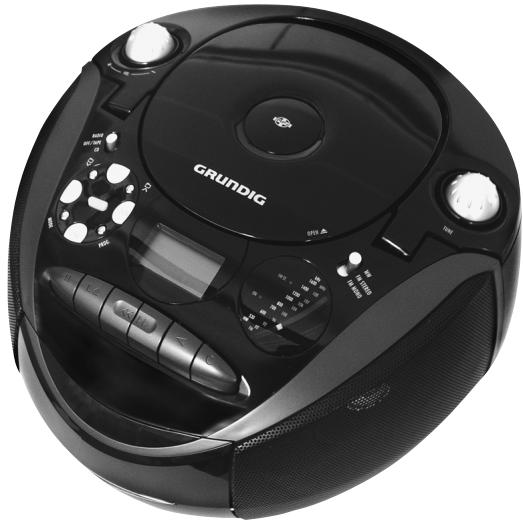
natural_image
Top-down view of a black Grundig portable radio with control knobs and a display (no visible text or symbols on the device body)MODE
Press repeatedly to select the following operating modes during CD playback: normal playback, repeat current track, repeat all tracks of the CD, repeat folder (MP3/WMA only), play introductions to all tracks (CD-DA only) and normal playback again.
When stopped, the random playback operating mode is also available.

In MP3/WMA mode: switches to next folder during playback.
When the device is stopped, displays the next folder number (switches to next folder number when stopped, starts playback with the first track of the selected folder – the current folder and current track are displayed).

In MP3/WMA mode: switches to previous folder during playback.
When the device is stopped, displays the previous folder number.
RRCD 3700
natural_image
Close-up of a black Grundig CD or DVD with control knobs and dials (no visible text or symbols on the device body)Tape unit
Cassetten-Fach Tape compartment. Press here to close.
Pauses recording and playback.
■ ▲ Ends playback/recording of the tape and opens the tape compartment.
Fast forwards the tape to the end.
Rewinds the tape to the beginning.
Starts playback.
Starts recording.
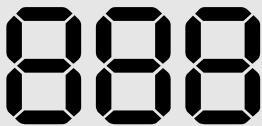
Displays

ALL
MP3
WMA
RANDOM
INTRO


PROG
888
In CD-DA mode: shows the total number of tracks and the current track. In MP3/WMA mode: displays the total number of tracks, displays the number of the current folder and the current track.
In CD-DA and MP3/WMA mode: displays the playlist memory position when creating a playlist.

In CD-DA and MP3/WMA mode: glows if a track is being repeated.

In MP3/WMA mode: » ◎ « glows if all tracks of the current folder are being repeated. » ◎ « flashes briefly with the folder number if all tracks of the current folder are being repeated.

ALL
In CD-DA and MP3/WMA mode: lights up when the whole CD is repeated.
MP3
In MP3 mode: indicates that an MP3 track is being played back.
WMA
In WMA mode: indicates that an WMA track is being played back.
RANDOM
In CD-DA and MP3/WMA mode: all tracks are played back in random order.
INTRO
In CD-DA mode: a short introduction to all tracks is played.

In CD-DA and MP3/WMA mode: glows during playback. Flashes during playback pauses.

In MP3/WMA mode: shows the folder level.
PROG
In CD-DA and MP3/WMA mode: flashes when a playlist is created. Glows when a playlist is played back.
Power supply
Mains operation
Check that the mains voltage on the type plate (on the bottom of the device) corresponds to your local mains supply. If this is not the case, contact your specialist dealer.
1 Plug the power cord supplied into the »AC\~« socket on the back of the device.
2 Plug the power cord into the wall socket.
Caution:
The device is connected to the mains with the power cord. Pull out the power cord when you want to completely disconnect the device from the mains.
Unplug the mains plug to disconnect the device from the mains. Make sure the power plug is easily accessible during operation and not hindered by other objects.
Battery operation
1 Open the battery compartment by pressing in »OPEN« (bottom of the device) and pushing the lid in the direction of the arrow (»▼«).
2 Insert six batteries (RRCD 2700 MP3: 6 x 1,5 V, type LR14/AM2/C size; RRCD 3700: 6 x 1,5 V, type LR20/AM1/D size), observing the polarity marked in the battery compartment.
Notes:
Do not expose the batteries to extreme heat, caused for example by direct sunlight, heaters or fire.
Remove the batteries when they are flat or when you know that the device will not be used for a long period of time. The manufacturer accepts no liability for damage caused by leaking batteries.
The batteries are switched off during mains operation.
Environmental note:
Batteries, including those which contain no heavy metal, should not be disposed of with household waste. Please dispose of used batteries in an environmentally sound manner.
Find out about the legal regulations which apply in your area.
GENERAL FUNCTIONS
Switching on and off
1 Switch on the device with the input source by moving the »RADIO OFF/TAPE CD« switch to the corresponding position.
2 Move the »RADIO OFF/TAPE CD« switch to the »OFF/TAPE« position to switch off the device.
Selecting the input source
1 Select the input source (CD, TAPE or RADIO) using »RADIO OFF/TAPE CD«.
Adjusting the volume
1 Press »+ VOL. -« to adjust the volume.
Switching the Ultra Bass System on and off
This function boosts the bass frequencies.
1 Switch the Ultra Bass System on and off by pressing »UBS«.
Listening with headphones
1 Connect the headphones to the » 🔊« headphone jack (ø 3.5 mm). – This switches off the loudspeakers.
Note:
Excessive sound pressure from the earphones or headphones can cause hearing loss.
RADIO MODE
Antennas
1 For FM stations (VHF) extend the telescopic antenna »Antenne«.
Note:
If the FM signal is too strong, it is advisable to push in the telescopic antenna.
2 The radio has a built-in rod antenna for MW reception. Turn the device around to align the antenna.
Selecting the radio input source
1 Move the »RADIO OFF/TAPE CD« switch to the »RADIO« position.
Selecting radio stations
1 Press »FM MONO FM STEREO MW« to select the frequency band (FM or MW).
2 Select the radio station with »TUNE«. – The frequency is displayed on the frequency scale.
RADIO MODE
Stereo/mono reception
If the device receives an FM stereo station, »FM ST. •« appears in the display. However, if the signal from the FM stereo station is weak, you can improve the sound quality by switching to mono reception.
1 Switch to mono reception with »FM MONO FM STEREO MW« (»FM MONO«).
2 Switch to stereo reception with »FM MONO FM STEREO MW« (»FM STEREO«).
CD MODE
The device is suitable for music CDs displaying the logo shown here (CD-DA) and for CD-Rs and CD-RWs with audio data or MP3 and WMA formats.
In MP3 mode, the terms "album" and "file" are very important. "Album" corresponds to a folder on a PC, "file" to a file on a PC or a CD-DA track. The device reads MP3 data with a maximum of 255 tracks per folder. An MP3 CD may not contain more than 511 tracks and 256 folders in total.
The device sorts the folders, or the tracks in a folder, by name into alphabetical order. If you want to order them differently, change the name of the track or folder and put a number before the name.
When burning CD-R and CD-RWs with audio files, various problems may arise which could lead to problems with playback. This can be caused by faulty software or hardware settings or by the CD being used. Should such problems arise, contact the customer services of your CD burner or software manufacturer or look for relevant information, for example on the Internet. When you are making audio CDs, observe all legal guidelines and ensure that the copyright of third parties is not infringed.
Always keep the CD compartment closed to prevent dust from collecting on the laser optics. Do not attach adhesive labels to CDs. Keep the surfaces of CDs clean. You can play standard 12 cm CDs as well as 8 cm CDs on your device. An adapter is not necessary.
Selecting the CD input source
1 Move the »RADIO OFF/TAPE CD« switch to the »CD« position.
2 Press »OPEN ▲« to open the CD compartment.
3 Insert a CD in the compartment with its label facing upwards.
4 Close the lid of the CD compartment by pressing »OPEN ▲«.
- The device scans the content of the CD. The total number of tracks appears in the display.
CD playback
1 Press »▶‖« to start playback.
- Playback always starts with the first file of the first album (MP3/WMA) or with the first track (CD-DA).
- Display: the current track number.
– Playback stops at the end of the CD.
Note:
The current folder number can be displayed in MP3/WMA mode by pressing »□ ∧« or »□ √« briefly.
2 Press »▶II« to pause playback.
3 Press »▶II« to resume normal playback.
4 Press »■« to end playback.
Repeating the current track
1 Briefly press »|« during playback.
– The track is repeated from the beginning.
Selecting another track
1 During playback, keep pressing »|«« or »»|« until the number of the track you want to hear appears in the display.
- Playback of the selected track starts automatically.
Searching for a passage within a track
1 During playback, press »|«« or »»|« and hold it down until you have found the passage.
- If »|«« or »»|« are released, playback starts.
Note:
During the search, the volume is reduced in CD-DA mode; in MP3 mode the search starts with a delay.
Selecting folders and tracks (only MP3/WMA)
1 During playback, select the desired album with »□ ∧« or »□ ∨«.
Note:
Pressing briefly displays the current folder number. When the folder display flashes, select the desired folder with »□ ∧« or »□ ∨«.
2 Press »|«« or »»»|« to select the track.
- Playback of the track starts automatically after a short time.
Notes:
You can also select folders and tracks in the stop position. However, you must then start playback of the file with »▶‖«.
The root folder is shown as number 1. However, you can only select a folder if it actually contains MP3/WMA files.
Repeating a track (Repeat 1)
1 Press »MODE« once during playback.
- The current track is repeated.
2 To quit the function, press »MODE« repeatedly until the repeat indicator »©« goes out.
Repeating all the tracks of a folder (Repeat 📄) (MP3/WMA only)
1 Press »MODE« twice during playback.
- All the tracks on the current folder are played back repeatedly.
2 To quit the function, press »MODE« repeatedly until the repeat indicator (»© «) goes out.
Repeating all tracks (Repeat All)
1 During playback, press »MODE« repeatedly until »ALL« appears in the display. – The whole CD is played in a loop.
2 To quit the function, press »MODE« repeatedly until the repeat indicator (» ⬇ ALL«) goes out.
Playing the introductions of all tracks (Intro) (CD-DA)
1 During playback, press »MODE« repeatedly until »INTRO« appears in the display. – Short introductions of all tracks on the CD are played.
2 To quit the function, press »MODE« repeatedly until the indicator »INTRO« goes out.
Playing back tracks in random order
1 When the device is stopped, press »MODE« repeatedly until »RANDOM« appears in the display.
2 Press »▶II« to start random playback.
- All tracks on the CD are played back once in random order.
3 To quit the function, press »MODE« repeatedly until the indicator »RANDOM« goes out.
Creating a playlist
You can create a playlist of up to 20 files on different albums (MP3/WMA) or up to 20 tracks (CD-DA) for the current CD in any order you choose and then play them back in that sequence. A file or track may be stored more than once. Programming is only possible in stop mode.
Selecting and storing tracks (MP3/WMA only)
1 Open the function with »PROG.«.
- Display: »P 01« for the first playlist memory position, »PROG« flashes.
2 Select the folder by pressing »□ ∧« or »□ ∨«.
3 Press »|«« or »»|« to select the track.
4 Save the track by pressing »PROG.«.
- Display: »P 02« for the second playlist memory position and »PROG« flashes.
5 To store more files, repeat steps 2 to 4.
Selecting and storing tracks (CD-DA only)
1 Open the function with »PROG.«.
- Display: »P 01« for the first playlist memory position, »PROG« flashes.
2 Press »|«« or »▶▶|« to select the track.
3 Save the track by pressing »PROG.«.
- Display: »P 02« for the second playlist memory position and »PROG« flashes.
4 To store more tracks, repeat steps 2 to 3.
Playing back a playlist
1 Press »▶‖« to start playing back the playlist.
- Playback begins with the first programmed track.
2 Press »■« to end playback.
3 To play the playlist again, press »PROG.« and afterwards »▶II«.
Replacing or adding tracks
1 When the device is stopped, keep pressing »PROG.« until the number of the track you want to replace appears in the display.
2 Select the number of the new track by pressing »|«« or »»|«.
3 Save the new track by pressing »PROG.«.
Deleting the playlist
The CD must be in the stop position.
1 Press »OPEN ▲« to open the CD compartment
or
in »PROG« mode (playlist playback) press »■« twice
or
move the »RADIO OFF/TAPE CD« switch to the »RADIO« or »OFF/TAPE« position.
TAPE MODE
Selecting the tape input source
1 Move the »RADIO OFF/TAPE CD« switch to the »OFF/TAPE« position.
2 Press »■ ▲« to open the tape compartment.
3 Put in a tape in the compartment with the open side facing upwards and the full reel on the right side.
4 Close the tape compartment.
Tape playback
1 Press »◀« to start playback.
– Playback ends at the end of the side of the tape.
2 Press »ll« to pause playback.
Press »ll« to resume playback.
3 Press »■ ▲« to end playback.
4 Press »■ ▲« again to open the tape compartment and take out the tape.
Fast forward and reverse search
1 Press »◀◀« or »▶▶« when the tape is in the stopped.
– »◀◀« forwards to the end of the tape, »▶▶« rewinds to the start of the tape.
2 Press »■ ▲« at the position you want.
Recording onto tape
Erase protection
natural_image
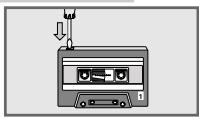
Illustration of a cassette tape with a cable, showing a cable being inserted into a clip (no text or symbols present)Each new recording writes over the previous recording.
You can protect your recordings against inadvertent deletion by breaking out the corresponding protection tab in the opening in the spine of the tape.
Purchased recordings on music tapes are already protected against accidental deletion.
TAPE MODE
If you wish to record on a protected tape, seal the corresponding opening with adhesive tape.
Notes:
Only use NORMAL-type cassettes (IEC I) for recording. CHROME (IEC II) or METAL (IEC IV) tapes are not suitable.
The Ultra Bass System does not affect recording.
Recording from the radio
1 Insert a tape without deletion protection and search for the desired tape position with »◀◀« or »▶▶«.
2 Move the »RADIO OFF/TAPE CD« switch to the »RADIO« position and select the radio station.
3 Press » ● « to start recording.
- The »◀« button is automatically engaged.
– The device automatically stops recording at the end of the tape.
4 Press »ll« to pause recording.
Press »ll« to resume recording.
5 Press »■ ▲« to stop recording.
Recording from a CD
1 Insert a tape without deletion protection and search for the desired tape position with »◀◀« or »▶▶«.
2 Move the »RADIO OFF/TAPE CD« switch to the »CD« position.
3 Pause the CD during playback at the desired position by pressing »▶II«.
4 Press » ● « to start recording.
- The »◀« button is automatically engaged and CD playback starts automatically.
- At the end of the tape, the CD switches to playback pause automatically.
5 Turn the tape over and continue recording with » ● «.
CD synchro recording
1 Insert a tape without deletion protection and search for the desired tape position with »◀◀« or »▶▶«.
2 Move the »FUNCTION RADIO TAPE/OFF CD« switch to the »CD« position.
3 Press » ● « to start recording.
- The »▶« button is automatically engaged. Playback automatically starts from the beginning of the CD or the start of the stored playlist when you briefly press »PROG.« on the device.
- CD playback is automatically paused at the end of the tape.
Cleaning the tape drive
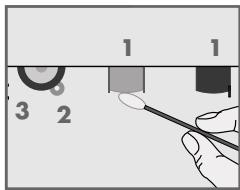
To guarantee good recording and playback quality, the parts shown (1, 2, 3) should be cleaned after every 50 hours of use, or once a month.
Open the tape compartment, moisten a cotton swab with alcohol or a special head-cleaning fluid and clean the idler (3), the capstan (2) and the magnetic heads (1). Close the cassette compartment. You can also play a cleaning cassette to clean the magnetic heads (1).
Protect your tapes against moisture, dust, heat and cold.
Do not store your cassettes near devices with strong magnetic fields such as television sets or stereo speakers.
After using a cassette, put it back in its protective case.
Technical data
This device is noise-suppressed according to the applicable EU directives.
This product fulfils the European directives 2004/108/EC and 2006/95/EC.
This device conforms to the safety regulation DIN EN 60065 (VDE 0860) and therefore the international safety regulation IEC 60065.
Never open the device casing. The manufacturer will not accept any liability for damage resulting from improper handling.
The type plate is located on the bottom of the device.
Power supply
| Mains operation: | 230 V~, 50/60 Hz |
| Battery operation: | |
| RRCD 2700 MP3: 6 x 1,5 V (LR14/AM2/C size) | |
| RRCD 3700 MP3: 6 x 1,5 V (LR20/AM1/D size) |
Max. power consumption:
| Operation: | 15 W |
| Standby: | < 2 W |
Output
| DIN 45324, 10% THD | |
| Audio power: | 2 x 2 W |
| Sine wave power: | 2 x 1.5 W |
| Stereo headphone jack: | 3.5 mm ø |
Radio unit
Frequency bands
| FM 87.5 ...108.0 MHz |
| MW 526.5 ... 1,606.5 kHz |
CD unit
| Frequency response: | 20 Hz ... 20 kHz |
| Noise voltage ratio: | ≥ 65 dB |
MP3
| Playback formats: | MP3(MPEG1/2/3 layer3),WMA |
| Maximum number of folders: | 256 |
| Maximum number of tracks: | 511 |
| File system: | ISO 9660 level 1 compatible |
Tape unit
| Sound recording medium: | Compact cassette according to DIN 45516 |
| Track position: | International quarter-track |
| Tape speed: | 4.76 cm/sec. |
| Motor: | DC motor |
| Frequency range: | 125 Hz ... 10 kHz |
| Noise voltage ratio: | ≥ 45 dB |
| Speed fluctuation: | ≤ 0.35 % |
Dimensions and weight
| RRCD 2700 MP3: | |
| W x H x L: | 280 x166 x 277 mm |
| Weight: | 2.3 kg |
| RRCD 3700 MP3: | |
| W x H x L: | 396 x 159 x 277 mm |
| Weight: | 3.1 kg |
Troubleshooting
If a fault occurs, first refer to this information before you take the device for repair.
If you are unable to rectify the fault using the information given here, contact your local dealer or service specialist.
Under no circumstances should you attempt to repair the radio recorder yourself, as this would invalidate the guarantee.
| PROBLEM | POSSIBLE CAUSE | REMEDY |
| GENERAL INFORMATIONNo sound | Volume is too low,headphones are connected,batteries are flat,batteries are incorrectly insertedPower cord incorrectly connected | Increase volume,disconnect the headphonesInsert new batteries.Insert batteries correctlyConnect power cord correctly |
| The radio recorder does not react when the buttons are pressed | Static electrical discharge | Switch off the device, disconnect the mains cable and plug it in again after a few secondsRemove any batteries |
| RADIOPoor radio reception | Weak radio antenna signalInterference from electrical devices such as televisions, video recorders, computers, neon lamps etc. | VHF (FM): tilt and turn the telescopic antennaMW: turn the whole deviceKeep the radio recorder away from electrical devices |
| CDPlayback will not start | The CD is damaged or dirty | Replace or clean the CD |
| The CD player skips tracks | A stored playlist is being playedThe RANDOM function is activated | Switch to normal playback or deleteSwitch off the RANDOM function |
| CD-Rs or CD-RWs are not being played back, or being played back incorrectly | The CD is faulty or the software or hardware settings were incorrect during burning | Check the components of your CD burner/burner software or change the CD you are using |
| TAPEPoor tape playback sound quality | Dust and dirt on magnetic heads,capstans or idlers | Clean the magnetic heads, capstan and idler |
| No tape recording | Recording protection tab has been broken off | Cover the opening with adhesive tape |
Environmental note
This product has been made from high-quality parts and materials which can be reused and recycled.
Therefore, do not throw the product away with normal household waste at the end of its service life. Take it to a collection point for recycling electrical and electronic devices. This is indicated by this symbol on the product, in the operating manual and on the packaging.
Please find out about collection points operated by your local authority.
Help protect the environment by recycling used products.
- Note:
- General information on laser devices
- Controls
- General information
- Radio unit
- CD unit
- MODE
- Tape unit
- Displays
- Power supply
- Mains operation
- Caution:
- Battery operation
- Notes:
- Environmental note:
- GENERAL FUNCTIONS
- Switching on and off
- Selecting the input source
- Adjusting the volume
- Switching the Ultra Bass System on and off
- Listening with headphones
- RADIO MODE
- Antennas
- Selecting the radio input source
- Selecting radio stations
- Stereo/mono reception
- CD MODE
- Selecting the CD input source
- CD playback
- Repeating the current track
- Selecting another track
- Searching for a passage within a track
- Selecting folders and tracks (only MP3/WMA)
- Repeating a track (Repeat 1)
- Repeating all the tracks of a folder (Repeat 📄) (MP3/WMA only)
- Repeating all tracks (Repeat All)
- Playing the introductions of all tracks (Intro) (CD-DA)
- Playing back tracks in random order
- Creating a playlist
- Selecting and storing tracks (MP3/WMA only)
- Selecting and storing tracks (CD-DA only)
- Playing back a playlist
- Replacing or adding tracks
- Deleting the playlist
- TAPE MODE
- Selecting the tape input source
- Tape playback
- Fast forward and reverse search
- Recording onto tape
- Erase protection
- Recording from the radio
- Recording from a CD
- CD synchro recording
- Cleaning the tape drive
- Technical data
- Troubleshooting
- Environmental note
Brand : GRUNDIG
Model : RRCD 3700 MP3
Category : Mp3 player