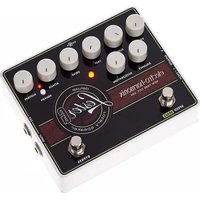
Lester G - Guitar effect pedal Electro Harmonix - Free user manual and instructions
Find the device manual for free Lester G Electro Harmonix in PDF.


| Product Type | Rotary Speaker Emulation Pedal |
| Brand | Electro-Harmonix |
| Model | Lester G |
| Dimensions | 4.5 x 2.75 x 2 inches (114 x 70 x 51 mm) |
| Weight | 0.6 lbs (272 g) |
| Power Supply | 9V DC, center-negative, 150 mA (power supply not included) |
| Input Impedance | 1 MΩ |
| Output Impedance | 100 Ω |
| Current Draw | 120 mA |
| Controls | Speed, Blend, Tone, Volume |
| Footswitch | True bypass with status LED |
| Modes | Slow, Fast, Brake |
| Main Features | Authentic rotary speaker simulation, adjustable speed ramp, dual outputs for stereo operation |
| Construction | Sturdy die-cast metal chassis |
| Maintenance | Wipe with dry cloth; avoid moisture and extreme temperatures |
| Safety | Use only specified power supply; do not disassemble |
| Spare Parts and Repairability | Contact Electro-Harmonix support or authorized service centers |
| General Information | Designed for guitar and keyboard; made in USA |
Frequently Asked Questions - Lester G Electro Harmonix
User questions about Lester G Electro Harmonix
0 question about this device. Answer the ones you know or ask your own.
Ask a new question about this device
Download the instructions for your Guitar effect pedal in PDF format for free! Find your manual Lester G - Electro Harmonix and take your electronic device back in hand. On this page are published all the documents necessary for the use of your device. Lester G by Electro Harmonix.
USER MANUAL Lester G Electro Harmonix
Deluxe Stereo Rotary Simulator
Congratulations on your purchase of the LESTER G stereo rotary speaker cabinet simulator! The LESTER G uses the finest rotary speaker simulation available today, and comes with a variety of deluxe features. Stereo outputs provide a lush, realistic effect. Tube-emulated overdrive is available with the DRIVE knob, and speaker mix can be fine-tuned with the BALANCE knob. Switch between adjustable FAST and SLOW modes for an accurate reproduction of a classic rotary speaker cabinet's speed adjustment. An expression pedal jack allows for fine tuning of the rotation speed with an expression pedal.
The Lester G also features a compression circuit that adds lush sustain to electric guitar. Using the compressor, the LESTER G provides guitarists with the fat, full sustain of an organ, to get the most out of the rotating speaker effect.
- CONTROLS -
VOL Knob – Controls the output volume of the LESTER G. As the VOL knob is turned clockwise, the output volume increases.
SLOW Knob – Varies the speed of the rotating speaker effect when the LESTER G is in SLOW mode. Turn the SLOW knob up to increase the rotation speed in SLOW mode. When in the center position, the rotation speed in SLOW mode is an accurate reproduction of a real rotary speaker cabinet's slow speed.
FAST Knob – Varies the speed of the rotating speaker effect when the LESTER G is in FAST mode. Turn the FAST knob up to increase the rotation speed in FAST mode. When in the center position, the rotation speed in FAST mode is an accurate reproduction of a real rotary speaker cabinet's fast speed.
ACCELERATION KNOB – Controls the rate at which the LESTER G transitions between FAST mode and SLOW mode. As ACCELERATION is turned clockwise, the rate of change increases. When ACCELERATION is at maximum, the rotating speaker effect changes from FAST to SLOW mode almost instantaneously. At the minimum position, the speed change is very gradual. When in the center position, the LESTER G changes speeds at the same rate a real rotary speaker cabinet does.
BALANCE Knob – Controls the mix between the simulator's low-frequency rotor and high-frequency horn. Turn the BALANCE knob clockwise to increase the volume of the horn and decrease the volume of the rotor, yielding a brighter sound. Turn the BALANCE knob counter-clockwise for a darker sound. Set the BALANCE knob to the center position to reproduce the natural acoustic balance of a rotary speaker cabinet.
DRIVE Knob – Controls the amount of overdrive, simulating the tone of an overdriven rotary speaker cabinet's tube amplifier. When the DRIVE knob is set fully counterclockwise, the overdrive effect is bypassed. As the DRIVE knob is turned clockwise, the amount of overdrive increases.
SUSTAIN Knob – Controls the compression effect. When the SUSTAIN knob is set fully counterclockwise, the compression effect is bypassed. As the SUSTAIN knob is turned up, the amount of compression increases.
ATTACK Knob – Controls the amount of attack when using the compressor. As ATTACK is turned up, the attack time of the compressor increases, resulting in a more prominent initial transient when a note is plucked.
SQUASH Switch and LED – Selects between two modes of compression: NORMAL and SQUASH. The SQUASH mode is a compression mode with a higher compression ratio, resulting in a more dramatic effect. The LED above the switch will light when you are in SQUASH mode.
BYPASS Footswitch and LED – This footswitch selects whether the LESTER G is in buffered bypass mode or effect mode. When the LESTER G is in effect mode, this central LED is lit and pulses between green and orange at the speed of the low frequency rotor oscillation.
SPEED/BRAKE footswitch – This silent footswitch selects the speed mode of the LESTER G. Tap the SPEED/BRAKE footswitch to switch between FAST and SLOW modes. Press and hold the SPEED/BRAKE footswitch for at least half a second to enter BRAKE mode. See “Operation and Description of Modes” on page 4 for more information on the speed modes of the LESTER G.
- CONNECTIONS -
INPUT Jack - This 14'' jack is the audio input of the LESTER G. The input impedance is 1MΩ.
MONO/L and R OUTPUT Jacks – The LESTER G has true stereo output. The two 14 " output jacks are labeled MONO/L and R. Connect these jacks to two separate amps or inputs on a mixing board. If using the LESTER G as a mono effect, we suggest you use the MONO/L output. The output impedance of each jack is 220Ω.
EXP Jack – Plug an expression pedal into this jack to control the LESTER G's rotation speed. See "Using an Expression Pedal" on the next page for more information on how to use the expression pedal.
The EXP input jack accepts a TRS expression pedal connector or a Tip-Sleeve 0-5V control voltage input. The expression pedal should ideally use a 10k potentiometer with linear taper. It must have the wiper connected to TIP and toe-down connected to RING. Some manufacturers' pedals do not conform to this convention and require a special cable/adaptor to swap RING and TIP. Suggested Expression Pedals: EHX Expression Pedal, M-Audio® EX-P, Moog® EP-2 & EP-3, Roland® EV-5 or Boss® FV-500L.
9V Power Jack – Plug the output of the LESTER G's supplied EHX9.6DC 200mA AC Adapter into the 9V power jack located at the top of the LESTER G. The LESTER G requires 100mA at 9VDC with a center-negative plug.
- OPERATION AND DESCRIPTION OF MODES -
The LESTER G has three principal modes of operation: FAST, SLOW, and BRAKE, which simulate the three rotation speeds of a classic rotary speaker cabinet. In normal operation, quickly tap the SPEED/BRAKE footswitch to switch between FAST and SLOW modes. Set the FAST and SLOW mode oscillation speeds with the FAST and SLOW knobs. The oscillation will accelerate or decelerate to the new mode, and the LED will pulse to indicate the oscillation speed of the low-frequency rotor.
FAST mode – FAST mode oscillates at the fast speed of a rotary speaker unit for a tremolo-like effect. With the FAST knob at the center position, the high-frequency horn oscillates at 6.2Hz, and the low-frequency rotor oscillates at 5.9Hz. Using the FAST knob, the horn's rotation can be adjusted between 1.55Hz and 24.8Hz and the rotor can be adjusted between 1.475Hz and 23.6Hz.
SLOW mode – SLOW mode oscillates at the slow speed of a rotary speaker unit for a chorale-type effect. With the SLOW knob at the center position, the high-frequency horn oscillates at 0.8Hz, and the low-frequency rotor oscillates at 0.7Hz. Using the SLOW knob, the horn's rotation can be adjusted between 0.1Hz and 3.2Hz, and the rotor can be adjusted between 0.0875and 2.8Hz.
BRAKE mode – To enter BRAKE mode, press and hold the SPEED/BRAKE footswitch for at least half a second, then release it. The LESTER G will gradually decelerate to a stop, and the bypass LED will hold steady at one color. Once in BRAKE mode, tap the SPEED/BRAKE footswitch to return to either FAST or SLOW mode. The LESTER G will return to whichever mode you were in before entering BRAKE mode.
- USING AN EXPRESSION PEDAL -
An expression pedal can be used to fine-tune the LESTER G's rate of rotation. When an expression pedal is plugged into the EXP jack, the SLOW and FAST knobs control the minimum and maximum speeds available with the expression pedal. At the heel position of the expression pedal, the LESTER G will oscillate at the speed set by the SLOW knob. At the toe position, it will oscillate at the speed set by the FAST knob. To change speeds, move the expression pedal, and the LESTER G will respond instantly. The ACCELERATION knob is disabled when using an expression pedal.
While an expression pedal is plugged in to the EXP jack, the SPEED/BRAKE footswitch is only used to enter BRAKE mode. Simply tap the SPEED/BRAKE footswitch to enter BRAKE mode. Pressing the footswitch for a half second or longer is not necessary.

natural_image
Stylized circular illustration of a stylized human face with swirling patterns (no text or symbols)- WARRANTY INFORMATION -
Please register online at http://www.ehx.com/product-registration or complete and return the enclosed warranty card within 10 days of purchase. Electro-Harmonix will repair or replace, at its discretion, a product that fails to operate due to defects in materials or workmanship for a period of one year from date of purchase. This applies only to original purchasers who have bought their product from an authorized Electro-Harmonix retailer. Repaired or replaced units will then be warranted for the unexpired portion of the original warranty term.
If you should need to return your unit for service within the warranty period, please contact the appropriate office listed below. Customers outside the regions listed below, please contact EHX Customer Service for information on warranty repairs at info@ehx.com or +1-718-937-8300. USA and Canadian customers: please obtain a Return Authorization Number (RA#) from EHX Customer Service before returning your product. Include with your returned unit: a written description of the problem as well as your name, address, telephone number, e-mail address, and RA#; and a copy of your receipt clearly showing the purchase date.
United States & Canada
EHX CUSTOMER SERVICE
ELECTRO-HARMONIX
c/o NEW SENSOR CORP.
47-50 33RD STREET
LONG ISLAND CITY, NY 11101
Tel: 718-937-8300
Email: info@ehx.com
Europe
JOHN WILLIAMS
ELECTRO-HARMONIX UK
13 CWMDONKIN TERRACE
SWANSEA SA2 0RQ
UNITED KINGDOM
Tel: +44 179 247 3258
Email: electroharmonixuk@virginmedia.com
This warranty gives a purchaser specific legal rights. A purchaser may have even greater rights depending upon the laws of the jurisdiction within which the product was purchased.
To hear demos on all EHX pedals visit us on the web at www.ehx.com Email us at info@ehx.com
FCC COMPLIANCE
Note: This equipment has been tested and found to comply with the limits for a Class B digital device, pursuant to part 15 of the FCC Rules. These limits are designed to provide reasonable protection against harmful interference in a residential installation. This equipment generates, uses and can radiate radio frequency energy and, if not installed and used in accordance with the instructions, may cause harmful interference to radio communications. However, there is no guarantee that interference will not occur in a particular installation. If this equipment does cause harmful interference to radio or television reception, which can be determined by turning the equipment off and on, the user is encouraged to try to correct the interference by one or more of the following measures:
• Reorient or relocate the receiving antenna.
- Increase the separation between the equipment and receiver.
- Connect the equipment into an outlet on a circuit different from that to which the receiver is connected.
- Consult the dealer or an experienced radio/TV technician for help.
Modifications not expressly approved by the manufacturer could void the user's authority to operate the equipment under FCC rules.

natural_image
Stylized circular illustration of a stylized human face with ornate swirling patterns (no text or symbols)


Brand : Electro Harmonix
Model : Lester G
Category : Guitar effect pedal