
Roller Shutter 3 - Switch Fibaro - Free user manual and instructions
Find the device manual for free Roller Shutter 3 Fibaro in PDF.


| Product Type | Z-Wave Roller Shutter Controller |
| Dimensions (WxHxD) | 42 x 36 x 17 mm |
| Weight | 30 g |
| Power Supply | 24 - 30 V DC |
| Maximum Load | 2 A (resistive), 1 A (inductive) |
| Communication Protocol | Z-Wave Plus (500 series) |
| Frequency | 868.42 MHz (EU) / 908.42 MHz (US) |
| Range | Up to 50 m indoor |
| Main Functions | Open/Close/Stop, Shutter position control, Scene activation, Energy metering |
| Position Feedback | Yes (via Z-Wave reports) |
| Manual Control | External button input |
| Firmware Update | Over the air (OTA) |
| Operating Temperature | 0°C to 40°C |
| IP Rating | IP20 (indoor use only) |
| Certifications | CE, Z-Wave Plus Certified |
| Installation | Inside standard wall box (flush mounting) |
| Wiring | Supports 3-wire and 4-wire systems |
| Reverse Polarity Protection | Yes |
| Overload Protection | Automatic shutdown and restart |
| Smart Integration | Compatible with most Z-Wave gateways |
| App Control | Via Fibaro Home Center or third-party apps |
Frequently Asked Questions - Roller Shutter 3 Fibaro
User questions about Roller Shutter 3 Fibaro
0 question about this device. Answer the ones you know or ask your own.
Ask a new question about this device
Download the instructions for your Switch in PDF format for free! Find your manual Roller Shutter 3 - Fibaro and take your electronic device back in hand. On this page are published all the documents necessary for the use of your device. Roller Shutter 3 by Fibaro.
USER MANUAL Roller Shutter 3 Fibaro
Flush-mounted module to control blinds and gates

FIBARO
HOME INTELLIGENCE

WAVE
Smart control of blinds and gates
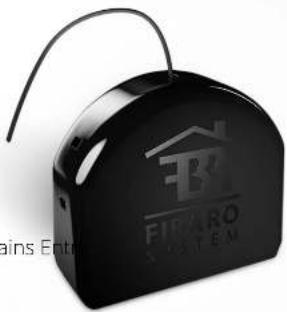
Roller Shutter 3 is the new version of FIBARO shutter and gate control module based on the Z-Wave 5 protocol.
Equipped with the latest version of the protocol, the module allows for even more convenient and efficient roller blinds management in your smart home. The power measurement feature provides precise information about energy consumption.

Blinds Roller

blinds

Windows Curtains En

gates

Garage doors
FIBARO
ROLLER SHUTTER 3
Comfortable roller blinds management
The module allows you to manage blinds and roller blinds at home. While sitting on the couch or lying already comfortably in bed you don't need to worry about getting up and doing it manually to have them covered exactly as you like it. Just say the voice command and have the blinds shut for the time of watching the movie. In combination with FIBARO sensors, blinds will be opened automatically when you approach the window in the morning. Moreover, thanks to the Local protection feature, you can lock the wall switches controls so that children cannot control them on their own.
FIBARO
ROLLER SHUTTER 3
Remote blinds and gates management
Is now possible with Roller Shutter 3 connected to the devices. Furthermore, you can easily run it manually or manage it remotely through the app or just set up scenes and automations. Anywhere you are and at any time, close or open the gates and blinds.
FIBARO

ROLLER SHUTTER 3
Closing roller blinds of the entire house
By synchronizing an alarm system with Roller Shutter 3 you can close all the blinds and gates with one simple push of a button while leaving the house.
FIBARO
ROLLER SHUTTER 3
Adaptation to weather conditions
Roller Shutter 3 synchronized with weather plugin will adjust the degree of blinds and roller shutters closure depending on the weather conditions. This will help to maintain the right temperature in the house and consequently reduce spendings on heating or air conditioning.
FIBARO
ROLLER SHUTTER 3
Safe house
Setting up an alarm scene assuming that if smoke or carbon monoxide is detected, the FIBARO system will open the blinds and windows to prevent the development of dangerous events in your home.

Fits everywhere
FIBARO modules are really tiny! The pocekt-size of smart devices makes them fit most standard flush-mount installation boxes and switches sockets. Wireless Z-Wave communication and solutions developed by engineers provide an average range of 14.5 m.

Simple installation
You will be surprised how easy it is to install FIBARO Roller Shutter 3.
You can do it yourself or use the help of a professional installer who is a part of the official FIBARO partner network.


Click and download connection diagram
ROLLER SHUTTER 3
Works with different types of switches
Thanks to the possibility of mounting the module directly in the box, the device is universal for different types of switches — monostable, bistable and roller blind. Installed in the light switch allows to control a single lighting circuit.

FIBARO
ROLLER SHUTTER 3
Energy Measurement
Power consumption of particular devices connected to FIBARO Roller Shutter 3 is constantly monitored and reported by the smart home system. Monitor the current consumption, plan the work of connected devices and save energy!
FIBARO

ROLLER SHUTTER 3
Wireless updates
FIBARO Roller Shutter 3 has an automatic software update feature. Just one simple click in the mobile app doesst the trick.

75%
Update in progress
Join the world of FIBARO

FIBARO
ROLLER SHUTTER 3
FIBARO®
HOME INTELLIGENCE
fibaro.com

- SMART CONTROL OF BLINDS AND GATES
- COMFORTABLE ROLLER BLINDS MANAGEMENT
- REMOTE BLINDS AND GATES MANAGEMENT
- CLOSING ROLLER BLINDS OF THE ENTIRE HOUSE
- ADAPTATION TO WEATHER CONDITIONS
- SAFE HOUSE
- FITS EVERYWHERE
- SIMPLE INSTALLATION
- WORKS WITH DIFFERENT TYPES OF SWITCHES
- ENERGY MEASUREMENT
- WIRELESS UPDATES
- FIBARO®
Brand : Fibaro
Model : Roller Shutter 3
Category : Switch