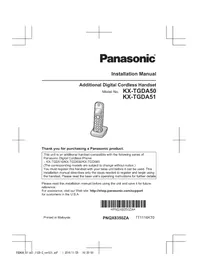
USER MANUAL KX-TGDA50 PANASONIC
Additional Digital Cordless Handset
Model No. KX-TGDA50
KX-TGDA51
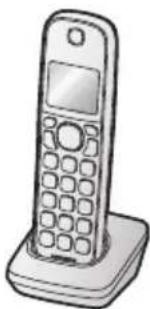
Thank you for purchasing a Panasonic product.
This unit is an additional handset compatible with the following series of Panasonic Digital Cordless Phone:
- KX-TGD510/KX-TGD530/KX-TGD560
(The corresponding models are subject to change without notice.)
You must register this handset with your base unit before it can be used. This installation manual describes only the steps needed to register and begin using the handset. Please read the base unit's operating instructions for further details.
Please read this installation manual before using the unit and save it for future reference.
For assistance, visit our Web site: http://shop.panasonic.com/support for customers in the U.S.A.

Printed in Malaysia
Installation
Supplied accessories
| Accessory item/Part number Quantity | |
| Charger*1 | 1 |
| Rechargeable batteries/HHR-4DPA 2 | |
| Handset cover*2, *3 | 1 |
*1 PNLC1077ZB (Black), PNLC1077ZW (White)
*2 The handset cover comes attached to the handset.
*3 PNYNTGDA50BR (Black), PNYNTGDA50WR (White)
Note:
- Please read the base unit's operating instructions for additional/replacement accessories.
For your safety
To prevent severe injury and loss of life/property, read this section carefully before using the product to ensure proper and safe operation of your product.

WARNING
Power connection
- Completely insert the AC adaptor/power plug into the power outlet. Failure to do so may cause electric shock and/or excessive heat resulting in a fire.
- Regularly remove any dust, etc. from the AC adaptor/power plug by pulling it from the power outlet, then wiping with a dry cloth. Accumulated dust may cause an insulation defect from moisture, etc. resulting in a fire.
- Unplug the product from power outlets if it emits smoke, an abnormal smell, or makes an unusual noise. These conditions can cause fire or electric shock. Confirm that smoke has stopped emitting and contact us at http://shop.panasonic.com/support
Installation
- To prevent the risk of fire or electrical shock, do not expose the product to rain or any type of moisture.
2 For assistance, please visit http://shop.panasonic.com/support
Installation
- Do not place or use this product near automatically controlled devices such as automatic doors and fire alarms. Radio waves emitted from this product may cause such devices to malfunction resulting in an accident.

CAUTION
Installation and location
- The AC adaptor is used as the main disconnect device. Ensure that the AC outlet is installed near the product and is easily accessible.
Battery
- We recommend using the supplied batteries or additional/replacement batteries noted on page 2 for replacement battery information. USE ONLY rechargeable Ni-MH batteries AAA (R03) size.
- Do not mix old and new batteries.
- Do not open or mutilate the batteries. Released electrolyte from the batteries is corrosive and may cause burns or injury to the eyes or skin. The electrolyte is toxic and may be harmful if swallowed.
- Exercise care when handling the batteries. Do not allow conductive materials such as rings, bracelets, or keys to touch the batteries, otherwise a short circuit may cause the batteries and/or the conductive material to overheat and cause burns.
- Charge the batteries provided with or identified for use with this product only, in accordance with the instructions and limitations specified in this manual.
- Only use a compatible base unit (or charger) to charge the batteries. Do not tamper with the base unit (or charger). Failure to follow these instructions may cause the batteries to swell or explode.
Attention:

A recyclable nickel metal hydride battery powers the product you have purchased.
Please call 1-800-8-BATTERY (1-800-822-8837) for information on how to recycle this battery.
Important safety instructions
When using your product, basic safety precautions should always be followed to reduce the risk of fire, electric shock, and injury to persons, including the following:
For assistance, please visit http://shop.panasonic.com/support
Installation
- Do not use this product near water, for example, near a bathtub, washbowl, kitchen sink, or laundry tub, in a wet basement, or near a swimming pool.
- Do not use the telephone to report a gas leak in the vicinity of the leak.
- Use only the power cord and batteries indicated in this manual. Do not dispose of batteries in a fire. They may explode. Check with local codes for possible special disposal instructions.
SAVE THESE INSTRUCTIONS
- Operating the product near electrical appliances may cause interference. Move away from the electrical appliances. CAUTION: Risk of explosion if battery is replaced by an incorrect type. Dispose of used batteries according to the instructions.
Routine care
- Wipe the outer surface of the product with a soft moist cloth.
- Do not use benzine, thinner, or any abrasive powder.
Notice for product disposal, transfer, or return
- This product can store your private/confidential information. To protect your privacy/confidentiality, we recommend that you erase information such as phonebook or caller list entries from the memory before you dispose of, transfer, or return the product.
Setting up
Connections/Wall mounting
① Connect the AC adaptor to the power outlet. ② Drive the screws (A) (not supplied) into the wall, if necessary.
B 27.2 mm (1 1/16 inches)

For assistance, please visit http://shop.panasonic.com/support
Installation
Note:
- The AC adaptor must remain connected at all times. (It is normal for the adaptor to feel warm during use.)
- Make sure that the wall and the fixing method are strong enough to support the weight of the unit.
Battery installation/Battery charging
Important:
- Use the supplied rechargeable batteries. For replacement, we recommend using the Panasonic rechargeable batteries noted on page 2.
- USE ONLY rechargeable Ni-MH batteries AAA (R03) size Ⓐ.
- Do NOT use alkaline/manganese/Ni-Cd batteries.
- Confirm correct polarities (+, -).
Charge for about 7 hours.
- Confirm "Charging" is displayed (B).
- When the batteries are fully charged, "Fully charged" is displayed.

Note:
- If the batteries are fully charged, but the operating time seems to be shorter, clean the battery ends (+) and the charge contacts with a dry cloth and charge again.
Removing the battery

For assistance, please visit http://shop.panasonic.com/support
Installation
Handset key print
For the following function, the key prints are different for the supplied handset and optional handset.
■ KX-TGDA51: For KX-TGD510/KX-TGD530 series users
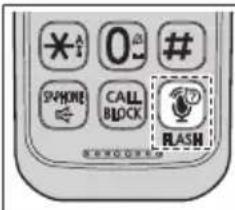 | Function Supplied | handset | Optional handset (KX-TGDA51) |
| Flash [FLASH] | | [ 1 \\ 2 ]+1/[FLASH] |
| Call waiting [CALL | WAIT] | [ 1 \\ 2 ]+1/[FLASH] |
*1 The remote voice assist feature is only available for KX-TGD560 series.
■ KX-TGDA50: For KX-TGD560 series users
 | Function Supplied | handset | Optional handset (KX-TGDA50) |
| Remote voice assist | [IMAGE] | [FLASH]/ [CALL WAIT] |
Registering a handset to a base unit
1 Base unit:
Press and hold [LOCATOR] for about 5 seconds.
- If all registered handsets start ringing, press [LOCATOR] again to stop, then repeat this step.
2 Handset:
Place the handset on the base unit or charger, then wait until a long beep sounds and ⚪ is displayed.
Note:
- If an error tone sounds, or if Y is displayed, register the handset according to the base unit's operating instructions.
Display language
1 [MENU] # 1 1 0
2 [▲]: Select the desired setting. → [SAVE] → [OFF]
6 For assistance, please visit http://shop.panasonic.com/support
This equipment is hearing aid compatible as defined by the FCC in 47 CFR Section 68.316.
When you hold the phone to your ear, noise might be heard in your Hearing Aid. Some Hearing Aids are not adequately shielded from external RF (radio frequency) energy. If noise occurs, use an optional headset accessory or the speakerphone option (if applicable) when using this phone. Consult with your audiologist or Hearing Aid manufacturer about the availability of Hearing Aids which provide adequate shielding to RF energy commonly emitted by digital devices.
WHEN PROGRAMMING EMERGENCY NUMBERS AND(OR) MAKING TEST CALLS TO EMERGENCY NUMBERS:
1) Remain on the line and briefly explain to the dispatcher the reason for the call. 2) Perform such activities in the off-peak hours, such as early morning or late evenings.
This device complies with Part 15 of the FCC Rules. Operation is subject to the following two conditions:
(1) This device may not cause harmful interference, and (2) this device must accept any interference received, including interference that may cause undesired operation.
Privacy of communications may not be ensured when using this phone.
CAUTION:
Any changes or modifications not expressly approved by the party responsible for compliance could void the user's authority to operate this device.
NOTE:
This equipment has been tested and found to comply with the limits for a Class B digital device, pursuant to Part 15 of the FCC Rules. These limits are designed to provide reasonable protection against harmful interference in a residential installation. This equipment generates, uses, and can radiate radio frequency energy and, if not installed and used in accordance with the instructions, may cause harmful interference to radio communications. However, there is no guarantee that interference will not occur in a particular installation. If this equipment does cause harmful interference to radio or television reception, which can be determined by turning the equipment off and on, the user is encouraged to try to correct the interference by one or more of the following measures:
– Reorient or relocate the receiving antenna. – Increase the separation between the equipment and receiver. - Connect the equipment into an outlet on a circuit different from that to which the receiver is connected. - Consult the dealer or an experienced radio/TV technician for help.
For assistance, please visit http://shop.panasonic.com/support
7
Installation
FCC RF Exposure Warning:
- This product complies with FCC radiation exposure limits set forth for an uncontrolled environment.
- This handset may not be collocated or operated in conjunction with any other antenna or transmitter.
- For body-worn operation, the handset must be used only with a non-metallic accessory. Use of other accessories may not ensure compliance with FCC RF exposure requirements.
Notice:
- FCC ID can be found inside the battery compartment or on the bottom of the unit.
Compliance with TIA-1083 standard

Telephone handsets identified with this logo have reduced noise and interference when used with T-Coil equipped hearing aids and cochlear implants.
Notice:
- This product is designed for use in the United States of America. Sale or use of this product in other countries may violate local laws.
- This device is designed for use in the United States of America. Sale or use of this device in certain other countries may constitute a violation of local legislation.
- This product is designed for use in the United States of America. Sale or use of this product in certain countries may constitute a violation of local legislation. ●This product is designed for use in the United States. If sold or used in other countries, it may violate local laws.
- This product is designed for use outside of Japan. Use within Japan is a violation of the law. Therefore, we generally cannot provide services such as repairs within Japan.
8 For assistance, please visit http://shop.panasonic.com/support
Customer services
Shop Accessories!
for all your Panasonic gear
Go to
http://shop.panasonic.com/support
Get everything you need to get the most out of your Panasonic products. Accessories & Parts for your Camera, Phone, A/V products, TV, Computers & Networking, Personal Care, Home Appliances, Headphones, Batteries, Backup Chargers & more...
Customer Services Directory
For Product Information, Operating Assistance, Parts, Owner's Manuals, Dealer and Service info go to http://shop.panasonic.com/support
For the hearing or speech impaired TTY: 1-877-833-8855
As of June 2015
For assistance, please visit http://shop.panasonic.com/support
Limited Warranty (ONLY FOR U.S.A.)
Panasonic Products Limited Warranty
Limited Warranty Coverage (For USA Only)
If your product does not work properly because of a defect in materials or workmanship, Panasonic Corporation of North America (referred to as “the warrantor”) will, for the length of the period indicated on the chart below, which starts with the date of original purchase (“warranty period”), at its option either (a) repair your product with new or refurbished parts, (b) replace it with a new or a refurbished equivalent value product, or (c) refund your purchase price. The decision to repair, replace or refund will be made by the warrantor.
| Product or Part Name | Parts | Labor |
| Telephone | One (1) Year | One (1) Year |
During the “Labor” warranty period there will be no charge for labor. During the “Parts” warranty period, there will be no charge for parts. This Limited Warranty excludes both parts and labor for non-rechargeable batteries, antennas, and cosmetic parts (cabinet). This warranty only applies to products purchased and serviced in the United States. This warranty is extended only to the original purchaser of a new product which was not sold “as is”.
Mail-In Service--Online Repair Request
Online Repair Request
To submit a new repair request and for quick repair status visit our Web Site at http://shop.panasonic.com/support
When shipping the unit, carefully pack it, include all supplied accessories listed in the Owner's Manual, and send it prepaid, adequately insured, and packed well in a carton box. When shipping Lithium Ion batteries, please visit our Web Site at http://shop.panasonic.com/support as Panasonic is committed to providing the most up to date information. Include a letter detailing the complaint, a return address, and provide a daytime phone number where you can be reached. A valid registered receipt is required under the Limited Warranty.
IF REPAIR IS NEEDED DURING THE WARRANTY PERIOD, THE PURCHASER WILL BE REQUIRED TO FURNISH A SALES RECEIPT/PROOF OF PURCHASE INDICATING DATE OF PURCHASE, AMOUNT PAID, AND PLACE OF PURCHASE. CUSTOMER WILL BE CHARGED FOR THE REPAIR OF ANY UNIT RECEIVED WITHOUT SUCH PROOF OF PURCHASE.
10 For assistance, please visit http://shop.panasonic.com/support
Limited Warranty Limits and Exclusions
This warranty ONLY COVERS failures due to defects in materials or workmanship, and DOES NOT COVER normal wear and tear or cosmetic damage. The warranty ALSO DOES NOT COVER damages which occurred in shipment, or failures which are caused by products not supplied by the warrantor, or failures which result from accidents, misuse, abuse, neglect, mishandling, misapplication, alteration, faulty installation, set-up adjustments, misadjustment of consumer controls, improper maintenance, power line surge, lightning damage, modification, introduction of sand, humidity or liquids, commercial use such as hotel, office, restaurant, or other business or rental use of the product, or service by anyone other than a Factory Service Center or other Authorized Servicer, or damage that is attributable to acts of God.
THERE ARE NO EXPRESS WARRANTIES EXCEPT AS LISTED UNDER "LIMITED WARRANTY COVERAGE".
THE WARRANTOR IS NOT LIABLE FOR INCIDENTAL OR CONSEQUENTIAL DAMAGES RESULTING FROM THE USE OF THIS PRODUCT, OR ARISING OUT OF ANY BREACH OF THIS WARRANTY.
(As examples, this excludes damages for lost time, travel to and from the servicer, loss of or damage to media or images, data or other memory or recorded content. The items listed are not exclusive, but for illustration only.)
ALL EXPRESS AND IMPLIED WARRANTIES, INCLUDING THE WARRANTY OF MERCHANTABILITY, ARE LIMITED TO THE PERIOD OF THE LIMITED WARRANTY.
Some states do not allow the exclusion or limitation of incidental or consequential damages, or limitations on how long an implied warranty lasts, so the exclusions may not apply to you. This warranty gives you specific legal rights and you may also have other rights which vary from state to state. If a problem with this product develops during or after the warranty period, you may contact your dealer or Service Center. If the problem is not handled to your satisfaction, then write to:
Consumer Affairs Department
Panasonic Corporation of North America
661 Independence Pkwy
Chesapeake, VA 23320
PARTS AND SERVICE, WHICH ARE NOT COVERED BY THIS LIMITED WARRANTY, ARE YOUR RESPONSIBILITY.
As of June 2015
For assistance, please visit http://shop.panasonic.com/support 11
Appendix
IMPORTANT!
If your product is not working properly...
① Reconnect AC adaptor to the base unit. ② Check if telephone line cord is connected. ③ Use rechargeable Ni-MH batteries.
(Alkaline/Manganese/Ni-Cd batteries CANNOT be used.) ④ Read troubleshooting page in the base unit's Operating Instructions.

Visit our Web site: http://shop.panasonic.com/support
- FAQ and troubleshooting hints are available.
Panasonic Corporation of North America
Two Riverfront Plaza, Newark, NJ 07102-5490
© Panasonic Corporation 2016
12 For assistance, please visit http://shop.panasonic.com/support
27.2 mm (1 1/16 inches)
KX-TGD451
KX-TGDAD50
Model No.
Additional Digital Cordless Handset
Installation Manual
Panasonic