LCD8W18 - Tumble dryer Logik - Free user manual and instructions
Find the device manual for free LCD8W18 Logik in PDF.
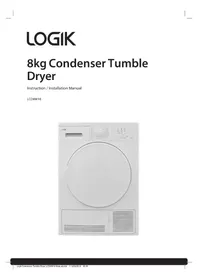


| Product Type | Tumble Dryer |
| Brand | Logik |
| Model | LCD8W18 |
| Capacity | 8 kg |
| Dimensions (H x W x D) | 85 x 60 x 60 cm |
| Weight | 38 kg |
| Power Supply | 220-240 V, 50 Hz, 10 A |
| Energy Class | C |
| Drying System | Condenser |
| Control Type | Electronic with LED display |
| Number of Programs | 8 |
| Noise Level | 67 dB(A) |
| Filter Type | Lint filter (clean after each cycle) |
| Condenser Cleaning | Periodically (every 6 months) |
| Anti-Crease Function | Yes |
| Delay Start | Up to 24 hours |
| Child Lock | Yes |
| Overheat Protection | Yes |
| Repairability Index | 7.5 / 10 |
| Spare Parts Availability | Logik authorized service centers |
| Warranty | 2 years |
| Installation Type | Freestanding |
| Color | White |
Frequently Asked Questions - LCD8W18 Logik
User questions about LCD8W18 Logik
0 question about this device. Answer the ones you know or ask your own.
Ask a new question about this device
Download the instructions for your Tumble dryer in PDF format for free! Find your manual LCD8W18 - Logik and take your electronic device back in hand. On this page are published all the documents necessary for the use of your device. LCD8W18 by Logik.
USER MANUAL LCD8W18 Logik
Contents
Safety Warnings....4
Unpacking....9
Installing Your Dryer 10
Choosing the Right Location for Your Dryer....10
Moving and Installing 11
Moving the Dryer from One Location to Another....11
Levelling the Dryer....11
Connecting to the Mains Supply 11
Product Overview....12
The unit 12
Control Panel 13
Preparation....14
Preparing to Tumble Dry Laundry....14
Organising Laundry....14
Selecting the Programme....15
Energy Consumption Values 15
Dry Programme Setting 16
First Time Use 16
Selecting a Drying Cycle 16
Tips for Optimum Drying....16
Cancelling a Programme 17
Pausing a Cycle....17
Removing Laundry and Switching Off....17
Emptying the Water Tank....18
Setting the Child Lock....18
Switching the Child Lock off....18
Adding the Delicate Option to a Programme 19
Setting a Delay Timer 19
Switching the Beep off 19
Maintenance – Cleaning the Dryer....20
Cleaning the Drum....20
Cleaning the Exterior of your Dryer 20
Cleaning the Door Seal and Window 20
Cleaning the Lint Filter 20
Cleaning the Condenser 21
Cleaning the Humidity Sensor....21
Hints and Tips 22
Product Fiche 24
Specifications....25
Safety Warnings
For your continued safety and to reduce the risk of injury or electric shock, read all instructions carefully before using the unit and keep them for future reference. Please follow all the safety precautions listed below.
Retain this manual. Include this manual if you pass the unit onto a third party.
WARNING!
- Never allow large loads to remain in the dryer after each drying cycle ends.
- Softener sheets can cause a waxy build-up on the lint filter. Wash the lint filter in warm soapy water and dry it completely before replacing it in the dryer.
- Do not leave damp items in a warm or hot dryer. Start the drying cycle immediately and keep the exhaust opening clutter free.
- Do not climb on the dryer. You may hurt yourself or damage the dryer.
- If you will not be using the dryer for a while, such as when you go on holiday, turn off the electricity supply to the dryer and remove the plug from the socket.
- Never stop a tumble dryer before the end of the drying cycle unless all items are quickly removed and spread out so that the heat is dissipated.
- Never store plastic, paper or clothing that may burn or melt on top of the dryer during operation.
- Keep flammable substances well away from the dryer – for example kerosene, gasoline, benzene, paint thinner and alcohol, or clothing soaked with these. They may cause an explosion or a fire.
- All airways (including wall vents) must be kept free from blockages.
- Never use the dryer without the lint filter.
- Do not place heavy or wet items on top of the product.
- Do not spill any liquid on the appliance, it may cause damage. Clean up any accidental spillages immediately.
Installation
- Check that the voltage marked on the rating label matches your mains voltage.
- The appliance must be placed on a flat stable surface (not on a carpet) and should not be subjected to excessive vibrations or any impact.
- Do not install your dryer anywhere that is exposed to high humidity, water or the weather. If you do, it may cause an electric shock, fire, failure or deterioration.
- Your tumble dryer should NOT be located next to a gas hob, cooker, heater, or eye-level grill as flames from the burners could cause damage to your machine.
- DO NOT operate the dryer in an enclosed environment; ensure the dryer is adequately ventilated.
- Do not stack the tumble dryer on top of other appliances.
- Any electrical work required to install the appliance should be carried out by a qualified person.
- Failure to install, maintain and/or operate the dryer according to the manufacturer's instructions may result in conditions which can lead to personal injury and/or property damage.
- The exhaust air must not be discharged into a flue that is used to extract fumes from an appliance burning gas or other fuels.
- The appliance must not be installed behind a lockable door, a sliding door or a door with a hinge on the opposite side to that of the tumble dryer, in such a way that a full opening of the tumble dryer door is restricted.
- Do not use a mains plug adapter or extension cable. It may overheat and cause a fire.
- Do not operate this dryer until you are sure the dryer has been installed according to the INSTALLATION INSTRUCTIONS, and installation and grounding are in compliance with all local codes and/or other applicable codes and requirements.
- Before the appliance is removed from service or discarded, remove the door of the drying compartment.
Caring for Laundry
- The dryer must only be used for its intended purpose.
- Always observe the rules for drying garments. If in doubt, do NOT tumble dry.
- Take particular care that woolen articles are NOT dried in a tumble dryer unless they are labelled 'Superwash', 'Machine Washable' or have the 'May be tumble dried' symbol. If in any doubt, do not dry wool in the machine. Unlike other materials, the mechanism of wool shrinkage is irreversible, i.e. it will not stretch back to its original size and shape.
- Do not dry water-proof sheets or clothing. These may cause dryer failure, which could lead to injury, or damage to the laundry or to the dryer.
- Items such as foam rubber (latex foam), shower caps, waterproof textiles, rubber backed articles and clothes or pillows fitted with foam rubber pads should not be dried in the tumble dryer.
- Fabric softeners, or similar products, should be used as specified by the fabric softener instructions.
- Do not dry unwashed items in the tumble dryer.
- Do not attempt to dry dripping wet articles.
- Do not overload the dryer with laundry. Drying results may be unsatisfactory.
- Be careful not to get your laundry caught in the door when you close it. This could damage your laundry.
- Always check and remove objects such as nails, pins, coins, clips, etc. Cigarette lighters, in particular, present a hazard that can be avoided by this process. They could damage your laundry or the dryer.
- Do not dry articles that have been previously cleaned in, washed in, soaked in, or spotted with gasoline, dry cleaning solvents, other flammable, or explosive substances as they give off vapours that could ignite or explode.
- Items that have been soiled with substances such as cooking oil, acetone, alcohol, petrol, kerosene, spot removers, turpentine, waxes and wax removers should be washed in hot water with an extra amount of detergent before being dried in the tumble dryer.
General Use
- This appliance is for normal, indoor, household, domestic use only.
- The maximum mass of dry textile material to be used in the appliance is 8kg.
- Make sure the mains plug is pushed firmly in the socket. A loose connection may overheat and cause electrical shock or a fire.
- Check the mains plug regularly for dirt. If dirt accumulates on the mains plug, it could cause a fire. To prevent this, unplug the cable and clean the mains plug with a dry rag.
- If you disconnect the mains plug, hold onto the mains plug not the cable. Pulling the cable may cause an electric shock or a fire.
- Do not touch the laundry inside the dryer until the drum has completely stopped. Even if the drum is spinning at low speed, it can cause injury. Take particular care of children.
- Do not operate the dryer with any guards and/or panels removed.
- Never attempt to operate this appliance if it is damaged, malfunctioning, has missing or broken parts, including a damaged mains cable or plug.
- Do not bypass any safety devices.
- Do not touch the mains lead or mains plug with wet hands. It may cause an electric shock.
- The final part of a tumble dryer cycle occurs without heat (cool down cycle) to ensure that the items are left at a temperature that ensures that the items will not be damaged.
- This appliance can be used by children aged from 8 years and above and persons with reduced physical, sensory or mental capabilities or lack of experience and knowledge if they have been given supervision or instruction concerning use of the appliance in a safe way and understand the hazards involved. Children shall not play with the appliance. Cleaning and user maintenance shall not be made by children without supervision.

CAUTION: WHEN THE DRYER IS IN USE, AVOID TOUCHING THE REAR OF THE DRYER AS IT MAY BE HOT.
Cleaning & Maintenance
- Clean the lint filter before and after every load.
- Clean the condenser every 30 drying cycles or once a month.
- If the supply cord is damaged, it must be replaced by the manufacturer, its service agent or similarly qualified persons in order to avoid a hazard.
- Keep all the area surrounding exhaust openings free from accumulation of dust, lint and dirt. An obstructed opening may reduce airflow and efficiency.
- Do not use the dryer if industrial chemicals have been used for cleaning.
- Do not pour water directly onto any part of the dryer. It may cause a short circuit or electric shock.
- Keep burning objects, such as candles or cigarettes, away from the dryer. They may cause a fire or damage.
- The interior of the machine and exhaust duct should be cleaned periodically by qualified service personnel.
- Do not dismantle, repair or modify the dryer. The dryer could malfunction and cause a fire or injury. If service is required, contact a qualified service agent.

IT IS HAZARDOUS FOR ANYONE OTHER THAN AUTHORISED SERVICE PERSONNEL TO CARRY OUT SERVICING OF REPAIRS WHICH INVOLVE THE REMOVAL OF COVERS.

TO AVOID THE RISK OF AN ELECTRICAL SHOCK DO NOT ATTEMPT REPAIRS YOURSELF.
Thank you for purchasing your new product.
We recommend that you spend some time reading this instruction manual in order that you fully understand all the operational features it offers.
Read all the safety instructions carefully before use and keep this instruction manual for future reference.
Unpacking
Remove all items from the packaging. Retain the packaging. If you dispose of it please do so according to local regulations.
The following items are included:

The Main Unit
Instruction Manual

If items are missing or damaged please contact Partmaster (UK only).
Tel: 0344 800 3456 for assistance.
Installing Your Dryer
Please read and follow the instructions carefully.
- In addition to the instructions mentioned here, special regulations of the relevant power supply companies may apply. If in doubt, have the dryer connected by a qualified technician.
- The dryer is heavy - caution when lifting it. Do not lift by projecting components (e.g. dryer door).
- Lay hoses and cables in such a way that there is no risk of tripping over them.

An additional space of (30mm) is required at the rear of the dryer.
Choosing the Right Location for Your Dryer
- Make sure there is enough space for your dryer. Install your dryer on a flat, stable surface to avoid excessive vibrations and noise.
× Sloping surface Unstable Bumpy surface

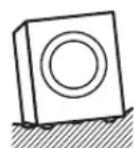
- Do not install your dryer in direct sunlight. If this appliance is installed in an unheated cold room, the optimum ambient storage temperature must be 5°C or above. If placed below this temperature, the appliance performance will be considerably affected and in some instances may not even operate until the ambient temperature rises above 5°C.
- Start by tilting the dryer backwards.
- One person should stand behind it, holding the rear of the top panel. The other person should grip the bottom feet at the front.
- Do not touch the door opening button (door handle) while holding.
- Check that you have all the required accessories for installation.
- Entrust the installation of the dryer to a qualified technician.

Two or more people are required to move the dryer.
INSTALLATION
Moving and Installing

Two or more people are required to carry the dryer and for any installation work.
Moving the Dryer from One Location to Another
Before you move the dryer:
- Turn off the power source, and disconnect the mains cable. Empty any water from the water tank.
Levelling the Dryer
There are levelling feet on the underside. They must be adjusted to make sure the dryer is level.
- Adjust all levelling feet.
- Use a spirit level to ensure the dryer is level.

Connecting to the Mains Supply
For your safety:
- Do not use a mains plug adapter or extension cable.
- If the mains cable or mains plug are damaged, stop using them and call a qualified technician for assistance.
Installation Check List
By now, you should have installed the dryer.
Let us go through the checklist to ensure that the installation has been done correctly!
| Questions Checkbox | ||
| Levelling feet | Are they bolted securely to the dryer? | |
| Are they standing flat? | ||
| Power supply - Is the household dedicated mains socket fully rated at AC220V to 240V independently? | ||
| Location - Is your dryer on a flat, stable surface? Does it run without wobbling/moving excessively? | ||
Product Overview
The unit

Control Panel

1. Water Tank
• Empty after each dry cycle.
2. Programme Dial
- Turn to select your desired programme or to switch the dryer off.
3. Water Tank Indicator
- Indicator lights up when the water tank is full. However, it's recommended to empty the water tank after every drying cycle.
4. Lint Filter Indicator
Indicator lights up when the lint filter needs cleaning. However, it's recommended to clean the lint filter after every drying cycle.
5. Condenser Indicator
- Indicator lights up when the condenser needs cleaning.
6. Delicate Indicator
Indicator lights up when the delicate function is selected.
7. Start / Pause Indicator
- The indicator flashes when a programme is ready or paused.
- The indicator is lit when a programme is in progress.
8. Start / Pause Button
- Press to start your dry programme.
- Press to pause your dry programme.
9. Delicate Button
- Press to select a delicate programme.
Beep On/Off
- Press and hold the Delicate button for 3 seconds to switch the beep on or off.
10. Delay Timer Button
- Press to select a delay timer either 3, 6 or 9 hours. The indicator above will show which delay time is selected.
Child Lock
Press the Delicate and Delay Timer buttons together for 3 seconds to activate or deactivate the child lock function.
11. Progress and Timer Delay Indicators
These indicators will show you if a timer delay was set, and once a drying cycle starts, they show the progress of the cycle: Drying - Cooling - End.
Preparation
Read the following to understand how best to prepare your laundry for drying.
Preparing to Tumble Dry Laundry
- Before loading laundry into the tumble dryer, thoroughly spin the laundry in the washing machine. This will reduce remaining moisture content and help dry your laundry faster. It will also be more energy-efficient.
- Make sure all zips are closed, buttons are done up, hooks and eyelets are fastened, and ties and belts are already looped. Always check the washing label of your clothes to make sure they are suitable for tumble drying. If no washing label is available, it is recommended not to tumble dry your clothes.
| Symbol Description | |
 | Tumble dry, normal |
 | Tumble dry, low heat |
 | Tumble dry, medium heat |
 | Tumble dry, high heat |
 | Do not tumble dry |

Organising Laundry
- Sort your laundry according to fabric type, e.g., polyester/cotton; denim; etc.
- Sort your laundry by colour.
Selecting the Programme
| Programme Description | Load (kg) | Washing machine spin speed | Approx amount or remaining humidity | Duration (mins) | |
| Cotton Extra Dry | This programme dries thick and multi-layer fabrics, such as cotton towels, bedsheets, pillowcases, bathrobes, at a high temperature to allow you to place them in a closet. | 8.0 1000 | 60% 132 | ||
| Cotton Cupboard Dry | This programme dries cotton pyjamas, underwear, tablecloths etc. to allow you to place them in a closet. | 8.0 1000 | 60% 129 | ||
| Cotton Iron Dry | This programme dries cotton laundry to prepare it for ironing. Laundry removed from the machine will be damp. | 8.0 1000 | 60% 107 | ||
| Synthetics Cupboard Dry | This programme dries synthetics, such as shirts, T-shirts, blouses, at a lower temperature compared to the cottons programme to allow you to place them in a closet. | 4.0 800 | 40% 51 | ||
| Synthetics Iron Dry | This programme dries synthetics, such as shirts, T-shirts, blouses, at a lower temperature compared to the cottons programme to prepare them for ironing. Laundry removed from the machine will be damp. | 4.0 800 | 40% 38 | ||
| Delicate | This programme dries thin clothes like shirts, blouses and silk garments at a low temperature to make them ready to wear. | 2.0 600 | 50% 39 | ||
| Mix | This programme dries cotton-synthetic mixed garments that do not discolour to make them ready to wear. | 4.0 1000 | 60% 75 | ||
| Baby Care | This programme dries delicate infant clothes at a low temperature to make them ready to wear. | 3.0 1000 | 60% 60 | ||
| Jeans This programme is used to dry jeans. 4.0 1000 60% 85 | |||||
| Time Programmes | To reach the required drying level at a low temperature, you can use the timed programmes of 10 min., 30 min., and 60 min. Regardless of the drying level, the programme stops at the desired time. | 103060 | |||
| Refresh | This programme provides ventilation for 10 minutes without applying heat to help freshen up your garments. | ||||
| Express 29' | 2 kg of cotton shirts spun at a high speed in the washing machine are dried in 29 minutes. | 2.0 1200 | 50% 29 | ||
| Shirts 12' 2 to 3 | shirts are ready for to be ironed in 12 minutes. 0.5 1200 50% 12 | ||||

Duration of drying may vary due to the moisture content, type of garment fabric, and/or other factors not within the unit's control. The lower the temperature of the room, the longer it will take for the dryer to dry clothing.
Energy Consumption Values
| Programme Load (kg) | Washing machine spin speed | Approx amount or remaining humidity | Energy consumption values (kWh) | |
| Cotton Cupboard Dry 8.0 | 1000 | 60% | 4.68 | |
| Cotton Iron Dry | 8.0 | 1000 | 60% | 4.10 |
| Synthetics Cupboard Dry | 4.0 | 800 | 40% | 1.58 |
| Power consumption in the “off mode” Po (W) | 0.5 | |||
| Power consumption in the “on mode” PL (W) | 1.0 | |||

The Cotton Cupboard Dry programme is the standard drying programme that can be run with a full or half load and for which the information is given on the label and product receipt. This programme is the most energy efficient programme to dry normal wet cotton clothes.
*Energy labelling standard programme (EN 61121:2013)
All values in the table were determined in accordance with the EN 61121:2013 standard. Consumption values may vary from the values in the table depending on the fabric type, spin speed, environment conditions and voltage values.
Dry Programme Setting
First Time Use
Before the first use, wipe the dryer drum with a damp cloth to remove any residues which may have been produced during production. Alternatively, run a brief drying cycle (around 1 hour) with damp clothes in the drum.

- Before use, check that the lint filter is clean and positioned properly in the dryer. Never use the appliance without the lint filter in place.
- Always check the clothing manufacturer's care label before placing the clothing in the tumble dryer. If in doubt, do NOT tumble dry.
Selecting a Drying Cycle
- Pull the door handle and put the laundry in the drum. Make sure laundry is loose and not caught in the door.
- Close the door firmly. It will click.
- Turn the Programme Dial to your desired drying programme the Start/Pause indicator will flash and your dryer will beep once.
At this point you can set a Delay timer or select Delicate if your laundry is delicate.
- Press the Start/Pause button to start the drying programme. The Start/Pause indicator and the Drying indicator will both light, the dryer will beep and the cycle will start.
The progress indicators will show the progress of the cycle Drying, then Cooling then End.
- When the drying programme has finished, the machine will beep, and the End, Water Tank, and Lint filter indicators will light up.
When each drying cycle ends, if you don't remove your laundry, your dryer will start its Anti Crease cycle. Your dryer will then periodically rotate the drum for 1 hour to prevent the laundry from creasing. At the end of this process, the End indicator will switch off.
- To switch the dryer off, turn the Programme Dial to OFF.
If you don't switch the dryer off, it will beep every few minutes to remind you that the cycle has finished.

If you need to pause the unit or open the door for any reason during a drying cycle, take extra care! The interior drum temperature will increase because air movement has been stopped.
Tips for Optimum Drying
- Do not over-dry the clothes, as this increases the chance of shrinkage and creasing.
- Do not dry clothes containing rubber, foam, and similar elasticated fabrics.
- Do not dry clothes if they have been dry-cleaned.
- Always check your clothes' washing labels for tumble dry suitability. If in doubt, do NOT tumble dry.
Cancelling a Programme
To cancel a drying programme:
- Turn the Programme Dial to off.
The drying programme is now cancelled.
To choose a different programme, turn the Programme Dial.
Pausing a Cycle
To pause a cycle, press the Start/Pause button. The dryer will beep and the Start/Pause indicator will flash. It is recommended that you do not use the pause for a long period of time, as heat can build up in your dryer. Always let the programme finish, as this allows your dryer to cool down.
Opening the door while a programme is in progress also pauses your dryer; it will beep and the Start/Pause indicator will flash.

If you pause the dryer for any length of time, remove the laundry to allow it to cool down. Be very careful: the laundry and drum could be very hot.
To start the programme again, make sure the door is closed and then press the Start/Pause button.
Removing Laundry and Switching Off
Always allow the unit to complete the drying cycle before removing laundry.
- Turn the Programme Dial to OFF to switch off the dryer. Unplug the dryer.
- Open the dryer door and remove your laundry.

If you do not remove the laundry at the end of a cycle, the Anti Crease phase will activate. The dryer drum will rotate at regular intervals, tumbling the laundry to prevent creasing. This will last for 1 hour after the drying cycle finishes.
Emptying the Water Tank
You must empty the water tank after every drying cycle.
- Pull the water tank out of the slot using the handle. When the tank is approximately half way out, you will need to use your other hand to hold the tank. Remember, it is full of water and will be quite heavy.

- Pour the water into a sink or drain.
- When empty, replace the water tank. Make sure you push it all the way in.

- Never operate the dryer without the water tank inserted into the dryer.
Setting the Child Lock
The Child Lock prevents children from stopping or changing programmes accidentally. It locks all buttons and the programme dial. If the Child Lock is activated, you won't be able to switch the dryer off using the Programme Dial. To switch the dryer off, you will need to switch it off at the mains socket.
- Make sure the dryer is plugged into the mains.
- Select your desired programme and start the drying cycle.
- During a drying programme, press the Delay Timer and Delicate buttons at the same time for 3 seconds or more to activate the Child Lock function. The machine will beep and the Delicate indicator will flash briefly.
When the child lock is activated, if you turn the Programme Dial or press any buttons, the dryer will beep and the Delicate indicator will flash to indicate your Child Lock is active.
Switching the Child Lock off
The child lock will automatically switch off at the end of a programme. You can manually switch it off by pressing the Delay Timer and Delicate buttons at the same time for 3 seconds or more. The machine will beep and the Delicate indicator will flash briefly.
Adding the Delicate Option to a Programme
Although your dryer has a preset Delicate programme, you can also add the Delicate option to some of the other programmes. Adding the Delicate option will reduce the temperature of the cycle and add extra time.
- Select your desired Programme.
- Press the Delicate button, the delicate indicator will light and the dryer will beep to show the option has been selected. If the indicator light flashes, the option is not available for the drying programme you have selected.
- Press Start/Pause to start the drying cycle.
Setting a Delay Timer
You can delay the start time of your drying cycle by 3, 6 or 9 hours.
- Select your desired drying programme.
- Press the Delay Timer button to select your desired delay time. Continually press the button to cycle through the delay times 3 - 6 - 9 - Delay Off. The Delay Timer indicator will light next to the time you have selected.
- Press Start/Pause to start your programme. The delay time indicator will start to flash, this indicates that the dryer is counting down and will start in 3, 6 or 9 hours.
If you decide you want to turn the delay timer off, simply press the Delay Timer button. The delay timer indicator will switch off. Then press the Start/Pause button to start your cycle.
Switching the Beep off
If you wish, you can switch the beeping sound off.
- Press and hold the Delicate button for 3 seconds. Your dryer will beep, which indicates the beep is now switched off. You now won't hear any beeping from the dryer when selections are made or the drying cycle ends.
- To switch the beep back on, press and hold the Delicate button again.
Maintenance – Cleaning the Dryer

Unplug the dryer before cleaning.
Cleaning the Drum
Any rust left inside the drum by metal articles must be removed immediately with chlorine-free detergent. Never use steel wool.
Cleaning the Exterior of your Dryer
- Clean the outside of your dryer with a soft cloth and mild detergent such as kitchen detergent.
- Do not splash water over the dryer.
- Do not use cream cleansers, thinners or products containing alcohol or kerosene.
Cleaning the Door Seal and Window
- Wipe the window and seal after each use to remove lint and stains. If lint builds up, it can affect drying performance.
- Remove any coins, buttons and other objects from the door seal after each drying cycle.
Cleaning the Lint Filter
- Open the door.
- Pull the lint filter straight up. Gently open the lint filter.

- Clean using a cloth to wipe away lint and dust. You can also wash the lint filter, but you must thoroughly dry it afterwards.
- Close and replace the lint filter firmly.


Before use, check that the lint filter is clean and positioned properly in the dryer. Never use the appliance without the lint filter in place.
Cleaning the Condenser

Allow the condenser to cool down before removing it.
- Turn off the dryer and remove the plug from the mains. Allow the dryer to cool down.
- Open the condenser flap on the front of the dryer.
- Release the blue clips.
- Gently pull the condenser out of the housing.
- Remove any dust or fluff from the condenser, you can rinse the condenser under a tap to clean between all the metal fins.
- Dry the condenser and slide it back into the housing and close the blue clips.
- Close the condenser flap on the front of the dryer.

Cleaning the Humidity Sensor
If you look inside the drum you will see 2 metal strips. They are at the front of the drum behind the lint filter. These need cleaning from time to time at least 4 times a year.
- Allow the dryer to cool down. Open the door, you might want to remove the lint filter so you can access the sensor easier.
- Wipe the sensor with a damp cloth, remove any lint or fluff if there is any stuck to the sensor. Do not use any cleaning products when cleaning the sensor.
Hints and Tips
| Problems Description / Possible Cause | Solution |
| The drying process takes a long time. | · The surface of the lint filter might be clogged. · Wash the filter with lukewarm water. |
| · The condenser might be clogged. · Clean or Wash the condenser. | |
| · The ventilation grills in front of the machine might be closed. · Open the doors/windows to prevent the room temperature from rising too much. | |
| · There might be a layer of lime scale on the humidity sensor. · Clean the humidity sensor. | |
| · The dryer might be overloaded with laundry. · Do not overload the dryer. | |
| · The laundry might be insufficiently spun. · Select a higher spin speed on your washing machine. | |
| Laundry comes out damp at the end of the drying process. | The laundry that comes out hot at the end of the drying process generally feels more humid. |
| · The programme used might not be suitable for the type of laundry. · Check the care labels on the laundry items, select a suitable programme for the type of laundry and additionally, use the time programmes. | |
| · The surface of the lint filter might be clogged. · Wash the filter with lukewarm water. | |
| · The condenser might be clogged. · Wash the condenser. | |
| · The dryer might be overloaded with laundry. · Do not overload the dryer. | |
| · The laundry might be insufficiently spun. · Select a higher spin speed on your washing machine. | |
| The dryer cannot be opened or the programme cannot be started. The dryer does not get activated when adjusted. | · The dryer might not be plugged in. · Make sure that the plug is fitted in the socket. |
| · The loading door might be open. · Make sure that the loading door is properly closed. | |
| · You might not have set a programme or pressed the Start/Pause key. · Make sure that the programme has been set and the dryer is not in the Standby (Pause) mode. | |
| · Child lock might be active. · Deactivate the child lock. |
| The programme has been interrupted for no reason. | · The loading door might not be closed properly. | · Make sure that the loading door is properly closed. |
| · There might have been a power failure. | · Press the Start/Pause button to start the programme. | |
| · The water tank might be full. | Empty the water tank. | |
| Clothes have shrunk, felted or deteriorated. | · The programme used might not be suitable for the type of laundry. | · Check the care labels on the laundry items, select a suitable programme for the type of laundry. |
| Water leaking from the loading door. | · There might be lint accumulated on the inner surfaces of the loading door and on the surfaces of the gasket of the loading door. | · Clean the inner surfaces of the loading door and the surfaces of the gasket of the loading door. |
| The loading door opens on its own. | · The loading door might not be closed properly. | · Push the loading door until you hear the clicking sound. |
| The water tank indicator is on. | · The water tank might be full. | · Empty the water tank. |
| The Lint filter indicator is on. | · The lint filter is be full. · Clean the filter. | |
| The condenser indicator is on. | · The condenser might be clogged. | · Wash the condenser. |
Product Fiche
| Brand Logik | |
| Model LCD8W18 | |
| Rated Capacity (kg) 8 | |
| Type of Tumble Dryer Condenser | |
| Energy Efficiency Class (1) | B |
| Annual Energy Consumption (kWh) (2) | 561 |
| Automatic or Non-automatic Automatic | |
| Energy Consumption of the standard cotton programme at full load (kWh) | 4.68 |
| Energy Consumption of the standard cotton programme at partial load (kWh) | 2.56 |
| Power consumption of the off-mode for the standard cotton programme at full load Po (W) | 0.5 |
| Power consumption of the left-on mode for the standard cotton programme at full load PL (W) | 1.0 |
| The duration of the left mode on (min) n/a | |
| Standard cotton programme (3) | |
| Programme time of the standard cotton programme at full load , Tdry (Min) | 129 |
| Programme time of the standard cotton programme at partial load , Tdry1/2 (Min) | 76 |
| Weighted programme time of the standard cotton programme at full and partial load ( Tt ) | 99 |
| Condensation efficiency class (4) | B |
| Average condensation efficiency of the standard cotton programme at full load Cdry | 81% |
| Average condensation efficiency of the standard cotton programme at partial load Cdry1/2 | 81% |
| Weighted condensation efficiency of the standard cotton programme at full load and partial load Ct | 81% |
| Sound power level for the standard cotton programme at full load (5) | 65 |
| Built-in No |
(1) Scale from A+++ (most efficient) to D (least efficient) (2) Energy consumption based on 160 drying cycles of the standard cotton programme at full and partial load, and the consumption of the low-power modes. Actual energy consumption per cycle will depend on how the appliance is used. (3) "Cotton cupboard dry programme" used at full and partial load is the standard drying programme to which the information in the label and the fiche relates, that this programme is suitable for drying normal wet cotton laundry and that it is the most efficient programme in terms of energy consumption for cotton (4) Scale from G (least efficient) to A (most efficient) (5) Weighted average value - L wA expressed in dB(A) re 1 pW
Specifications
| Model LCD8W18 | |
| Rated Voltage 220 - 240V~ | |
| Rated Frequency 50 Hz | |
| Rated Power Input 2,700 W | |
| Dimension of the Product 845-855mm (H) x 596mm (W) x 609mm (D) | |
| Weight of the Product 37.8 kg | |
| Maximum Mass of Dry Cloth 8 kg | |
Features and specifications are subject to change without prior notice.


Team Knowhow
Help with all life's kit™
For general information about this appliance and handy hints and tips, please visit:
www.TeamKnowhow.com/discover
or call 0344 561 1234
Partmaster.co.uk
Visit Partmaster.co.uk today for the easiest way to buy electrical spares and accessories. With over 1 million spares and accessories available we can deliver direct to your door the
very next day. Visit www.partmaster.co.uk or call 0344 800 3456 (UK customers only) Calls charged at National Rate.

The symbol on the product or its packaging indicates that this product must not be disposed of with your other household waste. Instead, it is your responsibility to dispose of your waste equipment by handing it over to a designated collection point for the recycling of waste electrical and electronic equipment.
The separate collection and recycling of your waste equipment at the time of disposal will help conserve natural resources and ensure that it is recycled in a manner that protects human health and the environment.
For more information about where you can drop off your waste for recycling, please contact your local authority, or where you purchased your product.
DSG Retail Ltd. (co. no. 504877)
1 Portal Way, London, W3 6RS, UK
IB-LCD8W18-190212V3


- CONTENTS
- SAFETY WARNINGS
- UNPACKING
- INSTALLING YOUR DRYER
- MOVING AND INSTALLING
- PRODUCT OVERVIEW
- PREPARATION
- DRY PROGRAMME SETTING
- MAINTENANCE – CLEANING THE DRYER
- HINTS AND TIPS
- PRODUCT FICHE
- SPECIFICATIONS
- WARNING
- INSTALLATION
- CARING FOR LAUNDRY
- GENERAL USE
- CLEANING & MAINTENANCE
- THANK YOU FOR PURCHASING YOUR NEW PRODUCT
- PLEASE READ AND FOLLOW THE INSTRUCTIONS CAREFULLY
- CHOOSING THE RIGHT LOCATION FOR YOUR DRYER
- MOVING THE DRYER FROM ONE LOCATION TO ANOTHER
- LEVELLING THE DRYER
- CONNECTING TO THE MAINS SUPPLY
- FOR YOUR SAFETY
- INSTALLATION CHECK LIST
- CONTROL PANEL
- WATER TANK
- PROGRAMME DIAL
- WATER TANK INDICATOR
- LINT FILTER INDICATOR
- CONDENSER INDICATOR
- DELICATE INDICATOR
- START / PAUSE INDICATOR
- START / PAUSE BUTTON
- DELICATE BUTTON
- BEEP ON/OFF
- DELAY TIMER BUTTON
- CHILD LOCK
- PROGRESS AND TIMER DELAY INDICATORS
- PREPARING TO TUMBLE DRY LAUNDRY
- ORGANISING LAUNDRY
- FIRST TIME USE
- SELECTING A DRYING CYCLE
- TIPS FOR OPTIMUM DRYING
- CANCELLING A PROGRAMME
- PAUSING A CYCLE
- REMOVING LAUNDRY AND SWITCHING OFF
- EMPTYING THE WATER TANK
- SETTING THE CHILD LOCK
- SWITCHING THE CHILD LOCK OFF
- ADDING THE DELICATE OPTION TO A PROGRAMME
- SETTING A DELAY TIMER
- SWITCHING THE BEEP OFF
- CLEANING THE DRUM
- CLEANING THE EXTERIOR OF YOUR DRYER
- CLEANING THE DOOR SEAL AND WINDOW
- CLEANING THE LINT FILTER
- CLEANING THE CONDENSER
- CLEANING THE HUMIDITY SENSOR
- TEAM KNOWHOW
- PARTMASTER.CO.UK
Brand : Logik
Model : LCD8W18
Category : Tumble dryer