
Sensixx AdvancedSteam TDS4571GB - Iron BOSCH - Free user manual and instructions
Find the device manual for free Sensixx AdvancedSteam TDS4571GB BOSCH in PDF.


| Product Type | Steam Iron |
| Brand | Bosch |
| Model | Sensixx AdvancedSteam TDS4571GB |
| Color | Blue/White |
| Power Rating | 2400 W |
| Water Tank Capacity | 400 ml |
| Continuous Steam Rate | Up to 50 g/min |
| Steam Boost | Up to 200 g/min |
| Soleplate Type | Ceranium Glide |
| Vertical Steam Function | Yes |
| Auto Shut-off | Yes |
| Anti-Calc System | Yes, self-cleaning |
| Anti-Drip System | Yes |
| Cord Length | 2.5 m |
| Dimensions (L x W x H) | 30 x 15 x 20 cm |
| Weight | 1.5 kg |
| Warranty | 2 years |
| Spare Parts Available | Soleplate, water tank, anti-calc filter |
| Repairability Index | 7.5/10 |
Frequently Asked Questions - Sensixx AdvancedSteam TDS4571GB BOSCH
User questions about Sensixx AdvancedSteam TDS4571GB BOSCH
0 question about this device. Answer the ones you know or ask your own.
Ask a new question about this device
Download the instructions for your Iron in PDF format for free! Find your manual Sensixx AdvancedSteam TDS4571GB - BOSCH and take your electronic device back in hand. On this page are published all the documents necessary for the use of your device. Sensixx AdvancedSteam TDS4571GB by BOSCH.
USER MANUAL Sensixx AdvancedSteam TDS4571GB BOSCH

Register your new Bosch now: http://www.bosch-home.co.uk

Sensixx B45L

BOSCH
en Operating instructions
Index
Page
General safety instructions
1 Description 6
2 "i-Temp" function 7
3 "AntiShine" function 7
4 How to use the steam station 7
5 Preparations before ironing 8
6 Setting the temperature 10
7 Ironing with steam 10
8 "PulseSteam" function* 11
9 Ironing without steam 11
10 Vertical steam 11
11 Energy saving "eco" button 12
12 "secure" auto shut-off 12
13 Fabric protection soleplate cover 12
14 Descaling the filter and the boiler 12
15 Rinsing the iron steam chamber 14
16 Cleaning & Maintenance 15
17 Storing the appliance 15
18 Advice on disposal 16
19 Guarantee conditions 16
20 Trouble shooting 16
Thank you for buying the Sensixx B45L steam station, the new steam-ironing system from Bosch.
Please visit www.bosch-home.co.uk for more product information or to register your product, just follow the link to the Online guarantee registration.
Introduction
These instructions for use contain valuable information about the unique features of this system and some hints to make ironing easier for you.
We hope that you enjoy ironing with this steam station.
Important
Carefully read through the operating instructions for the appliance and keep them safe for future reference.
Open out the first page of the booklet, to help you to understand how the appliance works.
This appliance complies with international safety standards.
This appliance has been designed exclusively for domestic use and must not be used for industrial purposes.
This appliance must only be used for the purposes for which it was designed, i.e. as an iron. Any other use will be considered improper and consequently dangerous. The manufacturer will not be held responsible for any damage arising from misuse or improper use.
General safety instructions
- The iron must not be left unattended while it is connected to the supply mains.
- Remove the plug from the socket before filling the appliance with water or before pouring out the remaining water after use.
- The appliance must be used and placed on a stable surface.
- When placed on its stand, make sure that the surface on which the stand is placed is stable.
- The iron should not be used if it has been dropped, if there are visible signs of damage or if it is leaking water. It must be checked by an authorized Technical Service Centre before it can be used again.
- With the aim of avoiding dangerous situations, any work or repair that the appliance may need, e.g. replacing a faulty mains cable, must only be carried out by qualified personnel from an Authorised Technical Service Centre.
This appliance can be used by children aged from 8 years and above and persons with reduced physical, sensory or mental capabilities or lack of experience
and knowledge if they have been given supervision or instruction concerning use of the appliance in a safe way and understand the hazards involved. Children shall not play with the appliance. Cleaning and user maintenance shall not be made by children without supervision.
- Keep the iron and its cord out of reach of children less than 8 years of age when it is energized or cooling down. • CAUTION. Hot surface. Surface is liable to get hot during use.
- This appliance is to be connected and used in accordance with the information stated on its characteristics plate.
- This appliance must be connected to an earthed socket. If it is absolutely necessary to use an extension cable, make sure that it is suitable for 16A and has a socket with an earth connection.
- Certain environmental conditions can cause instability in steam production and temperature in a short period of time. If necessary, the user can ask the public power supply company for the system impedance at the interface point.
- If the safety fuse fitted in the appliance blows, the appliance will be rendered inoperative. To restore normal operation the appliance will have to be taken to an authorised Technical Service Centre.
- In order to avoid that, under unfavourable mains conditions, phenomena like transient voltage drops or lighting fluctuations can happen, it is recommended that the iron is connected to a power supply system with a maximum impedance of 0.47 Ω.
If necessary, the user can ask the public power supply company for the system impedance at the interface point.
- The appliance must never be placed directly under the tap to fill the water tank.
- Unplug the appliance from the mains supply after each use, or if a fault is suspected.
- The electrical plug must not be removed from the socket by pulling the cable.
- Never immerse the iron in water or any other fluid.
- Do not leave the appliance exposed to weather conditions (rain, sun, frost, etc.).
Important:
- This appliance reaches high temperatures and produces steam during use, which could cause scalds or burns if used improperly.
- The steam hose, base station, metal plate at the bottom of the removable iron pad (2), and especially the iron can get hot during use. This is normal.
- Never aim the steam at people or animals.
- Do not allow the power cable to come into contact with the soleplate when it is hot.
1 Description
- Removable water tank
- Removable iron pad
- Carrying handle
- Steam hose and mains cable storage compartment
- Mains cable
- Steam hose
- "Energy Saving" button (green)
- Display
- Illuminated main power button (red)
- Iron SecureLock system
- Housing with internal steam generator
- Descaling filter
- Steam release button
- Steam release button "Ultimate" *
- Iron pilot light
- Soleplate
- Fabric protection soleplate cover*
* Model dependent


2
"i-Temp" function

This steam station has a unique "i-Temp" function. When switching on the appliance it automatically sets an appropriate combination of temperature and steam, which is suitable for all fabrics that can be ironed.
The "i-Temp" function prevents clothes from being damaged due to an unsuitable temperature being selected.
The "i-Temp" function does not apply to fabrics that cannot be
ironed. Please check the garment care label for details or try ironing on a part of the cloth not visible normally.
3
"AntiShine" function

This steam station has a unique "AntiShine" function. If this function is selected and the steam release button is regularly pressed, the risk of shiny marks on the garment due to the ironing is reduced.
4
How to use the steam station

- When the steam station is plugged in and main power button set to the "on" position (button illuminated), the display (8) lights up and shows all icons for 2 seconds.
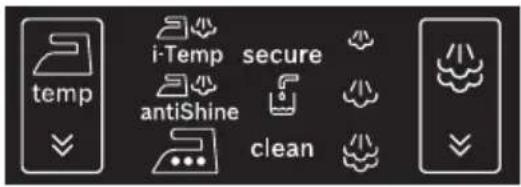
- After that time, the appliance shifts automatically to the "i-Temp" setting. The icon will flash until the temperature and steam settings are reached.

3. Temperature settings:
 | Temperature level selection touch icon is used to change the temperature of the iron soleplate. |
 | Automatic temperature selection of the iron soleplate. It is suitable for any type of fabric which can be ironed on this setting |
 | Temperature setting for dark and delicate fabrics. Reduces the risk of shiny marks. |
 | Indicates that the selected ironing temperature is suitable for silk and synthetic fabrics. |
 | Indicates that the selected ironing temperature is suitable for wool. |
 | Indicates that the selected ironing temperature is suitable for cotton and linen. |
To change the temperature of the
soleplate, touch the icon on the display (8) repeatedly. The iron runs through the following cycle:
![graph LR A["i-Temp"] --> B["antiShine"] B --> C["..."] C --> D["..."] D --> E["..."]](/content/2026/06/1330390/images/c485176a1a018e1cd7c7aed11e1bd2f87cee62977139329e6360ce8699457a5b.jpg)
4. Steam settings:

Steam level selection touch icon is used to change the amount of steam coming out of the soleplate.

Low steam flow
Medium steam flow
High steam flow
When "i-Temp" and "AntiShine" functions are selected, it is not possible to change the steam setting by pressing the icon. The steam amount is automatically selected.
Only on 🔊 🔊 🔊 settings it is possible to change the steam amount.
To change the amount of steam manually, touch the icon on the display (8) repeatedly. The steam generator runs through the following cycle:

The selected icon flashes until the pressure corresponding to each steam level is reached. Steam is now ready to be released by pressing the steam release buttons (13 or 14 * ).
5. Other indicators:

Indicates (flashing) that the auto shut-off system has been activated.
Indicates (flashing) that the water tank (1) is empty and must be filled.
Indicates (flashing) that the boiler and the filter (12) must be rinsed.
6. Beep activation/deactivation
You can activate or deactivate a beep which may be heard when touching the icons on the display (8).
To do this, simply touch the ▼ and ▼ icons at the same time for 3 seconds. After this time, a long beep will be emitted indicating that the beep has been activated or deactivated.
5
Preparations before ironing

For details of the following actions, please see the related chapters of this user manual.
- Release the iron from its SecureLock system (10) by pulling the lever located at the heel of the iron backwards.

- Remove any label or protective covering from the soleplate (16).
- Place the appliance horizontally on a solid, stable surface. You may remove the iron pad (2) from the appliance and place the iron on it on another solid, stable, horizontal surface.
- Fill the removable water tank (1). If the tank is removed, three beeps may be heard.


- Unwind the mains cable (5) fully, and plug it into an earthed socket.
- Set the main power button (9) to the on position (illuminated in red).

- The temperature and steam level automatic selection function will be selected by default.
This allows you to start ironing without having to select the steam or temperature levels.
If required, you can select your preferred setting manually by using the touch icons on the display (8).
The selected temperature and steam icons will stop flashing after a time, indicating that the appliance is ready to use.
Remark:
The steam generator will take more time to generate steam only on initial heating up, or after performing the de-scaling operation (Calc'n'Clean).
When water is already present in the steam generator during regular use, heat up time to reach the operating temperature will be faster.
- This appliance has a built-in water level sensor which indicates when the water tank (1) must be filled.
The icon will flash when the water tank is empty (three beeps may be heard at the same time).
Important:
• Normal tap water can be used.
To prolong the optimum steam function you can mix tap water with distilled water 1:1. If the tap water in your district is very hard, mix tap water with distilled water 1:2.
You can inquire about the water hardness with your local water supplier.
- The water tank (1) can be refilled at any time while using the appliance. • To avoid damage and/or contamination of the water tank and the boiler, do not put perfume, vinegar, starch, descaling agents, additives or any other type of chemical product into the water tank.
Any damage caused by the use of the aforementioned products, will void the guarantee.
- Do not use condensation water from tumble dryers, air conditioning systems or similar. This appliance has been designed to use normal tap water.
- The iron is not designed to rest on its heel. Please always position it horizontally on the iron pad (2).
- The iron pad can be placed into the specially designed recess on the appliance or somewhere suitable alongside the ironing area.
Never rest the iron on the appliance without the iron pad!
- During its first use the iron may produce certain vapours and odours, along with white particles on the soleplate, this is normal and will stop after a few minutes.
- While the steam release button is pressed, the water tank may produce a pumping sound, this is normal, indicating that water is being pumped to the steam tank.
Setting the temperature

By default, the steam station automatically chooses the "i-Temp" temperature setting. If necessary, the temperature setting may be modified and adapted to your needs.

- Check the ironing instruction label on the garment to determine the correct ironing temperature.
- Select the required ironing temperature setting:
| Temperature icon on display | Suitable for |
 | Any type of fabric which can be ironed. |
 | Temperature setting for dark and delicate fabrics.Reduces the risk of shiny marks. |
 | Synthetics |
 | Silk – Wool |
 | Cotton – Linen |
- The selected temperature icon will flash while the soleplate (16) is heating and will stop flashing as soon as the soleplate has reached the selected temperature.
Tips:
- Sort your garments out based on their cleaning symbol labels, always starting with clothes that have to be ironed at the lowest temperatures.
- If you are not sure what the garment is made of then begin ironing at a low temperature and decide on the correct temperature by ironing a small section not usually seen when worn.
7
Ironing with steam

The steam control is used to adjust the amount of steam produced when ironing.
By default, the steam station automatically chooses the "i-Temp" steam setting. The steam setting can be changed by the user by changing the temperature. The steam station will propose the suitable steam level automatically depending on the temperature selection made.
| Temperature icon on display | Steam setting |
 |  |
 |  |
 |  |
If necessary, the steam level can be adapted to your needs by touching the icon on the display (8).
The selected icon flashes until the pressure corresponding to each steam level is reached. Steam is now ready to be released by pressing the steam release buttons (13 or 14 * ).

Attention:
- When ironing on a lower temperature setting, only press the steam release button (13) for a few seconds at a time. If you find that water is dripping out of the soleplate, set the temperature to a higher position (take care that the garment can be ironed on this heat temperature setting).
- At the beginning of each use, it is possible that drops of water will be dispensed alongside steam.
Therefore, it is advisable to try the iron on the ironing board or a piece of cloth to start with.
Tip:
- For better ironing results, iron the last strokes without steam to dry the garment.
8
"PulseSteam" function

This appliance has a special function for tackling difficult creases. The "PulseSteam" function helps soften stubborn garments like jeans or linen faster.
When the steam release button is activated, the steam generator will release three powerful shots of steam so that the steam reaches even deeper into the fabric.
- Set the temperature to the setting.
- Press the steam release button (14*) on the top of the handle.
or (model dependent)
Quickly press the steam release button (13) on the bottom of the handle twice (double-click).
Remarks:
- It is possible to stop the shots of steam by quickly pressing the steam button again. - Some water drops may appear when you use the "PulseSteam" function for the first time.
The water drops will disappear after you have used the function for some time.
9
Ironing without steam

This enables the iron to be used for dry ironing.
- Begin ironing but without pressing the steam release buttons (13-14*).
10
Vertical steam


This can be used to remove creases from hanging clothes, curtains etc. It cannot be used on a synthetic setting for delicate items.
Warning!:
- Never direct the steam jet at garments that are being worn. - Never aim the steam at people or animals.
- Set the temperature to the setting.
- Hold the iron in an upright position 15 cm away from the garment being steamed.
- You can steam iron curtains and hanging garments (jackets, suits, coats...) by placing the iron in a vertical position and pressing the steam release button (13 or 14*).


11
Energy saving "eco" button
Energy Saving
Water Saving
If the “Energy saving” button (7) is switched on, you can save up to 25% of the energy and 40% of the water consumption (*), and still achieve good results when ironing most of your garments.
It is advisable to use the normal energy setting only for thick and very wrinkled fabrics.
(*) In comparison to the maximum setting.
Note:
If you work with the “Energy saving” function, the variable steam regulation and temperature regulation can still be used as recommended.
12
"secure" auto shut-off

(model dependent)
If during ironing, the steam release button (13-14*) on the iron handle is not pressed for a certain length of time (8 minutes), the steam station will automatically switch off.
The “secure” icon will flash when auto shut-off has been activated (three beeps may be heard at the same time). To switch the steam station back on, press the steam release button again.
13
Fabric protection soleplate cover
protect
(model dependent)
The fabric-protection soleplate cover (17*) is used for steam ironing delicate garments at maximum temperature without damaging them. Use of the soleplate cover also does away with the need for a cloth to prevent shine on dark materials.
It is advisable to first iron a small section on the inside of the garment to see if it is suitable.
To attach the soleplate cover to the iron, place the tip of the iron into the end of the soleplate cover and pull the elastic strap over the lower rear of the iron until it fits tightly. To release the soleplate cover, pull the elastic strap and remove the iron.

The fabric-protection soleplate cover may be purchased from customer service or from our website:
Accessory code (After-sales)
Name of accessory (Online shop)
571510 TDZ2045
14
Descaling the filter and the boiler
Cash/Clean Advanced
(Calc'n'Clean Advanced)
To extend the life of your steam generator and to avoid any build up of scale, it is essential that you rinse out the filter (12) and the boiler after a period of use (approximately after 50 hours). If the water is hard, increase the frequency.
Do not use descaling agents for rinsing out the boiler, as they could damage it. If the "clean" icon flashes (three beeps may be heard at the same time), this indicates that the boiler must be rinsed. Please proceed as follows:
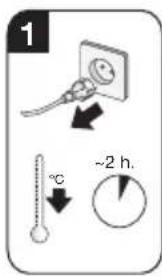

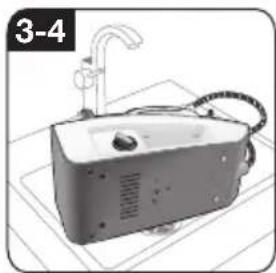


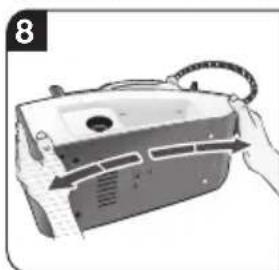


- Check carefully that the appliance is cold and unplugged for more than 2 hours, and that the water tank (1) is empty.
- Fix the iron to the base by inserting the tip of the iron into the front slot and moving the SecureLock lever (10) against the heel of the iron.
- Place your appliance over a sink or bucket.
- Lean the appliance on the opposite side of the filter opening.
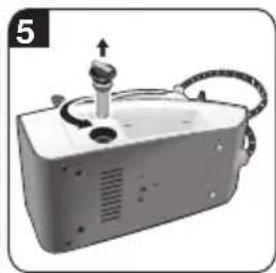
- Unscrew the filter (12) and take it out.
- To wash the filter, you may:
a. Place the filter under the water tap and wash it until calc residues are removed. Squeeze the filter as indicated in the picture 6. b. Immerse the filter in tap water (250 ml) mixed with a measure (25 ml) of descaling fluid. Rinse filter thoroughly before placing it back into the boiler.
The descaling fluid can be obtained from our After-sales service or from our website.
| Accessory code(After-sales) | Name ofaccessory(Online shop) |
- Holding your steam generator in the lateral position and using a jug, fill the boiler with 1/4 litre of water and replace the filter.
- Shake the base unit for a few moments, unscrew the filter again and empty the boiler completely over a sink or bucket.
For best results, we recommend that this operation is performed twice.
Important: before re-closing, make sure no water remains in the boiler.
- Replace and tighten the filter.
To reset the "clean" counter, switch the station on and off twice, keeping it off for at least 30 seconds each time.
(on → 30s off → on → 30s off → on)
15
Rinsing the iron steam chamber

Caution! Risk of burns!
This procedure helps to remove scale particles from the steam chamber.
This cleaning procedure may be performed occasionally (approximately once a year), when after a long period of use with very hard water, scale particles start to come out of the soleplate.
a) Ensure that the iron has cooled down. b) Fill the tank with tap water. c) Plug in the mains cable and set the main power button (9) to the "I" position, (illuminated in red). d) Set the temperature to the setting. e) Set the steam setting to 🎨 and wait until the icon stops flashing. f) Hold the iron over the sink or a container to collect the water. g) Press the steam release button (13) and gently shake the iron. Boiling water and steam will be released, carrying scale and/or deposits that might be inside. This process may take from 5 up to 10 minutes. Please note that if you have filled the water tank to the maximum, you do not have to continue until it is completely empty, but just long enough so that there are no more scale deposits appearing from your iron hand set. h) Set the temperature to the setting, without pressing the steam release buttons (13-14*).
The water in the steam chamber will start evaporating. Wait until all the water inside the chamber has been evaporated.
i) To clean the soleplate, immediately rub off any residue by running the hot iron over a dry cotton cloth.


16
Cleaning & Maintenance

⚠ Attention! Risk of burns!
Always unplug the appliance from the mains supply before carrying out any cleaning or maintenance operation on it.
- After ironing, disconnect the plug and allow the appliance to cool down before cleaning.
- Wipe the housing, handle and iron body with a damp cotton cloth.
- If the soleplate is soiled with dirt or scale, clean it with a damp cotton cloth.
- If the cloth is synthetic, it may melt due to the high temperature on the soleplate (16). Switch off the steam and rub off any residue immediately with a thickly folded, dry cotton cloth.
- Never use abrasive products or solvents. To keep the soleplate (16) smooth, you should avoid hard contact with metal objects. Never use a scouring pad, or chemicals to clean the soleplate.
17
Storing the appliance

- Always allow the appliance to cool down before storing it.
- Set the main power button to the "0" position (the red light will go off) and disconnect the mains cable.
- Empty the water tank.
- Place the iron on the iron pad (2), standing on the soleplate, and fix it by inserting the tip of the iron into the front slot and moving the SecureLock lever (10) against the heel of the iron.

- Store the mains cable (5) and steam hose (6) in the storage compartment (4). Do not wrap the cords too tight.
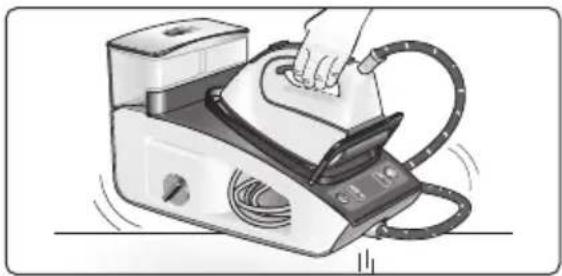
- Use the iron's handle when moving the appliance, as shown in figure below, or use the carrying handles (3) on either side.
18 Advice on disposal
Our goods come in optimised packaging. This basically consists of non-contaminating materials which should be handed over to the local waste disposal service as secondary raw materials. Your local town council can give you information about how to dispose of obsolete appliances.

This appliance is labelled in accordance with European Directive 2012/19/EU concerning used electrical and electronic appliances (waste electrical and electronic equipment -WEEE).
The guideline determines the framework for the return and recycling of used appliances as applicable throughout the EU.
19 Guarantee conditions
The terms of the guarantee for this appliance are in accordance with those stated by our representative for the country in which it is sold.
Details of these conditions can be obtained from the retailer from whom the appliance was purchased. The purchase receipt must be presented when making any claims against the terms of this guarantee.
20 Troubleshooting
Problem Possible causes Solution
| The display does not react when touched. | ·Dirt on the display. ·Fingers are too cold. | ·Clean the display with a damp cotton cloth (not too wet). ·Warm your fingers a little bit and try again. |
| "secure" icon flashes | The steam release button (13) on the iron handle has not been pressed during the last 8 minutes, and the auto shut-off system has been activated. | Press the steam release button again to switch the steam station back on. |
 icon flashes. icon flashes. | Water tank is empty. Fill the water tank. | |
| "clean" icon flashes. | Boiler and filter must be rinsed. | Rinse the filter and the boiler according to the cleaning instructions in this manual (see section "Descaling the filter and the boiler"). |
| When touching the display, the beep cannot be heard. | The beep has been deactivated. | Activate it according to the instructions in this manual, (see section "Beep activation/deactivation") |
| Problem Possible causes Solution | ||
| The steam generator does not come on. | ·There is a connection problem.·The main power button is not switched on. | ·Check the mains cable (5), the plug and the socket.·Set the main power button (9) to the “I” position (illuminated in red). |
| The iron does not heat up. | ·The main power button is not switched on.·The temperature is set to a low position. | ·Set the main power button (9) to the “I” position (illuminated in red).·Set the temperature to the desired position. |
| The iron begins to smoke when switched on. | ·During first use: certain components on the appliance have been lightly greased at the factory and may produce a little smoke when initially heated.·During subsequent use: the soleplate may be soiled. | ·This is completely normal and will stop after a short while.·Clean the soleplate according to the cleaning instructions in this manual. |
| Water flows through the holes on the soleplate. | ·The steam function is being used before it has reached the correct temperature.·The water is condensing inside the pipes because steam is being used for the first time or has not been used for a long time.·The steam generator contains too much scale. | ·Reduce the steam flow when ironing at low temperatures.·Point the iron away from the ironing area and press the steam release button until team is produced.·Clean the boiler as described in section “Descaling the filter and the boiler”. |
| Dirt comes out through the soleplate. | ·There is a build up of scale or minerals in the steam tank.·Chemical products or additives have been used. | ·Use tap water mixed 50% with distilled or demineralised water. To prolong the optimum steam function, mix tap water with distilled water 1:1. If the tap water in your district is very hard, mix tap water with distilled water 1:2.·Clean the soleplate with a damp cloth.·Never add products to the water. |
| The iron does not produce any steam. | ·The boiler is not switched on or the water tank is empty.·The steam regulation is set to the minimum position. | ·Set the main power button (9) to the “I” position (illuminated in red), and/or fill the water tank.·Increase the steam flow (see section “Ironing with steam”). |
| Problem Possible causes Solution | ||
| The ironed garment turns dark and/or sticks to the soleplate. | · The selected temperature is too high and has damaged the garment. | · Select a suitable temperature for the material being ironed and clean the soleplate with a damp cloth. |
| The soleplate turns brown. | · This is a regular consequence of continued use over a long period of time. | · Clean the soleplate with a damp cloth. |
| The appliance makes a pumping sound. | · Water is being pumped into the steam tank.· Water tank (1) is not correctly inserted in the housing.· The sound will not stop. | · This is normal.· Adjust the water tank to fit correctly.· If the sound will not stop, do not use the steam generator and contact an authorised technical service centre. |
| Loss of pressure during ironing. | Steam release button has been activated for too long a period of time, that is, it has been pressed too frequently. | Use the steam release button at intervals. This improves the ironing result as the textiles will be steamed dried and ironed properly. |
| Water spots appear on the garment during ironing. | May be caused by steam condensed on the ironing board. | Wipe the textile cover of the ironing board, and iron any water drops to dry them. |
| Water spots appear on the garment during use of the “PulseSteam” function. | Water spots are caused by steam condensation in the hose when cooling down after use. | Water drops stop coming out of the soleplate after using the “PulseSteam” function for some time. |
| The hose gets hot during use. | This is normal. It is caused by the steam passing through the hose during steam ironing. | Place the hose on the opposite side so that you cannot touch the hose during ironing. |
| Water leakage from the boiler. | Filter (12) located at the side of the appliance is loose. | Tighten up the filter. |
| The iron does not stop steaming after placing it on the pad (2). | “PulseSteam” function has been activated by double click. | Just press the trigger once again and the iron will stop steaming at once. |
If the above does not solve the problem, get in touch with an authorized technical service.
You can download this manual from the local homepages of Bosch.
Customer Service
Great Britain
Bosch Customer Service
Grand Union House
Old Wolverton Road, Milton Keynes
MK12 5PT
UK +44 (0)844 892 8979
IRL +353 (0)1450 2655
www.bosch-home.co.uk


- INDEX
- GENERAL SAFETY INSTRUCTIONS
- INTRODUCTION
- IMPORTANT
- DESCRIPTION
- I-TEMP" FUNCTION
- THE "I-TEMP" FUNCTION DOES NOT APPLY TO FABRICS THAT CANNOT BE
- ANTISHINE" FUNCTION
- HOW TO USE THE STEAM STATION
- TEMPERATURE SETTINGS
- STEAM SETTINGS
- OTHER INDICATORS
- BEEP ACTIVATION/DEACTIVATION
- PREPARATIONS BEFORE IRONING
- REMARK
- ANY DAMAGE CAUSED BY THE USE OF THE AFOREMENTIONED PRODUCTS, WILL VOID THE GUARANTEE
- NEVER REST THE IRON ON THE APPLIANCE WITHOUT THE IRON PAD
- SETTING THE TEMPERATURE
- TIPS
- IRONING WITH STEAM
- THE STEAM CONTROL IS USED TO ADJUST THE AMOUNT OF STEAM PRODUCED WHEN IRONING
- ATTENTION
- TIP
- PULSESTEAM" FUNCTION
- OR (MODEL DEPENDENT)
- REMARKS
- IRONING WITHOUT STEAM
- THIS ENABLES THE IRON TO BE USED FOR DRY IRONING
- VERTICAL STEAM
- THIS CAN BE USED TO REMOVE CREASES FROM HANGING CLOTHES, CURTAINS ETC. IT CANNOT BE USED ON A SYNTHETIC SETTING FOR DELICATE ITEMS
- WARNING
- ENERGY SAVING "ECO" BUTTON
- NOTE
- SECURE" AUTO SHUT-OFF
- (MODEL DEPENDENT)
- FABRIC PROTECTION SOLEPLATE COVER
- DESCALING THE FILTER AND THE BOILER
- (CALC'N'CLEAN ADVANCED)
- RINSING THE IRON STEAM CHAMBER
- CAUTION! RISK OF BURNS
- CLEANING & MAINTENANCE
- ⚠ ATTENTION! RISK OF BURNS
- ALWAYS UNPLUG THE APPLIANCE FROM THE MAINS SUPPLY BEFORE CARRYING OUT ANY CLEANING OR MAINTENANCE OPERATION ON IT
- STORING THE APPLIANCE
- ADVICE ON DISPOSAL
- GUARANTEE CONDITIONS
- TROUBLESHOOTING
- CUSTOMER SERVICE
- GREAT BRITAIN
Brand : BOSCH
Model : Sensixx AdvancedSteam TDS4571GB
Category : Iron