SC8551 - Vacuum Cleaner SAMSUNG - Free user manual and instructions

Find the device manual for free SC8551 SAMSUNG in PDF.
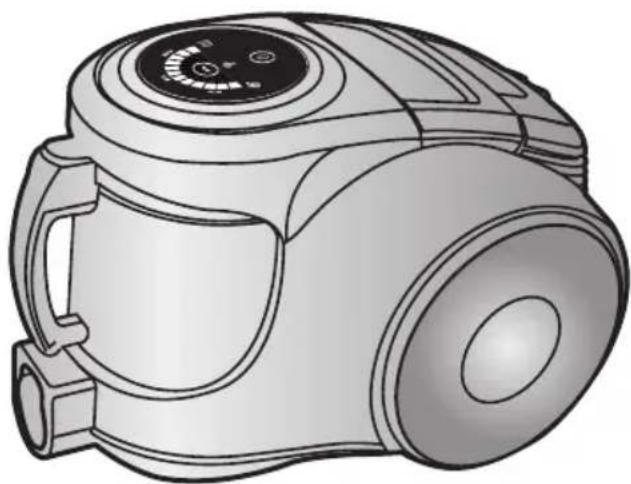
SAMSUNG SC8551 - Vacuum Cleaner
📄 36 pages English EN Download 💬 AI Question 10 questions ⚙️ Specs
Notice SAMSUNG SC8551 - page 1
View the manual : Français FR English EN
Pick your language and provide your email: we'll send you a specifically translated version.
Product type Canister vacuum cleaner
Brand Samsung
Model SC8551
Dimensions (L x W x H) 500 x 300 x 200 mm
Weight 5 kg
Power supply Mains, 220-240 V, 50-60 Hz
Nominal power 2000 W
Tank capacity 2 L
Filtration type Cyclonic with HEPA filter
Cord length 6 m
Operating range 9 m
Noise level 75 dB
Included accessories Crevice tool, upholstery brush, hard floor brush, turbo brush
Main functions Multi-channel cyclone, power regulation, automatic cord rewind
Maintenance and cleaning Clean the HEPA filter every month; empty the tank after each use
Safety Unplug before any maintenance; do not vacuum flammable materials
Spare parts and repairability Filters, tank, hose, nozzles available on Samsung website
General information Energy-certified vacuum cleaner class A

Frequently Asked Questions - SC8551 SAMSUNG

How to empty the tank of the SC8551 vacuum cleaner?
To empty the tank, press the release button on top of the tank, remove it, then empty the contents into a trash can. Close the lid and replace the tank until it clicks into place.
How often should I clean the HEPA filter?
It is recommended to clean the HEPA filter every month. You can do this by gently tapping the filter to remove dust, or by rinsing it with cold water (let it dry completely before reinstalling).
How to use the power regulation?
Power regulation is done via a slider on the handle. Push the slider up to increase power, down to decrease it.
What to do if the vacuum loses suction?
First check that the tank is not full and the filter is not clogged. Also check the hose and accessories for any blockages.
Can I use accessories from other brands?
It is best to use original Samsung accessories to ensure compatibility and performance. Universal accessories may not fit properly.
How to replace the HEPA filter?
Open the filter compartment by removing the cover, take out the old filter, insert the new filter in the same orientation, then close the cover.
The cord does not retract completely. What to do?
Pull the cord slightly then press the rewind pedal. If the problem persists, check that the cord is not twisted or stuck.
Is this vacuum suitable for hard floors and carpets?
Yes, it comes with a hard floor brush and a turbo brush for carpets. Use the turbo brush for carpets.
How to detect a motor problem?
If the vacuum suddenly stops and does not restart, it may be overheating. Let it cool for 30 minutes and check the filters. If the problem persists, contact Samsung service.
Where to find spare parts for the SC8551?
Spare parts such as filters, tanks, and accessories are available on the official Samsung website or from authorized dealers.

User questions about SC8551 SAMSUNG

0 question about this device. Answer the ones you know or ask your own.

Ask a new question about this device

Your email remains private: it is only used to notify you if someone answers your question.

No questions yet. Be the first to ask one.

Download the instructions for your Vacuum Cleaner in PDF format for free! Find your manual SC8551 - SAMSUNG and take your electronic device back in hand. On this page are published all the documents necessary for the use of your device. SC8551 by SAMSUNG.

USER MANUAL SC8551 SAMSUNG

* Before operating this unit, please read the instructions carefully. * Indoor use only.

Register your product at www.samsung.com/global/register

IMPORTANT SAFEGUARDS

  1. Read all instructions carefully. Before switching on, make sure that the voltage of your electricity supply is the same as that indicated on the rating plate on the bottom of the cleaner.
  2. WARNING: Do not use the vacuum cleaner when rug or floor is wet. Do not use to suck up water.
  3. Close supervision is necessary when any appliance is used by or near children. Do not allow the vacuum cleaner to be used as a toy. Do not allow the vacuum cleaner to run unattended at any time. Use the vacuum cleaner only for its intended use as described in these instructions.
  4. Do not use the vacuum cleaner without a dust bin. Empty the dust bin before it is full in order to maintain the best efficiency.
  5. Do not use the vacuum cleaner to pick up matches, live ashes or cigarette butts. Keep the vacuum cleaner away from stoves and other heat sources. Heat can deform and discolour the plastic parts of the unit.
  6. Avoid picking up hard, sharp objects with the vacuum cleaner as they may damage the cleaner parts. Do not stand on the hose assembly. Do not put weight on the hose. Do not block the suction or the exhaust port.
  7. Switch the vacuum cleaner off on the body of the machine before unplugging from the electrical outlet. Disconnect the plug from the electrical outlet before changing the dust bag or dust container. To avoid damage, please remove the plug by grasping the plug itself, not by pulling on the cord.
  8. This appliance is not intended for use by young persons or infirm persons without supervision unless they are adequately supervised by a responsible person to ensure that they can use the appliance safely. Young children should be supervised to ensure that they do not play with the appliance.
  9. The plug must be removed from the socket outlet before cleaning or maintaining the appliance.
  10. The use of an extension cord is not recommended.
  11. If your vacuum cleaner is not operating correctly, switch off the power supply and consult an authorized service agent.
  12. If the supply cord is damaged, it must be replaced by the manufacturer or its service agent or a similarly qualified person in order to avoid a hazard.
  13. Don't carry the vacuum cleaner by holding the hose. Use the handle on the vacuum cleaner set.

1 ASSEMBLING THE CLEANER

OPTION

OPTION

Illustration of a vacuum cleaner (no text or symbols visible)

3D rendered image of a mechanical lever or pivot component (no text or symbols visible)

3D rendered image of a mechanical clamp or lever component (no text or symbols visible)

3D rendered image of a mechanical T-joint component (no text or symbols visible)

Simple line drawing of a tray with two rectangular objects, no text or symbols present

▶ Features may vary according to model.

Safety warning illustration showing a robot with a cross mark and a warning symbol, accompanied by a safety warning icon.

CAUTION: Please do not use the dust bin handle when carrying the machine.

Illustration of a vacuum cleaner with handle and clamped component (no text or symbols)

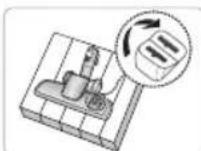
For storage, park the floor nozzle.

SAMSUNG SC8551 - ASSEMBLING THE CLEANER - 9

Please make sure your cable is fully extended before use.

Illustration of a hand operating a vacuum cleaner with a plug and cable (no text or symbols)

NOTES

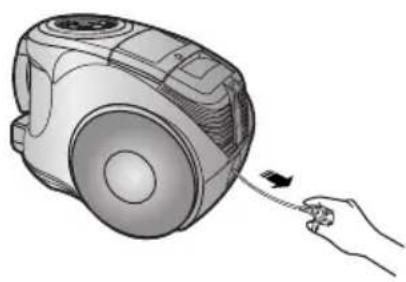
When removing the plug from the electrical outlet, grasp the plug, not the cord.

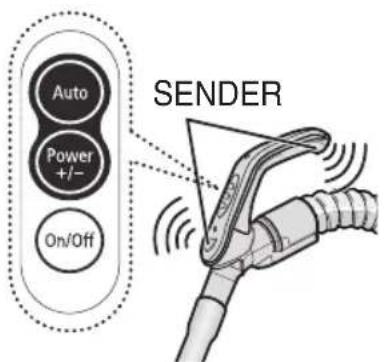
2-2 POWER CONTROL (INFRARED CONTROL)

  • HOSESAMSUNG SC8551 - 2-2 POWER CONTROL (INFRARED CONTROL) - 1

HANDLE CONTROL

[The cleaner is controlled by using infrared signals.]

  1. Vacuum cleaner ON/OFF

Press the ON/OFF button to operate the vacuum cleaner. Press again to stop the vacuum cleaner.

  1. Vacuum cleaner MODE (+/-)

Press the MODE button repeatedly to select the correct mode.

(ON) MIN → MID → MAX

SAMSUNG SC8551 - 2-2 POWER CONTROL (INFRARED CONTROL) - 2

SAMSUNG SC8551 - 2-2 POWER CONTROL (INFRARED CONTROL) - 3

SAMSUNG SC8551 - 2-2 POWER CONTROL (INFRARED CONTROL) - 4

  1. Using Auto mode

Press the Auto button to operate the vacuum cleaner automatically.

  • BODYSAMSUNG SC8551 - 2-2 POWER CONTROL (INFRARED CONTROL) - 5

Press the power control button repeatedly to select the correct mode.

(ON(MAX) → OFF)

SAMSUNG SC8551 - 2-2 POWER CONTROL (INFRARED CONTROL) - 6

NOTE: If the remote handle control is not working, the cleaner can be operated using the control button on the body of the machine.

SAMSUNG SC8551 - 2-2 POWER CONTROL (INFRARED CONTROL) - 7

The filter light is illuminated when the dust pack requires checking or emptying. An audio signal will also sound.

SAMSUNG SC8551 - 2-2 POWER CONTROL (INFRARED CONTROL) - 8

The IR light indicates the part that receives the infra-red signal from the handle control.

SAMSUNG SC8551 - 2-2 POWER CONTROL (INFRARED CONTROL) - 9

This shows the generation of negative ions when the vacuum cleaner is in operation.

SAMSUNG SC8551 - 2-2 POWER CONTROL (INFRARED CONTROL) - 10

This indicates that the automatic suction mode is selected.

The level of suction is indicated by the LED display.

2-3 HOW TO USE AND MAINTAIN THE ACCESSORIES

▶ Features may vary according to model.

PIPELine drawing of a cylindrical mechanical tool or rod with a flanged end (no text or symbols)

Illustration of a cylindrical mechanical device with blue arrows indicating motion or force (no text or symbols).

Adjust the length of the telescopic pipe by sliding the length control button located in the center of the telescopic pipe back and forth.

Illustration of a hand holding a cylindrical tool with a handle, emitting vapor or smoke (no text or symbols).

To check for blockages, separate the telescopic pipe and adjust to shorten. This allows for easier removal of waste clogging the tube.

ACCESSORYSAMSUNG SC8551 - 2-3 HOW TO USE AND MAINTAIN THE ACCESSORIES - 4
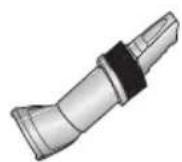
Illustration of a robotic arm with directional arrows indicating movement (no text or symbols).

SAMSUNG SC8551 - 2-3 HOW TO USE AND MAINTAIN THE ACCESSORIES - 6

SAMSUNG SC8551 - 2-3 HOW TO USE AND MAINTAIN THE ACCESSORIES - 7

SAMSUNG SC8551 - 2-3 HOW TO USE AND MAINTAIN THE ACCESSORIES - 8

SAMSUNG SC8551 - 2-3 HOW TO USE AND MAINTAIN THE ACCESSORIES - 9

SAMSUNG SC8551 - 2-3 HOW TO USE AND MAINTAIN THE ACCESSORIES - 10

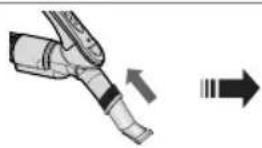
Push the accessory on to the end of the hose handle.

Pull out and turn the dusting brush for cleaning delicate areas.

To use the upholstery tool, push the accessory on to the end of the hose handle in the opposite direction.

ELBOW EXTENDING TUBE (OPTION)SAMSUNG SC8551 - 2-3 HOW TO USE AND MAINTAIN THE ACCESSORIES - 11

SAMSUNG SC8551 - 2-3 HOW TO USE AND MAINTAIN THE ACCESSORIES - 12

Diagram showing four steps of a pipe fitting or valve assembly with numbered instructions and a blue arrow indicating motion.

Illustration of a person using a handheld device to clean or wash a sofa (no text or symbols).

  1. Connect the elbow extending tube to connecting part for hose knob and telescopic pipe.
  2. Fit the telescopic pipe to the lower part of the elbow extending tube.
  3. Press the PUSH button.
  4. With the PUSH button pressed, the elbow extending tube is folded.
  5. Using the elbow extending tube allows hard to reach areas (e.g. under furniture) to be cleaned without having to kneel down.

OPTIONIllustration of a mechanical device with a handle and base plate (no text or symbols).

▶ Carpet Cleaning ▶ Floor Cleaning

SAMSUNG SC8551 - 2-3 HOW TO USE AND MAINTAIN THE ACCESSORIES - 16

SAMSUNG SC8551 - 2-3 HOW TO USE AND MAINTAIN THE ACCESSORIES - 17

Adjust the inlet lever according to the floor surface.

Illustration of a hand using a tool to press or install a mechanical component (no text or symbols visible).

Remove waste matter completely if the inlet is blocked.

OPTIONSAMSUNG SC8551 - 2-3 HOW TO USE AND MAINTAIN THE ACCESSORIES - 19

Vacuum dust in wide area at once

Illustration of a hand using a tool to cut or spread a wooden plank, with no visible text or symbols.

Remove waste matter completely if the inlet is blocked.

OPTIONIllustration of a vacuum cleaner (no text or symbols visible).
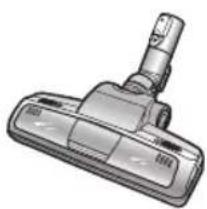
For improved pick-up of pet hair and fibre on carpets

Frequent vacuuming of hair or pet fur may cause a falling-off of the rotation due to matters tangled around the drum. In this case, clean the drum with care.

1 2 3

Push the Open button of the transparent screen cover to separate the cover.

Illustration of a hand holding a vacuum cleaner (no text or symbols visible).

Remove the brushbar from the transparent screen.

SAMSUNG SC8551 - 2-3 HOW TO USE AND MAINTAIN THE ACCESSORIES - 24

Remove waste matter such as dust and hair tangled around the brushbar using scissors.

4Technical illustration of a mechanical clamp or tool with no visible text or symbols.

Remove dust inside the brush housing using a dry duster or crevice tool.

5Technical illustration of a mechanical component with a cylindrical pin and housing (no text or symbols).

Insert brushbar into rotating belt and assemble.

6Mechanical assembly diagram showing a component being cut with arrows indicating motion (no text or symbols present).

Click the transparent screen cover back into place to reassemble.

OPTIONSAMSUNG SC8551 - 2-3 HOW TO USE AND MAINTAIN THE ACCESSORIES - 28

Brush for blanket

For picking up pet hair and fibre on upholstery and bed linen.

Clogs on turbine keeps brush from turning, and in this case, take care of it.

SAMSUNG SC8551 - 2-3 HOW TO USE AND MAINTAIN THE ACCESSORIES - 29

Remove waste matter completely when inlet is blocked.
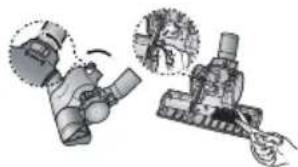
Illustration of mechanical components with no visible text or symbols.

Turn the lock button to 'UNLOCK', and remove waste matter.

Mechanical assembly diagram showing a valve mechanism with directional arrows and a close-up inset (no text or labels).

To reassemble, align the cover to the front of the main body and close. After closing the cover, ensure that the lock button is turned to the 'LOCK' position.

Warning: Use for bedclothes only. Be cautious not to damage brush during unclogging.

3 EMPTYING THE DUST BIN

123Illustration of a kitchen blender with a digital display showing a grid pattern (no text or symbols).

Once dust reaches the dust full mark, or once the filter check light is on, empty the dust bin.

Illustration of a hand holding a small appliance next to a device, showing internal components and a close-up view of the device (no text or symbols present).

Take the dust bin out by pressing the button.
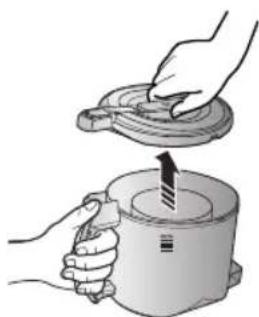
Illustration of hands using a tool to lift a cylindrical device (no text or symbols visible).

Separate the dust bin cover.

4Illustration of a hand pouring liquid into a trash bin with granular material (no text or symbols).

Throw away dust in the bin.

5Illustration of hands using a tool to lift a cup, showing the lid being inserted (no text or symbols present).

Close the dust bin cover.

6CLICK

Before use, push the dust bin into the main body of the vacuum cleaner until you hear the "click" sound.

  • Empty into a plastic bag (recommended for asthma/allergy sufferers)SAMSUNG SC8551 - EMPTYING THE DUST BIN - 7

Illustration of hands holding a container with a curved arrow indicating rotation (no text or symbols).

Line drawing of a hand pouring liquid into a bag with a handle (no text or symbols).

Safety warning symbol and electrical diagram showing a hand using a tool to switch an electrical outlet with warning symbols.

NOTE

You may rinse the dust bin with cold water
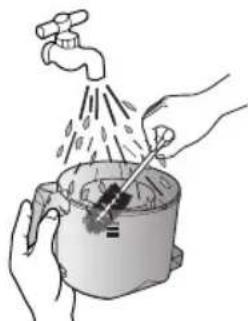
Illustration of hands using a tool to clean or wash food from a pot (no text or symbols).

4 CLEANING THE DUST PACK

4-1. WHEN TO CLEAN THE DUST PACK

- If suction is noticeably reduced during cleaning, please check the dust pack as indicated below.

Auto Power +/- On/Off POWER CONTROL

Turn the vacuum power to 'MAX' HANDLE CONTROL

Mechanical device with a 10cm measurement annotation on a surface (no text or symbols on the device itself).

If the filter check indicator turns red with the inlet floating 10 cm above flat floor, clean it.

Illustration of a portable air conditioner with a dial and control panel, no text or symbols present.

When the indicator light comes on, please empty the Dust Pack(4-2) as shown in the following illustrations.

4-2 CLEANING THE DUST PACK

Illustration showing two steps of a kitchen appliance: adding a pot and opening the lid, with numbered instructions.

Remove the dust bin and dust pack as shown.

Illustration of hands holding a small object with a magnified inset showing the same object.

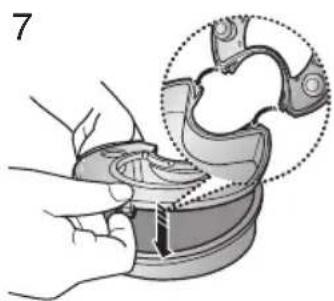
Remove the fixed frame of the dust pack cover.

Illustration of hands cleaning a sink with a faucet, showing water level and drain.

Remove the sponge pad from the dust pack.

Illustration showing two hands washing a faucet and pouring liquid from a bowl.

Wash the sponge and the filter of the dust pack with water.

Illustration of a sun shining on a brick wall and a broken floor with a curved object.

Let the sponge and dust pack dry in the shade for more than 12 hours.
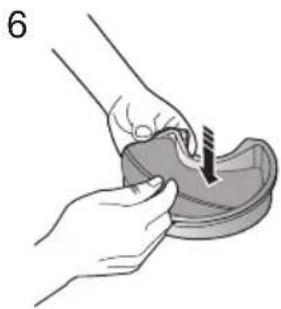
Illustration of hands using a tool to apply material to a small object.

Put the sponge into the dust pack.

Illustration of a hand holding a curved object with an arrow indicating direction.

Before reassembly, align the dust pack cover and dust pack correctly.

Illustration of a hand holding a small mechanical component with a curved arrow indicating rotation.

Put the assembled dust pack into the main body.

Image showing five prohibition symbols: a microwave oven, a frying pan, a kitchen with steam, a washing machine, and a spoon.

NOTE: Make sure the filter is completely dry before putting it back into the vacuum cleaner. Allow 12 hours for it to dry.

5 CLEANING THE MOTOR PROTECTION FILTER

Illustration showing two steps of a hand holding a cup and a lid, with numbered annotations indicating the process.

Take out both the dust bin and the dust pack.
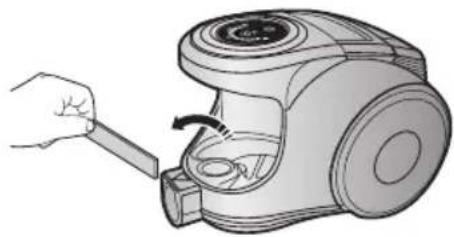
Illustration of a hand using a tool to adjust or install a vacuum cleaner's air gap.

Remove the motor protection filter from the vacuum cleaner. Shake and tap the dust from it and put back in machine.

6 CLEANING THE OUTLET FILTER

Illustration of a hand pressing down on a small vacuum cleaner.

Lift the handle. Hold the handle of the
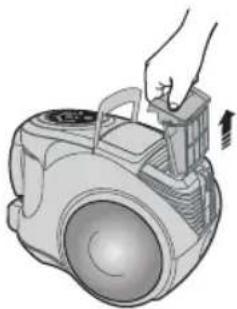
Illustration of a hand operating a vacuum cleaner device with a handle.

outlet filter and lift to remove.

Illustration of hands cleaning a textured surface with a magnified inset showing the edge detail.

Remove the fixed frame of the outlet filter cover.
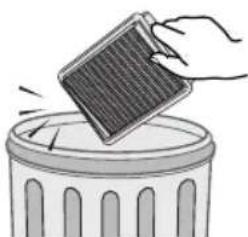
Illustration of a hand holding a small solar panel above a trash can.

Dust off the outlet filter by gently tapping.

QUICKCLICK

Before reassembly, align the outlet filter cover and the outlet filter correctly, and push the outlet filter until you hear a click sound.

Illustration of a hand inserting a device into a vacuum cleaner (no text or symbols visible)

Push the outlet filter into the main body until you hear a click sound.

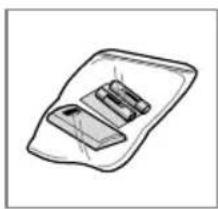
7 CHANGE THE BATTERY (OPTIONAL)

Illustration of a mechanical tool with exploded view and component details (no text or symbols)

BATTERY TYPE: AA SIZESAMSUNG SC8551 - CHANGE THE BATTERY (OPTIONAL) - 2

NOTE

  1. When the vacuum cleaner does not work, replace the batteries. If the problem persists, please contact our authorized dealer.
  2. Use 2 batteries of size AA.

SAMSUNG SC8551 - NOTE - 1

WARNING

  1. Never disassemble or recharge the batteries.
  2. Never heat up the batteries or throw them into fire.
  3. Do not reverse (+),(-) poles.
  4. Dispose of the batteries properly.
  5. IF YOU HAVE A PROBLEM
PROBLEM CAUSE REMEDY
Motor does not start.No power supply. Thermal cut-out.Check cable, plug and socket. Leave to cool.
Suction force is gradually decreasing.Nozzle, suction hose or tube is blocked.Check for blockage and remove it.
Cord does not rewind fully. Check that the cord is not twisted or wound unevenly.Pull the cord out 2-3m and push the cord rewind button.
Vacuum cleaner does not pick up dirt.Crack or hole in hose.Check hose and replace if required.
Low or decreasing suctionFilter is full of dust.Please check filter and, if necessary, clean as illustrated in the instructions.

The vacuum cleaner

Line drawing of a vacuum cleaner device with control panel and handle (no text or symbols)

3D rendered image of a mechanical lever or clamp component (no text or symbols visible)

3D rendering of a vacuum cleaner with a lever and base (no text or symbols visible)

3D rendered image of a mechanical pipe fitting (no text or symbols visible)

Simple line drawing of a tray with two rectangular objects, no text or symbols present

◀ Power

Illustration of a vacuum cleaner with attached mechanical components (no text or symbols)

Safety warning illustration showing a person using a device to mark the hazard, with an exclamation mark and warning symbol.

Illustration of a hand pulling a small cable into a vacuum cleaner (no text or symbols present)

Control with staff

Illustration of a hand pouring liquid into a trash bin with scattered particles (no text or symbols).

Illustration of hands washing a pot with a faucet and water droplets (no text or symbols).

Medical illustration showing a hand holding a device with a magnified circular detail of the device (no text or symbols present).

Technical line drawing of a mechanical device with no visible text or symbols.

It. To clean

Illustration of a hand pressing down on a small mechanical device (no text or symbols visible).

On the handle.

Illustration of a hand holding a vacuum cleaner's device (no text or symbols visible).

Warning

!

3D rendered image of a mechanical lever or pivot component (no text or symbols visible)

3D rendered image of a mechanical clamp or lever component (no text or symbols visible)

3D rendered image of a metallic T-shaped pipe fitting (no text or symbols)

Simple line drawing of a tray with three rectangular objects, no text or symbols present

Illustration of a hand holding a vacuum cleaner with a plug icon and cable, no text or symbols present

Note

Illustration of a cylindrical mechanical device with blue arrows indicating motion or force (no text or symbols)

SAMSUNG SC8551 - The vacuum cleaner - 22

SAMSUNG SC8551 - The vacuum cleaner - 23

SAMSUNG SC8551 - The vacuum cleaner - 24

SAMSUNG SC8551 - The vacuum cleaner - 25

Diagram showing three-step mechanical assembly steps with labeled parts and directional arrows

Illustration of a person using a handheld vacuum cleaner to clean a sofa (no text or symbols)

▶ Carpet cleaning ▶ Tile cleaning
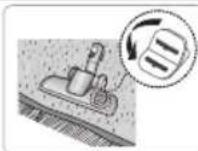
SAMSUNG SC8551 - The vacuum cleaner - 28

Illustration of a hand using a tool to adjust or install a wooden component (no text or symbols visible)

Illustration of hands holding a device with a curved arrow indicating rotation (no text or symbols)

SAMSUNG SC8551 - The vacuum cleaner - 31

Safety warning illustration showing a hand using a screwdriver to adjust an electrical outlet with a warning symbol

NOTE

2

Illustration of hands holding a small object with a magnified inset showing the circular detail (no text or symbols)

3Illustration of hands cleaning a sink with a faucet, showing water flowing from the drain (no text or symbols)

BATTERY TYPE: SIZE AA

SAMSUNG SC8551 - NOTE - 3

NOTE

Manual assistant
Powered by Anthropic
Waiting for your message
Product information

Brand : SAMSUNG

Model : SC8551

Category : Vacuum Cleaner