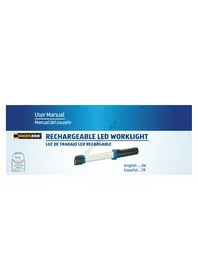
LED Work Light GT-C-1-US - Work lamp Workzone - Free user manual and instructions
Find the device manual for free LED Work Light GT-C-1-US Workzone in PDF.


| Type | LED Work Light |
| Brand | Workzone |
| Model | GT-C-1-US |
| Light Source | LED |
| Luminous Flux | 1500 lumens |
| Color Temperature | 6000K (cool white) |
| Power Source | Rechargeable Li-ion battery (7.4V, 4000mAh) and AC adapter |
| Charging Time | 4-5 hours |
| Operating Time | 3-6 hours (depending on brightness level) |
| Brightness Levels | High / Medium / Low |
| Beam Angle | 120° |
| IP Rating | IP54 (dust and splash resistant) |
| Material | ABS plastic and aluminum |
| Dimensions | 10.2 x 6.3 x 4.7 inches (260 x 160 x 120 mm) |
| Weight | 2.2 lbs (1 kg) |
| Mounting Options | Stand and hanging hook |
| Included Accessories | AC charger, user manual |
| Safety Features | Overheat protection, overcharge protection |
| Maintenance | Clean with dry cloth; do not use abrasive cleaners |
| Repairability | Not user-serviceable; contact customer service for repairs |
Frequently Asked Questions - LED Work Light GT-C-1-US Workzone
User questions about LED Work Light GT-C-1-US Workzone
0 question about this device. Answer the ones you know or ask your own.
Ask a new question about this device
Download the instructions for your Work lamp in PDF format for free! Find your manual LED Work Light GT-C-1-US - Workzone and take your electronic device back in hand. On this page are published all the documents necessary for the use of your device. LED Work Light GT-C-1-US by Workzone.
USER MANUAL LED Work Light GT-C-1-US Workzone
English .... 06 Español...39
Contents
Overview ....4
Pack contents/device parts....6
General information 7
Reading and storing the user manual 7
Explanation of symbols......8
Safety....12
Proper use 12
Safety instructions....13
First use 25
Checking the light and pack contents......25
Operation....26
Setting up the light 29
Replacing the fuse of the car adapter 29
Activating/deactivating the light 30
Cleaning....31
Technical data 33
Disposal 36
Disposing of the packaging....36
Disposing of the light 37
4
A

1
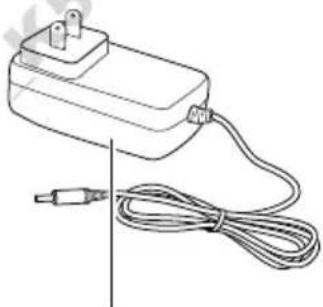
2
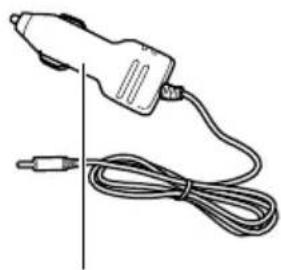
3
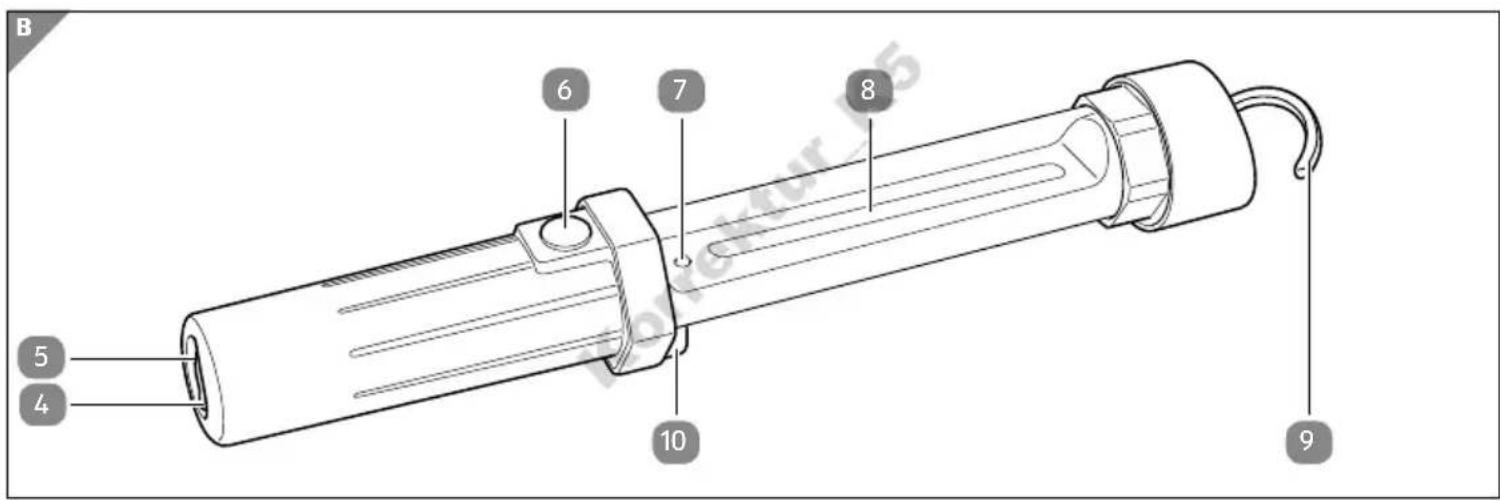
Pack contents/device parts
1 Light
2 Power supply unit
3 Car adapter
4 Rubber plug
5 Adapter jack
6 On/Off switch
7 LED
8 LED strip
9 Rotatable hook
10 Magnet
General information
Reading and storing the user manual

This user manual accompanies this rechargeable LED worklight (referred to below only as the “light”). It contains important information on handling the product.
Before using the light, please read through the user manual carefully. This particularly applies to the safety instructions. Store the user manual for further use. Failure to observe this user manual may result in se-
vere injury or damage to the light. If you pass the light on to third parties, please be absolutely sure to include this user manual.
General information
Explanation of symbols
The following symbols and signal words are used in this user manual, on the light or on the packaging.

WARNING!
This signal symbol/word designates a hazard with moderate degree of risk which may lead to death or severe injury if not avoided.
General information
CAUTION!
This signal symbol/word designates a hazard with low risk that, if not avoided, may result in minor or moderate injury.
NOTICE!
This signal word warns against potential damages to property.
General information

This symbol provides you with useful supplementary information on handling.

Products marked with this symbol may only be operated in indoor areas.

This symbol identifies electric devices corresponding to protection class III.
IP20
This symbol identifies products protected against the ingress of debris ≥ 0.49'' (12.5 mm).
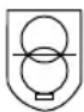
Products marked with this symbol are equipped with a short-circuit proof safety transformer.
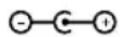
Products marked with this symbol have positive polarity.
Safety
Safety
Proper use
The light is only designed for the illumination of indoor areas. It is only intended for private use and not suitable for commercial purposes.
Only use the light as described in this user manual. Any other use is deemed improper and may result in damage to property or even personal injury. The light is not a children's toy.
The manufacturer or vendor cannot be held liable for damages incurred through improper or incorrect use.
Safety instructions

WARNING!
Risk of electric shock!
A faulty electrical installation or excessive line voltage may result in an electric shock.
- Only connect the light if the line voltage of the socket corresponds to the specification on the rating plate.
- Only connect the light to an easily accessible socket so that you can quickly disconnect the light from the grid in the event of a fault.
Safety
- Only connect the car adapter in cars with a battery voltage of 12 V. The car adapter is not designed for trucks, boats etc. with a battery voltage of 24 V.
- Do not operate the light if it exhibits visible damages or the power cable or the power supply unit or car adapter is defective.
- If the power cable of the light is damaged, the manufacturer, its after sales support or a person with similar qualifications must replace it to avoid risks.
- Do not open the housing; instead, have a qualified professional perform the repairs. Contact a qualified workshop for this. Liability and warranty claims are waived in the event of repairs performed by the user, improper connection or incorrect operation.
- The light source of this light cannot be replaced; if the light source has reached the end of its useful life, replace the entire light.
Safety
- Only parts that comply with the original device data may be used for repairs. Electric parts, which are essential for providing protection against risk sources, are contained in this light.
- If the power supply unit or the car adapter is damaged, it must not be used anymore and must be replaced by a power supply unit or car adapter of the same type.
- Do not immerse the light or the power supply unit or car adapter in water or other liquids.
- Never touch the power supply unit or the car adapter with damp hands.
- Never pull the power supply unit or the car adapter out of the socket by the power cable; instead, always take hold of the power supply unit or the car adapter.
- Never use the power cable as a carrying strap.
- Keep the light, the power supply unit or the car adapter away from open flames and hot surfaces.
- Lay the power cable so that it does not pose a tripping hazard.
Safety
- Do not kink the power cable and do not lay it over sharp edges.
- Only use the light in rooms located indoors. Never use it in wet rooms or in the rain.
- Never store the light such that there is a risk of it falling in a tub or sink.
- Never attempt to grab the light if it has fallen into water. In this case, immediately disconnect the power supply unit or the car adapter from the power supply.
- Make sure that children do not insert any objects in the light.
- When you are not using the light, cleaning it or in the event of a fault, always switch the light off and pull the power supply unit or the car adapter out of the socket.
WARNING!
Danger for children and persons with impaired physical, sensory or mental capacities (e.g. partially disabled persons, older persons with reduced physical and mental capacities) or lack of experience and knowledge (e.g. older children).
- This light may be used by children ages eight and over as well as persons with impaired physical, sensory or mental capacities or those lacking experience and knowledge if they are supervised or have been instructed in how to safely use the light and have understood the risks associated with using it. Children must not play with the light. Cleaning and user maintenance must not be performed by unsupervised children.
Safety
- Keep children under eight years of age away from the light and the connector cable.
- Do not leave the light unattended while in use.
- Do not let children play with the packaging wrapper. Children may get caught in it when playing and suffocate.
WARNING!
Danger of explosion!
Improper handling of the rechargeable battery may cause an explosion.
- Never short circuit the rechargeable battery.
- Never disassemble the rechargeable battery.
- Never throw the rechargeable battery in fire.
- Only recharge the light with the enclosed accessories.
Safety

WARNING!
Fire hazard!
Improper handling of the light may cause a fire.
- Do not use the light in areas where there is a risk of fire or explosion.
- Keep the light away from flammable materials.
- Do not hang any objects over the light, the power supply unit or the car adapter.
- Do not cover the light, the power supply unit or the car adapter with objects.
CAUTION!
Risk of accident and injury!
Handling the light improperly may result in injury.
- The light is very bright. Do not look directly into the light and do not dazzle other persons or animals.
- If you use the light in a car with the car adapter, make sure that:
- neither the light nor the power cable pose a risk for the driver or the passengers. The light must be properly stored and secured at all times.
- the driver is able to operate all parts of the vehicle properly and without restriction.
- the light is generally not switched on or used during the trip and in road traffic in general.
Safety

CAUTION!
Risk of chemical burns!
Leaked fluid from the rechargeable batteries could cause burns if it comes into contact with skin or other body parts.
- Never open the rechargeable battery.
- If battery acid leaks out, avoid contact with skin, eyes and mucus membranes. In the event of contact, immediately flush the applicable areas with plenty of clean water and consult a physician promptly.
NOTICE!
Risk of damage!
Improper handling of the light may damage it.
- Do not use the light for longer than 3 hours.
- Never place the light on or near hot surfaces (e.g. stovetops etc.).
- Ensure that the power cable does not come into contact with hot parts.
- Never expose the light to high temperatures (heaters etc.) or to the effects of the weather (rain etc.).
- Never use the light until the LED strip goes out as the rechargeable battery may be irreversibly destroyed as a result.
Safety
- Disconnect the light from the power supply after each use.
- Make sure that you always switch off the light when not using it.
- If you do not want to use the light for a prolonged period of time, you must fully charge the rechargeable battery before storing it.
- If you use the light in a vehicle with the car adapter, make sure that the car adapter has been plugged in completely to avoid any risk of overheating.
First use
Checking the light and pack contents
NOTICE!
Risk of damage!
If you are not cautious when opening the packaging with a sharp knife or other pointed objects, you may quickly damage the light or the accessories.
- Be very careful when opening.
Operation
- Take the light 1 and its accessories out of the packaging.
- Check to make sure that the delivery is complete (see fig. A and B).
- Check whether the light or the accessories exhibit damage. If this is the case, do not use the light. Contact the manufacturer at the service address specified on the warranty card.
Operation
If you would like to use the light 1 without the power supply unit 2 or the car adapter 3, you must first charge the rechargeable battery of the light. The rechargeable battery is located in the handle of the light. Charging takes approx. 6 hours. You can charge the light via the socket or the cigarette lighter of a vehicle.
NOTICE!
Risk of damage!
Improper handling of the light may damage it.
- Always switch the light off during the charging process.
- Completely unwind the power cable.
-
Pull the rubber plug 4 out of the adapter jack 5 .
-
Connect the device plug of the power supply unit or the car adapter to the adapter jack.
Operation
- Connect the power supply unit to a properly installed socket or the car adapter to a current-carrying cigarette lighter jack in a car.

The LED 7 is illuminated in red during the charging process. As soon as the charging process is complete, the LED will turn green.
- Once charging is complete, push the rubber plug into the adapter jack.
Setting up the light
To optimally illuminate your workplace, you can attach the light 1 to metallic surfaces using the magnet 10 on the back or hang it up on the rotatable hook 9.
Replacing the fuse of the car adapter
- Unscrew the colored ring on the car adapter 3 by turning it counterclockwise.
- Replace the defective fuse with a new fuse of the type F0.5AL250V (0.5 A, 250 V, fast).
- Tighten the colored ring on the car adapter by turning it clockwise.
Operation
Activating/deactivating the light
- Push the On/Off switch 6 to switch the light 1 on or off.

To avoid being dazzled by the light, turn the light with the On/Off switch into another direction. Make sure that nearby persons are not dazzled.
Cleaning
NOTICE!
Risk of short circuit!
Liquid that has penetrated the housing may cause a short-circuit.
- Never immerse the light in liquids.
- Make sure that no water penetrates the housing.
- Before cleaning, pull the power supply unit out of the socket or the car adapter out of the cigarette lighter.
Cleaning
NOTICE!
Risk of damage!
Improper handling of the light may result in damage.
- Do not use any aggressive cleaners, brushes with metal or nylon bristles or sharp or metallic cleaning utensils such as knives, steel wool and the like. They could damage the surfaces.
- Make sure that the light 1 is switched off and disconnected from the grid.
- Let the light cool off completely.
- Use a damp cloth to wipe off the light. Then let all parts dry completely.
Technical data
LED light
Model: GT-C-1-US
Article number: 94430
Rechargeable battery type: 3.7 V — — —, 1800 mAh, Li-Ion
LED output: max. 3 W
Input voltage: 12 V = - - - , max. 500 mA
Protection class: III
Technical data
Power supply unit
Model: WJ-Y111200500W
Input voltage: 100–240 V\~, 50/60 Hz
Output power:
12 V = - - - , 500mA
Car adapter
Model: ZZ-103
Input: 12 V = = =
Output: 12 V ---
Fuse: F0.5AL250V
This user manual can also be downloaded as a PDF file from our homepage www.gt-support.de.
Disposal
Disposal
Disposing of the packaging
- Sort the packaging before you dispose of it. Dispose of paperboard and cardboard with the waste paper and wrappers in the recyclable waste.
Disposing of the light
- Should the light no longer be capable of being used at some point in time, dispose of it in accordance with the regulations in force in your federal state or country.
- Please ensure your recycling information applies to the local regulations and EPA recommendations (www.epa.gov).
- Batteries and rechargeable batteries must not be disposed of with household waste!
As the end user you are required by law to bring all batteries and rechargeable batteries, regardless whether they contain harmful substances* or not, to a collection point run by the communal authority or borough or to a retailer, so that they can be disposed of in an environmentally friendly manner. Turn in the rechargeable battery at your collection point in a discharged state only!
* labeled with: Cd = cadmium, Hg = mercury, Pb = lead
Disposal
To remove the rechargeable battery, you will need a Phillips-head screwdriver and scissors.
- Switch the light 1 off by pushing the On/Off switch 6 and disconnect the light from the grid.
- Use the Phillips-head screwdriver to remove the 2 Phillips-head screws on the top of the handle.
- Pull the light apart by the handle.
- Use scissors to sever the red and black wire one after the other.
- Remove the rechargeable battery.
Contenido
Contenido
Conjunto....4

- CONTENTS
- OPERATION....26
- CLEANING....31
- TECHNICAL DATA 33
- DISPOSAL 36
- PACK CONTENTS/DEVICE PARTS
- GENERAL INFORMATION
- READING AND STORING THE USER MANUAL
- EXPLANATION OF SYMBOLS
- CAUTION
- NOTICE
- IP20
- SAFETY
- PROPER USE
- SAFETY INSTRUCTIONS
- RISK OF ELECTRIC SHOCK
- WARNING
- DANGER OF EXPLOSION
- FIRE HAZARD
- RISK OF ACCIDENT AND INJURY
- RISK OF CHEMICAL BURNS
- RISK OF DAMAGE
- FIRST USE
- CHECKING THE LIGHT AND PACK CONTENTS
- OPERATION
- SETTING UP THE LIGHT
- REPLACING THE FUSE OF THE CAR ADAPTER
- ACTIVATING/DEACTIVATING THE LIGHT
- CLEANING
- RISK OF SHORT CIRCUIT
- TECHNICAL DATA
- LED LIGHT
- POWER SUPPLY UNIT
- CAR ADAPTER
- DISPOSAL
- DISPOSING OF THE PACKAGING
- DISPOSING OF THE LIGHT
- CONTENIDO
Brand : Workzone
Model : LED Work Light GT-C-1-US
Category : Work lamp