
Motion Sensor - Home Automation Fibaro - Free user manual and instructions
Find the device manual for free Motion Sensor Fibaro in PDF.


| Type | Z-Wave Motion Sensor |
| Detection Technology | Passive Infrared (PIR) |
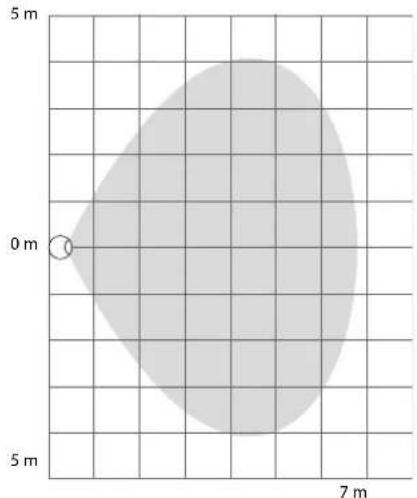
| Detection Range | Up to 7 meters (23 ft) at 90° angle |
| Z-Wave Protocol | Z-Wave Plus, 500 series chip |
| Frequency | 868.42 MHz (EU) / 908.42 MHz (US) |
| Power Supply | 1x CR123A battery (3V) |
| Battery Life | Up to 2 years (typical usage) |
| Operating Temperature | -10°C to 40°C (14°F to 104°F) |
| Operating Humidity | 0% to 85% non-condensing |
| Dimensions (W x H x D) | 45 x 45 x 32 mm (1.77 x 1.77 x 1.26 in) |
| Weight | 35 g (1.23 oz) without battery |
| Material | White ABS plastic |
| Installation | Wall or ceiling mount, adhesive tape or screws |
| Tamper Protection | Tamper switch for removal detection |
| Alarm Output | Z-Wave command to hub |
| LED Indicator | Red LED for alarm and tamper |
| Certifications | CE, Z-Wave Plus certified |
| Compatibility | Works with Z-Wave hubs (e.g., SmartThings, Vera, Fibaro HC2) |
| Included Accessories | Mounting screws, double-sided tape |
| Cleaning Instructions | Wipe with a dry, soft cloth; do not use solvents |
| Repairability | Battery replaceable; no user-serviceable parts |
Frequently Asked Questions - Motion Sensor Fibaro
User questions about Motion Sensor Fibaro
0 question about this device. Answer the ones you know or ask your own.
Ask a new question about this device
Download the instructions for your Home Automation in PDF format for free! Find your manual Motion Sensor - Fibaro and take your electronic device back in hand. On this page are published all the documents necessary for the use of your device. Motion Sensor by Fibaro.
USER MANUAL Motion Sensor Fibaro
natural_image
Simple concentric circle diagram with no text or symbolsFIBARO MOTION SENSOR FGBHMS-001
CONTENTS
v1.1
1: Description and features 3
2: Powering the accessory 4
3: Pairing the accessory 5
4: Physical installation 6
5: Reset 7
6: Functionality 8
7: Configurable parameters 9
8: Specifications 11
9: Regulations 12
Important safety information

Read this manual before attempting to install the device!
Failure to observe recommendations included in this manual may be dangerous or cause a violation of the law. The manufacturer, Fibar Group S.A. will not be held responsible for any loss or damage resulting from not following the instructions of operating manual.
HomeKit technology
Apple HomeKit technology provides an easy, secure way to control HomeKit-enabled accessories using Siri on your iPhone, iPad, or iPod touch.
After installing your FIBARO Motion Sensor, configure it from a compatible app with just a few simple steps.
You can even create your own custom scenes to control your home settings. For example, you can create a scene to automatically turn off the lights, lock your doors, close the garage door, and set the thermostat to the desired temperature in just one step.

To control this HomeKit-enabled accessory, iOS 9.3.5 or later is recommended.
Controlling this HomeKit-enabled accessory automatically and away from home requires an Apple TV with tvOS 9.2 or later or an iPad with iOS 9.3 or later set up as a home hub.
#1: Description and features
FIBARO Motion Sensor is a HomeKit-enabled multi-sensor using Bluetooth® low energy technology.
Along with detecting motion, the accessory measures the ambient temperature and light intensity.
The sensor has a built-in accelerometer to detect any tampering with the accessory.
FIBARO Motion Sensor is battery powered and designed to be installed quickly and easily on any surface.
The eye-shaped LED indicator signals motion, temperature level, tampering and can be used to identify the accessory.
Main features of FIBARO Motion Sensor:
- compatible with Apple HomeKit technology
• detects motion using a passive IR sensor
• measures ambient temperature
• measures light intensity
• detects tampering using accelerometer - easy installation
- may be installed anywhere - wall or any surface
- battery powered
• indicates state using multicolor LED diode
- Bluetooth® low energy technology for wireless communication

NOTE
Remember to use only battery type specified in the manual and keep the right polarity.

NOTE
If the accessory blinks green after powering, it is already paired and has to be reset to pair again.
#2: Powering the accessory
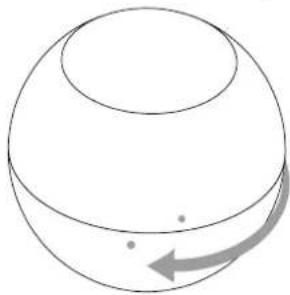
- Turn the cover counter-clockwise and open it.
natural_image
Simple line drawing of a sphere with a curved arrow indicating rotation or movement (no text or symbols)- Remove the battery blocker and check if the battery is placed correctly.

-
The accessory will glow red – it is ready to be paired.
-
Close the cover and turn it clockwise, dots on the casing should align.

natural_image
Simple line drawing of a sphere with a curved arrow indicating rotation or movement (no text or symbols)#3: Pairing the accessory
- Open the Settings app on your iOS device.
- Go to the Bluetooth ^® section, and turn the Bluetooth ^® on.
- Place the accessory next to your iOS device.
- Open a HomeKit compatible app of your choosing on your iOS device.
- Open pairing window in your HomeKit app to detect available accessories.
- Choose Motion Sensor you wish to pair.
- You can identify it - Motion Sensor will triple blink blue 3 times.
- Find HomeKit Setup Code on the last page of Quick Start Guide included in the box that looks like this:

- Start pairing with your HomeKit app.
- Point your iOS device's camera at the Setup Code to scan it or enter the Setup Code manually.
- If entered Setup Code is valid, the device will complete the setup process.
- Follow instructions displayed in the application.
i NOTE
Remember to keep your HomeKit Setup Code in safe place. You may need it in case of re-pairing.
#4: Physical installation
Installing the Motion Sensor:
- Install the holder (using an expansion bolt or a sticker).
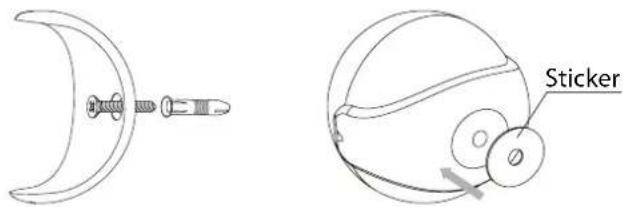
- Insert the device into the holder.
- Test the operation - check whether the accessory indicates motion detection.
Installation location and working conditions:
The Motion Sensor should be installed in a corner of the room or perpendicularly to the doors.
Moving objects such as trees blowing in the wind, cars passing by, household fans and moving masses of air and heat within detection area of the sensor can cause false motion detection.

natural_image
Simple line drawing of a room layout with furniture and objects (no text or symbols)
natural_image
Floor plan layout with furniture and a triangular shape (no text or labels)Detection range:
Detection range of the Motion Sensor is shown below. Actual range of the Sensor can be influenced by environmental conditions.
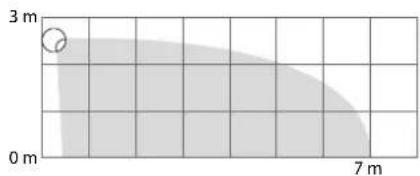
#5: Reset
Resetting the Motion Sensor to factory defaults:
Reset procedure allows to restore the accessory back to its factory settings including HomeKit pairing.
- Open the cover.
- Press and hold the button.

- Wait for the LED indicator to glow yellow.
- Release the button.
- Click the button to confirm.
- Accessory will glow red to confirm reset.
- Delete the accessory from the app before pairing it again.
#6: Functionality
Motion detection:
The Motion Sensor detects movement using PIR sensor and reports it to your iOS device.
Blink of LED indicates detected motion. Color of blink is dependent on current ambient temperature (smooth transition through blue, green and red). Brightness of blink is adjusted by measured light intensity.
Tamper detection:
The Motion Sensor detects tampering when accessory is moved and reports it to your iOS device. Tampering is indicated with an alternate blinking in red, blue and white.
Temperature measuring:
The Motion Sensor measures ambient temperature every 5 minutes. If the measured temperature differs from previously reported by at least 2^ C ( 3.6^ F), accessory reports it to your iOS device.
Battery level measuring:
The Motion Sensor measures battery level every 24 hours and reports it to your iOS device. Additionally, if battery level is below 15%, the accessory will report low level battery status to your iOS device.
Light intensity measuring:
The Motion Sensor measures light intensity. If the measured light intensity differs from previously reported by at least 200 lux, accessory reports it to your iOS device.
PIR sensor malfunction detection (Fault Code 1):
The Motion Sensor detects malfunction of PIR sensor (responsible for motion detection) and reports it to your iOS device.
Getting Fault Code 1 warning means that the accessory is damaged and should be returned to the distributor for the warranty (if still valid).

NOTE
The accessory measures temperature in the place of installation. Remember that temperature near the ceiling may differ from that on eye-level or the floor.

NOTE
The accessory measures light intensity in the place of installation, not where the sensor is pointed.
#7: Configurable parameters
1. Motion detection – sensor sensitivity
This parameter allows to set sensitivity of PIR sensor used for motion detection.
The higher the value of this parameter, the higher the sensitivity.
| Available settings: 1 – low sensitivity2 – medium sensitivity3 – high sensitivity |
| Default setting: 2 (medium sensitivity) |
2. Tamper - sensor sensitivity
This parameter allows to set sensitivity of tamper detection.
The higher the value of this parameter, the higher the sensitivity.
| Available settings: 0 – tamper disabled1 – low sensitivity2 – medium sensitivity3 – high sensitivity |
| Default setting: 2 (medium sensitivity) |
3. Motion detection – LED indication
This parameter allows to choose how the LED indicator will behave after detecting motion.
| Available settings: 0 – LED indications disabled1 – color dependent on temperature*2 – flashlight mode**3 – white, 4 – red, 5 – green, 6 – blue, 7 – yellow, 8 – cyan, 9 – magenta |
Default setting: 1 (color dependent on temperature)
4. Tamper - LED indication
This parameter allows to choose if accessory will indicate tampering using LED (alternate blinking in red, blue and white).
| Available settings: 0 – tamper indication disabled1 – tamper indication enabled |
| Default setting: 1 (tamper indication enabled) |
5. Motion detection - sustain time
This parameter allows to set how long the information about detected motion is sustained by the accessory. Each subsequent motion detection causes time to be counted from the beginning.
Available settings: 1-32767 – sustain time in seconds
Default setting: 30 (30 seconds)
#8: Specifications
| Power supply: | 3.0V DC battery |
| Battery type: | CR123A |
| EU directives compliance: | RoHS 2011/65/EURED 2014/53/EU |
| Radio protocol: | Bluetooth® low energy |
| Radio frequency: | 2.4 GHz |
| Range: | up to 50m (free range)(164 feet) |
| Recommended installation height: | 2.4 meters (7.87 feet) |
| Operating temperature: | 0-40°C (32-104°F) |
| Temperature measuring range: | 0-40°C (32-104°F) |
| Temperature measuring accuracy: | ±0.5°C (±0.9°F) |
| Light intensity measuring range: | 0-32000 lux |
| Dimensions (diameter): | 46 mm (1.8 inch) |

CAUTION
Using batteries other than specified may result in explosion. Dispose of properly, observing environmental protection rules.
#9: Regulations
This device complies with Part 15 of the FCC Rules
Operation is subject to the following two conditions:
- This device may not cause harmful interference
-
This device must accept any interference received, including interference that may cause undesired operation. This equipment has been tested and found to comply with the limits for a Class B digital device, pursuant to part 15 of the FCC Rules. These limits are designed to provide reasonable protection against harmful interference in a residential installation. This equipment generates, uses and can radiate radio frequency energy and, if not installed and used in accordance with the instructions, may cause harmful interference to radio communications. However, there is no guarantee that interference will not occur in a particular installation. If this equipment does cause harmful interference to radio or television reception, which can be determined by turning the equipment off and on, the user is encouraged to try to correct the interference by one or more of the following measures:
-
Reorient or relocate the receiving antenna.
- Increase the separation between the equipment and receiver.
- Connect the equipment into an outlet on a circuit different from that to which the receiver is connected.
- Consult the dealer or an experienced radio/TV technician for help.
Note
Changes and modifications not expressly approved by the manufacturer or registrant of this equipment can void your authority to operate this equipment under Federal Communications Commission's rules.
Industry Canada (IC) Compliance Notice
Radio frequency (RF) exposure statement
This equipment should be installed and operated keeping the radiator at least 20 cm or more away from person's body.
DGT Warning Statement
Article 12
Without permission, any company, firm or user shall not alter the frequency, increase the power, or change the characteristics and functions of the original design of the certified lower power frequency electric machinery.
Article 14
The application of low power frequency electric machineries shall not affect the navigation safety nor interfere a legal communication, if an interference is found, the service will be suspended until improvement is made and the interference no longer exists.
第十二條
All information, including, but not limited to, information regarding the features, functionality, and/or other product specification are subject to change without notice. Fibaro reserves all rights to revise or update its products, software, or documentation without any obligation to notify any individual or entity.
FIBARO and Fibar Group logo are trademarks of Fibar Group S.A.
The Bluetooth word mark and logos are registered trademarks owned by Bluetooth SIG, Inc. and any use of such marks by Fibar Group S.A. is under license.
Apple, iPhone, iPad, iPad Air, and iPod touch are trademarks of Apple Inc., registered in the U.S. and other countries. HomeKit is a trademark of Apple Inc.
All other brands and product names referred to herein are trademarks of their respective holders.
Use of the Works with Apple HomeKit logo means that an electronic accessory has been designed to connect specifically to iPod touch, iPhone, or iPad, respectively, and has been certified by the developer to meet Apple performance standards. Apple is not responsible for the operation of this device or its compliance with safety and regulatory standards.
Warning
This product is not a toy. Keep away from children and animals!
Information according REACH
The included Panasonic CR123A battery contains 1,2-Dimethoxyethane substance. Normal use of the device does not expose the user to a given substance.
Declaration of conformity
CE Hereby, Fibar Group S.A. declares that the device is in compliance with the essential requirements and other relevant provisions of Directive 2014/53/EU. The full text of the EU declaration of conformity is available at the following internet address: www.manuals.fibaro.com
WEEE Directive Compliance
Device labelled with this symbol should not be disposed with other household wastes. It shall be handed over to the applicable collection point for the recycling of waste electrical and electronic equipment.
EAC


- FIBARO MOTION SENSOR FGBHMS-001
- CONTENTS
- 1: Description and features 3
- 2: Powering the accessory 4
- 3: Pairing the accessory 5
- 4: Physical installation 6
- 5: Reset 7
- 6: Functionality 8
- 7: Configurable parameters 9
- 8: Specifications 11
- 9: Regulations 12
- Important safety information
- Read this manual before attempting to install the device!
- HomeKit technology
- #1: Description and features
- Main features of FIBARO Motion Sensor:
- NOTE
- #2: Powering the accessory
- #3: Pairing the accessory
- i NOTE
- #4: Physical installation
- Installing the Motion Sensor:
- Installation location and working conditions:
- Detection range:
- #5: Reset
- Resetting the Motion Sensor to factory defaults:
- #6: Functionality
- Motion detection:
- Tamper detection:
- Temperature measuring:
- Battery level measuring:
- Light intensity measuring:
- PIR sensor malfunction detection (Fault Code 1):
- #7: Configurable parameters
- Motion detection – sensor sensitivity
- Tamper - sensor sensitivity
- Motion detection – LED indication
- Tamper - LED indication
- Motion detection - sustain time
- #8: Specifications
- CAUTION
- #9: Regulations
- This device complies with Part 15 of the FCC Rules
- Industry Canada (IC) Compliance Notice
- Radio frequency (RF) exposure statement
- DGT Warning Statement
- Article 12
- Article 14
- 第十二條
- Warning
- Information according REACH
- Declaration of conformity
- WEEE Directive Compliance
Brand : Fibaro
Model : Motion Sensor
Category : Home Automation