
SBT720 - Beard trimmer PHILIPS - Free user manual and instructions
Find the device manual for free SBT720 PHILIPS in PDF.


| Product Type | Beard Trimmer |
| Brand | Philips |
| Model | SBT720 |
| Dimensions (approx.) | 15 x 4 x 4 cm |
| Weight (approx.) | 150 g |
| Power Source | Rechargeable Lithium-Ion battery |
| Charging Time | 1 hour |
| Runtime | 45 minutes |
| Cutting Length Settings | 0.5 - 10 mm with adjustable comb |
| Blade Material | Self-sharpening stainless steel |
| Washable | Yes, washable under running water |
| Maintenance | Oil blades regularly; clean after use |
| Safety Features | Protective cap, ergonomic grip |
| Spare Parts Available | Replacement blades and combs |
| Warranty | 2 years |
Frequently Asked Questions - SBT720 PHILIPS
User questions about SBT720 PHILIPS
0 question about this device. Answer the ones you know or ask your own.
Ask a new question about this device
Download the instructions for your Beard trimmer in PDF format for free! Find your manual SBT720 - PHILIPS and take your electronic device back in hand. On this page are published all the documents necessary for the use of your device. SBT720 by PHILIPS.
USER MANUAL SBT720 PHILIPS
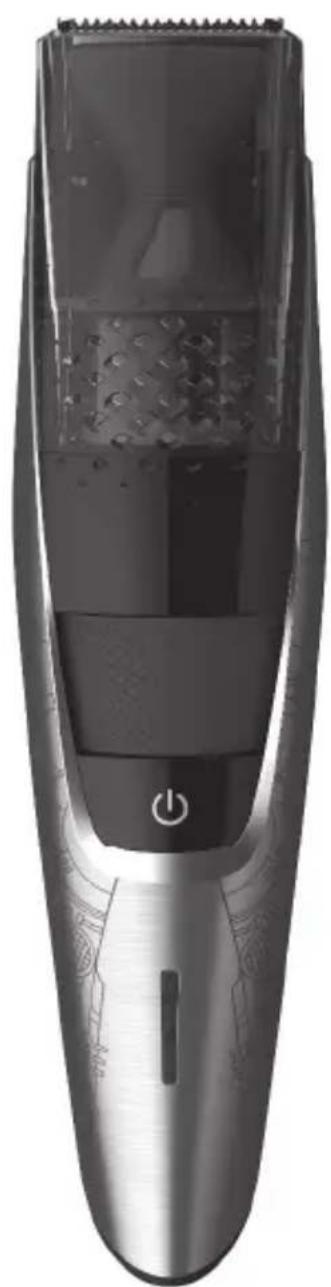
natural_image
Close-up of a modern hairbrush with a black plastic grille and metallic blade, showing no text or symbols.© & ™ Lucasfilm Ltd.
© Disney
natural_image
Illustration of an open book with a grid and arrow indicating rotation (no text or symbols)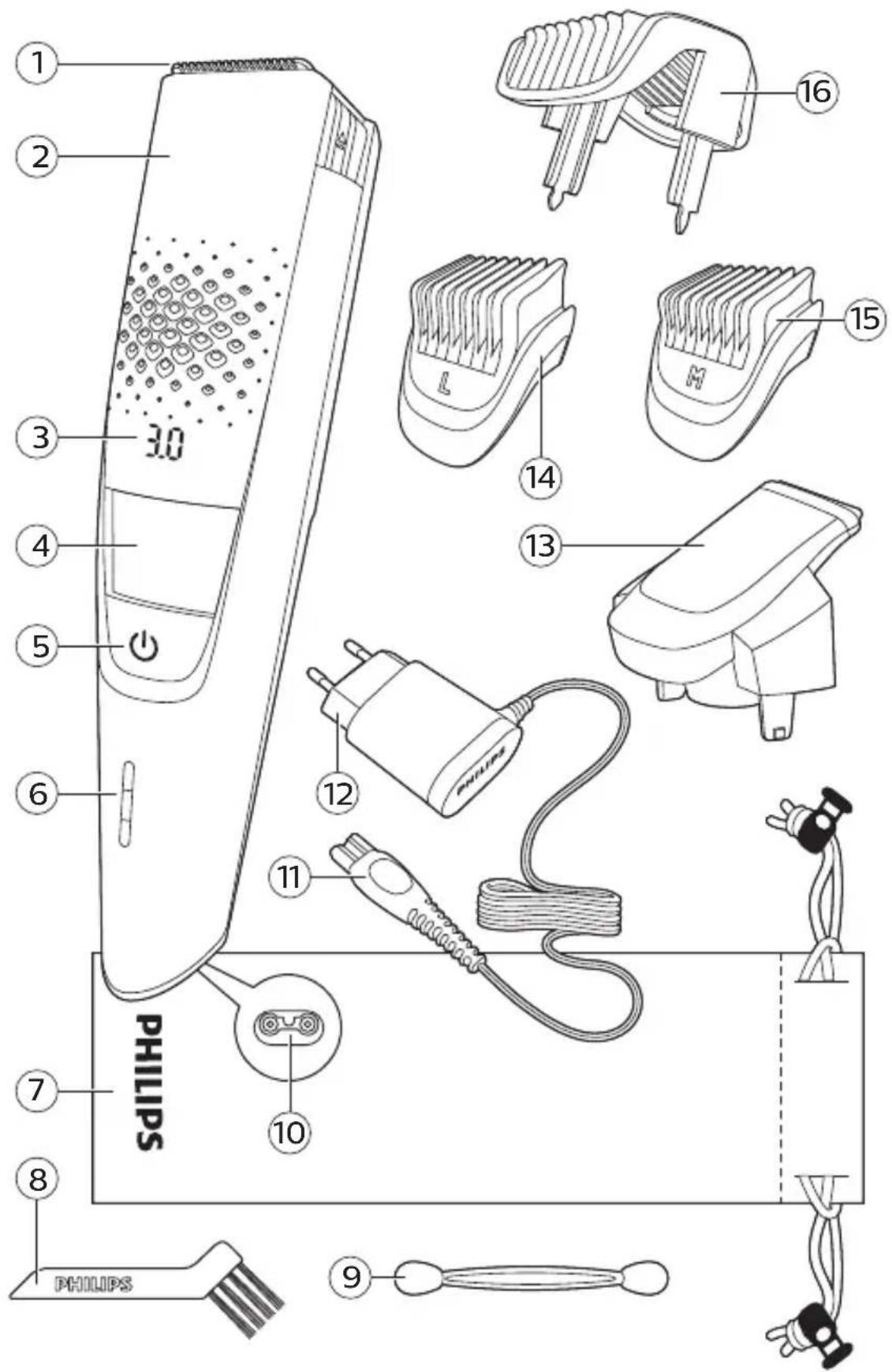
English 6
简体中文 20
Introduction
Congratulations on your purchase and welcome to Philips! To fully benefit from the support that Philips offers, register your product at www.philips.com/welcome.
General description (Fig. 1)
1 Cutting unit
2 Vacuum system
3 Length settings
4 Zoom wheel
5 On/off button
6 Battery status indicator
7 Pouch
8 Cleaning brush
9 Cleaning sponge
10 Small plug
11 Socket for small plug
12 Supply unit
13 Precision trimmer
14 Detail comb 5mm (L)
15 Detail comb 3mm (M)
16 Beard and stubble comb
Important safety information
Read this important information carefully before you use the appliance and its accessories and save it for future reference. The accessories supplied may vary for different products.
Danger

natural_image
Prohibition sign showing a showerhead crossed out by a diagonal line, indicating no hazard or caution (no text present)- Keep the supply unit dry.
Warning
- To charge the battery, only use the detachable supply unit (HQ8505) provided with the appliance.
- The supply unit contains a transformer. Do not cut off the supply unit to replace it with another plug, as this causes a hazardous situation.
- This appliance can be used by children aged from 8 years and above and persons with reduced physical, sensory or mental capabilities or lack of experience and knowledge if they have been given supervision or instruction concerning use of the appliance in a safe way and understand the hazards involved. Children shall not play with the appliance. Cleaning and user maintenance shall not be made by children without supervision.
- Always check the appliance before you use it. Do not use the appliance if it is damaged, as this may cause injury. Always replace a damaged part with one of the original type.
- Do not open the appliance to replace the rechargeable battery.
Caution

natural_image
Prohibition sign showing a faucet without a shower, enclosed in a circle (no text or symbols)- Only combs and cutting units can be rinsed separately. The appliance is not washable. Never immerse the appliance in water and do not rinse it under the tap.
- Only use this appliance for its intended purpose as shown in the user manual.
- For hygienic reasons, the appliance should only be used by one person.
- Never use compressed air, scouring pads, abrasive cleaning agents or aggressive liquids such as petrol or acetone to clean the appliance.
English
- Do not use the supply unit in or near wall sockets that contain an electric air freshener to prevent irreparable damage to the supply unit.
Electromagnetic fields (EMF)
This Philips appliance complies with all applicable standards and regulations regarding exposure to electromagnetic fields.
General
- The supply unit is suitable for mains voltages ranging from 100 to 240 volts.
- The supply unit transforms 100-240 volts to a safe low voltage of less than 24 volts.
The display
Charging indications
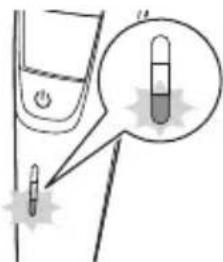
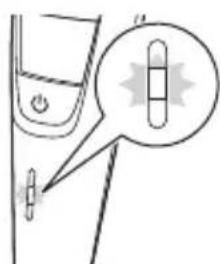
Battery low
When the battery is almost empty, the bottom light of the battery status indicator flashes orange.
Battery charging
When the battery is charging, first the bottom light flashes blue, then the second light, and so on.
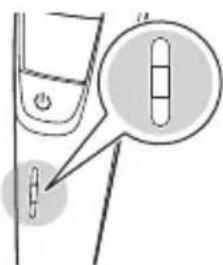
Battery fully charged
When the battery is fully charged, all lights of the battery charge indicator light up blue continuously.
Note: The lights switch off automatically after 30 minutes.
Remaining battery capacity
The remaining battery charge is shown by the lights of the battery charge indicator that light up continuously.
Length settings
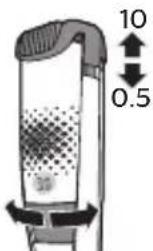
The selected length setting is shown on the display above the zoom wheel when you select the desired hair length setting with the zoom wheel.
Charging
Charge the appliance before you use it for the first time and when the battery status indicator indicates that the battery is almost empty.
Charging takes approx. 1 hour. A fully charged appliance has an operating time of up to 80 minutes.
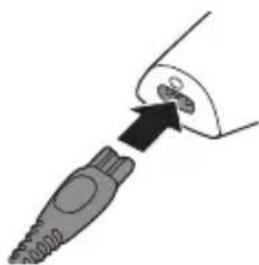
Charging with the supply unit
natural_image
Diagram of a plug inserted into a socket (no text or symbols)1 Make sure the appliance is switched off.
2 Put the small plug in the appliance and put the supply unit in the wall socket.
The battery status indicator indicates that the appliance is charging.
3 After charging, remove the supply unit from the wall socket and pull the small plug out of the appliance.
Using the appliance
Always check the appliance and all accessories before use. Do not use the appliance or any accessory if it is damaged, as this may cause injury. Always replace a damaged part with one of the original type.
Note: This appliance can be used cordless or directly from the wall socket.
You can use this appliance for a stubble beard and a short beard. This appliance has an integrated vacuum system that catches cut beard hair for a less messy trimming experience.
The vacuum system is activated automatically as soon as you switch on the appliance.
Note: Switch off and clean the appliance after each use.

natural_image
Prohibition sign showing a faucet without a shower, enclosed in a circle (no text)This symbol indicates that the appliance is not washable.
Only the comb(s) and cutting unit(s) can be rinsed separately.
Switching the appliance on and off

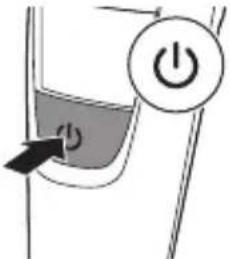
1 To switch the appliance on or off, press the on/off button once.
Removing or attaching the cutting units
1 Make sure the appliance is switched off.

natural_image
Illustration of a hand using a handheld device to lift a surface, with an upward arrow indicating force (no text or symbols present)2 Pull the cutting unit straight off the handle.

natural_image
Diagram of a mechanical device with arrows indicating motion or force (no text or symbols)3 Insert the lug of the cutting unit into the slot in the top of the handle. Then press down the cutting unit to attach it to the appliance.
Removing or attaching trimming combs
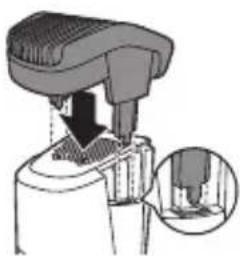
Beard and stubble comb
natural_image
Mechanical assembly diagram showing a presser pressing down on a component with a magnified inset detail (no text or symbols)1 To attach the beard and stubble comb, slide the comb into the guiding grooves on both sides of the handle ('click').
2 To detach the beard and stubble comb, pull it upwards off the handle.
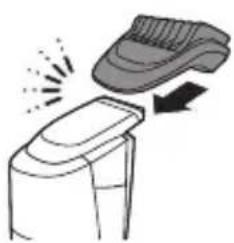
Detail comb
natural_image
Illustration of a shoe being placed on top of a chair, with no text or symbols present.1 To attach the detail comb, slide it onto the precision trimmer.
2 To remove the detail comb, slide it off the precision trimmer.
Trimming
Trimming tips
- If you are trimming for the first time, be careful. Do not move the appliance too fast. Make smooth and gentle movements
12 English
- Since all hairs do not grow in the same direction, you may want to try different trimming positions (i.e. upwards, downwards, or across). Practice is best for optimum results.
- Always make smooth and gentle movements and be sure the surface of the comb always stays in contact with your skin.
Trimming with comb
Note: When you trim for the first time, start at the highest length setting to familiarize yourself with the appliance.
Use the beard and stubble comb attached to the cutting unit to groom your beard and moustache in your preferred style. The beard and stubble comb allows you to choose from 20 length settings ranging from 0.5mm to 10mm in steps of 0.5mm. You can set the desired setting by turning the zoom wheel.

natural_image
Mechanical device with a downward arrow indicating compression or disassembly (no text or symbols visible)1 Attach the beard and stubble comb onto the appliance.
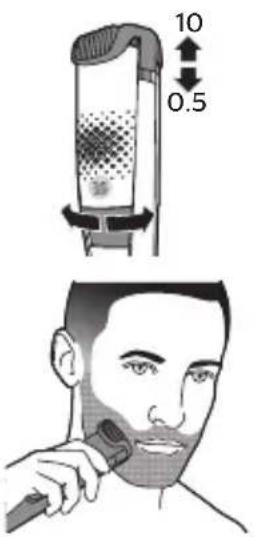
2 Select the desired hair length setting with the zoom wheel.
3 Switch on the appliance.
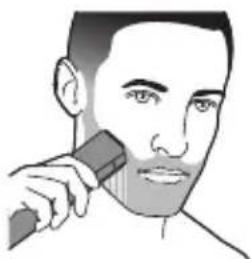
4 To trim most effectively, move the appliance against the hair growth direction.
Note: Make sure that the surface of the comb always stays in contact with the skin.

natural_image
Illustration of a person applying a toothbrush to their face (no text or symbols)5 Switch off and clean the appliance after each use.
Trimming with detail comb
Use the detail comb attached to the precision trimmer for precision trimming of your sideburns, moustache or beard. This appliance comes with 2 different detail combs: 5mm (L) and 3mm (M).
1 Attach the detail comb onto the precision trimmer.
2 Switch on the appliance.
3 To trim most effectively, move the appliance against the hair growth direction.
Note: Make sure that the surface of the comb always stays in contact with the skin.
4 Switch off and clean the appliance after each use.
Trimming without comb
Use the appliance without beard and stubble comb to trim hair close to the skin or to contour the neckline and sideburns.
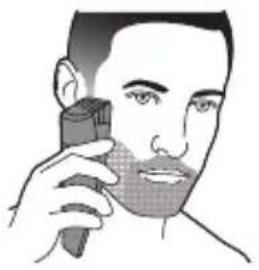
1 To trim hair close to the skin, place the flat side of the trimming head against your skin and make strokes in the desired direction.
natural_image
Illustration of a person applying a toothpaste to their face (no text or symbols present)2 For contouring, hold the trimming head perpendicular to the skin and move the trimming head upwards or downwards with gentle pressure.
3 Switch off and clean the appliance after each use.
Precision trimming without comb
Use the precision trimmer to create fine lines and contours to define your facial style, close to the skin.
natural_image
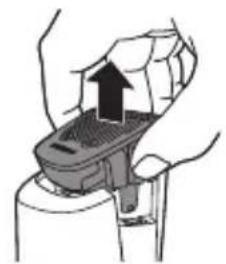
Illustration of a hand using a handheld device to lift a surface, showing mechanical components and an upward arrow (no text or symbols)1 Remove the cutting unit by pulling it upwards off the handle.
natural_image
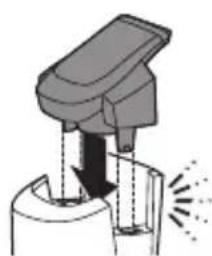
Diagram of a mechanical device with arrows indicating motion or force (no text or symbols)2 Attach the precision trimmer.
3 Switch on the appliance.

natural_image
Illustration of a person applying a toothbrush to their face (no text or symbols)4 Hold the precision trimmer perpendicular to the skin and move the precision trimmer upwards or downwards with gentle pressure.
5 Switch off and clean the appliance after each use.
Cleaning and maintenance
Regular cleaning guarantees better shaving results.
Never clean, remove or replace a shaving or cutting unit while the appliance is switched on.
Always check if the water is too hot, to prevent burning your hands.
Never dry cutting units or shaving foils with a towel or tissue, as this may cause damage.
Never use compressed air, scouring pads, abrasive cleaning agents or aggressive liquids such as petrol or acetone to clean the appliance.
Cleaning the appliance
We advise you to empty the hair-collection chamber after each trimming session. When you trim long, dense beards, it may also be necessary to empty the hair-collection chamber during the trimming session in order to maintain optimal suction performance.
Only the cutting unit and the comb can be cleaned with water.
1 Switch off the appliance and disconnect it from the wall socket.
2 Wipe the housing of the appliance with a dry cloth.
3 Remove the comb and clean it with the cleaning brush and/or rinse it under the tap.

natural_image
Illustration of three different mechanical or cleaning techniques: a saw blade, a bucket, and a hand pump (no text or symbols present)4 Remove the cutting unit and clean it under the tap.
5 Carefully shake off excess water and let the cutting unit air-dry completely.
Never dry the cutting unit with a towel or tissue, as this may damage the trimming teeth.
6 Shake out the hairs that have collected in the hair chamber.

7 Brush out the hairs with the cleaning brush or cleaning sponge supplied.
natural_image
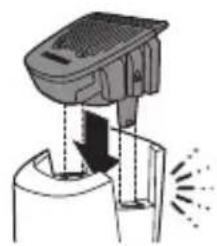
Diagram of a device emitting exhaust heat, showing airflow direction and component structure (no text or symbols)8 After cleaning, reattach the cutting unit and comb to the appliance.
Ordering accessories
To buy accessories or spare parts, visit www.shop.philips.com/service or go to your Philips dealer. You can also contact the Philips Consumer Care Center in your country (see the international warranty leaflet for contact details).
Recycling
- Do not throw away the product with the normal household waste at the end of its life, but hand it in at an official collection point for recycling. By doing this, you help to preserve the environment.
- This product contains a built-in rechargeable battery which shall not be disposed of with normal household waste. Please take your product to an official collection point or a Philips service center to have a professional remove the rechargeable battery.
- Follow your country's rules for the separate collection of electrical and electronic products and rechargeable batteries. Correct disposal helps prevent negative consequences for the environment and human health.
Removing the rechargeable battery
Only remove the rechargeable battery when you discard the product. Before you remove the battery, make sure that the product is disconnected from the wall socket and that the battery is completely empty.
Take any necessary safety precautions when you handle tools to open the product and when you dispose of the rechargeable battery.
1 Check if there are screws in the back or front of the appliance. If so, remove them.
2 Remove the back and/or front panel of the appliance with a screwdriver. If necessary, also remove additional screws and/or parts until you see the printed circuit board with the rechargeable battery.
3 Remove the rechargeable battery.
Warranty and support
If you need information or support, please visit www.philips.com/support or read the international warranty leaflet.
Warranty restrictions
Cutting units are not covered by the terms of the international warranty because they are subject to wear.
Troubleshooting
This chapter summarizes the most common problems you could encounter with the product. If you are unable to solve the problem with the information below, visit www.philips.com/support
for a list of frequently asked questions or contact the Consumer Care Center in your country.
Problem Possible cause Solution
| The appliance does not work. | The battery is empty. | Charge the appliance for at least 2 hours so the appliance has enough power again. |
| I cannot switch off the vacuum system. | The vacuum system is automatically deactivated when the appliance is switched off. It is activated automatically as soon as you switch on the appliance. | Switch off the appliance. |
| The vacuum system performs poorly or does not work at all. | The hair chamber is full. | Empty the hair chamber after each trimming session. First remove the cutting unit from the appliance, then empty the hair chamber by carefully shaking or blowing hair out and/or by brushing the hair out with the cleaning brush supplied. Never use water to clean the hair chamber, this may damage the appliance. |
| The air holes on the appliance are covered. If they are, vacuum performance is reduced. | Make sure the air holes on the appliance are not covered. |
Problem Possible cause Solution
| If the suction system performs poorly or not at all, even though the appliance is clean, not covered and used according to the instructions in the user manual, take the appliance to your local Philips dealer or call the Consumer Care Center. |
简介
natural_image
Prohibition sign of a faucet with no text or symbolsnatural_image
Prohibition sign showing a faucet without spraying water, enclosed in a circle (no text)电池电量不足
电池正在充电
电池已完全充满
natural_image
Diagram of a medical or laboratory device with an arrow pointing to a component (no text or symbols visible)1 确保产品电源已关闭。
natural_image
Prohibition sign showing a faucet without a shower, enclosed in a circle (no text or symbols)打开或关闭产品
natural_image
Illustration of a hand holding a device with an upward arrow indicating motion (no text or symbols present)natural_image
Diagram of a mechanical device with arrows indicating motion or force (no text or symbols)natural_image
Mechanical assembly diagram showing a presser pressing down on a component with an inset close-up of the mechanism (no text or symbols visible)胡须和短茬修剪梳
natural_image
Illustration of a shoe being placed on top, showing motion and impact (no text or symbols)修发
精细修剪梳
natural_image
Mechanical assembly diagram showing a lever mechanism with a magnified inset (no text or symbols)
natural_image
Illustration of a person using a handheld device to apply face-to-face care (no text or symbols present)
natural_image
Illustration of hands using a handheld device to interact with a device (no text or symbols visible)
natural_image
Diagram of a mechanical device with arrows indicating motion or force (no text or symbols)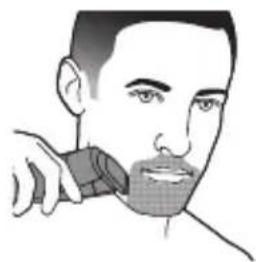
natural_image
Illustration of a person using a handheld device to apply or brush (no text or symbols present)natural_image
Illustration of a mechanical device with rotating components and a lever mechanism (no text or symbols)
natural_image
Diagram showing a hand holding a glove with liquid, separated by a diagonal line (no text or symbols)

natural_image
Diagram of a mechanical device with arrows indicating motion or force (no text or symbols)订购配件
75% recycled paper
75% papier recyclé
- Introduction
- General description (Fig. 1)
- Important safety information
- Danger
- Warning
- Caution
- English
- Electromagnetic fields (EMF)
- General
- The display
- Charging indications
- Battery low
- Battery charging
- Battery fully charged
- Remaining battery capacity
- Length settings
- Charging
- Charging with the supply unit
- Using the appliance
- Switching the appliance on and off
- Removing or attaching the cutting units
- Removing or attaching trimming combs
- Beard and stubble comb
- Detail comb
- Trimming
- Trimming tips
- English
- Trimming with comb
- Trimming with detail comb
- Trimming without comb
- Precision trimming without comb
- Cleaning and maintenance
- Cleaning the appliance
- Only the cutting unit and the comb can be cleaned with water.
- Ordering accessories
- Recycling
- Removing the rechargeable battery
- Warranty and support
- Warranty restrictions
- Troubleshooting
- 简介
- 电池电量不足
- 电池正在充电
- 电池已完全充满
- 打开或关闭产品
- 胡须和短茬修剪梳
- 修发
- 精细修剪梳
- 订购配件
Brand : PHILIPS
Model : SBT720
Category : Beard trimmer