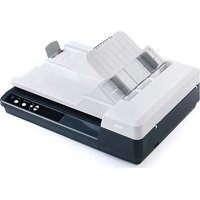
AV620N - Scanner AVISION - Free user manual and instructions
Find the device manual for free AV620N AVISION in PDF.


Pick your language and provide your email: we'll send you a specifically translated version.
| Product Type | Document Scanner |
| Model | AV620N |
| Brand | Avision |
| Scan Speed (A4, color, 300 dpi) | Up to 60 ppm / 120 ipm |
| Optical Resolution | 600 dpi |
| Document Size | Up to A4 (210 x 297 mm) |
| Duplex Scanning | Yes, one-pass duplex |
| Daily Duty Cycle | Up to 3,000 pages |
| Connectivity | USB 2.0 |
| Dimensions (W x D x H) | 318 x 230 x 250 mm |
| Weight | 3.8 kg |
| Power Supply | AC 100-240V, 50/60Hz |
| Power Consumption (Standby) | < 6 W |
| Supported File Formats | JPEG, TIFF, PDF, DOCX |
| Maintenance | Clean scanner glass and feed rollers regularly |
| Safety | Complies with CE, FCC, RoHS |
| Spare Parts | Replacement roller kits and lamp available |
| Repairability | User-replaceable rollers and lamp; professional service for other issues |
| Warranty | Limited 1-year warranty |
Frequently Asked Questions - AV620N AVISION
How do I install the Avision AV620N scanner?
Connect the scanner via USB to your computer, power it on, and install the latest drivers from Avision's website. The scanning software (e.g., PaperPort or Avision Capture Tool) is included on the installation CD or can be downloaded.
What should I do if the scanner doesn't power on?
Check that the power cable is securely connected to both the scanner and a working outlet. Verify the power switch is turned on. If it still doesn't power on, try a different power cable or contact customer support.
How do I clean the scanner glass and rollers?
Turn off and unplug the scanner. Open the scanner cover and wipe the glass with a lint-free cloth dampened with glass cleaner. For the rollers, use a slightly damp cloth with isopropyl alcohol, then dry thoroughly before use.
The scanner is pulling multiple pages at once. What can I do?
This may be due to dirty or worn rollers. Clean the feed rollers as described. Also, fan the paper stack before loading to separate pages. Ensure the paper is within the supported weight range (typically 60-105 g/m²).
Can I scan documents larger than A4?
The AV620N is designed for documents up to A4 size (210 x 297 mm). For larger documents, you may need to scan in sections and stitch them using the provided software.
What software is compatible with this scanner?
The scanner works with Twain-compliant software such as Adobe Acrobat, Microsoft Office Document Imaging, and the included Avision Capture Tool. It also supports WIA for basic scanning.
How do I clear a paper jam?
Open the front and rear covers carefully. Gently pull out any jammed paper in the direction of the paper path. Avoid using excessive force to prevent damage. Close the covers and restart scanning.
The scanned images have lines or streaks. Why?
Streaks are often caused by dirt or smudges on the scanner glass or the internal optics. Clean the glass thoroughly. If streaks persist, scan a calibration sheet (if available) or run a cleaning cycle from the software.
Is the scanner compatible with Mac OS?
Yes, the AV620N supports macOS (10.12 and later) with appropriate drivers available from Avision's support page. Ensure you download the correct version for your system.
Where can I find replacement parts or have the scanner repaired?
Replacement parts such as feed rollers and lamp can be ordered from authorized Avision dealers. For repairs beyond user maintenance, contact Avision service centers or an authorized technician.
User questions about AV620N AVISION
0 question about this device. Answer the ones you know or ask your own.
Ask a new question about this device
No questions yet. Be the first to ask one.
Download the instructions for your Scanner in PDF format for free! Find your manual AV620N - AVISION and take your electronic device back in hand. On this page are published all the documents necessary for the use of your device. AV620N by AVISION.
USER MANUAL AV620N AVISION
Manual assistant
Powered by Anthropic
Waiting for your message
Product information
Brand : AVISION
Model : AV620N
Category : Scanner