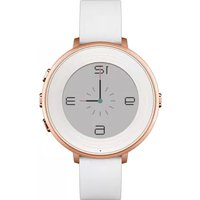
Time Round - Smartwatch Pebble - Free user manual and instructions
Find the device manual for free Time Round Pebble in PDF.


| Product Type | Smartwatch |
| Brand | Pebble |
| Model | Time Round |
| Display Type | 1.25-inch color e-paper (always-on) |
| Display Resolution | 180 x 180 pixels |
| Dimensions | 38.5 mm case diameter, 7.5 mm thick |
| Weight | Approx. 48 g (with leather strap) |
| Strap | Removable 20 mm quick-release strap (leather/silicone) |
| Water Resistance | Splash proof (IPX7, not for swimming) |
| Battery Life | Up to 2 days (typical usage) |
| Charging | Magnetic charging cable (1-2 hours to full) |
| Processor | ARM Cortex-M3 |
| Memory | 8 MB flash storage |
| Connectivity | Bluetooth 4.0 LE (compatible with iOS 8+ and Android 4.3+) |
| Sensors | Accelerometer, ambient light sensor |
| Notifications | Call, SMS, email, calendar, app alerts with vibration |
| Activity Tracking | Step count, sleep tracking (automatic) |
| Music Control | Play, pause, skip tracks on phone |
| Voice Response | Send quick replies via voice dictation (Android only) |
| Compatibility | Pebble app on iOS and Android |
| Operating System | Pebble OS (v3.x) |
| Watch Faces | Thousands available via Pebble app store |
| Buttons | 3 side buttons (back, up, select) |
Frequently Asked Questions - Time Round Pebble
User questions about Time Round Pebble
0 question about this device. Answer the ones you know or ask your own.
Ask a new question about this device
Download the instructions for your Smartwatch in PDF format for free! Find your manual Time Round - Pebble and take your electronic device back in hand. On this page are published all the documents necessary for the use of your device. Time Round by Pebble.
USER MANUAL Time Round Pebble
Introduction to Time Round
Last Updated - Nov 09, 2015 02:40PM PST
What is Pebble Time Round?
How it works
Compatibility
Terminology
Apps
Pebble Settings
Battery Life
What is Pebble Time Round?
Pebble Time Round is the latest, lightest, and thinnest customizable watch from Pebble that conveniently are subtly delivers the information that you want directly to your wrist. It connects to your iOS (running iOS8 & u or Android (running OS 4.3 & up) smartphone via classic (Android) or low energy Bluetooth (iOS and Android) and notifies you about calls, texts, calendar events, social messages, sports scores, stocks, workout progress and more!

natural_image
Five smartwatches arranged in a row, each displaying a clock face and color swatch (no visible text or symbols on the watches themselves)Despite the screen always being on, Pebble Time Round lasts for up to 2 days on a single charge. It is also fast charging so that you can get a full day's worth of power available after charging for just 15 minutes.
Scratch and splash resistant for your convenience, Pebble Time Round is our most personalizable watch ye It's available in three colors (Silver, Black, Rose Gold), two band sizes (14mm or 20mm), with two band opti (leather and metal).
The latest addition to our collection is everything we loved about Pebble Time, in a smaller, more elegant package.
Order Now! Back to the Top
How it Works
Pebble Time Round connects by Bluetooth LE (4.0) to your iPhone or classic and Bluetooth LE to your And device.
Setting up Pebble is as easy as downloading the Pebble Time app onto your phone. All software updates are wirelessly transmitted to your Pebble Time so that you stay current with the latest Pebble has to offer.
Back to the Top
Compatibility
Pebble Time Round will work with iPhones or other iOS devices running iOS 8 & up, as well as Android devices running OS 4.3 & up.
We do not have an official app for Blackberry or Windows Phone.
Back to the Top
Terminology
The Main Menu is where you can scroll through to select which app you would like to use or setting you would like to manage.
As with all previous Pebble models, Pebble Time Round has four buttons.
The left button is called the 'Back' button, which is initially used to Power on your watch (press and hold it for 3 - 5 seconds), and subsequently used for returning to the previous screen or entering your watchface from th
main menu.
On the right side, the top and bottom ('Up' and 'Down') buttons generally are used for scrolling through lists. While using the timeline interface, they can be used to scroll through the past and future, respectively. The center button is used to 'Select' an item in a list or start an app on Pebble. It can also be used to get to the main menu from a watchface.
Back to the Top
Apps
Watchapps designed for previous versions of Pebble will need to be updated to display properly on our new round screen. While connected to a Pebble Time Round, the Pebble Time mobile app will automatically filte your Watchfaces and your App & Timeline list so only compatible apps are shown.
We're working hard within the company and with our developers to make your favorites available to you as quickly as possible.
Back to the Top
Pebble Settings
Settings
In Pebble Time's main menu, the Settings icon will let you know at a glance what your battery life percentag (bottom left) and whether your smartwatch is paired to your smartphone (bottom right). Within the settings y will be able to customize the display of your Pebble Time.
To access the options below from your Settings menu, press Select.
Bluetooth
To make Pebble Time Rount discoverable to your smartphone, the Bluetooth must be "Discoverable" in you settings. To disable Bluetooth, press Select while the Bluetooth icon and "Connection: Now Discoverable" is highlighted. When "Airplane Mode" is on, you will not be able to receive notifications and time will not be synced. However any existing calendar events within 48 hours will remain on your timeline: 24 hours from the past, and 24 hours into the future.
In the Bluetooth menu, you will also be able to see your watch's Bluetooth code when 'Connection' is highlighted, and see a list of devices that have been paired with your smartwatch.
Notifications
From the Notifications menu, you will be able to filter incoming notifications, disable Pebble Time's vibration and control text size.
Quiet Time
Quiet Time will silence Pebble Time Round notifications and vibration when you need to concentrate on other things.
The Manual option lets you toggle Quiet Time at will. You can also engage Quiet Mode by holding the Back button from your current watchface or a new notification.
Calendar Aware lets Pebble Time Round quiet itself during your scheduled events. Otherwise, you can set up recurring quiet periods during the Weekdays or Weekends.
Interruptions allows you to decide whether you want to prevent all notifications from coming through, or if yo still like to be notified about phone calls.
Activity
If you have chosen to add a watchapp to your Pebble Time Round that runs in the background to help track your fitness, it will be displayed here.
Quick Launch
QuickLaunch is an incredibly helpful feature designed to get you into your favorite watchapps faster. You can assign two watchapps for QuickLaunch: one that will launch when you long-press (2 seconds) the up button and the other for a long-press on the down button.
We highly recommend assigning one to your Notifications for quick reference of missed or dismissed notifications.
Date & Time
In this section, you can select your time zone and whether you'd prefer your watchfaces to display the time in 24 hour or 12 hour clock format.
Display
From the Display screen, you can select your language and personalize your watch's backlight settings including how and when it's triggered, the intensity, and how long it remains on.
Please note: Pebble Time Round only supports English for language at the moment, but we are planning to add French, Spanish, and German language options before the new year.
System
The System screen contains Pebble Time Round hardware and software version information, Stand-By Mod (which helps preserve battery life when you're not wearing your watch), as well as the Shut Down and Fact Reset options.
Back to the Top
Battery Life
Pebble Time Round's battery lasts up to 2 days, depending on the number of notifications received per day, type of apps used, and the use of the backlight and voice replies. And recharging is a snap, gaining another day's worth of charge within 15 minutes of attaching the charging cable, and an 80% charge within a half an hour.
As with the rest of the Pebble Time collection, the battery life indicator can be found at the bottom left corner the Settings icon in Pebble Time Round's main menu. It will be expressed as a percentage. However, you will also receive a notification reminding you to charge your Pebble Time when your battery is at 20%, and again when it reaches 10% and 5%.
Back to the Top
Still having trouble?
If the information above did not solve your issue, please contact our Support Team through your Pebble app.
Don't know where to start? Still stumped?
Ask a Question
pebble


GET PEBBLE NEWS
you@email.com
Copyright 2015 Pebble, All Rights Reserved


Brand : Pebble
Model : Time Round
Category : Smartwatch