E-Paper - Smartwatch Pebble - Free user manual and instructions
Find the device manual for free E-Paper Pebble in PDF.


| Product Type | Smartwatch |
| Brand | Pebble |
| Model | E-Paper |
| Display Type | E-Paper (Memory LCD) |
| Screen Size | 1.26 inches |
| Resolution | 144 x 168 pixels |
| Dimensions | 40.5 x 37.5 x 9.5 mm |
| Weight | 30 grams (without band) |
| Battery Type | Rechargeable Lithium-ion |
| Battery Life | Up to 7 days |
| Charging Method | Magnetic USB cable |
| Connectivity | Bluetooth 4.0 LE |
| Water Resistance | 3 ATM (splash and rain resistant) |
| Operating System | Pebble OS |
| Compatibility | iOS 7+ and Android 4.0+ |
| Notifications | Call, SMS, Email, Calendar, App alerts |
| Music Control | Play, pause, skip, volume |
| Fitness Tracking | Steps, distance, sleep monitoring |
| Sensors | Accelerometer, Compass, Ambient Light |
| Vibration Motor | Silent vibrating alert |
| Band Size | 22 mm (standard) |
| Languages | English, Spanish, French, German, Italian, Japanese, Korean, Portuguese, Russian, Simplified Chinese |
| Cleaning Instructions | Wipe with a soft, damp cloth; avoid harsh chemicals |
Frequently Asked Questions - E-Paper Pebble
User questions about E-Paper Pebble
0 question about this device. Answer the ones you know or ask your own.
Ask a new question about this device
Download the instructions for your Smartwatch in PDF format for free! Find your manual E-Paper - Pebble and take your electronic device back in hand. On this page are published all the documents necessary for the use of your device. E-Paper by Pebble.
USER MANUAL E-Paper Pebble
E-Paper Watch for iPhone and Android
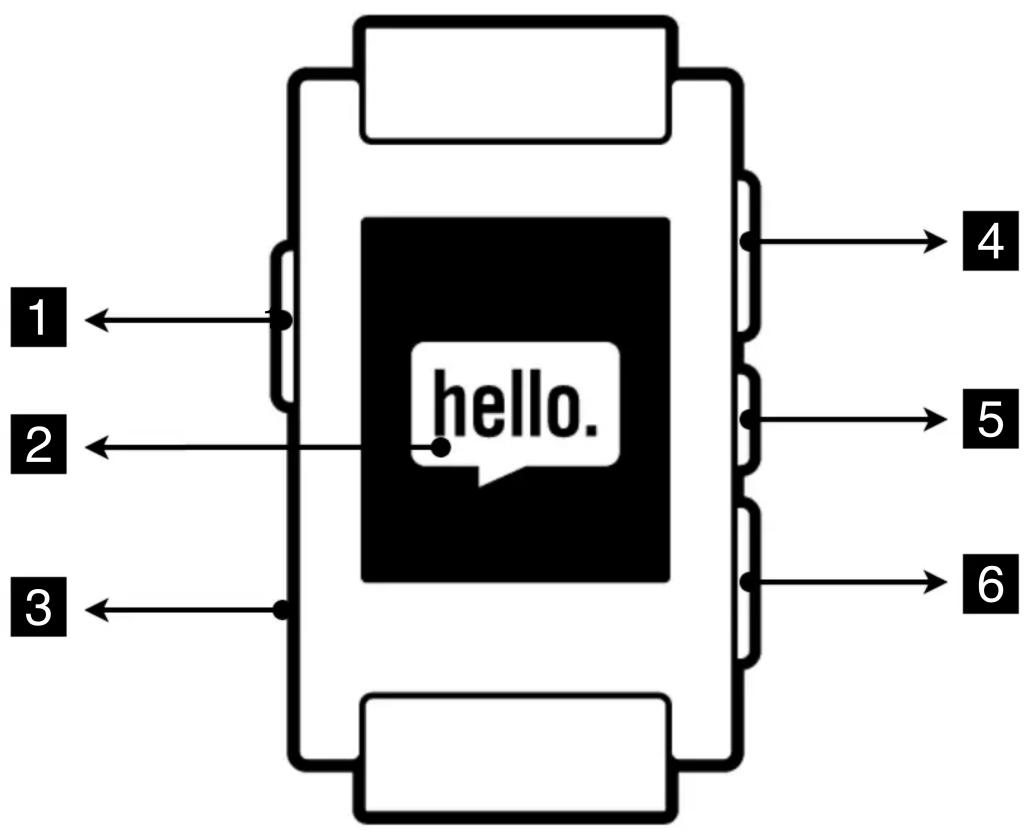
flowchart
graph TD
    A["1"] --> B["hello."]
    C["2"] --> B
    D["3"] --> B
    E["4"] --> B
    F["5"] --> B
    G["6"] --> B
1 Button A
4 Button B
2 Display
5 Button C
3 Charge Port
6 Button D
Pebble
E-Paper Watch for iPhone and Android
Certifications and Safety Approvals
• FCC Compliance Statement
This device complies with Part 15 of the FCC Rules. Operation is subject to the following two conditions: (1) this device may not cause harmful interference, and (2) this device must accept any interference received, including interference that may cause undesired operation.
CAUTION: Change or modification not expressly approved by the party responsible for compliance could void the user's authority to operate this equipment.
This equipment has been tested and found to comply with the limits for a Class B digital device, pursuant to Part 15 of the FCC Rules. These limits are designed to provide reasonable protection against harmful interference in a residential installation.
This equipment generates, uses and can radiate radio frequency energy and, if not installed and used in accordance with the instructions, may cause harmful interference to radio communications. However, there is no guarantee that interference will not occur in a particular installation. If this equipment does cause harmful interference to radio or television reception, which can be determined by turning the equipment off and on, the user is encouraged to try to correct the interference by one or more of the following measures:
--Reorient or relocate the receiving antenna.
--Increase the separation between the equipment and receiver.
--Connect the equipment into an outlet on a circuit different from that to which the receiver is connected.
--Consult the dealer or an experienced radio/TV technician for help.
CAUTION:
Any changes or modifications not expressly approved by the grantee of this device could
void the user's authority to operate the equipment.
RF exposure warning
This equipment must be installed and operated in accordance with provided instructions and the antenna(s) used for this transmitter must be installed to provide a separation distance of at least 2.5 cm from all persons and must not be co-located or operating in conjunction with any other antenna or transmitter. End-users and installers must be provide with antenna installation instructions and transmitter operating conditions for satisfying RF exposure compliance."
Pebble
E-Paper Watch for iPhone and Android
• Industry Canada Compliance Statement
This Class B digital apparatus complies with Canadian ICES-003.
This device complies with Industry Canada license-exempt RSS standard(s). Operation is subject to the following two conditions: (1) this device may not cause interference, and (2) this device must accept any interference, including interference that may cause undesired operation of the device.
The Bluetooth® word mark and logos are owned by the Bluetooth SIG, Inc. and any use of such marks by Pebble Technology, Corp is under license. Other trademarks and trade names are those of their respective owners
• CE Declaration of Conformity
We, Pebble Technology Corp. 639 High St, Palo Alto, CA 94301 declare under our sole responsibility that the product Pebble: E-Paper Watch for iPhone and Android to which this declaration relates is in conformity with the following standard(s) or other normative document(s)
| Article 3.1 a - Safety | EN 60950-1: 2006 |
| Article 3.1 b - EMC | EN 301 489-01: V1.9.2 |
| EN 301 489-17: V2.1.1 | |
| Article 3.2 - Radio | EN 300 328: V1.7.1 |
following the provisions of the R&TTE Directive (99/5/EC).
Palo Alto, USA. November 29, 2012
Emigicovsky
Eric Migicovsky, CEO
Version 1.0
Pebble Technology, Corp
Page 3 of 4
Nov 29, 2012
Pebble
E-Paper Watch for iPhone and Android
Warranty
For more information on about the One Year Limited Warranty, please visit www.getpebble.com/warranty.
Quickstart Guide
Each Pebble shipment includes:
- One Pebble smartwatch
- One Pebble USB charge cable
- Charge Pebble
Attach the curved end of the Pebble USB charge cable onto Pebble. Plug the other end of the cable into a USB port on a computer, laptop or USB wall charger.
To obtain a full charge, leave Pebble connected for at least 2 hours.
- Download smartphone app
Pebble is compatible with the following iOS devices running at least iOS 5 or greater:
- iPhone 3GS
- iPhone 4
- iPhone 4S
- iPhone 5
- iPod Touch 3rd to 5th generation
Pebble is compatible with Android smartphones running Android OS 2.3.3 or higher.
Download the Pebble App by visiting http://go.getpebble.com from the iOS or Android browser.
- Bluetooth pairing
Enable Bluetooth in iOS or Android settings. Perform a Bluetooth device scan. Pebble will show up with the name “Pebble XXXX” where XXXX is a unique identifier (the last 4 digits of the serial number imprinted on the back of the watch). After selecting the ‘Pair’ option, a confirmation prompt will be presented on the watch display. Press Button C to confirm the pairing. Then confirm the pairing on the smartphone side.
- Open Pebble App
After installing the Pebble App and pairing via Bluetooth, open the Pebble App on iOS or Android. After each reboot, the Pebble App needs to be opened.

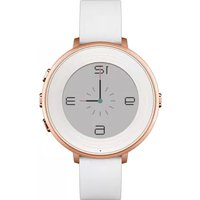

Brand : Pebble
Model : E-Paper
Category : Smartwatch