
AW-3 - Vocal Harmonizer ROLAND - Free user manual and instructions
Find the device manual for free AW-3 ROLAND in PDF.


| Product Type | Voice Harmonizer |
| Brand | Roland |
| Model | AW-3 |
| Power Supply | AC adapter (DC 9 V) or batteries (6 x AA) |
| Power Consumption | Approximately 5 W |
| Dimensions (W x D x H) | Approximately 300 x 180 x 50 mm |
| Weight | Approximately 1.2 kg (without batteries) |
| Inputs | 1 x 6.35 mm jack (mic), 1 x 6.35 mm jack (line) |
| Outputs | 2 x 6.35 mm jacks (L/R mix) |
| Main Functions | Real-time vocal harmonization, 4-part harmony, tone and volume control |
| Built-in Effects | Reverb, Chorus, Delay |
| Operating Modes | Manual, Auto, Pedal |
| Additional Connectivity | MIDI In/Out, Expression pedal input |
| Housing Material | Rugged plastic |
| Maintenance and Cleaning | Clean with a dry, soft cloth. Avoid solvents. |
| Safety | Use only the recommended adapter. Do not expose to moisture. |
| Spare Parts and Repairability | Contact an authorized Roland service center. Some parts are available. |
| Included Accessories | AC adapter, MIDI cable, user manual |
| Country of Manufacture | Japan |
| Warranty | 2 years (according to applicable law) |
Frequently Asked Questions - AW-3 ROLAND
User questions about AW-3 ROLAND
0 question about this device. Answer the ones you know or ask your own.
Ask a new question about this device
Download the instructions for your Vocal Harmonizer in PDF format for free! Find your manual AW-3 - ROLAND and take your electronic device back in hand. On this page are published all the documents necessary for the use of your device. AW-3 by ROLAND.
USER MANUAL AW-3 ROLAND
Thank you, and congratulations on your choice of BOSS AW-3 Dynamic Wah.
Before using this unit, carefully read the sections entitled: "USING THE UNIT SAFELY" and "IMPORTANT NOTES" (Owner's manual p. 25 - p. 32; p. 4 - p. 5). These sections provide important information concerning the proper operation of the unit. Additionally, in order to feel assured that you have gained a good grasp of every feature provided by your new unit, Owner's manual should be read in its entirety. The manual should be saved and kept on hand as a convenient reference.
Copyright © 2000 BOSS CORPORATION
All rights reserved. No part of this publication may be reproduced in any form without the written permission of BOSS CORPORATION.
Main Features
- This effects unit analyzes the dynamics of your guitar picking, so it can provide a wah effect faithful to the picking.
- Whether you're playing a guitar or bass, the new SENS control feature lets you get just the right wah sound.
- Five modes—UP, DOWN, SHARP, HUMANIZER, and TEMPO—let you use the wah sound in a variety of ways.
- Separate guitar and bass guitar input jacks let you make settings especially for guitars when you are playing a guitar, and bass settings if it's a bass you're playing.
- Also included is a feature that lets you input the Auto Wah tempo with the AW-3's pedal.
- Equipped with Expression/Control jack. With a BOSS FS-5U foot switch (sold separately) connected, you can control the Auto Wah tempo; or, by connecting a Roland EV-5 expression pedal (sold separately), you gain access to a broad range of expressive potential with the Pedal Wah and Humanizer effects.
IMPORTANT NOTES
In addition to the items listed under "USING THE UNIT SAFELY" on p. 25, please read and observe the following:
Power Supply: Use of Batteries
- Do not use this unit on the same power circuit with any device that will generate line noise (such as an electric motor or variable lighting system).
- The AC adaptor will begin to generate heat after long hours of consecutive use. This is normal, and is not a cause for concern.
- The use of an AC adaptor is recommended as the unit's power consumption is relatively high. Should you prefer to use batteries, please use the alkaline type.
-
Batteries should always be installed or replaced before connecting any other devices. This way, you can prevent malfunction and/or damage to speakers or other devices.
-
A battery was installed in the unit before it left the factory. The life of this battery may be limited, however, since its primary purpose was to enable testing.
- Before connecting this unit to other devices, turn off the power to all units. This will help prevent malfunctions and/or damage to speakers or other devices.
Placement
- Using the unit near power amplifiers (or other equipment containing large power transformers) may induce hum. To alleviate the problem, change the orientation of this unit; or move it farther away from the source of interference.
- This device may interfere with radio and television reception. Do not use this device
in the vicinity of such receivers.
- To avoid possible breakdown, do not use the unit in a wet area, such as an area exposed to rain or other moisture.
Maintenance
-
For everyday cleaning wipe the unit with a soft, dry cloth or one that has been slightly dampened with water. To remove stubborn dirt, use a cloth impregnated with a mild, non-abrasive detergent. Afterwards, be sure to wipe the unit thoroughly with a soft, dry cloth.
-
Never use benzine, thinners, alcohol or solvents of any kind, to avoid the possibility of discoloration and/or deformation.
Additional Precautions
- Use a reasonable amount of care when using the unit's buttons, sliders, or other controls; and when using its jacks and
connectors. Rough handling can lead to malfunctions.
- When connecting / disconnecting all cables, grasp the connector itself—never pull on the cable. This way you will avoid causing shorts, or damage to the cable's internal elements.
- To avoid disturbing your neighbors, try to keep the unit's volume at reasonable levels. You may prefer to use headphones, so you do not need to be concerned about those around you (especially when it is late at night).
- When you need to transport the unit, package it in the box (including padding) that it came in, if possible. Otherwise, you will need to use equivalent packaging materials.
- Use only the specified expression pedal (Roland EV-5; sold separately). By connecting any other expression pedals, you risk causing malfunction and/or damage to the unit.
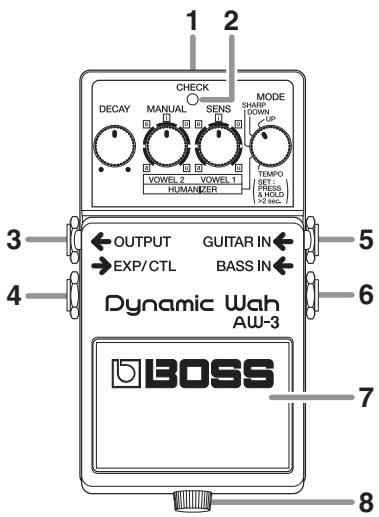
1. AC adaptor Jack
An AC adaptor (BOSS PSA-series: sold separately) can be connected to this jack. If an AC adaptor is used, you will be able to play for extended periods without worrying about battery life.
- As soon as you connect the AC adaptor, the unit is turned on.
- If there is the battery in the unit while an AC adaptor is being used, normal operation will continue should the line voltage be interrupted (power blackout or power cord disconnection).
- If you are going to use an AC adaptor, be sure to use the specified unit (BOSS PSA-Series).
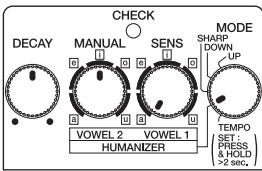
2. CHECK Indicator
Combination indicator that shows the effect's on/off status, tempo (in Tempo mode: p. 14), and Battery Check function. The indicator is lit when the effect is on, thereby allowing you to check whether the effect is on or off.
- If the indicator dims when the effect is on or when the tempo is being displayed, it means that the battery is running out of reserve; when this occurs, replace with fresh batteries. For instructions on changing the batteries, refer to "Changing the Battery" (p. 18).
- The CHECK indicator shows whether the effect is being applied or not, and is used to indicate other effects. It does not indicate whether the power to the device is on or not.
3. OUTPUT Jack
This output jack is connected to an amplifier or other effects device.
4. EXP/CTL Jack
Accepts connection of either an expression pedal (the optional Roland EV-5), or a momentary-type foot switch (the optional BOSS FS-5U). This allows you to attain pedal wah and Humanizer effects. It also allows setting of the tempo (while in Tempo mode).
- For more information and instructions, refer to "Description of Each Mode" (p. 12) and "Using the EXP/CTL Jack" (p. 16).
5. GUITAR IN Jack
This jack accepts input signals (coming from a guitar, some other musical instrument, or another effects unit).
6. BASS IN Jack
This jack accepts input signal coming from a bass guitar.
- BASS IN is disabled when the GUITAR IN jack is used.
- When running the unit on battery power, the GUITAR IN and BASS IN jacks double as power switches. Power to the unit is turned on when you plug into the GUITAR IN or BASS IN jack; the power is turned off when the cable is unplugged. Be sure to disconnect any cord plugged into the GUITAR IN or BASS IN jack when not using this effects device.
7. Pedal Switch
Used for switching effects on/off, and for inputting the tempo (in Tempo mode: p. 14).
8. Thumbscrew
When this screw is loosened, the pedal will open, allowing you to change the battery.
- For the procedure, refer to "Changing the Battery" (p. 18).
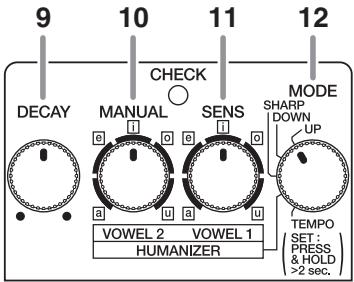
9. DECAY Knob
Adjusts the time over which the wah and Humanizer effects make the changes. Turn the knob clockwise to increase the time that the effect plays.
10. MANUAL Knob
Adjusts the frequency at which the wah effect begins.
- The range setting may vary with the selected mode and when inputting through the BASS IN jack.
When in HUMANIZER Mode
Switches to Vowel 2, in which the second vowel is selected.
11. SENS Knob
Adjusts the amount of wah effect that is applied in response to the input level. The further you turn this knob clockwise, the stronger the wah effect applied, even with lighter picking.

Turn the SENS knob fully counterclockwise, then adjust the MANUAL knob to get a fixed wah (fixed filter) effect.
When in HUMANIZER Mode
Switches to Vowel 1, in which the first vowel is selected.
12. MODE Switch
Switches the mode (UP, DOWN, SHARP, HUMANIZER, TEMPO).
- For more on the functions the other knobs have in each mode, refer to "Description of Each Mode" (p. 12 - p. 15).
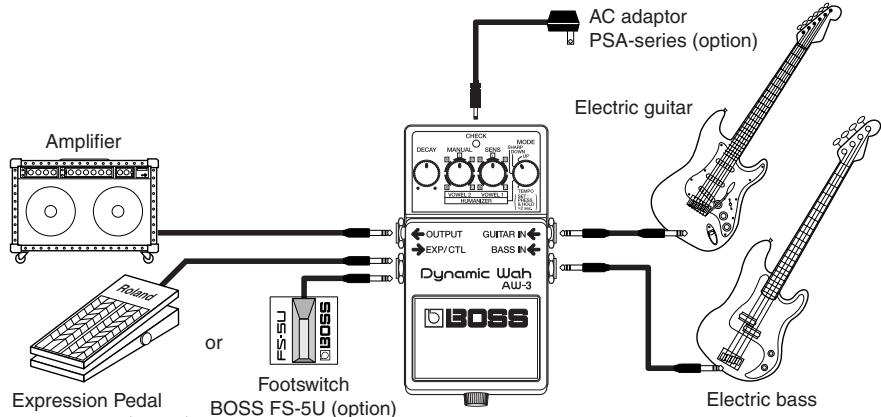
- Inserting a plug into the GUITAR IN or BASS IN Jack will automatically switch the unit on.
- To prevent malfunction and/or damage to speakers or other devices, always turn down the volume, and turn off the power on all devices before making any connections.
- If there are batteries in the unit while an AC adaptor is being used, normal operation will continue should the line voltage be interrupted (power blackout or power cord disconnection).
- Use only the specified expression pedal (Roland EV-5; sold separately). By connecting any other expression pedals, you risk causing malfunction and/or damage to the unit.
- Once you've gotten hooked up correctly (p. 10), be sure to observe the following order when switching on the power to your equipment. By turning on devices in the wrong order, you risk causing malfunction and/or damage to speakers and other devices.
When powering up: Turn on the power to your guitar amp last.
When powering down: Turn off the power to your guitar amp first.
Description of Each Mode
UP, DOWN, SHARP
UP Mode: Provides a wah effect in which the filter shifts to higher frequencies.
DOWN Mode: Provides a wah effect in which the filter shifts to lower frequencies.
SHARP Mode: Provides a stronger wah effect with shifting of the filter to higher frequencies.
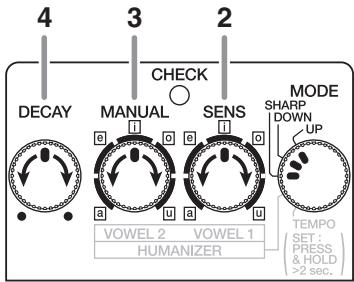
- When you have finished making the connections (p. 10), turn the effect on (the CHECK indicator turns red).
- Use the SENS knob to adjust the amount of effect that is applied in response to the input level.
- With the MANUAL knob, adjust the frequency at which the wah effect begins.
- With the DECAY knob, adjust the length of time the wah effect is applied.
When a Roland EV-5 (sold separately) is connected to the EXP/CTL jack, this becomes a pedal wah, and the SENS, MANUAL, and DECAY knob functions are disabled. - Refer to "Using the EXP/CTL Jack" (p. 16).
HUMANIZER
In this mode, the guitar sound is transformed into the sound of a human voice. The vowel changes as you pick.
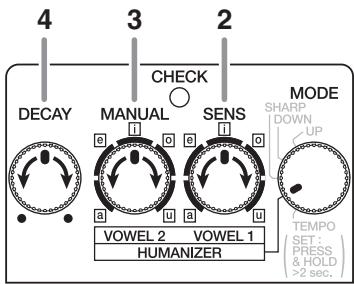
-
When you have finished making the connections (p. 10), turn the effect on (the CHECK indicator turns red).
-
Select the first vowel with the VOWEL 1 knob.
-
Select the second vowel with the VOWEL 2 knob.
-
Use the DECAY knob to adjust the length of time used to move from VOWEL 1 to VOWEL 2.
When a Roland EV-5 (sold separately) is connected to the EXP/CTL jack, it becomes a pedal Humanizer, and you'll be able to use the pedal to switch between VOWEL 1 and VOWEL 2.
- The DECAY knobs is disabled. Refer to "Using the EXP/CTL Jack" (p. 16).

Applying the same settings to VOWEL 1 and VOWEL 2 results in a fixed Humanizer (fixed filter) effect.
TEMPO
In this mode, you can use the AW-3's pedal switch (p. 8) or the optional BOSS FS-5U foot switch (p. 17) to set the Auto Wah's tempo, in a range from 200mSec to 4 Sec.
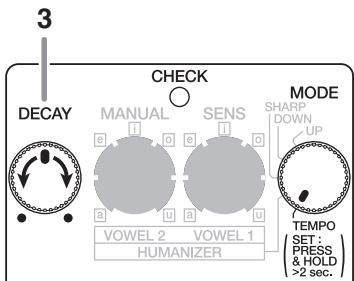
Tempo Settings with the AW-3 Pedal
- When you have finished making the connections (p. 10), press and hold down the AW-3's pedal switch for at least two seconds to enable setting of the tempo (the CHECK indicator turns green, and the tempo flashes in red).
The output sound also switches to Auto Wah at the same time.
- When the power is turned on (before tempo settings), the tempo is at 500 mSec.
-
To allow switching without the normal stress of dealing with effect on/off hassles, when you go into the tempo setting mode with the effect on, the effect is switched off for two seconds, after which the AW-3 switches to the tempo setting mode.
-
Depress the pedal to get the tempo you want.
The speed changes to match the tempo entered by pressing the pedal, and the CHECK indicator will flash in sync with the tempo.
Available range for the tempo:
200 mSec - 4 Sec
- With the DECAY knob, adjust the wah effect time.
- When you have finished setting the tempo, once again step on the pedal switch, and keep it down for two or more seconds.
You exit the tempo setting mode, and the pedal switch reverts to its normal function of turning the effect on and off.
- Immediately after exiting the tempo setting mode, the effect stays on, with Auto Wah in effect.
When connected to the EXP/CTL jack, the optional FS-5U is used for setting the tempo, and the AW-3's pedal switch then only turns the effect on and off. While the tempo can be set as usual, the effect can also be switched on and off.
Refer to "Using the EXP/CTL Jack" (p. 16).
When a Roland EV-5 (sold separately) is connected to the EXP/CTL jack, this becomes a pedal wah, and the DECAY knob functions are disabled.
Refer to "Using the EXP/CTL Jack" (p. 16).
Using the EXP/CTL Jack
-
With an expression pedal (the optional Roland EV-5) connected to the EXP/CTL jack, the wah and Humanizer effects are then applied in response to the operation of the pedal.
-
Set the EV-5's minimum volume to the lowest setting (0). The wah and Humanizer effects may not play correctly if this minimum value is not set.

(1) In UP, DOWN, or TEMPO mode:
Provides the pedal wah effect.
- The DECAY, MANUAL, and SENS knob functions are disabled.
(2) In SHARP mode:
Provides a pedal wah effect, but featuring special tone characteristics.
- The DECAY, MANUAL, and SENS knob functions are disabled.
(3) In HUMANIZER mode:
The pedal action shifts between VOWEL 1 and VOWEL 2.
- In Humanizer mode, the DECAY knob function is disabled.
-
If VOWEL 1 and VOWEL 2 have the same settings, no change is obtained by moving the pedal.
-
With a momentary-type foot switch (the optional BOSS FS-5U) connected to the EXP/CTL jack, you can use the foot switch to set tempos in TEMPO mode.
In this setup, the AW-3's pedal switch is only used to turn the effect on and off.
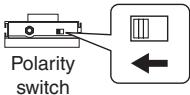
- Set the polarity switch of the connected foot switch as shown in the figure below.
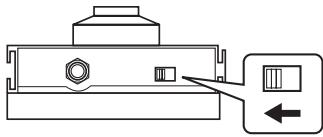
Polarity switch
- Connecting or disconnecting the optional BOSS FS-5U control pedal when setting the tempo may cause the tempo to become erratic. If this occurs, set the tempo again.
Changing the Battery
When the CHECK indicator goes dim or no longer lights while an effect is on, it means that the battery is nearly dead and must be replaced. Replace the battery following the steps below.
- For best results (i.e., longest usable life) use an alkaline type battery.
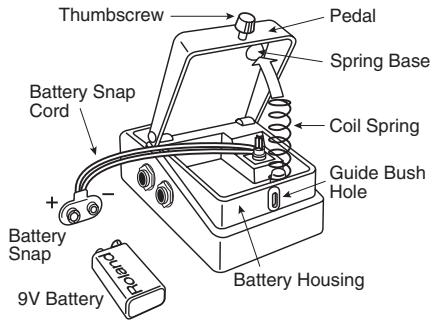
- Loosen the thumbscrew at the front of the pedal, then lift the pedal upwards to open the unit.
- The thumbscrew can be left in the pedal while changing the battery.
- Remove the old battery from the battery housing, and remove the battery snap connected to it.
- Connect the battery snap to the new battery, and place the battery inside the battery housing.
- Be sure to carefully observe the battery's polarity (+ versus -).
- Slip the coil spring onto the spring base on the back of the pedal, then close the pedal.
- Take care not to allow the battery snap cord to become caught in the pedal, coil spring, or other places.
- Finally, insert the thumbscrew into the guide bush hole and fasten it securely.
Power won't come on/ CHECK indicator doesn't light:
- Is the specified adaptor (PSA-series; sold separately) properly connected?
Check the connection once more (p. 10).
- Is the battery low or dead?
Replace with a new battery (p. 18).
- Is the guitar properly connected to the GUITAR IN or BASS IN jack?
Check the connection once more (p. 10).
-
To help preserve battery power while the AW-3 is being powered by battery, the power is actually switched on only at the moment a cord is plugged into the GUITAR IN or BASS IN jack.
-
The battery that was supplied with the unit is for temporary use--intended primarily for testing its operation. For using the unit for more extended periods of time, we recommend the use of alkaline batteries.
-
The CHECK indicator is designed for providing information about effects—such as their on/off status. It does not indicate whether the power is on or off.
No sound / Low volume:
- Is the AW-3 properly connected to your instrument?
Check the connection once more (p. 10). - Is the volume turned down on any guitar amp or effects device you have connected?
- Are you inputting to both the GUI-TAR IN and BASS IN jacks?
The GUITAR IN jack is given priority. If both jacks are used at the same time, the signal that has been applied at BASS IN will not be heard.
- Is an EV-5 connected to the EXP/CTL jack?
With an EV-5 connected to the EXP/CTL jack, you won't be able to obtain a wah effect that reflects picking dynamics.
Sound is distorted:
- Is the battery low?
As the battery is drained, the CHECK indicator dims, and the AW-3 may start to function incorrectly. Replace with a new battery (p. 18).
- Could the level of the sound being input be excessive?
With some guitars, distortion may be produced. Be careful of your guitar's output level.
The wah and Humanizer effects don't work well:
- Is the input volume too loud?
Use care in setting the volume levels when using the AW-3 after distortion effects devices. This unit may be unable to sense how hard or softly the guitar strings are being picked, which may prevent accurate use of the effect.
Could the SENS knob be set to the minimum?
If the SENS knob is turned fully counterclockwise, guitar picking will not be detected.
If you are using the EV-5, is the EV-5's minimum volume set to 0 (minimum)?
Refer to "Using the EXP/CTL Jack" (p. 16 - p. 17).
Turning the knobs has no effect:
- Is the MODE switch at the correct position?
Certain knob functions are disabled in some modes. Refer to "Description of Each Mode" (p. 12 - p. 15) for more on the functions in each mode.
- Do you have an EV-5 connected to the EXP/CTL jack?
Certain knob functions are disabled when the EV-5 is connected to the EXP/CTL jack. Refer to "Using the EXP/CTL Jack" (p. 16 - p. 17).
You cannot input the tempo with the external foot switch:
- Is the connector cord designed for stereo use?
- Have you connected a latch-type foot switch (such as the optional BOSS FS-5L)?
Cannot input the tempo correctly with the external foot switch:
- Is the polarity switch of the foot switch (optional BOSS FS-5U) set correctly? Check the connection once more (p. 10).
Setting samples
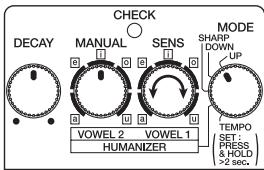
Standard Picking Wah
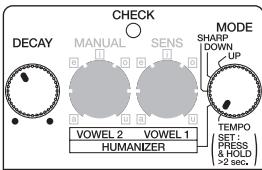
Wah Wah Pedal
Synth-like Picking Wah
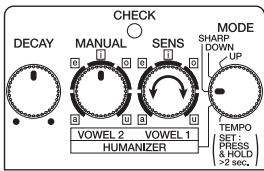
Human-like Voice
Specifications
AW-3: Dynamic Wah
Nominal Input Level .-20 dBu
Input Impedance 1 MΩ
Nominal Output Level -20 dBu
Output Impedance 1 kΩ
Recommended Load Impedance.... 10k or greater
Residual Noise. -92 dBu (IHF-A Typ.)
Controls .Pedal Switch, DECAY Knob, MANUAL/VOWEL 2 Knob
SENS/VOWEL 1 Knob, MODE Switch
Indicator CHECK Indicator
(Serves also as tempo and battery check indicator)
Connectors.........GUITAR IN Jack, BASS IN Jack, OUTPUT Jack,
EXP/CTL Jack, AC adaptor Jack
Power Supply .DC 9 V; Dry battery 6F22 (9 V) type (carbon)/
Dry battery 6LR61 (9 V) type (alkaline)
AC Adaptor (PSA-series: optional)
Current Draw. 50 mA (DC 9 V)
- Expected battery life under continuous use:
Carbon: 2 hours Alkaline: 6 hours
These figures will vary depending on the actual conditions of use.
| Dimensions | 73 (W) x 129 (D) x 59 (H) mm |
| 2-7/8 (W) x 5-1/8 (D) x 2-3/8 (H) inches | |
| Weight | 420 g /15 oz (including Battery) |
| Accessories | Owner's Manual |
| Leaflet ("USING THE UNIT SAFELY," "IMPORTANT NOTES," and "Information") | |
| Dry battery/9 V type (6F22) | |
| * The battery that was supplied with the unit is for temporary use—intended primarily for testing its operation. We recommend that alkaline batteries be used when replacing the batteries. | |
| Options | AC Adaptor (PSA-series) |
| Expression pedal Roland EV-5 | |
| Footswitch (momentary-type) BOSS FS-5U |
- 0 dBu = 0.775 Vrms
- In the interest of product improvement, the specifications and/or appearance of this unit are subject to change without prior notice.
USING THE UNIT SAFELY
INSTRUCTIONS FOR THE PREVENTION OF FIRE, ELECTRIC SHOCK, OR INJURY TO PERSONS
About WARNING and CAUTION Notices
| ▲WARNING | Used for instructions intended to alert the user to the risk of death or severe injury should the unit be used improperly. |
| ▲CAUTION | Used for instructions intended to alert the user to the risk of injury or material damage should the unit be used improperly. * Material damage refers to damage or other adverse effects caused with respect to the home and all its furnishings, as well to domestic animals or pets. |
About the Symbols
| A | The △symbol alerts the user to important instructions or warnings. The specific meaning of the symbol is determined by the design contained within the triangle. In the case of the symbol at left, it is used for general cautions, warnings, or alerts to danger. |
| ◎ | The ⊕symbol alerts the user to items that must never be carried out (are forbidden). The specific thing that must not be done is indicated by the design contained within the circle. In the case of the symbol at left, it means that the unit must never be disassembled. |
| ◎ | The ●symbol alerts the user to things that must be carried out. The specific thing that must be done is indicated by the design contained within the circle. In the case of the symbol at left, it means that the power-cord plug must be unplugged from the outlet. |
ALWAYS OBSERVE THE FOLLOWING

WARNING
- Before using this unit, make sure to read the instructions below, and the Owner's Manual.

- Do not open (or modify in any way) the unit or its AC adaptor.

- Do not attempt to repair the unit, or replace parts within it (except when this manual provides specific instructions directing you to do so). Refer all servicing to your retailer, the nearest Roland Service Center, or an authorized Roland distributor, as listed on the "Information" page.


WARNING
-
Never use or store the unit in places that are:
-
Subject to temperature extremes (e.g., direct sunlight in an enclosed vehicle, near a heating duct, on top of heat-generating equipment); or are
- Damp (e.g., baths, washrooms, on wet floors); or are
- Humid; or are
- Exposed to rain; or are
- Dusty; or are
- Subject to high levels of vibration.


- Make sure you always have the unit placed so it is level and sure to remain stable. Never place it on stands that could wobble, or on inclined surfaces.


WARNING
- Use only the specified AC adaptor (PSA-series), and make sure the line voltage at the installation matches the input voltage specified on the AC adaptor's body. Other AC adaptors may use a different polarity, or be designed for a different voltage, so their use could result in damage, malfunction, or electric shock.
- Do not excessively twist or bend the power cord, nor place heavy objects on it. Doing so can damage the cord, producing severed elements and short circuits. Damaged cords are fire and shock hazards!



WARNING
- This unit, either alone or in combination with an amplifier and headphones or speakers, may be capable of producing sound levels that could cause permanent hearing loss. Do not operate for a long period of time at a high volume level, or at a level that is uncomfortable. If you experience any hearing loss or ringing in the ears, you should immediately stop using the unit, and consult an audiologist.
- Do not allow any objects (e.g., flammable material, coins, pins); or liquids of any kind (water, soft drinks, etc.) to penetrate the unit.


WARNING
-
Immediately turn the power off, remove the AC adaptor from the outlet, and request servicing by your retailer, the nearest Roland Service Center, or an authorized Roland distributor, as listed on the "Information" page when:
-
The AC adaptor or the power-supply cord has been damaged; or
- Objects have fallen into, or liquid has been spilled onto the unit; or
- The unit has been exposed to rain (or otherwise has become wet); or
- The unit does not appear to operate normally or exhibits a marked change in performance.

WARNING
- In households with small children, an adult should provide supervision until the child is capable of following all the rules essential for the safe operation of the unit.

- Protect the unit from strong impact. (Do not drop it!)

- Do not force the unit's power-supply cord to share an outlet with an unreasonable number of other devices. Be especially careful when using extension cords—the total power used by all devices you have connected to the extension cord's outlet must never exceed the power rating (watts/amperes) for the extension cord. Excessive loads can cause the insulation on the cord to heat up and eventually melt through.


WARNING
- Before using the unit in a foreign country, consult with your retailer, the nearest Roland Service Center, or an authorized Roland distributor, as listed on the "Information" page.
- Batteries must never be recharged, heated, taken apart, or thrown into fire or water.


CAUTION


- The unit and the AC adaptor should be located so their location or position does not interfere with their proper ventilation.
Always grasp only the plug or the body of the AC adaptor when plugging into, or unplugging from, an outlet or this unit. - Whenever the unit is to remain unused for an extended period of time, disconnect the AC adaptor.
- Try to prevent cords and cables from becoming entangled. Also, all cords and cables should be placed so they are out of the reach of children.

CAUTION
- Never climb on top of, nor place heavy objects on the unit.

- Never handle the AC adaptor body, or its plugs, with wet hands when plugging into, or unplugging from, an outlet or this unit.

- Before moving the unit, disconnect the AC adaptor and all cords coming from external devices.

- Before cleaning the unit, turn off the power and unplug the AC adaptor from the outlet (p. 10).

- Whenever you suspect the possibility of lightning in your area, disconnect the AC adaptor from the outlet.


CAUTION
- If used improperly, batteries may explode or leak and cause damage or injury. In the interest of safety, please read and observe the following precautions (p. 18).
- Carefully follow the installation instructions for batteries, and make sure you observe the correct polarity.
- Avoid using new batteries together with used ones. In addition, avoid mixing different types of batteries.
- Remove the batteries whenever the unit is to remain unused for an extended period of time.


CAUTION
- If a battery has leaked, use a soft piece of cloth or paper towel to wipe all remnants of the discharge from the battery compartment. Then install new batteries. To avoid inflammation of the skin, make sure that none of the battery discharge gets onto your hands or skin. Exercise the utmost caution so that none of the discharge gets near your eyes. Immediately rinse the affected area with running water if any of the discharge has entered the eyes.
- Never keep batteries together with metallic objects such as ballpoint pens, necklaces, hairpins, etc.

CAUTION
- Used batteries must be disposed of in compliance with whatever regulations for their safe disposal that may be observed in the region in which you live.
- Should you remove the Thumbscrew, make sure to put them in a safe place out of children's reach, so there is no chance of them being swallowed accidentally.


For the USA
FEDERAL COMMUNICATIONS COMMISSION RADIO FREQUENCY INTERFERENCE STATEMENT
This equipment has been tested and found to comply with the limits for a Class B digital device, pursuant to Part 15 of the FCC Rules. These limits are designed to provide reasonable protection against harmful interference in a residential installation. This equipment generates, uses, and can radiate radio frequency energy and, if not installed and used in accordance with the instructions, may cause harmful interference to radio communications. However, there is no guarantee that the equipment will be able to detect any interference. If this equipment does cause harmful interference to radio or television reception, which can be determined by turning the equipment off and on, the user is encouraged to try to rectify the interference by one or more of the following measures:
Reorient or relocate the receiving antenna.
- Increase the separation between the equipment and receiver.
- Connect the equipment into an outlet on a circuit different from that to which the receiver is connected.
- Consult the dealer or an experienced radio/TV technician for help.
This device complies with Part 15 of the FCC Rules. Operation is subject to the following two conditions:
(1) this device may not cause harmful interference, and
(2) this device must accept any interference received, including interference that may cause undesired operation.
Unauthorized changes or modification to this system can void the users authority to operate this equipment.
This equipment requires shielded interface cables in order to meet FCC class B Limit.
For Canada
NOTICE
This Class B digital apparatus meets all requirements of the Canadian Interference-Caising Equipment Regulations.
AVIS
This product contains chemicals known to cause cancer, birth defects and other reproductive harm, including lead.
- Copyright © 2000 BOSS CORPORATION
- Main Features
- IMPORTANT NOTES
- Power Supply: Use of Batteries
- Placement
- Maintenance
- Additional Precautions
- AC adaptor Jack
- CHECK Indicator
- OUTPUT Jack
- EXP/CTL Jack
- GUITAR IN Jack
- BASS IN Jack
- Pedal Switch
- Thumbscrew
- DECAY Knob
- MANUAL Knob
- When in HUMANIZER Mode
- SENS Knob
- MODE Switch
- Description of Each Mode
- UP, DOWN, SHARP
- HUMANIZER
- TEMPO
- Tempo Settings with the AW-3 Pedal
- Available range for the tempo:
- Using the EXP/CTL Jack
- Changing the Battery
- Power won't come on/ CHECK indicator doesn't light:
- No sound / Low volume:
- Sound is distorted:
- The wah and Humanizer effects don't work well:
- Turning the knobs has no effect:
- Setting samples
- Standard Picking Wah
- Wah Wah Pedal
- Synth-like Picking Wah
- Human-like Voice
- Specifications
- AW-3: Dynamic Wah
- USING THE UNIT SAFELY
- WARNING
- CAUTION
- FEDERAL COMMUNICATIONS COMMISSION RADIO FREQUENCY INTERFERENCE STATEMENT
- NOTICE
- AVIS
Brand : ROLAND
Model : AW-3
Category : Vocal Harmonizer