
Z 09138 - Vacuum Cleaner Cleanmaxx - Free user manual and instructions
Find the device manual for free Z 09138 Cleanmaxx in PDF.


| Product type | Canister vacuum cleaner |
| Brand | Cleanmaxx |
| Model | Z 09138 |
| Dimensions (L x W x H) | 30 x 30 x 50 cm |
| Weight | 5 kg |
| Power supply | 1200 W, 220-240 V ~ 50 Hz |
| Filtration type | Washable HEPA filter |
| Container capacity | 2 L |
| Operating radius | 8 m |
| Cable length | 6 m |
| Noise level | 78 dB(A) |
| Main functions | Floor, carpet, furniture, crevice vacuuming |
| Accessories included | Combination nozzle, upholstery brush, crevice tool |
| Bag type | Disposable dust bag (type S) |
| Fill indicator | Yes, indicator light |
| Power regulation | Electronic speed control |
| Care and cleaning | Clean filter monthly, replace bag when indicator lights up |
| Safety | Thermal protection, automatic shut-off in case of overheating |
| Spare parts and repairability | Bags, filters, belt, brush available online |
| General information | Manual available in English, hose length 1.5 m |
Frequently Asked Questions - Z 09138 Cleanmaxx
User questions about Z 09138 Cleanmaxx
0 question about this device. Answer the ones you know or ask your own.
Ask a new question about this device
Download the instructions for your Vacuum Cleaner in PDF format for free! Find your manual Z 09138 - Cleanmaxx and take your electronic device back in hand. On this page are published all the documents necessary for the use of your device. Z 09138 by Cleanmaxx.
USER MANUAL Z 09138 Cleanmaxx
natural_image
White and black electric vacuum cleaner with extended handle (no visible text or symbols)Gebrauchsanleitung
ab Seite 3
Instruction manual
starting on page 13
Mode d'emploi
www.service-shopping.de
natural_image
Front view of a white handheld device with black handle and ventilation slots (no visible text or symbols)
Bürstsauger-Bodendüse
natural_image
Close-up of hands installing or adjusting a white panel with a tool (no visible text or symbols)natural_image
Hand inserting a small circular button into a tall container (no text or symbols visible)natural_image
Close-up of a handheld device with a circular button labeled 'X' (no visible text or symbols on the device itself)natural_image
Hand holding a black rectangular device with a handle, against a plain white background (no text or symbols visible)natural_image
Hand holding a mechanical device with multiple ports and a handle (no visible text or symbols)Meaning of the Symbols in These Instructions 13
Intended Use 14
Safety Instructions 14
Dangers of Injury 14
Proper Connection 14
Danger of Fire 15
Proper Use 15
Items Supplied and Device Overview 16
Suction Nozzles 17
Before Initial Use 17
Unpacking the Items Supplied 17
Inserting / Removing the Handle Pole 17
Connecting the Crevice Nozzle / Brush Vacuum Floor Nozzle ____ 18
Operation 18
Cleaning and storing 19
Emptying the Dust Container 20
Cleaning the HEPA Filter 20
Cleaning the Brush nozzle 20
Troubleshooting 21
Technical Data 21
Disposal 22
Dear Customer,
We are delighted that you have opted for this cyclone vacuum-cleaner.
Before using the device for the first time, please read the instructions through carefully and store them in a safe place. If the device is given to someone else, it should always be accompanied by these instructions. The manufacturer and importer do not accept any liability if the information in these instructions is not complied with! We reserve the right to modify the device, packaging or enclosed documentation at any time in conjunction with our policy of continuous development.
If you have any questions, contact the customer service department via our website:
www.service-shopping.de
Meaning of the Symbols in These Instructions


All safety instructions are identified with this symbol. Please read through them carefully and comply with the safety instructions in order to prevent personal injury and damage to property.
Tips and recommendations are identified with this symbol.
Intended Use
☐ This device is designed for vacuum cleaning normal household dust.
☐ On no account should the device be used to suck up the following:
–Liquids or wet substances (e.g. wet carpet shampoo)
—Glowing ash, cigarette ends, matches, etc.
– Inflammable or explosive substances
- Very fine dust (e.g. concrete dust), ash or toner
-Pointed, hard substances such as large pieces of broken glass
☐ This device may be used by children aged 8 and over and by people with reduced physical, sensory or mental abilities or a lack of experience and/or knowledge if they are supervised or have received instruction on how to use the device safely and have understood the dangers resulting from this. Children may not play with the device. Cleaning and user maintenance may not be performed by children, unless they are older than 8 years of age and are supervised.
☐ The device is for personal use only and is not intended for commercial applications.
☐ Use the device only as described in the instructions. Any other use is deemed to be improper.
☐ The following are excluded from the warranty: all defects caused by improper handling, damage or unauthorised attempts at repair. This also applies to normal wear and tear.
Safety Instructions

Dangers of Injury
☐ Danger of suffocation! Keep the packaging material away from children and animals.
☐ Keep the device, the cable and the plug away from water or other liquids in order to avoid electric shocks. Never touch the mains plug, the cable or the device with wet or moist hands.
☐ Keep animals, hair, jewellery, wide clothing, fingers and all other body parts away from the nozzles of the device. They could become stuck to the device. Should the vacuum cleaner become stuck, switch the device off immediately.
☐ Please take particular care when cleaning stairs so that you do not stumble and fall.
☐ Wear sturdy shoes when using the device.
☐ The device should only be used and stored out of the reach of children. Improper use can lead to injuries and electric shock. The mains cable must also be kept out of the reach of children.

Proper Connection
☐ Only ever connect the device to a properly installed plug socket. The plug socket must also be readily accessible after connection. The mains voltage must match the
technical data for the device (see the "Technical Data" chapter). Only use suitable extension cables whose technical data is the same as that of the device.
☐ Make sure that the connected mains cable does not present a trip hazard, does not become squashed or bent and does not come into contact with hot surfaces.

Danger of Fire
☐ Do not use the device if highly flammable gases are present in the air.
☐ Do not cover the device during operation in order to prevent it from catching fire.

Proper Use
☐ Use and store the device only in closed rooms. Do not operate it outdoors, in rooms with high humidity or on hot surfaces.
□ Always check the device and accessories for damage before putting them into operation. If the device, the cable, the plug or a filter shows visible signs of damage, the device must not be used. Do not try to repair the device yourself or to replace any individual parts. In the event of any damage, contact our customer service department.
☐ Do not use the device if it has malfunctioned, sucked up liquids or objects or been dropped. Have the device checked by a specialist.
☐ The device should only be used when it is fully and correctly assembled. The dust container and the filters must be inserted and must not be damaged. If the dirt were to get inside the device, this could damage the motor. The dust container must be closed for it to be inserted correctly.
☐ Do not expose the device to extreme temperatures, wide temperature fluctuations, open fire, direct sunlight, moisture or wet conditions.
☐ Do not drop the device or allow it to be knocked violently.
☐ Never place heavy objects on the device.
☐ Do not immerse the device in water or other liquids in order to avoid electric shocks. Do not pour liquids into the dust container.
☐ Never touch the device, the cable or the plug with wet hands.
☐ Do not insert anything into the openings/nozzles of the device and make sure that these do not become clogged.
☐ Never leave the device unattended when it is switched on or connected to the mains.
☐ Switch the device off and pull the mains plug out of the mains socket
-if you are not using the device,
—before you change accessories,
-if a fault or error occurs while the device is in operation,
-if liquids or foreign bodies have found their way into the device,
—before a thunderstorm,
—before you clean parts of the device and accessories.
☐ The device must be switched off when inserting or removing the mains plug.
□ Always pull the plug and never the cable!
☐ Never pull the device by the cable to move it. Use the handles.
☐ Do not try to lubricate the rollers with lubricant or oil. This would cause dust and dirt to increasingly adhere to the rollers.
☐ Empty the dust container after each use. The filters must also be regularly cleaned in order to prevent overloading of the motor.
☐ The dust container and the dust filter must be completely dry before you put them back inside the device.
☐ Use only original manufacturer's accessories.
☐ Store the device in a cool, dry place that is not accessible to children and animals when it is not being used.
Items Supplied and Device Overview

1 Handle bar (removable)
2 Top cable winder
3 Bottom cable winder
4 Main unit
5 Dust bin
6 Nozzle insert
7 Brush floor nozzle
8 Dust bin lid
9 Release button for dust bin
10 Dust filter insert
11 Hepa dust filter
12 On/Off switch
13 Handle bar release button
Not shown: Tile nozzle

To order more original spare parts/accessories, visit our website: www.service-shopping.de
Suction Nozzles

CAUTION!
□ Always switch off the vacuum cleaner before changing nozzles.
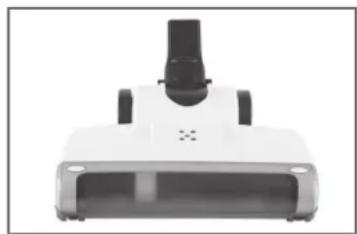
natural_image
Front view of a white handheld device with black handle and ventilation slots (no visible text or symbols)Brush Vacuum Floor Nozzle
The floor nozzle is suitable for large, flat floor coverings (carpet, tile, laminate etc.).

Crevice Nozzle
The crevice nozzle is suitable for cleaning all nooks and crannies which you cannot reach with the other nozzle.
Before Initial Use
Unpacking the Items Supplied

CAUTION!
☐ Danger of suffocation! Keep the packaging material away from children and animals.
☐ Make sure that the device is not connected to the mains power before you attach or detach the accessories.
Unpack all parts and check the items supplied for completeness (see the "Items Sup- plied and Device Overview" chapter) and transport damage. If you find any damage to the components, do not use them (!), but contact our customer service department.
Inserting / Removing the Handle Pole
Notice: You can use the vacuum cleaner to clean floors with both the handle bar and floor nozzle or as a hand-held vacuum cleaner with the tile nozzle to clean difficult to reach areas.

natural_image
Close-up of hands installing or adjusting a vertical pipe or pipe fitting (no text or symbols visible)- Slide up the release button for the handle pole.
- Insert the handle pole into the receiving socket on the brush vacuum cleaner.
- Release the release button for the handle pole to fix the handle pole in place.
- When you want to detach the handle pole, switch up the release button nach oben and pull the handle pole up and out of the brush vacuum cleaner.
Connecting the Crevice Nozzle / Brush Vacuum Floor Nozzle

CAUTION!
□ Always switch the device off first and pull the mains plug out of the plug socket before you attach or remove any accessories.
☐ When the device is switched on and the brush nozzle is in use, the brush rotates in the nozzle. Please ensure that the device is standing upright on a suitable floor covering which cannot be damaged by the brush. Do not lean on the device and do not place it on furniture or uneven surfaces. Carry the device exclusively by the carrying handle to move it.
You can place the nozzles directly onto the device.
- Mount the nozzles on the nozzle adapter behind the dust bin.
- To remove the nozzles, simply pull them off.
Operation

CAUTION!
☐ Never hold the nozzles close to parts of your body or animals during use and do not place your hands inside the nozzles. They could become stuck to the device/injured. If the vacuum cleaner should become stuck, switch the device off immediately.
☐ Switch on the device only when you have checked that all the parts have been properly attached and that the dust container and the dust filter are correctly inserted.
☐ If the device switches itself off during use, it is possible that the overheating protection has been triggered. Switch off the device and check the nozzle for any blockages, remove them and then allow the device to cool down for at least 15 minutes before you switch it on again. If this does not solve the problem, contact the customer service department.
☐ On no account should the device be used to suck up the following:
–Liquids or wet substances (e.g. wet carpet shampoo)
-Glowing ash, cigarette ends, matches, etc.
– Inflammable or explosive substances
– Very fine dust (e.g. concrete dust), ash or toner
-Pointed, hard objects such as large pieces of broken glass
- Make sure that the accessories are correctly attached to the device (see the "Before Initial Use" chapter, "Inserting / Removing the Handle Pole" section and the "Connecting the Crevice Nozzle / Brush Vacuum Floor Nozzle" chapter).
- Unwind the mains cable. To unwind the mains cable quickly, turn the upper cable winder down and pull off the mains cable.
-
Insert the mains plug into a properly installed mains socket that is easily accessible.
-
Mount the desired nozzle on the main unit as described in the chapter "Connecting the Crevice Nozzle / Brush Vacuum Floor Nozzle".
- Press the On / Off switch to switch on the vacuum cleaner.
- Guide the brush nozzle or the crevice nozzle over the surface to be cleaned.
- Press the On / Off switch to switch off the vacuum cleaner.
- If you have used the brush nozzle, move the device back into an upright standing position, pull the mains plug out of the plug socket and wind the cable around the cable winder.
- If you have used the crevice nozzle (using as hand-held vacuum cleaner), remove it and insert the handle pole back into the device. Pull the mains plug out of the plug socket and wind the cable around the cable winder.
- To ensure optimum performance of the device, you should empty the dust container and clean the dust filter regularly (see the "Cleaning the Device" chapter) after every use.
Cleaning and storing

CAUTION!
☐ Empty the dust container if it is full and clean the HEPA filter regularly to prevent overheating of the motor.
□ Always remove the mains plug from the plug socket before doing any cleaning of the device.
☐ Keep the device, the cable and the mains plug away from water or other liquids in order to avoid electric shocks. Make sure that no liquid gets into the device during cleaning. Only the HEPA filter and the dust filter may be cleaned with water. However, they must be completely dry before they are put back into the device.
☐ The HEPA filter is not machine-washable, dishwasher-safe or suitable for tumble drying! Only ever dry the filter in the air, and never use a hair dryer to do so.
☐ Do not use any sharp or abrasive cleaning agents or cleaning pads to clean the device. These could damage the surfaces.
- Clean the HEPA filter regularly or if you notice a decrease in the suction power.
- Clean the housing if necessary using a damp, soft cloth. Dry it with a soft cloth.
- Remove hair and fluff from the nozzles at regular intervals.
- Store the vacuum cleaner and the nozzles in a cool, dry indoor room out of the reach of children and animals.

The HEPA filter may lose some of its colour over time. This is normal and does not have any adverse effect on function.
Emptying the Dust Container
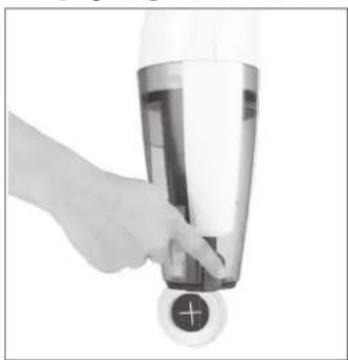
natural_image
Hand placing a small circular button with a plus sign on a glass container (no text or symbols visible)-
Hold the device over an open dustbin.
-
Press the release button to open the dust container. The bottom of the dust container will open and the dirt will fall out.
-
Then flip the dust container flap closed again. The fastener must be heard to engage in place.
-
If necessary, you can rinse the dust container with clear, lukewarm water. To do this, remove the dust contain from the device (see the „Cleaning the HEPA Filter“ chapter).
Cleaning the HEPA Filter

natural_image
Close-up of a handheld device with a black plastic connector and a circular button (no visible text or symbols)-
Remove the floor or tile nozzle as described in the chapter "Connecting the Crevice Nozzle / Brush Vacuum Floor Nozzle".
-
Turn the dust bin slightly to the left to remove it from the main unit.
-
Pull out the dust filter insert together with the HEPA filter.
-
Take the HEPA filter out of the dust filter insert
- Tap out the HEPA fi Iter.
- If necessary, thoroughly rinse the HEPA filter and the dust filter insert with clear, lukewarm water. CAUTION: Do not under any circumstances clean the filter in a washing machine or dishwasher! Then shake off any excess water and let the filter and the filter protective frame dry completely in the air before you insert them both again.
- Place the HEPA filter back onto the dust filter insert.
- Insert the dust filter insert together with the HEPA filter back into the dust container and turn it tight.
- Then place the dust container back into the device. Make sure that the dust container locks in place correctly.
Cleaning the Brush nozzle
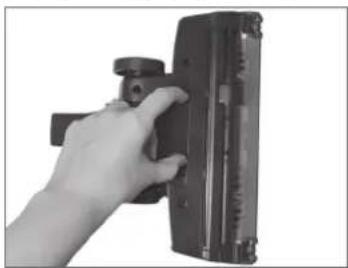
natural_image
Hand holding a black rectangular object with a circular knob, against a white background (no text or symbols visible)- To make it easy to clean the brush nozzle, you can open the nozzle: Open the dust compartment on the bottom of the nozzle by pushing both hooks in.

natural_image
Hand holding a mechanical device with no visible text or symbols-
To clean the brush, remove the upper part of the housing carefully. You can now remove hair, dust, etc.
-
After cleaning, put the brush nozzle back together. The dust compartment and the upper part of the housing must engage audibly.
Troubleshooting
Should your device stop working properly at any time, exhibit signs of damage or require a spare part, please contact the customer service department. For your own safety, do not attempt to carry out repairs yourself. The following table contains tips on how you can remedy small problems yourself.
| Problem Possible cause / solution / tips | |
| The device generates no suction. | Is the plug not inserted in the mains socket correctly?Is the plug socket defective? Try another mains socket.Check the fuse of your mains connection.Is the filter clogged? Clean the dust filter (see the "Cleaning the Device" chapter). |
| The performance is weak. | Is the dust container too full? Empty the container.Is the filter heavily clogged up? Clean the dust filter (see the "Cleaning the Device" chapter).Is the nozzle being used clogged? Remove any objects blocking the nozzle (see the "Cleaning the Device" chapter).Is the rotating brush of the brush nozzle dirty? Remove the blockages. |
| Dust escapes from the device. | Is the dust container not closed correctly and / or not (correctly) inserted into the device? Correct this. |
| During vacuum cleaning, an unpleasant smell is detected. | A smell often develops when new devices are first used. The smell should disappear after you have used the device several times. |
Technical Data
Model number: T-110-80
Article number: Z 09138
Voltage supply: 230 V\~, 50 Hz
P o w e r :
Protection class: II

8
Disposal

The packaging material is recyclable. Please dispose of it in an environmentally friendly manner and take it to a recycling centre.
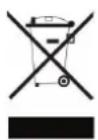
Dispose of the device in an environmentally friendly manner. It should not be disposed of alongside general household waste. Dispose of it at a recycling centre for used electrical and electronic devices.
You can obtain more information from your local authorities.
Contenu
www.service-shopping.de
natural_image
Front view of a white handheld device with black handle and control buttons (no visible text or symbols)natural_image
Close-up of hands installing or adjusting a white panel with a tool (no visible text or symbols)natural_image
Hand holding a small electronic device with a circular button and plus sign (no visible text or symbols)natural_image
Close-up of a handheld vacuum cleaner with black and white casing, showing internal components and a close-up of the bulb (no text or symbols visible)natural_image
Hand holding a black rectangular device with a knob, against a plain background (no text or symbols visible)natural_image
Hand holding a mechanical device with no visible text or symbolswww.service-shopping.de
www.service-shopping.de
Zuigmonden

OPGELET!
natural_image
Front view of a white handheld vacuum cleaner with black adjustment knobs (no visible text or symbols)natural_image
Close-up of hands installing or adjusting a white panel with a tool (no text or symbols visible)natural_image
Hand placing a small button into a glass container with a plus sign (no text or symbols visible)natural_image
Close-up of a handheld vacuum cleaner with black and white casing, showing internal components and a close button (no text or symbols visible)natural_image
Hand holding a camera lens next to a rectangular device (no visible text or symbols)natural_image
Hand holding a mechanical device with no visible text or symbols


- Gebrauchsanleitung
- Instruction manual
- Mode d'emploi
- Bürstsauger-Bodendüse
- Meaning of the Symbols in These Instructions
- Intended Use
- Safety Instructions
- Dangers of Injury
- Proper Connection
- Danger of Fire
- Proper Use
- Items Supplied and Device Overview
- Suction Nozzles
- CAUTION!
- Brush Vacuum Floor Nozzle
- Crevice Nozzle
- Before Initial Use
- Unpacking the Items Supplied
- Inserting / Removing the Handle Pole
- Connecting the Crevice Nozzle / Brush Vacuum Floor Nozzle
- Operation
- Cleaning and storing
- Emptying the Dust Container
- Cleaning the HEPA Filter
- Cleaning the Brush nozzle
- Troubleshooting
- Technical Data
- Disposal
- Contenu
- Zuigmonden
- OPGELET!
Brand : Cleanmaxx
Model : Z 09138
Category : Vacuum Cleaner