
FreeStyle Si 6245 - Iron BRAUN - Free user manual and instructions
Find the device manual for free FreeStyle Si 6245 BRAUN in PDF.


| Product type | Cordless iron |
| Brand | Braun |
| Model | FreeStyle Si 6245 |
| Dimensions (L x W x H) | 30 x 15 x 20 cm |
| Weight | 1.2 kg |
| Power supply | 230 V, 50 Hz, 2400 W |
| Water tank capacity | 300 ml |
| Soleplate material | Eloxal |
| Main functions | Vertical steam, spray, anti-drip function, automatic shut-off, anti-calc system |
| Usage type | Cordless with charging base |
| Care and cleaning | Clean the soleplate with a damp cloth, descale regularly with a water-vinegar mixture |
| Safety | Automatic shut-off when idle, thermal fuse |
| Spare parts and repairability | Water tank, charging base, replacement soleplate |
| General information | Cordless iron by Braun, model FreeStyle Si 6245. Ideal for convenient ironing with complete freedom of movement. |
Frequently Asked Questions - FreeStyle Si 6245 BRAUN
User questions about FreeStyle Si 6245 BRAUN
0 question about this device. Answer the ones you know or ask your own.
Ask a new question about this device
Download the instructions for your Iron in PDF format for free! Find your manual FreeStyle Si 6245 - BRAUN and take your electronic device back in hand. On this page are published all the documents necessary for the use of your device. FreeStyle Si 6245 by BRAUN.
USER MANUAL FreeStyle Si 6245 BRAUN
Type 4699
Type 4694

English 4
Français 8
Español 11
Thank you for purchasing a Braun product.
We hope you are completely satisfied with your new Braun FreeStyle.
If you have any questions, please call:
BRAUN-11 1-800-272-8611
Canadian residents 1-800-387-6657
UGMCONMEX Printed in Suvia
B

C

1

E
F

G
![graph TD A["1: Anti-calcium system"] --> B["max"] B --> C["3: Induction"] C --> D["2: Sunlight"] D --> E["6: Presser"] E --> F["7: Electric fan"] F --> G["8: Pressure gauge"] style A fill:#f9f,stroke:#333 style B fill:#ccf,stroke:#333 style C fill:#cfc,stroke:#333 style D fill:#fcc,stroke:#333 style…](/content/2026/06/1300364/images/470e203d49d9d6cf9ed61208a03d15bca1c0507ed7964ef9040b270c562c6dd4.jpg)

IMPORTANT SAFEGUARDS
When using your iron, basic safety precautions should always be followed, including the following:
READ ALL INSTRUCTIONS BEFORE USING
-
Use iron only for its intended use.
-
To protect against a risk of electric shock do not immerse the iron in water or other liquids.
-
The iron's temperature selector should always be turned to the «min» position before plugging or unplugging from outlet. Never yank cord to disconnect from outlet; instead, grasp plug and pull to disconnect.
-
Do not allow cord to touch hot surfaces. Let iron cool completely before putting away. Loop cord loosely around iron when storing it.
-
Always disconnect iron from electrical outlet when filling with water or emptying and when not in use.
-
Do not operate iron with a damaged cord or if the iron has been dropped or damaged. To avoid risk of electric shock, do not disassemble the iron; take it to an authorized service center for examination and repair. Unauthorized repair may cause a risk of electric shock, injury or property damage.
-
Close supervision is necessary for any appliance being used by or near children. Do not leave the iron unattended while plugged in or on an ironing board.
-
Burns can occur from touching hot metal parts, hot water or steam. Use caution when you turn a steam iron upside down, as there may be hot water in the reservoir.
-
This product is intended for household use only.
SPECIAL INSTRUCTIONS
-
This is a 1500 watt appliance. To avoid a circuit overload, do not operate another high wattage appliance on the same circuit.
-
If an extension cord is absolutely necessary, a 12.5-ampere cord must be used.
Cords rated for less amperage may overheat.
Care should be taken to arrange the cord so that it cannot be pulled or tripped over.
SAVE THESE INSTRUCTIONS
Braun products are engineered to meet the highest standards of quality, functionality and design. We hope you enjoy your new Braun FreeStyle iron.
Notice: Remove any labels affixed to the soleplate before first use.
Important safeguards
- Before using the iron read the use instructions completely. Keep the use instructions during the entire life of the iron.
- Make sure your voltage corresponds to the voltage printed on the iron. Connect the iron to alternative current (AC) only.
- Always unplug the iron and make sure the steam button (3) is pushed down into the lowered position (steam off) before filling the tank with water. To unplug the iron always pull by the plug, not the cord. The card should never come in contact with hot objects or with the solenplate.
- Never immerse the iron in water or other liquids.
- During pauses in ironing always place the iron upright on the heel rest (8). Unplug it when leaving the room, even if only for a short time.
- Never pull out the steam button (3) during ironing.
- Keep the iron away from children.
- Electric irons combine high temperatures and hot steam that could lead to burns.
- Check the cord regularly for possible damage.
- If the appliance (including cord) shows any defect, stop using it and take it to a Braun service center for repair.
- Faulty or unqualified repair work may cause accidents or injury to the user.
A Description
1 Spray nozzle
2 Water tank opening
3 Steam button
3a Steam regulator
4 Spray button
5 Power shot button
6 Temperature selector
7 Temperature / auto shut-off pilot light
8 Heel rest
B Before getting started
This iron is designed to be used with tap water. If you have extremely hard water we recommend using a mixture of 50% tap water and 50% distilled water. Fill the water tank to the «max» marking. Never use distilled water exclusively. Do not add any additives (e.g. starch).
- Keep the iron in the upright position and plug it into the outlet. Select the desired temperature according to the ironing guide on the heel rest (8) or the label in your garment.
- The temperature pilot light (7) goes off when the desired temperature is reached (after approximately 1 minute).
C Ironing
1 Steam on/off
For steam ironing, the temperature selector (6) must be set within the red range.
Press the steam button (3) to start the steam mode.


steam on steam off
(upnight position) (lowered position)
With the steam button (3) in the upright position, turn the steam regulator (3a) to adjust the steam quantity.
Pre-Conditioning Steam (available on models SI 6285 and SI 6245) Steam comes out of the channels on the upper part of the soleplate around the front of the iron. This preconditions the fabric by “pre-steaming”, thus making ironing easier. Use caution as steam comes out laterally.
2 Power shot
Prior to use, press the power shot button (5) 3 to 4 times to activate it. Press the power shot button (5) in intervals of at least 5 seconds.
Power shot (5) can be activated when dry ironing (see point 4 below). However, the temperature selector (6) must be set in the range between «•••» and «max». The power shot function can also be used in the vertical position for steaming hanging garments or curtains.
3 Spray function
Press the spray button (4).
4 Dry Ironing
Turn the steam mode off by pressing the steam button (3) down so that it catches in the lowered position.
5 Automatic Shut-Off
(available on models SI 6285, SI 6245 and SI 6225)
Important: the auto shut-off feature is mercury-free. The auto shut-off mechanism causes a slight rattling noise during ironing. This is normal and in no case indicates a fault of the iron. The «auto-off» pilot light (7) will flash when the automatic shut-off is activated. This happens when the iron has rested:
- horizontally on the soleplate for about 25 seconds or
- vertically on the heel rest (8) for about 12.5 minutes or
- when the iron has been lying on its side for about 25 seconds.
To turn on the iron again, just move it. When the "auto-off" pilot light (7) stops flashing the electrical power is on again.
D After ironing
- Unplug the iron and press the steam on/off button (3) down so that it catches in the lowered position (steam off).
• To prolong the life of the iron empty the water tank after each use. - Always allow the iron to cool down before storing it in the upright position in a dry place.
E Maintenance and cleaning
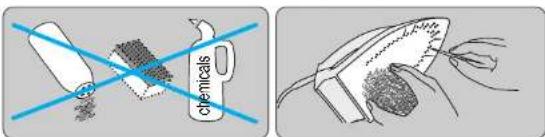
To clean the soleplate use steel wool. Then wipe the soleplate clean with a cloth. Never use a scouting pad, vinegar or other chemicals. To clean the soft material on the handle and the knobs, wipe with soapy water.
F Cleaning the «anti-calc» valve
The iron's «anti-calc» valve is a long wand that is located beneath the steam button (3). This valve needs to be decalcified regularly (e.g., when the steam development is insufficient). Proceed as follows:
1) Unplug the iron and empty the water tank.
2) Press the steam button (3) so that it is in the upright position.
3) Remove the steam button (3) carefully (some water may leak from the soleplate).
4) Be careful not to touch the «anti-calc» valve.
5) Immerse the valve in white vinegar or lemon juice until the limescale becomes soft.
6) Using a brush with non-metallic bristles, brush until all openings on the valve are clean.
7) Rinse the valve under running water.
8) Insert the valve back into the iron and press the steam button (3) down until it clicks into place.
9) Press the steam button (3) to check the steam on/off function.
Note: never use the iron unless the steam button (3) is securely in place.
G Decalcifying / «anti-calc» system
When limescale particles come out of the steam vents or when the steam development is insufficient even after cleaning the «anti-calc» valve, you should clean the steam chamber as follows:
1) Make sure the steam button (3) is in the lowered position (steam off).
2)-3) Fill the water tank, plug in the iron and select the «•••» temperature setting.
4)-5) Wait until the pilot light (7) turns off, then unplug the iron from the outlet.
6)-7) Holding the iron over a sink, press the steam button (3) so it is in the upright position, carefully pull it up, turn it and let it rest in that position.
Caution: When the steam button (3) is pulled up, hot water and steam will be released from the soleplate.
8) Turn the steam button (3) back into place by pushing it down until it clicks into place.
9)–10) Fill the water tank, plug the iron in and select the «•••» temperature setting.
11)-13) When the pilot light (7) goes off, press the power shot button (5) 4 times to rinse the iron. Disconnect the iron and wait for the soleplate to cool off, then clean it as described above in section E.
Note: the iron must never be used without the steam button (3).
H Troubleshooting Guide
Problem Remedy
| Water drops coming out of the steam vents | Turn the steam regulator (3a) counterclockwise to reduce the steam or press the steam button (3) down to turn the steam off. |
| Wait for longer intervals between pressing the power shot button (5). | |
| Select a higher temperature setting. | |
| No steam at all | Press the steam button (3) so that it is in the upright position. |
| Less steam develops or no steam at all | Clean the «anti-calc» valve (see section F). |
| Calcium particles coming through the steam vents | Decalcify the steam chamber (see section G). |
Subject to change without notice.
For USA only
How to obtain service in the USA
Should your Braun product require service, please call 1-800-BRAUN 11 (800-272-8611) to be referred to the authorized Braun Service Center closest to you.
To obtain service:
A. Take the product in to the authorized Braun Service Center of your choice or,
B. Ship the product to the authorized Braun Service Center of your choice.
Pack the product well. Ship the product prepaid and insured (recommended).
Include a copy of your proof of purchase to verify warranty coverage, if applicable.
To obtain original Braun replacement parts and accessories:
Contact an authorized Braun Service Center, Please call 1-800-BRAUN 11 (800-272-8611) to be referred to the authorized Braun Service Center closest to you.
To speak to a Braun Consumer Service
Representative: Please call 1-800-BRAUN 11 (800-272-8611).
Limited Warranty
Braun warrants this Braun appliance to be free of defects in material and workmanship for a period of one year from the date of original purchase at retail. If the appliance exhibits such a defect, Braun will, at its option, repair or replace it without cost for parts and labor. The product must be carried in or shipped, prepaid and insured (recommended), to an authorized Braun Service Center. Proof of date of original purchase is required.
The cost to ship the product to an authorized Service Center is the responsibility of the consumer, the cost to return the product to the consumer is the responsibility of Braun.
This warranty does not cover finishes, normal wear, nor does it cover damage resulting from accident, misuse, dirt, water, tampering, unreasonable use, service performed or attempted by unauthorized service counters, failure to provide reasonable and necessary maintenance, including recharging, or units that have been modified or used for commercial purposes.
ALL IMPLIED WARRANTIES, INCLUDING ANY IMPLIED WARRANTY OF MERCHANTABILITY OR FITNESS FOR ANY PARTICULAR PURPOSE, ARE LIMITED IN DURATION TO ONE YEAR FROM DATE OF ORIGINAL PURCHASE. IN NO EVENT WILL BRAUN BE RESPONSIBLE FOR CONSEQUENTIAL DAMAGES RESULTING FROM THE USE OF THIS PRODUCT.
Some states do not allow the exclusion or limitation of incidental or consequential damages, so the above limitation may not apply to you. This warranty gives you specific legal rights, and you may have other legal rights which vary from state to state.
For Canada only
How to obtain service in Canada
Should your Braun product require service, please call 1-800-387-6657 to be referred to the authorized Braun Service Center closest to you.
To obtain service:
A. Carry the product in to the authorized Braun Service Center of your choice or,
B. Ship the product to the authorized Braun Service Center of your choice.
Pack the product well. Ship the product prepaid and insured (recommended).
Include a copy of your proof of purchase to verify warranty coverage, if applicable.
To obtain original Braun replacement parts & accessories: Contact an authorized Braun Service Center. Please call 1-800-397-6657 to be referred to the authorized Braun Service Center closest to you.
To speak to a Braun Consumer Service
Representative: Please call 1-800-387-6657.
Limited 1-year Warranty
In the event a Braun appliance fails to function within the specified warranty period because of defects in material or workmanship, and the consumer returns the unit to an authorized service center, Braun Canada will; at its option either repair or replace the unit without additional charge to the consumer. This warranty does not cover any product which has been damaged by dropping, tampering, servicing performed or attempted by unauthorized service agencies, misuse or abuse. This warranty excludes units which have been modified or used for commercial purposes.
To the extent allowed by law, Braun Canada shall not be responsible for loss of the product, loss of time, inconvenience, commercial loss, special or consequential damages.
The provisions of this warranty are in addition to and not a modification of or subtraction from the statutory warranties and other rights and remedies contained in ap-plicable provincial legislation.
IMPORTANTES PRÉCAUTIONS DE SÉCURITÉ
The Braun Textile Protector protects fabrics from heat damage and reduces shiny patches while allowing full steam output. It can therefore be used to iron delicate and dark fabrics without having to use a cloth between the iron and the garment.
Before ironing with the Textile Protector Before using the Textile Protector for the first time, be certain to iron for approximately two minutes without it.
To attach the Textile Protector, lay it flat on the ironing board, position the tip of the iron into the Textile Protector tip, pull back the plastic release, place the iron into the Textile Protector, and click it into place by letting go of the plastic release.
After attaching the Textile Protector, wait approximately 1 ½ minutes before you start ironing.
Ironing with the Textile Protector
The Textile Protector allows you to have the temperature selector (6) at «****» or «max» so that you can use all the steam functions offered on the iron. The heat from the soleplate will be absorbed by the Textile Protector and will not be transferred onto the fabric.
Before you start ironing, we recommend ironing a small section of the fabric on the reverse side to check the reaction of the fabric.
After ironing with the Textile Protector To remove the Textile Protector, pull back the plastic release and lift up the iron. Caution: The Textile Protector does retain heat.
Never stand your iron in the upright position on the Textile Protector as the rubber anti-skid strips will become damaged. Always store your iron with the Textile Protector detached.
Français
Español
Protector de Tela
- IMPORTANT SAFEGUARDS
- READ ALL INSTRUCTIONS BEFORE USING
- SPECIAL INSTRUCTIONS
- SAVE THESE INSTRUCTIONS
- A DESCRIPTION
- SPRAY NOZZLE
- B BEFORE GETTING STARTED
- C IRONING
- STEAM ON/OFF
- POWER SHOT
- SPRAY FUNCTION
- DRY IRONING
- AUTOMATIC SHUT-OFF
- D AFTER IRONING
- E MAINTENANCE AND CLEANING
- F CLEANING THE «ANTI-CALC» VALVE
- G DECALCIFYING / «ANTI-CALC» SYSTEM
- H TROUBLESHOOTING GUIDE
- FOR USA ONLY
- HOW TO OBTAIN SERVICE IN THE USA
- TO OBTAIN SERVICE
- LIMITED WARRANTY
- FOR CANADA ONLY
- HOW TO OBTAIN SERVICE IN CANADA
- LIMITED 1-YEAR WARRANTY
- IMPORTANTES PRÉCAUTIONS DE SÉCURITÉ
- FRANÇAIS
- ESPAÑOL
- PROTECTOR DE TELA
Brand : BRAUN
Model : FreeStyle Si 6245
Category : Iron