
Universe FC9012 - Vacuum Cleaner PHILIPS - Free user manual and instructions
Find the device manual for free Universe FC9012 PHILIPS in PDF.
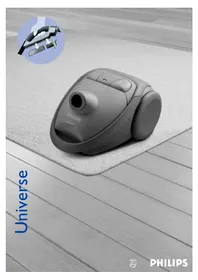


| Product type | Canister vacuum cleaner |
| Brand | Philips |
| Model | Universe FC9012 |
| Dimensions (L x W x H) | 40 x 25 x 30 cm |
| Weight | 5.5 kg |
| Power supply | Mains, 220-240 V, 50-60 Hz |
| Suction power | 350 W adjustable |
| Tank capacity | 2.5 L (dust bag) |
| Noise level | 78 dB(A) |
| Filtration type | Washable HEPA filter |
| Main functions | Floor and carpet vacuuming, motorized brush, electronic power control |
| Included accessories | Crevice tool, furniture brush, carpet tool, sponge tool |
| Cord length | 8 m |
| Operating range | 10 m |
| Maintenance and cleaning | Disposable dust bag, washable water filter, removable dust container |
| Safety | Automatic shutdown in case of overheating, power plug with safety stop |
| Spare parts and repairability | Repairability index 7.8/10, parts available (filter, bag, brush, wheels) |
| General information | Color gray and red, release year 2022, energy class A |
Frequently Asked Questions - Universe FC9012 PHILIPS
User questions about Universe FC9012 PHILIPS
0 question about this device. Answer the ones you know or ask your own.
Ask a new question about this device
Download the instructions for your Vacuum Cleaner in PDF format for free! Find your manual Universe FC9012 - PHILIPS and take your electronic device back in hand. On this page are published all the documents necessary for the use of your device. Universe FC9012 by PHILIPS.
USER MANUAL Universe FC9012 PHILIPS


ENGLISH 6 FRANÇAIS 11 ESPAÑOL 16 PORTUGUÊS 21 TIẾNG VIỆT 26 한국어 31
Important
- Only use Philips s-bag™ double-layer paper dustbags, Philips Sydney+ double-layer paper dustbags (HR 6999) or the cotton dustbag if provided.
- Never use the vacuum cleaner to suck up water or any other liquid. Never suck up ashes until they are cold.
- When the vacuum cleaner is used to suck up fine dust, the pores of the dustbag may become clogged, causing the passage of air through the dustbag to become obstructed. As a result, the dustbag-full indicator will indicate that the dustbag needs to be replaced, even though the dustbag is not full at all.
- Never use the appliance without the Motor Protection Filter. This could damage the motor and shorten the life of the appliance.
Connecting accessories
Hose
To connect the hose to the appliance, push it into the appliance and turn it clockwise. (fig. 1) 2 To disconnect the hose from the appliance, turn it anticlockwise and pull it out of the appliance. Tube
Conical coupling (specific types only)
- To connect the tubes to the handgrip, insert the narrow section into the wider section while turning it. (fig. 2)
Use the same method to connect the accessories to the tube.
To disconnect, turn the tube or the accessories anticlockwise and pull.
Button coupling (specific types only)
- Connect the tube to the handgrip ("click"). (fig. 3)
Use the same method to connect the accessories to the tube.
- To disconnect the tube from the handgrip, push the lock button and pull the tube out of the handgrip. The accessories are disconnected in the same way.
Telescopic tube (specific types only)
Connect the tube to the handgrip ("click"). 2 Adjust the tube to the length you find most comfortable during vacuum cleaning. (fig.4) Convertible nozzle (specific types only)
The convertible nozzle can be used on either carpets or hard floors.
Connect the convertible nozzle to the telescopic tube ("click"). 2 Push the rocker switch on top of the convertible nozzle with your foot to make the brush strip for cleaning hard floors come out of the nozzle housing. (fig.5) 3 Push the rocker switch again to make brush strip disappear into the convertible nozzle housing again. (fig.6)
Reach & Clean nozzle (specific types only)
The Reach & Clean nozzle can be used on either carpets or hard floors. The nozzle can be turned 360 degrees to 4 different positions, allowing you to also vacuum clean hard-to-reach places in an easy way. When the nozzle is positioned lengthwise, the suction power is concentrated at the front side of the nozzle. (fig.7)
To adjust the nozzle to the type of floor and the area to be cleaned, put your foot on the indicated spot and then turn the tube until the nozzle is in the required position. (fig.8)
With the nozzle positioned breadthwise and the brush strip folded out, you can clean large hard floor areas. Turn the tube until the brush strip pops out of the nozzle housing and the nozzle is positioned breadthwise. (fig.9) 2 With the nozzle positioned lengthwise and the brush strip folded out, you can vacuum clean small hard floor areas. Turn the tube 90 degrees anti-clockwise until it is positioned lengthwise with the brush strip still folded out of the nozzle housing. (fig.10) 3 With the nozzle positioned breadthwise and the brush strip folded in, you can vacuum clean large soft floor areas. Turn the tube 90 degrees anti-clockwise again to position the nozzle breadthwise and to make the brush strip disappear into the nozzle housing. (fig.11) 4 With the nozzle positioned lengthwise and the brush strip folded in, you can vacuum clean small soft floor areas. Turn the tube 90 degrees anti-clockwise again until it is positioned lengthwise with the brush strip still folded in. (fig.12)
Crevice tool and small nozzle
Connect the crevice tool (1) or small nozzle (2) directly to the handgrip or to the tube. (fig.13)
Accessory holder
The accessory holder can simply be snapped onto the handgrip. (fig.14)
- The crevice tool and the small nozzle can be stored in the accessory holder by pushing them in the holder. (fig.15)
Please note the way in which the small nozzle must be placed in the accessory holder.
Vacuum cleaning
Adjusting suction power
- You can adjust the suction power while vacuum cleaning
I Adjust the suction power by means of the electronic suction power control.(fig.16) 2 Set the knob to MAX for maximum suction power.(fig.17)
Use maximum suction power for vacuum cleaning very dirty carpets and hard floors.
3 Set the knob to MIN for minimal suction power.
Use minimum power for vacuum cleaning curtains, table carpets, etc.
Parking the tube
- By inserting the ridge on the nozzle in the parking slot, you can park the tube in a convenient position.(fig.18)
Storing the vacuum cleaner
You can put the appliance in upright position and attach the nozzle to the appliance by inserting the ridge on the nozzle in the slot.(fig.19)
Replacing the dustbag
1 Replace the dustbag as soon as the dustbag-full indicator changes colour (even when the nozzle is not placed on the floor).(fig.20)
2 Switch the appliance off. 3 Open the cover by pulling it upwards. (fig.21)
Place your fingers at the inlet of the cover and press with your thumb on the ridge on top of the cover.
4 Lift the dustbag holder out of the appliance. (fig.22)
Make sure you hold the dustbag upright when lifting it out of the appliance.
5 Remove the full dustbag from the holder by pulling the cardboard tag. (fig.23)
When you do this, the dustbag will be automatically sealed.
6 Slide the cardboard tag of the new dustbag into the two grooves of the dustbag holder as far as possible. Re-insert the dustbag holder into the vacuum cleaner. (fig.24)
You cannot close the cover if no dustbag has been inserted.
If provided, you can use the cotton dustbag instead of paper dustbags. The cotton dustbag can be used and emptied repeatedly.
To empty the cotton dustbag:
- Hold the dustbag over a dustbin.
- Remove the clip by sliding it off the dustbag sideways.
- Undo the metal hooks.
- Close the dustbag by fastening the metal hooks and sliding the clip back onto the bottom edge of the dustbag.
Ordering dustbags
Philips s-bag™ paper dustbags are available under type number FC8021 (4822480101113).
Philips s-bag™ clinic high filtration dustbags are available under type number FC8022 (883802201010).
Philips Sydney+ double-layer paper dustbags are available under type number HR6999.
Philips cotton dustbags are available under number FC8020 (432200493291).
Cleaning and replacing filters
Motor Protection Filter
Every time you empty or replace the dustbag, clean the Permanent Motor Protection Filter.
Remove the dustbag holder with the dustbag.
Take the Motor Protection Filter holder out of the appliance and clean the filter by shaking it over a dustbin (fig. 25).
Press the filter holder with the clean filter firmly into place to ensure that it fits properly at the bottom (fig. 26).
Place the dustbag holder with the dustbag back into the appliance.
Activated Carbon Filter
Instead of with the Motor Protection Filter, the appliance can be used with an Activated Carbon Filter. This filter neutralises smells produced by the dirt in the dustbag.
Replace the Activated Carbon Filter every six months or when you notice that smell absorption becomes less effective.
To replace the Activated Carbon Filter, see the Motor Protection Filter section above. Instead of cleaning the filter, you have to insert a new filter.
Motor Outlet Filter
The AFS Micro Filter located in the back of this appliance will filter a large part of the smallest particles from the exhaust air by means of its electrostatically charged fibres.
Replace the AFS Micro Filter every six months. 2. Open the filter grille (fig. 27). 3. Remove the old filter (fig. 28). 4. Insert the new filter into the appliance. 5. Close the filter grille and push the left and right bottom corners until they snap home (fig. 29).
HEPA Filter
Instead of the AFS Micro Filter, some appliances are equipped with the special HEPA Filter. The HEPA Filter is able to remove at least 99.99% of all particles down to 0.0003 mm in size from the outlet air. This not only includes normal house dust, but also harmful microscopic vermin such as house dust mites and their excrements, which are well-known causes of respiratory allergies.
The HEPA Filter can be replaced in the same way as the AFS Micro Filter. Replace the HEPA Filter every six months.
Ordering filters
AFS Micro Filters are available under type number FC8030 (432200492910).
HEPA Filters are available under type number FC8031 (432200492920).
Activated Carbon Filters are available under type number FC8033 (482248020145).
Activated Carbon upgrade kits are available under type number FC8034 (883803401010).
Ordering accessories
If you have any difficulties obtaining dustbags, filters or other accessories for this appliance, please contact the Philips Customer Care Centre in your country or consult the worldwide guarantee leaflet.
Environment
The plastic parts of the vacuum cleaner are coded to facilitate recycling.
If the mains cord of this appliance is damaged, it must always be replaced by Philips or a service centre authorised by Philips, as special tools and/or parts are required.
Solving problems
- The suction power is insufficient:
Check if the suction power control is in the required position (see the section on vacuum cleaning - adjusting suction power). 2 Check if the dustbag is full. If necessary, replace the dustbag. 3 Check if the filters need to be replaced. 4 Check if the nozzle, tube or hose is blocked up. 5 To remove the obstruction, disconnect the blocked-up item and connect it (as far as possible) in reverse position. Switch the vacuum cleaner on to make the airflow suck the obstructing material out of the blocked-up item. (fig. 30)
Information & service
If you need information or if you have a problem, please visit the Philips Web site at www.philips.com or contact the Philips Customer Care Centre in your country (you will find its phone number in the worldwide guarantee leaflet).
If there is no Customer Care Centre in your country, turn to your local Philips dealer or contact the Service Department of Philips Domestic Appliances and Personal Care BV.
Important


- IMPORTANT
- CONNECTING ACCESSORIES
- VACUUM CLEANING
- ADJUSTING SUCTION POWER
- STORING THE VACUUM CLEANER
- REPLACING THE DUSTBAG
- ORDERING DUSTBAGS
- CLEANING AND REPLACING FILTERS
- MOTOR PROTECTION FILTER
- ACTIVATED CARBON FILTER
- MOTOR OUTLET FILTER
- HEPA FILTER
- ORDERING FILTERS
- ORDERING ACCESSORIES
- ENVIRONMENT
- SOLVING PROBLEMS
- INFORMATION & SERVICE
Brand : PHILIPS
Model : Universe FC9012
Category : Vacuum Cleaner