
Vision Plus HR8901 - Vacuum Cleaner PHILIPS - Free user manual and instructions
Find the device manual for free Vision Plus HR8901 PHILIPS in PDF.
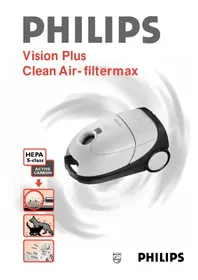


| Brand | Philips |
| Model | Vision Plus HR8901 |
| Product type | Bagless canister vacuum cleaner |
| Maximum power | 1900 W |
| Tank capacity | 2 L |
| Filter type | Washable HEPA |
| Power cord length | 8 m |
| Operating radius | 10 m |
| Noise level | 78 dB(A) |
| Weight | 6.5 kg |
| Dimensions (L×W×H) | 450 × 300 × 280 mm |
| Power adjustment | Electronic with dial |
| Automatic cord rewinder | Yes |
| Dust level indicator | Yes |
| Hard floor nozzle | Yes, with integrated brush |
| Upholstery nozzle | Yes |
| Crevice tool | Yes |
| Filter maintenance | Wash with water every 3 months |
| Spare parts available | Filters, brushes, tank |
| Warranty | 2 years |
| Energy class | A |
Frequently Asked Questions - Vision Plus HR8901 PHILIPS
User questions about Vision Plus HR8901 PHILIPS
0 question about this device. Answer the ones you know or ask your own.
Ask a new question about this device
Download the instructions for your Vacuum Cleaner in PDF format for free! Find your manual Vision Plus HR8901 - PHILIPS and take your electronic device back in hand. On this page are published all the documents necessary for the use of your device. Vision Plus HR8901 by PHILIPS.
USER MANUAL Vision Plus HR8901 PHILIPS

Keep pages 3 and 46 open when reading these operating instructions.
- To enable recycling, the plastics of the product have been coded.
- The cardboard packaging has been made of recycled material and is entirely suitable for recycling.

Important
- Before using for the first time, check if the dustbag is placed correctly.
- Never suck up water (or any other liquid). Never pick up ashes until they are cold.
- When picking up fine dust, the pores of the dustbag may become clogged. This will obstruct the air passage. Subsequently, the dustbag needs replacement, although the bag might be far from full.
- Only use this vacuum cleaner with the original paper dustbags type Philips Oslo+ or Oslo+ Hygiene (closeable).
- Never use the vacuum cleaner without the Active Carbon filter and/or the dustbag!
Getting the vacuum cleaner ready for use:
- Connecting the hose: press firmly ("Click!") (fig. 1).
- To disconnect: press the knob (1) and pull (2) the hose out of the vacuum cleaner (fig. 2).
- Connecting the nozzle, the (telescopic) tube and the handle: insert the narrowed section into the wider section while rotating a little (fig. 3).
- To disconnect: pull while rotating.
- To adjust the telescopic tube to the required length: grasp the plastic ring and pull out the upper tube as far as necessary (fig. 4). Lock the telescopic tube in position by releasing the plastic ring.
- Nozzles:
- Combi nozzle. This nozzle is convertible for use on either carpets (without brush, fig. 5) or hard floors (with brush, fig. 6);
- Small nozzle, brush nozzle and crevice nozzle. These can be found in the special storage compartment (fig. 7-11);
- Pull the mains plug out of the vacuum cleaner (fig. 12) and insert into the wall socket.
- Press the on/off switch (①) (fig. 13).
- The electronic suction power control on the vacuum cleaner enables smooth suction power adjustment (fig. 14). Medium suction power is advisable for general use. Minimum suction power is advisable for dusting using the brush nozzle and for cleaning curtains, cloths, etc. Maximum suction power is advisable for cleaning very dirty carpets and hard floors.
- The suction power control at the hand grip enables you to reduce suction power (fig. 15). This extra facility is advisable if you wish to apply lower suction power for a short period.
Insufficient suction power?
Please check:
- if the slide on the vacuum cleaner is in the required position;
- if the control at the hand grip is in "open" position;
- if the dustbag is full;
- if the nozzle, tube or hose is blocked up. To remove the obstruction, disconnect the blocked-up item and connect it (as far as possible) in adverse position. Then the air will stream through the item in opposite direction.
Active Carbon filter
The active carbon in this filter absorbs unpleasant smells. The two electrostatically charged filter layers guarantee that the exhaust air is perfectly clean.
S-Class filter
The S-Class filter is capable of removing from the outlet air at least 99.97% of all the particles measuring 0.0003 mm and more.
This includes not only normal domestic dust, but also harmful microscopic vermin such as glycyphagii and their excrements. These are known as causes of bronchial allergies.
Park & Stop
If you wish to interrupt vacuum cleaning, you can place the tube clip into the rest (fig. 16).
You can slide the clip along the tube to change the height.
In one movement the tube is parked in a convenient position (fig. 17) and the motor is switched off.
When you lift the tube from the rest the motor will start again automatically.
Storage
- Switch the vacuum cleaner off (fig. 18).
- Remove the mains plug from the wall socket.
- Rewind the mains cord by pressing the cordwinder pedal (©-α) (fig. 19).
- Hitch the lower tube onto the vacuum cleaner (fig. 20-21). You can slide the clip along the tube to change the height.
Replacing the dustbag
- Only use this vacuum cleaner with the original Philips dustbags types Oslo+ or Oslo+ Hygiene (closeable). Damage due to using other dustbags is not covered by guarantee.
- The "dustbag full indicator" will indicate when the dustbag is full (fig. 22).
- Switch the vacuum cleaner off (fig. 18).
- Remove the hose (fig. 2).
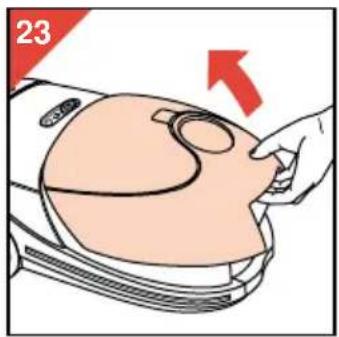
- Open the cover (fig. 23).
- Remove the cassette with the full dustbag (fig. 24).
- Remove the full dustbag from the cassette by pulling the cardboard tag (fig. 25).
This automatically closes the dustbag (type Oslo+ Hygiene).
- Discard the full dustbag.
- Slide the cardboard front plate of the new dustbag into the two slots of the cassette as far as possible (fig. 26-27).
- Position the cassette and the new dustbag in the vacuum cleaner (fig. 28).
- Bend the rear part of the dustbag downwards.
- Close the cover ("Click!") (fig. 29). Note: If no dustbag has been placed into the cassette, the cover cannot be closed.
Replacing the Active Carbon filter
Replace this filter once a year or when you notice that smell absorption becomes less effective.
After having removed the full dustbag, you can see the removable holder with the old Active Carbon filter. You can take the holder to the dustbin and shake the filter out there. Hygienic: you need not touch the filter (fig. 31).
Position the new filter in the holder (fig. 30-31).
Press the holder with the new filter firmly into place to ensure that it fits in correctly at the bottom.
Replacing the S-Class filter
To guarantee optimum air filtering, the S-Class filter needs replacement at least once a year.
- Open the filter holder (fig. 33).
- Remove the old filter (fig. 34).
- Position the S-Class filter as indicated (fig. 35). Ensure that the protruding notches fit well in the apertures.
- Push the S-Class filter well into place (fig. 36).
- Position the filter holder in the vacuum cleaner and close the filter holder ("Click!") (fig. 37).
Replacing the mains cord
If the mains cord of this appliance is damaged, it must only be replaced by Philips or their service representative, as special tools and/or parts are required.
Extra accessories
To enable you have even better profit from your Philips Vision Plus vacuum cleaner, some extra accessories are available from your dealer:
Turbo nozzle HR 6988 (fig. 38)
This turbo nozzle has been especially designed for enhanced cleaning of rugs and carpets.
The rotating brush effortlessly picks up small threads, hairs, fluff and more difficult to vacuum particles.
Good in-depth cleaning is guaranteed with the turbo nozzle.
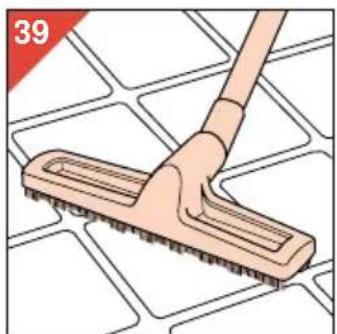
Hard floor nozzle HR 6943 (fig. 39)
This nozzle is especially advisable for large surfaces of parquet, tiles, etc.
Ordering dustbags, filters and accessories
Dustbags can be bought either with or without filters.
A Clean Air filtermax pack, consisting of dustbags, an S-Class filter and an Active Carbon filter, is available under order code HR 6969.
The following loose Philips dustbags are available: Oslo + (type n°. HR 6938 or service n°. 4822 015 70049) or Oslo + Hygiene (closeable) (type n°. HR 6938-OSH or service n°. 4822 015 70057) (fig. 40).
S-Class filters and Active Carbon filters are also available separately under order codes HR 6992 S-Class en HR 6949 ACF respectively.
In case you have any difficulties obtaining dustbags, filters or other accessories for this vacuum cleaner, please contact the consumer relations desk in your country. For phone numbers please refer to the guarantee card.





- IMPORTANT
- GETTING THE VACUUM CLEANER READY FOR USE
- INSUFFICIENT SUCTION POWER
- PLEASE CHECK
- ACTIVE CARBON FILTER
- S-CLASS FILTER
- PARK & STOP
- STORAGE
- REPLACING THE DUSTBAG
- REPLACING THE ACTIVE CARBON FILTER
- REPLACING THE S-CLASS FILTER
- REPLACING THE MAINS CORD
- EXTRA ACCESSORIES
- TURBO NOZZLE HR 6988 (FIG. 38)
- HARD FLOOR NOZZLE HR 6943 (FIG. 39)
- ORDERING DUSTBAGS, FILTERS AND ACCESSORIES
Brand : PHILIPS
Model : Vision Plus HR8901
Category : Vacuum Cleaner