
ZigBee HM-HS1SA-M - Smoke detector Zipato - Free user manual and instructions
Find the device manual for free ZigBee HM-HS1SA-M Zipato in PDF.


| Product Type | Smoke Detector |
| Brand | Zipato |
| Model | ZigBee HM-HS1SA-M |
| Communication Protocol | ZigBee (2.4 GHz) |
| Detection Technology | Photoelectric |
| Power Supply | CR123A 3V Lithium Battery (included) |
| Battery Life | Up to 3 years |
| Standby Current | < 10 μA |
| Alarm Sound Level | ≥ 85 dB at 3 meters |
| Operating Temperature | -10°C to 50°C (14°F to 122°F) |
| Operating Humidity | 10% to 90% RH (non-condensing) |
| Dimensions | Diameter 100 mm x Height 45 mm |
| Weight | 150 g (including battery) |
| Compatibility | Zipato Zipabox and other ZigBee HA 1.2 certified hubs |
| Smart Features | Push notifications, remote monitoring, intercommunication with other ZigBee devices |
| Testing Function | Test button for manual alarm test |
| Low Battery Warning | Chirp every 45 seconds |
| End of Life Warning | After 10 years, alarm chirps |
| Installation | Ceiling mounting with included bracket and screws |
| Maintenance | Vacuum clean every 6 months; test monthly |
Frequently Asked Questions - ZigBee HM-HS1SA-M Zipato
User questions about ZigBee HM-HS1SA-M Zipato
0 question about this device. Answer the ones you know or ask your own.
Ask a new question about this device
Download the instructions for your Smoke detector in PDF format for free! Find your manual ZigBee HM-HS1SA-M - Zipato and take your electronic device back in hand. On this page are published all the documents necessary for the use of your device. ZigBee HM-HS1SA-M by Zipato.
USER MANUAL ZigBee HM-HS1SA-M Zipato
Zipato and the Zipato logo are registered Trademarks. All other product names mentioned herein may be trademarks or registered trademarks of their respective companies.
NOTICE
Although Zipato has attempted to ensure the accuracy of the content of this manual, it is possible that this document may contain technical inaccuracies, typographical, or other errors. Zipato assumes no liability for any error in this publication, and for damages, whether direct, indirect, incidental, and consequential or otherwise, that may result from such error, including, but not limited to loss of data or profits. Zipato provides this publication "as is" without warranty of any kind, either express or implied, including, but not limited to its implied value. The information is not likely to be reliable or if fitness for a particular item. The published information in the manual is subject to change without notice. Zipato reserves the right to make changes in the product design, layout, and driver revisions without notification to its users. This version of the Installation guide supersedes all previous versions.
INTRODUCTION
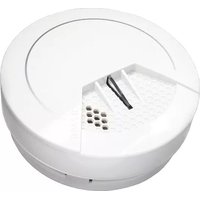
This product is a Smart Smoke Sensor, a warning device. It can not sense gas, heat, flame and cannot prevent or put out the fire. It is capable of real time detection of smoke, visible particles (smoldering fire) faster than ionization smoke alarms. Red LED flashes rapidly and detectors sound alarm once the smoke/fire manager has been detected. Smoke alarms should be installed in all rooms where fire may happen.
SPECIFICATION
Working voltage: DC3V (CR123A Lithium battery)
Static current: 20uA
Alarm sound: 85dB/1m
Networking: Z-Wave
Working temperature: -10°C\~+50°C
Dimensions: 60 x 60
-
Specifically designed for home use
-
Avoid installation in bathrooms and other very humid places, dusty or dense areas, as very airy place with air conditioning.
dusty or greasy a ceiling fans, etc.
- Keep Smoke Sensor clean. Recommended to clean every 6
months with soft brush.


INSTALLATION
1| CEILING MOUNTING
The preferred location to install the sensor is in the centre of the ceiling because smoke, heat and combustion products rise to the ceiling and will lateral spread. Keep at least 30 cm
distance from lights or decoration, and at least 15 cm from walls. If room is more than 12 meters wide please install at 2 sides of the room.
2| SLOPING CEILING MOUNTING
If ceiling is sloping, please install the smoke alarm at horizontal distance 90 cm away from the ceiling top.
INSTALLATION STEP 1:

Anticlockwise rotate the bracket out from the installation base, then remove the battery insulating strip to make the sensor to power on.
INSTALLATION STEP 2:
- DEVICE INCLUSION
- Click [Add] icon in Z-Wave PC Controller Program. Press the Net Button 3 times within 1.5x Green LED is
- Press the Net_Button 3 times within 1.5s, GREEN LED is blinking 3 times within 1 second
- If Inclusion Process is successful, Green led will turn off
- DEVICE EXCLUSION
- Click [Remove] icon in Z-Wave PC Controller Program
- Press the Net_Button 3 times within 1.5s - If Exclusion Process is successful, Green led is Blinking A
times, then turn off.
- DEVICE TEST MODE
If Inclusion process is successful. Press Test Button to test if
the device is working normally. Red LED blinks 3 times when
smoke is detected.
- DEVICE DETECTION MODE
If Inclusion process is successful, the device will report alarm information if detect the status change of smoke and no exposure
Red LED blinks quickly when smoke is detected.
5. DEVICE FACTORY RESET
- Long press Net_Button while installing batteries in HS1SA-Z.
- Device Reset Locally notification is Transmitted
- Please use this procedure only when the network primary controller is missing or otherwise inoperable.
controller is missing or otherwise inoperable.
- ASSOCIATION & ASSOCIATION GROUP INFORMATION
- Lifeline between controller and HS1SA-Z
- Supported command classes
Battery report, Notification report, and Device Reset Locally notification Disagreement
- Maximum supported nodes are 5
- Association Group description
• Association group 1: Lifeline association group
Include command classes: Battery report, Notification report
and Device Reset Locally notification, Binary report.
- Association group 2: Root Device group[Binary Sensor] Binary Sensor Command Class: Compatible with 300 series
1-Binary Sensor reports status of smoke or no smoke via Lifeline
2-When the sensor detects status change between smoke and
no smoke, the device will be triggered.
- Association group 3: Root Device group[Notification]
1-Notification reports reports status of detect smoke or no
smoke via Lifeline.
2-When the sensor detects status change between smoke and
no smoke, the device will be triggered.
- NOTIFICATION REPORT
- Press or release test button, or smoke status is changed
(smoke detected or no smoke detected), Notification Report is transmitted.
is transmitted
| NOTIFICATION TYPE EVENT | |
| Smoke Alarm(0x01) | Previous Events cleared (0x00) |
| Smoke detected, Unknown Location(0x02) | |
- BATTERY REPORT
- Battery Report is transmitted when power on the device.
- Battery Report is transmitted once a day.
- Battery Report is transmitted when the battery falls less than 10%
BATTERY VOLTAGE BATTERY LEVEL
| 2.4V ~ 3.0V 10- 100 [%] | |
| Under 2.4V DxFF |
- Wake up Notification is transmitted every 24 hours by default.
- Wake up Notification is transmitted after Notification Report
is Transmitted
INSTALLATION STEP 3:

Remove the double-sided adhesive membrane on the mounting bracket and fit the smoke sensor into the bracket by rotating it.
STATUS & TROUBLESHOOTING
| STATUS LIGHT ALARM SUND | |
| Normal Red LED flashes every 53 seconds No | |
| Testing Red LED flashes quickly Rapid beeps | |
| Alarm Red LED flashes quickly Rapid beeps | |
| Mute mode Red LED flashes every 10 seconds No | |
| Low power Red LED flashes every 40 seconds Beep every 40 seconds | |
| Fault Red LED flashes every 40 seconds Beep every 40 seconds |
Please refer to the following situations if the Smoke Sensor isn't working properly:
1. If battery reaches service life, please replace it
2. Fault affected by dust or oil, please clean it
3. Check if the sensor is properly placed into bracket
Please make sure that there is no real danger of fire when using the mute function. Under known and non-fire alarm conditions, please do not block or by any other form prohibit alarming. Press the "Test/Mute" button to lower sensitivity and relieve alarm.
MUTE FUNCTION

Press test button for 3 seconds until alarm sounds. Do this test at least once a week.
BATTERY REPLACEMENT

Turn right to dismantle the mounting base of the device. Replace the battery correctly, following the battery positive and negative electrode. Turn left to install the mounting base of the device (before install the mounting base, you should must insert battery firstly, otherwise the mounting base will not be fixed).
Please pay attention to environmental protection and dispose used batteries properly.
LIMITED PRODUCT WARRANTY
GENERAL TERMS
Nothing in this Limited Product Warranty affects your statutory rights as a consumer.
The Limited Product Warranty set forth below is given by Tri plus grupa d.o.o. [Europe] [herein referred to as "ZIPATO"]. This Limited Product Warranty is only effective upon presentation of the proof of purchase. Upon further request by ZIPATO, this warranty card has to be presented, too.
EXCEPT AS EXPRESSLY SET FORTH IN THIS LIMITED WARRANTY, ZIPATO MAKES NO OTHER WARRANTIES, EXPRESS OR IMPLIED, INCLUDING ANY IMPLIED WARRANTIES OF MERCHANTABILITY AND FITNESS FOR A PARTICULAR PURPOSE, ZIPATO EXPRESSLY DISCLAIMS ALL WARRANTIES NOT STATED IN THIS LIMITED WARRANTY. ANY IMPLIED WARRANTIES THAT MAY BE IMPOSED BY LAW ARE LIMITED IN DURATION TO THE LIMITED WARRANTY PERIOD. TO THE EXTENT ALLOWED BY LOCAL LAW, THE REMEDIES IN THIS WARRANTY STATEMENT ARE CUSTOMER'S SOLE
AND EXCLUSIVE REMEDGIES ADDAINS ZIPATO. THEY DO NOT HOWEVER, AFFECT OR RESTRICT THE RIGHTS YOU ARE IN ANY OTHER THAN THE INFORMATION AND PRODUCT FROM. IN NO EVENT WILL ZIPATO BE LIABLE FOR LOSS OF DATA OR FOR INDIRECT, SPECIAL INCIDENTAL, AND/OR ANY OTHER INFORMATION TO THE OTHER DAMAGE, WHETHER BASED IN CONTRACT, TORT, OR OTHERWISE. HOWEVER, NOTHINGS IN THIS AGREEMENT LIMITS ZIPATO'S LIABILITY TO YOU (IN THE EVENT OF DEATHY) SHALL NOT BE RESPONSIBLE FOR ANY OTHER ANY OTHER INFORMATION. TAXES OF TAXES shall NOT BE RESPONSIBLE NO NEGLOSION, OR (II) TO THE EXTENT RESULTING FROM ANY fraudIDUAL MISREPRESENTATION ON THE PROPERTY OF THE BUSINESS NAME OF THE PROPERTY OF THE PART I OF THE CONSUMER PROTECTION ACT 1987 OF THE UNITED KINGDOM: SOME STATES OR COUNTRIES DO NOT HOLD ITEMS OF THE BUSINESS NAME OF THE LIMITED ON HOW LONG AN IMPLIED WARRANTY LASTS OR THE EXCLUSION; OR (II) LIMITATION OF INCIDENTAL OR FOREIGN ITEMS OF THE BUSINESS NAME OF THE LIMITED IN SUCH STATES OR COUNTRIES, SOME EXCLUSIONS OR LIMITATIONS OF THIS LIMITED WARRANTY MAY NOT APPLY TO PREVENT YOUR INFORMATION AND ANY OTHER RIGHTS. YOU MAY ALSO HAVE OTHER RIGHTS THAT MAY VARY FROM STATE TO STATE OR FROM COUNTRY TO COUNTRY. YOU ARE ADVISED TO CONSULT APPLICABLE STATE OR COUNTRY LAWS FOR A FULL DETERMINATION OF YOUR RIGHTS.
This Limited Product Warranty applies to ZIPATO branded hardware products (collectively referred to as "ZIPATO Hardware Products") sold by ZIPATO [Europe], its European subsidiaries, affiliates, authorized resellers, or country distributors (collectively referred to as "ZIPATO Resellers") with this Limited Product Warranty.
The term "ZIPATO Hardware Product" is limited to the hardware components and all its internal components including firmware.
The term "ZIPATO Hardware Product" DOES NOT include any software applications or programs.
GEOGRAPHICAL SCOPE OF THE LIMITED
PRODUCT WARRANTY
This Limited Product Warranty is applicable to Hardware Products sold by Zipato Resellers in all countries listed at the beginning of this document under the heading "Countries in which this ZIPATO Limited Product Warranty applies". The Limited Product Warranty will be honored in any country where ZIPATO or its authorized service providers offer warranty service subject to the terms and conditions set forth in this Limited Product Warranty. However, warranty service availability and response times may vary from country to country and may also be subject to registration requirements.
LIMITATION OF PRODUCT WARRANTY
ZIPATO warrants that the products described below under normal use are free from material defects in materials and workmanship during the Limited Product Warranty Period set forth below [“Limited Product Warranty Period”], if the product is used and serviced in accordance with the user manual and other documentation provided to the purchaser at the time of purchase [or as amended from time to time].
ZIPATO does not warrant that the products will operate uninterrupted or error-free or that all deficiencies, errors, defects or non-conformities will be corrected. This warranty shall not apply to problems resulting from: [a] unauthorized alterations or attachments; [b] negligence, abuse or misuse, including failure to operate the product in accordance with specifications or interface requirements; [c] improper handling; [d] failure of goods or services not obtained from ZIPATO or not subject to a then-effective ZIPATO warranty or maintenance agreement; (e) improper use or storage; or [f] fire, water, acts of God or other catastrophic events. This warranty shall also not apply to any particular product if any ZIPATO serial number has been removed or defaced in any way. ZIPATO IS NOT RESPONSIBLE FOR DAMAGE THAT OCCURS AS A RESULT OF YOUR FAILURE TO FOLLOW THE INSTRUCTIONS FOR THE ZIPATO HARDWARE PRODUCT.
LIMITED PRODUCT WARRANTY PERIOD
The Limited Product Warranty Period starts on the date of purchase from ZIPATO. Your dated sales or delivery receipt, showing the date of purchase of the product, is your proof of the purchase date. You may be required to provide proof of purchase as a condition of receiving warranty service. You are entitled to warranty service according to the terms and conditions of this document if a repair to your ZIPATO branded hardware is required within the Limited Product Warranty Period.
[Other than in respect of products for domestic use (in particular those listed in the first and last boxes in the table below), this Limited Product Warranty extends only to the original end user purchaser of this ZIPATO Hardware Product and is not transferable to anyone who obtains ownership of the ZIPATO Hardware Product from the original end-user purchaser.
PRODUCT WARRANTY PERIOD TABLE

IMPORTANT
The content of "Product Type" listed above is subject to change; please refer to the www.zipato.com for latest update.
PERFORMANCE OF THE LIMITED PRODUCT
If a product defect occurs, ZIPATO's sole obligation shall be to repair or replace any defective Zipato Hardware Product free of charge provided it is returned to an Authorized ZIPATO Service Centre during the Limited Warranty Period. Such repair or replacement will be rendered by ZIPATO at an Authorized
ZIPATO Service Centre. All component parts or hardware products that are replaced under this Limited Product Warranty become the property of ZIPATO. The replacement part or product takes on the remaining Limited Warranty Period of the replaced part or product. The replacement product need not be new or of an identical make, model or part; ZIPATO may in its discretion replace the defective product (or any part thereof) with any reconditioned equivalent [or superior] product in all material respects to the defective product.
WARRANTOR
III plus grupa d.o.o. Banjaviceva 11
10 000 Zagreb
CROATIA
TEL +385 (0)1 4004 404
FAX +385 (0)1 4004 405
DECLARATION OF CONFORMITY
CE
The manufacturer Tri plus grupa d.o.o declares under our sole
responsibility that the product:
Marketing model: Smart Smoke Sensor
Regulatory model: hm-hs1sa-z
Trade/Brand name: Zipato
is in conformity with the Directive 2014/53/EU and carries the CE
marking accordingly.
ETSI EN 300 220-1 V2.4.1 [2012-05]
ETSI EN 300 220-2 V2.4.1 [2012-05]
ETSI EN 301 489-1 V1.9.2 [2011-09]
ETSI EN 301 489-3 V1.6.1 [2013-08]
EN 62479: 2010
EN 60950-1:2006+A11:2009+A1:2010+A12:2011+A2:2013
Changes or modifications not expressly approved by Tri plus grupa d.o.o. for compliance could void the user's authority to operate the equipment.
©DISPOSING AND RECYCLING YOUR
PRODUCT
When it reaches end of life, dispose of the product according
to your local environmental laws, guidelines and regulations.


This symbol on the product or packaging means that according to local laws and regulations needs to be disposed of separately from household waste. Once this product has reached the end of its life, please take it to a collection point (recycle facilities) designated by your local authorities, some will accept your product for free or simply drop it off at your Zipato re-seller store. By recycling the product and its packaging in this manner you help to conserve the environment and protect human health. At Zipato, we understand and are committed to reducing any impact our operations and products may have on the environment. To minimize this impact Zipato designs and builds its products to be as environmentally friendly as possible, by using recyclable, low toxic materials in both products and packaging.
©COPYRIGHT
© 2017 Tri plus grupa d.o.o. All Rights Reserved
No part of this manual may be reproduced or transmitted in any
form without the expressed, written permission of Tri plus grupa
d.o.o.



- NOTICE
- INTRODUCTION
- SPECIFICATION
- INSTALLATION
- INSTALLATION STEP 2:
- DEVICE FACTORY RESET
- LIMITED PRODUCT WARRANTY
- GENERAL TERMS
- GEOGRAPHICAL SCOPE OF THE LIMITED
- PRODUCT WARRANTY
- LIMITATION OF PRODUCT WARRANTY
- LIMITED PRODUCT WARRANTY PERIOD
- PRODUCT WARRANTY PERIOD TABLE
- IMPORTANT
- PERFORMANCE OF THE LIMITED PRODUCT
- WARRANTOR
- ©DISPOSING AND RECYCLING YOUR
- PRODUCT
- ©COPYRIGHT
Brand : Zipato
Model : ZigBee HM-HS1SA-M
Category : Smoke detector