
DUB361Z - Blower MAKITA - Free user manual and instructions
Find the device manual for free DUB361Z MAKITA in PDF.


| Product Type | Cordless Blower |
| Brand | Makita |
| Model | DUB361Z |
| Rated Voltage | 18 V |
| Battery Type | Li-ion LXT |
| Recommended Battery Capacity | 5.0 Ah (BL1850B) |
| Maximum Airflow | 3.3 m³/min |
| Maximum Air Speed | 200 km/h |
| Weight (with battery) | 2.9 kg |
| Total Length | 900 mm |
| Sound Pressure Level (LpA) | 75 dB(A) |
| Sound Power Level (LWA) | 85 dB(A) |
| Vibration Level (ah) | 2.5 m/s² |
| Variable Speed Control | Yes |
| Trigger Lock | Yes |
| Tube Type | Flexible with Concentrator Nozzle |
| Maintenance | Regular cleaning of the air intake filter |
| Safety | Automatic stop in case of blockage, overload protection |
| Power Source | 18 V battery (sold separately) |
| Application | Garden, hard surface cleaning |
Frequently Asked Questions - DUB361Z MAKITA
User questions about DUB361Z MAKITA
0 question about this device. Answer the ones you know or ask your own.
Ask a new question about this device
Download the instructions for your Blower in PDF format for free! Find your manual DUB361Z - MAKITA and take your electronic device back in hand. On this page are published all the documents necessary for the use of your device. DUB361Z by MAKITA.
USER MANUAL DUB361Z MAKITA
GB Cordless Blower Instruction Manual



014610 012128
1

014611
4
015659
3
014606
6
014603
5

7
014604
8

9

10
11 12
014609
13 14

001145
014608
ENGLISH (Original instructions)
Explanation of general view
| 1 Red indicator | 7 Check button | 13 Buckle |
| 2 B u t t o n | 8 HIGH/LOW button | 14 Limit mark |
| 3 Battery cartridge | 9 OFF button | 15 Screwdriver |
| 4 Star marking | 10 Hook | 16 Brush holder cap |
| 5 Battery indicator | 11 Long nozzle | |
| 6 Indicator lamps | 12 Hanger |
SPECIFICATIONS
| Model DUB361 | ||
| Capacities | Air volume 0 - 2.8 m | 3/min |
| Air speed (average) 0 - 61.2 m/s | ||
| Air speed (max.) 0 - 74.8 m/s | ||
| Overall length | (without long nozzle) 420 mm | |
| (with long nozzle) 905 mm | ||
| Net weight 3.1 - 3.2 kg | ||
| Rated voltage | D.C. 36 V | |
- Due to our continuing program of research and development, the specifications herein are subject to change without notice.
- Specifications and battery cartridge may differ from country to country.
- The weight may differ depending on the attachment(s), including the battery cartridge. The lightest and heaviest combination are shown in the table.
Applicable battery cartridge and charger
| Battery cartridge | BL1815N / BL1820B / BL1830B / BL1840B / BL1850B / BL1860B |
| Charger | DC18RC / DC18RD / DC18RE / DC18SD / DC18SE / DC18SF / DC18SH / DC18WC |
- Some of the battery cartridges and chargers listed above may not be available depending on your region of residence.

WARNING:
- Only use the battery cartridges and chargers listed above. Use of any other battery cartridges and chargers may cause injury and/or fire.
Recommended cord connected power source
| Battery adapter | BAP182 |
| Cord connected battery pack | BL36120A |
| Portable power pack | PDC01 / PDC1200 / PDC1500 |
- The cord connected power source(s) listed above may not be available depending on your region of residence.
- Before using the cord connected power source, read instruction and cautionary markings on them.
Symbols
The following show the symbols used for the equipment. Be sure that you understand their meaning before use.

• Take particular care and attention.

- Read instruction manual.
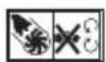
- Keep a hand away from rotating parts.

- Keep bystanders away.

- Wear eye and ear protection.

- Do not expose to moisture.

• Guaranteed sound power level according to EU Outdoor Noise Directive.


- Sound power level according to Australia NSW Noise Control Regulation.
- Only for EU countries
Due to the presence of hazardous components in the equipment, waste electrical and electronic equipment, accumulators and batteries may have a negative impact on the environment and human health.
Do not dispose of electrical and electronic appliances or batteries with household waste!
In accordance with the European Directive on waste electrical and electronic equipment and on accumulators and batteries and waste accumulators and batteries, as well as their adaptation to national law, waste electrical equipment, batteries and accumulators should be stored separately and delivered to a separate collection point for municipal waste, operating in accordance with the regulations on environmental protection.
This is indicated by the symbol of the crossed-out wheeled bin placed on the equipment.
ENE018-1
Intended use
The tool is intended for blowing dust.
ENB116-7
CORDLESS BLOWER SAFETY WARNINGS
Training
- Read the instructions carefully. Be familiar with the controls and the correct use of the blower.
- Never allow children, persons with reduced physical, sensory or mental capabilities or lack of experience and knowledge or people unfamiliar with these instructions to use the blower. Local regulations may restrict the age of the operator.
- Electric shock could occur if used on wet surfaces. Do not expose to rain. Store indoors.
- Keep in mind, that the operator or user is responsible for accidents or hazards occurring to other people or their property.
Preparation
- Obtain ear protection and safety glasses. Wear them at all times while operating the blower.
- Always wear substantial footwear and long trousers while operating the blower.
- Do not wear loose clothing or jewellery that can be drawn into the air inlet. Keep long hair away from the air inlets.
- To prevent dust irritation the wearing of a face mask is recommended.
Operation
- Operate the blower in a recommended position and only on a firm, level surface.
- Never point the nozzle at anyone in the vicinity when using the blower.
-
Never block suction inlet and/or blower outlet.
-
Do not block suction inlet or blower outlet to clean up in dusty areas.
- Do not use the blower with a tapered nozzle smaller than the original one, such as a new nozzle obtained by attaching an extra diameter-reduced hose or smaller hose to the nozzle top end.
-
Do not use the blower to inflate balls, rubber boat or the similar.
Increased motor revolution may cause dangerous fan breakage and result in serious personal injury. Heated motor and control circuit may cause a fire. -
Do not overreach and keep proper balance and footing at all times. Always be sure of the footing on slopes and to walk, never run.
- Do not operate the blower on a paved or gravel surface where ejected material could cause injury.
-
Never operate the blower while people, especially children, or pets are nearby.
-
Do not operate the blower near open window, etc.
-
Operating the blower only at reasonable hours is recommended - not early in the morning or late at night when people might be disturbed.
-
Using rakes and brooms to loosen debris before blowing is recommended.
-
It is recommended to slightly dampen surfaces in dusty conditions or use mister attachment available on the market.
-
It is recommended to use the long nozzle so the air stream can work close to the ground.
-
If the blower strikes any foreign objects or should start making any unusual noise or vibration, immediately switch off the blower to stop it. Remove the battery cartridge from the blower and take the following steps before restarting and operating the blower:
-
inspect for damage,
-
when the blower is damaged, have it repaired by Makita Authorized Service Centers.
-
Switch off the blower and remove the battery cartridge and make sure that all moving parts have come to a complete stop
• whenever you leave the blower,
- before clearing blockages or unclogging chute,
- before checking, cleaning or working on the blower,
-
if the blower starts to vibrate abnormally, for immediately check, or
• after striking a foreign object to inspect the blower for damage. -
Do not insert fingers or other objects into suction inlet or blower outlet.
-
Prevent unintentional starting. Ensure the switch is in the off-position before inserting battery pack, picking up or carrying the blower. Carrying the blower with your finger on the switch or energising the blower that has the switch on invites accidents.
Maintenance and storage
-
When the blower is stopped for servicing, inspection, or storage, or to change an accessory, shut off the power source, remove the battery cartridge from the blower and make sure that all moving parts come to a complete stop. Cool down the blower before making any inspections, adjustments, etc. Maintain the blower with care and keep it clean.
-
Store the blower in a dry place out of the reach of children.
-
Always cool down the blower before storing.
-
Keep all nuts, bolts and screws tight to be sure the blower is in safe working condition.
Battery tool use and care
-
Recharge only with the charger specified by the manufacturer. A charger that is suitable for one type of battery pack may create a risk of fire when used with another battery pack.
-
Use the blower only with specifically designated battery packs. Use of any other battery packs may create a risk of injury and fire.
SAVE THESE INSTRUCTIONS.
WARNING:
DO NOT let comfort or familiarity with product (gained from repeated use) replace strict adherence to safety rules for the subject product. MISUSE or failure to follow the safety rules stated in this instruction manual may cause serious personal injury.
ENC007-17
IMPORTANT SAFETY INSTRUCTIONS FOR BATTERY CARTRIDGE
- Before using battery cartridge, read all instructions and cautionary markings on (1) battery charger, (2) battery, and (3) product using battery.
- Do not disassemble or tamper with the battery cartridge. It may result in a fire, excessive heat, or explosion.
- If operating time has become excessively shorter, stop operating immediately. It may result in a risk of overheating, possible burns and even an explosion.
- If electrolyte gets into your eyes, rinse them out with clear water and seek medical attention right away. It may result in loss of your eyesight.
- Do not short the battery cartridge:
(1) Do not touch the terminals with any conductive material.
(2) Avoid storing battery cartridge in a container with other metal objects such as nails, coins, etc.
(3) Do not expose battery cartridge to water or rain.
A battery short can cause a large current flow, overheating, possible burns and even a breakdown.
- Do not store and use the tool and battery cartridge in locations where the temperature may reach or exceed 50 °C (122 °F).
-
Do not incinerate the battery cartridge even if it is severely damaged or is completely worn out. The battery cartridge can explode in a fire.
-
Do not nail, cut, crush, throw, drop the battery cartridge, or hit against a hard object to the battery cartridge. Such conduct may result in a fire, excessive heat, or explosion.
9. Do not use a damaged battery.
- The contained lithium-ion batteries are subject to the Dangerous Goods Legislation requirements.
For commercial transports e.g. by third parties, forwarding agents, special requirement on packaging and labeling must be observed.
For preparation of the item being shipped, consulting an expert for hazardous material is required. Please also observe possibly more detailed national regulations.
Tape or mask off open contacts and pack up the battery in such a manner that it cannot move around in the packaging.
- When disposing the battery cartridge, remove it from the tool and dispose of it in a safe place. Follow your local regulations relating to disposal of battery.
- Use the batteries only with the products specified by Makita. Installing the batteries to non-compliant products may result in a fire, excessive heat, explosion, or leak of electrolyte.
- If the tool is not used for a long period of time, the battery must be removed from the tool.
- During and after use, the battery cartridge may take on heat which can cause burns or low temperature burns. Pay attention to the handling of hot battery cartridges.
- Do not touch the terminal of the tool immediately after use as it may get hot enough to cause burns.
- Do not allow chips, dust, or soil stuck into the terminals, holes, and grooves of the battery cartridge. It may cause heating, catching fire, burst and malfunction of the tool or battery cartridge, resulting in burns or personal injury.
- Unless the tool supports the use near high-voltage electrical power lines, do not use the battery cartridge near high-voltage electrical power lines. It may result in a malfunction or breakdown of the tool or battery cartridge.
- Keep the battery away from children.
SAVE THESE INSTRUCTIONS.
CAUTION: Only use genuine Makita batteries. Use of non-genuine Makita batteries, or batteries that have been altered, may result in the battery bursting causing fires, personal injury and damage. It will also void the Makita warranty for the Makita tool and charger.
Tips for maintaining maximum battery life
- Charge the battery cartridge before completely discharged. Always stop tool operation and charge the battery cartridge when you notice less tool power.
- Never recharge a fully charged battery cartridge. Overcharging shortens the battery service life.
- Charge the battery cartridge with room temperature at 10 °C - 40 °C (50 °F - 104 °F). Let a hot battery cartridge cool down before charging it.
-
When not using the battery cartridge, remove it from the tool or the charger.
-
Charge the battery cartridge if you do not use it for a long period (more than six months).
FUNCTIONAL DESCRIPTION

CAUTION:
- Always be sure that the tool is switched off and the battery cartridge is removed before adjusting or checking function on the tool.
Installing or removing battery cartridge (Fig. 1)

CAUTION:
- Always switch off the tool before installing or removing of the battery cartridge.
- Hold the tool and the battery cartridge firmly when installing or removing battery cartridge. Failure to hold the tool and the battery cartridge firmly may cause them to slip off your hands and result in damage to the tool and battery cartridge and a personal injury.
To remove the battery cartridge, slide it from the tool while sliding the button on the front of the cartridge.
To install the battery cartridge, align the tongue on the battery cartridge with the groove in the housing and slip it into place. Insert it all the way until it locks in place with a little click. If you can see the red indicator on the upper side of the button, it is not locked completely.

CAUTION:
- Always install the battery cartridge fully until the red indicator cannot be seen. If not, it may accidentally fall out of the tool, causing injury to you or someone around you.
- Do not install the battery cartridge forcibly. If the cartridge does not slide in easily, it is not being inserted correctly.
NOTE:
- The tool does not work with only one battery cartridge.
Tool/battery protection system
The tool is equipped with a tool/battery protection system.
This system automatically cuts off power to the motor to extend tool and battery life.
The tool will automatically stop during operation if the tool or battery are placed under one of the following conditions. In some conditions, the indicators light up.
Overload protection
When the tool is operated in a manner that causes it to draw an abnormally high current, the tool automatically stops without any indication. In this situation, turn the tool off and stop the application that caused the tool to become overloaded. Then turn the tool on to restart.
Overheat protection for battery
When the battery is overheated, the tool stops automatically without any indication. The tool does not start even if pressing the switch button. In this situation, let the battery cool before turning the tool on again.
NOTE:
- The battery overheat protection works only with a battery cartridge with a star marking. (Fig. 2)
Overdischarge protection (Fig. 3)
When the remaining battery capacity gets low, the battery indicator blinks on the applicable battery side. By further use, the tool stops and the battery indicator lights up about 10 seconds. In this situation, charge the battery cartridge.
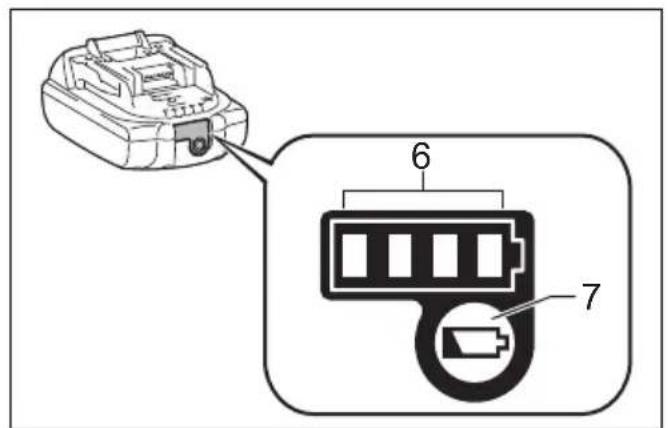
Indicating the remaining battery capacity (Fig. 4) Only for battery cartridges with the indicator
Press the check button on the battery cartridge to indicate the remaining battery capacity. The indicator lamps light up for few seconds.
| Indicator lamps | Remaining Capacity | ||
| Lighted Off Blinking | |||
| 75% to 100% | |||
| 50% to 75% | |||
| 25% to 50% | |||
| 0% to 25% | |||
| Charge the battery. | |||
| The battery may have malfunctioned. | |||
015658
NOTE:
- Depending on the conditions of use and the ambient temperature, the indication may differ slightly from the actual capacity.
Switch action (Fig. 5)
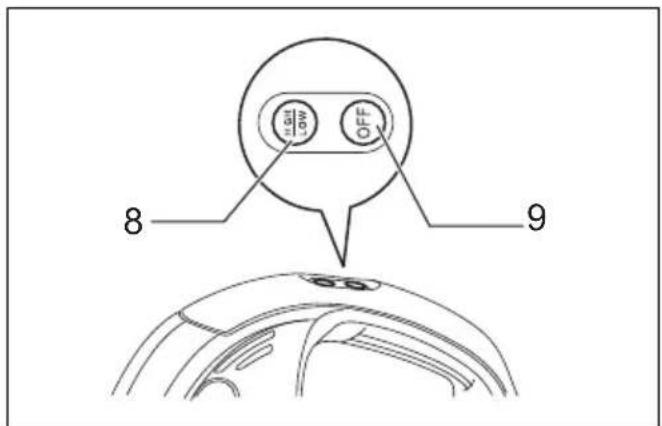
To start the tool, simply press the "HIGH/LOW" button. To switch off, press the "OFF" button. To change the tool speed, press the "HIGH/LOW" button. The first press on this button is for high speed and the second press for low speed and then each press on this button repeats the high/low speed cycle alternatively.
ASSEMBLY

CAUTION:
- Always be sure that the tool is switched off and the battery cartridge is removed before carrying out any work on the tool.
Installing or removing the long nozzle (Fig. 6 & 7)
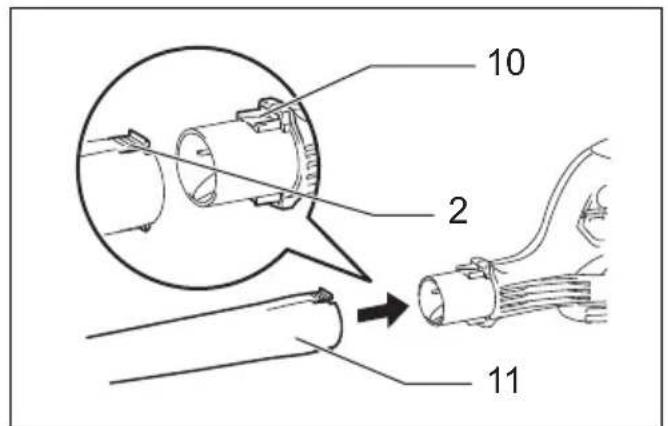
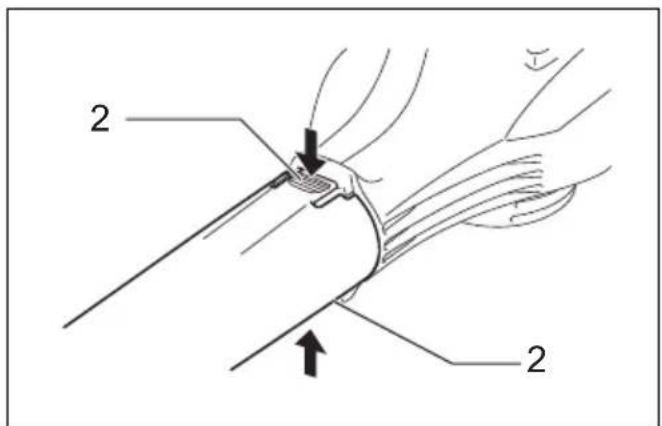
To install the long nozzle, push in onto the blower outlet of the tool all the way.
To remove the long nozzle, press its both buttons and with the buttons being pressed pull it out.
Attaching the shoulder harness (Fig. 8)

CAUTION:
- When you use the tool in combination of the backpack-type power supply such as portable power pack, do not use the shoulder harness included in the tool package.
If you put on the shoulder harness included in the tool package and the shoulder harness of the backpack-type power supply at the same time, removing the tool or backpack-type power supply is difficult in case of an emergency, and it may cause an accident or injury.
- Be sure to use the shoulder harness dedicated to this tool. Using other shoulder harness may cause an injury.
Pull the hanger out of the tool.
Hook the shoulder harness onto the hanger of the tool. Before use, adjust the length of harness so that it is easy to work with it. (Fig. 9)
The shoulder harness features a means of quick release. Simply squeeze the sides of the buckle while holding the tool to release the tool from the shoulder harness. (Fig. 10)
OPERATION
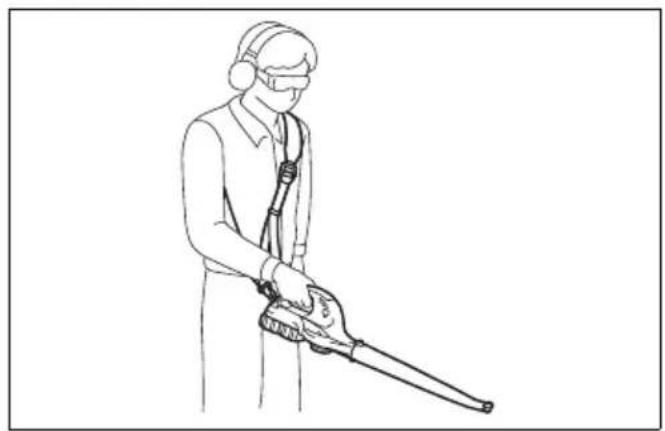
Blowing (Fig. 11)
Hold the blower firmly with a hand and perform the blowing operation by moving it around slowly.
When blowing around a building, a big stone or a vehicle, direct the nozzle away from them.
When performing an operation in corner, start from the corner and then move to wide area.
MAINTENANCE

CAUTION:
- Always be sure that the tool is switched off and the battery cartridge is removed before attempting to perform inspection or maintenance.
- Never use gasoline, benzine, thinner, alcohol or the like. Discoloration, deformation or cracks may result.
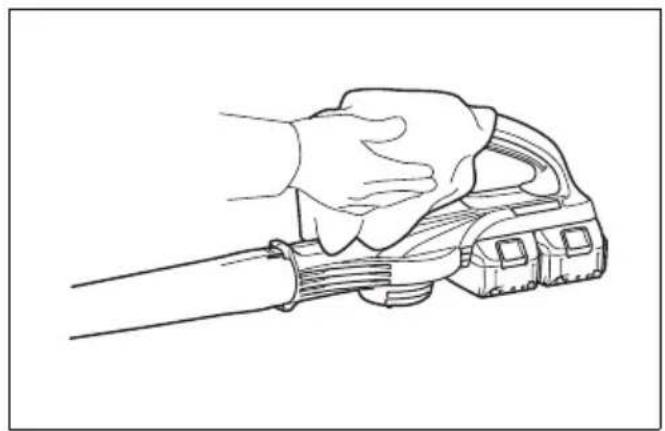
Cleaning (Fig. 12)
From time to time, wipe off the outside of the tool using a cloth dampened in soapy water.
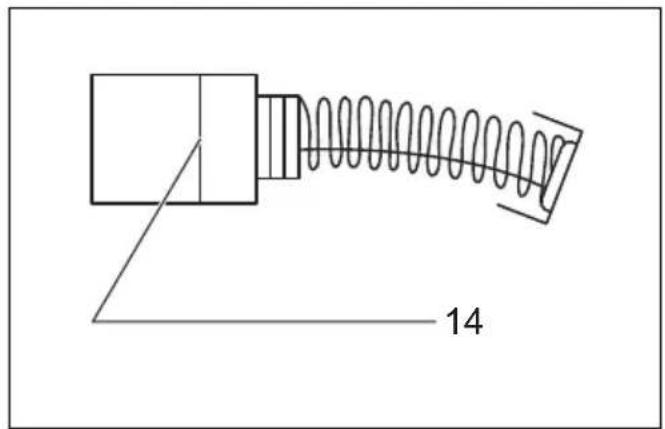
Replacing carbon brushes (Fig. 13 & 14)
Remove and check the carbon brushes regularly. Replace when they wear down to the limit mark. Keep the carbon brushes clean and free to slip in the holders. Both carbon brushes should be replaced at the same time. Use only identical carbon brushes.
Use a screwdriver to remove the brush holder caps. Take out the worn carbon brushes, insert the new ones and secure the brush holder caps.
To maintain product SAFETY and RELIABILITY, repairs, any other maintenance or adjustment should be performed by Makita Authorized Service Centers, always using Makita replacement parts.
OPTIONAL ACCESSORIES

CAUTION:
- These accessories or attachments are recommended for use with your Makita tool specified in this manual. The use of any other accessories or attachments might present a risk of injury to persons. Only use accessory or attachment for its stated purpose.
If you need any assistance for more details regarding these accessories, ask your local Makita Service Center.
- Makita genuine battery and charger
NOTE:
- Some items in the list may be included in the tool package as standard accessories. They may differ from country to country.
Noise
The typical A-weighted noise level determined according to EN50636-2-100:
Sound pressure level ( LnA ): 87.8 dB (A)
Uncertainty (K): 3.0 dB (Å)
Sound power level ( LWA ): 95.7 dB (A)
Uncertainty (K): 2.1 dB (A)
ENG907-1
NOTE:
- The declared noise emission value(s) has been measured in accordance with a standard test method and may be used for comparing one tool with another.
- The declared noise emission value(s) may also be used in a preliminary assessment of exposure.

WARNING:
- Wear ear protection.
- The noise emission during actual use of the power tool can differ from the declared value(s) depending on the ways in which the tool is used especially what kind of workpiece is processed.
- Be sure to identify safety measures to protect the operator that are based on an estimation of exposure in the actual conditions of use (taking account of all parts of the operating cycle such as the times when the tool is switched off and when it is running idle in addition to the trigger time).
ENG900-1
Vibration
The vibration total value (tri-axial vector sum) determined according to EN50636-2-100:
Work mode: operation without load
Vibration emission (a b ): 2.5 m/s 2 or less
Uncertainty (K): 1.5 m/s 2
ENG901-2
NOTE:
- The declared vibration total value(s) has been measured in accordance with a standard test method and may be used for comparing one tool with another.
- The declared vibration total value(s) may also be used in a preliminary assessment of exposure.

WARNING:
- The vibration emission during actual use of the power tool can differ from the declared value(s) depending on the ways in which the tool is used especially what kind of workpiece is processed.
- Be sure to identify safety measures to protect the operator that are based on an estimation of exposure in the actual conditions of use (taking account of all parts of the operating cycle such as the times when the tool is switched off and when it is running idle in addition to the trigger time).
DECLARATIONS OF CONFORMITY
For European countries only
The Declarations of conformity are included in Annex A to this instruction manual.
Descriptif
DÉCLARATIONS DE CONFORMITÉ
Incertezza (K): 3,0 dB (A)
OPTIONELE ACCESSOIRES
LET OP:
Incerteza (K): 3,0 dB (A)


- ENGLISH (ORIGINAL INSTRUCTIONS)
- WARNING
- SYMBOLS
- INTENDED USE
- CORDLESS BLOWER SAFETY WARNINGS
- TRAINING
- PREPARATION
- OPERATION
- MAINTENANCE AND STORAGE
- BATTERY TOOL USE AND CARE
- SAVE THESE INSTRUCTIONS
- IMPORTANT SAFETY INSTRUCTIONS FOR BATTERY CARTRIDGE
- DO NOT USE A DAMAGED BATTERY
- TIPS FOR MAINTAINING MAXIMUM BATTERY LIFE
- FUNCTIONAL DESCRIPTION
- CAUTION
- INSTALLING OR REMOVING BATTERY CARTRIDGE (FIG. 1)
- NOTE
- TOOL/BATTERY PROTECTION SYSTEM
- OVERLOAD PROTECTION
- OVERHEAT PROTECTION FOR BATTERY
- OVERDISCHARGE PROTECTION (FIG. 3)
- INDICATING THE REMAINING BATTERY CAPACITY (FIG. 4) ONLY FOR BATTERY CARTRIDGES WITH THE INDICATOR
- SWITCH ACTION (FIG. 5)
- ASSEMBLY
- INSTALLING OR REMOVING THE LONG NOZZLE (FIG. 6 & 7)
- ATTACHING THE SHOULDER HARNESS (FIG. 8)
- BLOWING (FIG. 11)
- MAINTENANCE
- CLEANING (FIG. 12)
- REPLACING CARBON BRUSHES (FIG. 13 & 14)
- OPTIONAL ACCESSORIES
- NOISE
- VIBRATION
- DECLARATIONS OF CONFORMITY
- FOR EUROPEAN COUNTRIES ONLY
- DÉCLARATIONS DE CONFORMITÉ
- OPTIONELE ACCESSOIRES
- LET OP
Brand : MAKITA
Model : DUB361Z
Category : Blower