
SJ-FP810V - Refrigerator SHARP - Free user manual and instructions
Find the device manual for free SJ-FP810V SHARP in PDF.


| Product Type | Refrigerator Freezer |
| Brand | Sharp |
| Model | SJ-FP810V |
| Height (mm) | 1830 |
| Width (mm) | 700 |
| Depth (mm) | 700 |
| Net Weight (kg) | 72 |
| Power Supply | 220-240 V ~ 50 Hz |
| Climate Class | SN-T |
| Total Net Volume (L) | 500 |
| Refrigerator Volume (L) | 340 |
| Freezer Volume (L) | 160 |
| Cooling Technology | Ventilated Cooling (No Frost) |
| Interior Lighting | LED |
| Temperature Control | Electronic with Display |
| Energy Class | A+ |
| Annual Consumption (kWh) | 290 |
| Noise Level (dB) | 41 |
| Defrosting | Automatic (No Frost) |
| Quick Freeze Function | Yes |
| Open Door Alarm | Yes |
| Refrigerant Gas Type | R600a |
| Maintenance | Clean with soft cloth and soapy water |
| Repairability | Spare parts available through authorized service centers |
| Included Accessories | Vegetable bin, glass shelves, door balcony |
Frequently Asked Questions - SJ-FP810V SHARP
User questions about SJ-FP810V SHARP
0 question about this device. Answer the ones you know or ask your own.
Ask a new question about this device
Download the instructions for your Refrigerator in PDF format for free! Find your manual SJ-FP810V - SHARP and take your electronic device back in hand. On this page are published all the documents necessary for the use of your device. SJ-FP810V by SHARP.
USER MANUAL SJ-FP810V SHARP
natural_image
Line drawing of a refrigerator front panel with lid and door (no text or symbols)
"Plasmacluster" and "Device of a cluster of grapes" are trademarks of Sharp Corporation.
• CARE AND CLEANING.... 13
- BEFORE YOU CALL FOR SERVICE.... 14
E CONTENIDO
• WAARSCHUWING....81
- LET OP 81
• INSTALLATIE 82
• TEMPERATUURINDICATOR 82
• BESCHRIJVING 83
• GEBRUIK 85
• OPBERGEN VAN VOEDSEL 89
• ONDERHOUD EN SCHOONMAKEN 90
• ALVORENS VOOR REPARATIE TE BELLEN..... 91
PL SPIS TREŚCI
• OSTRZEŻENIE 92
• ŚRODKI OSTROŻNOŚCI 92
• INSTALACJA....93
• WSKAŹNIK TEMPERATURY....93
• OPIS CZEŚCI....94
OBSŁUGA• 96
Thank you very much for buying this SHARP product. Before using your SHARP refrigerator, please read this operation manual to ensure that you gain the maximum benefit from it.
- This refrigerator is for household only, with ambient temperature between +5^ and +43^ .
The refrigerator should not be subjected to temperatures of -10^ or below for a long period of time.
WARNING CAUTION
This refrigerator contains flammable refrigerant (R600a: isobutane) and insulation blowing gas (cyclopentane).
Observe the following rules to prevent ignition and explosion.
The refrigeration system behind and inside the refrigerator contains refrigerant. Do not allow any sharp objects to come into contact with the refrigeration system.
Do not use mechanical devices or other means to • accelerate the defrosting process. (This refrigerator has adopted automatic defrosting system.)
Do not use electric appliances inside the refrigerator.
Use only the specified parts for the refrigerator compartment • light.
Do not block the openings on the circumference of the refrigerator.
Do not use flammable sprays, such as spray paint near the refrigerator. It may cause explosion or fire.
If the refrigeration system should get punctured, do not touch the wall outlet and do not use open flames. Open the window and air out the room. Then ask a service agent approved by SHARP for servicing.
This refrigerator should be disposed appropriately. Take the • refrigerator to a recycling plant for flammable refrigerant and insulation blowing gases.
Do not store highly volatile and flammable materials such as ether, petrol, propane gas, aerosol cans, adhesive agents and pure alcohol etc.
These materials are liable to explode.
Dust deposited on the power plug may cause fire. Wipe it off ■ carefully.
Do not attempt to change or modify this refrigerator. This may result in fire, electric shock or injury.
Do not touch the machinery parts of the automatic ice maker (upper section of the ice storage box). Operating the ice maker may cause injury.
Ensure that the refrigerator presents no danger to children while being stored for disposal. (e.g. remove the magnetic door seals to prevent child entrapment.)
■ Do not touch the compressor unit or its peripheral parts, as they become extremely hot during operation and the metal edges may cause injury.
Do not touch foods or metal containers in the freezer compartment with your wet hands. This may cause frostbite.
Do not use an extension cord or adapter plug.
Do not place bottled and canned drinks in the freezer as they may crack when frozen.
■ Make sure that the power cord has not been damaged during installation or moving. If the power plug or cord is loose, do not insert the power plug. There is a risk of electric shock or fire.
■Disconnect from the mains electricity supply by removing the mains plug from the electricity supply socket. Do not remove by pulling the mains lead. This may cause electric shock or fire.
■ In case of gas leak, ventilate the area by opening a window, etc. Do not touch the refrigerator or the power outlet.
Do not place objects containing liquid or unsteady objects on top of refrigerator.
IMPORTANT
■ Should the flexible supply cord be damaged, it must be replaced by service agent approved by SHARP as a special cord is required.
■ This appliance can be used by children aged from 8 years and above and persons with reduced physical, sensory or mental capabilities or lack of experience and knowledge if they have been given supervision or instruction concerning use of the appliance in a safe way and understand the hazards involved. Children shall not play with the appliance. Cleaning and user maintenance shall not be made by children without supervision.
Information on Disposal for Users (private households)

Attention:
Your product is marked with this symbol. It means that used electrical and electronic products should not be mixed with general household waste. There is a separate collection system for these products.
1. In the European Union
Attention: If you want to dispose of this equipment, please do not use the ordinary dust bin! Used electrical and electronic equipment must be treated separately and in accordance with legislation that requires proper treatment, recovery and recycling of used electrical and electronic equipment.
Following the implementation by member states private households within the EU states may return their used electrical and electronic equipment to designated collection facilities free of charge*. In some countries* your local retailer may also take back your old product free of charge if you purchase a similar new one.
^* Please contact your local authority for further details.
If your used electrical or electronic equipment has batteries or accumulators, please dispose of these separately beforehand according to local requirements.
By disposing of this product correctly you will help ensure that the waste undergoes the necessary treatment, recovery and recycling and thus prevent potential negative effects on the environment and human health which could otherwise arise due to inappropriate waste handling.
2. In other Countries outside the EU
If you wish to discard this product, please contact your local authorities and ask for the correct method of disposal.
For Switzerland: Used electrical or electronic equipment can be returned free of charge to the dealer, even if you don't purchase a new product. Further collection facilities are listed on the homepage of www.swico.ch or www.sens.ch.
GB
WARNING
Do not install the refrigerator in a damp or wet location as this may cause damage to the insulation and a leakage. Condensation may also build on the outer cabinet and cause rust.
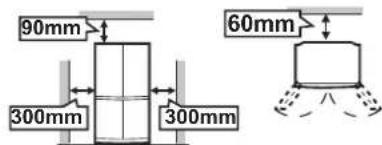
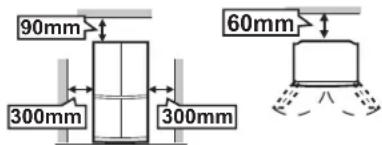
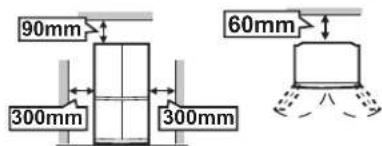
1 Keep adequate ventilation space around the refrigerator. The figure shows the minimum: \_\_\_\_
The figure shows the minimum required space for installing the refrigerator. The measurement condition of power
consumption is conducted under a different space dimension.
By keeping greater space, the refrigerator may be operated under a less amount of power consumption.

If using the refrigerator in the smaller space dimension • than the below figure, it may cause the temperature rise in the unit, loud noise and failure.
The space between the rear of the refrigerator and the wall should be 60mm or more and less than 75mm.
If the space is wider than 75mm, you may get injured by touching compressor and its peripheral parts which are extremely hot during the operation.

2 Use the two front adjustable feet, to ensure that the refrigerator is positioned firmly and flat on the floor.

3 When right and left doors are not properly aligned, adjust using the adjustable feet.

4 Remove the 4 screws of the cabinet lower part, and then set the foot cover (supplied inside the refrigerator compartment) with removed 4 screws.

NOTE
Position your refrigerator so that the plug is accessible. Keep your refrigerator out of direct sunlight.
Do not place next to heat generating appliance.
Do not place directly on the ground. Provide suitable stand. • To insert the power plug when the door is opened, door alarm • sounds but it is not abnormal. This sound stops when closing the door.
Before using your refrigerator
Clean the inside parts with a cloth soaked in warm water. If soapy water is used, wipe it off thoroughly with water.
INDICATOR OF TEMPERATURE
This refrigerator is provided with an indicator of temperature in the refrigerator compartment to allow you to control the average temperature in the coldest zone.
Coldest zone
The symbol indicates the coldest zone in the refrigerator compartment.
(The door pocket positioned at the same height isn't the coldest zone.)
Symbol

Checking the temperature in the coldest zone
You can carry out regular checks to ensure the temperature in the coldest zone is correct and, if necessary, adjust the refrigerator temp. control.
To maintain a correct temperature inside the appliance, check that the indicator of temperature is always BLUE.
If the indicator of temperature turns WHITE, the temperature is too high; in this case, increase the refrigerator temp. control setting and wait for 6 hours before checking the indicator of temperature again.
BLUE

Correct setting
WHITE

Temperature too high,
adjust the refrigerator temp.
control.
NOTE
The internal temperature of the refrigerator depends on various factors such as the ambient temperature of the room, the amount of food stored and the frequency of door opening.
When fresh food has been introduced or the door has been left open for some time, it is normal for the indicator of temperature to turn WHITE.
DESCRIPTION


Door pockets (B pcs.)
Refrigerator shelves (2 pcs.)
Shelf3.
Bottle pocket (left)4.
Highly sealed vegetable crisper5.
The cover of the Vegetable crisper opens as the case is pulled.
Freezer cases (small) 6 pcs.)
Freezer cases (large) 72 pcs.)
Casters 81 pcs.)
Adjustable feet (2 pcs.)
Foot cover10.
Hybrid cooling panel11.
The panel is cooled from the rear, thus indirectly cools the refrigerator compartment. In this way, food is refrigerated gently, without exposing to the cold air flow.
Light12.
Utility pocket cover13.
Utility pocket14.
Egg holder15.
Egg pocket16.
-
Fruit case
-
Bottle pocket (right)
To store large-size bottles, move the partition all the way back.
Fresh case19.

Partition

-
Ice cube maker (2 pcs.)
-
Do not over fill the tray; otherwise the ice cubes will be joined together when frozen.
-
When the ice cubes are made, turn the lever clockwise to empty the ice into the Ice cube box.
-
Ice cube box (2 pcs.)
To prevent damage to the Ice cube box, do not make ice in the Ice cube box or pour oil into it.
Magnetic door seals (22pcs.)
- Eco sign
When the refrigerator door is left open, the lamp will slowly change its color from blue to orange. This shows the temperature in the refrigerator is rising.
- Control panel
Deodorizing unit
Deodorizing catalyst is installed on the routes of cold air. No operation and cleaning are required.
More food can be stored by taking out the internal accessories with duly cooling.

natural_image
Line drawing of an open refrigerator with doors open, showing internal compartments and doorways (no text or symbols)How to remove
To remove the partition, pull it to the front with pushing the claw.
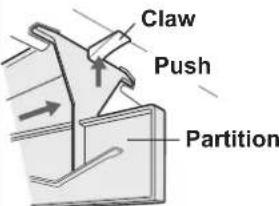
How to set
Insert the four projections into the upper parts.
Lever
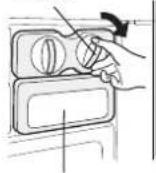
Ice cube box
Control panel
GB

Feature icons
Icons of features in operation are displayed.

Plasmacluster

Energy saving Freeze

Vacation mode

Express Freezing

Child lock
Controlling temperature icons

Refrigerator compartment

npartment
NOTE
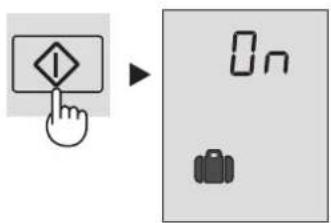
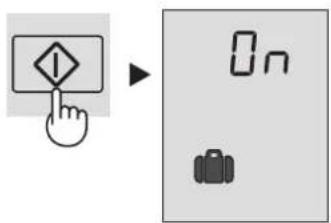
Features start automatically like right figure • when inserting the power plug. (At first, only Door alarm is "ON").
When there is no operation for approx. • 1 minute the display automatically return to the standby display. Additionally, the display will be turned off when there is no operation for 1 minute.
When either of the button is pressed, the icons are blink once and show the standby display. When the refrigerator stops with power failure, the display shows similarly as before having a power failure at the time of re-power distribution.
However, when it has a power failure during operation of Express Freezing, the operation is stopped at the time of re-power distribution.

Sound ON/OFF
At first, the sound is set "ON".
Use this feature when you want to switch the sound of button operation to "ON" or "OFF".
To set sound "OFF"
Press the button and button simultaneously and continuously for 3 seconds or more.

To set sound "ON"
Press the button and button simultaneously and continuously for 3 seconds or more again.
OPERATION

Plasmacluster
The ionizer inside your refrigerator releases clusters of ions, which are collective masses of positive and negative ions, into the refrigerator compartment.
These ion clusters inactivate airborne mold fungus.

chemical
Diagram showing the transformation of a mold fungus to a cross-shaped organic molecule with multiple hydroxyl groupsTo start operation
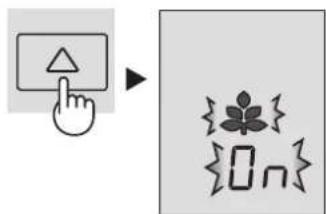
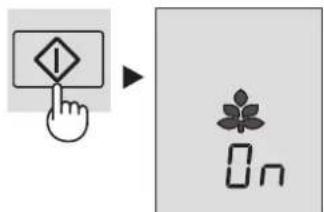
① Select "Plasmacluster icon".
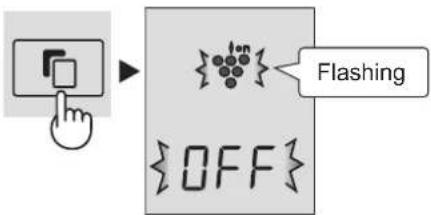
② Select "ON".

③ Finalize the setting.

To cancel operation
It is the same method as starting operation. Select "OFF" in step 2.

NOTE
- There may be a slight odor in the refrigerator. This is the smell of ozone generated by the ionizer. The amount of ozone is minimal, and quickly decomposes in the refrigerator.

Energy Saving
Use this feature when you want to switch the appliance to energy-saving operation.
To start operation
① Select "Energy saving" icon.

② Select "ON".

③ Finalize the setting.

To cancel operation
It is the same method as starting operation. Select "OFF" in step 2.

NOTE
While this feature is operating, the inside temperature of the refrigerator and freezer compartment will be higher than the preset temperature by about 1°C (refrigerator) and about 2°C (freezer). This is the guide under the condition of the preset temperature 3°C (refrigerator) and -18°C (freezer). The display of preset temperature will not be changed.
The efficiency of power saving depends on the usage environment (controlling temperature, ambient temperature, frequency of opening or closing the door, amount of food). Cancel this feature when you feel the beverages are not cooled enough or ice making takes time.

Vacation mode
Use this feature when going on a trip or leaving the house for a long time.
To start operation
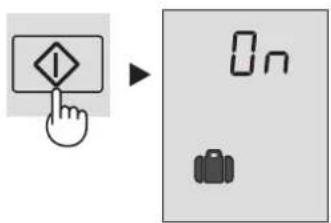
① Select "Vacation mode" icon.

② Select "ON".

③ Finalize the setting.

To cancel operation
It is the same method as starting operation. Select "OFF" in step 2.

NOTE
The temperature inside the refrigerator compartment will be adjusted to about 10^ C. Food storage period in the refrigerator compartment becomes approx. 1/2-1/3 of normal operation. Please utilize only when there is no perishable food. Temperature of refrigerator compartment cannot be modified. (“10°C” is indicated on the display.)

Express Freezing
High-quality frozen foods can be made using this feature and is convenient for home-freezing.
To start operation
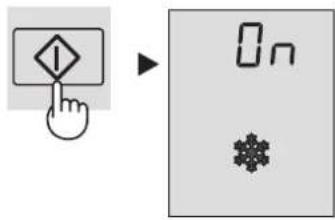
① Select "Express freezing" icon.

② Select "ON".

③ Finalize the setting.

To cancel operation
It is the same method as starting operation. Select "OFF" in step 2.

NOTE
Express Freezing ends automatically in about 2 hours. • (The icon will disappear.)
Large foods cannot be frozen in a single operation.
Express Freezing may require more than 2 hours in the case • operation overlaps with defrosting as operation is started after defrosting is completed.
Avoid opening the door as much as possible during operation of this feature.

Child Lock
Button operation of the control panel will be locked. Use this feature to prevent the panel from being used unintentionally by children or someone.
To start operation
① Select "Child lock" icon.

② Select "ON".

③ Finalize the setting.

To cancel operation
It is the same method as starting operation. Select "OFF" in step 2.

Door Alarm
At first, door alarm is set "ON".
When the refrigerator door is left open, the door alarm will sound.
The door alarm will sound in 1 minute after opening the door • and again after 1 minute (once in each case).
If the door is left open for approx. 3 minutes, the alarm will sound continuously.
To cancel operation
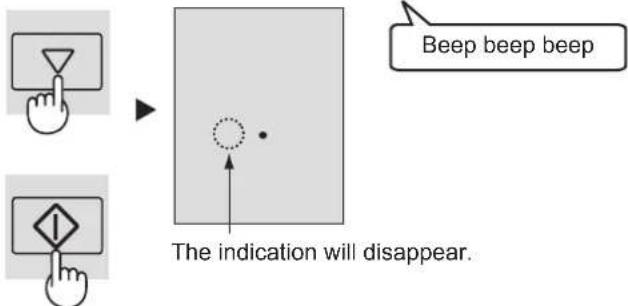
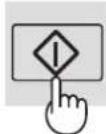
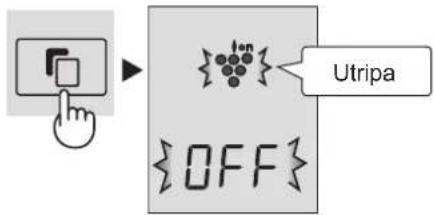
① Select the door alarm indication like the below figure.

flowchart
graph TD
    A["User Button"] --> B["Flashing"]
    B --> C["Sequence 0.n"]
② Select "OFF".
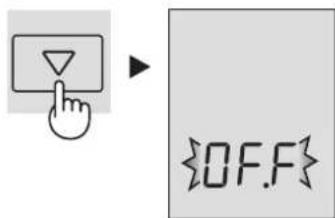
③ Finalize the setting.
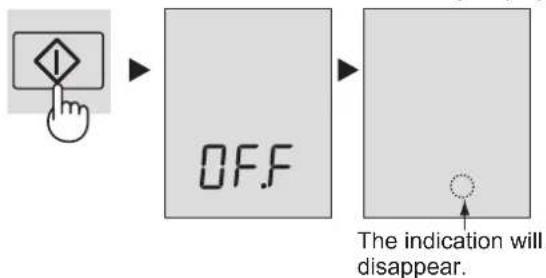
flowchart
graph LR
    A["Input Hand Icon"] --> B["ON/OFF Signal"]
    B --> C["Result: Disinjection"]
    note right of C: The indication will disappear.
To start operation
It is the same method as canceling operation. Select "ON" in step 2.

flowchart
graph LR
    A["Hand icon"] --> B["Flashing"]
    B --> C["Door alarm indication"]
    D["●"] --> E["●"]
    F["●"] --> G["●"]
    H["●"] --> I["●"]
    J["●"] --> K["●"]
    L["●"] --> M["●"]
    N["●"] --> O["●"]
    P["●"] --> Q["●"]
    R["●"] --> S["●"]
    T["●"] --> U["●"]
    V["●"] --> W["●"]
    X["●"] --> Y["●"]
    Z["●"] --> AA["●"]
    AB["●"] --> AC["●"]
    AD["●"] --> AE["●"]
    AF["●"] --> AG["●"]
    AH["●"] --> AI["●"]
    AJ["●"] --> AK["●"]
    AL["●"] --> AM["●"]
    AN["●"] --> AO["●"]
    AP["●"] --> AQ["●"]
    AR["●"] --> AS["●"]
    AT["●"] --> AU["●"]
    AV["●"] --> AW["●"]
    AX["●"] --> AY["●"]
    AZ["●"] --> BA["●"]
    BB["●"] --> BC["●"]
    BD["●"] --> BE["●"]
    BF["●"] --> BG["●"]
    BH["●"] --> BI["●"]
    BJ["●"] --> BK["●"]
    BL["●"] --> BM["●"]
    BN["●"] --> BO["●"]
    BP["●"] --> BQ["●"]
    BR["●"] --> BS["●"]
    BT["●"] --> BU["●"]
    BV["●"] --> BW["●"]
    BX["●"] --> BY["●"]
    BZ["●"] --> CA["●"]
    CB["●"] --> CC["●"]
    CD["●"] --> CE["●"]
    CF["●"] --> CG["●"]
    CH["●"] --> CI["●"]
    CJ["●"] --> CK["●"]
    CL["●"] --> CM["●"]
    CN["●"] --> CO["●"]
    CP["●"] --> CY["●"]
    CZ["●"] --> DA["●"]
    DB["●"] --> DC["●"]
    DD["●"] --> DJ["●"]
    DK["●"] --> DL["●"]
    DV["●"] --> DW["●"]
    DX["●"] --> DXB["●"]
    DXB --> DXC["C"]
    DXC --> DXD["C"]
    DXD --> DXE["C"]
    DXE --> DXF["C"]
    DXF --> DXG["C"]
    DXG --> DXH["C"]
    DXH --> DXI["C"]
    DXI --> DXJ["C"]
    DXJ --> DXK["C"]
The refrigerator controls its temperature automatically. However, if needed, adjust the temperature as follows.
Refrigerator compartment
Adjustable between 0°C and 6°C in steps of 1°C.
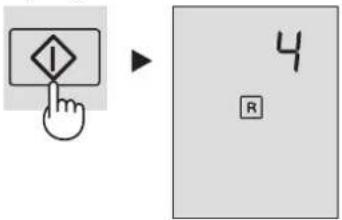
① Select Icon.
The display shows the current preset temperature.

② Set the temperature.
[△: increase, ▽decrease]

③ Finalize the setting.

Freezer compartment
Adjustable between -13°C and -21°C in steps of 1°C.
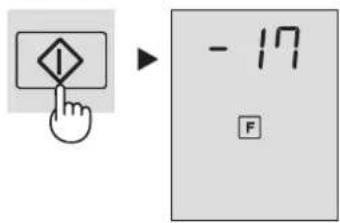
① Select F con.
The display shows the current preset temperature.

② Set the temperature.
[△: increase, ▽decrease]

③ Finalize the setting.
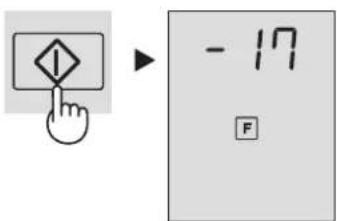
Advanced Setting of Freezer / Refrigerator compartment
The temperature of freezer compartment and refrigerator compartment can be adjusted in steps of 0.5 ^ by following steps 1 to 3 below.
Refrigerator compartment
- Select R icon.
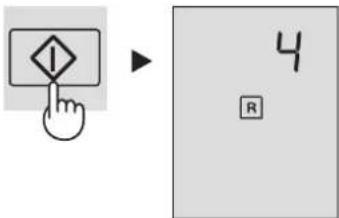
- Press ◆ button continuously for 3 seconds or more. The current preset temperature on the display will be changed to 3.0^ C. (The display will be indicated like right figure.)
- Adjust the temperature in the same way as steps 2 to 3 above.
Follow steps 1 to 2 again if you want to adjust the temperature in steps of 1^ C.
Freezer compartment
- Select F icon.
- Press ◇ button continuously for 3 seconds or more. The current preset temperature on the display will be changed to -18.0 °C. (The display will be indicated alternately like right figure.)
- Adjust the temperature in the same way as steps 2 to 3 above.
Follow steps 1 to 2 again if you want to adjust the temperature in steps of 1^ C.
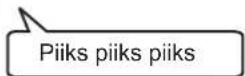
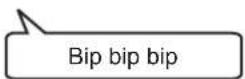
Beep beep beep


STORING FOOD

Refrigeration reduces the rate of food spoilage. To maximize the shelf life of perishable food products, ensure that the food is of the freshest possible quality. The following is a general guide to help promote longer food storage.
Fruit / Vegetables
To minimize moisture loss, fruit and vegetables should be loosely enclosed in a plastic material e.g. wrap, bags (do not seal) and place in the vegetable crisper or the fruit case. If you store a lot of vegetables, dew may form. This has no effect on the operation or the performance. Use a dry cloth to remove the dew.
Dairy Products & Eggs
Most dairy products have a use by date on the outer packaging • which informs the recommended temperature and shelf life of the product.
Eggs should be stored in the Egg holder.
Meats / Fish / Poultry
Place on a plate or dish and cover with paper or plastic wrap. For larger cuts of meat, fish, or poultry, place to the rear of the shelves.
Ensure all cooked food is wrapped securely or placed in an • airtight container.
NOTE
Evenly place the food on the shelves • to allow the cooling air to circulate efficiently.
Hot foods should be cooled before • storing. Storing hot foods increases the temperature in the unit and increases the risk of food spoilage.
Do not block the outlet and inlet of the • cool air circulating circuit with foods or containers; otherwise the foods will not be evenly cooled throughout the refrigerator.
Keep the door securely closed.

Do not place food directly in front of cold air outlet. This may lead to the food freezing.
For best freezing
Quality of foods should be fresh.
Freeze small quantities of food at a time to freeze them • quickly.
Food should be properly sealed, sealed tightly or covered. Evenly place the food in the freezer.
Label bags or containers to keep an inventory of freezing food.
WARNING
Unplug the refrigerator first to prevent electric shock. ■ Do not splash water directly on the outer cabinet or the ■ interior. This may lead to rusting and deterioration of the electrical insulation.
IMPORTANT
To prevent cracking on inside surfaces and plastic components, follow these tips.
Wipe any food oils adhered to plastic components. Some household chemicals may cause damage, so use only diluted washing-up liquid (soapy water). If undiluted detergent is used or soapy water is not wiped off thoroughly, cracking of plastic parts can result.
1 Remove the accessories e.g. shelves from the cabinet and door. Wash them in warm soapy dishwashing water; rinse in clean water and dry.
2 Clean the inside with a cloth soaked in warm soapy dishwashing water. Then, use cold water to wipe off soapy water.
3 Wipe the exterior with a soft cloth each time it is soiled.
4 Clean the Magnetic door seal with a toothbrush and warm soapy dishwashing water.
5 Wipe the control panel with the dry cloth.
NOTE
To prevent damage to your refrigerator, do not use heavy duty • cleansers or solvents (lacquer, paint, polishing powder, benzine, boiled water, etc.).
If the power supply is disconnected, please wait for at least 5 minutes before re-connecting power.
The glass shelves weigh approximately 3 kg each. Hold firmly • when removing from the cabinet or carrying.
Do not drop objects inside the refrigerator or strike the inner wall. This may cause the inner surface to crack.
Defrosting
Defrosting is fully automatic due to a unique energy saving system.
When the compartment light is blown
Contact the service agent approved by SHARP to request a replacement compartment light. The compartment light is not to be removed other than by qualified service personnel.
When transporting
- Wipe up water in the evaporating pan. Before wiping up the water, wait more than 1 hour after pulling out the plug because refrigeration cycle equipment is extremely hot. (The evaporating pan is located on the rear of the product.)

• The casters allow the refrigerator to move back and forth.
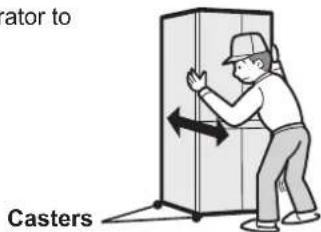
- Carry the refrigerator by holding the handles located on the rear and bottom.

natural_image
Illustration of workers installing or maintaining a cable or cable assembly, with close-ups of the components (no text or symbols)Switching off your refrigerator
If you switch your refrigerator off when you are going away for an extended period, remove all food, clean the interior thoroughly. Remove the power cord plug from the power socket and leave all doors open.
Tips for saving energy
Keep the ventilation space as much as possible around the refrigerator.
- Keep your refrigerator out of direct sunlight, and do not place next to heat generating appliance.
■ Open your refrigerator door as briefly as possible. ■ Hot foods should be cooled before storing.
■ Place the food evenly on the shelves to allow the cooling air to circulate efficiently.
The amount of power consumption of this model is measured according to the international standard of the refrigerator performance under the following conditions.
All accessories in the freezer • compartment are taken out as indicated on the figure.

natural_image
Architectural line drawing of a double-door refrigerator with open doors and internal compartments (no text or symbols)Space dimensions.
BEFORE YOU CALL FOR SERVICE
Before you call for service, check the following points.
| Problem Solution | |
| The outside of the cabinet is hot when touched. | It is normal. The hot pipe is in the cabinet in order to prevent dew generation. |
| When there is refrigerator noise. | It is normal for the refrigerator to produce the following sounds.Loud noise produced by the compressor when operation starts--- Sound becomes quieter after a while.Loud noise produced once a day by the compressor --- Operating sound produced immediately after automatic defrost operation.Sound of flowing fluid (gurgling sound, fizzing sound)--- Sound of refrigerant flowing in pipes (sound may become louder from time to time).Cracking or crunching sound, squeaking sound--- Sound produced by expansion and contraction of inner walls and internal parts during cooling. |
| Frosting or dew generation occurs inside or outside the refrigerator. | This may occur in one of the following cases. Use a wet cloth for wiping frost and a dry cloth for wiping dew.When the ambient humidity is high.When the door is frequently opened and closed.When foods containing plenty of moisture is stored. (Wrapping is required.)• |
| Foods in the refrigerator compartment freeze. | Is the refrigerator operated for a long time with refrigerator temp. control set at 0°C?Is the refrigerator operated for a long time with freezer temp. control set at -21°C?Low ambient temperatures may cause placed foods to freeze even if the refrigerator temp. control is set to 6°C. |
| It smells in the compartment. | Wrapping is required for the foods with strong smell.Deodorizing unit cannot remove all of the smell. |
IF YOU STILL REQUIRE SERVICE
Refer to your nearest service agent approved by SHARP.
natural_image
Line drawing of an open refrigerator with doors open, showing internal compartments and door frame (no text or symbols)Cómo extraerla
chemical
Chemical reaction diagram showing hongos de moho reacting with a triphosphate ion structureNOTAS
NOTAS
NOTAS
Alarma de la puerta
natural_image
Technical line drawing of a mechanical assembly with a cylindrical component and a rectangular housing (no text or symbols)natural_image
Illustration of a person in a hard hat pushing a cabinet with an arrow indicating left motion (no text or symbols)natural_image
Architectural line drawing of a cabinet interior with doors open and shelves stacked (no text or symbols)ANTES DE LLAMAR AL SERVICIO TECNICO
natural_image
Line drawing of an open refrigerator with doors open (no text or symbols)Come rimuoverla
natural_image
Simple diagram with a dotted circle and a dot above an upward arrow (no text or symbols)

chemical
Diagram illustrating the transformation of a fungo della muffa into a mixture structure with hydroxyl groupsNOTA
NOTA
NOTA
Allarme porte

Comparto freezer
natural_image
Illustration of a person pushing a door with an arrow indicating left motion (no text or symbols)natural_image
Illustration of workers installing a large cylindrical object with circular components, shown in two views (no text or symbols present)natural_image
Line drawing of an open refrigerator with doors and shelves (no text or symbols)
natural_image
Pure technical diagram showing a mechanical component with no text or symbolsPied réglable
natural_image
Line drawing of an open refrigerator with doors open (no text or symbols)Pour le retirer
natural_image
Simple diagram with two dots and an upward arrow inside a rectangle (no text or symbols)
natural_image
Simple diagram with a dotted circle and a dot above an upward arrow (no text or symbols)

chemical
Chemical reaction diagram showing addition of champignons and moisissures into a mixture of hydroxyl groupsNOTES
flowchart
graph TD
    A["Hand Click Button"] --> B["Tree Icon"]
    B --> C["On Symbol"]
NOTES
NOTES
Alarme de la porte
flowchart
graph LR
    A["Hand press icon"] --> B["OFF"]
    B --> C[Decrease icon with arrow pointing to 'Le signe disparaîtra.'
natural_image
Architectural line drawing of a double-door refrigerator with doors open and internal compartments (no text or symbols)
AVANT D'APPELER LE SERVICE APRES-VENTE
natural_image
Line drawing of an open double door with internal compartments and doors (no text or symbols)Como remover
natural_image
Simple diagram with two dots and an upward arrow inside a rectangle (no text or symbols)
Mostra o som "DESLIGADO".
Para regular o som para "LIGADO"
natural_image
Simple diagram with a dotted circle and a dot above an upward arrow (no text or symbols)

chemical
Diagram showing transformation of a molecule labeled 'Fungo do bolor' into a molecular structure with multiple OH groupsOBSERVAÇÕES
OBSERVAÇÕES
OBSERVAÇÕES
Alarme da porta
flowchart
graph TD
    A["Top Panel"] --> B["Left Panel"]
    B --> C["Right Panel"]
    C --> D["Bottom Panel"]
    D --> E["Left Panel"]
    E --> F["Right Panel"]
    F --> G["Bottom Panel"]
    style A fill:#f9f,stroke:#333
    style G fill:#bbf,stroke:#333
ENTRA SAÍ
natural_image
Illustration of a person standing beside a cabinet with directional arrows indicating movement (no text or symbols)natural_image
Illustration of workers installing or maintaining a cable or panel, with close-ups of the components (no text or symbols)Desligando o seu frigorífico
natural_image
Line drawing of an open refrigerator with doors and shelves (no text or symbols)
ANTES DE CHAMAR PELO SERVIÇO DE ASSISTÊNCIA TÉCNICA
natural_image
Pure mechanical diagram showing a rotating component with no text or symbolsΡυθμιζόμενο πόδι
Βίδα (4 βίδες)

Κάλυμμα ποδιών
ΣΗΜΕΙΩΣΗ
natural_image
Line drawing of an open refrigerator with doors open (no text or symbols)natural_image
Simple diagram with two dots and an upward arrow inside a rectangle (no text or symbols)natural_image
Simple diagram with a dotted circle and a solid dot above an upward arrow (no text or symbols)

chemical
Chemical reaction diagram showing molecular rearrangement of μύκητας and μούχλας with water moleculesΣΗΜΕΙΩΣΗ
flowchart
graph TD
    A["Hand Click Button"] --> B["Tree Icon"]
    B --> C["On Symbol"]
ΣΗΜΕΙΩΣΗ
ΣΗΜΕΙΩΣΗ
Συναγερμός πόρτας
Χώρος καταψύκτη
natural_image
Illustration of workers installing or maintaining a cable or cable assembly, with close-ups of the components (no text or symbols)natural_image
Architectural line drawing of an open refrigerator with doors and shelves (no text or symbols)Διαστάσεις χώρου.

natural_image
Line drawing of an open refrigerator with doors open (no text or symbols)Entfernen
natural_image
Simple diagram with a dotted circle and a dot above an upward arrow (no text or symbols)

chemical
Chemical reaction diagram showing Schimmelpilze reacting with a mixture of OH groups to form a cross-linked productHINWEISE
HINWEISE
HINWEISE
Türalarm
natural_image
Technical line drawing of a mechanical assembly with a cylindrical component and housing (no text or symbols)Verdunstungsbecken
natural_image
Illustration of workers installing or maintaining a large tool, with inset diagrams showing close-ups of the tool (no text or symbols)natural_image
Line drawing of an open refrigerator with doors and shelves (no text or symbols)Raumabmessungen.
BEVOR SIE DEN SHARP-SERVICE KONTAKTIEREN
natural_image
Line drawing of an open refrigerator with doors open, showing internal compartments and doorways (no text or symbols)Verwijderen
natural_image
Simple diagram with a dashed circle and a dot above an upward arrow (no text or symbols)

chemical
Chemical reaction diagram showing disulfide (schim mels) formation into a cyclic alcohol with multiple hydroxyl groupsDe werking starten
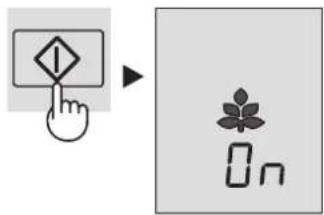
① Selecteer "Plasmacluster icoon".

② Selecteer "AAN".

③ Druk hierop om de instelling te bevestigen.

N.B.
② Selecteer "AAN".
③ Druk hierop om de instelling te bevestigen.
N.B.
① Selecteer "Vakantiestand" icoon.

② Selecteer "AAN".

③ Druk hierop om de instelling te bevestigen.
② Selecteer "AAN".

③ Druk hierop om de instelling te bevestigen.
N.B.
② Selecteer "AAN".

③ Druk hierop om de instelling te bevestigen.

Deuralarm
③ Druk hierop om de instelling te bevestigen.

flowchart
graph LR
    A["Hand Press Icon"] --> B["OFF"]
    B --> C["Stand-by weergave"]
③ Druk hierop om de instelling te bevestigen.

Vriesgedeelte
natural_image
Illustration of a person pushing a cabinet with directional arrows indicating movement (no text or symbols)natural_image
Illustration of workers installing or maintaining a large cable or cable with rollers, shown in two views (no text or symbols present)natural_image
Line drawing of an open refrigerator with doors and shelves (no text or symbols)ALVORENS VOOR REPARATIE TE BELLEN
natural_image
Symbol of a trash bin crossed with no visible text or labelsUwaga:
natural_image
Pure mechanical diagram showing a rotating component with no text or symbolsRegulowane nóżki
natural_image
Line drawing of an open refrigerator with doors open, showing internal compartments and door frame (no text or symbols)Jak wyjąć
natural_image
Simple diagram with a dashed circle and a dot above an upward arrow (no text or symbols)chemical
Chemical reaction diagram showing molecular arrangement of olefin with hydroxyl groupsWłączenie funkcji
Wyłączenie funkcji
UWAGA
flowchart
graph TD
    A["Hand Click Button"] --> B["Leaf Symbol"]
    B --> C["Sequence of symbols"]
Wyłączenie funkcji
UWAGA
Wyłączenie funkcji
UWAGA
Wyłączenie funkcji
Alarm drzwi
flowchart
graph LR
    A["User Hand Icon"] --> B["OFF"]
    B --> C["Wskazanie znikie"]
Włączenie funkcji

natural_image
Technical line drawing of a mechanical assembly with a cylindrical component and housing (no text or symbols)natural_image
Illustration of workers installing or maintaining a cable or pipe, with close-ups of the pipe (no text or symbols)Wyłączanie lodówki
natural_image
Line drawing of an open refrigerator with doors and shelves (no text or symbols)ZANIM WEZWIESZ SERWIS
natural_image
Pure technical diagram showing a mechanical component with an angular arrow, no text or symbols presentnatural_image
Simple diagram with a circle and dot, no text or symbols presentA jelzés eltünik.
chemical
Chemical reaction diagram showing penészgomba decomposition into a triphosphate ion structureMEGJEGYZÉS
MEGJEGYZÉS
MEGJEGYZÉS
Ajtóriasztó
Fagyasztótér
flowchart
graph TD
    A["Top Panel"] --> B["Left Panel"]
    B --> C["Right Panel"]
    C --> D["Bottom Panel"]
    D --> E["Left/Right"]
    E --> F["Center/Right"]
    F --> G["Left/Right"]
    G --> H["Right/Right"]
    H --> I["Center/Right"]
    I --> J["Left/Right"]
    J --> K["Right/Right"]
    K --> L["Center/Right"]
    L --> M["Left/Right"]
    M --> N["Right/Right"]
    N --> O["Center/Right"]
    O --> P["Left/Right"]
    P --> Q["Right/Right"]
    Q --> R["Center/Right"]
    R --> S["Left/Right"]
    S --> T["Right/Right"]
    T --> U["Center/Right"]
    U --> V["Left/Right"]
    V --> W["Right/Right"]
    W --> X["Center/Right"]
    X --> Y["Left/Right"]
    Y --> Z["Right/Right"]
natural_image
Illustration of a person pushing a cabinet with directional arrows indicating movement (no text or symbols)natural_image
Architectural line drawing of a refrigerator interior showing doors, shelves, and storage compartments (no text or symbols)Térbeli kiterjedés.

MIELŐTT SZERVIZHEZ FORDULNA
natural_image
Symbol of a trash bin crossed with two crossed lines, no text or numbers presentAtentie:
NOTĂ
natural_image
Line drawing of an open refrigerator with doors open (no text or symbols)Modul de detaşare
natural_image
Simple diagram with a dotted circle and a dot above an upward arrow (no text or symbols)chemical
Chemical reaction diagram showing conversion of ciuperci de micegai to a mixture structure with OH groupsNOTĂ
NOTĂ
NOTĂ
Alarmă uşă

natural_image
Illustration of workers installing or maintaining a cable or panel, with close-ups of the components (no text or symbols)natural_image
Line drawing of an open refrigerator with doors and shelves (no text or symbols)Dimensiuni spațiu.

ÎNAINTE DE A CHEMA SERVICIUL DE DEPANARE
natural_image
Symbol of a trash bin crossed with a diagonal line and a horizontal bar below (no text or labels)Upozornění:
natural_image
Pure technical diagram showing a mechanical assembly with no text or symbolsNastavitelná noha
natural_image
Line drawing of an open refrigerator with doors open (no text or symbols)Jak sejmout
natural_image
Simple diagram with two dots and an upward arrow inside a rectangle (no text or symbols)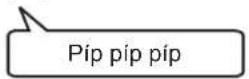
natural_image
Simple diagram with a dashed circle and a dot above an upward arrow (no text or symbols)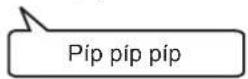

Indikace zmizí.
OBSLUHA

Ionizátor Plasmacluster
chemical
Chemical reaction diagram showing houbovita pliseň reacting with a mixture of multiple hydroxyl groupsSpuštění operace
Zrušení operace
POZNÁMKA
flowchart
graph TD
    A["User Hand Click"] --> B["Click Button"]
    B --> C["Leaf Symbol"]
    C --> D["On Icon"]
Zrušení operace
POZNÁMKA
Zrušení operace
Zrušení operace
POZNÁMKA
Zrušení operace
flowchart
graph LR
    A["Hand icon pointing at diamond"] --> B["OFF"]
    B --> C["Indikace zmizi"]
Spuštění operace
flowchart
graph TD
    A["Top Panel"] --> B["Left Panel"]
    B --> C["Right Panel"]
    C --> D["Bottom Panel"]
    D --> E["Left Panel"]
    E --> F["Right Panel"]
    F --> G["Bottom Panel"]
    style A fill:#f9f,stroke:#333
    style G fill:#bbf,stroke:#333

DOVNITŘ
VEN
natural_image
Illustration of workers installing or maintaining a cable or cable using a tool, with close-ups of the components (no text or symbols)natural_image
Architectural line drawing of a double-door refrigerator with doors open and shelves inside (no text or symbols)Rozměry prostoru.

NEŽ ZAVOLÁTE OPRAVÁŘE
natural_image
Line drawing of an open refrigerator with doors open (no text or symbols)Ako sa vyberá
natural_image
Simple diagram with a dotted circle and a solid dot above an upward arrow (no text or symbols)
Indikácia zmizne.
PREVÁDZKA

chemical
Chemical reaction diagram showing plesen with hydroxyl groups reacting to form a cross-linked structureSpustenie činnosti
③ Ukončenie nastavovania.

Zrušit' činnost'
POZNÁMKA
flowchart
graph TD
    A["Hand Button"] --> B["User Icon with Triangle"]
    B --> C["Leaf Icon with '0n' symbol"]
③ Ukončenie nastavovania.
Zrušit' činnost'
POZNÁMKA
③ Ukončenie nastavovania.
Zrušit' činnost'
③ Ukončenie nastavovania.

Zrušit' činnost'
POZNÁMKA
Expresné zmrazovanie sa automaticky ukončí asi za 2 hodiny. • (Ikona zmizne.)
③ Ukončenie nastavovania.

Zrušit' činnost'
③ Ukončenie nastavovania.

flowchart
graph LR
    A["Hand icon pointing at diamond"] --> B["OFF"]
    B --> C["Indikácia zmizne"]
Spustenie činnosti
③ Ukončenie nastavovania.
Priestor mrazničky
natural_image
Illustration of workers installing or maintaining a ceiling structure, with close-ups of the components (no text or symbols)natural_image
Line drawing of an open refrigerator with doors and shelves (no text or symbols)Rozmery priestoru.
SKÔR NEŽ ZAVOLÁTE DO SERVISU
natural_image
Pure mechanical diagram showing a rotating component with no text or symbolsReguliuojama kojelė
natural_image
Line drawing of an open refrigerator with doors open (no text or symbols)Kaip pašalinti
natural_image
Simple diagram with a dashed circle and a dot above an upward arrow (no text or symbols)
Parodymai dings.

APTARNAVIMAS

„Plasmacluster“ jonizatorius
chemical
Chemical reaction diagram showing pelsinis grybelis reacting with a triphosphate ion to form a hydroxylated productFunkcijos jungimas
PASTABA
PASTABA
PASTABA
PASTABA
Duru signalizacija
natural_image
Illustration of a person pushing a cabinet with an arrow indicating motion (no text or symbols)Perstūmimo ratukai
natural_image
Illustration of workers pulling a large cylindrical object with ropes, showing mechanical components (no text or symbols)natural_image
Line drawing of an open refrigerator with doors and shelves (no text or symbols)Atstumu matmenys.

PRIEŠ SKAMBINANT I APTARNAVIMO SKYRIŲ
natural_image
Line drawing of an open refrigerator with doors open (no text or symbols)Kā nonemt
natural_image
Simple diagram with a dotted circle and a solid dot above an upward arrow (no text or symbols)Rādījums izzudīs.

DARBİBA

chemical
Diagram showing the transformation of rauga sēnites into a triphosphate ion structureProcesa sākšana
① Izvēlieties ikonu "Plasmacluster".

PIEZIME
PIEZIME

PIEZIME
natural_image
Illustration of workers installing or maintaining a large cable or cable, with close-ups of the cable being inserted (no text or symbols present)natural_image
Architectural line drawing of an open refrigerator with doors and shelves (no text or symbols)Attālumi.

PIRMS ZVANİŠANAS APKALPES DIENESTAM
natural_image
Pure mechanical diagram showing a rotating component with no text or symbolsnatural_image
Line drawing of an open refrigerator with doors open, showing internal compartments and door frame (no text or symbols)Kuidas eemaldada
natural_image
Simple diagram with a dotted circle and a solid dot above an upward arrow (no text or symbols)
Märge kaob.
TÖÖTAMINE

Ioniseerija "Plasmacluster"
chemical
Chemical reaction diagram showing formation of a halitusseen molecule from a lipid bilayer③ Lôpetage seadistamine.

MÄRKUS
③ Lôpetage seadistamine.

MÄRKUS
③ Lôpetage seadistamine.
③ Lôpetage seadistamine.

MÄRKUS
③ Lôpetage seadistamine.

Ukse helisignaal
③ Lôpetage seadistamine.

flowchart
graph LR
    A["Hand with warning symbol"] --> B["OFF"]
    B --> C["Marge knob indicator"]
③ Lôpetage seadistamine.
③ Lôpetage seadistamine.
natural_image
Illustration of workers installing or maintaining a large cable or cable with magnified insets showing the cable being inserted (no text or symbols present)natural_image
Architectural line drawing of a double-door refrigerator with open doors and internal compartments (no text or symbols)Ruumi möötmed.

ENNE MEHAANIKU KUTSUMIST
natural_image
Line drawing of an open refrigerator with doors open (no text or symbols)Kako odstraniti
Če želite odstraniti eno polico, jo povlecite naprej tako, da potisnete na kaveljčke.

Kako namestiti
natural_image
Simple diagram with a dashed circle and a solid dot above an upward arrow (no text or symbols)Indikator izgine.
DELOVANJE

Ionizator »Plasmacluster«
chemical
Chemical reaction diagram showing Plesniva goba reacting with a mixture of hydroxyl groups to form a cross-linked productZačetek delovanja
① Izberite ikono »Plasmacluster«.
OPOMBA
OPOMBA
OPOMBA
Alarm vrat
flowchart
graph LR
    A["Hand with diamond icon"] --> B["OFF"]
    B --> C["Indicator izgine."]
Začetek delovanja
Zamrzovalni predel
Nastavljivo od -13 °C do -21 °C v korakih po 1 °C.
natural_image
Illustration of a person in a hard hat pushing a cabinet with an arrow indicating left motion (no text or symbols)natural_image
Illustration of workers installing or maintaining a cable or panel, with close-ups of the cable being held (no text or symbols present)Izklop hladilnika
natural_image
Line drawing of an open refrigerator with doors and shelves (no text or symbols)Dimenzije prostora.

PREDEN POKLIČETE SERVISNO SLUŽBO
natural_image
Pure technical diagram showing a pipe connection with no text, numbers, or symbolsГвинт (4 гвинти)

Декоративна панель
ПРИМІТКА
natural_image
Line drawing of an open refrigerator with doors open (no text or symbols)natural_image
Simple diagram with a dotted circle and a solid dot above an upward arrow (no text or symbols)
chemical
Chemical reaction diagram showing gribki plisnybii reacting with a triphosphate ion to form a triphosphate complexПРИМИТКА
flowchart
graph TD
    A["Hand Button"] --> B["Tree Icon"]
    B --> C["On Symbol"]
ПРИМІТКА
ПРИМИТКА
Сигнал дверцят
natural_image
Technical line drawing of a mechanical assembly with a cylindrical component and internal components (no text or symbols)natural_image
Line drawing of an open refrigerator with doors and shelves (no text or symbols)natural_image
Line drawing of an open refrigerator with doors open (no text or symbols)Изваждане
natural_image
Simple diagram with a dotted circle and a solid dot above an upward arrow (no text or symbols)

chemical
Chemical reaction diagram showing plenes conversion to a triphosphate structureЗАБЕЛЕЖКА
② Натиснете "ON" (ВКЛ.).

ЗАБЕЛЕЖКА
ЗАБЕЛЕЖКА
natural_image
Illustration of workers installing or maintaining a beam with tools, showing close-ups of components (no text or symbols)natural_image
Architectural line drawing of a double-door refrigerator with open doors and internal compartments (no text or symbols)natural_image
Line drawing of an open refrigerator with doors open (no text or symbols)Як выдаліць
chemical
Chemical reaction diagram showing transformation of a grobokic acid with OH groups to form a triphosphate structureПачатак аперацыі
Адмена аперацыі
УВАГА
Адмена аперацыі
УВАГА
Адмена аперацыі
Адмена аперацыі
УВАГА
Адмена аперацыі
natural_image
Illustration of workers installing or maintaining a large cable or cable with magnified insets showing the cable being inserted (no text or symbols present)natural_image
Architectural line drawing of a double-door refrigerator with doors open and shelves inside (no text or symbols)• Памеры.

Manufacturer of this product is SHARP CORPORATION, 1 Takumi-cho, Sakai-ku, Sakai-shi, Osaka 590-8522, Japan and is in Europe represented by Sharp Electronics Europe Ltd., 4 Furzeground Way, Stockley Park Uxbridge, Middlesex, UB11 1EZ, UK.
Importer of this product into the European Economic Area, except for Italy, is VESTEL UK, Waterside Drive, Langley, Berkshire, SL3 6EZ, Great Britain.
In all cases of requests market surveillance authorities should contact Sharp Electronics Europe Ltd.
Printed in Thailand
- E CONTENIDO
- PL SPIS TREŚCI
- WARNING CAUTION
- IMPORTANT
- Information on Disposal for Users (private households)
- Attention:
- In the European Union
- In other Countries outside the EU
- WARNING
- Keep adequate ventilation space around the refrigerator. The figure shows the minimum: \_\_\_\_
- Use the two front adjustable feet, to ensure that the refrigerator is positioned firmly and flat on the floor.
- When right and left doors are not properly aligned, adjust using the adjustable feet.
- Remove the 4 screws of the cabinet lower part, and then set the foot cover (supplied inside the refrigerator compartment) with removed 4 screws.
- NOTE
- Before using your refrigerator
- INDICATOR OF TEMPERATURE
- Coldest zone
- Checking the temperature in the coldest zone
- DESCRIPTION
- Deodorizing unit
- More food can be stored by taking out the internal accessories with duly cooling.
- Control panel
- Feature icons
- Controlling temperature icons
- Sound ON/OFF
- To set sound "OFF"
- To set sound "ON"
- OPERATION
- Plasmacluster
- To start operation
- To cancel operation
- Energy Saving
- Vacation mode
- Express Freezing
- Child Lock
- Door Alarm
- Refrigerator compartment
- Freezer compartment
- Advanced Setting of Freezer / Refrigerator compartment
- STORING FOOD
- Fruit / Vegetables
- Dairy Products & Eggs
- Meats / Fish / Poultry
- For best freezing
- Defrosting
- When the compartment light is blown
- When transporting
- Switching off your refrigerator
- Tips for saving energy
- BEFORE YOU CALL FOR SERVICE
- IF YOU STILL REQUIRE SERVICE
- NOTAS
- Alarma de la puerta
- ANTES DE LLAMAR AL SERVICIO TECNICO
- NOTA
- Allarme porte
- Comparto freezer
- NOTES
- Alarme de la porte
- AVANT D'APPELER LE SERVICE APRES-VENTE
- Para regular o som para "LIGADO"
- OBSERVAÇÕES
- Alarme da porta
- Desligando o seu frigorífico
- ANTES DE CHAMAR PELO SERVIÇO DE ASSISTÊNCIA TÉCNICA
- ΣΗΜΕΙΩΣΗ
- Συναγερμός πόρτας
- Χώρος καταψύκτη
- HINWEISE
- Türalarm
- BEVOR SIE DEN SHARP-SERVICE KONTAKTIEREN
- De werking starten
- N.B.
- Deuralarm
- Vriesgedeelte
- ALVORENS VOOR REPARATIE TE BELLEN
- Uwaga:
- Włączenie funkcji
- Wyłączenie funkcji
- UWAGA
- Alarm drzwi
- Wyłączanie lodówki
- ZANIM WEZWIESZ SERWIS
- MEGJEGYZÉS
- Ajtóriasztó
- Fagyasztótér
- MIELŐTT SZERVIZHEZ FORDULNA
- Atentie:
- NOTĂ
- Alarmă uşă
- ÎNAINTE DE A CHEMA SERVICIUL DE DEPANARE
- Upozornění:
- OBSLUHA
- Ionizátor Plasmacluster
- Spuštění operace
- Zrušení operace
- POZNÁMKA
- NEŽ ZAVOLÁTE OPRAVÁŘE
- PREVÁDZKA
- Spustenie činnosti
- Zrušit' činnost'
- Priestor mrazničky
- SKÔR NEŽ ZAVOLÁTE DO SERVISU
- APTARNAVIMAS
- „Plasmacluster“ jonizatorius
- Funkcijos jungimas
- PASTABA
- Duru signalizacija
- PRIEŠ SKAMBINANT I APTARNAVIMO SKYRIŲ
- DARBİBA
- Procesa sākšana
- PIEZIME
- PIRMS ZVANİŠANAS APKALPES DIENESTAM
- TÖÖTAMINE
- Ioniseerija "Plasmacluster"
- MÄRKUS
- Ukse helisignaal
- ENNE MEHAANIKU KUTSUMIST
- DELOVANJE
- Ionizator »Plasmacluster«
- Začetek delovanja
- OPOMBA
- Alarm vrat
- Zamrzovalni predel
- Izklop hladilnika
- PREDEN POKLIČETE SERVISNO SLUŽBO
- ПРИМІТКА
- ПРИМИТКА
- Сигнал дверцят
- ЗАБЕЛЕЖКА
- Пачатак аперацыі
- Адмена аперацыі
- УВАГА
Brand : SHARP
Model : SJ-FP810V
Category : Refrigerator