
CV1 66-S - Tumble dryer CANDY - Free user manual and instructions
Find the device manual for free CV1 66-S CANDY in PDF.


| Product type | Condenser tumble dryer |
| Brand | Candy |
| Model | CV1 66-S |
| Load capacity | 6 kg |
| Dimensions (H x W x D) | 85 x 60 x 54 cm |
| Net weight | 35 kg |
| Power supply | 220-240 V / 50 Hz |
| Power consumption | 2000 W |
| Energy class | C |
| Available programs | Cotton, Synthetics, Wool, Quick, Delicates |
| Options | Delayed start, Child lock, Buzzer |
| Drying type | Condenser |
| Noise level | 65 dB(A) |
| Maintenance | Clean the filter after each cycle, clean the condenser regularly |
| Safety | Child lock, overheat protection |
| Spare parts | Filter, belt, heating element, drain pump |
| Repairability | Repairability index 8.0 / 10 |
Frequently Asked Questions - CV1 66-S CANDY
User questions about CV1 66-S CANDY
0 question about this device. Answer the ones you know or ask your own.
Ask a new question about this device
Download the instructions for your Tumble dryer in PDF format for free! Find your manual CV1 66-S - CANDY and take your electronic device back in hand. On this page are published all the documents necessary for the use of your device. CV1 66-S by CANDY.
USER MANUAL CV1 66-S CANDY
Unpacking the Product 3
Safety reminders....4
Installation 4
Use 4
The Laundry 4
Environmental Issues 5
GIAS Service 5
Installation....6
Electrical requirements 6
Adjusting the feet 6
Ventilation....7
Preparing the load 8
Clothes preparation 8
Sorting the load....9
Drying advice....10
Do not tumble dry 10
Energy saving....10
Drying guide 10
Controls and indicators 11
Door and Filter 12
Opening the door 12
Filter....12
Filter care indicator 12
Selecting the Programme 13
Operation 14
Cancelling and resetting the programme 14
Start Delay 14
Cleaning and Routine Maintenance....15
Cleaning the dryer 15
Technical specifications....15
Troubleshooting....16
Customer Service....17
Spares. 17
GIAS Service 17
Introduction
Please read and follow these instructions carefully and operate the machine accordingly. This booklet provides important guidelines for safe use, installation, maintenance and some useful advice for best results when using your machine.
Keep all documentation in a safe place for future reference or for any future owners
Delivery information
Please check that the following items are delivered with the appliance:
●Instruction manual
●Guarantee card
●Vent kit and instructions
●Energy label
Check that no damage has occurred to the machine during transit. If it has, call for service by GIAS.
Failure to comply with the above can compromise the safety of the appliance. You may be charged for a service call if a problem with your machine is caused by misuse.
Unpacking the product
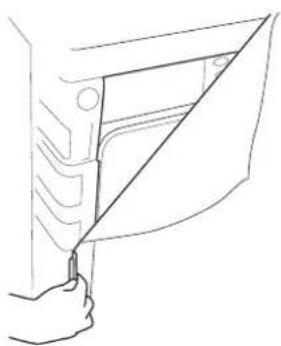
Remove the machine from its packaging close to the final location of the machine.
- Cut carefully around the base of the packaging and up one corner.
- Remove the polythene sleeve and lift the dryer off the polystyrene base.
Dispose of the packaging safely. Make sure it is out of the reach of children, it is a potential source of danger.
natural_image
Line drawing of a hand holding a door handle with a diagonal line indicating alignment (no text or symbols)Safety reminders
Installation
- Check that the product has no visible signs of damage before use. If damaged do not use and please call GIAS Service.
- Do not use adapters, multiple connectors and/or extensions.
●This machine should not be installed in a bathroom or shower room.
●Never install the dryer against curtains and be sure to prevent items from falling or collecting behind the dryer.
Use
●WARNING Misuse of a tumble dryer may create a fire hazard.
●This machine is solely for domestic use, i.e. to dry household textiles and garments.
●This machine should only be used for its intended purpose as described in this manual. Ensure that the instructions for installation and use are fully understood before operating the appliance.
●Do not touch the appliance when hands or feet are damp or wet.
- Do not lean on the door when loading the machine or use the door to lift or move the machine.
- Do not allow children to play with the machine or its controls.
● WARNING Do not use the product if the fluff filter is not in position or is damaged; fluff could be ignited.
● WARNING Where the hot surface symbol ⚠ is located the temperature rise during operation of the tumble dryer may be in excess of 60 degrees C.
- Remove the plug from the electricity supply. Always remove the plug before cleaning the appliance.
●Do not continue to use this machine if it appears to be faulty.
●Lint and fluff must not be allowed to collect on the floor around the outside of the machine.
●The drum inside may be very hot. Always allow the dryer to complete the cool down period before removing the laundry.
The Laundry
● WARNING Do not tumble dry fabrics treated with dry cleaning fluids.
● WARNING Foam rubber materials can, under certain circumstances, when heated become ignited by spontaneous combustion. Foam plastic, foam rubber and rubber-like material are not suitable for tumble drying. Articles made from these materials MUST NOT be placed in the dryer.
●Always refer to the laundry care labels for directions on suitability for drying.
●Clothes should be spin dried or thoroughly wrung before they are put into the tumble dryer. Clothes that are dripping wet should NOT be put into the dryer.
● Lighters and matches must not be left in pockets and NEVER use flammable liquids near the machine.
● Glass fibre curtains should NEVER be put in this machine. Skin irritation may occur if other garments are contaminated with the glass fibres.
●Garments treated or contaminated with flammable cleaning sprays or liquids such as petrol, cooking oil or aerosol sprays MUST NOT be put in this machine.
Environmental Issues
●All packaging materials used are environmentally-friendly and recyclable. Please help dispose of the packaging via environmentally-friendly means. Your local council will be able to give you details of current means of disposal.
●To ensure safety when disposing of an old tumble dryer disconnect the mains plug from the socket, cut the mains power cable and destroy this together with the plug. To prevent children shutting themselves in the machine break the door hinges or the door lock.
GIAS Service
●To ensure the continued safe and efficient operation of this appliance we recommend that any servicing or repairs are only carried out by an authorised GIAS Service engineer.
European directive 2002/96/EC
This appliance is marked according to the European directive 2002/96/EC on Waste Electrical and Electronic Equipment (WEEE).
By ensuring this product is disposed of correctly, you will help prevent potential negative consequences for the environment and human health, which could otherwise be caused by inappropriate waste handling of this product.
The symbol on the product indicates that this product may not be treated as household waste. Instead it shall be handed over to the applicable collection point for the recycling of electrical and electronic equipment Disposal must be carried out in accordance with local environmental regulations for waste disposal.
For more detailed information about treatment, recovery and recycling of this product, please contact your local city office, your household waste disposal service or the shop where you purchased the product.

natural_image
Symbol of a trash bin crossed out by two diagonal lines (no text or labels)
If the appliance is not running properly or breaks down, switch it off and disconnect the plug from the socket. Consult GIAS Service for possible repair.
Installation
You may be charged for a service call if a problem with your machine is caused by incorrect installation.
If the mains cord on this appliance is damaged, it must be replaced by a special cord which is ONLY obtainable from the spares service. It must be installed by a competent person.
Electrical requirements
Tumble dryers are supplied to operate at a voltage of 230V, 50 Hz single phase. Check that the supply circuit is rated to at least 10A.
Electricity can be extremely dangerous.
This appliance must be earthed.
The socket outlet and the plug on the appliance must be of the same type.
Do not use multiple adapters and/or extension leads.
The plug should be accessible for disconnection after the appliance has been installed.
The wires in the mains lead are coloured in accordance with the following codes:
Blue NEUTRAL
Brown LIVE
Green and Yellow EARTH
CE Appliance complies with European Directive 89/336/EEC, 73/23/EEC and subsequent amendments.
Do not plug the machine in and switch it on at the mains until the installation is completed.
For your safety, this dryer must be correctly installed.
If there is any doubt about installation, call GIAS Service for advice.

natural_image
Hand holding a small mechanical component with directional arrows indicating motion (no text or symbols)Adjusting the feet
Once the machine is in place the feet should be adjusted to ensure that the machine is level.
Adjust the four feet to ensure the machine is firm and level.
Ventilation
Adequate ventilation must be provided in the room where the tumble dryer is located to prevent gases from appliances burning other fuels, including open fires, being drawn into the room during operation of the tumble dryer.
●Exhaust air must not be discharged into a flue which is used for exhausting fumes from appliances burning gas or other fuels.
- Check regularly that the air flowing through the dryer is not restricted.
- Check the fluff filter after use, and clean, if necessary.
●The inlet and outlets should be kept free from obstructions. To ensure adequate ventilation the space between the bottom of the machine and the floor must not be obstructed. There should be a gap of at least 12mm between the machine and any obstructions.
●Prevent items from falling or collecting behind the dryer as these may obstruct the air inlet and outlet.
●NEVER install the dryer up against curtains.

natural_image
Simple line drawing of a sock with decorative elements and a circular button (no text or symbols)Installation of the Discharge Hose
It is essential to use a venting hose to carry the hot moist air away from the dryer unless the dryer is situated in a open space with a good air flow around it. Recirculation of the moist air will prevent the efficient operation of the dryer.
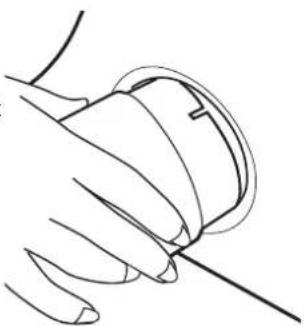
The hose is assembled to the machine as shown
The hose may be fitted through a wall or through an open door or window. The hose is 110mm in diameter and will extend 1.8 meters.
The following guidelines should be followed when installing the discharge hose.
natural_image
Line drawing of a hand holding a small object with a curved line extending from it (no text or symbols)●Do not use two hoses joined together as the drying performance will be reduced.
●Do not restrict the flow of air through the hose e.g. by kinking it or
fitting a smaller diameter connector to mount to a wall opening.
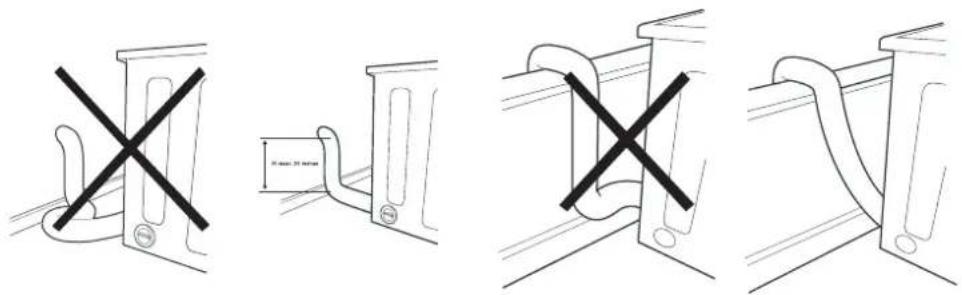
●Avoid the hose making U shaped curves as this will restrict the flow of air and increase the chance that water will collect in the hose.
- Check the hose regularly to remove any build-up of fluff or water that may have collected in it.
The following diagrams give examples of good and bad installations.
Preparing the load
Before using the tumble dryer for the first time:
- Please read this instruction book thoroughly.
- Remove all items packed inside drum.
●Wipe the inside of the drum and door with a damp cloth to remove any dust which may have settled in transit.
Clothes preparation
Make sure that the laundry you are going to dry is suitable for drying in a tumble dryer, as shown by the care symbols on each item.
Check that all fastenings are closed and that pockets are empty. Turn the articles inside out. Place clothes loosely in the drum to make sure that they don't get tangled.
Do not overload the drum, large items when wet can exceed the maximum admissible clothes load (for example: sleeping bags, duvets).
Maximum drying weight
●Cottons Max. 6 kg
●Synthetics Max. 3 kg
Sort the load as follows:
●By care symbols
These can be found on the collar or inside seam:

Suitable for tumble drying.

Tumble drying at high temperature.

Tumble drying at low temperature only.

Do not tumble dry.
If the item does not have a care label it must be assumed that it is not suitable for tumble drying.
●By amount and thickness
Whenever the load is bigger than the dryer capacity, separate clothes according to thickness (e.g. towels from thin underwear).
●By type of fabric
Cottons/linen: Towels, cotton jersey, bed and table linen.
Synthetics: Blouses, shirts, overalls, etc. made of polyester or polyamid, as well as for cotton/synthetic mixes.
●By drying level
Sort into: iron dry, cupboard dry, etc. For delicate articles press the 🔊 button to select low drying temperature.
Drying advice
IMPORTANT: Do not dry articles which have been treated with a dry cleaning fluid or rubber clothes (danger of fire or explosion).
Do not tumble dry:
Woollens, silk, delicate fabrics, nylon stockings, delicate embroidery, fabrics with metallic decorations, garments with PVC or leather trimmings, training shoes, bulky items such as sleeping bags, etc.
Energy saving
Only put into the tumble dryer laundry which has been thoroughly wrung or spin-dried. The drier the laundry the shorter the drying time thus saving electricity.
During the last 15 minutes the load is always tumbled in cool air.
ALWAYS
●Try to dry the maximum weight of laundry, this will save time and electricity.
- Check that the filter is clean before every drying cycle.
NEVER
●Exceed the maximum weight, this will waste time and electricity.
●Put dripping wet items into the tumble dryer, this may damage the appliance.
Drying guide
The table shows approximate drying times, depending on the type of fabric and dampness of the clothes.
| Fabric | HEAT SETTING | INDICATOR LIGHT | HEAVY LOAD | MEDIUM LOAD | LIGHT LOAD |
| COTTON 📋 | HIGH | OFF | 120-140 min | 100-120 min | 30-50 min |
| SYNTHETICS 🖱 | LOW | ON | - | 50-70 min | 30-40 min |
| ACRYLIC 🕒 | LOW | ON | - | 40-50 min | 20-30 min |
Controls and indicators
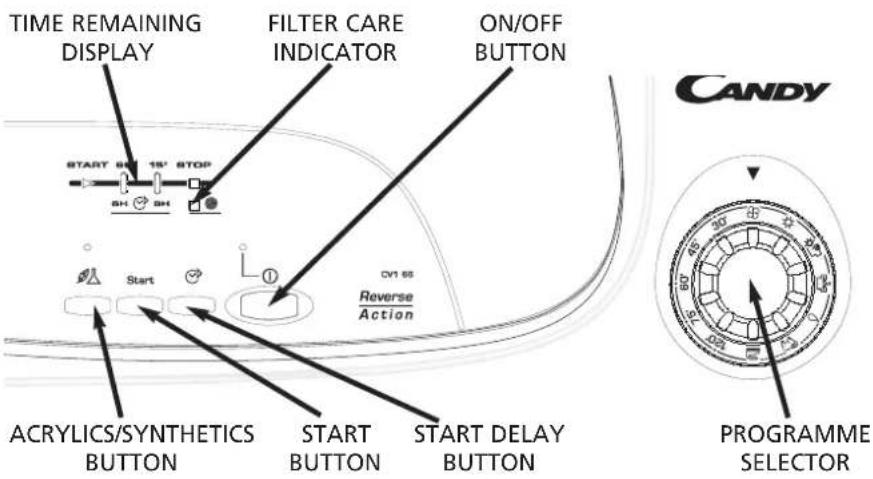
Control panel and indicator lights
Programme Selector – select the required programme
On/Off button and indicator -press to switch on, the indicator will light
Start button – Press to commence the selected drying programme. Press for 5 seconds to cancel/reset the programme
Acrylics/Synthetics button -press to reduce the heat level for delicate
items, the indicator above the button will light up. To change the heat setting the programme must be reset.
Low Heat – Indicator light ON High Heat – Indicator light OFF
Filter Care Indicator lights when the filter needs cleaning
Start Delay Button ☑ Allows the user to delay the start of the drying cycle (see details of operation on page 14).
Time Remaining Display
START – When the dryer is switched On the START indicator will flash, when the programme starts the START indicator will light up
60' – Indicator lights when there is less than 60 minutes left until completion of the programme
15' – Indicator lights when there is less than 15 minutes left until completion of the programme. At this stage of the drying cycle the machine enters the Cool down phase
STOP – Indicator lights when the programme is finished.
6h - 6 hour start delay (light flashes when in operation)
9h - 9 hour start delay (light flashes when in operation)
Door and Filter

natural_image
Line drawing of a hand holding a car seatbelt, no text or symbols presentOpening the door
Pull on handle to open the door.
To restart the dryer, close the door and press Start.
WARNING!
When the tumble dryer is in use the drum and door may be VERY HOT
natural_image
Line drawing of a hand placing objects into a container (no text or symbols)Filter
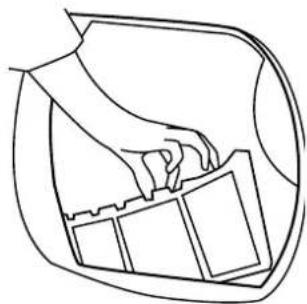
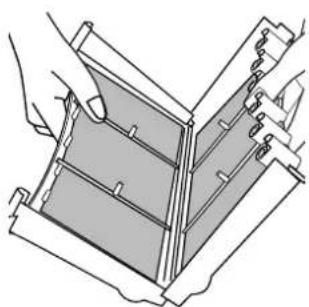
IMPORTANT: To maintain the efficiency of the dryer check that the fluff filter is clean before each drying cycle.
- Pull the filter upwards.
- Open filter as shown.
- Gently remove lint using a soft brush or your fingertips.
- Snap the filter together and push back into place.
natural_image
Technical line drawing of a mechanical assembly with no visible text or symbolsFilter Care Indicator
● lights when the filter needs cleaning.
If the laundry is not drying check that the filter is not clogged. The indicator will also light when the venting hose is blocked or kinked.
Selecting the Programme
This Sensor Dry machine gives many options for drying the laundry to suit all circumstances.
Note: The sensor may not detect a small load of small articles. For small loads and separate items or pre-dried fabrics with low moisture content, use the timed programmes. Set the programme between 30 and 75 minutes depending on the load size and dryness required, and select high or low heat depending upon the fabric type.
If the sensor does not detect the item the dryer will only operate for 10 minutes before going into cooldown.
If the load is too large or too wet to tumble dry the dryer will automatically go into cooldown after 185 minutes.
The table below lists the programmes and the function of each programme.
| Programme | Description |
| Bone Dry [IMAGE] | Select the degree of dryness that you require.This ranges from Bone Dry for bath towels and bathrobes, through Cupboard Dry for items that will be put away without ironing, to the programme that leaves the laundry suitable for ironing. |
| Extra Dry [IMAGE] | |
| Cupboard Dry [IMAGE] | |
| Iron Dry [IMAGE] | |
| Wool [IMAGE] | A gentle programme specially created to get woollens softer after air-drying.This delicate warm air cycle, lasting 12 minutes, can also be used to get woollens 'refreshed' after being stored in the wardrobe. |
| Fast Iron [IMAGE] | The Fast Iron programme provides a conditioning and anticrease function. The dryer will heat the load for 9 minutes followed by a 3 minute cool down period and is especially good for garments which may have been left for some time prior to ironing, in a linen basket for example. Garments may also become stiffened when dried outside on a washing line or inside on radiators. The Fast Iron process relaxes the creases in the fabric making ironing quicker and easier. |
| 120' | 120 minutes of drying |
| 75' | 75 minutes of drying |
| 60' | 60 minutes of drying |
| 45' | 45 minutes of drying |
| 30' | 30 minutes of drying |
| Refresh [IMAGE] | Tumbling of laundry in cool air for 30 minutes. |

Operation
- Open the door and load the drum with laundry. Ensure that garments do not hinder closure of the door.
- Gently close the door pushing it slowly until you hear the door 'click' shut.
- Press the Start button to switch on the dryer. The indicator will light up and the START indicator will flash.
- Turn the Programme Selector dial to select the required drying program (see Programme Guide).
- If drying synthetics, acrylics or delicate items, press the button to reduce the heat level. The light above the push button will light up when the machine is in low heat setting. To deselect this status when the drying cycle has started it is necessary to reset the machine
- Press the Start button. The dryer will start automatically and the START indicator will be continuously lit.
- The Time Remaining display will show the drying progress in terms of time remaining.
- If the door is opened during the programme to check the laundry, it is necessary to press Start to recommence drying after the door has been closed.
- When the 15' indicator is lit the machine will enter the cool down phase, the clothes will be tumbled in cool air allowing the load to cool down.
- When the programme is complete the STOP indicator will light.
WARNING!
The drum, door and load may be very hot.
Cancelling and resetting the programme
To cancel a programme press the Start button for 5 seconds. The machine will indicate that it has been reset by the START indicator flashing. It is possible to change the programme within the first 10 minutes without using the cancel and reset function.
Start Delay
The Delay Start Function ⬇ allows the user to delay the start of the drying cycle by 6 or 9 hours.
When the function is first selected the display will show a delay of 6 hours, a subsequent press of the button will increase the delay to 9 hours.
To commence the programme press Start and the appliance will complete the drying cycle at the end of this time. The 6 or 9 hour indicator light will flash to indicate that the start delay is in progress.
Cleaning and Routine Maintenance
Cleaning the dryer
●Clean the filter after every drying cycle.
●After each period of use, wipe the inside of the drum and leave the door open for a while to allow circulation of air to dry it.
●Wipe the outside of the machine and the door with a soft cloth.
●DO NOT use abrasive pads or cleaning agents.
●To prevent the door sticking or the build up of fluff periodically clean the inner door and gasket with a damp cloth.
Technical specifications
Drum capacity 115 litres
Maximum load 6 kg
Height 85cm
Width 60cm
Depth 60cm
Energy Label Band C
IMPORTANT
Always switch off and remove the plug from the electricity supply before cleaning this appliance.
For electrical data refer to the rating label on the front of the dryer cabinet (with the door open).
Troubleshooting
What might be the cause of...
Defects you can remedy yourself
Before calling GIAS Service for technical advice please run through the following checklist. A charge will be made if the machine is found to be working or has been installed incorrectly or used incorrectly. If the problem persists after completing the recommended checks, please call GIAS Service, they may be able to assist you over the telephone.
Drying time is too long/clothes are not dry enough...
●Have you selected the correct drying time/programme?
●Were the clothes too wet? Were the clothes thoroughly wrung or spin-dried?
●Does the filter need cleaning?
●Is the dryer overloaded?
●Is the venting hose kinked or blocked?
●Has the option been selected from a previous cycle?
The dryer does not operate...
●Is there a working electricity supply to the dryer? Check using another appliance such as a table lamp.
●Is the plug properly connected to the mains supply?
●Is there a power failure?
●Has the fuse blown?
●Is the door fully closed?
●Is the dryer switched on, both at the mains supply and at the machine?
●Has the drying time or the programme been selected?
●Has the machine been switched on again after opening the door?
The dryer is noisy...
●Switch off the dryer and contact GIAS Service for advice.
The Filter Care Indicator is on...
- Does the filter need cleaning?
●Is the venting hose kinked or blocked?
Customer Service
Should there still be a problem with your dryer after completing all the recommended checks, please call GIAS Service for advice. They may be able to assist you over the telephone or arrange for a suitable appointment for an engineer to call under the terms of your guarantee. However, a charge may be made if any of the following applies to your machine:
●Is found to be in working order.
●Has not been installed in accordance with the installation instructions.
●Has been used incorrectly.
Spares
Always use genuine spares, available direct from GIAS Service.
GIAS Service
For service and repairs call your local GIAS Service engineer.
The manufacturer declines all responsibility in the event of any printing mistakes in this booklet. The manufacturer also reserves the right to make appropriate modifications to its products without changing the essential characteristics.
Introduction 19
natural_image
Line drawing of a hand holding a door panel with a diagonal line indicating alignment (no text or symbols)Rappels de sécurité
Installation
natural_image
Symbol of a trash bin crossed with a diagonal line, representing no waste or discharge (no text or labels)
natural_image
Hand holding a small mechanical component with directional arrows indicating motion (no text or symbols)Besoins électriques
natural_image
Simple line drawing of a sock with decorative elements and a circular button (no text or symbols)natural_image
Line drawing of a hand holding a small object with a curved line extending from it (no text or symbols)natural_image
Line drawing of a hand holding a car seatbelt, no text or symbols presentnatural_image
Line drawing of a hand placing objects into a container (no text or symbols)natural_image
Technical line drawing of a mechanical assembly with hands operating a component (no text or symbols)natural_image
Line drawing of a hand holding a door panel with a diagonal line (no text or symbols)Sicherheitshinweise
Installation
natural_image
Symbol of a trash bin crossed out by two diagonal lines (no text or labels)
natural_image
Hand holding a small mechanical component with directional arrows indicating motion (no text or symbols)Elektro-Anschluss
natural_image
Simple line drawing of a sock with decorative elements and a circular button (no text or symbols)
natural_image
Line drawing of a hand holding a small object with a curved line extending from it (no text or symbols)natural_image
Line drawing of a hand holding a car seatbelt, no text or symbols presentÖffnen der Tür
natural_image
Line drawing of a hand placing objects into a container (no text or symbols)natural_image
Technical line drawing of a mechanical assembly with hands operating a component (no text or symbols)natural_image
Line drawing of a hand holding a door panel with a diagonal line (no text or symbols)natural_image
Simple line drawing of a trash bin with two crossed lines indicating no waste or prohibition (no text or symbols)
natural_image
Hand holding a small mechanical component with directional arrows indicating motion (no text or symbols)Requisiti elettrici
natural_image
Simple line drawing of a sock with decorative elements and a circular button (no text or symbols)natural_image
Line drawing of a hand holding a circular object with a diagonal line extending from it (no text or symbols)natural_image
Four technical line drawings showing mechanical bracket assembly with no text or symbolsnatural_image
Line drawing of a hand holding a car seatbelt, no text or symbols presentnatural_image
Line drawing of a hand placing objects into a container (no text or symbols)natural_image
Technical line drawing of a mechanical assembly with hands operating a component (no text or symbols)natural_image
Line drawing of a hand holding a door panel with a diagonal line indicating alignment (no text or symbols)natural_image
Symbol of a trash bin crossed out by two diagonal lines (no text or numbers present)
natural_image
Hand holding a small mechanical component with directional arrows indicating motion (no text or symbols)natural_image
Simple line drawing of a sock with decorative elements and a circular button (no text or symbols)natural_image
Line drawing of a hand holding a circular object with a pointed tip, no text or symbols presentnatural_image
Line drawing of a hand holding a car seatbelt, no text or symbols presentDe deur openen
natural_image
Line drawing of a hand placing objects into a container (no text or symbols)natural_image
Technical line drawing of a mechanical assembly with no visible text or symbolsIndikator for filteredlikehold 92
Velge program 93
Drift 94
Avbryte og nullstille programmet 94
Startforsinkelse 94
natural_image
Line drawing of a hand inserting a component into a door panel (no text or symbols)natural_image
Symbol of a trash bin crossed out by two diagonal lines (no text or labels)
natural_image
Hand holding a small mechanical component with directional arrows indicating motion (no text or symbols)Justere føttene
natural_image
Simple line drawing of a sock with decorative elements and a circular button (no text or symbols)natural_image
Line drawing of a hand holding a small object with a curved line extending from it (no text or symbols)natural_image
Four technical line drawings showing bracket assembly with cross marks, no text or symbols presentGjøre klart tøyet
natural_image
Line drawing of a hand holding a car seatbelt, no text or symbols presentÅpne døren
natural_image
Line drawing of a hand placing objects into a container (no text or symbols)natural_image
Technical line drawing of a mechanical assembly with hands operating a component (no text or symbols)Indikator for filtervedlikehold
Lyser när filteret trenger rengjøring.
natural_image
Line drawing of a hand holding a door panel with a diagonal line (no text or symbols)Säkerhetsinformation
Installation
natural_image
Symbol of a trash bin crossed out by two diagonal lines (no text or labels)
natural_image
Hand holding a small mechanical component with directional arrows indicating motion (no text or symbols)Elanslutningskrav
natural_image
Simple line drawing of a sock with decorative elements and a circular button (no text or symbols)natural_image
Line drawing of a hand holding a circular object with a diagonal line extending from it (no text or symbols)natural_image
Four technical line drawings showing mechanical bracket assembly with no text or symbolsFörbereda lasten
natural_image
Line drawing of a hand holding a car seatbelt, no text or symbols presentÖppna luckan
natural_image
Line drawing of a hand placing objects into a container (no text or symbols)natural_image
Technical line drawing of a mechanical assembly with no visible text or symbolsnatural_image
Line drawing of a hand holding a door panel with a diagonal line indicating alignment (no text or symbols)Turvallisuusohjeet
Asennus
natural_image
Symbol of a trash bin crossed with two crossed lines, no text or labels presentnatural_image
Hand holding a small mechanical component with directional arrows indicating motion (no text or symbols)Sähkövaatimukset
natural_image
Simple line drawing of a sock with decorative elements and a circular button (no text or symbols)
natural_image
Line drawing of a hand holding a circular object with a thin line extending from it (no text or symbols)natural_image
Four technical line drawings showing mechanical bracket assembly with cross marks, no text or symbols presentnatural_image
Line drawing of a hand holding a car seatbelt, no text or symbols presentLuukun avaaminen
natural_image
Line drawing of a hand placing objects into a container (no text or symbols)Suodatin
natural_image
Technical line drawing of a mechanical device with no visible text or symbolsnatural_image
Line drawing of a hand holding a door handle with a diagonal line indicating alignment (no text or symbols)Znakovi upozorenja
Instalacija
- Prije korištenja provjerite ima li stroj vidljivih znakova oštećenja. Ako je oštećen, ne koristite ga i nazovite GIAS servis.
●Ne koristite adaptere, višestruke konektore i/ili produžetke.
●Ovaj se stroj ne smije instalirati u kupatilo ili u prostoriju s tušem.
●Sušilicu ne smijete nipošto instalirati u blizini zastora i pobrinite se da predmeti ne padaju i ne skupljaju se iza stroja.
Korištenje
natural_image
Symbol of a trash bin crossed out by two diagonal lines (no text or numbers present)
natural_image
Hand holding a small mechanical component with directional arrows indicating motion (no text or symbols)Električno napajanje
Za rad sušilice potrebna je voltaža od 230V, 50 Hz svaka faza. Provjerite da je jakost struje mreže najmanje 10A.
natural_image
Simple line drawing of a sock with decorative elements and a circular button (no text or symbols)Instaliranje ispušne cijevi
natural_image
Line drawing of a hand holding a circular object with a line extending from it (no text or symbols)natural_image
Four technical line drawings showing mechanical bracket assembly with no text or symbolsnatural_image
Line drawing of a hand holding a car seatbelt, no text or symbols presentOtvaranje vrata
Povucite ručicu za otvaranje vrata.
Za restartanje sušilice, zatvorite vrata i pritisnite Start.
UPOZORENJE!
Kad je sušilica u upotrebi, bubanj i vrata mogu biti VEOMA VRUĆI
Filtar
natural_image
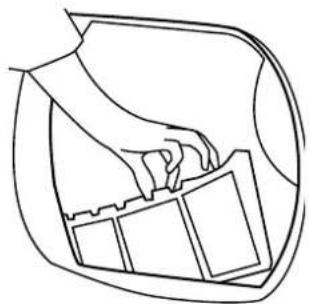
Line drawing of a hand placing objects into a container (no text or symbols)VAŽNO: Za održavanje učinkovitosti sušilice prije svakog ciklusa sušenja provjerite je li filtar za otpatke čist.
natural_image
Technical line drawing of a mechanical assembly with no visible text or symbolsnatural_image
Line drawing of a hand holding a door panel with a diagonal line indicating alignment (no text or symbols)natural_image
Simple line drawing of a trash bin crossed with two diagonal lines (no text or symbols)
natural_image
Hand holding a small mechanical component with directional arrows indicating motion (no text or symbols)natural_image
Simple line drawing of a sock inside a container with handles and a button (no text or symbols)natural_image
Line drawing of a hand holding a curved object, possibly a device or tool, with no visible text or symbols.natural_image
Line drawing of a hand holding a car seatbelt, no text or symbols presentΆνοιγμα της πόρτας
natural_image
Line drawing of a hand placing objects into a container (no text or symbols)natural_image
Technical line drawing of a mechanical assembly with no visible text or symbolsnatural_image
Pure geometric lines and markers without any text, numbers, or symbols
natural_image
Pure geometric lines and markers without any text, numbers, or symbols
bar
| Value | | --------- | | 40003976 |- Introduction
- Delivery information
- Unpacking the product
- Safety reminders
- Installation
- Use
- The Laundry
- Environmental Issues
- GIAS Service
- European directive 2002/96/EC
- Electrical requirements
- Adjusting the feet
- Ventilation
- Installation of the Discharge Hose
- Preparing the load
- Clothes preparation
- Maximum drying weight
- Sort the load as follows:
- Drying advice
- Do not tumble dry:
- Energy saving
- ALWAYS
- NEVER
- Drying guide
- Controls and indicators
- Control panel and indicator lights
- Time Remaining Display
- Door and Filter
- Opening the door
- WARNING!
- Filter
- Filter Care Indicator
- Selecting the Programme
- Operation
- Cancelling and resetting the programme
- Start Delay
- Cleaning and Routine Maintenance
- Cleaning the dryer
- Technical specifications
- IMPORTANT
- Troubleshooting
- What might be the cause of...
- Defects you can remedy yourself
- Drying time is too long/clothes are not dry enough...
- The dryer does not operate...
- The dryer is noisy...
- The Filter Care Indicator is on...
- Customer Service
- Spares
- Introduction 19
- Rappels de sécurité
- Besoins électriques
- Sicherheitshinweise
- Elektro-Anschluss
- Öffnen der Tür
- Requisiti elettrici
- De deur openen
- Justere føttene
- Gjøre klart tøyet
- Åpne døren
- Indikator for filtervedlikehold
- Säkerhetsinformation
- Elanslutningskrav
- Förbereda lasten
- Öppna luckan
- Turvallisuusohjeet
- Asennus
- Sähkövaatimukset
- Luukun avaaminen
- Suodatin
- Znakovi upozorenja
- Instalacija
- Korištenje
- Električno napajanje
- Instaliranje ispušne cijevi
- UPOZORENJE!
- Filtar
- Άνοιγμα της πόρτας
Brand : CANDY
Model : CV1 66-S
Category : Tumble dryer