
Impact Plus FC8381 - Vacuum Cleaner PHILIPS - Free user manual and instructions
Find the device manual for free Impact Plus FC8381 PHILIPS in PDF.
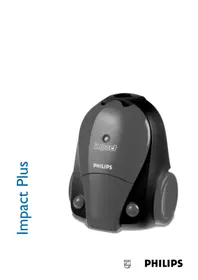


| Brand | Philips |
| Model | Impact Plus FC8381 |
| Type | Canister vacuum cleaner |
| Color | Blue/White |
| Dimensions (L x W x H) | Approx. 45 x 28 x 25 cm |
| Weight | Approx. 5.5 kg |
| Power consumption | 1800 W |
| Suction power | 350 AW |
| Noise level | 78 dB(A) |
| Dust capacity | 3 L |
| Filtration | HEPA 10 filter |
| Cord length | 6 m |
| Operating radius | 9 m |
| Cleaning method | Dry vacuuming |
| Bag type | Philips s-bag Classic |
| Accessories included | Combination nozzle, crevice tool, small brush |
| Handle type | Comfort grip with carry handle |
| Airflow control | Yes, on handle |
| Automatic cord rewind | Yes |
| Maintenance | Replace bag when full; clean filter regularly |
| Reparability | Replaceable parts: bag, filter, hose, nozzle |
| Safety features | Thermal overload protection |
Frequently Asked Questions - Impact Plus FC8381 PHILIPS
User questions about Impact Plus FC8381 PHILIPS
0 question about this device. Answer the ones you know or ask your own.
Ask a new question about this device
Download the instructions for your Vacuum Cleaner in PDF format for free! Find your manual Impact Plus FC8381 - PHILIPS and take your electronic device back in hand. On this page are published all the documents necessary for the use of your device. Impact Plus FC8381 by PHILIPS.
USER MANUAL Impact Plus FC8381 PHILIPS
Read these instructions for use carefully before using the appliance and save them for future reference.
- Only use Philips s-bag™ double-layer paper dustbags or the cotton dustbag provided.
- Never suck up water or any other liquid. Never suck up ashes until they are cold.
- When the vacuum cleaner is used to suck up fine dust, the pores of the dustbag may become clogged, causing the passage of air through the dustbag to become obstructed. As a result, the 'dustbag full' indicator will indicate that the dustbag needs to be replaced, even though the dustbag is not full at all.
- Never use the appliance without the Motor Protection Filter. This could damage the motor and shorten the life of the appliance. If the mains cord of this appliance is damaged, it may only be replaced by Philips or a service centre authorised by Philips in order to avoid hazardous situations.
Noise level: Lc= 80 dB(A)
Connecting accessories
Hose
To connect the hose, push it into the appliance and turn it clockwise (fig. 1).
To disconnect the hose, turn it anticlockwise and pull it out of the appliance.
Connect the tubes to each other and to the handgrip by inserting the narrow section into the wider section while turning it a little. The tube with the clip is the lower tube (fig. 2).
You can connect the accessories in the same way.
Disconnect the accessories and tubes by pulling them and turning them a little.
Telescopic tube (specific types only)
Adjust the tube to the length you find most comfortable during vacuum cleaning (fig. 3).
Combi nozzle
The combi nozzle can be used on either carpets (with the brush strips folded in) or hard floors (with the brush strips folded out):
1 Push the rocker switch on top of the combi nozzle with your foot to make the brush strip for cleaning hard floors come out of the nozzle housing (fig. 4). 2 Push the rocker switch on the other side to make the brush strip disappear into the housing (fig. 5). Crevice nozzle
The crevice nozzle can be found in the special storage compartment (fig. 6).
Using the appliance
Adjusting the suction power
You can adjust the suction power by means of the slide on the handgrip (specific types only) (fig. 7). 2 You can adjust the suction power by means of the electronic suction power control (specific types only) (fig. 8).
To carry the appliance, put the handle in upright position (fig. 9).
Storage
Put the appliance in upright position and attach the lower tube to the appliance by means of the clip (fig. 10).
The clip can be slid along the tube to adjust its height.
Replacing the dustbag
- Replace the dustbag as soon as the 'dustbag full' indicator has changed colour permanently.
1 Switch the appliance off and open the cover (fig. 11). 2 Push the dustbag holder backwards (fig. 12). 3 Lift the dustbag out of the compartment by pulling the cardboard lug upwards. This causes the dustbag to become sealed (fig. 13). 4 Slide the cardboard front of the new dustbag into the two grooves of the dustbag holder. Press it down as far as possible (fig. 14). 5 Pull the dustbag holder forwards until you hear a click. You cannot close the cover if no dustbag has been inserted (fig. 15).
Philips s-bag™ paper dustbags are available under type number FC8021 (883802101010).
- If provided, you can use the cotton dustbag instead of paper dustbags.
The cotton dustbag can be used and emptied repeatedly.
For removing and inserting the cotton dustbag, simply follow the instructions for replacing paper dustbags.
To empty the cotton dustbag:
1 Remove the clip by sliding it off the dustbag sideways. 2 Undo the metal hooks. 3 Shake out the contents. 4 Close the dustbag by fastening the metal hooks and sliding the clip back onto the bottom edge of the dustbag.
Philips cotton dustbags are available under type number FC8020 (432200493291).
Filter replacement
AFS Micro Filter
Replace the AFS Micro Filter every 6 months.
The AFS Micro Filter will remove a large part of the smallest particles from the exhaust air.
1 Detach the filter holder and remove the filter (fig. 16).
2 Place the sides (1, 2) and the bottom edge (3) of the new filter properly behind the ridges of the holder (fig. 17).
3 Put the holder back into the vacuum cleaner by first hooking the bottom edge of the holder into the appliance (1) and then pushing the holder towards the appliance (2) until it snaps home (fig. 18).
Make sure the filter holder has been placed properly.
Motor Protection Filter
Replace the Motor Protection Filter once a year.
If you are using the cotton dustbag, wash the Motor Protection Filter in lukewarm water once a year.
Make sure the Motor Protection Filter is completely dry before you put it back into the appliance.
1 Switch the appliance off and open the cover. Take out the filter holder and remove the filter (fig. 19). 2 Insert a new filter into the holder with the white side facing upwards and put the holder back into the appliance.
Two AFS Micro Filters and one Motor Protection Filter are available under type number FC8032 (883803201010).
Environment
To make recycling possible, the plastics used for this appliance have been coded.
The cardboard packaging has been made of recycled material and is fully recyclable.
Insufficient suction power
I Check if the dustbag needs to be replaced. 2 Check if the filters need to be replaced. 3 Check if the slide on the handgrip is closed. 4 Check if the electronic suction power control is in maximum position (specific types only). 5 Check if the nozzle, tube or hose is blocked up. To remove the obstruction, disconnect the blocked-up item and connect it (as far as possible) the other way around. Switch the vacuum cleaner on to force the air through the blocked-up item in opposite direction (fig. 20).
Guarantee & service
If you need information or if you have a problem, please visit the Philips Web site at www.philips.com or contact the Philips Customer Care Centre in your country (you will find its phone number in the worldwide guarantee leaflet). If there is no Customer Care Centre in your country, turn to your local Philips dealer or contact the Service Department of Philips Domestic Appliances and Personal Care BV.
Hose opening assembly
1
Device
Brand : PHILIPS
Model : Impact Plus FC8381
Category : Vacuum Cleaner