
FM Transmitter 00014156 - Hi-Fi System HAMA - Free user manual and instructions
Find the device manual for free FM Transmitter 00014156 HAMA in PDF.


| Product Type | FM Transmitter for Audio |
| Brand | Hama |
| Model | 00014156 |
| Category | Hi-Fi System |
| FM Frequency Range | 87.5 – 108.0 MHz |
| Audio Input | 3.5 mm jack |
| Power Supply | 12 V cigarette lighter |
| Cable Length | Approximately 1 m |
| Weight | 95 g |
| Dimensions (L × W × H) | 80 × 40 × 20 mm |
| Main Function | Wireless audio transmission to car radio |
| Display | LED screen for frequency |
| Compatibility | Audio devices with jack socket (smartphones, MP3 players, etc.) |
| Cleaning | Soft dry cloth |
| Maintenance | Avoid moisture and shocks |
| Safety | Use only in vehicles with 12 V battery |
| Repairability | Spare parts not available separately |
| Warranty | 2 years |
Frequently Asked Questions - FM Transmitter 00014156 HAMA
User questions about FM Transmitter 00014156 HAMA
0 question about this device. Answer the ones you know or ask your own.
Ask a new question about this device
Download the instructions for your Hi-Fi System in PDF format for free! Find your manual FM Transmitter 00014156 - HAMA and take your electronic device back in hand. On this page are published all the documents necessary for the use of your device. FM Transmitter 00014156 by HAMA.
USER MANUAL FM Transmitter 00014156 HAMA
FM Transmitter with Bluetooth®Function
Operating Instructions
Bedienungsanleitung
Mode d'emploi
GB
D
F


Controls and Displays
- USB charging connection, 2.4 A
- USB charging connection, 1 A / USB stick
- Display / Frequency indicator
- Jump backward one title, Volume -
- Start/Pause playback
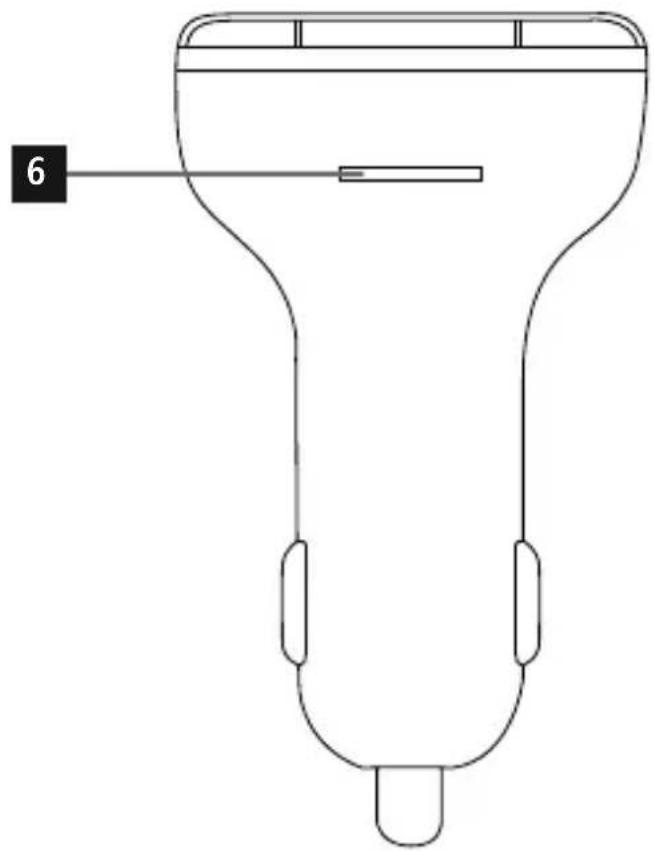
- Side: microSD card slot
- Transmission frequency selection
- Jump forward one title / Volume +
Thank you for choosing a Hama product.
Take your time and read the following instructions and information completely. Please keep these instructions in a safe place for future reference. If you sell the device, please pass these operating instructions on to the new owner.
1. Package Contents
- The product is intended for private, non-commercial use only.
- Use the product for its intended purpose only.
- Do not operate the product outside the power limits given in the specifications.
- Protect the product from dirt, moisture and overheating, and only use it in a dry environment
- Do not use the product in moist environments avoid splashes.
- Do not bend or crush the cable.
- A lways pull directly on the plug when disconnecting the cable, never on the cable itself.
- Do not drop the product and do not expose it any major shocks.
- D ispose of packaging material immediately according to locally applicable regulations.
- Do not modify the product in any way. Doing voids the warranty.

Note
- When using this product, observe the applicable local traffic laws and regulations.
- Take care that components such as airbags, safety areas, controls, instruments, etc. and visibility are not blocked or restricted.

Warning
- Do not continue to operate the device if it becomes visibly damaged.
3. Product Features
The FM transmitter is used to transmit music or voice from a mobile device (smartphone, tablet, etc.) to an FM playback device (such as a car radio) in high quality in a car, caravan or boat. At the same time, up to two terminal devices can be charged simultaneously using the USB connections. The FM transmitter is compatible with all terminal devices that have Bluetooth® function. The FM transmitter can also transmit music or voice directly from a USB stick (maximum of 32 GB) or a microSD card (maximum of 32 GB).
4. Getting Started and Operation
- P lug the FM transmitter into a power socket of your vehicle's electrical system, and then establish the Bluetooth® connection between the mobile device and the FM transmitter as described below. - A Internatively, audio files can be transferred directly from a USB stick or microSD card.

Note
- F or some vehicle types, the ignition has to be switched on to supply power to the 12 V car socket. For more information, please refer to your vehicle's operating instructions.
- D isconnect all cable and on-board connections after use.
4.1 Bluetooth® pairing

Note
- Check whether your mobile device (MP3 player mobile phone, etc.) is Bluetooth® capable.
- If not, the only way you can use the FM transmitter for playback is with a USB stick or microSD card.
- N ote that the maximum range Bluetooth® is 10 metres without obstacles such as walls, people, etc.
- Make sure that y Bluetooth® capable terminal device is on and Bluetooth® is activated.
- Plug the FM transmitter into a car socket located near the car radio.
- Make sure that the FM transmitter is within the maximum Bluetooth® range of 10 metres.
- O pen the Bluetooth® settings on your terminal device and wait until BT10 appears in the list Bluetooth® devices found.
- S elect BT10 and wait until the FM transmitter listed as connected in the Bluetooth® settings on your terminal device. A transmission frequency is now shown on the display.

Note -Bluetooth® password
Some terminal devices require a password in order to connect to another Bluetooth ® device.
- If your terminal device requests a password connection to the speaker, enter 0000.

Note - Connection impaired
After the FM transmitter and terminal device have been paired, a connection is established automatically. If the Bluetooth® connection is not established automatically, check the following:
- C heck the Bluetooth® settings of your terminal device to see whether BT10 is connected. If not, repeat the steps listed under Bluetooth® pairing.
- C heck whether your terminal device and the FM transmitter are less than 10 metres apart. If not, move the devices closer together.
- C heck whether obstacles are impairing the range. If so, move the devices closer together.
4.2 Audio playback (viBluetooth®)
Start and control audio playback on the connected terminal device accordingly. Alternatively, audio playback can also be controlled on the FM transmitter (if the connected device supports this function).
- Press the function button to start or pause audio playback.
- Press the function button to jump forward one title.
- Press the function button to jump backward one title.
4.3 Audio playback or (via USB stick or microSD card)
- P lug the USB stick into the USB socket marked with ⬤(2); playback will start automatically.
- Insert a microSD card into the card slot (6) on the FM transmitter; playback will start automatically.

Note
- T he capacity of the USB stick or microSD card must not exceed 32 GB.
- T he following formats are supported for audio playback: MP3.
4.4 Manual station search
- Search for an available frequency on your car (static without partial signals).
- S et the same frequency on the FM transmitter. do this, press and hold the CH button (7) until the frequency indicator on the display (3) begins to flash.
- Then press the or button to set the desired frequency.
- The FM transmitter always stores the last frequent set.

Note – Automatic standby
- A fter 50 to 60 seconds without a music signal or button being pressed, the FM transmitter switches to standby.
- If it receives a music signal or a button is pressed, the FM transmitter is activated again.
4.5 Charging function
The FM transmitter has two USB connections. These supply the charging currents specified in Point 8. Technical specifications.

Note - Connecting terminal devices
- Before connecting a terminal device, check whether the power output of the charger can supply sufficient power for the device.
- Ensure that the total power consumption of all connected terminal devices does not exceed 3400 mA.
- P lease refer to the instructions in the operating manual of your terminal device.
- D isconnect all cable and mains connections after use.
6. Warranty Disclaimer
Adiona GmbH & Co KG assumes no liability and provides no warranty for damage resulting from Improper installation/mounting, improper use of the product or from failure to observe the operating instructions and/or safety notes.
7. Service and Support
Please contact Hama Product Consulting if you have any questions about this product.
Hotline: +49 9091 502-115 (German/English) Further support information can be found here: www.hama.com
8. Technical Data
| FM transmitter with Bluetooth® function | |
| Bluetooth® technology | Bluetooth® v2.1. |
| Input voltage 12 – 16 V | |
| Input current | 1.7 A |
| Output voltage, USB | 5.0 V |
| Output current, USB 1 | 2.4 A |
| Output current, USB 2 (marked with symbol) | 1 A |
| VHF frequency range | 87.6–107.9 MHz |
| Transmitting power Max. | 50 nW |
5. Care and Maintenance
Only clean this product with a slightly damp, lint-free cloth and do not use aggressive cleaning agents.
9. Recycling Information
Note on environmental protection:

After the implementation of the European Directive 2012/19/EU and 2006/66/EU in the national legal system, the following applies: Electric and electronic devices as well as batteries must not be disposed of with household waste. Consumers are obliged by law to return electrical and electronic devices as well as batteries at the end of their service lives to the public collecting points set up for this purpose or point of sale. Details to this are defined by the national law of the respective country. This symbol on the product, the instruction manual or the package indicates that a product is subject to these regulations. By recycling, reusing the materials or other forms of utilising old devices/batteries, you are making an important contribution to protecting our environment.
10. Declaration of Conformity

Hereby, Hama GmbH & Co KG declares that the radio equipment type [00014156] is in compliance with Directive 2014/53/EU. The
full text of the EU declaration of conformity is available at the following internet address: www.hama.com/00014156 / Downloads.
Frequency for the Bluetooth® transfers
2,402 GHz \~ 2,480 GHz
Bluetooth ® transfer power Max. 4 dBm
www.hama.com/00014156/Downloads.
The Bluetooth ® word mark and logos are registered trademarks owned by Bluetooth SIG, Inc. and any use of such marks by Hama GmbH & Co KG is under license. Other trademarks and trade names are those of their respective owners.
All listed brands are trademarks of the corresponding companies. Errors and omissions excepted, and subject to technical changes. Our general terms of delivery and payment are applied.

- FM TRANSMITTER WITH BLUETOOTH®FUNCTION
- CONTROLS AND DISPLAYS
- PACKAGE CONTENTS
- NOTE
- WARNING
- PRODUCT FEATURES
- GETTING STARTED AND OPERATION
- 4.1 BLUETOOTH® PAIRING
- NOTE -BLUETOOTH® PASSWORD
- NOTE - CONNECTION IMPAIRED
- 4.2 AUDIO PLAYBACK (VIBLUETOOTH®)
- 4.3 AUDIO PLAYBACK OR (VIA USB STICK OR MICROSD CARD)
- 4.4 MANUAL STATION SEARCH
- NOTE – AUTOMATIC STANDBY
- 4.5 CHARGING FUNCTION
- NOTE - CONNECTING TERMINAL DEVICES
- WARRANTY DISCLAIMER
- SERVICE AND SUPPORT
- TECHNICAL DATA
- CARE AND MAINTENANCE
- RECYCLING INFORMATION
- NOTE ON ENVIRONMENTAL PROTECTION
- DECLARATION OF CONFORMITY
Brand : HAMA
Model : FM Transmitter 00014156
Category : Hi-Fi System