
PSR-F51 - MIDI Keyboard YAMAHA - Free user manual and instructions
Find the device manual for free PSR-F51 YAMAHA in PDF.


| Product Type | MIDI Keyboard |
| Brand | Yamaha |
| Model | PSR-F51 |
| Number of Keys | 61 |
| Key Action | Touch-sensitive |
| Polyphony | 32 notes |
| Built-in Voices | 120 |
| Built-in Styles | 100 |
| Song Memory | 2-track recorder |
| Connectivity | USB to Host, Sustain Pedal, Headphones |
| Power Supply | 6 AA batteries or optional AC adapter |
| Dimensions (W x D x H) | 940 x 317 x 102 mm |
| Weight | 4.6 kg (without batteries) |
| Display | LCD screen |
| Speaker System | 2 x 2.5W |
| Headphone Jack | 1 x 1/4" stereo |
| Included Accessories | Music stand, User manual |
| Cleaning | Wipe with a soft, dry cloth; do not use solvents |
| Safety | Keep away from moisture; use only recommended adapter |
| Spare Parts / Repairability | Contact Yamaha authorized service centers |
Frequently Asked Questions - PSR-F51 YAMAHA
User questions about PSR-F51 YAMAHA
0 question about this device. Answer the ones you know or ask your own.
Ask a new question about this device
Download the instructions for your MIDI Keyboard in PDF format for free! Find your manual PSR-F51 - YAMAHA and take your electronic device back in hand. On this page are published all the documents necessary for the use of your device. PSR-F51 by YAMAHA.
USER MANUAL PSR-F51 YAMAHA
Please keep this manual in a safe and handy place for future reference.
For AC adaptor

WARNING
- This AC adaptor is designed for use with only Yamaha electronic instruments. Do not use for any other purpose.
- Indoor use only. Do not use in any wet environments.

CAUTION
- When setting up, make sure that the AC outlet is easily accessible. If some trouble or malfunction occurs, immediately turn off the power switch of the instrument and disconnect the AC adaptor from the outlet. When the AC adaptor is connected to the AC outlet, keep in mind that electricity is flowing at the minimum level, even if the power switch is turned off. When you are not using the instrument for a long time, make sure to unplug the power cord from the wall AC outlet.
For PSR-F51

WARNING
Always follow the basic precautions listed below to avoid the possibility of serious injury or even death from electrical shock, short-circuiting, damages, fire or other hazards. These precautions include, but are not limited to, the following:
Power supply/AC adaptor
- Do not place the power cord near heat sources such as heaters or radiators. Also, do not excessively bend or otherwise damage the cord, or place heavy objects on it.
- Only use the voltage specified as correct for the instrument. The required voltage is printed on the name plate of the instrument.
- Use the specified adaptor (page 11) only. Using the wrong adaptor can result in damage to the instrument or overheating.
- Check the electric plug periodically and remove any dirt or dust which may have accumulated on it.
Do not open
- This instrument contains no user-serviceable parts. Do not open the instrument or attempt to disassemble or modify the internal components in any way. If it should appear to be malfunctioning, discontinue use immediately and have it inspected by qualified Yamaha service personnel.
Water warning
- Do not expose the instrument to rain, use it near water or in damp or wet conditions, place on it any containers (such as vases, bottles or glasses) containing liquids which might spill into any openings. If any liquid such as water seeps into the instrument, turn off the power immediately and unplug the power cord from the AC outlet. Then have the instrument inspected by qualified Yamaha service personnel.
- Never insert or remove an electric plug with wet hands.
Fire warning
- Do not put burning items, such as candles, on the unit. A burning item may fall over and cause a fire.
Battery
- Follow the precautions below. Failure to do so might result in explosion, fire, overheating or battery fluid leakage.
- Do not tamper with or disassemble batteries.
- Do not dispose of batteries in fire.
- Do not attempt to recharge batteries that are not designed to be charged.
- Keep the batteries separate from metallic objects such as necklaces, hairpins, coins, and keys.
- Use the specified battery type (page 11) only.
- Use new batteries, all of which are the same type, same model, and made by the same manufacturer.
- Always make sure all batteries are inserted in conformity with the +/- polarity markings.
- When the batteries run out, or if the instrument is not to be used for a long time, remove the batteries from the instrument.
- When using Ni-MH batteries, follow the instructions that came with the batteries. Use only the specified charger device when charging.
- Keep batteries away from small children who might accidentally swallow them.
- If the batteries do leak, avoid contact with the leaked fluid. If the battery fluid should come in contact with your eyes, mouth, or skin, wash immediately with water and consult a doctor. Battery fluid is corrosive and may possibly cause loss of sight or chemical burns.
If you notice any abnormality
- When one of the following problems occur, immediately turn off the power switch and disconnect the electric plug from the outlet. (If you are using batteries, remove all batteries from the instrument.) Then have the device inspected by Yamaha service personnel.
- The power cord or plug becomes frayed or damaged.
- It emits unusual smells or smoke.
- Some object has been dropped into the instrument.
- There is a sudden loss of sound during use of the instrument.
Always follow the basic precautions listed below to avoid the possibility of physical injury to you or others, or damage to the instrument or other property. These precautions include, but are not limited to, the following:
Power supply/AC adaptor
- Do not connect the instrument to an electrical outlet using a multiple-connector. Doing so can result in lower sound quality, or possibly cause overheating in the outlet.
- When removing the electric plug from the instrument or an outlet, always hold the plug itself and not the cord. Pulling by the cord can damage it.
- Remove the electric plug from the outlet when the instrument is not to be used for extended periods of time, or during electrical storms.
Location
- Do not place the instrument in an unstable position where it might accidentally fall over.
- Before moving the instrument, remove all connected cables, to prevent damage to the cables or injury to anyone who might trip over them.
- When setting up the product, make sure that the AC outlet you are using is easily accessible. If some trouble or malfunction occurs, immediately turn off the power switch and disconnect the plug from the outlet. Even when the power switch is turned off, electricity is still flowing to the product at the minimum level. When you are not using the product for a long time, make sure to unplug the power cord from the wall AC outlet.
Connections
- Before connecting the instrument to other electronic components, turn off the power for all components. Before turning the power on or off for all components, set all volume levels to minimum.
- Be sure to set the volumes of all components at their minimum levels and gradually raise the volume controls while playing the instrument to set the desired listening level.
Handling caution
- Do not insert a finger or hand in any gaps on the instrument.
- Never insert or drop paper, metallic, or other objects into the gaps on the panel or keyboard. This could cause physical injury to you or others, damage to the instrument or other property, or operational failure.
- Do not rest your weight on, or place heavy objects on the instrument, and do not use excessive force on the buttons, switches or connectors.
- Do not use the instrument/device or headphones for a long period of time at a high or uncomfortable volume level, since this can cause permanent hearing loss. If you experience any hearing loss or ringing in the ears, consult a physician.
Yamaha cannot be held responsible for damage caused by improper use or modifications to the instrument, or data that is lost or destroyed.
Always turn the power off when the instrument is not in use.
Even when the [⏻] (Standby/On) switch is in standby status (display is off), electricity is still flowing to the instrument at the minimum level.
When you are not using the instrument for a long time, make sure you unplug the power cord from the wall AC outlet.
Make sure to discard used batteries according to local regulations.
NOTICE
To avoid the possibility of malfunction/ damage to the product, damage to data, or damage to other property, follow the notices below.
■ Handling and Maintenance
- Do not use the instrument in the vicinity of a TV, radio, stereo equipment, mobile phone, or other electric devices. Otherwise, the instrument, TV, or radio may generate noise. When you use the instrument along with the application on your iPhone/iPad, we recommend that you set "Airplane Mode" to "ON" on your iPhone/iPad in order to avoid noise caused by communication.
- Do not expose the instrument to excessive dust or vibrations, or extreme cold or heat (such as in direct sunlight, near a heater, or in a car during the day) to prevent the possibility of panel disfiguration, damage to the internal components or unstable operation. (Verified operating temperature range: 5° - 40°C , or 41° - 104°F .)
- Do not place vinyl, plastic or rubber objects on the instrument, since this might discolor the panel or keyboard.
- When cleaning the instrument, use a soft, dry/dry or slightly damp cloth. Do not use paint thinners, solvents, cleaning fluids, or chemical-impregnated wiping cloths.
Information
■ About copyrights
- Copying of the commercially available musical data including but not limited to MIDI data and/or audio data is strictly prohibited except for your personal use.
- This product incorporates and bundles computer programs and contents in which Yamaha owns copyrights or with respect to which it has license to use others' copyrights. Such copyrighted materials include, without limitation, all computer software, style files, MIDI files, WAVE data, musical scores and sound recordings. Any unauthorized use of such programs and contents outside of personal use is not permitted under relevant laws. Any violation of copyright has legal consequences. DON'T MAKE, DISTRIBUTE OR USE ILLEGAL COPIES.
■ About functions/data bundled with the instrument
- Some of the preset songs have been edited for length or arrangement, and may not be exactly the same as the original.
Included Accessories
- Owner's Manual (this book)
- AC Adaptor 1
• Online Member Product Registration 2 - Music rest
*1: May not be included depending on your particular locale. Check with your Yamaha dealer.
*2: The PRODUCT ID on the sheet will be needed when you fill out the User Registration form.
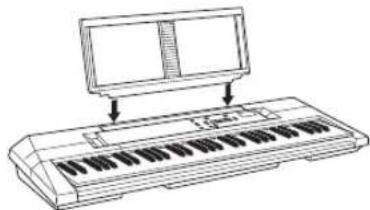
Music Rest
Insert the music rest into the slots as shown.
Online Material (for Yamaha Online members)

Song Book (only in English, French, German and Spanish)
Contains music scores for the preset Songs (excluding Song 001) of this instrument. After completing the user registration at the website below, you can download this Song Book free of charge.
Yamaha Online Member https://member.yamaha.com/myproduct/regist/
You will need the PRODUCT ID on the sheet “Online Member Product Registration” packaged with this manual in order to fill out the User Registration form.
■ About this manual
- The illustrations and displays as shown in this manual are for instructional purposes only, and may appear somewhat different from those on your instrument.
- iPhone and iPad are trademarks of Apple Inc., registered in the U.S. and other countries.
- The company names and product names in this manual are the trademarks or registered trademarks of their respective companies.
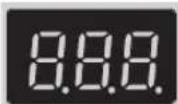
Remove the transparent protective film that was applied to the display prior to shipment from the factory.
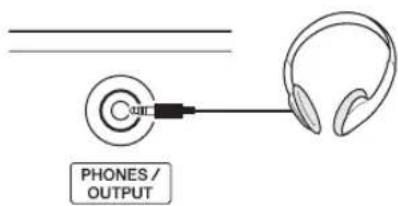
Connecting Headphones or External Audio Equipment (PHONES/OUTPUT Jack)
Any pair of stereo headphones with a stereo phone mini plug can be plugged in here for convenient monitoring. The speakers are automatically shut off when a plug is inserted into this jack. The PHONES/OUTPUT jack also functions as an external output. You can connect the PHONES/OUTPUT jack to a keyboard amplifier, stereo system, mixer, tape recorder, or other line-level audio device to send the instrument's output signal to that device.

CAUTION
- See the "Connections" and "Handling caution" section in the Precautions.
Power Requirements
Although the instrument will run either from an AC adaptor or batteries, Yamaha recommends use of an AC adaptor whenever possible. An AC adaptor is more environmentally friendly than batteries and does not deplete resources.
Using an AC Adaptor
1 Make sure that the power of the instrument is off.

WARNING
- Use the specified adaptor (refer to "Specifications" on page 11). Using the wrong adaptor can result in damage to the instrument or overheating.
2Connect the AC adaptor to the power supply jack.
3Plug the AC adaptor into an AC outlet.


CAUTION
- When using a power adaptor, even when the power is off, a small amount of electricity is still being consumed by the instrument. When you are not using the instrument for a long time, make sure to unplug the AC adaptor from the wall AC outlet.
■ Notice for the AC adaptor
Depending on your particular locale, the AC adaptor having a separable plug should be used. In this case, make sure to follow the explanations below for your safety.
If the plug is accidentally removed from the AC adaptor
Without touching the metallic section, slide the plug into place as shown below then push it in completely until you hear the click sound.

Slide the plug as indicated.
The shape of the plug differs depending on locale.

WARNING
- Make sure to keep the plug attached to the AC adaptor. Using the plug alone can cause electric shock or fire.
- Never touch the metallic section when attaching the plug. To avoid electric shock, short circuit or damage, also be careful that there is no dust between the AC adaptor and plug.
Using Batteries

WARNING
- See the "Battery" section in the Precautions.
■ Installing the batteries
1 Make sure that the power of the instrument is off.
2Open the battery compartment cover located on the instrument's bottom panel.

3Insert six new 1.5V “AA” size alkaline batteries or 1.2V rechargeable Ni-MH batteries (recommended), being careful to follow the polarity markings on the inside of the compartment.

4Replace the compartment cover, making sure that it locks firmly in place.
Setting Up
First, refer to the Power Requirements section (page 7) for important instructions on using the instrument with AC power or batteries. To turn on the power, press the [∅(STANDBY/ON) switch. To set the power to standby, press the switch again.
Adjusting the Volume
Use the MASTER VOLUME [+]/-] buttons to adjust the sound level of the instrument. To restore the default value, press both buttons simultaneously.
Functions
The Functions provide various “hidden” detailed settings for the instrument. (See page 10.)
Songs (No. 001–030)
The Songs showcase the performance possibilities of the instrument, with 30 specially recorded pieces—for playing and practicing along with, or just for listening.
*All Songs play back in succession repeatedly until stopped manually.
To select a Song, press the [SONG/STYLE] button, then use the Number buttons or [+]/-] buttons. See the list on the panel for quick reference in selecting Songs. To play the Song, press the [START/STOP] button; to stop it, press the button again.
With the Songs, you can do the following:
Pause a Song during playback. While the Song is playing, press the [PAUSE/AUTO FILL] button. To resume playback, press the button again.
Mute the melody track of a Song, so that you can play or practice the melody yourself. Simply press the [MUTE] button and start Song playback.
Use the OTS (One Touch Setting) Voice (page 9). Use the Sync Start Function (page 10).
Changing the Tempo
This affects both Song/Style playback and Metronome speed. Press the [TEMPO/TAP] button then use the Number buttons or [+]/[-] buttons while “ P ” or the current tempo value is shown.
Tapping out a Tempo—Tap Start
You can start a Style or Song at a desired speed by simply tapping out the tempo with the [TEMPO/TAP] button. Tap the button four times for time signatures in 4 (such as 4/4) or three times for time signatures in 3 (such as 3/4).
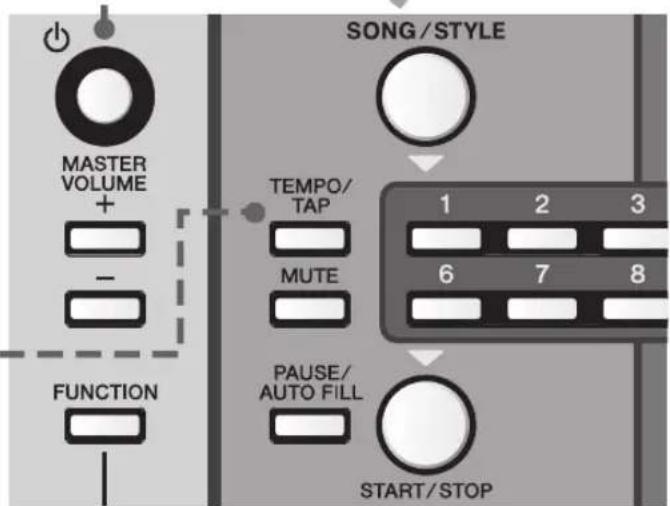
Number buttons
Use the Number buttons to directly select a Voice, Style or Song.
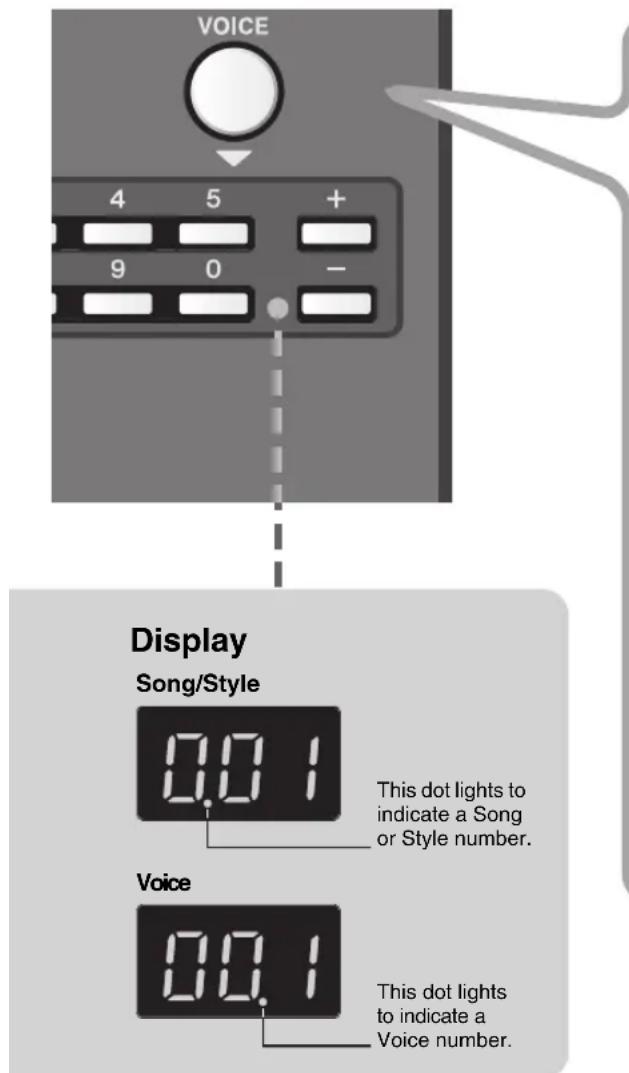
For example, to select Voice 003, press the [VOICE] button, then buttons 0, 0, 3 in succession.

[+] / [-] buttons
Use these buttons to move up [+] or down [-] through the values. Holding down either button continuously increases or decreases the value accordingly.
![YAMAHA PSR-F51 - [+] / [-] buttons - 1](/content/2026/06/1288969/images/c74cdb699f4d594ae35ad73810f4d50c350a08c4cd396577429004588d2e8cb4.jpg)
To restore the default value of a setting, press both buttons simultaneously.
Styles (No. 101–214)
The Styles add excitement to your performance—giving you authentic, automatic backing in a wide variety of music genres. Just play chords (or even single-note chords) with your left hand, and enjoy the accompaniment of a full band behind you!
To select a Style, press the [SONG/STYLE] button, then use the Number buttons or [+]/[-] buttons. See the list on the panel for quick reference in selecting Styles. To start the Style, press the [START/STOP] button; to stop it, press the button again.
Playing the Styles
To properly play a Style and hear the backing parts, you'll need to play chords in the left side or accompaniment section of the keyboard (keys C1–F#2) while the rhythm is playing.

Try playing various chords with your left hand while you play a melody over the accompaniment with your right.
* If you select one of the PIANIST category Styles, which have no rhythm parts, no sound is produced even when you press the [START/STOP] button. If this happens, play a chord in the Accompaniment section of the keyboard to play back other accompaniment parts.
With the Styles, you can do the following:
Play Auto Fills, to add rhythmic interest to your performance. While a Style is playing, press the [PAUSE/AUTO FILL] button.
Mute the instrumental backing of the Style and play only the rhythm. While a Style is playing, press the [MUTE] button. This also lets you play over the full range of the keyboard while the drums/percussion are playing. To restore full Style playback, press the [MUTE] button again and play a chord in the auto accompaniment section of the keyboard.
Start the Style as soon as you play a chord in the accompaniment section (or any key, when Mute function is on) of the keyboard. To do this, set Sync Start (page 10) to on.
Use the OTS (One Touch Setting) Voice.
Voices
The Voices are the heart of the PSR-F51, letting you play over 120 realistic instrument sounds from the keyboard.
To select a Voice, press the [VOICE] button, then use the Number buttons or [+]/[-] buttons. See the list on the panel for quick reference in selecting Voices.
With the Voices, you can do the following:
Select Dual Voices for playing two Voices in a layer (Voices 093–113.)
Select Split Voices for playing different Voices from specific keyboard sections (Voices 114–120.)
* When a Dual or Split Voice is selected, turning on the Duo function may produce unexpected results in the Voice(s) and the Voice ranges, etc. of the two sections.
Select the OTS (One Touch Setting) Voice (Voice 000.) When this is called up and you select a Style or Song, the instrument automatically selects the most appropriate Voice for playing with that Style or Song. To turn this function off, select another Voice.
The Functions

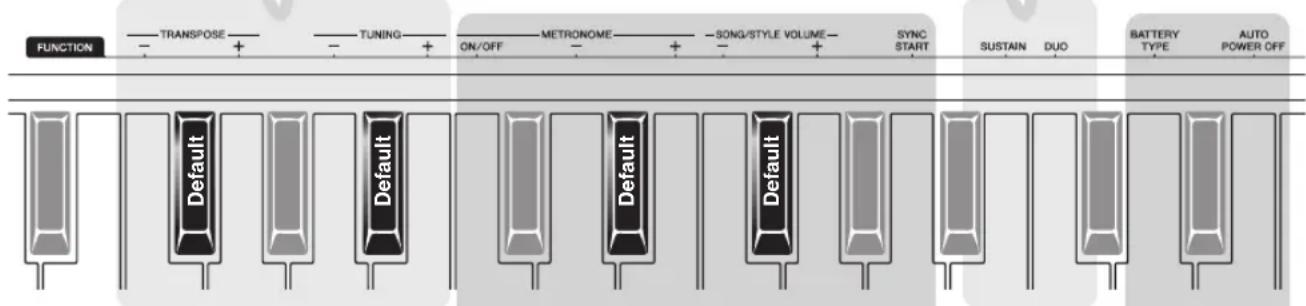
These detailed settings provide extra convenience and enhanced operation. To set the Functions, hold down the [FUNCTION] button, and then simultaneously press the appropriate key on the keyboard as indicated. Use the [+] and [-] keys to change the value, or the Default key to call up the default value (indicated with underline).
* Display indication shown in parentheses.
Transpose/Tuning
TRANSPOSE
Changes the pitch of the instrument in semitones, for playing in different keys.
Range: -12 - 0 - 12
TUNING
Finely changes the pitch of the entire instrument in roughly 0.2 Hz steps, for tuning to other instruments.
Settings: 427.0 - 440.0 - 453.0 Hz (27.0 - 40.0 - 53.0)
Performance
SUSTAIN
When this is set to On, the Voices played from the keyboard have a long decay or sustain.
Settings: On/Off (Son/SoF)
DUO
When this is on, the keyboard is split into two sections (C1–F#3 and G3–C6), with the same Voice and range. Use this when playing or learning with another player.
Settings: On/Off (don/doF)
Metronome/Volume/Sync Start
METRONOME ON/OFF
The Metronome plays a steady click sound for practicing. Change the speed with the Tempo control (page 8).
Settings: On/Off
METRONOME Beat
Sets the number of beats (clicks) in a measure. Set this to 4 for a 4/4 time signature; or 3 for 3/4.
Settings: 0 - 4 - 16
SONG/STYLE/METRONOME VOLUME
Adjusts the volume of the Style/Song/Metronome sound, letting you adjust the balance between those sounds and the keyboard Voice.
Settings: 0 - 12 - 15
SYNC START On/Off
Lets you start the Style or Song by playing a chord or key (page 9).
Settings: On/Off * When set to on, the current display indication flashes.
Utility
BATTERY TYPE
Changes the type of battery to be used. Be sure to change this to match the batteries you've installed.
Settings: Alkaline/Manganese (AL) or Rechargeable (nl)
AUTO POWER OFF
Changes the amount of time that elapses before the power is automatically turned off. The Off setting disables this feature.
Settings: Off/5/10/15/30/60/120 min.
Backup
Backup Parameters
The following settings are maintained even when the power is turned off.
Master Volume Level, Auto Power Off setting, Tuning, Sustain On/off, Battery Select
Initialization
This operation initializes the backup data. While holding down the highest white key on the keyboard, press the [ ] (Standby/ On) switch to turn the power on.

Specifications
| Dimensions(W x D x H) | 940 x 306 x 109 mm(37" x 12-1/16" x 4-5/16") |
| Weight 3.4 kg (7 bs., 8 oz.) (not including batteries) | |
| Keyboard 61 standard-size keys | |
| Display LED display | |
| Voices | Polyphony: 32 notesPreset: 120 |
| Accompaniment Styles | Preset: 114Style Controls: Main, Fill-in |
| Songs Preset: 30 | |
| Connectivity MINI | PHONES/OUTPUT, DC IN |
| Amplifiers 2.5W + | 2.5W |
| Speakers 8cm x 2 | |
| Power Supply | AC Adaptor: PA-130Batteries: Six 1.5V "AA" size Alkaline,Manganese or 1.2V Ni-MH rechargeablebatteries or equivalent |
| Power Consumption | 6W (When using PA-130 AC Adaptor) |
| Auto Power Off Function | Yes |
| Included Accessories | Owner's ManualAC Adaptor: PA-130 or equivalentMay not be included depending on your particular area. Please check with your Yamaha dealer.Music RestOnline Member Product Registration |
| Optional Accessories | AC Adaptor: PA-130 or equivalentHeadphones (HPH-50/HPH-100/HPH-150) |
* The contents of this manual apply to the latest specifications as of the publishing date. To obtain the latest manual, access the Yamaha website then download the manual file. Since specifications, equipment or separately sold accessories may not be the same in every locale, please check with your Yamaha dealer.
Information for Users on Collection and Disposal of Old Equipment and used Batteries

These symbols on the products, packaging, and/or accompanying documents mean that used electrical and electronic products and batteries should not be mixed with general household waste.
For proper treatment, recovery and recycling of old products and used batteries, please take them to applicable collection points, in accordance with your national legislation and the Directives 2002/96/EC and 2006/66/EC.
By disposing of these products and batteries correctly, you will help to save valuable resources and prevent any potential negative effects on human health and the environment which could otherwise arise from inappropriate waste handling.
For more information about collection and recycling of old products and batteries, please contact your local municipality, your waste disposal service or the point of sale where you purchased the items.
[For business users in the European Union]
If you wish to discard electrical and electronic equipment, please contact your dealer or supplier for further information.
[Information on Disposal in other Countries outside the European Union]
These symbols are only valid in the European Union. If you wish to discard these items, please contact your local authorities or dealer and ask for the correct method of disposal.
Note for the battery symbol (bottom two symbol examples):
This symbol might be used in combination with a chemical symbol. In this case it complies with the requirement set by the Directive for the chemical involved.
(weee_battery_eu_en_01)
The model number, serial number, power requirements, etc., may be found on or near the name plate, which is at the bottom of the unit. You should note this serial number in the space provided below and retain this manual as a permanent record of your purchase to aid identification in the event of theft.
Model No.
Serial No.
(bottom_en_01)
Voice List / Voice-Liste / Liste des sonorités / Lista de voces / Lista de vozes / Elenco delle voci / Voicelijst / Tabela brzmień / Список тембров / Liste over lyde / Lista över ljud / Seznam rejstříků / Zoznam hlasov / Hangszínek listája / Seznam zvokov / Списък с тонове / Listă Voci / Skaņu saraksts / Garsų sąrašas / Helide loend / Popis zvukova / Ses Listesi
| Voice No. | Voice Name |
| PIANO | |
| 1 Grand Piano | |
| 2 Bright Piano | |
| 3 Honky-tonk Piano | |
| 4 Harpsichord | |
| E.PIANO | |
| 5 Electric Piano 1 | |
| 6 Electric Piano 2 | |
| 7 Electric Grand | |
| ORGAN | |
| 8 Drawbar Organ | |
| 9 Percussive Organ | |
| 10 Rock Organ | |
| 11 Pipe Organ | |
| 12 Reed Organ | |
| ACCORDION | |
| 13 Accordion | |
| 14 Tango Accordion | |
| 15 Harmonica | |
| GUITAR | |
| 16 Nylon Guitar | |
| 17 Steel Guitar | |
| 18 12Strings Guitar | |
| 19 Jazz Guitar | |
| 20 Clean Guitar | |
| 21 Muted Guitar | |
| 22 Overdriven Guitar | |
| 23 Distortion Guitar | |
| 24 Ukulele | |
| BASS | |
| 25 Acoustic Bass | |
| 26 Finger Bass | |
| 27 Pick Bass | |
| 28 Fretless Bass | |
| 29 Slap Bass | |
| 30 Synth Bass | |
| STRINGS | |
| 31 Strings 1 | |
| 32 Strings 2 | |
| 33 Synth Strings | |
| 34 Pizzicato Strings | |
| 35 Violin | |
| 36 Viola | |
| 37 Cello | |
| 38 Contrabass | |
| 39 Orchestral Harp | |
| Voice No. | Voice Name |
| WOODWIND | |
| 40 | Flute |
| 41 | Piccolo |
| 42 | Recorder |
| 43 | Oboe |
| 44 | Clarinet |
| 45 | Bassoon |
| SAXOPHONE | |
| 46 | Tenor Sax |
| 47 | Alto Sax |
| 48 | Soprano Sax |
| 49 | Baritone Sax |
| BRASS | |
| 50 | Brass Section |
| 51 | Trumpet |
| 52 | Trombone |
| 53 | French Horn |
| 54 | Tuba |
| 55 | Synth Brass |
| PERCUSSION | |
| 56 | Vibraphone |
| 57 | Marimba |
| 58 | Celesta |
| 59 | Timpani |
| SYNTH | |
| 60 | Square Lead |
| 61 | Sawtooth Lead |
| 62 | Bass & Lead |
| 63 | New Age Pad |
| 64 | Warm Pad |
| 65 | Halo Pad |
| 66 | Crystal |
| 67 | Brightness |
| WORLD | |
| 68 | Pan Flute |
| 69 | Ocarina |
| 70 | Banjo |
| 71 | Kalimba |
| 72 | Bagpipe |
| 73 | Dulcimer 1 |
| 74 | Dulcimer 2 |
| 75 | Harmonium 1 (Single Reed) |
| 76 | Harmonium 2 (Double Reed) |
| 77 | Harmonium 3 (Triple Reed) |
| 78 | Sitar |
| 79 | Detuned Sitar |
| Voice No. | Voice Name |
| 80 Shehnai | |
| 81 Tabla | |
| 82 Indian Kit | |
| 83 Oud | |
| 84 Rabab | |
| 85 Kanoon | |
| 86 Arabic Kit | |
| 87 Er Hu | |
| 88 Yang Chin | |
| 89 Koto | |
| DRUM KITS | |
| 90 Standard Kit | |
| 91 Brush Kit | |
| 92 Dance Kit | |
| DUAL | |
| 93 Octave Piano | |
| 94 Piano & Strings | |
| 95 Piano Pad | |
| 96 E.Piano Pad | |
| 97 Octave Harpsichord | |
| 98 Full Organ | |
| 99 Octave Strings | |
| 100 Octave Pizzicato | |
| 101 Strings & Flute | |
| 102 Strings Pad | |
| 103 Flute & Clarinet | |
| 104 Oboe & Bassoon | |
| 105 Alto Sax & Tenor Sax | |
| 106 Octave Brass | |
| 107 Power Brass | |
| 108 Jazz Section | |
| 109 Orchestra Tutti | |
| 110 Trumpet & Trombone | |
| 111 Fat Lead | |
| 112 Bell Mixture | |
| 113 Bell Pad | |
| SPLIT | |
| 114 Piano / A.Bass | |
| 115 E.Piano / E. Bass | |
| 116 Brass / Tuba | |
| 117 Trumpet / Trombone | |
| 118 | Flute / Oboe / Clarinet / Bassoon |
| 119 | Soprano / Alto / Tenor / Baritone Sax |
| 120 | Trumpet / Horn / Trombone / Tuba |
Drum Kit List / Drum-Kit-Liste / Liste des kits de batterie / Lista de juegos de batería / Lista do conjunto de percussão / Elenco dei kit di batteria / Lijst met drumkits / Tabela zestawów perkusyjnych / Список наборов ударных / Liste over trommesæt / Lista över trumset / Seznam bicích sad / Zoznam bicích nástrojov / Dobkészletek listája / Seznam bobnov / Списък на набор от ударни инструменти / Listă Seturi de tobe / Bungu komplektu saraksts / Mušamujų rinkinio sąrašas / Trummikomplektide loend / Popis kompleta bubnjeva / Davul Seti Listesi
: Same as "Standard Kit".
| No. 90 No. 91 No. 92 No. 86 No. 82 | ||||||
| Standard Kit Brush | Klt Dance Kit Arabic Kit Indian Kit | |||||
| C1 | C#1 | C 1 Finger Snap | Khaligi Clap 1 Baya ge | |||
| C#1 B r u s h T a | p | Zarb Back mf Baya ke | ||||
| D1 | D#1 | D 1 Brush Swirl | Khaligi Clap 2 Baya ghe | |||
| D#1 B r u s h S l | a p | Arabic Zalgouta Close | Baya ka | |||
| E1 | E 1 Brush Tap Swirl | Reverse Cymbal | Arabic Hand Clap | Tabla na | ||
| F1 | F#1 | F 1 Snare Roll | Tabel Tak 1 | Tabla tin | ||
| F# 1 Castanel | Sagat 1 | Tablabaya dha | ||||
| G1 | G#1 | G 1 Snare Soft | Brush Slap 2 | AnSD Snappy | Tabel Dom | Dhol 1 Open |
| G# 1 Surdo Open | Sagat 2 | Dhol 1 Slap | ||||
| A1 | A#1 | A 1 Kick Soft | Kick 3 | Tabel Tak 2 | Dhol 1 Mute | |
| A# 1 Open Rim Shot | Open Rim Shot Light | AnSD OpenRim | Sagat 3 | Dhol 1 Open Slap | ||
| B1 | B 1 Kick Tight | AnBD Dance-2 | Riq Tik 3 | Dhol 1 Roll | ||
| C2 | C#2 | C 2 Kick | Kick Jazz | AnBD Dance-3 | Riq Tik 2 | Dandia Short |
| C# 2 Side Stick | Stick Light | Analog Side Stick | Riq Tik Hard 1 | Dandia Long | ||
| D2 | D#2 | D 2 Snare | Brush Slap 3 | AnSD Q | Riq Tik 1 | Chutki |
| D#2 Hand Clap | Riq Tik Hard 2 | Chipri | ||||
| E2 | E 2 Snare Tight | Brush Tap 2 | Snare Dry | Riq Tik Hard 3 | Khanjira Open | |
| F2 | F#2 | F 2 Floor Tom L | Tom Brush 1 | Tom Analog 1 | Riq Tish | Khanjira Slap |
| F# 2 Hi-Hat Closed | Hi-Hat Closed Analog 3 | Riq Snouj 2 | Khanjira Mute | |||
| G2 | G#2 | G 2 Floor Tom H | Tom Brush 2 | Tom Analog 2 | Riq Roll | Khanjira Bendup |
| G# 2 Hi-Hat Pedal | Hi-Hat Closed Analog 4 | Riq Snouj 1 | Khanjira Benddown | |||
| A2 | A#2 | A 2 Low Tom | Tom Brush 3 | Tom Analog 3 | Riq Sak | Dholak 1 Open |
| A# 2 Hi-Hat Open | Hi-Hat Open Analog 2 | Riq Snouj 3 Dholak 1 Mute | ||||
| B2 | B 2 Mid Tom L | Tom Brush 4 | Tom Analog 4 | Riq Snouj 4 | Dholak 1 Slap | |
| C3 | C#3 | C 3 Mic Tom H Tom Brush 5 | Tom Analog 5 Rig Tak 1 | Dhol 2 Open | ||
| C# 3 Crash Cymbal 1 | Crash Analog | Riq Brass 1 | Dhol 2 Slap | |||
| D3 | D#3 | D 3 High Tom | Tom Brush 6 | Tom Analog 6 | Riq Tak 2 | Dhol 2 Rim |
| D#3 Ride Cymbal 1 | Riq Brass 2 | Hand Clap | ||||
| E3 | E 3 Chinese Cymbal | Riq Dom | Mridangam din | |||
| F3 | F#3 | F 3 Ride Cymbal Cup | Zarb Tom f | Mridangam ki | ||
| F# 3 Ambourine | Katem Dom | Mridangam ta | ||||
| G3 | G#3 | G 3 Splash Cymbal | Katem Sak 1 | Dafli Open | ||
| G# 3 Cowbell | Katem Tak 1 | Dafli Slap | ||||
| A3 | A#3 | A 3 Crash Cymbal 2 | Katem Sak 2 | Dafli Rim | ||
| A# 3 V i br a s l a | p | Katem Tak 2 | Chimta Normal | |||
| B3 | B 3 Ride Cymbal 2 | Daholla Sak 2 | Chimta Ring | |||
| C4 | C#4 | C 4 Bongo H | Daholla Sak 1 | Dholki Hi Open | ||
| C#4 Bongo L | Daholla Tak 1 | Dholki Hi Mute | ||||
| D4 | D#4 | D 4 Conga H Mute | Conga Analog H | Daholla Dom | Dholki Lo Open | |
| D#4 Conga H Open | Conga Analog M | Daholla Tak 2 | Dholki Hi Slap | |||
| E4 | E 4 Conga L | Conga Analog L | Zarb Eshareh | Dholki Lo Slide | ||
| F4 | F#4 | F 4 Timbale H | Tablah Dom 2 Dholak 2 Open | |||
| F# 4 Timbale L | Tablah Roll of Edge | Dholak 2 Slide | ||||
| G4 | G#4 | G 4 Agogo H | Tablah Tak Finger 4 | Dholak 2 Rim 1 | ||
| G# 4 Agogo L | Tablah Tak Trill 1 | Dholak 2 Rim 2 | ||||
| A4 | A#4 | A 4 Cabasa | Tablah Tak Finger 3 | Dholak 2 Ring | ||
| A# 4 Maracas | Tablah Tak Trill 2 | Jhanji Open | ||||
| B4 | B 4 Metronome Click | Zarb Wipping Dholak 2 Slap | ||||
| C5 | C#5 | C 5 Meronome Bell | Tablah Tak Finger 1 | Mondira Open | ||
| C#5 Guro Short | Tablah Tik 2 | Mondira Close | ||||
| D5 | D#5 | D 5 Guro Long | Tablah Tik 4 | Tabla C | ||
| D#5 C I av es | Tablah Tik 3 | Tabla F | ||||
| E5 | E 5 Wood Block H | Tablah Tik 1 | Tabla G | |||
| F5 | F#5 | F 5 Wood Block L | Tablah Tak 3 | Tabla B | ||
| F# 5 Scratch H | Scratch H 2 Tablah Tak 1 | Khomokh Normal | ||||
| G5 | G#5 | G 5 Sc ra tc hL | Scratch L 2 | Tablah Tak 4 | Duff Open | |
| G# 5 Triangle Mute | Tablah Tak 2 | Hatheli Long | ||||
| A5 | A#5 | A 5 Triangle Open | Tablah Sak 2 | Hatheli Short | ||
| A# 5 Shaker | Tablah Tremolo | Thavil Slap | ||||
| B5 | B 5 Jingle Bells | Tablah Sak 1 | Thavil Mute | |||
| C6 | C 6 Bell Tree | Tablah Dom 1 Khartaal | ||||
Style List / Style-Liste / Liste des styles / Lista de estilos / Lista de estilos / Elenco degli stili / Stijllijst / Tabela stylów / Список стилей / Liste over stilarter / Lista över kompstilar / Seznam stylů / Zoznam štylov / Stílusok listája / Seznam slogov / Списък със стилове / Listă Stiluri / Stilu saraksts / Stilių sąrašas / Stiilide loend / Popis stilova / Stil Listesi
| Style No. | Style Name |
| Pop & Rock | |
| 101 8BeatModern | |
| 102 60sGuitarPop | |
| 103 60s8Beat | |
| 104 8Beat | |
| 105 OffBeat | |
| 106 60sRock | |
| 107 HardRock | |
| 108 RockShuffle | |
| 109 8BeatRock | |
| 110 16Beat | |
| 111 PopShuffle | |
| 112 GuitarPop | |
| 113 16BtUptempo | |
| 114 KoolShuffle | |
| 115 HipHopLight | |
| Ballad | |
| 116PianoBallad | |
| 117 6/8ModernEP | |
| 1186/8SlowRock | |
| 119OrganBallad | |
| 120 PopBallad | |
| 121 16BeatBallad | |
| Dance&Disco | |
| 122 EuroTrance | |
| 123 Ibiza | |
| 124 SwingHouse | |
| 125 Clubdance | |
| 126 ClubLatin | |
| 127 Garage | |
| 128 TechnoParty | |
| 129 HipHopGroove | |
| 130 70sDisco | |
| 131 LatinDisco | |
| 132 SaturdayNight | |
| 133 DiscoHands | |
| Swing&Jazz | |
| 134 BigBandFast | |
| 135 JazzBallad | |
| 136 JazzClub | |
| 137 Swing1 | |
| 138 Swing2 | |
| 139 Five/Four | |
| 140 Dixieland | |
| 141 Ragtime | |
| Style No. | Style Name |
| R&B | |
| 142 Soul | |
| 143 DetroitPop | |
| 144 6/8Soul | |
| 145 CrocoTwist | |
| 146 Rock&Roll | |
| 147 ComboBoogie | |
| 148 6/8Blues | |
| Country | |
| 149 CountryPop | |
| 150 CountrySwing | |
| 151 Country2/4 | |
| 152 Bluegrass | |
| Ballroom | |
| 153 VienneseWaltz | |
| 154 EnglishWaltz | |
| 155 Slowfox | |
| 156 Foxtrot | |
| 157 Quickstep | |
| 158 Tango | |
| 159 Pasodoble | |
| 160 Samba | |
| 161 ChaChaCha | |
| 162 Rumba | |
| 163 Jive | |
| Trad & Waltz | |
| 164 March | |
| 165 6/8March | |
| 166 PolkaPop | |
| 167 Tarantella | |
| 168 Showtune | |
| 169 ChristmasSwing | |
| 170 ChristmasWaltz | |
| 171 ScottishReel | |
| 172 Waltz | |
| 173 SwingWaltz | |
| 174 JazzWaltz | |
| 175 CountryWaltz | |
| 176 Musette | |
| World | |
| 177 BrazilianSamba | |
| 178 BossaNova | |
| 179 Forro | |
| 180 Sertanejo | |
| 181 Mambo | |
| Style No. Style Name |
| 182 Salsa |
| 183 Beguine |
| 184 Reggae |
| 185 Tijuana |
| 186 Duranguense |
| 187 CumbiaGrupera |
| 188 Joropo |
| 189 Parranda |
| 190 ModernDangdut |
| 191 Keroncong |
| 192 Bhajan |
| 193 BollyMix |
| 194 IndianPop |
| 195 HindBallad |
| 196 IndyWaltz |
| 197 Bhangra |
| 198 Kerala |
| 199 Rajasthan |
| 200 Dandiya |
| 201 Qawwali |
| 202 Saeidy |
| 203 WehdaSaghira |
| 204 Laffi |
| 205 IranianElec |
| 206 Emarati |
| Pianist |
| 207 Stride |
| 208 PianoSwing |
| 209 Arpeggio |
| 210 Habanera |
| 211 SlowRock |
| 212 8BeatPianoBallad |
| 213 6/8PianoMarch |
| 214 PianoWaltz |
Song List / Song-Liste / Liste des morceaux / Lista de canciones / Lista de músicas / Elenco delle song / Songlijst / Tabela utworów / Список композиций / Liste over melodier / Lista över Songer / Seznam skladeb / Zoznam skladieb / Zenedarabok listája / Seznam pesmi / Списък с песни / Listă Cântece / Dziesmu saraksts / Kürinių sąrašas / Lugude loend / Popis skladbi / Şarkı Listesi
| Category Song No. | Song Name | Composer | |
| DEMO 1 Demo Original | |||
| ORCHESTRA | 2 Danse des Mirlitons from “The Nutcracker” P.I. Tchaikovsky | ||
| 3 “Orphée aux Enfers” Ouverture J. Offenbach | |||
| 4 | Slavonic Dances No.10 | A. Dvořák | |
| 5 Méditation (Thaïs) J. Massenet | |||
| 6 Frühlingslied F. Mendelssohn | |||
| 7 “The Surprise” Symphony F.J. Haydn | |||
| PIANIST | 8 La Candeur J.F.Burgmüller | ||
| 9 Arabesque | J.F.Burgmüller | ||
| 10 | Pastorale | J.F.Burgmüller | |
| 11 | Innocence | J.F.Burgmüller | |
| 12 | Etude op.10-3 “Chanson de l'adieu” | F.Chopin | |
| 13 | Valse op.64-1 “Petit Chien” | F.Chopin | |
| 14 | Menuett | L. Boccherini | |
| 15 | Moments Musicaux op.94-3 | F. Schubert | |
| 16 | Prelude (Wohltemperierte Klavier 1-1) | J.S. Bach | |
| 17 | La Viollette | L.Streabbog | |
| 18 | Für Elise | L.v. Beethoven | |
| TRADITIONAL | 19 | America the Beautiful | S.A. Ward |
| 20 | Londonderry Air | Traditional | |
| 21 | Wenn ich ein Vöglein wär ? | Traditional | |
| 22 | Die Lorelei | F. Silcher | |
| 23 | Turkey in the Straw | Traditional | |
| 24 | Muss i denn | F. Silcher | |
| 25 | To a Wild Rose | E.A. MacDowell | |
| DUET | 26 | We Wish You A Merry Christmas (DUET) | Traditional |
| 27 | Ten Little Indians (DUET) | Traditional | |
| 28 | Twinkle Twinkle Little Star (DUET) | Traditional | |
| 29 | The Cuckoo (DUET) | Traditional | |
| 30 | O du lieber Augustin (DUET) | Traditional | |
MEMO
MEMO
Important Notice: Guarantee Information for customers in European Economic Area (EEA) and Switzerland
| Tärkeä ilmoitus: Takuutiedot Euroopan talousalueen (ETA)* ja Sveitsin asiakkailleTämän Yamaha-tuotteen sekä ETA-alueen ja Sveitsin takuuta koskevat yksityiskohtaiset tiedot saatte alla olevasta nettiosoit-teesta. (Tulostettava tiedosto saatavissa sivustollamme.) Voitte myös ottaa yhteyttä paikalliseen Yamaha-edustajaan.*ETA: Euroopan talousalue | Suomi |
| Waźne: Warunki gwarancyjne obowiązujące w EOG* i SzwajcariiAby dowiedzieć się więcej na temat warunków gwarancyjnych tego produktu firmy Yamaha i serwisu gwarancyjnego w całym EOG* i Szwajcarii, należy odwiedzić wskazaną poniżej stronę internetową (Plik gotowy do wydruku znajduje się na naszej stronie internetowej) lub skontaktować się z przedstawicielstwem firmy Yamaha w swoim kraju. * EOG — Europejski Obszar Gospodarczy | Polski |
| Dúležité oznámení: Záruční informace pro zákazníky v EHS* a ve ŠvýcarskuPodrobné záruční informace o tomto produktu Yamaha a záručním servisu v celém EHS* a ve Švýcarsku naleznete na níže uvedené webové adrese (soubor k tisku je dostupný na našich webových stránkách) nebo se můžete obrátit na zastoupení firmy Yamaha ve své zemi. * EHS: Evropský hospodářský prostor | Česky |
| Fontos figyelmeztetés: Garancia-információk az EGT* területén és Svájcban élő vásárlók számáraA jelen Yamaha terměkre vonatkozó részletes garancia-információk, valamint az EGT*-re és Svájcra kiterjedő garanciális szolgáltatás tekintetében keresse fel webhelyünket az alábbi címen (a webhelyen nyomtatható fájlt is talál), vagy pedig lépjen kapcsolatba az országában můködő Yamaha képviseleti irodával. * EGT: Európai Gazdasági Térség | Magyar |
| Oluline márkus: Garantiiteave Euroopa Majanduspiirkonna (EMP)* ja Šveitsi klientideleTápsema teabe saamiseks selle Yamaha toote garantii ning kogu Euroopa Majanduspiirkonna ja Šveitsi garantiiteeninduse kohta, külastage palun veebisaiti alljárgneval aadressil (meie saidil on saadaval prinditav fail) või põörduge Teie regiooni Yamaha esinduse poole. * EMP: Euroopa Majanduspiirkond | Eesti keel |
| Svarīgs paziņojums: garantijas informācija klientiem EEZ* un ŠveicēLai saņemtu detalizėtu garantijas informāciju par šo Yamaha produktu, kā arī garantijas apkalpošanu EEZ* un Šveicē, lūdzu, apmeklėjiet zemāk norādīto tīmekļa vietnes adresi (tīmekļa vietnė ir pieejams drukājams fails) vai sazinieties ar jūsu valsti apkalpojošo Yamaha pārstāvniecību. * EEZ: Elropas Ekonomikas zona | Latviešu |
| Dėmesio: informacija dėl garantijos pirkėjams EEE* ir ŠveicarijojeJei reikia išsamios informacijos apie šį „Yamaha“ produktą ir jo techninę priežiūrą visoje EEE* ir Šveicarijoje, apsilankykite mūsų svetainėje toliau nurodytu adresu (svetainėje yra spausdintinas failas) arba kreipkitės j „Yamaha“ atstovybę savo šaliai.*EEE – Europos ekonominė erdvė | Lietuvių kalba |
| Dôležité upozornenie: Informácie o záruke pre zákazníkov v EHP* a ŠvajčiarskuPodrobné informácie o záruke týkajúce sa tohto produktu od spoločnosti Yamaha a garančnom servise v EHP* a Švajčiarsku nájdete na webovej stránke uvedenej nižšie (na našej webovej stránke je k dispozícii súbor na tlač) alebo sa obrátte na zástupcu spoločnosti Yamaha vo svojej krajine. * EHP: Európsky hospodářsky priestor | Slovenčina |
| Pomembno obvestilo: Informacije o garanciji za kupce v EGP* in ŠviciZa podrobnejše informacije o tem Yamahinem izdelku ter garancijskem servisu v celotnem EGP in Švici, obiščite spletno mesto, ki je navedeno spodaj (natisljiva datoteka je na voljo na našem spletnem mestu), ali se obrnite na Yamahinega predstavnika v svoji državi. * EGP: Evropski gospodarski prostor | Slovenščina |
| Bажно съобщение: Информация за гаранцията за клиенти в ЕИП* и ШвейцарияЗа подробна информация за гаранцията за този продукт на Yamaha и гаранционното обслужване в паневропейската зона на ЕИП* и Швейцария или посетете посочения по-долу уеб сайт (на нашия уеб сайт има файл за печат), или се свържете с представителния офис на Yamaha във вашата страна. * ЕИП: Европейско икономическо пространство | Български език |
| Notificare importantă: Informații despre garanție pentru clientii din SEE* și ElvețiaPentru informații detaliate privind acest produs Yamaha și serviciul de garanție Pan-SEE* și Elveția, vizitați site-ul la adresa de mai jos (fișierul imprimabil este disponibil pe site-ul nostru) sau contactați biroul reprezentanței Yamaha din țara dumneavoastră .* SEE: Spațiul Economic European | Limba română |
http://europe.yamaha.com/warranty/
| Important Notice: Guarantee Information for customers in EEA* and SwitzerlandFor detailed guarantee information about this Yamaha product, and Pan-EEA* and Switzerland warranty service, please either visit the website address below (Printable file is available at our website) or contact the Yamaha representative office for your country. * EEA: European Economic Area | English |
| Wichtiger Hinweis: Garantie-Information für Kunden in der EWR* und der SchweizFür nähere Garantie-Information über dieses Produkt von Yamaha, sowie über den Pan-EWR*- und Schweizer Garantieservice, besuchen Sie bitte entweder die folgend angegebene Internetadresse (eine druckfähige Version befindet sich auch auf unserer Webseite), oder wenden Sie sich an den für Ihr Land zuständigen Yamaha-Vertrieb. *EWR: Europäischer Wirtschaftsraum | Deutsch |
| Remarque importante: informations de garantie pour les clients de l'EEE et la SuissePour des informations plus détaillées sur la garantie de ce produit Yamaha et sur le service de garantie applicable dans l'ensemble de l'EEE ainsi qu'en Suisse, consultez notre site Web à l'adresse ci-dessous (le fichier imprimable est disponible sur notre site Web) ou contactez directement Yamaha dans votre pays de résidence. * EEE : Espace Economique Européen | Français |
| Belangrijke mededelling: Garantie-informatie voor klanten in de EER* en ZwitserlandVoor gedetailleerde garantie-informatie over dit Yamaha-product en de garantieservice in heel de EER* en Zwitserland, gaat u naar de onderstaande website (u vind een afdrukbaar bestand op onze website) of neemt u contact op met de vertegenwoordiging van Yamaha in uw land. * EER: Europese Economische Ruimte | Nederlands |
| Aviso importante: información sobre la garantía para los clientes del EEE* y SuizaPara una información detallada sobre este producto Yamaha y sobre el soporte de garantía en la zona EEE* y Suiza, visite la dirección web que se incluye más abajo (la version del archivo para imprimir esta disponible en nuestro sitio web) o póngase en contacto con el representante de Yamaha en su país. * EEE: Espacio Económico Europeo | Español |
| Avviso importante: informazioni sulla garanzia per i clienti residenti nell'EEA* e in SvizzeraPer informazioni dettagliate sulla garanzia relativa a questo prodotto Yamaha e l'assistenza in garanzia nei paesi EEA* e in Svizzera, potete consultare il sito Web all'indirizzo riportato di seguito (è disponibile il file in formato stampabile) oppure contattare l'ufficio di rappresentanza locale della Yamaha. * EEA: Area Economica Europea | Italiano |
| Aviso importante: informações sobre as garantias para clientes da AEE* e da SuíçaPara obter uma informação pormenorizada sobre este produto da Yamaha e sobre o serviço de garantia na AEE* e na Suíça, visite o site a seguir (o arquivo para impressão está disponível no nosso site) ou entre em contato com o escritório de representação da Yamaha no seu país. * AEE: Área Econômica Européia | Português |
| Σημαντική σημείωση: Πληροφορίες εγγύησης για τους πελάτες στον ΕΟΧ* και ΕλβετίαΓια λεπτομερείς πληροφορίες εγγύησης σχετικά με το παρόν προϊόν της Yamaha και την κάλυψη εγγύησης σε όλες τις χώρες του ΕΟΧ και την Ελβετία, επισκεφτείτε την παρακάτω ιστοσελίδα (Εκτυπώσιμη μορφή είναι διαθέσιμη στην ιστοσελίδα μας) ή απευθυνθείτε στην αντιπροσωπεία της Yamaha στη χώρα σας. * ΕΟΧ: Ευρωπαϊκός Οικονομικός Χώρος | Ελληνικά |
| Viktigt: Garantiinformation för kunder i EES-området* och SchweizFör detaljerad information om denna Yamahaprodukt samt garantiservice i hela EES-området* och Schweiz kan du antingen besöka nedanstående webbaddress (en utskriftsvänlig fil finns på webbplatsen) eller kontakta Yamahas officiella representant i ditt land. * EES: Europeiska Ekonomiska Samarbetsområdet | Svenska |
| Viktig merknad: Garantiinformasjon for kunder i E∅S* og SveitsDetaljert garantiinformasjon om dette Yamaha-produktet og garantiservice for hele E∅S-området* og Sveits kan fås enten ved å besøke nettadressen nedenfor (utskriftsversjon finnes på våre nettsider) eller kontakte kontakte Yamaha-kontoret i landet der du bor. *E∅S: Det europeiske økonomiske samarbeidsområdet | Norsk |
| Vigtig oplysning: Garantioplysninger til kunder i E∅O* og SchweizDe kan finde detaljerede garantioplysninger om dette Yamaha-produkt og den fælles garantiserviceordning for E∅O* (og Schweiz) ved at besøge det websted, der er angivet nedenfor (der findes en fil, som kan udskrives, på vores websted), eller ved at kontakte Yamahas nationale repräsentationskontor i det land, hvor De bor. * E∅O: Det Europæiske ∅konomiske Område | Dansk |
NORTH AMERICA
CANADA
Yamaha Canada Music Ltd.
135 Milner Avenue, Toronto, Ontario M1S 3R1,
Canada
Tel: +1-416-298-1311
U.S.A.
Yamaha Corporation of America
6600 Orangethorpe Avenue, Buena Park, CA 90620,
U.S.A.
Tel: +1-714-522-9011
CENTRAL & SOUTH AMERICA
MEXICO
PANAMA AND OTHER LATIN
AMERICAN COUNTRIES/
CARIBBEAN COUNTRIES
Yamaha Music Latin America, S.A.
Edif. Torre Banco General, F7, Urb. Marbella,
Sherbourne Drive, Tilbrook, Milton Keynes,
MK7 8BL, U.K.
Tel: +44-1908-366700
GERMANY
Yamaha Music Europe GmbH
Siemensstrasse 22-34, 25462 Rellingen, Germany
Tel: +49-4101-303-0
Branch Switzerland in Zürich
Seefeldstrasse 94, 8008 Zürich, Switzerland
Tel: +41-44-3878080
AUSTRIA
Yamaha Music Europe GmbH, Branch Austria
Schleiergasse 20, 1100 Wien, Austria
Tel: +43-1-60203900
CZECH REPUBLIC/HUNGARY/
ROMANIA/SLOVAKIA/SLOVENIA
Yamaha Music Europe GmbH, Branch Austria
Schleiergasse 20, 1100 Wien, Austria
Tel: +43-1-60203900
POLAND/LITHUANIA/LATVIA/
ESTONIA
Yamaha Music Europe GmbH
Valletta Road, Mosta MST9010, Malta
Tel: +356-2133-2093
NETHERLANDS/BELGIUM/
LUXEMBOURG
Yamaha Music Europe, Branch Benelux
Clarissenhof 5b, 4133 AB Vianen, The Netherlands
Tel: +31-347-358040
FRANCE
Yamaha Music Europe
Yamaha Music Europe GmbH, Branch Italy
Viale Italia 88, 20020, Lainate (Milano), Italy
Tel: +39-02-93577-1
SPAIN/PORTUGAL
Yamaha Music Europe GmbH Ibérica, Sucursal
en España
Ctra. de la Coruna km. 17,200, 28231
Las Rozas de Madrid, Spain
19th klm. Leof. Lavriou 190 02 Peania – Attiki,
Greece
Tel: +30-210-6686260
SWEDEN
Yamaha Music Europe GmbH Germany filial
Scandinavia
JA Wettergrensgata 1, 400 43 Göteborg, Sweden
Tel: +46-31-89-34-00
DENMARK
Yamaha Music Denmark,
Fillial of Yamaha Music Europe GmbH, Tyskland
Generatorvej 8C, ST. TH., 2860 Søborg, Denmark
Tel: +45-44-92-49-00
FINLAND
F-Musiikki Oy
Antaksentie 4
FI-01510 Vantaa, Finland
Tel: +358 (0)96185111
NORWAY
Yamaha Music Europe GmbH Germany -
Norwegian Branch
Grini Næringspark 1, 1332 ∅sterås, Norway
Tel: +47-6716-7800
ICELAND
Hljodfaerahusid Ehf.
Sidumula 20
IS-108 Reykjavik, Iceland
Tel: +354-525-5050
CROATIA
Euro Unit D.O.O.
Slakovec 73
40305 Nedelisce
Tel: +38540829400
RUSSIA
Yamaha Music (Russia) LLC.
Room 37, entrance 7, bld. 7, Kievskaya street,
Moscow, 121059, Russia
Tel: +7-495-626-5005
OTHER EUROPEAN COUNTRIES
Yamaha Music Europe GmbH
Siemensstrasse 22-34, 25462 Rellingen, Germany
Tel: +49-4101-303-0
AFRICA
Yamaha Music Gulf FZE
JAFZA-16, Office 512, P.O.Box 17328,
Jebel Ali FZE, Dubai, UAE
Tel: +971-4-801-1500
MIDDLE EAST
TURKEY
Yamaha Music Europe GmbH
Maslak Meydan Sodak, Spring Giz Plaza Bagimsiz
Böl. No:3, Sariyer Istanbul, Turkey
Tel: +90-212-999-8010
CYPRUS
Nakas Music Cyprus Ltd.
Nikis Ave 2k
1086 Nicosia
Tel: +357-22-511080
Major Music Center
21 Ali Riza Ave. Ortakoy
P.O.Box 475 Nicosia, Cyprus
Tel: (392) 227 9213
OTHER COUNTRIES
Yamaha Music Gulf FZE
JAFZA-16, Office 512, P.O.Box 17328,
Jebel Ali FZE, Dubai, UAE
Tel: +971-4-801-1500
ASIA
THE PEOPLE'S REPUBLIC OF CHINA
Yamaha Music & Electronics (China) Co., Ltd.
2F, Yunhcdasha, 1818 Xinzha-lu, Jingan-qu,
Shanghai, China
Tel: +86-400-051-7700
HONG KONG
Tom Lee Music Co., Ltd.
11/F., Silvercord Tower 1, 30 Canton Road,
Tsimshatsui, Kowloon, Hong Kong
Tel: +852-2737-7688
INDIA
Yamaha Music India Private Limited
Spazedge Building, Ground Floor, Tower A.
Sector-47, Gurgaon- Sohna Road, Gurgaon-122002,
Haryana, India
Tel: +91-124-485-3300
INDONESIA
PT. Yamaha Musik Indonesia (Distributor)
Yamaha Music Center Bldg. Jalan Jend. Gatot
Subroto Kav. 4, Jakarta 12930, Indonesia
Tel: +62-21-520-2577
KOREA
Yamaha Music Korea Ltd.
8F, Dongsung Bldg. 21, Techeran-ro 87-gil,
Gangnam-gu, Seoul, 135-880, Korea
Tel: +82-2-3467-3300
MALAYSIA
Yamaha Music (Malaysia) Sdn. Bhd.
No.8, Jalan Perbandaran, Kelana Jaya, 47301
Petaling Jaya, Selangor, Malaysia
Tel: +60-3-78030900
SINGAPORE
Yamaha Music (Asia) Private Limited
Block 202 Hougang Street 21, #02-00,
Singapore 530202, Singapore
Tel: +65-6740-9200
TAIWAN
Yamaha Music & Electronics Taiwan Co., Ltd.
2F., No.1, Yuandong Rd, Banqiao Dist.
New Taipei City 22063, Taiwan, R.O.C.
3, 4, 15, 16th Fl., Siam Motors Building,
891/1 Rama 1 Road, Wangmai.
Pathumwan, Bangkok 10330, Thailand
Tel: +66-2215-2622
VIETNAM
Yamaha Music Vietnam Company Limited
15th Floor, Nam A Bank Tower, 201-203 Cach
Mang Thang Tam St., Ward 4, Dist.3,
Ho Chi Minh City, Vietnam
Tel: +84-8-3818-1122
OTHER ASIAN COUNTRIES
http://asia.yamaha.com
OCEANIA
AUSTRALIA
Yamaha Music Australia Pty. Ltd.
Level 1, 99 Queensbridge Street, Southbank,
VIC 3006, Australia
Tel: +61-3-9693-5111
NEW ZEALAND
Music Works LTD
P.O.BOX 6246 Wellesley, Auckland 4680,
New Zealand
Tel: +64-9-634-0099
COUNTRIES AND TRUST
TERRITORIES IN PACIFIC OCEAN
http://asia.yamaha.com

ZV13460
Yamaha Global Site
http://www.yamaha.com/
Yamaha Downloads
http://download.yamaha.com/
Manual Development Department
© 2016 Yamaha Corporation
Published 05/2016 PO-A0
ZV13460


- FOR AC ADAPTOR
- WARNING
- CAUTION
- FOR PSR-F51
- POWER SUPPLY/AC ADAPTOR
- DO NOT OPEN
- WATER WARNING
- FIRE WARNING
- BATTERY
- IF YOU NOTICE ANY ABNORMALITY
- LOCATION
- CONNECTIONS
- HANDLING CAUTION
- NOTICE
- HANDLING AND MAINTENANCE
- INFORMATION
- ABOUT COPYRIGHTS
- ABOUT FUNCTIONS/DATA BUNDLED WITH THE INSTRUMENT
- INCLUDED ACCESSORIES
- ONLINE MATERIAL (FOR YAMAHA ONLINE MEMBERS)
- ABOUT THIS MANUAL
- CONNECTING HEADPHONES OR EXTERNAL AUDIO EQUIPMENT (PHONES/OUTPUT JACK)
- POWER REQUIREMENTS
- USING AN AC ADAPTOR
- NOTICE FOR THE AC ADAPTOR
- IF THE PLUG IS ACCIDENTALLY REMOVED FROM THE AC ADAPTOR
- USING BATTERIES
- INSTALLING THE BATTERIES
- SETTING UP
- ADJUSTING THE VOLUME
- FUNCTIONS
- SONGS (NO. 001–030)
- WITH THE SONGS, YOU CAN DO THE FOLLOWING
- CHANGING THE TEMPO
- TAPPING OUT A TEMPO—TAP START
- NUMBER BUTTONS
- [+] / [-] BUTTONS
- STYLES (NO. 101–214)
- PLAYING THE STYLES
- WITH THE STYLES, YOU CAN DO THE FOLLOWING
- VOICES
- WITH THE VOICES, YOU CAN DO THE FOLLOWING
- THE FUNCTIONS
- TRANSPOSE/TUNING
- TRANSPOSE
- TUNING
- PERFORMANCE
- SUSTAIN
- DUO
- METRONOME/VOLUME/SYNC START
- METRONOME ON/OFF
- METRONOME BEAT
- SONG/STYLE/METRONOME VOLUME
- SYNC START ON/OFF
- UTILITY
- BATTERY TYPE
- AUTO POWER OFF
- BACKUP
- BACKUP PARAMETERS
- INITIALIZATION
- SPECIFICATIONS
- INFORMATION FOR USERS ON COLLECTION AND DISPOSAL OF OLD EQUIPMENT AND USED BATTERIES
- [FOR BUSINESS USERS IN THE EUROPEAN UNION]
- [INFORMATION ON DISPOSAL IN OTHER COUNTRIES OUTSIDE THE EUROPEAN UNION]
- NOTE FOR THE BATTERY SYMBOL (BOTTOM TWO SYMBOL EXAMPLES)
- MODEL NO
- SERIAL NO
- VOICE LIST / VOICE-LISTE / LISTE DES SONORITÉS / LISTA DE VOCES / LISTA DE VOZES / ELENCO DELLE VOCI / VOICELIJST / TABELA BRZMIEŃ / СПИСОК ТЕМБРОВ / LISTE OVER LYDE / LISTA ÖVER LJUD / SEZNAM REJSTŘÍKŮ / ZOZNAM HLASOV / HANGSZÍNEK LISTÁJA / SEZNAM ZVOKOV / СПИСЪК С ТОНОВЕ / LISTĂ VOCI / SKAŅU SARAKSTS / GARSŲ SĄRAŠAS / HELIDE LOEND / POPIS ZVUKOVA / SES LISTESI
- STYLE LIST / STYLE-LISTE / LISTE DES STYLES / LISTA DE ESTILOS / LISTA DE ESTILOS / ELENCO DEGLI STILI / STIJLLIJST / TABELA STYLÓW / СПИСОК СТИЛЕЙ / LISTE OVER STILARTER / LISTA ÖVER KOMPSTILAR / SEZNAM STYLŮ / ZOZNAM ŠTYLOV / STÍLUSOK LISTÁJA / SEZNAM SLOGOV / СПИСЪК СЪС СТИЛОВЕ / LISTĂ STILURI / STILU SARAKSTS / STILIŲ SĄRAŠAS / STIILIDE LOEND / POPIS STILOVA / STIL LISTESI
- MEMO
- NORTH AMERICA
- CANADA
- U.S.A
- CENTRAL & SOUTH AMERICA
- MEXICO
- PANAMA AND OTHER LATIN
- AMERICAN COUNTRIES
- CARIBBEAN COUNTRIES
- GERMANY
- AUSTRIA
- CZECH REPUBLIC/HUNGARY
- ROMANIA/SLOVAKIA/SLOVENIA
- POLAND/LITHUANIA/LATVIA
- ESTONIA
- NETHERLANDS/BELGIUM
- LUXEMBOURG
- FRANCE
- SPAIN/PORTUGAL
- SWEDEN
- DENMARK
- FINLAND
- NORWAY
- ICELAND
- CROATIA
- RUSSIA
- OTHER EUROPEAN COUNTRIES
- AFRICA
- MIDDLE EAST
- TURKEY
- CYPRUS
- OTHER COUNTRIES
- ASIA
- THE PEOPLE'S REPUBLIC OF CHINA
- HONG KONG
- INDIA
- INDONESIA
- KOREA
- MALAYSIA
- SINGAPORE
- TAIWAN
- VIETNAM
- OTHER ASIAN COUNTRIES
- OCEANIA
- AUSTRALIA
- NEW ZEALAND
- COUNTRIES AND TRUST
- TERRITORIES IN PACIFIC OCEAN
Brand : YAMAHA
Model : PSR-F51
Category : MIDI Keyboard