
PC-KW 1061 - Kitchen scale PROFICOOK - Free user manual and instructions
Find the device manual for free PC-KW 1061 PROFICOOK in PDF.


| Product Type | Kitchen Scale |
| Brand | ProfiCook |
| Model | PC-KW 1061 |
| Dimensions (approx.) | 20 x 15 x 2 cm |
| Weight (approx.) | 300 g |
| Power Supply | 2 AAA batteries (1.5 V) |
| Maximum Capacity | 5 kg |
| Accuracy | 1 g |
| Measurement Units | g, kg, lb, oz |
| Tare Function | Yes |
| Display | LCD |
| Auto-off | Yes, after 2 minutes of inactivity |
| Weighing Surface | Tempered Glass |
| Care and Cleaning | Clean with a soft damp cloth; do not immerse |
| Safety | Do not overload; use on a flat, stable surface |
| Spare Parts and Repairability | Not applicable; device not user-repairable |
Frequently Asked Questions - PC-KW 1061 PROFICOOK
User questions about PC-KW 1061 PROFICOOK
0 question about this device. Answer the ones you know or ask your own.
Ask a new question about this device
Download the instructions for your Kitchen scale in PDF format for free! Find your manual PC-KW 1061 - PROFICOOK and take your electronic device back in hand. On this page are published all the documents necessary for the use of your device. PC-KW 1061 by PROFICOOK.
USER MANUAL PC-KW 1061 PROFICOOK
Thank you for buying our product. We wish you a great experience with this appliance.
Symbols in these Instructions for Use
Important information for your safety is specially marked. It is essential to comply with these instructions in order to avoid accidents and prevent damage to the machine:

WARNING:
This warns you of dangers to your health and indicates possible injury risks.

CAUTION:
This refers to possible hazards to the machine or other objects.

NOTE:
This highlights tips and information.
Safety Information
Read the operating instructions carefully before putting the appliance into operation and keep the instructions including the warranty, the receipt and, if possible, the box with the internal packing. If you give this device to other people, please also pass on the operating instructions.
- The device is intended exclusively for private and not for commercial use.
- Do not apply pressure or drop the appliance, as the sensitive electronic circuit could be damaged.
- Do not use the appliance if it is damaged.
- Do not repair the device yourself, but rather consult an authorised expert.
- Use the device only for the intended purpose.
- The kitchen scales are designed for a maximum weight of 5 kg.
- Protect this measuring device against direct sunlight, high temperatures, humidity and dust.
Children
- In order to ensure your children's safety, please keep all packaging (plastic bags, boxes, polystyrene etc.) out of their reach.

WARNING:
Do not allow small children to play with the foil. There is a danger of suffocation!
- Children should be supervised at all times in order to ensure that they do not play with the device.
Inserting the batteries
Handling of batteries

WARNING:
- Do not expose the batteries to high temperatures or direct sunlight.
- Never throw batteries into the fire. There is a danger of explosion!
- Keep batteries away from children. They are not a toy.
- Batteries can be swallowed which may be life-threatening. If a battery has been swallowed, seek medical attention immediately.
- Do not force open batteries.
- Avoid contact with metal objects. (Rings, nails, screws, etc.). There is a risk of short circuit!
- A short circuit may cause batteries to become very hot or possibly even ignite. This can result in burns.
- The battery poles should be covered with adhesive tape during transport for your safety.
- If a battery should leak, do not rub the liquid into your eyes or mucous membranes. In the case of contact, wash your hands, rinse your eyes with clean water, and if the symptoms persist, seek medical advice.

CAUTION:
- Different battery types or new and used batteries must not be used together.
△ CAUTION:
- Batteries are not to be disposed of together with domestic wastes. Dispose of the used batteries at the relevant collection bin or at your dealer's.
i NOTE:
The display showing "Lo" indicates that batteries must be replaced.
- The battery compartment is located on the bottom of the scale.
• The batteries are protected by a plastic foil. - Remove this plastic foil.
Using the Scales
The kitchen balance was developed to display the weight of food and ingredients.
Display Indication
| 88888 Self test | |
| ▲ | Ready to weigh |
| →0Zero balance | |
| kg Kilogram | |
| g Gram | |
| lb American pound | |
| oz British ounce | |
| Lo Battery Low | |
| EEEE Overload | |
| Un St Not standing on a stable surface | |
Switching On
- Place the scales on a flat, smooth surface.
- Press the ON/OFF button.
All segments are briefly illuminated in the display followed by “▲-0”←
Weighing
- Use the UNIT button to select the desired unit of measurement: "g", "kg", "lb" or "oz".
-
Wait for the ▲ symbol to indicate that the scale is ready to measure.
-
Place the goods on the scale plate centered as far as possible.
- When the ▲ symbol appears, the measurement has been completed.
- You may then read off the measurement.
Tare Function
If you would like to add a further ingredient to the first ingredient and then weigh it:
- Press the TARE button briefly.
- The scales are reset to "0". Wait for the
▲ symbol to indicate that the scale is ready to measure. - If you now place further ingredients on the scales their weight is displayed.
Switching Off
i NOTE:
With the automatic switch-off the scales turn off automatically after approximately 120 seconds.
If you want to turn off the scale earlier, press and hold the ON/OFF button for approx. 3 seconds.
Periods of non-usage
If you do not use the appliance for a longer period of time, remove the batteries in order to prevent "leakage" of battery acid.
Cleaning
△ CAUTION:
- Do not immerse the appliance in water: the electronic components can be damaged.
- Do not use a wire brush or any abrasive items.
- Do not use any acidic or abrasive detergents.
- Clean the device with a slightly moist cloth. Make sure that no humidity or waters seeps into the device!
- Dry the device well after cleaning with a dry and soft cloth.
Storage
Keep the appliance in a clean, dry place.
Technical Data
Model: PC-KW 1061
Power supply: ......2 batteries 3 V, Type CR 2032
Max. weight load: 5 kg (11 lb)
Net weight: ....approx. 0.98 kg
The right to make technical and design modifications in the course of continuous product development remains reserved.
This device has been tested according to all relevant current CE guidelines, such as electromagnetic compatibility and low voltage directives, and has been constructed in accordance with the latest safety regulations.
Disposal
Battery disposal
As a consumer, you are legally obliged to return used batteries.

CAUTION:
Batteries may not be disposed of with household waste!

Remove the batteries from the appliance.
Return used batteries to designated collection points or to the dealer.
You can find information about public collection centers from your municipal or local authority.
Meaning of the "Dustbin" Symbol
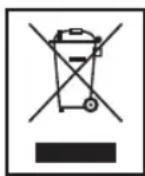
Protect our environment: do not dispose of electrical equipment in the domestic waste.
Please return any electrical equip-
ment that you will no longer use to the collection points provided for their disposal.
This helps avoid the potential effects of incorrect disposal on the environment and human health.
This will contribute to the recycling and other forms of reutilisation of electrical and electronic equipment.
Information concerning where the equipment can be disposed of can be obtained from your local authority.
CTC Clatronic Sp. z o.o


- SYMBOLS IN THESE INSTRUCTIONS FOR USE
- WARNING
- CAUTION
- NOTE
- SAFETY INFORMATION
- CHILDREN
- INSERTING THE BATTERIES
- HANDLING OF BATTERIES
- △ CAUTION
- I NOTE
- USING THE SCALES
- SWITCHING ON
- WEIGHING
- TARE FUNCTION
- SWITCHING OFF
- PERIODS OF NON-USAGE
- CLEANING
- STORAGE
- TECHNICAL DATA
- DISPOSAL
- BATTERY DISPOSAL
- MEANING OF THE "DUSTBIN" SYMBOL
Brand : PROFICOOK
Model : PC-KW 1061
Category : Kitchen scale