
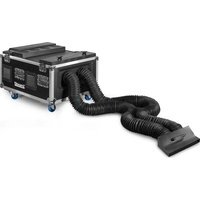
Pandora 1250 TTL - Effect machine BeamZ - Free user manual and instructions
Find the device manual for free Pandora 1250 TTL BeamZ in PDF.


| Product Type | Effect Machine (Fog Machine) |
| Brand | BeamZ |
| Model | Pandora 1250 TTL |
| Power Consumption | 1250 W |
| Warm-Up Time | Approx. 4-5 minutes |
| Fluid Tank Capacity | 2.5 L |
| Output Distance | Up to 8 meters |
| Output Volume | Approx. 200 m³/min |
| Fluid Consumption | Approx. 60 mL/min |
| Control Methods | Manual, wired remote, DMX (optional) |
| DMX Channels | 1 or 2 (depending on mode) |
| Voltage | AC 230V / 50Hz |
| Dimensions (L x W x H) | 400 x 250 x 250 mm |
| Weight | 6.5 kg |
| Housing Material | Metal with heat-resistant casing |
| Heater Element | 1250 W stainless steel |
| Safety Features | Thermal fuse, auto shut-off when empty |
| Recommended Fluid | Water-based fog fluid |
| Cleaning | Rinse tank with distilled water after use |
| Accessories Included | Wired remote, hanging bracket, user manual |
Frequently Asked Questions - Pandora 1250 TTL BeamZ
User questions about Pandora 1250 TTL BeamZ
0 question about this device. Answer the ones you know or ask your own.
Ask a new question about this device
Download the instructions for your Effect machine in PDF format for free! Find your manual Pandora 1250 TTL - BeamZ and take your electronic device back in hand. On this page are published all the documents necessary for the use of your device. Pandora 1250 TTL by BeamZ.
USER MANUAL Pandora 1250 TTL BeamZ
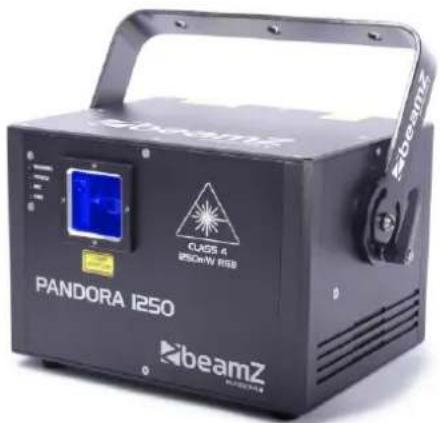
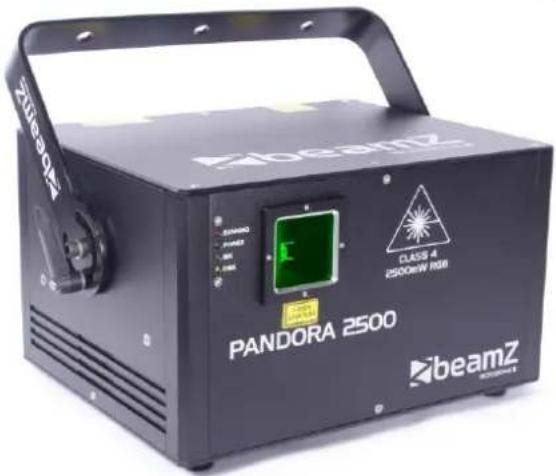
INSTRUCTION MANUAL
GEBRUIKSAANWIJZING
GEBRAUCHSANLEITUNG
Congratulations to the purchase of this Beamz product. Please read this manual thoroughly prior to using the unit in order to benefit fully from all features.
Read the manual prior to using the unit. Follow the instructions in order not to invalidate the warranty. Take all precautions to avoid fire and/or electrical shock. Repairs must only be carried out by a qualified technician in order to avoid electrical shock. Keep the manual for future reference.
- Prior to using the unit, please ask advice from a specialist. When the unit is switched on for the first time, some smell may occur. This is normal and will disappear after a while.
- The unit contains voltage carrying parts. Therefore do NOT open the housing.
- Do not place metal objects or pour liquids into the unit This may cause electrical shock and malfunction.
- Do not place the unit near heat sources such as radiators, etc. Do not place the unit on a vibrating surface. Do not cover the ventilation holes.
- The unit is not suitable for continuous use.
- Be careful with the mains lead and do not damage it. A faulty or damaged mains lead can cause electrical shock and malfunction.
- When unplugging the unit from a mains outlet, always pull the plug, never the lead.
- Do not plug or unplug the unit with wet hands.
- If the plug and/or the mains lead are damaged, they need to be replaced by a qualified technician.
- If the unit is damaged to such an extent that internal parts are visible, do NOT plug the unit into a mains outlet and DO NOT switch the unit on. Contact your dealer. Do NOT connect the unit to a rheostat or dimmer.
- To avoid fire and shock hazard, do not expose the unit to rain and moisture.
- All repairs should be carried out by a qualified technician only.
- Connect the unit to an earthed mains outlet (220-240Vac/50Hz) protected by a 10-16A fuse.
- During a thunderstorm or if the unit will not be used for a longer period of time, unplug it from the mains. The rule is: Unplug it from the mains when not in use.
- If the unit has not been used for a longer period of time, condensation may occur. Let the unit reach room temperature before you switch it on. Never use the unit in humid rooms or outdoors.
-
During operation, the housing becomes very hot. Do not touch it during operation and immediately after.
-
To prevent accidents in companies, you must follow the applicable guide lines and follow the instructions.
- Secure the unit with an extra safety chain if the unit is ceiling mount. Use a truss system with clamps. Make sure nobody stands in the mounting area. Mount the effect at least 50cm away from inflammable material and leave at least 1 meter space on every side to ensure sufficient cooling.
- This unit contains high intensity LEDs. Do not look into the LED light to prevent damage to your eyes.
- Do not repeatedly switch the fixture on and off. This shortens the life time.
- Keep the unit out of the reach of children. Do not leave the unit unattended.
- Do not use cleaning sprays to clean switches. The residues of these sprays cause deposits of dust and grease. In case of malfunction, always seek advice from a specialist.
- Only operate the unit with clean hands.
- Do not force the controls.
- If the unit has fallen, always have it checked by a qualified technician before you switch the unit on again.
- Do not use chemicals to clean the unit. They damage the varnish. Only clean the unit with a dry cloth.
- Keep away from electronic equipment that may cause interference.
- Only use original spares for repairs, otherwise serious damage and/or dangerous radiation may occur.
- Switch the unit off prior to unplugging it from the mains and/or other equipment. Unplug all leads and cables prior to moving the unit.
- Make sure that the mains lead cannot be damaged when people walk on it. Check the mains lead before every use for damages and faults!
- The mains voltage is 220-240Vac/50Hz. Check if power outlet match. If you travel, make sure that the mains voltage of the country is suitable for this unit.
- Keep the original packing material so that you can transport the unit in safe conditions

This mark attracts the attention of the user to high voltages that are present inside the housing and that are of sufficient magnitude to cause a shock hazard.

This mark attracts the attention of the user to important instructions that are contained in the manual and that he should read and adhere to.

DO NOT LOOK DIRECTLY INTO THE LENS. This can damage your eyes. Persons who are subject to epileptic attacks should be aware of the effects that this light effect may have on them.
The unit has been certified CE. It is prohibited to make any changes to the unit. They would invalidate the CE certificate and their guarantee!
NOTE: To make sure that the unit will function normally, it must be used in rooms with a temperature between 5° C/41°F and 35° C/95°F.

Electric products must not be put into household waste. Please bring them to a recycling centre. Ask your local authorities or your dealer about the way to proceed.
NEDERLANDS
Read for the commissioning of the laser all safety instructions and technical data of this manual carefully and thoroughly.

Laser Light is different from any other light source with which you may be familiar. The light from this product can potentially cause eye injury if not set up and used properly. Laser light is thousands of times more concentrated than light from any other kind of light source. This concentration of light power can cause instant eye injuries, primarily by burning the retina (the light sensitive portion at the back of the eye). Even if you cannot feel “heat” from a laser beam, it can still potentially injure or blind you or your audience. Even very small amounts of laser light are potentially hazardous even at long distances. Laser eye injuries can happen quicker than you can blink.
It is wrong to assume that a single beam of a bundle of hundreds by the laser beams made, it cannot cause injury.
It is also incorrect to assume that it is safe to look at a moving beam. In the laser safety regulation, it is not legal to aim Class 3B/4 lasers in areas which people can get exposed also on a dance floor.
Caution:
- Do not point lasers at people or animals.
- Never look into the laser aperture or laser beams, this can potentially cause instant eye injury or blindness if laser light directly strikes the eyes.
- Do not point lasers in areas in which people can potentially get exposed, such as uncontrolled balconies, etc.
• Install the laser units such that laser beams above the audience move See section later in this manual. - Test the laser units always first before the public is present.
- Do not point lasers into the public or at highly reflective surfaces such as windows, mirrors and shiny metal. Even laser reflections can be hazardous.
- Never point a laser at aircraft or into the sky, this is a federal offense.
- Use of controls or adjustments or performance of procedures other than those specified herein may result in hazardous radiation exposure.
- Do not expose the output optic (aperture) to cleaning chemicals.
- The operation of a laser is only allowed if the show is controlled by a skilled and well-trained operator familiar with the requirements that are needed.
- Do not use laser if housing is damaged or open, or if optics appear damaged in any way.
- Never leave this device running unattended.
• Always use appropriate lighting safety cables when hanging lights and effects overhead.
The legal requirements for using laser entertainment products vary from country to country. The user is responsible for the legal requirements at the location/country of use.

This unit contains laser components with high power, live parts and parts that emit radiation. Therefore, DO NOT OPEN the housing, THIS CAN BE FATAL. It can also cause blindness, skin burns and fires.
Eye damage occurs faster than you can blink your eyes.
Further guidelines and safety programs for safe use of lasers can be found in the ANSI Z136.1 Standard “For Safe Use of Lasers”, available from “www.laserinstitute.org”. Many local governments, corporations, agencies, military and others, require all lasers to be used under the guidelines of ANSI Z136.1. Laser Display guidance can be obtained via the International Laser Display Association, www.laserist.org.

ENGLISH : Attention! The use in France is only allowed to the professional user and not to the enduser. See decision: www.legifrance.gouv.fr


CAUTION: Please consider the respective national norms during the installation! The installation must only be carried out by an authorized employee or dealers!

This fixture has been designed to be hung. It is recommended for safety purposes, your lighting effect are properly mounted using a suitable hanging clamp and safety cable. Items appropriate for safe and effective mounting are easily sourced from your lighting vendor. International laser safety regulations require that lasers must be operated in the fashion illustrated below, with a minimum of 3 meters (9.8 ft) of vertical separation between the floor and the lowest laser light vertically. Additionally, 2.5 meters of horizontal separation is required between laser light and audience or other public spaces.

CAUTION: Use of controls, adjustments, or performance of procedures other than what is specified herein may result in hazardous radiation exposure!
- The installation of the fixture has to be built and constructed in a way that it can hold 10 times the weight for 1 hour without any harming deformation.
• Always use the supplied mounting bracket to hang the fixture.
• The fixture should aid of a mounting bracket (not included) to the supplied mounting bracket to be confirmed. - The installation must always be secured with a secondary safety attachment, e.g. an appropriate catch net. This secondary safety attachment must be constructed in a way that no part of the installation can fall down if the main attachment fails.
• Make sure the area below the installation place is free from unwanted persons during rigging, de-rigging and servicing. - The operator has to make sure that safety-relating and machine-technical installations are approved by an expert before taking into operation for the first time and after changes before taking into operation another time.
- The operator has to make sure that safety-relating and machine-technical installations are approved by a skilled person once a year.
- The fixture should be installed in the position where persons cannot reach.
- For your own safety and for others, we do strongly recommend you to use this laser emergency kill switch. (ref.no: 152.958)


CAUTION: When installing the device, make sure there is no highly in inflammable material (decoration articles, etc.) in between a distance of min 0.5 meter.


UNPACKING INSTRUCTION
Immediately upon receiving a fixture, carefully unpack the carton, check the contents to ensure that all parts are present, and have been received in good condition. Notify the shipper immediately and retain packing material for inspection if any parts appear damage from shipping or the package itself shows signs of mishandling. Save the package and all packing materials. In the event that a fixture must be returned to the factory, it is important that the fixture be returned in the original factory box and packing.
If the device has been exposed to drastic temperature fluctuation (e.g. after transportation), do not switch it on immediately. The arising condensation water might damage your device. Leave the device switched off until it has reached room temperature.
Content:
1pcs Laser device
1pcs Power cable
1pcs Manual
set Keys
POWERSUPPLY
On the label on the backside of the fixture is indicated on this type of power supply must be connected. Check that the mains voltage corresponds to this, all other voltages than specified, the light effect can be irreparably damaged. The fixture must also be directly connected to the mains and may be used. No dimmer or adjustable power supply.

Always connect the fixture to a protected circuit (circuit breaker or fuse). Make sure the fixture has an appropriate electrical ground to avoid the risk of electrocution or fire.
FRONT AND REAR PANEL – PANDORA 750
- Laser Aperture
- DMX signal LED
- Mic LED
- Power LED indicator
- Running LED
- Sound sensitivity knob
- Sound active microphone
- LCD function setting panel
- Interlock
- Key switch
- DMX in/out
- ON/OFF switch
- Power input
- DB25 ILDA interface


FRONT AND REAR PANEL – PANDORA 1250
- Laser Aperture
- Running LED
- Power LED indicator
- Mic LED
- DMX signal LED
- Key switch
- Sound sensitivity knob
- Sound active microphone
- LCD function setting panel
- Interlock
- DMX in/out
- ON/OFF switch
- Power input
- DB25 ILDA interface


FRONT AND REAR PANEL – PANDORA 2500
- Laser Aperture
- Running LED
- Power LED indicator
- Mic LED
- DMX signal LED
- DMX in/out
- LCD function setting panel
- Sound sensitivity knob
- Sound active microphone
- Interlock
- Key switch
- ON/OFF switch
- Power input
- DB25 ILDA interface


DISPLAY
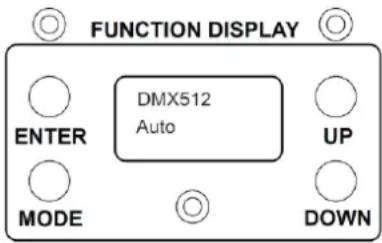
The control board offer several features: you can simple set the starting address, run the pre-programmed program or make a reset. The main menu is accessed by pressing the Mode-button, browse through the submenu by pressing Up or Down.
Press the Enter-button in order to select the desired menu.
You can change the selection by pressing Up or Down. Confirm every selection by pressing the Enter-button.
When you turn on the laser for the first time, it will take some seconds to auto load the built-in show. The default setting is AUTO EFFECT 1.
| First Menu | Second Menu | Third Menu | Fourth Menu |
| DMX512 | RunningA001 (DMX address) | ||
| AUTO(Auto running mode) | Running | Effect 1 (Full show)Effect 2 (Only beam)Effect 3 (only cartoon) | |
| Music(Sound activate mode) | Running | Effect 1 (Full show)Effect 2 (only beam)Effect 3 (only animation) | |
| Setting | Address | Choose DMX address | |
| Light(LCD backlight setting) | OFFONON 5S (ON for 5 sec)ON 10S (ON for 10 sec) | ||
| Cartoon(Running speed) | Press “UP” and “DOWN” to choose running speed from 1~99 (Slow to fast) | ||
| Master(set master unit) | OFFON | ||
| Laser(size and colour setting) | Size | (Press “UP” or “DOWN” to choose the size of graphics) | |
| Colour | 1. Single colour (1~7)2. RGY3. RBP4. GBC5. RGB | ||
| Invert X | |||
| Invert Y | |||
| One beam | OFF | ||
| ON | |||
| Default(restore default setting) | YESNO | ||
| Testing | Testing picture |
ONE BEAM PROTECTION
For safety reason you can switch the One Beam protection On/Off via display. If the One Beam is activated (ON) highly focused single beam are suppressed. Switch to OFF to deactivate the One Beam protection.

This function should only be turned off by well-trained operator, after checking well all safety aspects!
DMX-512 CONNECTION
If you are using a standard DMX controller, you can connect the DMX output of the controller directly to the DMX input of the first unit in a DMX chain. Always connect the output of one unit with the input of the next unit until all units are connected. If you use a controller with 5 pin DMX connection you will need to use a 5-pin to 3-pin adapter.
DMX Signal
![graph TD A["Beamz"] --> B["Device 1"] A --> C["Device 2"] A --> D["Device 3"] B --> E["Control Panel"] C --> F["Control Panel"] D --> G["Control Panel"] E --> H["Output 1"] E --> I["Output 2"] F --> J["Output 3"] G --> K["Output 4"]](/content/2026/06/1288420/images/6182a15ef26efe78017a8aff2e7a7add9b3047801f0ac8d6a019ea45881848dc.jpg)
At the last fixture, the DMX cable has to be terminated. Solder a 120 Ohm resistor between signal (-) and signal (+) into a 3-pin XLR connector and plug this into the DMX output of the last fixture in the chain.

REPLACING THE FUSE
If the fuse is defective, replace the fuse with a fuse of the same type and value. Before replacing the fuse, unplug mains lead.
Procedure:

Step 1: Open the fuse holder on the rear panel with a fitting screwdriver.
Step 2: Remove the old fuse from the fuse holder.
Step 3: Install the new fuse in the fuse holder.
Step 4: Replace the fuse holder in the housing.
TROUBLE SHOOTING
- If the power indicator is off and the laser doesn't work, please check the power supply and the input.
- In Stand-Alone operation, if the power supply indicator is ON and sound active indicator is OFF, but the laser doesn't work.
A. The sound may be too small and cannot activate the laser running, please increase the music volume or increase sound sensitivity on rear panel.
B. Please check if unit has been set up in slave mode, or DMX mode.
- In Master-Slave operation, slave units don't running, please check as below.
A. Make sure there's only one master in the chain, and the others are set in slave mode.
B. Make sure to use a good quality power cable and XLR connector.
- In DMX operation, the unit can't be controlled by the DMX console, but the DMX signal indicator is flashing, please make sure the DMX console and unit have the same channel.
After trying the above solution you still cannot sort out the problem, please contact your dealer or our company for service.
DMX CHANNELS
| Channel | Function | Value | Description |
| 1 | Laser OFF | 000-041 | Laser OFF |
| Auto Activate | 042-083 | DMX mode, CH2-CH12 valid | |
| 084-125 | Build in animation graphics auto running mode | ||
| 126-167 | Build in beam graphics auto running mode | ||
| Sound Activate | 168-209 | Build in beam graphics auto running mode | |
| 210-251 | Build in animation graphics auto running mode | ||
| 252-255 | DMX mode, CH2-CH12 valid | ||
| 2 | Pattern select | 000-255 | Selecting built-in patterns |
| 3 | Rotation | 000-127 | Manual rotation |
| 128-191 | Auto counter-clockwise rotation (from slow to fast) | ||
| 192-255 | Auto clockwise rotation (from slow to fast) | ||
| 4 | X-axis rolling | 000-127 | Manual rolling |
| 128-255 | Auto rolling (from slow to fast) | ||
| 5 | Y-axis rolling | 000-127 | Manual rolling |
| 128-255 | Auto rolling (from slow to fast) | ||
| 6 | X-axis moving | 000-127 | Manual choose moving position |
| 128-255 | Auto moving (from slow to fast) | ||
| 7 | Y-axis moving | 000-127 | Manual choose moving position |
| 128-255 | Auto moving (from slow to fast) | ||
| 8 | Pattern size | 000-063 | Choose pattern size, 0 is normal size, from small to big |
| Zooming | 064-127 | Auto zooming (-) from slow to fast | |
| 128-191 | Auto zooming (+) from slow to fast | ||
| 192-255 | Manual zooming (+/-) from slow to fast | ||
| 9 | Drawing | 000-255 | Auto drawing from slow to fast |
| 10 | Scanning speed | 000-127 | Auto drawing from slow to fast |
| Display dot | 128-255 | Choose the length of dot | |
| 11 | Colour setting | 000-024 | Normal colour |
| 025-199 | Choose every single colour | ||
| 200-224 | Every single colour changing one by one | ||
| 225-255 | All the colours together changing alternatively in one pattern | ||
| 12 | Colour change speed | 000-255 | Adjust colour changing speed from slow to fast |
TECHNICAL SPECIFICATION
| Pandora 750 | Pandora 1250 | Pandora 2500 | |
| Ref.nr: | 152.991 | 152.988 | 152.985 |
| Laser Green | 100mW @532nm | 200mW @532nm | 400mW @532nm |
| Laser Red | 150mW @635nm | 300mW @635nm | 600mW @635nm |
| Laser Blue | 500mW @447nm | 750mW @447nm | 1500mW @447nm |
| Guaranteed laser power | 500mW | 1000mW | 2000mW |
| Max. laser power | 750mW | 1250mW | 2500mW |
| Scanner system | 30K high speed optical scanner | 30K high speed optical scanner | 30K high speed optical scanner |
| Class | 4 | 4 | 4 |
| Modes | Sound Active, Auto run, DMX512 (12 CH), Master/slave mode, ILDA | Sound Active, Auto run, DMX512 (12 CH), Master/slave mode, ILDA | Sound Active, Auto run, DMX512 (12 CH), Master/slave mode, ILDA |
| Interface | 3 pins XLR jack for DMX or Maser-Slave linking, DB25 ILDA interface for PC | 3 pins XLR jack for DMX or Maser-Slave linking, DB25 ILDA interface for PC | 3 pins XLR jack for DMX or Maser-Slave linking, DB25 ILDA interface for PC |
| Function | DMX, Auto, Sound active and Master-Slave | DMX, Auto, Sound active and Master-Slave | DMX, Auto, Sound active and Master-Slave |
| Rated voltage | AC110~240V 50/60Hz | AC110~240V 50/60Hz | AC110~240V 50/60Hz |
| Fuse | T3A | T3A | T3A |
| Rated power | 80W | 80W | 80W |
| Weight (per unit) | 4.1Kg | 4.75Kg | 7.3Kg |
| Dimensions per unit | 228 x 185 x 170 mm | 220 x 235 x 172 mm | 255 x 281 x 172 mm |
The specifications are typical. The actual values can slightly change from one unit to the other. Specifications can be changed without prior notice.

tronios
Sound & Light
CE Declaration of Conformity
Importer: TRONIOS BV
Regulatory Requirement: EN 60598-1:2008+A11:2009
EN 60598-2-17:1989+A2:1991
EN 55015:2013
EN 61547:2009
EN 61000-3-2:2006+A2:2009
EN 61000-3-3:2013
EN 60825-1:2007
The product meets the requirements stated in Directives 2006/95 and 2004/108/EC and conforms to the above mentioned Declarations.
Almelo,
22-01-2015
P. Feldman
Signature :



- NEDERLANDS
- READ FOR THE COMMISSIONING OF THE LASER ALL SAFETY INSTRUCTIONS AND TECHNICAL DATA OF THIS MANUAL CAREFULLY AND THOROUGHLY
- CAUTION
- EYE DAMAGE OCCURS FASTER THAN YOU CAN BLINK YOUR EYES
- UNPACKING INSTRUCTION
- POWERSUPPLY
- FRONT AND REAR PANEL – PANDORA 750
- FRONT AND REAR PANEL – PANDORA 1250
- FRONT AND REAR PANEL – PANDORA 2500
- DISPLAY
- ONE BEAM PROTECTION
- DMX-512 CONNECTION
- REPLACING THE FUSE
- TROUBLE SHOOTING
- TRONIOS
- SOUND & LIGHT
- CE DECLARATION OF CONFORMITY
Brand : BeamZ
Model : Pandora 1250 TTL
Category : Effect machine