
T756HP - Tumble dryer ASKO - Free user manual and instructions
Find the device manual for free T756HP ASKO in PDF.


| Product type | Tumble dryer |
| Brand | ASKO |
| Model | T756HP |
| Drying capacity | 7 kg |
| Dimensions (H x W x D) | 85 x 60 x 60 cm |
| Net weight | 45 kg |
| Power supply | 230 V, 10 A, 50 Hz |
| Drying type | Heat pump |
| Energy class | A++ |
| Drying programs | 10 programs including cotton, synthetics, delicates, wool, quick |
| Moisture sensor function | Yes, automatic shut-off at end of drying |
| Noise level | 65 dB(A) |
| Drum material | Stainless steel |
| Door opening | Porthole with left hinge, reversible |
| Lint filter | Yes, clean after every cycle |
| Condenser | Regular cleaning recommended |
| Child safety | Yes, key lock |
| Automatic shut-off in case of overheating | Yes |
| Spare parts available | Yes, via ASKO after-sales service |
| User manual | Available for free download at notice-facile.com |
Frequently Asked Questions - T756HP ASKO
User questions about T756HP ASKO
0 question about this device. Answer the ones you know or ask your own.
Ask a new question about this device
Download the instructions for your Tumble dryer in PDF format for free! Find your manual T756HP - ASKO and take your electronic device back in hand. On this page are published all the documents necessary for the use of your device. T756HP by ASKO.
USER MANUAL T756HP ASKO
natural_image
Black-and-white collage showing a washing machine, towel rack, and folded towels (no text or symbols)GB Installation Instructions for the Tumble Dryer with heat pump
EN We reserve the right to make changes.
natural_image
Line drawing of a front-loading washing machine with front panel and side door (no text or symbols)natural_image
Line drawing of a wooden table with a flat top and a circular arrow pointing to the edge (no text or symbols)natural_image
Pure technical line drawing of a mechanical component with no text or symbolsnatural_image
Line drawing of a washing machine with wheels and a circular component, shown with a separate 2X schematic view (no text or symbols)natural_image
Line drawing of a simple industrial machine with wheels and a circular component (no text or symbols)natural_image
Diagram showing two views of a refrigerator with arrows indicating direction (no text or symbols)Justér födderne
natural_image
Line drawing of a simple industrial machine with a circular component on the door (no text or symbols)
natural_image
Technical diagram of a mechanical spring assembly with no visible text or symbolsKondensvandet
natural_image
Two identical electronic device sliders with control buttons, no visible text or symbolsStartinstruktion
natural_image
Front view of a horizontal control bar with buttons and a small icon (no text or symbols visible)

natural_image
Line drawing of a front-loading washing machine with front panel and side panels (no text or symbols)Montage:
natural_image
Line drawing of a mechanical component with a circular arrow and dimension label (no text or symbols)- Secure the anti-tilt device using the screws as shown in the picture.

natural_image
Line drawing of a mechanical assembly with a base plate and a handle, no text or symbols presentnatural_image
Pure technical line drawing of a mechanical part with no text, numbers, or symbolsnatural_image
Technical line drawing of a washing machine with a circular component and a separate view showing a circular component (no text or symbols)natural_image
Line drawing of a mechanical device with a circular component and wheels (no text or symbols)natural_image
Diagram showing two views of a mechanical device with arrows indicating direction (no text or symbols)Justieren der Füße
natural_image
Line drawing of a simple industrial oven or chamber with a circular vent and side-mounted door (no text or symbols)
natural_image
Technical diagram of a mechanical spring assembly with no visible text or symbolsKondenswasser
natural_image
Two identical electronic devices with control buttons and indicator lights, no visible text or symbols.Startanleitung
natural_image
Front view of a metallic control panel with buttons and a scroll (no visible text or symbols)

Positioning the tumble dryer
The tumble dryer can be free-standing or in a stack. Remember that the tumble dryer produces heat and should therefore not be located in a room that is too small. If the room is very small, drying will take longer due to the limited quantity of air.
Caution!
- Any electrical installation must be carried out by qualified professionals.
- The machine must not be installed behind a lockable door, a sliding door or a door with hinges on the opposite side to those of the tumble dryer.
- The tumble dryer's plinth ventilation must not be blocked by a rug or the like.
Tip!
- To improve ventilation, leave the door to the room where the tumble dryer is located open.
A. Freestanding
The tumble dryer can be positioned beside the washing machine. An air gap of at least 5 mm must be left between the washing machine and the tumble dryer.
If the customer has a problem with the machine sliding when on a low-friction floor, the plastic cups can be used under the feet of the tumble dryer (between foot and floor).
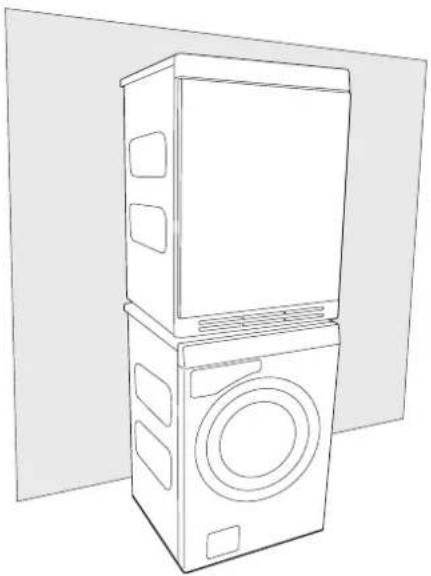
B. Stacking
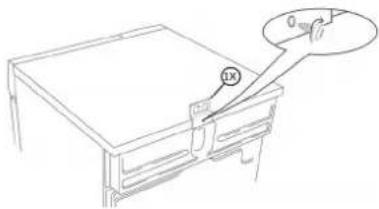
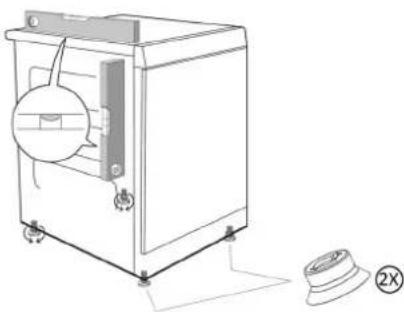
The tumble dryer can be placed on top of a ASKO washing machine. In this case you use the stacking attachments (foot cups and anti-tilt devices) that come with the machine. Two rubber feet and two anti-tipping brackets are supplied in the bag found in the drum of the dryer.
natural_image
Line drawing of a front-loading washing machine with front panel and side door (no text or symbols)How to assemble the stack:
I. Undo the screw on the back of the ASKO washing machine as shown in the figure.

natural_image
Line drawing of a table with a magnified inset showing a small object (no text or symbols)- Secure the anti-tilt device using the screws as shown in the picture.
natural_image
Line drawing of a mechanical component with a labeled section (no text or symbols)- Take the other anti-tipping bracket from the bag and attach it on the dryer with two screws as shown in the figure.

natural_image
Pure technical line drawing of a mechanical part with no text, numbers, or symbols- Place the two rubber feet on the front feet of the dryer.
natural_image
Line drawing of a washing machine with a circular component and a separate button labeled (2X), no text or symbols present.- Fasten or undo the rear feet of the appliance until it is fully level, either on the floor or on the washing machine.

natural_image
Line drawing of a simple industrial machine with a circular vent and wheels (no text or symbols)- Slide the dryer backward until it reaches the anti-tipping bracket. Make sure the front of the appliance is raised by 50 to 150 mm as you slide it back.

natural_image
Diagram showing two views of a refrigerator with arrows indicating direction (no text or symbols)Adjusting the feet
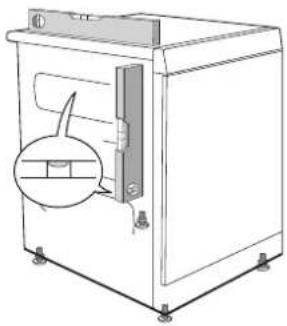
Screw the feet in or out so that the tumble dryer is steady and balanced on the floor or on the washing machine.

natural_image
Line drawing of a simple kitchen oven with a circular vent and handle (no text or symbols)
natural_image
Technical diagram of a mechanical spring assembly with directional arrows indicating rotation (no text or labels)Condensed water
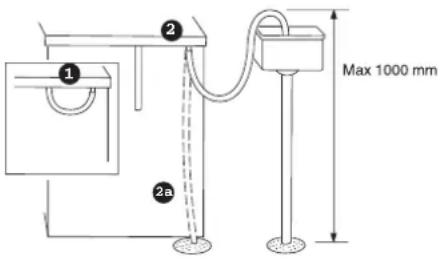
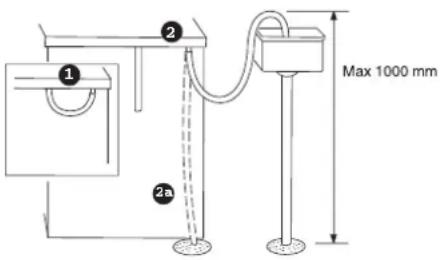
The machine is supplied as shown in Option I (inset). This means that the condensed water is pumped into the condensed water container. This must then be removed and emptied by hand.
Option 2 allows you to remove the small short hose from the nipple. Attach the rubber hose supplied to the same nipple. The water can then be pumped out into a sink or a floor drain (2a).
Transport/Winter storage
The machine must be transported upright! Leave the machine to stand for 24 hours after transporting. If you need to move your machine or store it over the winter in unheated premises, make sure that you drain the condensed water container beforehand.
Electrical installation
- The electrical wall socket must be placed outside of the installation area to be easily accessible.
- The machine must only be connected to an earthed wall socket.
- Any residual current devices must be type A.
Connection on delivery
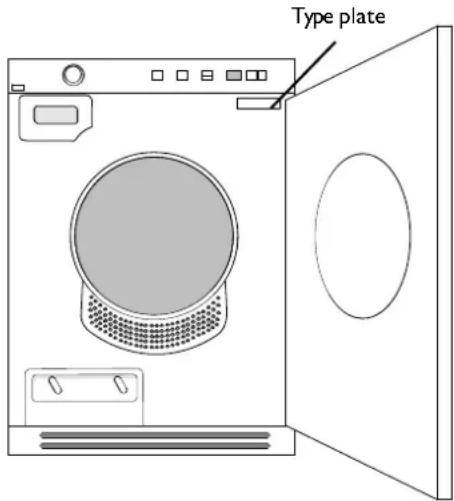
Information about the electrical connection can be found on the type plate. Compare the data with the mains supply data.
Start instructions

Start instructions
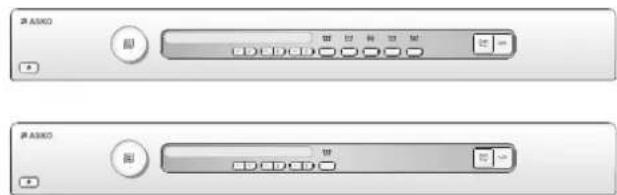
You will be prompted to select the display language when you have connected your machine and start it for the first time.
- Turn the programme selector and choose the required language.
- Press Start/Stop to save the selection and return to the programme menu.

natural_image
Two identical electronic control switches with buttons and display indicators (no text or symbols visible)Start instructions
The first time the machine is connected to a power supply, you need to select the language for the machine's menus and set the clock. If the power is cut before this is completed, the process must be restarted.
Note:
All selections must be made.
Select language
If you want to use the default language, press the Start button to confirm. Otherwise, use the up and down arrow buttons to select:
AU English, US English, svenska, dansk, norsk, suomea,
Francais, Deutsch, Italiano, espanol,
Русский, nederlands.
Press the Start button to confirm.
Set the clock to 12h, 24h, or remaining program time display
The clock is displayed in the middle of the display.
Use the up and down arrow buttons to choose 12h, 24h, or remaining program time display. Press the Start button to confirm.
If you select 12h or 24h, the clock setting menu automatically opens.
Set the clock
Press the up arrow button until the correct hour is displayed. Press the program selector (the big arrow) to save. Press the down arrow button until the correct minutes are displayed. Press the Start button to confirm.
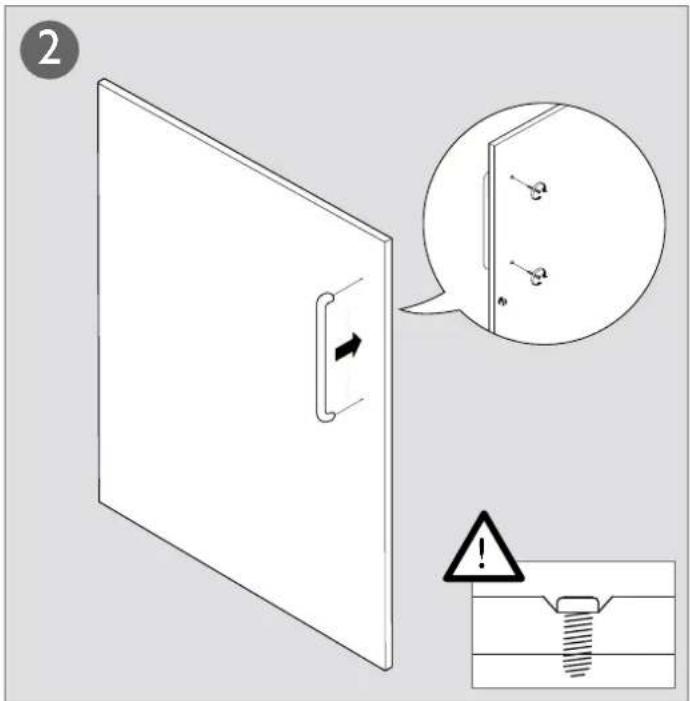
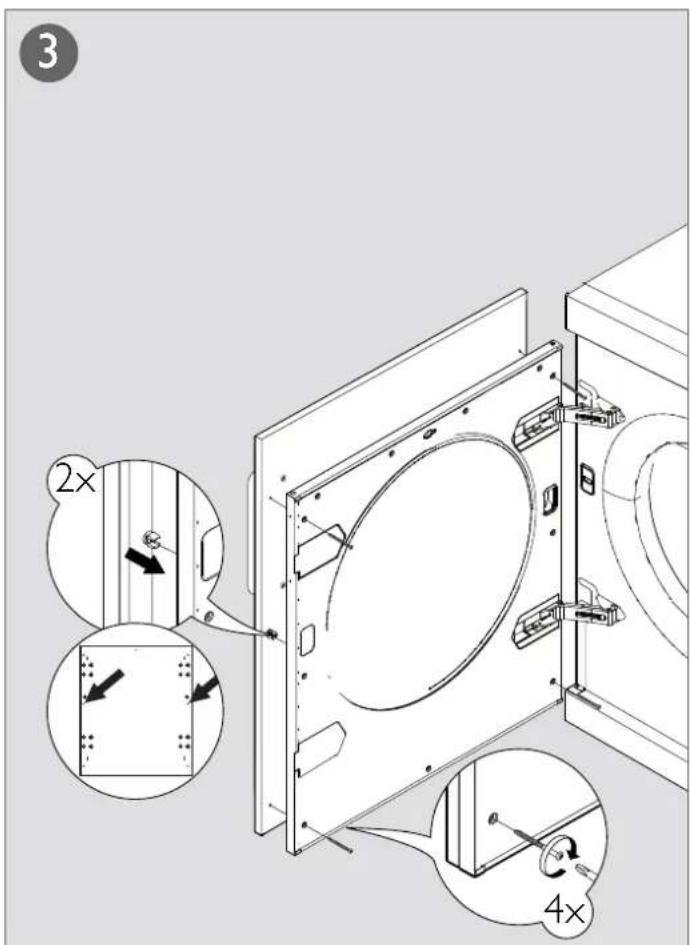
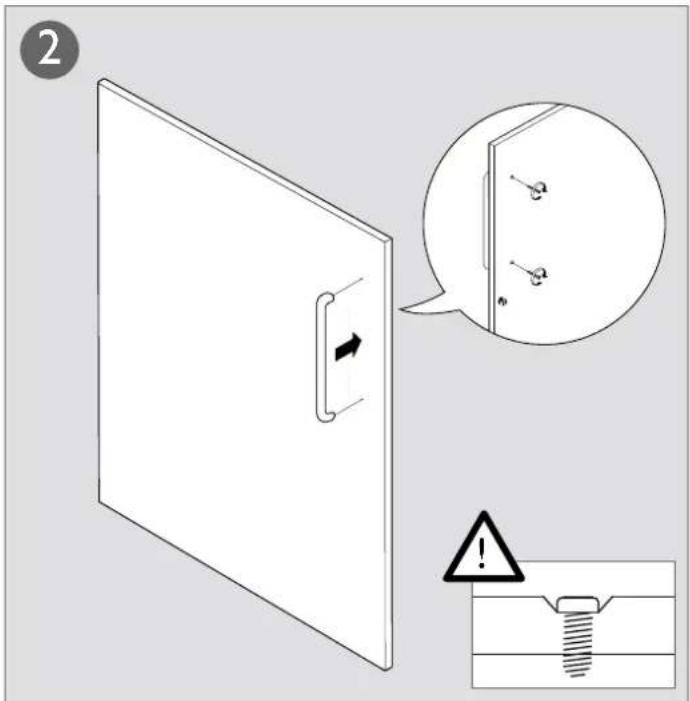
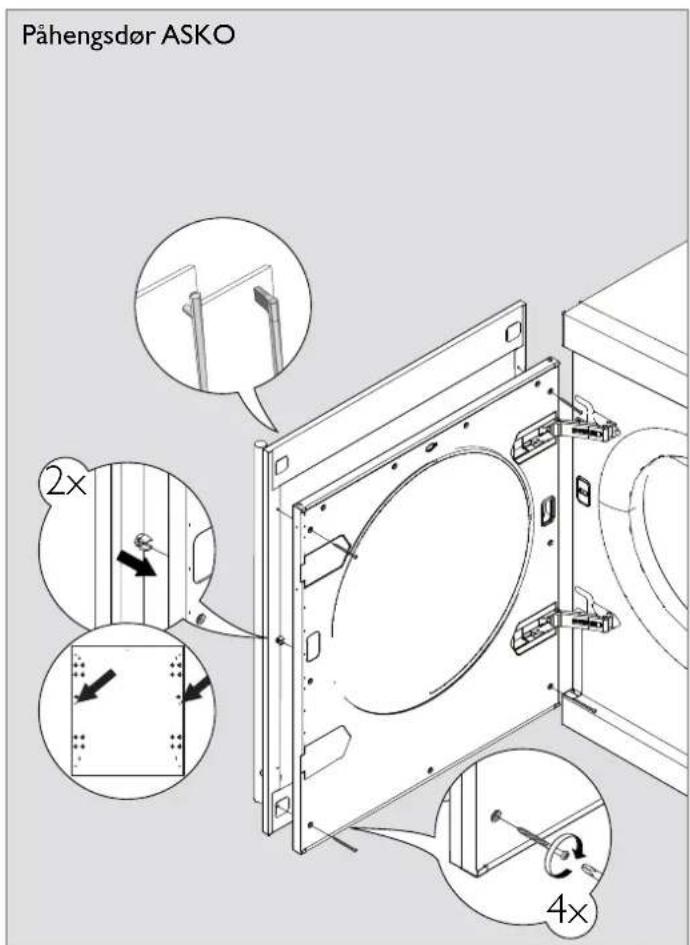
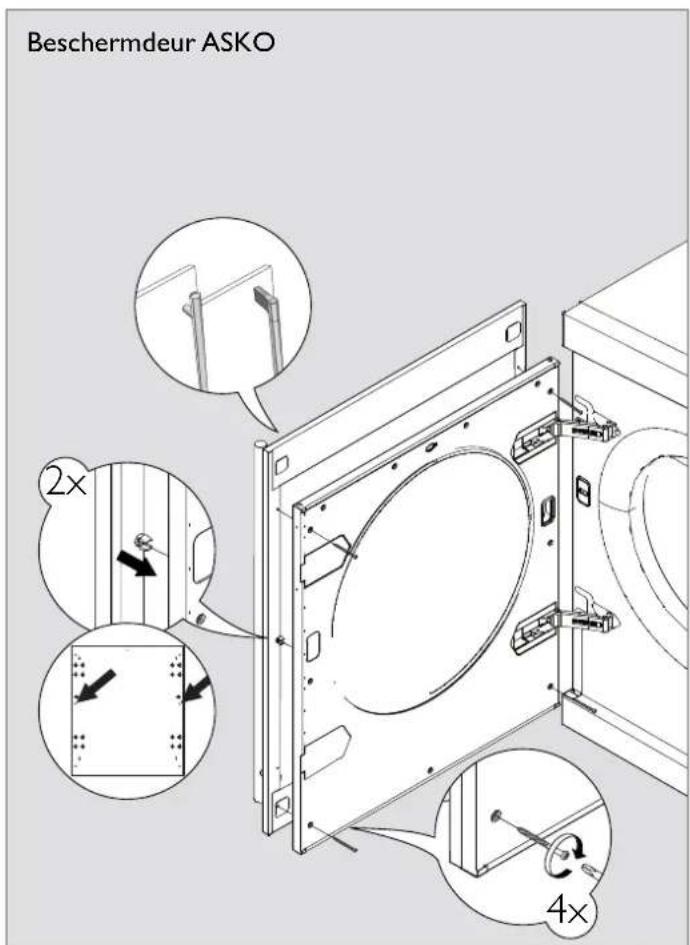
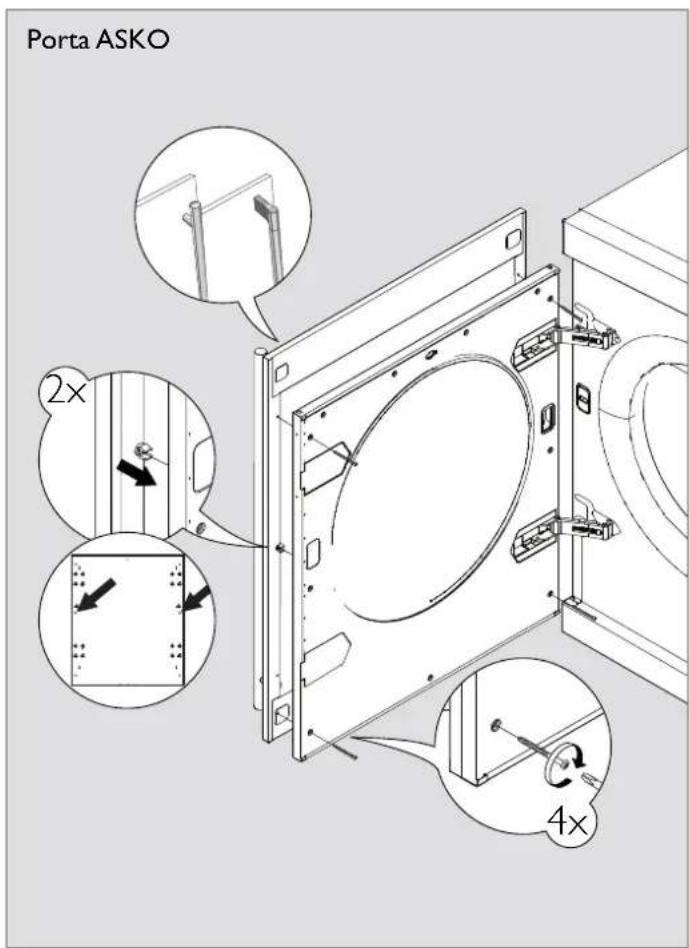
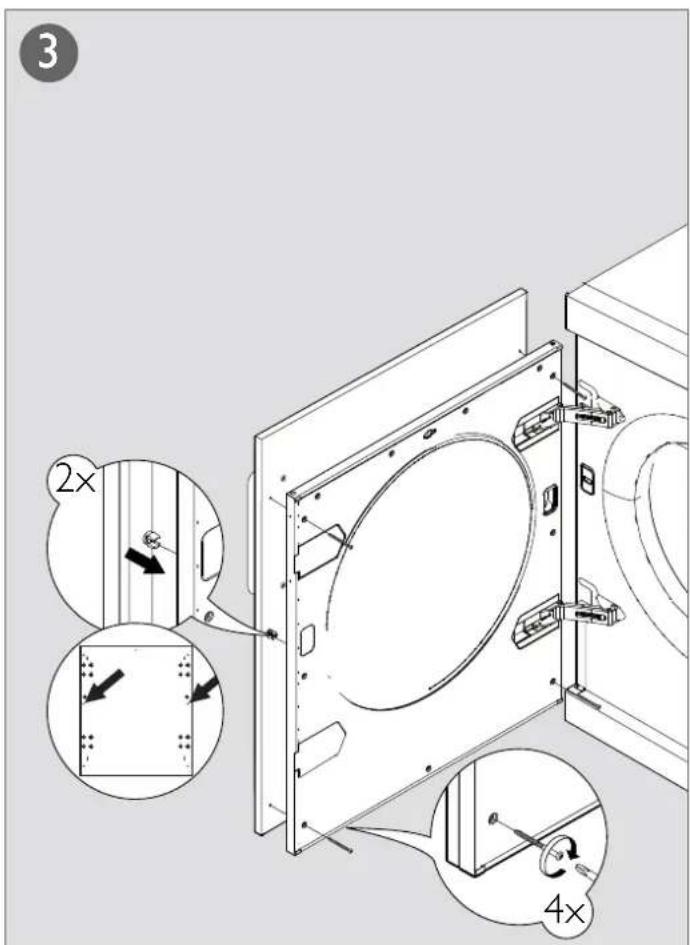
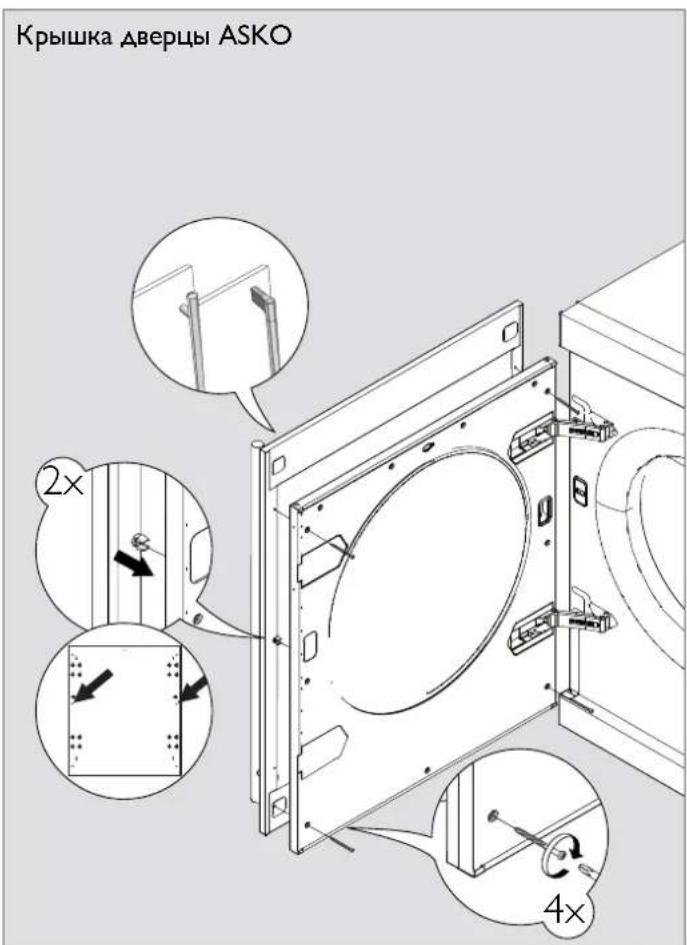
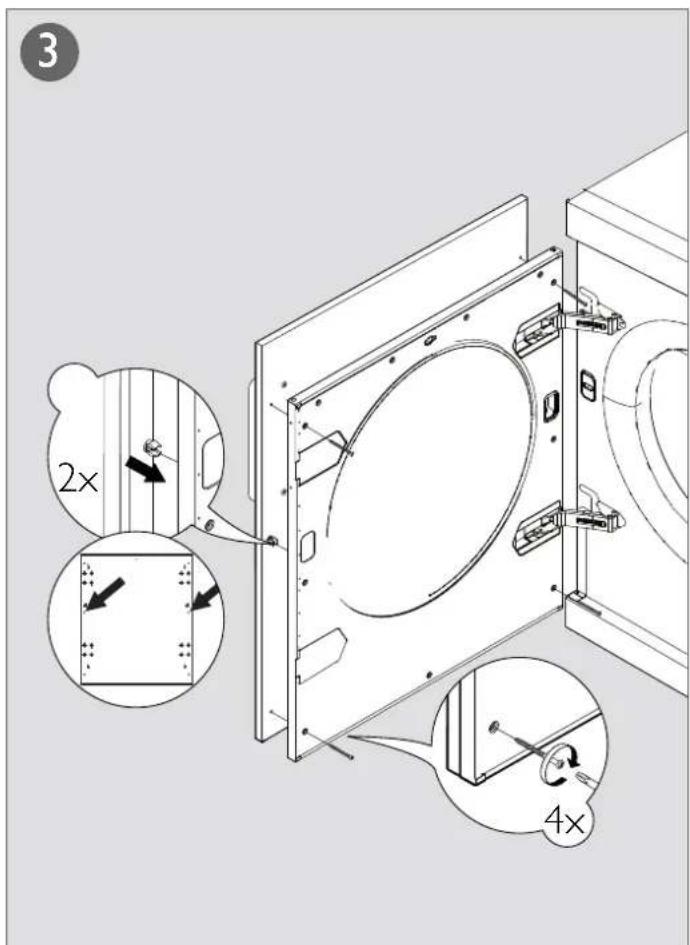
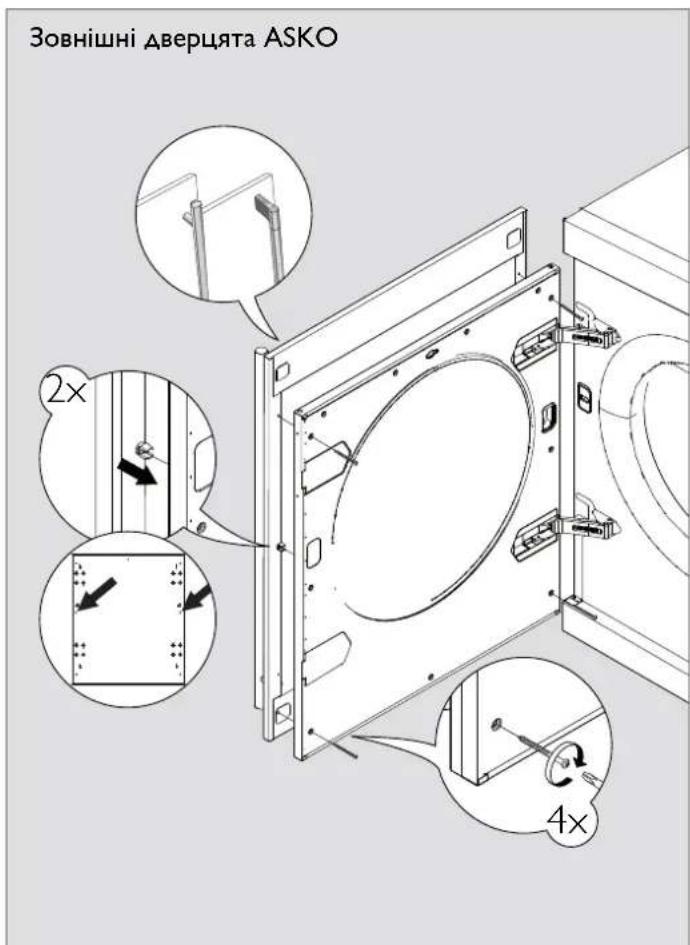
Fitting the cover door


natural_image
Close-up of a metallic control panel with buttons and a scroll (no visible text or symbols)Note!
The instructions for fitting the cover door only apply to the illustrated model.
![1 595 383 766 555 2× [mm]](/content/2026/06/1287565/images/77b3189fe9c61a1c12f1de388296ec58f422822cb6ecf2196a503dc3035180b1.jpg)


natural_image
Line drawing of a front-loading washing machine with front panel and side door (no text or symbols)Montage:
natural_image
Line drawing of a mechanical device with a cylindrical component inserted into a base (no text or symbols)- Secure the anti-tilt device using the screws as shown in the picture.

natural_image
Pure technical line drawing of a mechanical part with no text, numbers, or symbolsnatural_image
Line drawing of a washing machine with a circular component and a separate close-up view (no text or symbols)natural_image
Line drawing of a simple industrial machine with a circular component and wheels (no text or symbols)natural_image
Diagram showing two views of a chair or seat with arrows indicating direction (no text or symbols)Ajuste de las patas
natural_image
Line drawing of a simple kitchen oven with a circular vent and side-mounted door (no text or symbols)
natural_image
Technical diagram of a mechanical spring assembly with directional arrows indicating rotation (no text or labels)natural_image
Line drawing of a front view of a washing machine with lid and door (no text or symbols)natural_image
Close-up of a handheld electronic device with a black handle and control buttons (no visible text or symbols)
natural_image
Front view of a silver audio recording device with a horizontal bar and control buttons (no visible text or symbols)natural_image
Front view of a black rectangular electronic device with control buttons and indicator lights (no visible text or symbols)

natural_image
Line drawing of a multi-tiered refrigerator with front panel and side door (no text or symbols)Montage:
natural_image
Line drawing of a mechanical device with a magnified inset showing a small circular component (no text or symbols)natural_image
Pure technical line drawing of a mechanical component or bracket with no text, numbers, or symbolsnatural_image
Line drawing of a washing machine with a circular component and a separate close-up of the lid (no text or symbols)natural_image
Line drawing of a laboratory apparatus with a circular component and control knobs (no text or symbols)natural_image
Diagram showing two views of a mechanical device with arrows indicating direction (no text or symbols)Réglage des pieds
natural_image
Line drawing of a simple kitchen oven with a circular vent and side-mounted door (no text or symbols)
natural_image
Mechanical component diagram showing a threaded spring assembly with directional arrows indicating rotation (no text or symbols)Eau de condensation
natural_image
Two identical electronic device sliders with control buttons, no visible text or symbolsnatural_image
Front view of a gray electronic device control panel with buttons and a scroll (no visible text or symbols)N.B.!

natural_image
Line drawing of a front-loading washing machine with a top panel and side panels (no text or symbols)Slaganje aparata:
- Odvijte vijak na stražnjoj strani penlice kao što je prikazano na slici.

natural_image
Line drawing of a mechanical device with a circular component and a pointer (no text or symbols)natural_image
Line drawing of a mechanical assembly with a base plate and a handle, no text or symbols present- Iz kutije izvadite drugi dio kompleta protiv nagibanja uređaja (drugi držač) i dva vijka. Drugi držač protiv nagibanja uređaja pričvrstite pomoću dva vijka na stroj za sušenje rublja.

natural_image
Pure technical line drawing of a curved mechanical part with no text or symbolsnatural_image
Line drawing of a washing machine with a circular component and a separate view showing a speaker (no text or symbols)- Nožice privijte ili odvijte toliko da stroj za sušenje rublja izravnate u potpuno vodoravan položaj, bilo na tlu ili na perilici rublja.

natural_image
Line drawing of a laboratory apparatus with a circular component and wheels (no text or symbols)natural_image
Line drawing of two chair seats with arrows indicating movement (no text or symbols)Podešavanje nožica
Pritežite i otpuštajte nožice tako da sušilica bude stabilna i uravnotežena na podu ili na perilici rublja.
natural_image
Line drawing of a simple kitchen oven with a circular vent and side-mounted door (no text or symbols)
natural_image
Technical diagram of a mechanical spring assembly with no visible text or symbolsKondenzat
Aparat se isporučuje kako je prikazano u Opciji I (dodatak). To znači da se kondenzirana voda prepumpava u spremnik za kondenzat. On se mora zatim ukloniti i ručno isprazniti.
Opcija 2 omogućuje uklanjanje male kratke cijevi iz spojnice. Pričvrstite isporučenu gumenu cijev na istu spojnicu. Voda se zatim može ispumpati u umivaonik ili podni odvod (2a).
natural_image
Two identical electronic devices with scroll handles and indicator lights, no visible text or symbols.Upute za pokretanje
Kada se aparat prvi put priključuje na napajanje, morate odabrati jezik izbornika i postaviti sat. Ako se napajanje prekine prije dovršetka tog postupka, morate krenuti od početka.
Napomena:
Morate odabrati sve postavke.
Odabir jezika
Ako želite koristiti zadani jezik, za potvrdu pritisnite tipku za pokretanje. U suprotnom, pomoću tipki sa strelicama odaberite sljedeće: AU English (australski engleski), US English (američki engleski), svenska (švedski), dansk (danski), norsk (norveški), suomea (fi nski), Francais (francuski), Deutsch (njemački), Italiano (talijanski), espanol (španjolski), Русский (ruski), nederlands (nizozemski). Pritisnite tipku za pokretanje da biste potvrdili odabir.
Podesite sat na 12 h, 24 h ili na prikaz preostalog vremena programa.
Sat se prikazuje na sredini zaslona.
Pomoću strelica za gore ili dolje podesite sat na 12 h, 24 h ili na prikaz preostalog vremena programa.
Pritisnite tipku za pokretanje da biste potvrdili odabir.
Ako odaberete 12 h ili 24 h, automatski se otvara izbornik s postavkama sata.
Postavljanje sata
Pritiščite tipku sa strelicom prema gore dok se ne prikaže točan sat. Pritiščite programator (velika strelica) da biste spremili postavku.
Pritiščite tipku sa strelicom prema dolje dok se ne prikažu točne minute.
Pritisnite tipku za pokretanje da biste potvrdili odabir.
natural_image
Close-up of a metallic audio workstation (no visible text or labels)Napomena!
Upute za montažu vanjskih vrata odnose se samo prikazani model.
![1 595 383 2× 766 555 [mm]](/content/2026/06/1287565/images/27a79286d17426f49a8eb8711e669fe874783961d8762a306abb515790f44259.jpg)


natural_image
Line drawing of a multi-tiered refrigerator with front panel and side door (no text or symbols)natural_image
Line drawing of a mechanical device with a circular component inserted into the top section (no text or symbols)natural_image
Pure technical diagram showing a curved surface with a circular feature and two labeled points (21 and 22) without any readable text or symbols.natural_image
Line drawing of a washing machine with a circular vent and attached component, shown with mounting base (no text or symbols)natural_image
Line drawing of a simple industrial machine with a circular component and control panel (no text or symbols)natural_image
Diagram showing two views of a mechanical device with arrows indicating direction (no text or symbols)Justere føttene
natural_image
Line drawing of a simple industrial oven with a circular vent and side-mounted door (no text or symbols)
natural_image
Technical diagram of a mechanical spring assembly with no visible text or symbolsKondensvannet
Startanleitungen
Startanleitungen
natural_image
Two identical electronic device sliders with control buttons, no visible text or symbolsStartanleitungen
natural_image
Front view of a gray electronic device control panel with buttons and a scroll (no visible text or symbols)Obs!
Montering av påhengsdør gjelder kun for den modelltypen som er vist på bildet.
![1 595 383 766 555 2× [mm]](/content/2026/06/1287565/images/227dd8b2a338154202abf702c438697e9b149881cc9526b1dd2bfc6f238af04b.jpg)

natural_image
Line drawing of a front-loading washing machine with front panel and side panels (no text or symbols)natural_image
Line drawing of a mechanical component with a circular arrow and dimension label (no text or symbols)natural_image
Line drawing of a mechanical assembly with a base plate and a handle, no text or symbols presentnatural_image
Pure technical line drawing of a curved mechanical part with no text, numbers, or symbolsnatural_image
Line drawing of a washing machine with a circular component and a separate close-up of the lid (no text or symbols)natural_image
Line drawing of a portable oven with a circular vent and side-mounted door (no text or symbols)natural_image
Diagram showing two views of a refrigerator with arrows indicating direction (no text or symbols)natural_image
Line drawing of a simple kitchen oven with a circular vent and side-mounted door (no text or symbols)
natural_image
Technical diagram of a mechanical spring assembly with directional arrows indicating rotation (no text or labels)Condenswater
natural_image
Two identical electronic device sliders with control buttons, no visible text or symbolsStartinstructies
natural_image
Front view of a gray electronic device control panel with buttons and a scroll (no visible text or symbols)
natural_image
Line drawing of a multi-tiered refrigerator with front panel and side door (no text or symbols)natural_image
Line drawing of a table with a magnified inset showing a small circular object (no text or symbols)- Aperte o esquadro anti-queda da máquina de lavar roupa como indicado na fi gura.

natural_image
Pure technical line drawing of a mechanical part with no text or symbolsnatural_image
Line drawing of a washing machine with a circular component and a separate close-up of its base (no text or symbols)natural_image
Line drawing of a simple industrial machine with a circular component and wheels (no text or symbols)- Empurre a máquina de secar roupa contra o esquadro da máquina de lavar roupa; para isso, mantenha a máquina de secar roupa inclinada levantando-a para a frente de 50 a 150 mm.

natural_image
Diagram showing two views of a refrigerator with arrows indicating direction (no text or symbols)Ajustar os pés
natural_image
Line drawing of a simple kitchen oven with a circular vent and side-mounted door (no text or symbols)
natural_image
Technical diagram of a mechanical spring assembly with no visible text or symbolsÁgua condensada
natural_image
Two identical electronic device sliders with control buttons, no visible text or symbolsnatural_image
Close-up of a metallic control panel with buttons and a scroll (no visible text or symbols)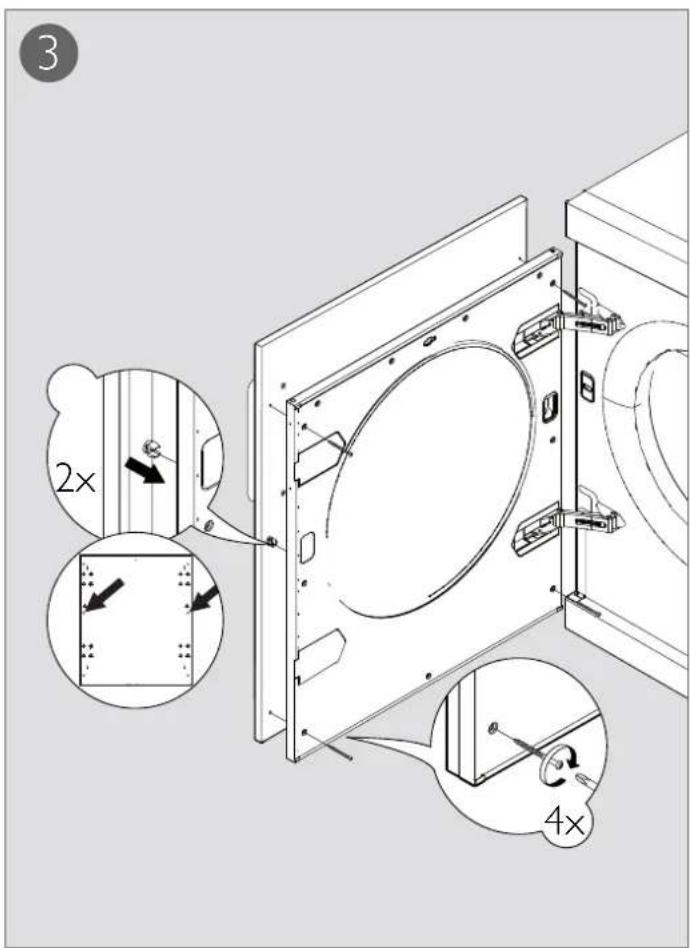
natural_image
Line drawing of a multi-tiered refrigerator with front panel and side door (no text or symbols)natural_image
Line drawing of a mechanical component with a circular arrow and dimension label (no text or symbols)natural_image
Technical line drawing of a mechanical assembly with no visible text or symbolsnatural_image
Pure technical line drawing of a curved mechanical part with no text or symbolsnatural_image
Line drawing of a washing machine with a circular component and a separate plastic housing (no text or symbols)natural_image
Line drawing of a simple industrial machine with a circular component and control panel (no text or symbols)natural_image
Line drawing of two chair seats with arrows indicating movement (no text or symbols)Регулировка ножек
natural_image
Line drawing of a simple industrial machine with a circular component on the side panel (no text or symbols)
natural_image
Technical diagram of a mechanical spring assembly with directional arrows indicating rotation (no text or labels)Конденсат
natural_image
Two identical electronic device sliders with control buttons, no visible text or symbolsnatural_image
Front view of a gray electronic device control panel with buttons and a scroll (no visible text or symbols)Внимание!
natural_image
Line drawing of a front-loading washing machine with front panel and side door (no text or symbols)natural_image
Line drawing of a table with a magnified view of a small object on top (no text or symbols)natural_image
Pure technical diagram showing a curved surface with a circular feature and two labeled points (21 and 22) without any readable text or symbols.natural_image
Technical line drawing of a washing machine with a circular component and a separate close-up view (no text or symbols)natural_image
Line drawing of a simple industrial machine with a circular component and wheels (no text or symbols)natural_image
Diagram showing two views of a chair with arrows indicating direction (no text or symbols)Säädä jalat
natural_image
Line drawing of a simple kitchen oven with a circular vent and side-mounted door (no text or symbols)
natural_image
Mechanical component diagram showing a threaded bolt with internal springs and a base (no text or symbols)Kondenssivesi
Käynnistysohje
natural_image
Two identical electronic device sliders with control buttons, no visible text or symbolsKäynnistysohje
natural_image
Front view of a gray electronic device control panel with buttons and a scroll (no visible text or symbols)

Torktumlarens placering
natural_image
Line drawing of a front-loading washing machine with front panel and side door (no text or symbols)natural_image
Line drawing of a table with a magnified inset showing a small object (no text or symbols)natural_image
Line drawing of a mechanical assembly with a base plate and clamping mechanism (no text or symbols)natural_image
Pure technical line drawing of a mechanical part with no text, numbers, or symbolsnatural_image
Line drawing of a washing machine with a circular component and a separate close-up of the lid (no text or symbols)natural_image
Line drawing of a simple industrial machine with a circular vent and side-mounted buttons (no text or symbols)natural_image
Diagram showing two views of a mechanical device with arrows indicating direction (no text or symbols)Justera fötterna
natural_image
Line drawing of a simple kitchen oven with a circular vent and side-mounted door (no text or symbols)
natural_image
Technical illustration of a mechanical spring assembly with no visible text or symbolsKondensvattnet
natural_image
Two identical electronic device sliders with control buttons, no visible text or symbolsStartinstruktion
natural_image
Close-up of a metallic control panel with buttons and a scroll (no visible text or symbols)

natural_image
Line drawing of a front-loading washing machine with front panel and side door (no text or symbols)natural_image
Line drawing of a table with a magnified inset showing a small object (no text or symbols)natural_image
Technical line drawing of a mechanical assembly with no visible text or symbolsnatural_image
Pure technical line drawing of a mechanical part with no text, numbers, or symbolsnatural_image
Line drawing of a washing machine with a circular component and a separate view showing a speaker (no text or symbols)natural_image
Line drawing of a simple industrial machine with a circular component and control panel (no text or symbols)natural_image
Diagram showing two views of a mechanical device with arrows indicating direction (no text or symbols)Регулювання ніжок
natural_image
Line drawing of a simple kitchen oven with a circular vent and side-mounted door (no text or symbols)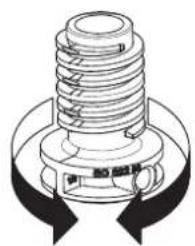
natural_image
Technical illustration of a mechanical spring assembly with no visible text or symbolsКонденсат
natural_image
Line drawing of a front view of a washing machine with lid and door (no text or symbols)natural_image
Close-up of a black horizontal bar with circular ends and a small circular icon, no visible text or symbols.
natural_image
Front view of a silver audio player interface with no visible text or symbolsnatural_image
User interface control bar with slider and control buttons (no text or symbols)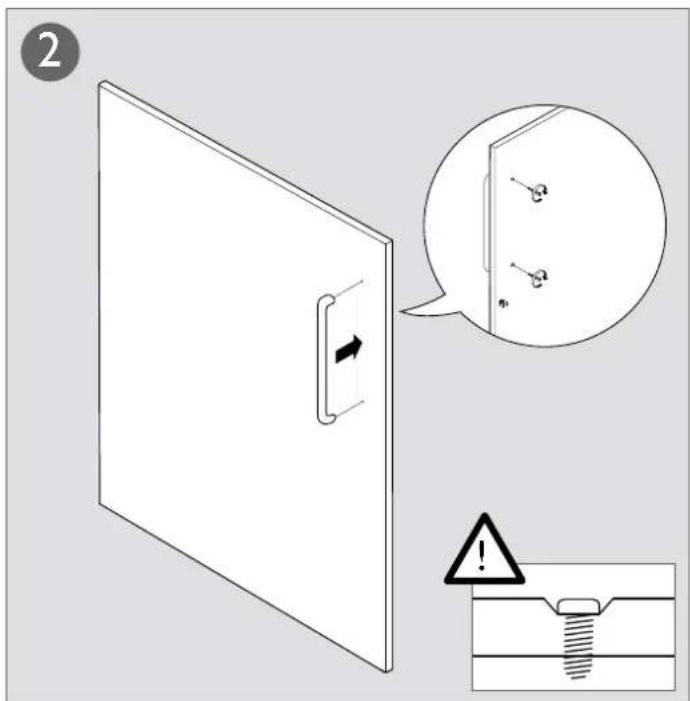
- GB Installation Instructions for the Tumble Dryer with heat pump
- Justér födderne
- Kondensvandet
- Startinstruktion
- Montage:
- Justieren der Füße
- Kondenswasser
- Startanleitung
- Positioning the tumble dryer
- Caution!
- Tip!
- Freestanding
- Stacking
- How to assemble the stack:
- Adjusting the feet
- Condensed water
- Transport/Winter storage
- Electrical installation
- Connection on delivery
- Start instructions
- Note:
- Select language
- Set the clock to 12h, 24h, or remaining program time display
- Set the clock
- Fitting the cover door
- Ajuste de las patas
- Réglage des pieds
- Eau de condensation
- Slaganje aparata:
- Podešavanje nožica
- Kondenzat
- Upute za pokretanje
- Napomena:
- Podesite sat na 12 h, 24 h ili na prikaz preostalog vremena programa.
- Postavljanje sata
- Justere føttene
- Kondensvannet
- Startanleitungen
- Condenswater
- Startinstructies
- Ajustar os pés
- Água condensada
- Регулировка ножек
- Конденсат
- Säädä jalat
- Kondenssivesi
- Käynnistysohje
- Torktumlarens placering
- Justera fötterna
- Kondensvattnet
- Регулювання ніжок
Brand : ASKO
Model : T756HP
Category : Tumble dryer