
S850A GO - Telephone GIGASET - Free user manual and instructions
Find the device manual for free S850A GO GIGASET in PDF.


Pick your language and provide your email: we'll send you a specifically translated version.
| Product type | DECT cordless telephone |
| Brand | Gigaset |
| Model | S850A GO |
| Dimensions (base) | Approx. 95 x 90 x 100 mm |
| Dimensions (handset) | Approx. 160 x 50 x 30 mm |
| Weight (handset) | Approx. 130 g |
| Power supply | Mains adapter 230 V ~ 50 Hz, 2 x AAA NiMH 1.2 V batteries |
| Display type | TFT color display, backlit |
| Standby time | Up to 200 hours |
| Talk time | Up to 14 hours |
| Indoor range | Up to 50 meters |
| Outdoor range | Up to 300 meters |
| Phonebook | Up to 200 contacts |
| Hands-free speakerphone | Yes |
| Caller ID | Yes |
| Main functions | Call, phonebook, call list, alarm, notepad, color display |
| Maintenance and cleaning | Clean with a slightly damp soft cloth, avoid abrasive products |
| Safety | Do not expose to moisture, use only the supplied adapter |
| Spare parts and repairability | Replaceable batteries, repair by approved center |
| General information | Manual available for free download in PDF format |
Frequently Asked Questions - S850A GO GIGASET
How to install the Gigaset S850A GO telephone?
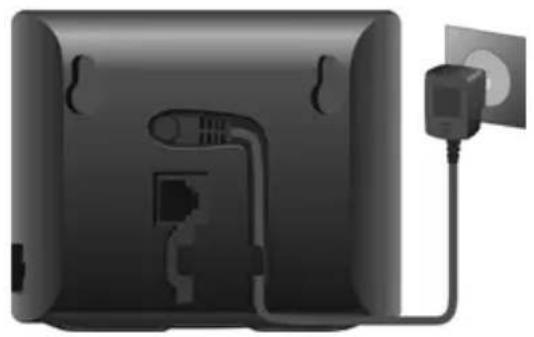
Plug the base into a power outlet, insert the batteries into the handset, then place the handset on the base to charge. Follow the on-screen instructions.
How to register an additional handset?
On the base, press the registration button (often marked with a key icon). On the handset, go to Settings > Register and follow the prompts.
How to adjust the ringtone volume?
In standby mode, press the volume keys (up/down) or go to Menu > Settings > Ringtone > Ringtone volume.
How to use the hands-free speakerphone?
During a call, press the Speaker key (speaker icon) to activate hands-free mode. Press again to return to the handset.
How to add a contact to the phonebook?
Press the Phonebook key, then select New contact. Enter the name and number, then confirm.
What to do if the handset does not ring?
Check that the ringtone volume is not set to 'Silent'. Make sure the handset is registered to the base and that the base is powered.
How to view the missed calls list?
Press the Call list key (often a phone icon). Missed calls are marked with a specific icon. Navigate with the arrow keys.
How to set the date and time?
Go to Menu > Settings > Date and time. Set the date and time manually or enable automatic synchronization via the network.
How to lock the handset keypad?
In standby mode, press and hold the * (asterisk) key for about 2 seconds. The lock symbol appears. To unlock, repeat the operation.
What is the maximum range of the telephone?
Indoors, the range can reach 50 meters; outdoors, up to 300 meters depending on obstacles.
User questions about S850A GO GIGASET
0 question about this device. Answer the ones you know or ask your own.
Ask a new question about this device
No questions yet. Be the first to ask one.
Download the instructions for your Telephone in PDF format for free! Find your manual S850A GO - GIGASET and take your electronic device back in hand. On this page are published all the documents necessary for the use of your device. S850A GO by GIGASET.
USER MANUAL S850A GO GIGASET
Double appel (flashing) ▶ appui bref
A Touche Inscription/Paging
natural_image
Back view of a black electronic device with a power outlet and cable, no visible text or symbolsTéléphonie fixe
natural_image
Back view of a black rectangular device connected to two wall-mounted power outlets (no text or symbols visible)natural_image
Two black wireless devices with ports and cables, one connected to a port and the other attached to a router (no text or symbols visible)natural_image
Close-up of a cylindrical battery with two 1000+充电 cells, no visible text or symbolsnatural_image
Close-up of a battery component with an arrow indicating the insertion or disassembly process (no text or symbols visible)natural_image
Close-up of a black plastic object with an arrow pointing to its side (no text or symbols visible)natural_image
3D rendered image of a device casing with two black arrows pointing to features (no text or symbols visible)natural_image
Close-up of a black mechanical component with a labeled section '1' pointing to a hole (no text or symbols beyond the label)natural_image
Top-down view of a black electronic device with a labeled component (no text or symbols on the device itself)Base


Table of contents
Click a title to access it
Manual assistant
Powered by Anthropic
Waiting for your message
Product information
Brand : GIGASET
Model : S850A GO
Category : Telephone