
PowerPro Aqua FC6401 - Vacuum Cleaner PHILIPS - Free user manual and instructions
Find the device manual for free PowerPro Aqua FC6401 PHILIPS in PDF.


| Product Type | 2-in-1 Vacuum and Mop |
| Brand | Philips |
| Model | PowerPro Aqua FC6401 |
| Weight | 3.2 kg (7.1 lb) |
| Dimensions (L x W x H) | 260 x 200 x 1150 mm (10.2 x 7.9 x 45.3 in) |
| Dust Capacity | 0.6 L (20.3 oz) |
| Water Tank Capacity | 200 ml (6.8 fl oz) |
| Battery Type | Lithium-ion (Li-ion) |
| Battery Voltage | 22 V |
| Run Time | Up to 40 minutes (vacuum mode), up to 20 minutes (mop mode) |
| Charging Time | 4 hours |
| Filtration System | Cyclonic with washable filter |
| Operating Modes | Vacuum only, Wet mopping, Vacuum & mop |
| Noise Level | 78 dB |
| Cordless | Yes |
| Accessories Included | Crevice tool, 2-in-1 brush, Charging stand |
| Color | Black / Blue |
| Warranty | 2 years |
Frequently Asked Questions - PowerPro Aqua FC6401 PHILIPS
User questions about PowerPro Aqua FC6401 PHILIPS
0 question about this device. Answer the ones you know or ask your own.
Ask a new question about this device
Download the instructions for your Vacuum Cleaner in PDF format for free! Find your manual PowerPro Aqua FC6401 - PHILIPS and take your electronic device back in hand. On this page are published all the documents necessary for the use of your device. PowerPro Aqua FC6401 by PHILIPS.
USER MANUAL PowerPro Aqua FC6401 PHILIPS
natural_image
Icon of a person reading a book (no text or symbols)
natural_image
Warning symbol: white exclamation mark inside a triangle on black background (no text or numbers)
flowchart
graph TD
    A["Grid Layout"] --> B["Open Panel"]
    B --> C["Arrow Up"]
    B --> D["Arrow Down"]
-1
1_
-1
1
-1
1_
-1
1
English 6
Čeština 12
Dansk 18
Deutsch 24
Eesti 31
Français 37
Hrvatski 43
Italiano 49
Latviešu 56
Lietuviškai 62
Magyar 68
Nederlands 74
Norsk 80
Polski 86
Português 93
Română 99
Slovenščina 105
Slovensky 111
Suomi 117
Svenska 123
Ελληνικα 129
Русский 135
Українська 141
Қазақша 146
Introduction
Introduction
Congratulations on your purchase and welcome to Philips! To fully benefit from the support that Philips offers, register your product at www.philips.com/welcome.
Important safety information
Read this important information carefully before you use the appliance and save it for future reference.
Danger
- Never vacuum up water or any other liquid. Never vacuum up flammable substances and do not vacuum up ashes until they are cold.
- Never immerse the appliance or the adapter in water or any other liquid, nor rinse it under the tap.
Warning
- Check if the voltage indicated on the adapter corresponds to the local mains voltage before you connect the appliance.
- Always check the appliance before you use it. Do not use the appliance if it is damaged, as this may cause injury. Always replace a damaged part with one of the original type.
- Do not use the appliance or the adapter if it is damaged.
- If the adapter is damaged, always have it replaced with one of the original type in order to avoid a hazard.
- Do not open the appliance to replace the rechargeable battery.
- The adapter contains a transformer. Do not cut off the adapter to replace it with another plug, as this causes a hazardous situation.
- To prevent damage, never put ethereal oils or similar substances in the water tank or let the appliance pick them up.
- Do not lift or tilt the nozzle when the water tank is assembled and full, as water may spray out of the water tank.
- This appliance can be used by children aged from 8 years and above and persons with reduced physical, sensory or mental capabilities or lack of experience and knowledge if they have been given supervision or instruction concerning use of the appliance in a safe way and understand the hazards involved. Children shall not play with the appliance. Cleaning and user maintenance shall not be made by children without supervision.
- The plug must be removed from the socket-outlet before cleaning or maintaining the appliance.
Caution
- Only charge the appliance with the adapter supplied. During charging, the adapter feels warm to the touch. This is normal.
- Do not plug in, unplug or operate the appliance with wet hands.
- Do not unplug the appliance by pulling at the cord. Always unplug by pulling the small plug (Fig. 2) out of the appliance and the adapter out of the wall socket (Fig. 1).
- As this appliance uses water to clean, the floor may remain wet and slippery for a while (Fig. 3).
- To prevent damage, never put wax, oil, floor maintenance products or liquid floor cleaners that are not water-dilutable in the water tank.
- Do not mix different types of liquid floor cleaner. When you have used one liquid floor cleaner, first empty and rinse the water tank before you add another liquid floor cleaner to the water in the water tank.
- To prevent damage, do not use liquid floor cleaners that are not transparent or even milky.
- Never exceed the maximum quantities mentioned on the bottle when you use a liquid floor cleaner. Do not add more than a few drops to the water in the water tank, as this tank has a capacity of 200ml.
8 English
- Do not clean the metal wetting strip with a sharp object, as this may damage the strip. Only clean the wetting strip by rinsing it under the tap. Replace the wetting strip when you can no longer clean it.
- Replace the wetting strip only with an original strip. For ordering a new strip, see chapter 'Ordering accessories'.
- Clean the water tank according to the instructions. The water tank is not dishwasher-proof.
- Always switch off the appliance after use and when you charge it.
- Never block the exhaust air openings during vacuuming.
- Always use the vacuum cleaner with the filter unit assembled.
- Make sure that the appliance is installed with the wall fixture mounted to the wall, according to the instructions in the user manual.
- Be careful when you drill holes in the wall to attach the wall fixture, to avoid the risk of electric shock.
- Maximum noise level: Lc = 84 dB(A)
Electromagnetic fields (EMF)
- This Philips appliance complies with all applicable standards and regulations regarding exposure to electromagnetic fields.
Using the appliance
Usage restrictions
- Only use the water tank on hard floors with a water-resistant top coat (such as linoleum, enameled tiles and varnished parquet) and stone floors (such as marble). If your floor has not been treated to make it water-resistant, check with the manufacturer if you can use water to clean it. Do not use the water tank on hard floors of which the water-resistant top coat is damaged.
- Only use the water tank on linoleum floors that are properly affixed to prevent linoleum from being drawn into the mopping nozzle.
- Do not use the water tank to clean carpets.
- Do not move the appliance with water tank assembled sideways, as this leaves water traces. Only move forwards and backwards.
Note: Runtime duration depends on power level used during cleaning.
Using liquid floor cleaner in the water tank
If you want to add a liquid floor cleaner to the water in the water tank, make sure that you use a low-foaming or non-foaming liquid floor cleaner that can be diluted in water. As the water tank has a capacity of 200ml, you only have to add a few drops of liquid floor cleaner to the water.
Cleaning the water tank
To clean the water tank, mix one part vinegar with three parts water. Pour this mixture into the water tank and close the cap. Shake the water tank and put the water tank on a water-resistant surface. Leave the water-vinegar mixture in the water tank overnight. Then empty the water tank, rinse it thoroughly with fresh water, and use it normally again.
Ordering accessories
To buy accessories or spare parts, visit www.shop.philips.com/service or go to your Philips dealer. You can also contact the Philips Consumer Care Centre in your country (see the international warranty leaflet for contact details).
Warranty and support
If you need information or support, please visit www.philips.com/support or read the international warranty leaflet.
Recycling
- This symbol means that this product shall not be disposed of with normal household waste (2012/19/EU) (Fig. 4).
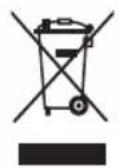
- This symbol means that this product contains a built-in rechargeable battery which shall not be disposed of with normal household waste (Fig. 5) (2006/66/EC). We strongly advise you to take your product to an official collection point or a Philips service centre to have a professional remove the rechargeable battery.
- Follow your country's rules for the separate collection of electrical and electronic products and rechargeable batteries. Correct disposal helps prevent negative consequences for the environment and human health.
Removing the rechargeable batteries
Warning: Only remove the rechargeable battery when you discard the appliance. Before you remove the battery, make sure that the appliance is disconnected from the wall socket and that the battery is completely empty.
Warning: Take any necessary safety precautions when you handle tools to open the appliance and when you dispose of the rechargeable battery.
To remove the rechargeable battery, follow the instructions below.
1 Take the plug out of the wall socket and let the appliance run until it stops.
2 Remove the dust container and the cyclone from the appliance.
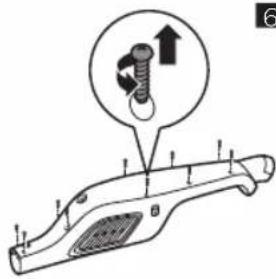
3 Undo the 10 screws in the back of the housing of the appliance (Fig. 6).
10 English
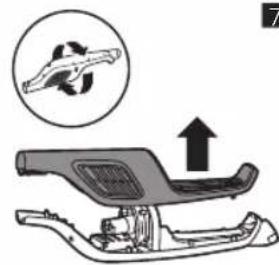
4 Remove the housing of the appliance. (Fig. 7)
5 Remove the motor unit and the suction part (Fig. 8).
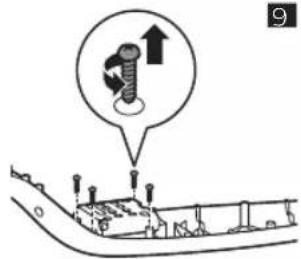
6 Undo the 4 screws that keep the battery compartment cover in place (Fig. 9).
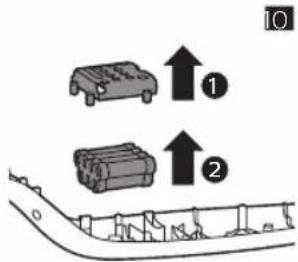
7 Remove the battery compartment cover (1) and take out the battery pack (2). Then disconnect the battery pack from the appliance (Fig. 10).
Troubleshooting
This chapter summarizes the most common problems you could encounter with the appliance. If you are unable to solve the problem with the information below, visit www.philips.com/support for a list of frequently asked questions or contact the Consumer Care Center in your country.
| Problem | Possible cause Solution | |
| The appliance does not work when I push the button. | The battery light flashes fast because the batteries are low. | To charge the batteries, insert the small plug into the socket on the appliance and insert the adapter into a wall socket. |
| You cannot use the appliance because the appliance is still charging. | You have to remove the small plug from the socket on the appliance before you can switch on the appliance. | |
| You have to press two buttons. | First press the on/off button to switch on the appliance. Then press the MAX button to get maximum suction power. | |
| The appliance has a lower suction power than usual. | The filter and the cyclone are dirty. | Clean the filter and the cyclone. |
| You have not connected the dust bucket, the dust separator and the cyclone properly. Incorrect assembly of these parts causes air leakage, which leads to loss of suction power. | Connect the dust bucket, the dust separator and the cyclone properly. | |
| Dust escapes from the appliance. | The filter is dirty. Clean the filter. | |
| The brush does not turn anymore. | The brush encounters too much resistance. | Clean the brush with a pair of scissors or by hand. If you clean the roller brush by hand, pull the hairs or threads from the widest side to the narrowest side of the roller brush (see user manual). |
| The water flow from the water tank is reduced | The wetting strip is blocked by excessive residue. | Remove the wetting strip and clean it. |
| The microfiber mopping pad is not placed correctly. It covers the wetting strip and blocks the water flow from the wetting strip. | Make sure that the Velcro strips on the mopping pad and the Velcro strips on the water tank are perfectly aligned. Also make sure the striped side of the mopping pad is facing outwards, away from the bottom of the water tank. | |
Problem Possible cause Solution
| The water tank is empty or nearly empty. | Refill the water tank. | |
| You use a microfiber mopping pad that is not supplied by Philips. | Only use an original Philips microfiber mopping pad. You can buy these mopping pads in the online Philips shop at www.shop.philips.com/service or at your Philips dealer. | |
| The output of water is faster and larger than normal. | If the water tank produces an uncontrolled and too large amount of water, the cap of the tank is probably not closed properly. | Check the cap and make sure it is fully and properly closed. |
| The strip is not placed properly in the bottom of the water tank. | Check the strip and make sure that it is fitted properly n the bottom plate of the water tank. | |
| The floor dries with stripes when I use the water tank. | You added too much liquid cleaner to the water. | Use only a few drops or use a cleaner that foams less. |
12 Čeština
Úvod
Úvod
Encomendar acessórios
natural_image
Illustration of a hand using a power plug to test a switch (no text or symbols present)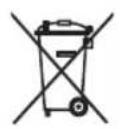
1

natural_image
Illustration of a hand holding a tool near a vehicle's leg, with an arrow indicating direction and a cross mark (no text or symbols)
3
4
5
6
natural_image
Diagram of a vehicle chassis with an arrow indicating upward motion, no text or symbols present7

natural_image
Mechanical assembly diagram showing a shaft and housing with an upward arrow indicating motion (no text or symbols)8
flowchart
graph TD
    A["Grid Layout"] --> B["Open Panel"]
    B --> C["Arrow Up"]
    B --> D["Arrow Down"]

4222.003.4185.3


75% recycled paper
75% papier recyclé
- Introduction
- Important safety information
- Danger
- Warning
- Caution
- English
- Electromagnetic fields (EMF)
- Using the appliance
- Usage restrictions
- Using liquid floor cleaner in the water tank
- Cleaning the water tank
- Ordering accessories
- Warranty and support
- Recycling
- Removing the rechargeable batteries
- English
- Troubleshooting
- Čeština
- Úvod
- Encomendar acessórios
Brand : PHILIPS
Model : PowerPro Aqua FC6401
Category : Vacuum Cleaner