
PowerPro Uno FC6170 - Vacuum Cleaner PHILIPS - Free user manual and instructions
Find the device manual for free PowerPro Uno FC6170 PHILIPS in PDF.


| Product type | Bagless canister vacuum cleaner |
| Brand | Philips |
| Model | PowerPro Uno FC6170 |
| Separation technology | Cyclonic (PowerCyclone 5) |
| Color | Black and red |
| Dimensions (L x W x H) | 25 x 30 x 45 cm |
| Weight | 4.5 kg |
| Cable length | 6 m |
| Operating radius | 9 m |
| Container capacity | 1.5 L |
| Suction power | 650 W (variable) |
| Nominal power | 800 W |
| Noise level | 75 dB |
| Filtration | Washable HEPA filter (class H13) |
| Main brush | TriActive (for hard floors and carpets) |
| Included accessories | Crevice tool, upholstery brush, carpet nozzle |
| Filter maintenance | Wash with water (every 3 empties) |
| Emptying | Simple, no contact with dust |
| Repairability | Filters and accessories available as spare parts |
| Energy class | A (according to EU standard) |
Frequently Asked Questions - PowerPro Uno FC6170 PHILIPS
User questions about PowerPro Uno FC6170 PHILIPS
0 question about this device. Answer the ones you know or ask your own.
Ask a new question about this device
Download the instructions for your Vacuum Cleaner in PDF format for free! Find your manual PowerPro Uno FC6170 - PHILIPS and take your electronic device back in hand. On this page are published all the documents necessary for the use of your device. PowerPro Uno FC6170 by PHILIPS.
USER MANUAL PowerPro Uno FC6170 PHILIPS
Always here to help you
Register your product and get support at www.philips.com/welcome

FC6170
FC6164
User manual
PHILIPS
ENGLISH 6
ČEŠTINA 9
DANSK 12
DEUTSCH 15
ΕΛΛΗΝΙΚΑ 18
ESPAÑOL 21
SUOMI 24
FRANÇAIS 27
HRVATSKI 30
MAGYAR 33
ITALIANO 36
КАЗАКША 39
LIETUVIŠKAI 42
LATVIEŠU 45
NEDERLANDS 48
NORSK 51
POLSKI 54
PORTUGUÊS 57
ROMÂNĂ 60
РУССКИЙ 63
SLOVENSKY 66
SLOVENŠČINA 69
SVENSKA 72
УКРАЇНСЬКА 75
Introduction
Congratulations on your purchase and welcome to Philips! To fully benefit from the support that Philips offers, register your product at www.philips.com/welcome.
Important
Read this important information carefully before you use the appliance and save it for future reference.
Danger
- Never vacuum up water or any other liquid. Never vacuum up flammable substances and do not vacuum up ashes until they are cold.
- Never immerse the appliance or the adapter in water or any other liquid, nor rinse it under the tap.
Warning
- Check if the voltage indicated on the adapter corresponds to the local mains voltage before you connect the appliance.
- Do not use the vacuum cleaner or the adapter if it is damaged.
- If the adapter is damaged, always have it replaced with one of the original type in order to avoid a hazard.
- The adapter contains a transformer. Do not cut off the adapter to replace it with another plug, as this causes a hazardous situation.
- This appliance can be used by children aged from 8 years and above and persons with reduced physical, sensory or mental capabilities or lack of experience and knowledge if they have been given supervision or instruction concerning use of the appliance in a safe way and understand the hazards involved. Children shall not play with the appliance. Cleaning and user maintenance shall not be made by children without supervision.
- The plug must be removed from the socket-outlet before cleaning or maintaining the appliance.
Caution
- Only charge the vacuum cleaner with the adapter supplied. During charging, the adapter feels warm to the touch. This is normal.
- Always switch off the vacuum cleaner after use and when you charge it.
- Never block the exhaust air openings during vacuuming.
- Always use the vacuum cleaner with the filter unit assembled.
- Make sure that the appliance is installed with the wall fixture mounted to the wall according to the instructions in the user manual.
- Be careful when you drill holes in the wall to attach the wall fixture, to avoid the risk of electric shock.
- Maximum noise level: Lc = 84.5 dB(A)
Electromagnetic fields (EMF)
This Philips appliance complies with all applicable standards and regulations regarding exposure to electromagnetic fields.
Ordering accessories
To buy accessories or spare parts, visit www.shop.philips.com/service or go to your Philips dealer. You can also contact the Philips Consumer Care Centre in your country (see the worldwide guarantee leaflet for contact details).
Recycling
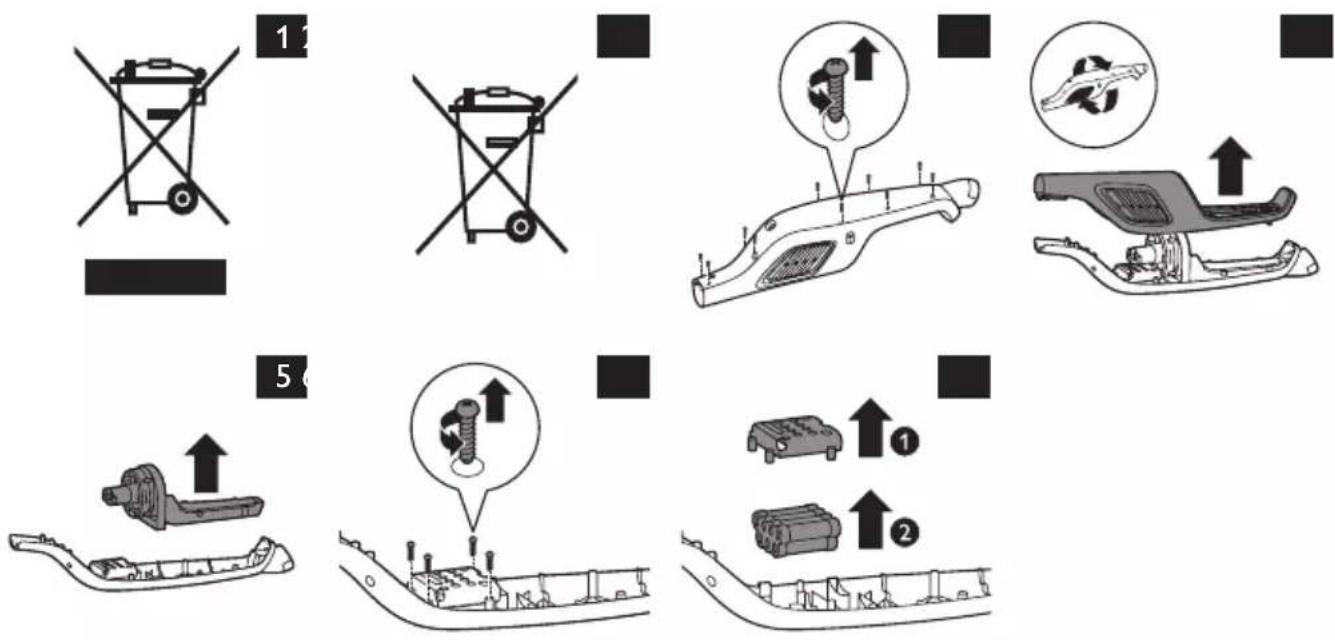
- This symbol on a product means that the product is covered by European Directive 2012/19/EU (Fig. 1).
- This symbol means that the product contains a built-in rechargeable battery covered by European Directive 2006/66/EC which cannot be disposed of with normal household waste. Follow the instructions in section ‘Removing the rechargeable battery’ to remove the battery (Fig. 2).
- Inform yourself about the local separate collection system for electrical and electronic products and rechargeable batteries. Follow local rules and never dispose of the product and rechargeable batteries with normal household waste. Correct disposal of old products and rechargeable batteries helps prevent negative consequences for the environment and human health.
Removing the rechargeable batteries
Batteries may explode when exposed to high temperatures or fire.
Only remove the rechargeable batteries if they are completely empty.
You can remove the rechargeable batteries in the following way.
1 Disconnect the appliance from the mains and let it run until it stops.
2 Remove the dust bucket and the cyclone from the appliance.
3 Undo the 10 screws in the back of the housing of the appliance (Fig. 3).
4 Remove the housing of the appliance (Fig. 4).
5 Remove the motor unit and the suction part (Fig. 5).
6 Undo the 4 screws that keep the battery compartment cover in place (Fig. 6).
7 Remove the battery compartment cover (1) and take out the battery pack (2) (Fig. 7).
8 Disconnect the battery pack from the appliance.
Guarantee and support
If you need information or support, please visit www.philips.com/support or read the separate worldwide guarantee leaflet.
Troubleshooting
This chapter summarises the most common problems you could encounter with your appliance. If you are unable to solve the problem with the information below, visit www.philips.com/support for a list of frequently asked questions or contact the Philips Consumer Care Centre in your country.
Problem Cause Solution
| The appliance does not work when I push the button. | The battery light flashes fast because the batteries are low. | To charge the batteries, insert the small plug into the socket on the appliance and insert the adapter into a wall socket. |
| You cannot use the appliance because the appliance is still charging. | You have to remove the small plug from the socket on the appliance before you can switch on the appliance. | |
| You have to press two buttons. | First press the on/off button to switch on the appliance. Then press the MAX button to get maximum suction power. | |
| The vacuum cleaner has a lower suction power than usual. | The filter and the cyclone are dirty. | Clean the filter and the cyclone. |
| You have not connected the dust bucket, the dust separator and the cyclone properly. Incorrect assembly of these parts causes air leakage, which leads to loss of suction power. | Connect the dust bucket, the dust separator and the cyclone properly. | |
| Dust escapes from the vacuum cleaner. | The filter is dirty. Clean the filter. | |
| The brush does not turn anymore. | The brush has encountered too much resistance. | Clean the brush. |
Úvod
Encomendar acessórios

Brand : PHILIPS
Model : PowerPro Uno FC6170
Category : Vacuum Cleaner