
SoundTrue II - Earphones BOSE - Free user manual and instructions
Find the device manual for free SoundTrue II BOSE in PDF.


| Product type | On-ear headphones |
| Brand | Bose |
| Model | SoundTrue II |
| Dimensions (folded) | Approximately 15.2 x 6.4 x 12.7 cm |
| Weight | Approximately 130 g |
| Power | Rechargeable lithium-ion battery (up to 15 hours of battery life) |
| Connectivity | Bluetooth and detachable audio cable |
| Main functions | Volume control, play/pause, call handling, voice command |
| Noise cancellation | No (standard model, without active noise cancellation) |
| Maintenance and cleaning | Wipe with a soft, dry cloth. Do not use chemical products. |
| Safety | Use at moderate volume to protect hearing |
| Spare parts and repairability | Foam tips and ear cushions available online |
| General information | Comes with USB cable and audio cable, limited 1-year warranty |
Frequently Asked Questions - SoundTrue II BOSE
User questions about SoundTrue II BOSE
0 question about this device. Answer the ones you know or ask your own.
Ask a new question about this device
Download the instructions for your Earphones in PDF format for free! Find your manual SoundTrue II - BOSE and take your electronic device back in hand. On this page are published all the documents necessary for the use of your device. SoundTrue II by BOSE.
USER MANUAL SoundTrue II BOSE
Bose® SoundTrue®
around-ear headphones II
for use with select iPod, iPhone, and iPad models
Owner's Guide | Brugervejledning | Bedienungsanleitung | Gebruikershandleiding
Guía del usuario | Käyttöohje | Notice d'utilisation | Manuale di istruzioni
Please read this owner's guide carefully and save it for future reference.
WARNINGS:
- DON'T use the headphones at a high volume for any extended period.
- To avoid hearing damage, use your headphones at a comfortable, moderate volume level.
-
Turn the volume down on your device before placing the headphones on your ears, then turn the volume up gradually until you reach a comfortable listening level.
-
DO focus on your safety and that of others if you use the headphones while engaging in any activity requiring your attention, e.g., while riding a bicycle or walking in or near traffic, a construction site or railroad, etc. Remove the headphones or adjust your volume to ensure you can hear surrounding sounds, including alarms and warning signals
- DON'T use mobile phone adapters to connect headphones to airplane seat jacks, as this could result in personal injury such as burns or property damage due to overheating.
- DO remove headphones and disconnect immediately if you experience a warming sensation or loss of audio.
- DON'T submerge or expose for extended period to water, or wear while participating in water sports, i.e. swimming, waterskiing, surfing, etc.
- DON'T place naked flame sources, such as lighted candles, on or near the product.
- DO be sure the earcup ports are kept clear, and that no moisture is allowed to get inside the earcup.
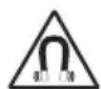
This product contains magnetic material. Please contact your physician if you have any questions on whether this might affect the operation of your implantable medical device.
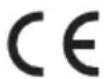
This product conforms to all applicable EU directive requirements. The complete declaration of conformity can be found at www.Bose.com/compliance

This symbol means the product must not be discarded as household waste, and should be delivered to an appropriate collection facility for recycling. Proper disposal and recycling helps protect natural resources, human health and the environment. For more information on disposal and recycling of this product, contact your local municipality, disposal service, or the shop where you bought this product.
Limited Warranty
Your Bose ® headphones are covered by a limited warranty. Details of the limited warranty are provided on the product registration card that is included in the carton. Please refer to the card for instructions on how to register. Failure to register will not affect your limited warranty rights.
The warranty information provided with this product does not apply in Australia and New Zealand. See www.Bose.com.au/warranty or www.Bose.co.nz/warranty for details.
| Names and Contents of Toxic or Hazardous Substances or Elements | ||||||
| Toxic or Hazardous Substances and Elements | ||||||
| Part Name | Lead (Pb) | Mercury (Hg) | Cadmium (Cd) | Hexavalent (CR(VI)) | Polybrominated Biphenyl (PBB) | Polybrominated diphenylether(PBDE) |
| PCBs XOOOOO | ||||||
| Metal parts XOOOOO | ||||||
| Plastic parts OOOOOO | ||||||
| Speakers XOOOOO | ||||||
| Cables XOOOOO | ||||||
| This table is prepared in accordance with the provisions of SJ/T 11364.O: Indicates that said hazardous substance contained in all of the homogeneous materials for this part is below the limit requirement of GB/T 26572. |  | |||||
| X: Indicates that said hazardous substance contained in at least one of the homogeneous materials used for this part is above the limit requirement of GB/T 26572. | ||||||
Date of manufacture: The first underlined digit in the serial number indicates the year of manufacture; “5” is 2005 or 2015.
China Importer: Bose Electronics (Shanghai) Company Limited, Part C, Plan 9, No. 353 North Riying Road, China (Shanghai) Pilot Free Trade Zone
EU Importer: Bose GP, Castleblayney Road, Carrickmacross, Ireland
Taiwan Importer: Bose Taiwan Branch, Room 905, 9F, Worldwide House, 131 Min Sheng East Rd, Section 3, Taipei, Taiwan, 105
Please complete and retain for your records:
The serial and model numbers can be found on the warranty card.
Serial number ____
Model number ____
Purchase date ____
We suggest you keep your receipt with this owner's guide.
iPad, iPhone, and iPod, are trademarks of Apple Inc., registered in the U.S. and other countries. The trademark “iPhone” is used with a license from Aiphone K.K.
“Made for iPod,” “Made for iPhone,” and “Made for iPad” mean that an electronic accessory has been designed to connect specifically to iPod, iPhone, or iPad, respectively, and has been certified by the developer to meet Apple performance standards. Apple is not responsible for the operation of this device or its compliance with safety and regulatory standards. Please note that the use of this accessory with iPod, iPhone, or iPad may affect wireless performance.
Welcome....5
Components....5
Wearing the headphones....6
Connecting to your device....6
Using the headphones with your device....6
Headphone controls 6
Basic functions ....7
Media playback functions....7
Folding earcups....8
Reattaching earcup cushions....8
Troubleshooting 9
Cleaning the headphones....9
Replacement parts and accessories 9
Welcome
Thank you for purchasing the Bose® SoundTrue® around-ear headphones II for select iPod, iPhone, and iPad models. These headphones were designed to give you easy access and greater control of your device.
With Bose SoundTrue around-ear headphones II, you can immerse yourself in your music and enjoy an around-ear fit that stays comfortable for hours.
Components

Wearing the headphones
Put on the headphones using the markings which identify the left (L) and right (R) earcups. Adjust the headband so it rests gently on top of your head and the earcup cushions fit comfortably around your ears.
Connecting to your device
Attach the smaller (2.5 mm) connector securely to the left earcup. Attach the larger (3.5 mm) connector securely to the standard headphones connector on your device. You should hear or feel a click when you make these connections.
Using the headphones with your device
The headphones have a small in-line remote with an integrated microphone for convenient control of select iPod, iPhone, and iPad models.
Note: Full controls may not be available for some devices or applications.
Headphone controls

Basic functions
| Increase volume Press and release the + | button. |
| Decrease volume Press and release the - | button. |
| Answer a call When you receive an incoming call, press and release the Answer/End button to answer. | |
| End a call Press and release the Answer/End button. | |
| Decline an incoming call Press and hold the Answer/End button for about two seconds, then release. | |
| Switch to an incoming or on-hold call and put the current call on hold | While on a call, press and release the Answer/End button once. Press and release again to switch back to the first call. |
| Switch to an incoming or on-hold call and end the current call | While on a call, press and hold the Answer/End button for about two seconds, then release. |
| Use Voice Control Press and hold the Answer/End button.See your device user's guide for compatibility and usage information about this feature. | |
Media playback functions
| Play or pause a song or video Press and | release the Answer/End button. |
| Skip forward Press and release the Answer | ver/End button twice quickly. |
| Fast forward Press and release the Answer | ver/End button twice quickly and hold the second press. |
| Skip backward Press and release the Answer | swer/End button three times quickly. |
| Rewind Press and release the Answer/End | button three times quickly and hold the third press. |
Folding earcups
The headphones feature rotating earcups that fold flat for easy, convenient storage.
Caution: The earcups rotate in only one direction. Incorrectly rotating the earcups can damage the headphones.
Reattaching earcup cushions
The earcup cushions are held in place by a mounting flange which snaps under eight small tabs located around the inside rim of each earcup. If an earcup cushion becomes partially or completely detached, push the mounting flange of the earcup cushion back into the earcup. Using your finger or thumb, press around the edge of the mounting flange, making sure it snaps in place all the way around the earcup.

Troubleshooting
If you experience any trouble using your headphones, try the following trouble-shooting instructions. If you still need help, contact Bose Customer Service.
| Problem What to do | |
| No audio or audio in one earcup only | Make sure both ends of the audio cable are firmly connected.Try another audio device. |
| Distorted bass • Make sure both ear cushions are firmly secured. | |
| Misshaped cushion • The high-density earcup foam will regain its shape after a few minutes in a neutral position. | |
| Microphone is not picking up sound • | Make sure you are using a com patible deviceMake sure the audio cable is securely connected to your device.Make sure the microphone is not being blocked or covered.The microphone is located on the back of the Answer/End button. (You may notice the small opening for the microphone.) |
| Device is not responding to remote button presses | Make sure the audio cable is securely connected to your device.For multi-press functions: Vary speed of presses. |
| Device is not responding to remote | Full controls may not be available for some devices or applications. |
Cleaning the headphones
The headphones do not require scheduled cleaning. Should cleaning be necessary, simply wipe the outside surfaces with a soft cloth. Be sure the earcup ports are kept clear, and that no moisture is allowed to get inside the earcup.
Replacement parts and accessories
Accessories or replacement parts can be ordered through Bose Customer Service at global.Bose.com
Importor for Kina: Bose Electronics (Shanghai) Company Limited, Part C, Plan 9, No. 353 North Riying Road, Kina (Shanghai) Pilot Free Trade Zone
Importør for EU: Bose GP, Castleblayney Road, Carrickmacross, Irland
Importor for Taiwan: Bose Taiwan Branch, Room 905, 9F, Worldwide House, 131 Min Sheng East Rd, Section 3, Taipei, Taiwan, 105
Fejlfinding
China-Import: Bose Electronics (Shanghai) Company Limited, Part C, Plan 9, No. 353 North Riying Road, China (Shanghai) Pilot Free Trade Zone
EU-Import: Bose GP, Castleblayney Road, Carrickmacross, Irland
Taiwan-Import: Bose Taiwan Branch, Room 905, 9F, Worldwide House, 131 Min Sheng East Rd, Section 3, Taipei, Taiwan, 105
Fehlerbehebung
Importeur in China: Bose Electronics (Shanghai) Company Limited, Part C, Plan 9, No. 353 North Riying Road, China (Shanghai) Pilot Free Trade Zone
Importeur in de EU: Bose GP, Castleblayney Road, Carrickmacross, Ierland
Importeur in Taiwan: Bose Taiwan Branch, Room 905, 9F, Worldwide House, 131 Min Sheng East Rd, Section 3, Taipei, Taiwan, 105
Maahantuoja Taiwanissa: Bose Taiwan Branch, Room 905, 9F, Worldwide House, 131 Min Sheng East Rd, Section 3, Taipei, Taiwan, 105
Säilytä tiedot.
Ongelmanratkaisu
Importatore per la Cina: Bose Electronics (Shanghai) Company Limited, Part C, Plan 9, No. 353 North Riying Road, China (Shanghai) Pilot Free Trade Zone
Importatore per Taiwan: Bose Taiwan Branch, Room 905, 9F, Worldwide House, 131 Min Sheng East Rd, Section 3, Taipei, Taiwan, 105
Kínai importór: Bose Electronics (Shanghai) Company Limited, Part C, Plan 9, No. 353 North Riying Road, China (Shanghai) Pilot Free Trade Zone
EU-importör: Bose GP, Castleblayney Road, Carrickmacross, Ireland
Taiwani importór: Bose Taiwan Branch, Room 905, 9F, Worldwide House, 131 Min Sheng East Rd, Section 3, Taipei, Taiwan, 105
Hibaelhárítás
Importor for Kina: Bose Electronics (Shanghai) Company Limited, Part C, Plan 9, No. 353 North Riying Road, Kina (Shanghai) Pilot Free Trade Zone
Importør for EU: Bose GP, Castleblayney Road, Carrickmacross, Irkalnd
Importor for Taiwan: Bose Taiwan Branch, Room 905, 9F, Worldwide House, 131 Min Sheng East Rd, Section 3, Taipei, Taiwan, 105
Feilsøking
Importer — Chiny: Bose Electronics (Shanghai) Company Limited, Part C, Plan 9, No. 353 North Riying Road, China (Shanghai) Pilot Free Trade Zone
Importer — UE: Bose GP, Castleblayney Road, Carrickmacross, Ireland
Importer — Tajwan: Bose Taiwan Branch, Room 905, 9F, Worldwide House, 131 Min Sheng East Rd, Section 3, Taipei, Taiwan, 105
Kinaimportör: Bose Electronics (Shanghai) Company Limited, Part C, Plan 9, No. 353 North Riying Road, Kina (Shanghai) Pilot Free Trade Zone
EU-importör: Bose GP, Castleblayney Road, Carrickmacross, Ireland
Taiwanimportör: Bose Taiwan Branch, Room 905, 9F, Worldwide House, 131 Min Sheng East Rd, Section 3, Taipei, Taiwan, 105
Felsökning

การแก้ปัญหา
중국 수입업체: Bose Electronics (Shanghai) Company Limited, Part C, Plan 9, No. 353 North Riying Road, China (Shanghai) Pilot Free Trade Zone
EU 수입업체: Bose GP, Castleblayney Road, Carrickmacross, Ireland
대만 수입업체: Bose Taiwan Branch, Room 905, 9F, Worldwide House, 131 Min Sheng East Rd, Section 3, Taipei, Taiwan, 105
기록용으로 작성하여 보관하십시오.
欧洲进口商:Bose GP, Castleblayney Road, Carrickmacross, Ireland
歐洲進口商:Bose GP, Castleblayney Road, Carrickmacross, Ireland

疑難排解
This product conforms to all applicable EU directive requirements. The complete declaration of conformity can be found at www.Bose.com/compliance

This symbol means the product must not be discarded as household waste, and should be delivered to an appropriate collection facility for recycling. Proper disposal and recycling helps protect natural resources, human health and the environment. For more information on disposal and recycling of this product, contact your local municipality, disposal service, or the shop where you bought this product.
保証
| Names and Contents of Toxic or Hazardous Substances or Elements | ||||||
| Toxic or Hazardous Substances and Elements | ||||||
| Part Name | Lead (Pb) | Mercury (Hg) | Cadmium (Cd) | Hexavalent (CR(VI)) | Polybrominated Biphenyl (PBB) | Polybrominated diphenylether (PBDE) |
| PCBs X O O O O | O | |||||
| Metal parts X O O | O O O | |||||
| Plastic parts O O | O O O O | |||||
| Speakers X O O | O O O | |||||
| Cables X O O O | O O | |||||
| This table is prepared in accordance with the provisions of SJ/T 11364.O: Indicates that said hazardous substance contained in all of the homogeneous materials for this part is below the limit requirement of GB/T 26572. |  | |||||
| X: Indicates that said hazardous substance contained in at least one of the homogeneous materials used for this part is above the limit requirement of GB/T 26572. | ||||||
台湾における輸入元: Bose Taiwan Branch, Room 905, 9F, Worldwide House, 131 Min Sheng East Rd, Section 3, Taipei, Taiwan, 105

الوظائق الأساسية
Bose Electronics (Shanghai) Company Limited, Part C, Plan 9, No. 353 North Riying Road, China (Shanghai) Pilot Free Trade Zone
Bose GP, Castleblayney Road, Carrickmacross, Ireland
المستورد في تايوان:
Bose Taiwan Branch, Room 905, 9F, Worldwide House, 131 Min Sheng East Rd, Section 3, Taipei, Taiwan, 105
"مسع من أجل (Made for iPad) "iPad (Made for iPod) "iPad (Made for iPod) Exporting (Made for iPad) Exporting (Made for iPad) Exporting (Made for iPad) Exporting (Made for iPad) Exporting (Made for iPad) Exporting (Made for iPad) Exporting (Made for iPad) Exporting (Made for iPad) Exporting (Made for iPad) Exporting (Made for iPad) Exporting (Made for iPad) Exporting (Made for iPad) Exporting (Made for iPad) Exporting (Made for iPad) Exporting (Made for iPad) Importing Apple Exporting Apple Exporting Apple Exporting Apple Exporting Apple Exporting Apple Exporting Apple Exporting Apple Exporting Apple Exporting Apple Exporting Apple Exporting Apple Exporting Apple Exporting Apple Exporting Apple Exporting Apple Exporting Apple Exporting Apple Exporting Apple Exporting Apple Exporting Apple Exporting Apple Exporting Apple Exporting Apple Exporting Apple Exporting Apple Exporting Apple Exporting Apple Exporting Apple Exporting Apple Exporting Apple Exporting Apple Exporting Apple Exporting Apple Exportin App Store App Store App Store App Store App Store App Store App Store App Store App Store App Store App Store App Store App Store App Store App Store App Store App Store App Store App Store App Store App Store App Store App Store App Store App Store App Store App Store App Store App Store App Store App Store App Store App Store App Store App Store App Store App Store App Store App Store App Store App Store App Store App Store App Store App Store App Store App Store App Store App Store App Store AppStore App Store App Store App Store App Store App Store App Store App Store App Store App Store App Store App Store App Store App Store App Store App Store App Store App Store App Store App Store App Store App Store App Store App Store App Store App Store App Store App Store App Store App Store App Store App Store App Store App Store App Store App Store App Store App Store App Store App Store App Store App Store App Store App Store App Store App Store App Store App Store App Store App Store App
إلى أن - قم ب个百分点Preference Preference Policy Policy Policy Policy Policy Policy Policy Policy Policy Policy Policy Policy Policy Policy Policy Policy Policy Policy Policy Policy Policy Policy Policy Policy Policy Policy Policy Policy Policy Policy Policy Policy Policy Policy Policy Policy Policy Policy Policy Policy Policy Policy Policy Policy Policy Policy Policy Policy Policy Policy Policy Policy Policy Policy Policy Policy Policy Policy Policy Policy Policy Policy Policy Policy Policy Policy Policy Policy Policy Policy Policy Policy Policy Policy Policy Policy Policy Policy Policy Policy Policy Policy Policy Policy Policy Policy Policy Policy Policy Policy Policy Policy Policy Policy Policy Policy Policy Policy Policy Policy Strategy, Model 10.



- BOSE® SOUNDTRUE®
- PLEASE READ THIS OWNER'S GUIDE CAREFULLY AND SAVE IT FOR FUTURE REFERENCE
- WARNINGS
- LIMITED WARRANTY
- PLEASE COMPLETE AND RETAIN FOR YOUR RECORDS
- WELCOME
- COMPONENTS
- WEARING THE HEADPHONES
- CONNECTING TO YOUR DEVICE
- USING THE HEADPHONES WITH YOUR DEVICE
- HEADPHONE CONTROLS
- FOLDING EARCUPS
- REATTACHING EARCUP CUSHIONS
- TROUBLESHOOTING
- CLEANING THE HEADPHONES
- REPLACEMENT PARTS AND ACCESSORIES
- FEJLFINDING
- FEHLERBEHEBUNG
- SÄILYTÄ TIEDOT
- ONGELMANRATKAISU
- HIBAELHÁRÍTÁS
- FEILSØKING
- FELSÖKNING
- การแก้ปัญหา
- 기록용으로 작성하여 보관하십시오
- 疑難排解
- 保証
Brand : BOSE
Model : SoundTrue II
Category : Earphones