
Series 1000 BT405 - Beard trimmer PHILIPS - Free user manual and instructions
Find the device manual for free Series 1000 BT405 PHILIPS in PDF.


| Product Type | Beard Trimmer |
| Brand | Philips |
| Model | Series 1000 BT405 |
| Dimensions | 4.5 x 2.5 x 20 cm (1.8 x 1.0 x 7.9 in) |
| Weight | 200 g (7.1 oz) |
| Power Source | Rechargeable NiMH battery |
| Charging Time | 10 hours |
| Operating Time | 50 minutes |
| Blade Material | Stainless steel |
| Length Settings | 0.5 – 10 mm (adjustable with guard comb) |
| Attachment Combs | 1 adjustable comb (1 mm increments) |
| Washable | Rinseable head (blade unit can be removed and cleaned under running water) |
| Cleaning Method | Remove blade and rinse with water; dry before reuse |
| Safety Features | Ergonomic non-slip grip, auto shut-off when charging |
| Replacement Parts | Replacement blade unit (BT400) and guard comb available |
| What's in the Box | Beard trimmer, guard comb, charging cable, user manual |
| Warranty | 2 years |
Frequently Asked Questions - Series 1000 BT405 PHILIPS
User questions about Series 1000 BT405 PHILIPS
0 question about this device. Answer the ones you know or ask your own.
Ask a new question about this device
Download the instructions for your Beard trimmer in PDF format for free! Find your manual Series 1000 BT405 - PHILIPS and take your electronic device back in hand. On this page are published all the documents necessary for the use of your device. Series 1000 BT405 by PHILIPS.
USER MANUAL Series 1000 BT405 PHILIPS


English 6
Danish 17
German 28
Spanish 40
French 51
Italian 63
Dutch 75
Norwegian 87
Portuguese 97
Finnish 109
Swedish 120
Turkish 130
Greek 141
Introduction
Congratulations on your purchase and welcome to Philips! To fully benefit from the support that Philips offers, register your product at www.philips.com/welcome.
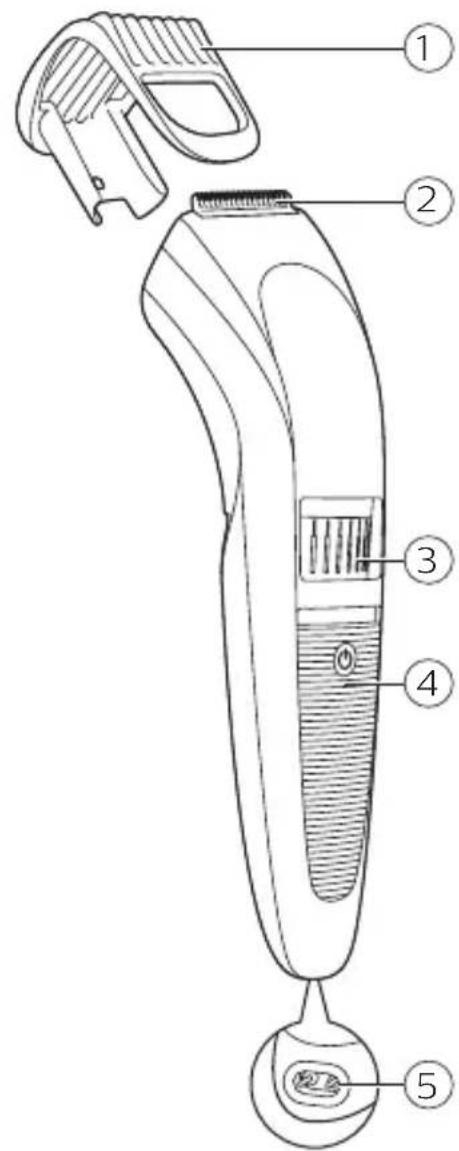
General description (Fig. 1)
1 Trimming comb 2 Cutting unit 3 Precision Zoom Lock™ adjustment ring 4 On/off slide 5 Socket for small plug 6 Cleaning brush 7 Small plug 8 Charging light 9 Supply unit
Important safety information
Read this important information carefully before you use the appliance and its accessories and save it for future reference. The accessories supplied may vary for different products.
Danger

- Keep the supply unit dry.
Warning
- To charge the battery, only use the detachable supply unit (A00390) provided with the appliance.
- The supply unit contains a transformer. Do not cut off the supply unit to replace it with another plug, as this causes a hazardous situation.
- This appliance can be used by children aged from 8 years and above and persons with reduced physical, sensory or mental capabilities or lack of experience and knowledge if they have been given supervision or instruction concerning use of the appliance in a safe way and understand the hazards involved. Children shall not play with the appliance. Cleaning and user maintenance shall not be made by children without supervision.
- Always check the appliance before you use it. Do not use the appliance if it is damaged, as this may cause injury. Always replace a damaged part with one of the original type.
- Do not open the appliance to replace the rechargeable battery.
Caution

- This appliance is not washable. Never immerse the appliance in water and do not rinse it under the tap.
- Only use this appliance for its intended purpose as shown in the user manual.
- For hygienic reasons, the appliance should only be used by one person.
- Never use compressed air, scouring pads, abrasive cleaning agents, or aggressive liquids such as petrol or acetone to clean the appliance.
- Do not use the supply unit in or near wall sockets that contain an electric air freshener to prevent irreparable damage to the supply unit.
Electromagnetic fields (EMF)
This Philips appliance complies with all applicable standards and regulations regarding exposure to electromagnetic fields.
General
- The supply unit is suitable for mains voltages ranging from 100 to 240 volts.
- The supply unit transforms 100-240 volts to a safe low voltage of less than 24 volts.
Charging
Charge the appliance fully before you use it for the first time and after a long period of disuse.
Charging takes approximately 10 hours. A fully charged appliance has a cordless operating time of up to 35 minutes.
Charging with the supply unit BT405

1. Make sure the appliance is switched off.
2. Put the small plug in the appliance and put the supply unit in the wall socket.
The charging light on the supply unit lights up green to indicate that the appliance is charging.
Note: The charging light on the supply unit does not change color and does not go out when the appliance is fully charged.
3 After charging, remove the supply unit from the wall socket and pull the small plug out of the appliance.
Optimizing the lifetime of the rechargeable battery
When you have charged the appliance for the first time, we advise you to use it until the battery is completely empty. Continue to use the appliance until the motor almost stops running during a session. Then recharge the battery. Follow this procedure at least twice a year.
Using the appliance
Always check the appliance and all accessories before use. Do not use the appliance or any accessory if it is damaged, as this may cause injury. Always replace a damaged part with one of the original type.
Note: This appliance is for cordless use only.
Always comb the beard and/or moustache with a fine comb before you start trimming.
Be careful when you trim for the first time. Do not move the trimmer too fast. Make smooth and gentle movements.
Switching the appliance on and off
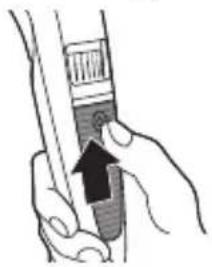
1 To switch on the appliance, slide the on/off button up.

2 To switch off the appliance, slide the on/off button down.
Trimming with comb
The length settings on the Precision Zoom Lock™ adjustment ring (ranging from 1 to 10) correspond to the remaining hair length after trimming. For example, setting 2 equals a hair length of 2mm.
Note: When you trim for the first time, start at the highest length setting to familiarise yourself with the appliance.

1 Slide the beard trimming comb straight into the guiding groove of the appliance.
2 Turn the Precision Zoom Lock™ adjustment ring to the desired setting. The selected setting is the setting in the center of the adjustment ring.
3 Switch on the appliance.
4 To trim most effectively, move the appliance against the hair growth direction. Make sure that the surface of the comb always stays in contact with the skin.
5 Regularly remove cut hair from the comb. If a lot of hair has accumulated in the comb, remove it from the product and blow and/or shake out the hairs. The selected setting does not change when you do this.

Trimming at the unique 'stubble look' setting

1 To create a 'stubble look', trim with the beard trimming comb set to setting 1.
Trimming without comb
Use the trimmer without beard trimming comb to trim full beards and single hairs.
Be careful when you trim without comb because the cutting unit removes every hair it touches.

1 Pull the beard trimming comb straight off the appliance. 2 Switch on the appliance.
3 Make well-controlled movements. Touch the hair lightly with the trimmer.
Cleaning
Regular cleaning guarantees better grooming results.
Never clean, remove or replace a shaving or cutting unit while the appliance is switched on.
Never wipe cutting units or shaving foils with a towel or tissue, as this may cause damage.
Never use compressed air, scouring pads, abrasive cleaning agents or aggressive liquids such as petrol or acetone to clean the appliance.
Clean the appliance after every use. Only the cutting unit can be rinsed under the tap.
1 Switch off the appliance and disconnect it from the wall socket. 2 Wipe the housing of the appliance with a dry cloth.
Never immerse the appliance in water, or rinse it under the tap.

3 Remove the comb and clean it with the cleaning brush.
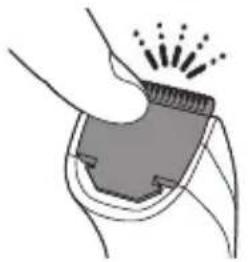
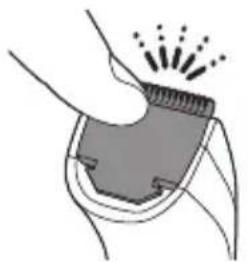
4 Remove the cutting unit by pushing against the teeth of the cutting unit and clean it with the brush or rinse it under the tap.
Only the cutting unit can be rinsed under the tap.
5 Carefully shake off excess water and let air dry completely.
6 Insert the lug of the cutting unit into the guiding slot and push the cutting unit back onto the appliance.
Replacement
Replace damaged parts immediately. Always replace the cutting unit with the original Philips cutting unit.

1 Push the teeth of cutting unit upwards and pull the cutting unit off the appliance.
2 Remove the used cutting unit.
3 Insert the lug of the new cutting unit into the guiding slot and push the cutting unit onto the appliance ('click').


Ordering accessories
To buy accessories or spare parts, visit www.shop.philips.com/service or go to your Philips dealer. You can also contact the Philips Consumer Care Center in your country (see the international warranty leaflet for contact details).
Recycling

- This symbol means that this product shall not be disposed of with normal household waste (2012/19/EU).

- This symbol means that this product contains a built-in rechargeable battery which shall not be disposed of with normal household waste (2006/66/EC). Please take your product to an official collection point or a Philips service center to have a professional remove the rechargeable battery.
- Follow your country's rules for the separate collection of electrical and electronic products and rechargeable batteries. Correct disposal helps prevent negative consequences for the environment and human health.
Removing the rechargeable battery
Only remove the rechargeable battery when you discard the appliance. Before you remove the battery, make sure that the appliance is disconnected from the wall socket and that the battery is completely empty.
Take any necessary safety precautions when you handle tools to open the appliance and when you dispose of the rechargeable battery.
1 Disconnect the appliance from the wall socket and let the appliance run until the motor stops.
2 Insert a screwdriver in the hair chamber to separate the housing part.

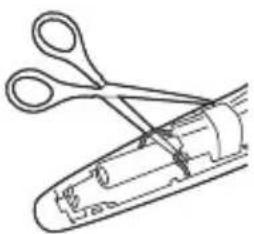
3 Cut the wires close to the battery with a pair of household scissors. 4 Remove the rechargeable battery.
Warranty and support
If you need information or support, please visit www.philips.com/support or read the international warranty leaflet.
Introduction
1 Switch on the appliance by pushing the on/off button upward.
2 Switch off the appliance by pushing the on/off button downward.
Trimming with comb
Setting for the rough 'stubble look'

Cleaning

Cleaning
Replacement

Replacement


74 Italian

Trim in the unique 'stubble beard' setting


Replacement
2 Turn the Precision Zoom Lock™ adjustment ring to the desired setting. The selected setting is the one in the middle of the adjustment ring.
3 Switch on the appliance.
1 For a "three-day" effect, trim with the beard trimmer comb on setting 1.
Trimming without comb
1 Pull the beard trimmer comb straight off the appliance. 2 Switch on the appliance.

3 Use controlled movements. Touch the hair lightly with the trimmer.
Cleaning


Replacement
Ordering accessories
3 Cut the wires near the battery with household scissors. 4 Remove the rechargeable battery.
Warranty and support




75% recycled paper
75% recycled paper
- INTRODUCTION
- GENERAL DESCRIPTION (FIG. 1)
- IMPORTANT SAFETY INFORMATION
- DANGER
- WARNING
- CAUTION
- ELECTROMAGNETIC FIELDS (EMF)
- GENERAL
- CHARGING
- CHARGING WITH THE SUPPLY UNIT BT
- OPTIMIZING THE LIFETIME OF THE RECHARGEABLE BATTERY
- USING THE APPLIANCE
- SWITCHING THE APPLIANCE ON AND OFF
- TRIMMING WITH COMB
- TRIMMING AT THE UNIQUE 'STUBBLE LOOK' SETTING
- TRIMMING WITHOUT COMB
- CLEANING
- ONLY THE CUTTING UNIT CAN BE RINSED UNDER THE TAP
- REPLACEMENT
- ORDERING ACCESSORIES
- RECYCLING
- REMOVING THE RECHARGEABLE BATTERY
- WARRANTY AND SUPPORT
- SETTING FOR THE ROUGH 'STUBBLE LOOK
- ITALIAN
- TRIM IN THE UNIQUE 'STUBBLE BEARD' SETTING
Brand : PHILIPS
Model : Series 1000 BT405
Category : Beard trimmer